Flutter for OpenHarmony 实战:实现Logo标志的 morphing 动画
在移动开发领域,我们总是面临着选择与适配。今天,你的Flutter应用在Android和iOS上跑得正欢,明天可能就需要考虑一个新的平台:HarmonyOS(鸿蒙)。这不是一道选答题,而是很多团队正在面对的现实。Flutter的优势很明确——写一套代码,就能在两个主要平台上运行,开发体验流畅。而鸿蒙代表的是下一个时代的互联生态,它不仅仅是手机系统,更着眼于未来全场景的体验。
欢迎加入开源鸿蒙跨平台社区: https://openharmonycrossplatform.csdn.net
前言:跨生态开发的新机遇
在移动开发领域,我们总是面临着选择与适配。今天,你的Flutter应用在Android和iOS上跑得正欢,明天可能就需要考虑一个新的平台:HarmonyOS(鸿蒙)。这不是一道选答题,而是很多团队正在面对的现实。
Flutter的优势很明确——写一套代码,就能在两个主要平台上运行,开发体验流畅。而鸿蒙代表的是下一个时代的互联生态,它不仅仅是手机系统,更着眼于未来全场景的体验。将现有的Flutter应用适配到鸿蒙,听起来像是一个“跨界”任务,但它本质上是一次有价值的技术拓展:让产品触达更多用户,也让技术栈覆盖更广。
不过,这条路走起来并不像听起来那么简单。Flutter和鸿蒙,从底层的架构到上层的工具链,都有着各自的设计逻辑。会遇到一些具体的问题:代码如何组织?原有的功能在鸿蒙上如何实现?那些平台特有的能力该怎么调用?更实际的是,从编译打包到上架部署,整个流程都需要重新摸索。
这篇文章想做的,就是把这些我们趟过的路、踩过的坑,清晰地摊开给你看。我们不会只停留在“怎么做”,还会聊到“为什么得这么做”,以及“如果出了问题该往哪想”。这更像是一份实战笔记,源自真实的项目经验,聚焦于那些真正卡住过我们的环节。
无论你是在为一个成熟产品寻找新的落地平台,还是从一开始就希望构建能面向多端的应用,这里的思路和解决方案都能提供直接的参考。理解了两套体系之间的异同,掌握了关键的衔接技术,不仅能完成这次迁移,更能积累起应对未来技术变化的能力。
混合工程结构深度解析
项目目录架构
当Flutter项目集成鸿蒙支持后,典型的项目结构会发生显著变化。以下是经过ohos_flutter插件初始化后的项目结构:
my_flutter_harmony_app/
├── lib/                          # Flutter业务代码(基本不变)
│   ├── main.dart                 # 应用入口
│   ├── home_page.dart           # 首页
│   └── utils/
│       └── platform_utils.dart  # 平台工具类
├── pubspec.yaml                  # Flutter依赖配置
├── ohos/                         # 鸿蒙原生层(核心适配区)
│   ├── entry/                    # 主模块
│   │   └── src/main/
│   │       ├── ets/              # ArkTS代码
│   │       │   ├── MainAbility/
│   │       │   │   ├── MainAbility.ts       # 主Ability
│   │       │   │   └── MainAbilityContext.ts
│   │       │   └── pages/
│   │       │       ├── Index.ets           # 主页面
│   │       │       └── Splash.ets          # 启动页
│   │       ├── resources/        # 鸿蒙资源文件
│   │       │   ├── base/
│   │       │   │   ├── element/  # 字符串等
│   │       │   │   ├── media/    # 图片资源
│   │       │   │   └── profile/  # 配置文件
│   │       │   └── en_US/        # 英文资源
│   │       └── config.json       # 应用核心配置
│   ├── ohos_test/               # 测试模块
│   ├── build-profile.json5      # 构建配置
│   └── oh-package.json5         # 鸿蒙依赖管理
└── README.md
目录
展示效果图片
flutter 实时预览 效果展示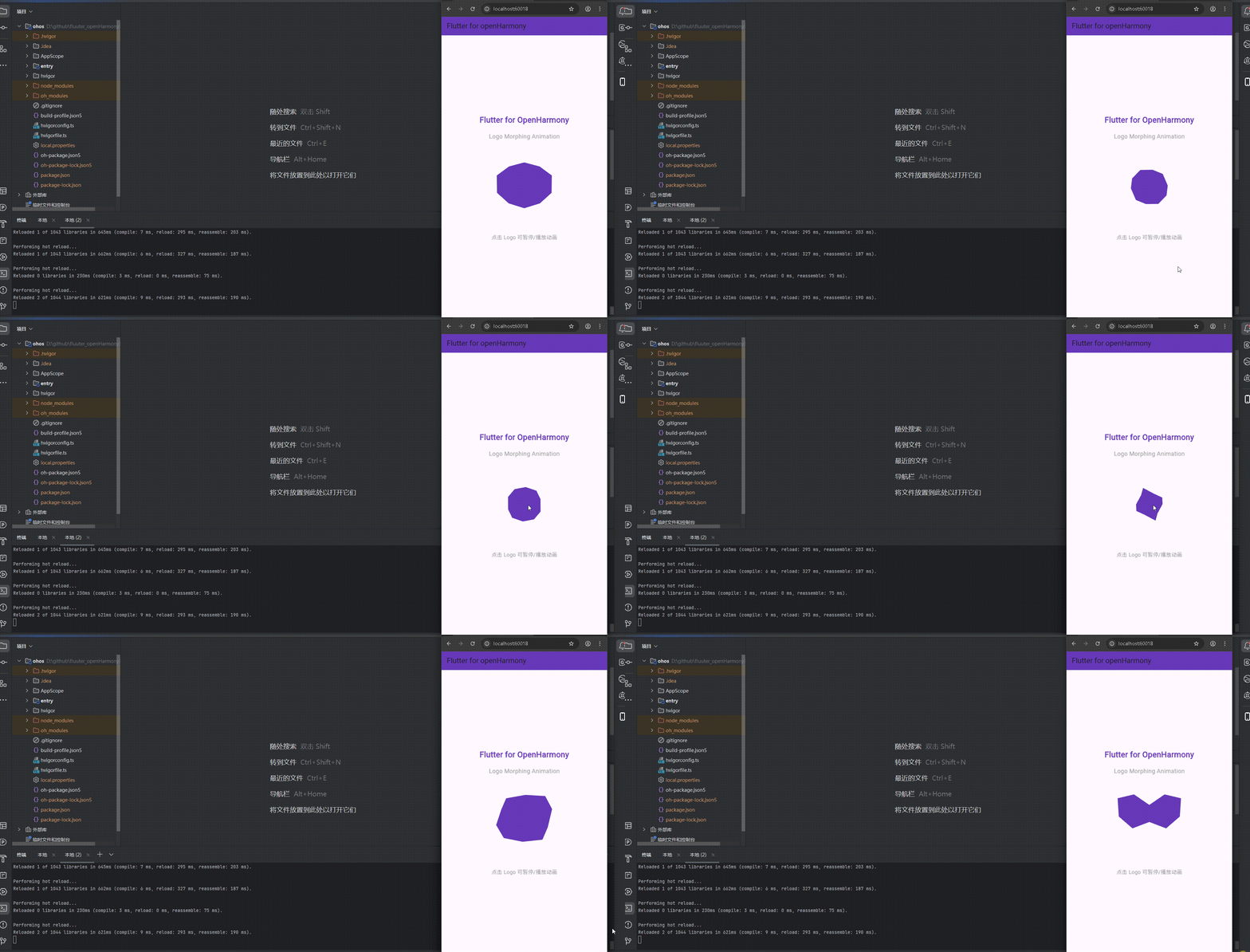
运行到鸿蒙虚拟设备中效果展示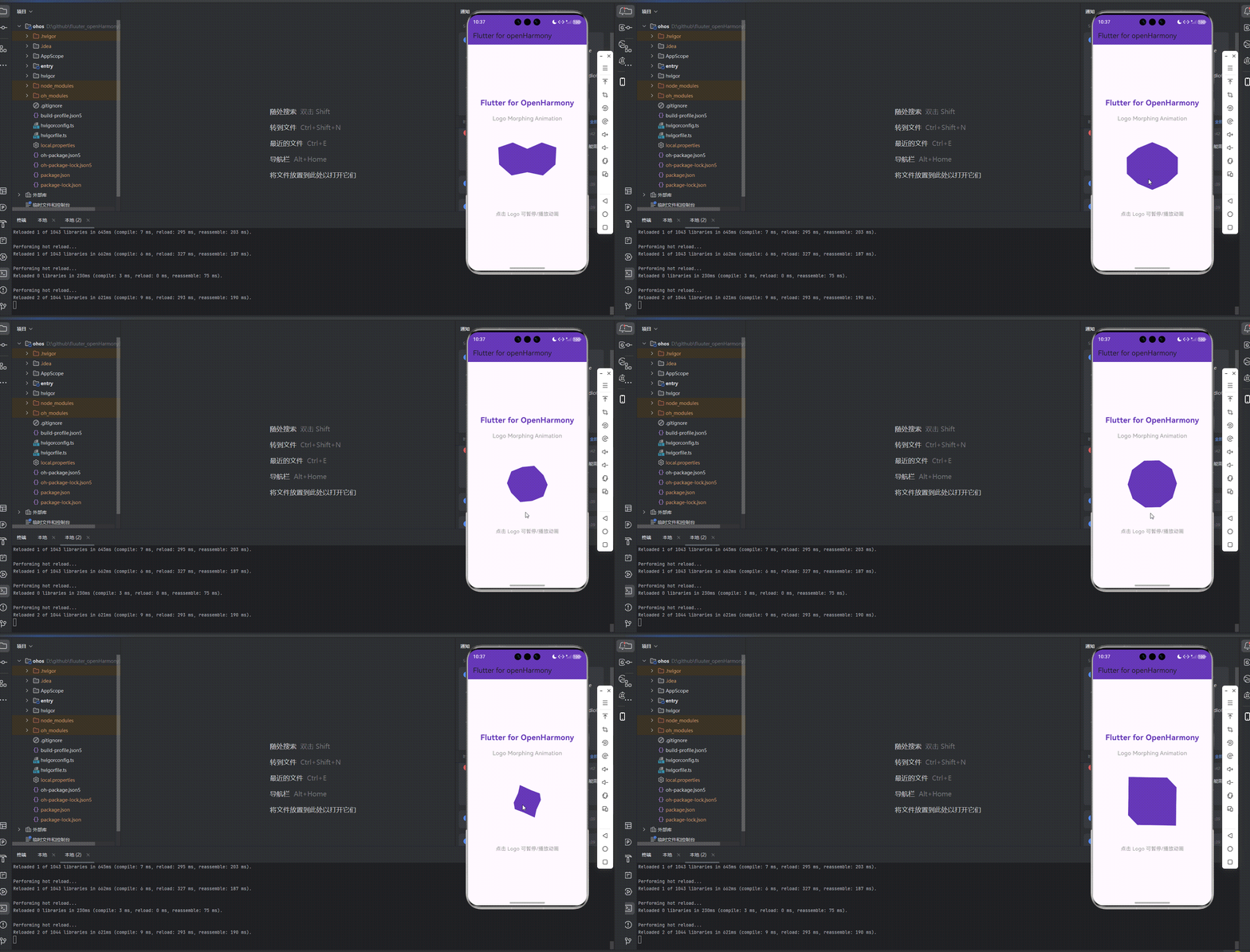
功能代码实现
Logo Morphing 动画组件
组件结构设计
Logo Morphing 动画组件采用了 Flutter 的 CustomPaint 和 AnimationController 实现,主要包含以下部分:
LogoMorphingAnimation类:对外暴露的组件,管理动画状态_LogoMorphingAnimationState类:实现动画逻辑和状态管理_LogoMorphingPainter类:负责绘制不同形状并实现 morphing 效果
核心代码实现
1. 动画状态管理
class _LogoMorphingAnimationState extends State<LogoMorphingAnimation> with SingleTickerProviderStateMixin {
late AnimationController _controller;
late Animation<double> _animation;
int _currentShapeIndex = 0;
final List<Path> _shapes = [];
void initState() {
super.initState();
_initializeShapes();
_controller = AnimationController(
duration: const Duration(seconds: 2),
vsync: this,
);
_animation = Tween<double>(begin: 0, end: 1).animate(_controller)
..addListener(() {
setState(() {});
})
..addStatusListener((status) {
if (status == AnimationStatus.completed) {
_currentShapeIndex = (_currentShapeIndex + 1) % _shapes.length;
_controller.reset();
_controller.forward();
}
});
_controller.forward();
}
void dispose() {
_controller.dispose();
super.dispose();
}
}
2. 形状定义
void _initializeShapes() {
  // Flutter Logo shape
  final flutterPath = Path();
  flutterPath.moveTo(100, 50);
  flutterPath.cubicTo(150, 0, 200, 0, 200, 50);
  flutterPath.cubicTo(200, 100, 150, 150, 100, 100);
  flutterPath.cubicTo(50, 150, 0, 100, 0, 50);
  flutterPath.cubicTo(0, 0, 50, 0, 100, 50);
  _shapes.add(flutterPath);

  // OpenHarmony Logo shape (simplified)
  final openHarmonyPath = Path();
  openHarmonyPath.moveTo(100, 20);
  openHarmonyPath.lineTo(180, 60);
  openHarmonyPath.lineTo(180, 140);
  openHarmonyPath.lineTo(100, 180);
  openHarmonyPath.lineTo(20, 140);
  openHarmonyPath.lineTo(20, 60);
  openHarmonyPath.close();
  _shapes.add(openHarmonyPath);

  // Circle shape
  final circlePath = Path();
  circlePath.addOval(Rect.fromCircle(center: const Offset(100, 100), radius: 80));
  _shapes.add(circlePath);

  // Square shape
  final squarePath = Path();
  squarePath.addRect(Rect.fromLTWH(20, 20, 160, 160));
  _shapes.add(squarePath);
}
3. Morphing 效果实现
class _LogoMorphingPainter extends CustomPainter {
final double animationValue;
final Path currentShape;
final Path nextShape;
_LogoMorphingPainter({
required this.animationValue,
required this.currentShape,
required this.nextShape,
});
void paint(Canvas canvas, Size size) {
final paint = Paint()
..color = Colors.deepPurple
..style = PaintingStyle.fill;
final morphPath = Path();
final currentMetrics = currentShape.computeMetrics();
final nextMetrics = nextShape.computeMetrics();
final currentPathMetrics = currentMetrics.toList();
final nextPathMetrics = nextMetrics.toList();
for (int i = 0; i < currentPathMetrics.length && i < nextPathMetrics.length; i++) {
final currentPathMetric = currentPathMetrics[i];
final nextPathMetric = nextPathMetrics[i];
final currentPath = currentPathMetric.extractPath(0, currentPathMetric.length);
final nextPath = nextPathMetric.extractPath(0, nextPathMetric.length);
final currentPoints = _extractPoints(currentPath);
final nextPoints = _extractPoints(nextPath);
for (int j = 0; j < currentPoints.length && j < nextPoints.length; j++) {
final currentPoint = currentPoints[j];
final nextPoint = nextPoints[j];
final x = currentPoint.dx + (nextPoint.dx - currentPoint.dx) * animationValue;
final y = currentPoint.dy + (nextPoint.dy - currentPoint.dy) * animationValue;
if (j == 0) {
morphPath.moveTo(x, y);
} else {
morphPath.lineTo(x, y);
}
}
morphPath.close();
}
canvas.drawPath(morphPath, paint);
}
List<Offset> _extractPoints(Path path) {
final points = <Offset>[];
final metrics = path.computeMetrics();
for (final metric in metrics) {
const step = 0.1;
for (double t = 0; t <= 1; t += step) {
final tangent = metric.getTangentForOffset(metric.length * t);
if (tangent != null) {
points.add(tangent.position);
}
}
}
return points;
}
bool shouldRepaint(covariant _LogoMorphingPainter oldDelegate) {
return animationValue != oldDelegate.animationValue ||
currentShape != oldDelegate.currentShape ||
nextShape != oldDelegate.nextShape;
}
}
4. 交互功能实现
void _toggleAnimation() {
if (_controller.isAnimating) {
_controller.stop();
} else {
_controller.forward();
}
}
Widget build(BuildContext context) {
return GestureDetector(
onTap: _toggleAnimation,
child: Container(
width: 200,
height: 200,
child: CustomPaint(
painter: _LogoMorphingPainter(
animationValue: _animation.value,
currentShape: _shapes[_currentShapeIndex],
nextShape: _shapes[(_currentShapeIndex + 1) % _shapes.length],
),
),
),
);
}
使用方法
在需要使用 Logo Morphing 动画的地方,只需导入组件并添加到布局中:
import 'components/logo_morphing_animation.dart';

// 在 Widget 树中使用
const LogoMorphingAnimation();
首页集成与使用
首页结构设计
首页采用 Scaffold 布局,包含以下部分:
- 顶部 AppBar:显示应用标题
- 中间内容区:垂直居中布局,包含应用标题、动画标题、动画组件和交互提示
集成代码实现
import 'package:flutter/material.dart';
import 'components/logo_morphing_animation.dart';
void main() {
runApp(const MyApp());
}
class MyApp extends StatelessWidget {
const MyApp({super.key});
Widget build(BuildContext context) {
return MaterialApp(
title: 'Flutter for openHarmony',
theme: ThemeData(
colorScheme: ColorScheme.fromSeed(seedColor: Colors.deepPurple),
useMaterial3: true,
),
debugShowCheckedModeBanner: false,
home: const MyHomePage(title: 'Flutter for openHarmony'),
);
}
}
class MyHomePage extends StatefulWidget {
const MyHomePage({super.key, required this.title});
final String title;
State<MyHomePage> createState() => _MyHomePageState();
}
class _MyHomePageState extends State<MyHomePage> {
Widget build(BuildContext context) {
return Scaffold(
appBar: AppBar(
title: Text(widget.title),
backgroundColor: Colors.deepPurple,
),
body: Center(
child: Column(
mainAxisAlignment: MainAxisAlignment.center,
children: <Widget>[
const Text(
'Flutter for OpenHarmony',
style: TextStyle(
fontSize: 24,
fontWeight: FontWeight.bold,
color: Colors.deepPurple,
),
),
const SizedBox(height: 20),
const Text(
'Logo Morphing Animation',
style: TextStyle(
fontSize: 18,
color: Colors.grey,
),
),
const SizedBox(height: 40),
const LogoMorphingAnimation(),
const SizedBox(height: 40),
const Text(
'点击 Logo 可暂停/播放动画',
style: TextStyle(
fontSize: 16,
color: Colors.grey,
),
),
],
),
),
);
}
}
开发注意事项
-
动画性能优化
- 使用
SingleTickerProviderStateMixin确保动画流畅 - 在
dispose方法中释放AnimationController,避免内存泄漏 - 控制动画持续时间,避免过长导致用户等待
- 使用
-
形状定义
- 确保所有形状的路径点数量相近,以获得更平滑的 morphing 效果
- 使用相对坐标定义形状,便于组件尺寸调整
- 形状路径需要闭合,否则可能出现绘制异常
-
交互体验
- 提供清晰的交互反馈,如点击后动画状态变化
- 考虑添加视觉反馈,如点击时的缩放效果
- 确保交互区域足够大,便于用户操作
-
平台适配
- Flutter for OpenHarmony 环境下,确保
CustomPaint正常工作 - 测试不同设备尺寸下的显示效果
- 注意鸿蒙平台的性能特性,适当调整动画复杂度
- Flutter for OpenHarmony 环境下,确保
开发中容易遇到的问题
1. 动画卡顿问题
问题描述
在部分设备上运行时,Logo morphing 动画可能出现卡顿现象。
原因分析
- 形状路径点数量过多,导致绘制计算量大
CustomPaint的shouldRepaint方法实现不当,导致不必要的重绘- 动画持续时间过短,导致视觉上的卡顿感
解决方案
- 优化
_extractPoints方法,调整采样步长(如将step从 0.1 调整为 0.15) - 确保
shouldRepaint方法正确实现,只在必要时重绘 - 适当增加动画持续时间,如从 2 秒调整为 3 秒
2. 形状变形不自然
问题描述
不同形状之间的 morphing 过渡效果不够自然流畅。
原因分析
- 不同形状的路径点数量差异较大
- 形状的起始点和方向不一致
- 动画曲线选择不当
解决方案
- 确保所有形状使用相似数量的路径点
- 统一形状的起始点位置和绘制方向
- 尝试使用不同的动画曲线,如
Curves.easeInOut
3. 内存泄漏风险
问题描述
长时间运行应用后,可能出现内存占用增加的情况。
原因分析
AnimationController未在dispose方法中正确释放CustomPaint的painter对象创建过于频繁
解决方案
- 确保在
dispose方法中调用_controller.dispose() - 优化
_LogoMorphingPainter的创建逻辑,避免不必要的对象创建
4. 鸿蒙平台适配问题
问题描述
在 OpenHarmony 设备上运行时,动画可能出现显示异常。
原因分析
- Flutter for OpenHarmony 对
CustomPaint的支持可能存在差异 - 鸿蒙平台的绘图引擎特性与 Android/iOS 不同
解决方案
- 测试不同版本的 Flutter for OpenHarmony SDK
- 简化形状复杂度,确保兼容性
- 关注官方文档和社区反馈,及时更新适配方案
总结开发中用到的技术点
1. Flutter 核心动画技术
- AnimationController:控制动画的启动、暂停、重置等操作
- Tween:定义动画的起始值和结束值
- CustomPaint:自定义绘制不同形状
- Path:创建和操作形状路径
- GestureDetector:实现点击交互功能
2. 自定义绘制技术
- CustomPainter:实现自定义绘制逻辑
- Canvas:提供绘制操作的画布
- Paint:定义绘制的样式和颜色
- PathMetrics:分析路径的度量信息
- Tangent:获取路径上的点信息,用于实现 morphing 效果
3. 状态管理技术
- StatefulWidget:管理组件的状态
- setState:触发 UI 更新
- SingleTickerProviderStateMixin:为动画提供 vsync 信号,优化性能
4. 布局与交互技术
- Scaffold:提供应用的基本结构
- AppBar:实现顶部导航栏
- Column:垂直布局组件
- MainAxisAlignment:控制垂直居中对齐
- SizedBox:控制组件间距
- Text:显示文本信息
5. 代码组织与架构
- 组件化开发:将动画逻辑抽离为独立组件
- 职责分离:将状态管理、绘制逻辑和 UI 展示分离
- 命名规范:使用清晰的命名,提高代码可读性
- 注释完善:添加必要的注释,说明核心逻辑
6. 平台适配技术
- Flutter for OpenHarmony:了解跨平台适配的特性和限制
- 平台特性:考虑不同平台的性能差异
- 兼容性测试:在不同设备上测试应用效果
7. 性能优化技术
- 内存管理:正确释放资源,避免内存泄漏
- 绘制优化:减少不必要的重绘操作
- 动画优化:调整动画参数,确保流畅运行
- 代码优化:简化逻辑,提高执行效率
通过本次实战,我们掌握了 Flutter for OpenHarmony 环境下实现复杂动画效果的方法,了解了自定义绘制和动画控制的核心技术,同时积累了跨平台开发的实践经验。这些技术不仅可以应用于 Logo morphing 动画,还可以扩展到其他需要自定义动画效果的场景中,为应用增添更多视觉吸引力。
欢迎加入开源鸿蒙跨平台社区: https://openharmonycrossplatform.csdn.net

开源鸿蒙跨平台开发社区汇聚开发者与厂商,共建“一次开发,多端部署”的开源生态,致力于降低跨端开发门槛,推动万物智联创新。
更多推荐

 10
10 0
0- 0


 已为社区贡献15条内容

所有评论(0)