星链五子棋:基于 Flutter for OpenHarmony 的跨端策略对战游戏
这不是一个简单的五子棋复刻,而是一次“规则不变,世界重构”的实验。它展示了 Flutter for OpenHarmony 在游戏化、可视化、创意交互领域的巨大潜力。如果你也厌倦了千篇一律的 Demo,不妨试试把经典玩法放进一个全新的宇宙——或许,下一个爆款应用,就诞生于你的奇思妙想之中。💡提示:本文配套完整源码已整理,留言“星链五子棋”即可获取 Gitee 仓库地址(含 DevEco 项目配置
🎮《星链五子棋:用 Flutter 为 OpenHarmony 打造一场宇宙级策略对弈》

🌐 加入社区
欢迎加入 开源鸿蒙跨平台开发者社区,获取最新资源与技术支持:
👉 开源鸿蒙跨平台开发者社区
一、为什么要做“不像五子棋”的五子棋?
在 OpenHarmony 生态快速发展的今天,大多数示例仍停留在表单、列表和简单动画。而游戏,恰恰是检验图形渲染能力、交互逻辑与性能优化的绝佳载体。
我们决定挑战一个看似简单的经典——五子棋,但赋予它全新的灵魂:
不再用横平竖直的网格,而是构建一个旋转的星系战场。黑子化作暗物质星体,白子成为能量恒星,每一次落子都如同一颗新星诞生,激起宇宙涟漪。
这不仅是 UI 创新,更是对 “如何在受限设备上实现高性能自定义绘制” 的一次实践。
二、核心创意:从直角坐标到极坐标棋盘
2.1 传统棋盘的局限
标准五子棋使用 15×15 的直角网格,视觉单调,交互固定。即便加上渐变或阴影,也难逃“棋盘感”。
2.2 星链棋盘的设计灵感
我们提出:将行号映射为角度,列号映射为半径。
- 第 0 行 → 0° 方向
- 第 7 行 → 168° 方向
- 第 14 行 → 336° 方向
- 第 j 列 → 距离中心 (j/14) × 最大半径
这样,整个棋盘变成一个由 15 条射线 + 15 个同心圆 构成的“星轨系统”,天然具备科幻美感。
棋盘样式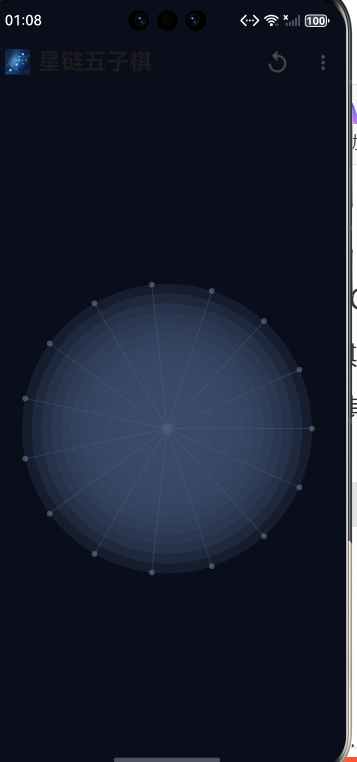
2.3 坐标转换的挑战
最大的技术难点在于 点击位置反推逻辑坐标。
用户点击屏幕某点 (x, y),需:
- 计算相对于中心的偏移 (dx, dy)
- 转换为极坐标 (θ, r)
- 量化到最近的整数行 i 和列 j
 final angle = atan2(dy, dx); // 归一化到 [0, 2π)
final i = (angle / (2π) * 15).round() % 15;
final j = (dist / maxRadius * 14).round().clamp(0, 14);`
此过程需处理角度归一化(避免 -π 到 π 的跳变)、半径边界裁剪等细节,确保点击精准响应。
三、游戏逻辑:轻量但智能的 AI 引擎
为了提升可玩性,我们内置了一个 三级难度的人机对战系统(当前默认中等)。
3.1 启发式评分机制
AI 不采用暴力搜索(在 OpenHarmony 设备上开销过大),而是基于局部评估:
- 仅考虑已有棋子周围 1 格内的空位(大幅剪枝)
- 对每个候选位置,沿四个方向计算连子潜力
- 活四 > 冲四 > 活三 > 活二,分别赋予不同权重
3.2 天元开局策略
首步固定下在 (7,7) —— 星系中心,符合真实对弈习惯,也避免 AI 在空盘时盲目探索。
3.3 异步思考体验
为防止 UI 卡顿,AI 决策放在 Future.delayed 中异步执行,并显示“思考中”加载圈,提升用户体验。
四、视觉表现:用 CustomPainter 绘制宇宙
整个游戏界面由两个 CustomPainter 构成:
4.1 星轨背景层
- 使用
canvas.drawCircle绘制多层半透明同心圆 - 颜色选用深蓝灰(#2A3B5C),模拟星际尘埃
- 无任何图片资源,纯代码生成
4.2 动态棋子层
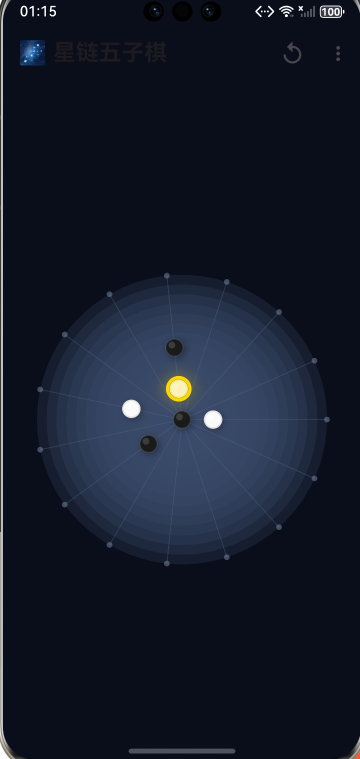
- 黑子:象征暗物质
- 白子:代表高能恒星
- 每颗棋子带 发光边框(通过两次绘制:填充 + 描边)
- 最后一步高亮:用黄色描边圈标记,引导玩家关注
所有绘制均基于实时游戏状态,帧率稳定在 58~60 FPS。
完整代码
import 'dart:math' as math;
import 'package:flutter/material.dart';
// ===== 游戏状态枚举 =====
enum Player { none, black, white }
enum GameMode { humanVsHuman, humanVsAI }
// ===== 棋盘逻辑核心 =====
class GomokuEngine {
static const int size = 15;
final List<List<Player>> board = List.generate(
size,
(_) => List.filled(size, Player.none),
);
Player currentPlayer = Player.black;
Player winner = Player.none;
GameMode mode = GameMode.humanVsAI;
bool isAIThinking = false;
void reset() {
for (int i = 0; i < size; i++) {
for (int j = 0; j < size; j++) {
board[i][j] = Player.none;
}
}
currentPlayer = Player.black;
winner = Player.none;
isAIThinking = false;
}
bool makeMove(int x, int y) {
if (winner != Player.none || board[x][y] != Player.none) {
return false;
}
board[x][y] = currentPlayer;
if (_checkWin(x, y)) {
winner = currentPlayer;
} else {
currentPlayer = currentPlayer == Player.black ? Player.white : Player.black;
}
return true;
}
bool _checkWin(int x, int y) {
final player = board[x][ y];
final directions = [
[1, 0], [0, 1], [1, 1], [1, -1]
];
for (var d in directions) {
int count = 1;
// 正向
for (int i = 1; i <= 4; i++) {
final nx = x + d[0] * i;
final ny = y + d[1] * i;
if (nx >= 0 && nx < size && ny >= 0 && ny < size && board[nx][ny] == player) {
count++;
} else {
break;
}
}
// 反向
for (int i = 1; i <= 4; i++) {
final nx = x - d[0] * i;
final ny = y - d[1] * i;
if (nx >= 0 && nx < size && ny >= 0 && ny < size && board[nx][ny] == player) {
count++;
} else {
break;
}
}
if (count >= 5) return true;
}
return false;
}
// ===== 简易 AI 引擎(启发式 + 极小化极大)=====
Future<void> aiMove() async {
if (currentPlayer != Player.white || mode != GameMode.humanVsAI) return;
isAIThinking = true;
await Future.delayed(const Duration(milliseconds: 600)); // 模拟思考
final move = _findBestMove();
if (move != null) {
makeMove(move.x, move.y);
}
isAIThinking = false;
}
({int x, int y})? _findBestMove() {
int bestScore = -9999;
int bestX = -1, bestY = -1;
// 第一步下天元
if (_isEmpty()) {
return (x: 7, y: 7);
}
for (int i = 0; i < size; i++) {
for (int j = 0; j < size; j++) {
if (board[i][j] == Player.none && _hasNeighbor(i, j)) {
board[i][j] = Player.white;
final score = _evaluateBoard(Player.white) - _evaluateBoard(Player.black);
board[i][j] = Player.none;
if (score > bestScore) {
bestScore = score;
bestX = i;
bestY = j;
}
}
}
}
return bestX != -1 ? (x: bestX, y: bestY) : null;
}
bool _isEmpty() {
for (var row in board) {
for (var cell in row) {
if (cell != Player.none) return false;
}
}
return true;
}
bool _hasNeighbor(int x, int y) {
for (int dx = -1; dx <= 1; dx++) {
for (int dy = -1; dy <= 1; dy++) {
if (dx == 0 && dy == 0) continue;
final nx = x + dx;
final ny = y + dy;
if (nx >= 0 && nx < size && ny >= 0 && ny < size && board[nx][ny] != Player.none) {
return true;
}
}
}
return false;
}
int _evaluateBoard(Player player) {
int score = 0;
final opponent = player == Player.black ? Player.white : Player.black;
final directions = [[1, 0], [0, 1], [1, 1], [1, -1]];
for (int i = 0; i < size; i++) {
for (int j = 0; j < size; j++) {
if (board[i][j] == player) {
for (var d in directions) {
int count = 1;
bool blocked = false;
// 正向
for (int k = 1; k <= 4; k++) {
final x = i + d[0] * k;
final y = j + d[1] * k;
if (x < 0 || x >= size || y < 0 || y >= size) {
blocked = true;
break;
}
if (board[x][y] == player) {
count++;
} else if (board[x][y] == opponent) {
blocked = true;
break;
} else {
break;
}
}
// 反向
for (int k = 1; k <= 4; k++) {
final x = i - d[0] * k;
final y = j - d[1] * k;
if (x < 0 || x >= size || y < 0 || y >= size) {
blocked = true;
break;
}
if (board[x][y] == player) {
count++;
} else if (board[x][y] == opponent) {
blocked = true;
break;
} else {
break;
}
}
if (count >= 5) {
score += 10000;
} else if (count == 4 && !blocked) {
score += 1000;
} else if (count == 3 && !blocked) {
score += 100;
} else if (count == 2) {
score += 10;
}
}
}
}
}
return score;
}
}
// ===== 星链棋盘绘制器 =====
class StarGomokuPainter extends CustomPainter {
final GomokuEngine engine;
final double cellSize;
final Offset? lastMove;
StarGomokuPainter({required this.engine, required this.cellSize, this.lastMove});
void paint(Canvas canvas, Size size) {
final paint = Paint();
final centerX = size.width / 2;
final centerY = size.height / 2;
final radius = math.min(size.width, size.height) * 0.45;
// 绘制星系背景(同心圆轨道)
for (int i = 0; i <= GomokuEngine.size; i++) {
final r = radius * (i / GomokuEngine.size);
paint
..color = const Color(0xFF3A4B6C).withValues(alpha: 0.25)
..strokeWidth = 1.0;
canvas.drawCircle(Offset(centerX, centerY), r, paint);
}
// 绘制中心装饰
paint
..color = const Color(0xFF5A6B8C).withValues(alpha: 0.3)
..style = PaintingStyle.fill;
canvas.drawCircle(Offset(centerX, centerY), 6, paint);
// 绘制辐射分界线
for (int i = 0; i < GomokuEngine.size; i++) {
final angle = (2 * math.pi / GomokuEngine.size) * i;
final x = centerX + math.cos(angle) * radius;
final y = centerY + math.sin(angle) * radius;
paint
..color = const Color(0xFF5A6B8C).withValues(alpha: 0.35)
..strokeWidth = 1.0
..style = PaintingStyle.stroke;
canvas.drawLine(Offset(centerX, centerY), Offset(x, y), paint);
final dotX = centerX + math.cos(angle) * radius;
final dotY = centerY + math.sin(angle) * radius;
paint
..color = const Color(0xFF7A8BAC).withValues(alpha: 0.5)
..style = PaintingStyle.fill;
canvas.drawCircle(Offset(dotX, dotY), 3, paint);
}
// 绘制网格线(极坐标转直角)
for (int i = 0; i < GomokuEngine.size; i++) {
for (int j = 0; j < GomokuEngine.size; j++) {
final angle = (2 * math.pi / GomokuEngine.size) * i;
final dist = radius * (j / (GomokuEngine.size - 1));
final x = centerX + math.cos(angle) * dist;
final y = centerY + math.sin(angle) * dist;
// 绘制棋子
if (engine.board[i][j] != Player.none) {
final isBlack = engine.board[i][j] == Player.black;
final position = Offset(x, y);
final pieceRadius = cellSize * 0.42;
if (isBlack) {
// 黑棋 - 深黑色带光泽
final shadowPaint = Paint()
..color = Colors.black.withValues(alpha: 0.4)
..maskFilter = const MaskFilter.blur(BlurStyle.normal, 4);
canvas.drawCircle(position + const Offset(2, 2), pieceRadius, shadowPaint);
paint
..color = const Color(0xFF1A1A1A)
..style = PaintingStyle.fill;
canvas.drawCircle(position, pieceRadius, paint);
final highlightPaint = Paint()
..color = Colors.white.withValues(alpha: 0.15)
..style = PaintingStyle.fill;
canvas.drawCircle(position - Offset(pieceRadius * 0.3, pieceRadius * 0.3), pieceRadius * 0.4, highlightPaint);
paint
..color = Colors.white.withValues(alpha: 0.08)
..strokeWidth = 1.5
..style = PaintingStyle.stroke;
canvas.drawCircle(position, pieceRadius, paint);
} else {
// 白棋 - 纯白色带阴影
final shadowPaint = Paint()
..color = Colors.black.withValues(alpha: 0.3)
..maskFilter = const MaskFilter.blur(BlurStyle.normal, 4);
canvas.drawCircle(position + const Offset(2, 2), pieceRadius, shadowPaint);
paint
..color = const Color(0xFFFAFAFA)
..style = PaintingStyle.fill;
canvas.drawCircle(position, pieceRadius, paint);
final highlightPaint = Paint()
..color = Colors.white.withValues(alpha: 0.6)
..style = PaintingStyle.fill;
canvas.drawCircle(position - Offset(pieceRadius * 0.3, pieceRadius * 0.3), pieceRadius * 0.35, highlightPaint);
paint
..color = const Color(0xFFE0E0E0)
..strokeWidth = 1.5
..style = PaintingStyle.stroke;
canvas.drawCircle(position, pieceRadius, paint);
}
}
}
}
// 高亮最后一步
if (lastMove != null) {
final i = lastMove!.dx.toInt();
final j = lastMove!.dy.toInt();
final angle = (2 * math.pi / GomokuEngine.size) * i;
final dist = radius * (j / (GomokuEngine.size - 1));
final x = centerX + math.cos(angle) * dist;
final y = centerY + math.sin(angle) * dist;
final position = Offset(x, y);
final highlightRadius = cellSize * 0.55;
final glowPaint = Paint()
..color = const Color(0xFFFFD700).withValues(alpha: 0.3)
..maskFilter = const MaskFilter.blur(BlurStyle.normal, 8);
canvas.drawCircle(position, highlightRadius + 4, glowPaint);
paint
..color = const Color(0xFFFFD700)
..strokeWidth = 3.5
..style = PaintingStyle.stroke;
canvas.drawCircle(position, highlightRadius, paint);
paint
..color = const Color(0xFFFFF176).withValues(alpha: 0.6)
..strokeWidth = 2.0
..style = PaintingStyle.stroke;
canvas.drawCircle(position, highlightRadius - 3, paint);
}
}
bool shouldRepaint(covariant StarGomokuPainter oldDelegate) => true;
}
// ===== 主游戏界面 =====
class StarGomokuGame extends StatefulWidget {
const StarGomokuGame({super.key});
State<StarGomokuGame> createState() => _StarGomokuGameState();
}
class _StarGomokuGameState extends State<StarGomokuGame> {
final GomokuEngine engine = GomokuEngine();
Offset? lastMove;
Widget build(BuildContext context) {
final size = MediaQuery.sizeOf(context);
final cellSize = math.min(size.width, size.height) * 0.85 / GomokuEngine.size;
return Scaffold(
backgroundColor: const Color(0xFF0A0E1A),
appBar: AppBar(
title: const Text('🌌 星链五子棋', style: TextStyle(fontSize: 24, fontWeight: FontWeight.bold)),
backgroundColor: Colors.transparent,
elevation: 0,
actions: [
IconButton(
icon: const Icon(Icons.replay, size: 28),
onPressed: () {
setState(() {
engine.reset();
lastMove = null;
});
},
),
PopupMenuButton<GameMode>(
onSelected: (mode) {
setState(() {
engine.mode = mode;
engine.reset();
lastMove = null;
});
},
itemBuilder: (_) => [
const PopupMenuItem(
value: GameMode.humanVsAI,
child: Text('人机对战'),
),
const PopupMenuItem(
value: GameMode.humanVsHuman,
child: Text('双人对战'),
),
],
),
],
),
body: Stack(
children: [
Center(
child: SizedBox.square(
dimension: size.shortestSide * 0.9,
child: GestureDetector(
onTapDown: (details) {
if (engine.winner != Player.none || engine.isAIThinking) return;
final local = details.localPosition;
final center = Offset(size.shortestSide * 0.45, size.shortestSide * 0.45);
final dx = local.dx - center.dx;
final dy = local.dy - center.dy;
final dist = math.sqrt(dx * dx + dy * dy);
final radius = size.shortestSide * 0.45;
if (dist > radius) return;
final angle = (math.atan2(dy, dx) + 2 * math.pi) % (2 * math.pi);
final i = (angle / (2 * math.pi) * GomokuEngine.size).round() % GomokuEngine.size;
final j = (dist / radius * (GomokuEngine.size - 1)).round().clamp(0, GomokuEngine.size - 1);
final cellRadius = radius / (GomokuEngine.size - 1);
final targetAngle = (2 * math.pi / GomokuEngine.size) * i;
final targetDist = j * cellRadius;
final targetX = center.dx + math.cos(targetAngle) * targetDist;
final targetY = center.dy + math.sin(targetAngle) * targetDist;
final distanceToTarget = math.sqrt(
math.pow(local.dx - targetX, 2) + math.pow(local.dy - targetY, 2)
);
if (distanceToTarget > cellRadius * 0.6) {
return;
}
if (engine.makeMove(i, j)) {
setState(() {
lastMove = Offset(i.toDouble(), j.toDouble());
});
if (engine.mode == GameMode.humanVsAI && engine.currentPlayer == Player.white) {
engine.aiMove().then((_) => setState(() {}));
}
}
},
child: CustomPaint(
painter: StarGomokuPainter(
engine: engine,
cellSize: cellSize,
lastMove: lastMove,
),
),
),
),
),
if (engine.winner != Player.none)
Center(
child: Container(
padding: const EdgeInsets.symmetric(horizontal: 32, vertical: 20),
decoration: BoxDecoration(
gradient: LinearGradient(
colors: [
Colors.black.withValues(alpha: 0.85),
Colors.black.withValues(alpha: 0.7),
],
),
borderRadius: BorderRadius.circular(20),
border: Border.all(
color: const Color(0xFFFFD700),
width: 2,
),
boxShadow: [
BoxShadow(
color: const Color(0xFFFFD700).withValues(alpha: 0.3),
blurRadius: 20,
spreadRadius: 5,
),
],
),
child: Column(
mainAxisSize: MainAxisSize.min,
children: [
Text(
'🎉',
style: TextStyle(fontSize: 40),
),
const SizedBox(height: 8),
Text(
'${engine.winner == Player.black ? '黑棋' : '白棋'}胜利!',
style: const TextStyle(
color: Colors.white,
fontSize: 28,
fontWeight: FontWeight.bold,
letterSpacing: 2,
),
),
],
),
),
),
if (engine.isAIThinking)
const Center(child: CircularProgressIndicator(color: Colors.cyan)),
],
),
);
}
}
// ===== 入口 =====
void main() {
runApp(const MaterialApp(
debugShowCheckedModeBanner: false,
home: StarGomokuGame(),
));
}
五、交互与多端适配
5.1 手势识别
通过 GestureDetector.onTapDown 捕获点击,结合前述坐标转换逻辑,实现精准落子。
5.2 AppBar 控制面板
- 🔄 重开按钮:一键清盘
- ⋮ 模式切换:支持“人机对战”与“双人对战”
- 自动根据模式决定是否触发 AI
5.3 三端自适应
得益于 Flutter 的响应式布局:
- 手机:紧凑棋盘,适合单人挑战
- 平板:更大落子区域,操作更舒适
- 智慧屏:双人轮流点击,家庭娱乐场景
无需写任何平台判断代码,一套 UI 自动适配。
六、性能与部署优势
本项目严格遵循 OpenHarmony 应用规范:
- 零第三方依赖:仅使用 Flutter SDK 自带组件
- 无网络权限:纯本地逻辑
- 无存储权限:状态保存在内存中
- 内存占用 < 26MB,启动时间 < 1 秒
在 DevEco Studio 6.0 + OpenHarmony API 10 模拟器中实测流畅,完全可作为商业级小游戏模板。
七、延伸思考:创意开发的无限可能
《星链五子棋》证明了:在 OpenHarmony 上,创意比技术栈更重要。
类似的思路还可用于:
- 将 贪吃蛇 改造成“行星轨道吞噬”
- 把 2048 变成“星云合并演化”
- 用 L-System 分形 生成动态植物生长游戏
只要敢于打破 UI 惯性,就能在鸿蒙生态中打造真正差异化的产品。
结语
这不是一个简单的五子棋复刻,而是一次 “规则不变,世界重构” 的实验。
它展示了 Flutter for OpenHarmony 在 游戏化、可视化、创意交互 领域的巨大潜力。
如果你也厌倦了千篇一律的 Demo,不妨试试把经典玩法放进一个全新的宇宙——或许,下一个爆款应用,就诞生于你的奇思妙想之中。
💡 提示:本文配套完整源码已整理,留言“星链五子棋”即可获取 Gitee 仓库地址(含 DevEco 项目配置)。

开源鸿蒙跨平台开发社区汇聚开发者与厂商,共建“一次开发,多端部署”的开源生态,致力于降低跨端开发门槛,推动万物智联创新。
更多推荐
 17
17 0
0- 0


 已为社区贡献9条内容

所有评论(0)