Flutter for OpenHarmony PUBG游戏助手App实战:武器系统详解
武器是PUBG游戏的核心。不同武器有不同的特性,玩家需要快速了解各种武器的伤害、射速、精准度等参数。今天我们来实现一个完整的武器展示系统。
武器是PUBG游戏的核心。不同武器有不同的特性,玩家需要快速了解各种武器的伤害、射速、精准度等参数。今天我们来实现一个完整的武器展示系统。
武器数据模型
首先定义武器的数据结构:
class Weapon {
  final String name;
  final String category;
  final int damage;
  final double fireRate;
  final double accuracy;
  final int magazine;
  final String description;
  final Color color;

  Weapon({
    required this.name,
    required this.category,
    required this.damage,
    required this.fireRate,
    required this.accuracy,
    required this.magazine,
    required this.description,
    required this.color,
  });
}
数据字段:damage表示单发伤害,fireRate是射速(每秒射击次数),accuracy是精准度(0-100),magazine是弹匣容量。
这个模型包含了玩家做出武器选择所需的所有关键信息。
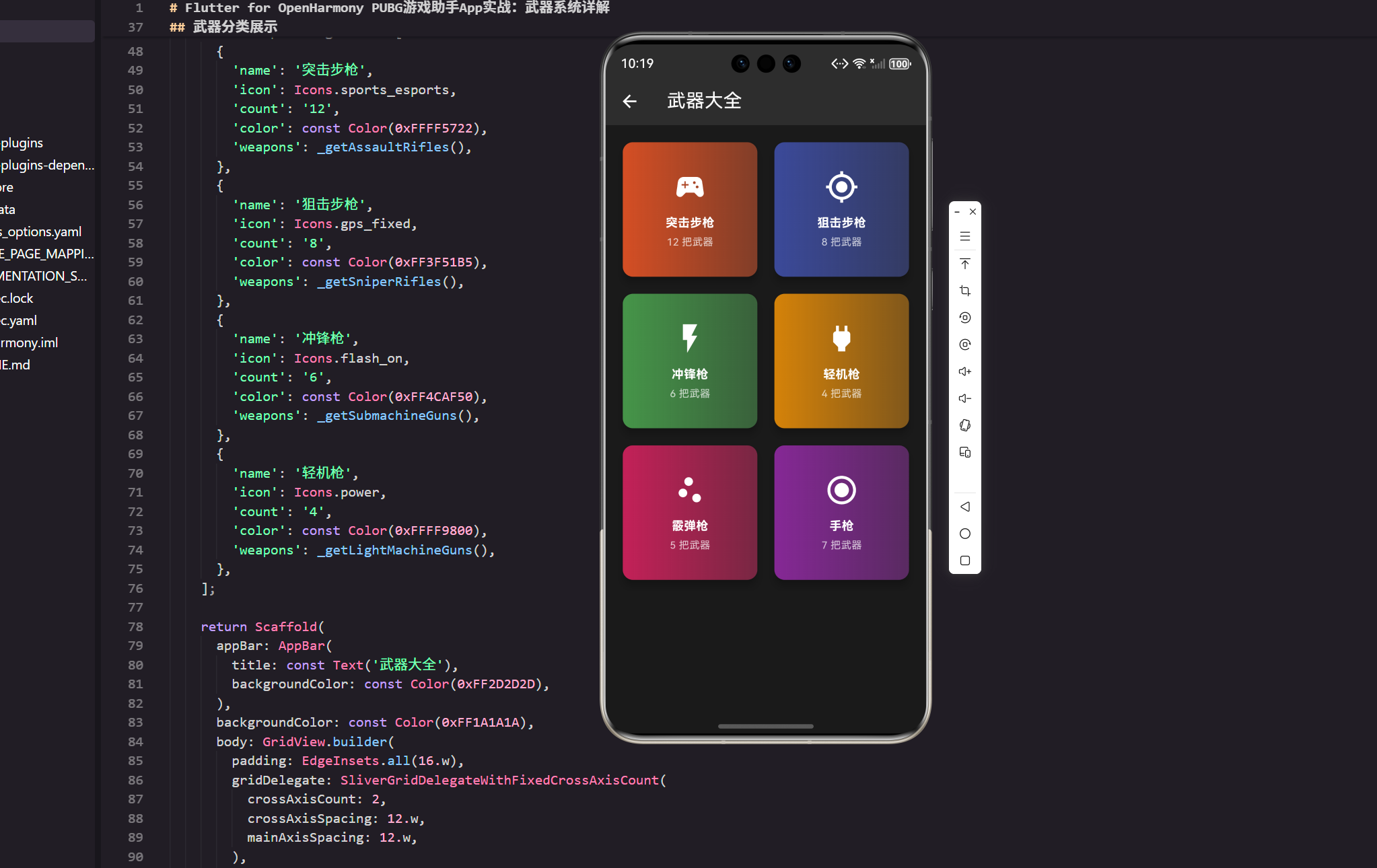
武器分类展示
武器按类型分类展示,使用GridView实现:
class WeaponsPage extends StatelessWidget {
const WeaponsPage({Key? key}) : super(key: key);
Widget build(BuildContext context) {
final weaponCategories = [
{
'name': '突击步枪',
'icon': Icons.sports_esports,
'count': '12',
'color': const Color(0xFFFF5722),
'weapons': _getAssaultRifles(),
},
{
'name': '狙击步枪',
'icon': Icons.gps_fixed,
'count': '8',
'color': const Color(0xFF3F51B5),
'weapons': _getSniperRifles(),
},
{
'name': '冲锋枪',
'icon': Icons.flash_on,
'count': '6',
'color': const Color(0xFF4CAF50),
'weapons': _getSubmachineGuns(),
},
{
'name': '轻机枪',
'icon': Icons.power,
'count': '4',
'color': const Color(0xFFFF9800),
'weapons': _getLightMachineGuns(),
},
];
return Scaffold(
appBar: AppBar(
title: const Text('武器大全'),
backgroundColor: const Color(0xFF2D2D2D),
),
backgroundColor: const Color(0xFF1A1A1A),
body: GridView.builder(
padding: EdgeInsets.all(16.w),
gridDelegate: SliverGridDelegateWithFixedCrossAxisCount(
crossAxisCount: 2,
crossAxisSpacing: 12.w,
mainAxisSpacing: 12.w,
),
itemCount: weaponCategories.length,
itemBuilder: (context, index) {
final category = weaponCategories[index];
return _buildCategoryCard(category);
},
),
);
}
static List<Weapon> _getAssaultRifles() {
return [
Weapon(
name: 'M416',
category: '突击步枪',
damage: 41,
fireRate: 8.6,
accuracy: 85,
magazine: 30,
description: '全能型步枪,易于控制',
color: const Color(0xFFFF5722),
),
Weapon(
name: 'AK47',
category: '突击步枪',
damage: 49,
fireRate: 7.6,
accuracy: 70,
magazine: 30,
description: '高伤害,后坐力大',
color: const Color(0xFFFF5722),
),
];
}
static List<Weapon> _getSniperRifles() {
return [
Weapon(
name: 'AWM',
category: '狙击步枪',
damage: 120,
fireRate: 0.9,
accuracy: 95,
magazine: 10,
description: '最强狙击枪,一枪致命',
color: const Color(0xFF3F51B5),
),
];
}
static List<Weapon> _getSubmachineGuns() {
return [];
}
static List<Weapon> _getLightMachineGuns() {
return [];
}
}
分类设计:每个分类包含名称、图标、武器数量和该分类的所有武器。
数据组织:使用静态方法返回各分类的武器列表,这样代码更清晰。
分类卡片设计
分类卡片展示分类信息和武器数量:
Widget _buildCategoryCard(Map<String, dynamic> category) {
  return GestureDetector(
    onTap: () {
      Get.toNamed('/weapons-detail', arguments: category);
    },
    child: Card(
      elevation: 8,
      color: const Color(0xFF2D2D2D),
      child: Container(
        decoration: BoxDecoration(
          borderRadius: BorderRadius.circular(12.r),
          gradient: LinearGradient(
            colors: [
              (category['color'] as Color).withOpacity(0.8),
              (category['color'] as Color).withOpacity(0.4),
            ],
            begin: Alignment.topLeft,
            end: Alignment.bottomRight,
          ),
        ),
        child: Column(
          mainAxisAlignment: MainAxisAlignment.center,
          children: [
            Icon(
              category['icon'] as IconData,
              size: 40.sp,
              color: Colors.white,
            ),
            SizedBox(height: 12.h),
            Text(
              category['name'] as String,
              style: TextStyle(
                color: Colors.white,
                fontSize: 14.sp,
                fontWeight: FontWeight.bold,
              ),
              textAlign: TextAlign.center,
            ),
            SizedBox(height: 4.h),
            Text(
              '${category['count']} 把武器',
              style: TextStyle(
                color: Colors.white70,
                fontSize: 12.sp,
              ),
            ),
          ],
        ),
      ),
    ),
  );
}
卡片交互:点击卡片跳转到该分类的详情页面,显示所有武器。
视觉设计:使用渐变背景和图标,使卡片更有吸引力。
武器详情页面
点击分类后进入详情页面,显示该分类的所有武器:
class WeaponDetailPage extends StatelessWidget {
final Map<String, dynamic> category;
const WeaponDetailPage({Key? key, required this.category}) : super(key: key);
Widget build(BuildContext context) {
final weapons = category['weapons'] as List<Weapon>;
return Scaffold(
appBar: AppBar(
title: Text(category['name'] as String),
backgroundColor: const Color(0xFF2D2D2D),
),
backgroundColor: const Color(0xFF1A1A1A),
body: ListView.builder(
padding: EdgeInsets.all(16.w),
itemCount: weapons.length,
itemBuilder: (context, index) {
return _buildWeaponCard(weapons[index]);
},
),
);
}
Widget _buildWeaponCard(Weapon weapon) {
return Card(
margin: EdgeInsets.only(bottom: 16.h),
color: const Color(0xFF2D2D2D),
child: Container(
padding: EdgeInsets.all(16.w),
decoration: BoxDecoration(
borderRadius: BorderRadius.circular(12.r),
gradient: LinearGradient(
colors: [
weapon.color.withOpacity(0.3),
Colors.transparent,
],
),
),
child: Column(
crossAxisAlignment: CrossAxisAlignment.start,
children: [
// 武器名称
Text(
weapon.name,
style: TextStyle(
color: Colors.white,
fontSize: 18.sp,
fontWeight: FontWeight.bold,
),
),
SizedBox(height: 4.h),
Text(
weapon.description,
style: TextStyle(
color: Colors.white70,
fontSize: 12.sp,
),
),
SizedBox(height: 16.h),
// 武器参数
_buildParameterRow('伤害', weapon.damage.toString(), weapon.color),
_buildParameterRow('射速', '${weapon.fireRate}/秒', weapon.color),
_buildParameterRow('精准度', '${weapon.accuracy}%', weapon.color),
_buildParameterRow('弹匣', weapon.magazine.toString(), weapon.color),
],
),
),
);
}
Widget _buildParameterRow(String label, String value, Color color) {
return Padding(
padding: EdgeInsets.symmetric(vertical: 8.h),
child: Row(
mainAxisAlignment: MainAxisAlignment.spaceBetween,
children: [
Text(
label,
style: TextStyle(
color: Colors.white70,
fontSize: 13.sp,
),
),
Container(
padding: EdgeInsets.symmetric(horizontal: 12.w, vertical: 4.h),
decoration: BoxDecoration(
color: color.withOpacity(0.2),
borderRadius: BorderRadius.circular(4.r),
border: Border.all(color: color, width: 1),
),
child: Text(
value,
style: TextStyle(
color: color,
fontSize: 13.sp,
fontWeight: FontWeight.bold,
),
),
),
],
),
);
}
}
卡片设计:每个武器占一个卡片,显示名称、描述和关键参数。
参数展示:使用Row横向排列参数标签和数值,数值用彩色背景突出显示。
武器对比功能
玩家经常需要对比不同武器,实现对比功能:
class WeaponComparisonPage extends StatefulWidget {
const WeaponComparisonPage({Key? key}) : super(key: key);
State<WeaponComparisonPage> createState() => _WeaponComparisonPageState();
}
class _WeaponComparisonPageState extends State<WeaponComparisonPage> {
Weapon? selectedWeapon1;
Weapon? selectedWeapon2;
final allWeapons = [
Weapon(
name: 'M416',
category: '突击步枪',
damage: 41,
fireRate: 8.6,
accuracy: 85,
magazine: 30,
description: '全能型步枪',
color: const Color(0xFFFF5722),
),
Weapon(
name: 'AK47',
category: '突击步枪',
damage: 49,
fireRate: 7.6,
accuracy: 70,
magazine: 30,
description: '高伤害步枪',
color: const Color(0xFFFF5722),
),
];
Widget build(BuildContext context) {
return Scaffold(
appBar: AppBar(
title: const Text('武器对比'),
backgroundColor: const Color(0xFF2D2D2D),
),
backgroundColor: const Color(0xFF1A1A1A),
body: SingleChildScrollView(
padding: EdgeInsets.all(16.w),
child: Column(
children: [
// 选择武器1
_buildWeaponSelector('武器1', selectedWeapon1, (weapon) {
setState(() => selectedWeapon1 = weapon);
}),
SizedBox(height: 16.h),
// 选择武器2
_buildWeaponSelector('武器2', selectedWeapon2, (weapon) {
setState(() => selectedWeapon2 = weapon);
}),
SizedBox(height: 24.h),
// 对比结果
if (selectedWeapon1 != null && selectedWeapon2 != null)
_buildComparisonResult(),
],
),
),
);
}
Widget _buildWeaponSelector(
String label,
Weapon? selected,
Function(Weapon) onSelect,
) {
return Column(
crossAxisAlignment: CrossAxisAlignment.start,
children: [
Text(
label,
style: TextStyle(
color: Colors.white,
fontSize: 14.sp,
fontWeight: FontWeight.bold,
),
),
SizedBox(height: 8.h),
Container(
decoration: BoxDecoration(
border: Border.all(color: Colors.white30),
borderRadius: BorderRadius.circular(8.r),
),
child: DropdownButton<Weapon>(
value: selected,
isExpanded: true,
underline: const SizedBox(),
items: allWeapons.map((weapon) {
return DropdownMenuItem(
value: weapon,
child: Padding(
padding: EdgeInsets.all(8.w),
child: Text(
weapon.name,
style: const TextStyle(color: Colors.white),
),
),
);
}).toList(),
onChanged: (weapon) {
if (weapon != null) onSelect(weapon);
},
),
),
],
);
}
Widget _buildComparisonResult() {
final w1 = selectedWeapon1!;
final w2 = selectedWeapon2!;
return Column(
crossAxisAlignment: CrossAxisAlignment.start,
children: [
Text(
'对比结果',
style: TextStyle(
color: Colors.white,
fontSize: 16.sp,
fontWeight: FontWeight.bold,
),
),
SizedBox(height: 16.h),
_buildComparisonRow('伤害', w1.damage, w2.damage),
_buildComparisonRow('射速', w1.fireRate.toInt(), w2.fireRate.toInt()),
_buildComparisonRow('精准度', w1.accuracy, w2.accuracy),
_buildComparisonRow('弹匣', w1.magazine, w2.magazine),
],
);
}
Widget _buildComparisonRow(String label, int value1, int value2) {
final isValue1Better = value1 > value2;
return Card(
margin: EdgeInsets.only(bottom: 8.h),
color: const Color(0xFF2D2D2D),
child: Padding(
padding: EdgeInsets.all(12.w),
child: Row(
children: [
Expanded(
child: Text(
label,
style: TextStyle(color: Colors.white70, fontSize: 13.sp),
),
),
Expanded(
child: Container(
padding: EdgeInsets.symmetric(vertical: 6.h),
decoration: BoxDecoration(
color: isValue1Better
? const Color(0xFF4CAF50).withOpacity(0.2)
: Colors.transparent,
borderRadius: BorderRadius.circular(4.r),
),
child: Text(
value1.toString(),
textAlign: TextAlign.center,
style: TextStyle(
color: isValue1Better ? const Color(0xFF4CAF50) : Colors.white,
fontSize: 13.sp,
fontWeight: FontWeight.bold,
),
),
),
),
Expanded(
child: Container(
padding: EdgeInsets.symmetric(vertical: 6.h),
decoration: BoxDecoration(
color: !isValue1Better
? const Color(0xFF4CAF50).withOpacity(0.2)
: Colors.transparent,
borderRadius: BorderRadius.circular(4.r),
),
child: Text(
value2.toString(),
textAlign: TextAlign.center,
style: TextStyle(
color: !isValue1Better ? const Color(0xFF4CAF50) : Colors.white,
fontSize: 13.sp,
fontWeight: FontWeight.bold,
),
),
),
),
],
),
),
);
}
}
对比功能:使用DropdownButton让用户选择要对比的武器,然后显示参数对比结果。
视觉反馈:参数值更优的武器用绿色背景突出显示,让用户一眼看出差异。
武器推荐系统
根据游戏阶段推荐合适的武器:
class WeaponRecommendationPage extends StatelessWidget {
const WeaponRecommendationPage({Key? key}) : super(key: key);
Widget build(BuildContext context) {
final recommendations = [
{
'stage': '早期(落地后)',
'weapons': ['M16A4', 'UMP9', '散弹枪'],
'reason': '优先找到任何武器,快速装备',
},
{
'stage': '中期(安全区内)',
'weapons': ['M416', 'AK47', 'M249'],
'reason': '寻找主武器和副武器搭配',
},
{
'stage': '后期(决赛圈)',
'weapons': ['M416', 'AWM', 'M24'],
'reason': '精准度和伤害最重要',
},
];
return Scaffold(
appBar: AppBar(
title: const Text('武器推荐'),
backgroundColor: const Color(0xFF2D2D2D),
),
backgroundColor: const Color(0xFF1A1A1A),
body: ListView.builder(
padding: EdgeInsets.all(16.w),
itemCount: recommendations.length,
itemBuilder: (context, index) {
final rec = recommendations[index];
return _buildRecommendationCard(rec);
},
),
);
}
Widget _buildRecommendationCard(Map<String, dynamic> rec) {
return Card(
margin: EdgeInsets.only(bottom: 16.h),
color: const Color(0xFF2D2D2D),
child: Padding(
padding: EdgeInsets.all(16.w),
child: Column(
crossAxisAlignment: CrossAxisAlignment.start,
children: [
Text(
rec['stage'] as String,
style: TextStyle(
color: Colors.white,
fontSize: 16.sp,
fontWeight: FontWeight.bold,
),
),
SizedBox(height: 12.h),
Wrap(
spacing: 8.w,
runSpacing: 8.h,
children: (rec['weapons'] as List<String>).map((weapon) {
return Container(
padding: EdgeInsets.symmetric(horizontal: 12.w, vertical: 6.h),
decoration: BoxDecoration(
color: const Color(0xFFFF6B35),
borderRadius: BorderRadius.circular(16.r),
),
child: Text(
weapon,
style: TextStyle(
color: Colors.white,
fontSize: 12.sp,
fontWeight: FontWeight.bold,
),
),
);
}).toList(),
),
SizedBox(height: 12.h),
Text(
rec['reason'] as String,
style: TextStyle(
color: Colors.white70,
fontSize: 12.sp,
),
),
],
),
),
);
}
}
推荐系统:根据游戏阶段提供武器推荐,帮助玩家快速做出选择。
用户体验:推荐理由清晰,让玩家理解为什么推荐这些武器。
小结
武器系统是游戏助手的重要功能。通过合理的数据结构、清晰的UI设计和实用的对比功能,我们为玩家提供了全面的武器信息。
关键要点:完整的数据模型、分类展示、详情对比、智能推荐。做好这些,武器系统就能成为玩家的得力助手。
欢迎加入开源鸿蒙跨平台社区:https://openharmonycrossplatform.csdn.net

开源鸿蒙跨平台开发社区汇聚开发者与厂商,共建“一次开发,多端部署”的开源生态,致力于降低跨端开发门槛,推动万物智联创新。
更多推荐
 5
5 0
0- 0


 已为社区贡献23条内容

所有评论(0)