Flutter三方库适配OpenHarmony【secure_application】— 测试策略与用例设计
欢迎加入开源鸿蒙跨平台社区:https://openharmonycrossplatform.csdn.net截屏防护无法通过截图来断言。你没办法在自动化测试中截一张图然后验证它是黑屏——因为截屏本身就被阻止了。所以测试策略需要分层:Dart 层的状态逻辑可以用单元测试覆盖,原生层的 API 调用需要在真机上手动验证。单元测试:Controller 状态机、事件流、防重入逻辑Mock 测试:Met
·
前言
欢迎加入开源鸿蒙跨平台社区:https://openharmonycrossplatform.csdn.net
安全类插件的测试有个特殊挑战:截屏防护无法通过截图来断言。你没办法在自动化测试中截一张图然后验证它是黑屏——因为截屏本身就被阻止了。所以测试策略需要分层:Dart 层的状态逻辑可以用单元测试覆盖,原生层的 API 调用需要在真机上手动验证。
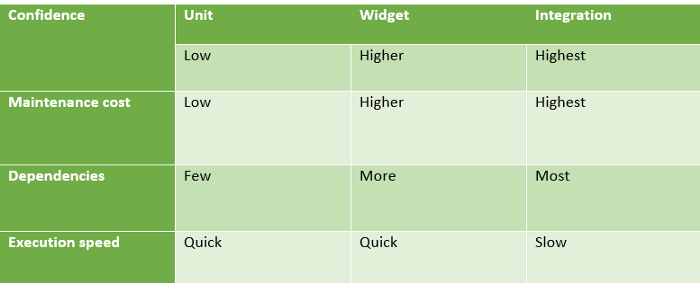
一、测试分层策略
1.1 三层测试
| 层级 | 测试类型 | 覆盖内容 | 自动化程度 |
|---|---|---|---|
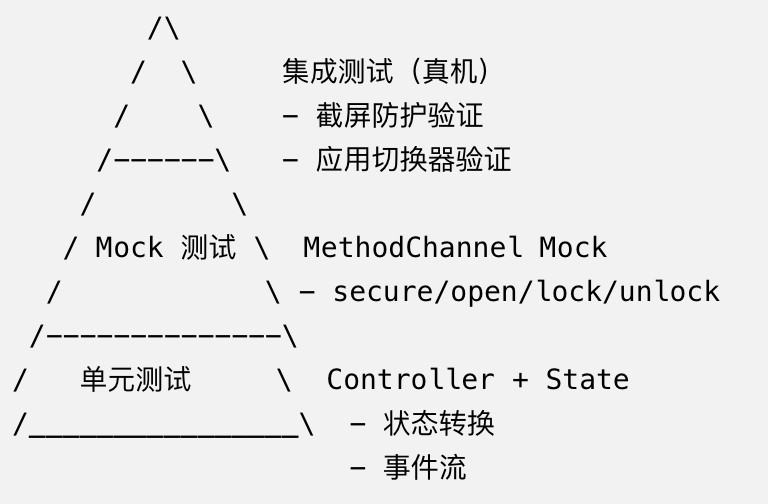
| Dart 层 | 单元测试 | Controller 状态机、事件流 | ✅ 完全自动化 |
| 通信层 | Mock 测试 | MethodChannel 调用 | ✅ 完全自动化 |
| 原生层 | 集成测试 | setWindowPrivacyMode、窗口事件 | ⚠️ 半自动化 |
1.2 测试金字塔
二、SecureApplicationController 单元测试
2.1 状态转换测试
import 'package:flutter_test/flutter_test.dart';
import 'package:secure_application/secure_application.dart';

void main() {
  group('SecureApplicationController', () {
    late SecureApplicationController controller;

    setUp(() {
      controller = SecureApplicationController(SecureApplicationState());
    });

    tearDown(() {
      controller.dispose();
    });

    test('初始状态应该全部为 false', () {
      expect(controller.secured, false);
      expect(controller.locked, false);
      expect(controller.paused, false);
      expect(controller.authenticated, false);
    });

    test('secure() 应该设置 secured=true', () {
      controller.secure();
      expect(controller.secured, true);
      expect(controller.locked, false);
    });

    test('open() 应该设置 secured=false', () {
      controller.secure();
      controller.open();
      expect(controller.secured, false);
    });

    test('lock() 应该设置 locked=true', () {
      controller.lock();
      expect(controller.locked, true);
    });

    test('unlock() 应该设置 locked=false', () {
      controller.lock();
      controller.unlock();
      expect(controller.locked, false);
    });

    test('重复 lock() 不应该重复通知', () {
      int notifyCount = 0;
      controller.addListener(() => notifyCount++);

      controller.lock();
      controller.lock();  // 重复调用

      expect(notifyCount, 1);  // 只通知一次
    });
  });
}
2.2 认证状态测试
group('认证状态', () {
  test('authSuccess 应该设置 authenticated=true', () {
    controller.authSuccess();
    expect(controller.authenticated, true);
  });

  test('authFailed 应该设置 authenticated=false', () {
    controller.authSuccess();
    controller.authFailed();
    expect(controller.authenticated, false);
  });

  test('authSuccess(unlock: true) 应该同时解锁', () {
    controller.lock();
    controller.authSuccess(unlock: true);
    expect(controller.authenticated, true);
    expect(controller.locked, false);
  });

  test('authLogout 应该设置 authenticated=false', () {
    controller.authSuccess();
    controller.authLogout();
    expect(controller.authenticated, false);
  });
});
2.3 暂停机制测试
group('暂停机制', () {
  test('pause() 应该设置 paused=true', () {
    controller.pause();
    expect(controller.paused, true);
  });

  test('unpause() 应该设置 paused=false', () {
    controller.pause();
    controller.unpause();
    expect(controller.paused, false);
  });

  test('lockIfSecured 在 paused 时不应该锁定', () {
    controller.secure();
    controller.pause();
    controller.lockIfSecured();
    // lockIfSecured 会调用 lock(),但 paused 状态由 Dart 层检查
    // 这里测试的是 Controller 的行为
    expect(controller.locked, true);  // Controller 本身不检查 paused
  });
});
三、事件流测试
3.1 authenticationEvents 测试
group('authenticationEvents', () {
  test('初始值应该是 NONE', () async {
    final status = await controller.authenticationEvents.first;
    expect(status, SecureApplicationAuthenticationStatus.NONE);
  });

  test('authSuccess 应该发射 SUCCESS', () async {
    final future = controller.authenticationEvents
        .skip(1)  // 跳过初始值
        .first;
    controller.authSuccess();
    final status = await future;
    expect(status, SecureApplicationAuthenticationStatus.SUCCESS);
  });

  test('authFailed 应该发射 FAILED', () async {
    final future = controller.authenticationEvents
        .skip(1)
        .first;
    controller.authFailed();
    final status = await future;
    expect(status, SecureApplicationAuthenticationStatus.FAILED);
  });

  test('authLogout 应该发射 LOGOUT', () async {
    final future = controller.authenticationEvents
        .skip(1)
        .first;
    controller.authLogout();
    final status = await future;
    expect(status, SecureApplicationAuthenticationStatus.LOGOUT);
  });
});
3.2 lockEvents 测试
group('lockEvents', () {
  test('初始值应该是 false', () async {
    final locked = await controller.lockEvents.first;
    expect(locked, false);
  });

  test('lock() 应该发射 true', () async {
    final future = controller.lockEvents.skip(1).first;
    controller.lock();
    expect(await future, true);
  });

  test('unlock() 应该发射 false', () async {
    controller.lock();
    final future = controller.lockEvents.skip(2).first;
    controller.unlock();
    expect(await future, false);
  });
});
四、MethodChannel Mock 测试
4.1 设置 Mock
import 'package:flutter/services.dart';
import 'package:flutter_test/flutter_test.dart';

void main() {
  TestWidgetsFlutterBinding.ensureInitialized();

  const channel = MethodChannel('secure_application');
  final List<MethodCall> log = [];

  setUp(() {
    TestDefaultBinaryMessengerBinding.instance.defaultBinaryMessenger
        .setMockMethodCallHandler(channel, (MethodCall methodCall) async {
      log.add(methodCall);
      return true;
    });
  });

  tearDown(() {
    log.clear();
    TestDefaultBinaryMessengerBinding.instance.defaultBinaryMessenger
        .setMockMethodCallHandler(channel, null);
  });
}
4.2 测试 Dart → Native 调用
group('SecureApplicationNative', () {
  test('secure() 应该调用 native secure 方法', () async {
    await SecureApplicationNative.secure();
    expect(log.length, 1);
    expect(log.first.method, 'secure');
  });

  test('open() 应该调用 native open 方法', () async {
    await SecureApplicationNative.open();
    expect(log.length, 1);
    expect(log.first.method, 'open');
  });

  test('opacity() 应该传递正确的参数', () async {
    await SecureApplicationNative.opacity(0.8);
    expect(log.length, 1);
    expect(log.first.method, 'opacity');
    expect(log.first.arguments, {'opacity': 0.8});
  });

  test('lock() 应该调用 native lock 方法', () async {
    await SecureApplicationNative.lock();
    expect(log.first.method, 'lock');
  });

  test('unlock() 应该调用 native unlock 方法', () async {
    await SecureApplicationNative.unlock();
    expect(log.first.method, 'unlock');
  });
});
4.3 测试 Native → Dart 事件
group('Native → Dart 事件', () {
  test('收到 lock 事件应该调用 lock 回调', () async {
    bool lockCalled = false;
    bool unlockCalled = false;

    SecureApplicationNative.registerForEvents(
      () => lockCalled = true,
      () => unlockCalled = true,
    );

    // 模拟 Native 端发送 lock 事件
    await TestDefaultBinaryMessengerBinding.instance.defaultBinaryMessenger
        .handlePlatformMessage(
      'secure_application',
      const StandardMethodCodec().encodeMethodCall(
        const MethodCall('lock'),
      ),
      (ByteData? data) {},
    );

    expect(lockCalled, true);
    expect(unlockCalled, false);
  });
});
五、Widget 测试
5.1 SecureGate 遮罩测试
group('SecureGate Widget', () {
  testWidgets('未锁定时不显示遮罩', (tester) async {
    final controller = SecureApplicationController(SecureApplicationState());

    await tester.pumpWidget(
      MaterialApp(
        home: SecureApplicationProvider(
          secureData: controller,
          child: SecureGate(
            child: Text('Protected Content'),
          ),
        ),
      ),
    );

    expect(find.text('Protected Content'), findsOneWidget);
    expect(find.byType(BackdropFilter), findsNothing);

    controller.dispose();
  });

  testWidgets('锁定时显示遮罩', (tester) async {
    final controller = SecureApplicationController(SecureApplicationState());

    await tester.pumpWidget(
      MaterialApp(
        home: SecureApplicationProvider(
          secureData: controller,
          child: SecureGate(
            child: Text('Protected Content'),
          ),
        ),
      ),
    );

    controller.lock();
    await tester.pump();

    expect(find.byType(BackdropFilter), findsOneWidget);

    controller.dispose();
  });

  testWidgets('lockedBuilder 在锁定时显示', (tester) async {
    final controller = SecureApplicationController(SecureApplicationState());

    await tester.pumpWidget(
      MaterialApp(
        home: SecureApplicationProvider(
          secureData: controller,
          child: SecureGate(
            lockedBuilder: (context, ctrl) => Text('Unlock Button'),
            child: Text('Protected Content'),
          ),
        ),
      ),
    );

    controller.lock();
    await tester.pump();

    expect(find.text('Unlock Button'), findsOneWidget);

    controller.dispose();
  });
});
六、集成测试
6.1 真机测试场景
| 场景 | 验证内容 | 自动化 |
|---|---|---|
| 截屏防护 | secure 后截屏为黑屏 | ❌ 手动 |
| 应用切换器 | 切换器中看不到内容 | ❌ 手动 |
| 锁定触发 | 切后台后遮罩显示 | ⚠️ 半自动 |
| 认证解锁 | 认证后遮罩消失 | ⚠️ 半自动 |
| 热重载 | 重载后功能正常 | ❌ 手动 |
6.2 自动化测试的局限
// ❌ 这个测试无法验证截屏防护
testWidgets('截屏防护', (tester) async {
  // 无法在测试中截屏并验证结果
  // 因为截屏本身就被阻止了
});

// ✅ 可以验证的:状态变化
testWidgets('secure 后状态变化', (tester) async {
  // 可以验证 Controller 的状态
  // 可以验证 MethodChannel 被调用
  // 但无法验证系统级效果
});
6.3 手动测试检查清单
- 调用 secure() 后截屏得到黑屏
- 调用 secure() 后应用切换器中看不到内容
- 切后台后模糊遮罩显示
- 点击解锁按钮后遮罩消失
- 调用 open() 后截屏恢复正常
- 热重载后功能正常
- 快速切换前后台不崩溃
- 长时间后台后切回正常
七、CI/CD 集成
7.1 可自动化的测试
# .github/workflows/test.yml
name: Test
on: [push, pull_request]
jobs:
  test:
    runs-on: ubuntu-latest
    steps:
      - uses: actions/checkout@v3
      - uses: subosito/flutter-action@v2
      - run: flutter test
7.2 测试覆盖率
# 生成覆盖率报告
flutter test --coverage
genhtml coverage/lcov.info -o coverage/html
| 文件 | 可测试行 | 覆盖率目标 |
|---|---|---|
| secure_application_state.dart | 31行 | 100% |
| secure_application_controller.dart | 170行 | 90%+ |
| secure_application_native.dart | 48行 | 80%+ |
| secure_gate.dart | 122行 | 70%+ |
| secure_application.dart | 168行 | 60%+ |
7.3 测试命名规范
// 格式:被测对象_操作_预期结果
test('Controller_secure_setsSecuredTrue', () { ... });
test('Controller_lockWhenAlreadyLocked_doesNotNotify', () { ... });
test('Gate_whenLocked_showsBackdropFilter', () { ... });
总结
本文设计了 secure_application 的完整测试策略:
- 单元测试:Controller 状态机、事件流、防重入逻辑
- Mock 测试:MethodChannel 调用验证、Native→Dart 事件模拟
- Widget 测试:SecureGate 遮罩显示/隐藏、lockedBuilder 渲染
- 集成测试:真机验证截屏防护、应用切换器效果
- 局限性:截屏防护无法通过自动化测试验证
下一篇我们讲 pubspec.yaml 的多平台配置——五个平台的插件声明和依赖管理。
如果这篇文章对你有帮助,欢迎点赞👍、收藏⭐、关注🔔,你的支持是我持续创作的动力!
相关资源:
- Flutter 测试指南
- flutter_test 包
- MethodChannel Mock 测试
- Widget 测试
- 集成测试
- secure_application 源码
- Flutter 测试覆盖率
- 开源鸿蒙跨平台社区
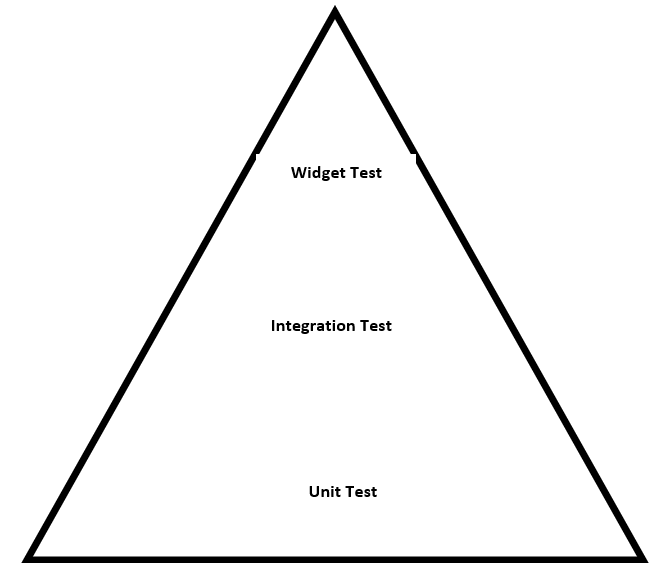
Flutter 测试金字塔

开源鸿蒙跨平台开发社区汇聚开发者与厂商,共建“一次开发,多端部署”的开源生态,致力于降低跨端开发门槛,推动万物智联创新。
更多推荐



 13
13 0
0- 0


 已为社区贡献51条内容

所有评论(0)