Flutter & OpenHarmony 运动App海拔高度追踪组件开发
本文介绍了跨平台海拔高度追踪组件的实现方案。Flutter端构建了ElevationData数据模型,包含当前海拔、累计爬升/下降等核心指标,并支持地形难度评估。OpenHarmony端通过LocationRequest获取GPS高度数据,采用滑动平均算法平滑处理,精确计算累计升降值。最后展示了Flutter端的可视化组件,以卡片形式直观显示各项海拔指标。该方案实现了专业级海拔追踪功能,适用于各类
前言
海拔高度追踪是户外运动应用中的重要功能,特别是对于越野跑、登山和骑行等运动。累计爬升和下降数据能够反映运动的真实强度,帮助用户了解地形对运动的影响。本文将详细介绍如何在Flutter与OpenHarmony平台上实现专业的海拔高度追踪组件。
Flutter海拔数据模型
class ElevationData {
  final double currentAltitude;
  final double minAltitude;
  final double maxAltitude;
  final double totalAscent;
  final double totalDescent;
  final List<ElevationPoint> elevationProfile;

  ElevationData({
    required this.currentAltitude,
    required this.minAltitude,
    required this.maxAltitude,
    required this.totalAscent,
    required this.totalDescent,
    required this.elevationProfile,
  });

  double get elevationGain => maxAltitude - minAltitude;

  String get difficultyLevel {
    if (totalAscent < 100) return '平坦';
    if (totalAscent < 300) return '起伏';
    if (totalAscent < 600) return '丘陵';
    return '山地';
  }
}

class ElevationPoint {
  final double distance;
  final double altitude;
  final DateTime timestamp;

  ElevationPoint({required this.distance, required this.altitude, required this.timestamp});
}
海拔数据模型封装了高度追踪的核心数据。currentAltitude是当前海拔,minAltitude和maxAltitude记录最低和最高点。totalAscent和totalDescent分别是累计爬升和下降,这两个指标比单纯的海拔差更能反映运动强度。elevationProfile存储海拔剖面数据用于绑制图表。difficultyLevel根据累计爬升判断地形难度级别。
OpenHarmony海拔传感器服务
import geoLocationManager from '@ohos.geoLocationManager';

class AltitudeService {
  private altitudeHistory: Array<number> = [];
  private lastAltitude: number = 0;
  private totalAscent: number = 0;
  private totalDescent: number = 0;
  private minAltitude: number = Infinity;
  private maxAltitude: number = -Infinity;

  startTracking(callback: (data: object) => void): void {
    let request: geoLocationManager.LocationRequest = {
      priority: geoLocationManager.LocationRequestPriority.ACCURACY,
      scenario: geoLocationManager.LocationRequestScenario.NAVIGATION,
      timeInterval: 5,
      distanceInterval: 10,
      maxAccuracy: 10,
    };

    geoLocationManager.on('locationChange', request, (location) => {
      let altitude = location.altitude || 0;
      this.processAltitude(altitude);

      callback({
        currentAltitude: altitude,
        totalAscent: this.totalAscent,
        totalDescent: this.totalDescent,
        minAltitude: this.minAltitude,
        maxAltitude: this.maxAltitude,
      });
    });
  }

  private processAltitude(altitude: number): void {
    let smoothedAltitude = this.smoothAltitude(altitude);

    if (this.lastAltitude > 0) {
      let diff = smoothedAltitude - this.lastAltitude;
      if (diff > 1) {
        this.totalAscent += diff;
      } else if (diff < -1) {
        this.totalDescent += Math.abs(diff);
      }
    }

    this.minAltitude = Math.min(this.minAltitude, smoothedAltitude);
    this.maxAltitude = Math.max(this.maxAltitude, smoothedAltitude);
    this.lastAltitude = smoothedAltitude;
  }

  private smoothAltitude(altitude: number): number {
    this.altitudeHistory.push(altitude);
    if (this.altitudeHistory.length > 5) {
      this.altitudeHistory.shift();
    }
    return this.altitudeHistory.reduce((a, b) => a + b, 0) / this.altitudeHistory.length;
  }

  stopTracking(): void {
    geoLocationManager.off('locationChange');
  }
}
海拔传感器服务从GPS获取高度数据并计算累计爬升下降。processAltitude方法处理每个高度数据点,使用滑动平均平滑处理减少GPS高度噪声。只有高度变化超过1米才计入爬升或下降,避免小幅波动的累积误差。同时更新最低和最高海拔记录。这种处理方式在准确性和实时性之间取得平衡。
Flutter海拔显示组件
class ElevationDisplay extends StatelessWidget {
final ElevationData data;
const ElevationDisplay({Key? key, required this.data}) : super(key: key);
Widget build(BuildContext context) {
return Card(
margin: EdgeInsets.all(16),
child: Padding(
padding: EdgeInsets.all(16),
child: Column(
children: [
Row(
mainAxisAlignment: MainAxisAlignment.center,
children: [
Icon(Icons.terrain, color: Colors.brown),
SizedBox(width: 8),
Text('${data.currentAltitude.toInt()} m', style: TextStyle(fontSize: 32, fontWeight: FontWeight.bold)),
],
),
SizedBox(height: 16),
Row(
mainAxisAlignment: MainAxisAlignment.spaceAround,
children: [
_buildStatItem(Icons.arrow_upward, '${data.totalAscent.toInt()} m', '累计爬升', Colors.green),
_buildStatItem(Icons.arrow_downward, '${data.totalDescent.toInt()} m', '累计下降', Colors.red),
],
),
SizedBox(height: 16),
Row(
mainAxisAlignment: MainAxisAlignment.spaceAround,
children: [
_buildStatItem(Icons.vertical_align_bottom, '${data.minAltitude.toInt()} m', '最低', Colors.blue),
_buildStatItem(Icons.vertical_align_top, '${data.maxAltitude.toInt()} m', '最高', Colors.orange),
],
),
SizedBox(height: 12),
Container(
padding: EdgeInsets.symmetric(horizontal: 12, vertical: 6),
decoration: BoxDecoration(color: Colors.brown.withOpacity(0.1), borderRadius: BorderRadius.circular(16)),
child: Text('地形: ${data.difficultyLevel}', style: TextStyle(color: Colors.brown)),
),
],
),
),
);
}
Widget _buildStatItem(IconData icon, String value, String label, Color color) {
return Column(
children: [
Icon(icon, color: color, size: 20),
SizedBox(height: 4),
Text(value, style: TextStyle(fontWeight: FontWeight.bold)),
Text(label, style: TextStyle(fontSize: 12, color: Colors.grey)),
],
);
}
}
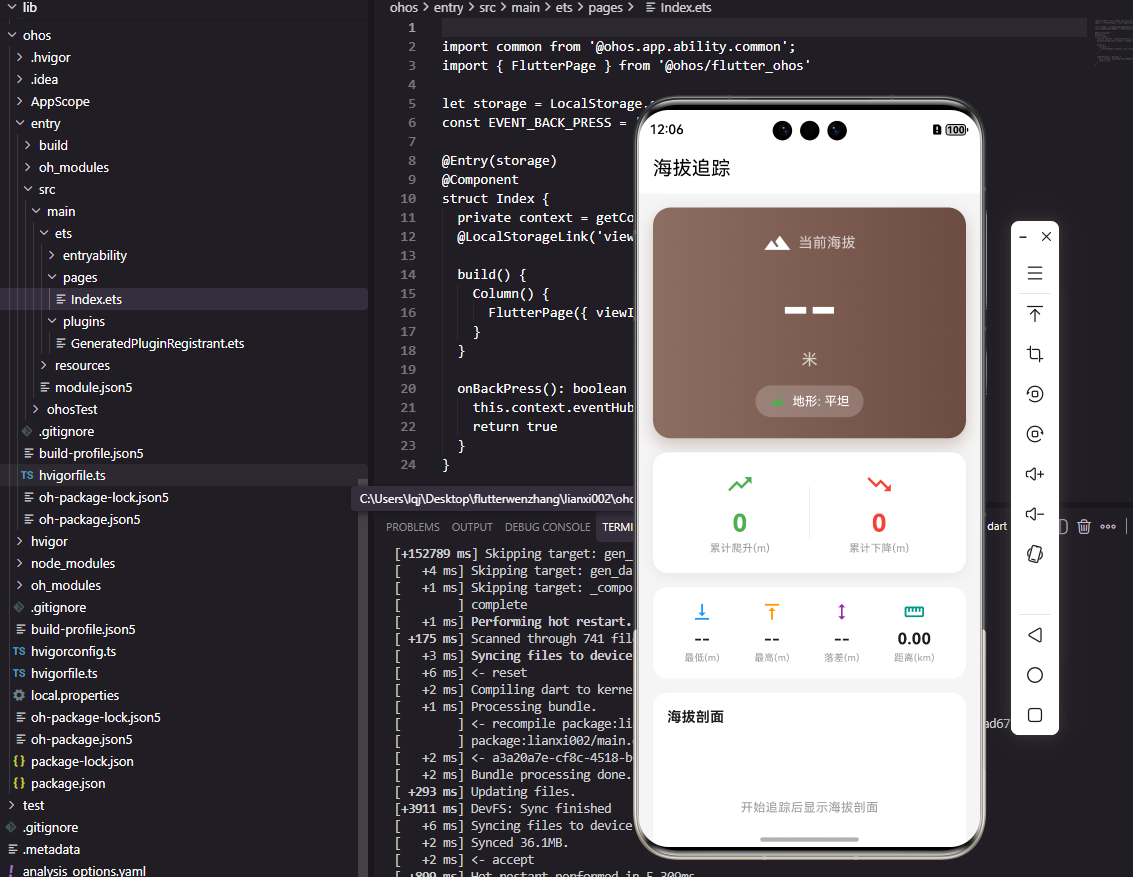
海拔显示组件展示当前海拔和累计数据。顶部大字体显示当前海拔,中间显示累计爬升和下降,使用绿色上箭头和红色下箭头直观区分。下方显示最低和最高海拔。底部标签显示地形难度级别。这种布局让用户全面了解运动过程中的高度变化情况。
Flutter海拔剖面图
class ElevationProfileChart extends StatelessWidget {
final List<ElevationPoint> points;
const ElevationProfileChart({Key? key, required this.points}) : super(key: key);
Widget build(BuildContext context) {
if (points.isEmpty) return SizedBox.shrink();
return Container(
height: 150,
padding: EdgeInsets.all(16),
child: CustomPaint(
size: Size(double.infinity, 118),
painter: ElevationProfilePainter(points: points),
),
);
}
}
class ElevationProfilePainter extends CustomPainter {
final List<ElevationPoint> points;
ElevationProfilePainter({required this.points});
void paint(Canvas canvas, Size size) {
if (points.length < 2) return;
double minAlt = points.map((p) => p.altitude).reduce((a, b) => a < b ? a : b);
double maxAlt = points.map((p) => p.altitude).reduce((a, b) => a > b ? a : b);
double maxDist = points.last.distance;
Paint fillPaint = Paint()
..shader = LinearGradient(
begin: Alignment.topCenter,
end: Alignment.bottomCenter,
colors: [Colors.green.withOpacity(0.5), Colors.green.withOpacity(0.1)],
).createShader(Rect.fromLTWH(0, 0, size.width, size.height));
Paint linePaint = Paint()
..color = Colors.green
..strokeWidth = 2
..style = PaintingStyle.stroke;
Path fillPath = Path();
Path linePath = Path();
for (int i = 0; i < points.length; i++) {
double x = (points[i].distance / maxDist) * size.width;
double y = size.height - ((points[i].altitude - minAlt) / (maxAlt - minAlt + 1)) * size.height;
if (i == 0) {
fillPath.moveTo(x, size.height);
fillPath.lineTo(x, y);
linePath.moveTo(x, y);
} else {
fillPath.lineTo(x, y);
linePath.lineTo(x, y);
}
}
fillPath.lineTo(size.width, size.height);
fillPath.close();
canvas.drawPath(fillPath, fillPaint);
canvas.drawPath(linePath, linePaint);
}
bool shouldRepaint(covariant CustomPainter oldDelegate) => true;
}
海拔剖面图以面积图形式展示整个运动过程的高度变化。横轴是距离,纵轴是海拔。使用渐变填充突出高度变化,绿色线条描绘轮廓。这种图表让用户直观看到路线的起伏情况,识别爬坡和下坡路段。剖面图是越野跑和骑行应用的标配功能。
OpenHarmony海拔数据存储
import relationalStore from '@ohos.data.relationalStore';

class ElevationStorageService {
  private rdbStore: relationalStore.RdbStore | null = null;

  async initDatabase(context: Context): Promise<void> {
    const config: relationalStore.StoreConfig = {
      name: 'elevation.db',
      securityLevel: relationalStore.SecurityLevel.S1,
    };
    this.rdbStore = await relationalStore.getRdbStore(context, config);

    await this.rdbStore.executeSql(
      'CREATE TABLE IF NOT EXISTS elevation_records (id INTEGER PRIMARY KEY AUTOINCREMENT, workout_id TEXT, distance REAL, altitude REAL, timestamp INTEGER)'
    );
  }

  async saveElevationPoint(workoutId: string, distance: number, altitude: number): Promise<void> {
    if (this.rdbStore) {
      let valueBucket = {
        'workout_id': workoutId,
        'distance': distance,
        'altitude': altitude,
        'timestamp': Date.now(),
      };
      await this.rdbStore.insert('elevation_records', valueBucket);
    }
  }

  async getElevationProfile(workoutId: string): Promise<Array<object>> {
    let points: Array<object> = [];
    if (this.rdbStore) {
      let predicates = new relationalStore.RdbPredicates('elevation_records');
      predicates.equalTo('workout_id', workoutId).orderByAsc('distance');

      let resultSet = await this.rdbStore.query(predicates);
      while (resultSet.goToNextRow()) {
        points.push({
          distance: resultSet.getDouble(resultSet.getColumnIndex('distance')),
          altitude: resultSet.getDouble(resultSet.getColumnIndex('altitude')),
        });
      }
      resultSet.close();
    }
    return points;
  }
}
海拔数据存储服务将高度剖面数据持久化保存。每个数据点包含运动ID、距离和海拔,按距离排序便于后续绘制剖面图。这种存储设计支持运动结束后回顾海拔变化,也支持多次运动的高度数据对比分析。
总结
本文全面介绍了Flutter与OpenHarmony平台上海拔高度追踪组件的实现方案。从数据采集到平滑处理,从累计计算到剖面展示,涵盖了海拔追踪功能的各个方面。通过准确的高度数据和直观的可视化展示,我们可以帮助用户了解运动路线的地形特征,更好地评估运动强度。
欢迎加入开源鸿蒙跨平台社区:https://openharmonycrossplatform.csdn.net

开源鸿蒙跨平台开发社区汇聚开发者与厂商,共建“一次开发,多端部署”的开源生态,致力于降低跨端开发门槛,推动万物智联创新。
更多推荐

 20
20 0
0- 0


 已为社区贡献26条内容

所有评论(0)