Flutter for OpenHarmony PUBG游戏助手App实战:赛季统计分析
build()下面我用一个真实项目里常见的做法,把赛季统计拆成「模型 -> 数据仓库 -> 页面 -> 组件」四层来写,代码量不大,但结构清晰,方便后续把 mock 换成 API。
·
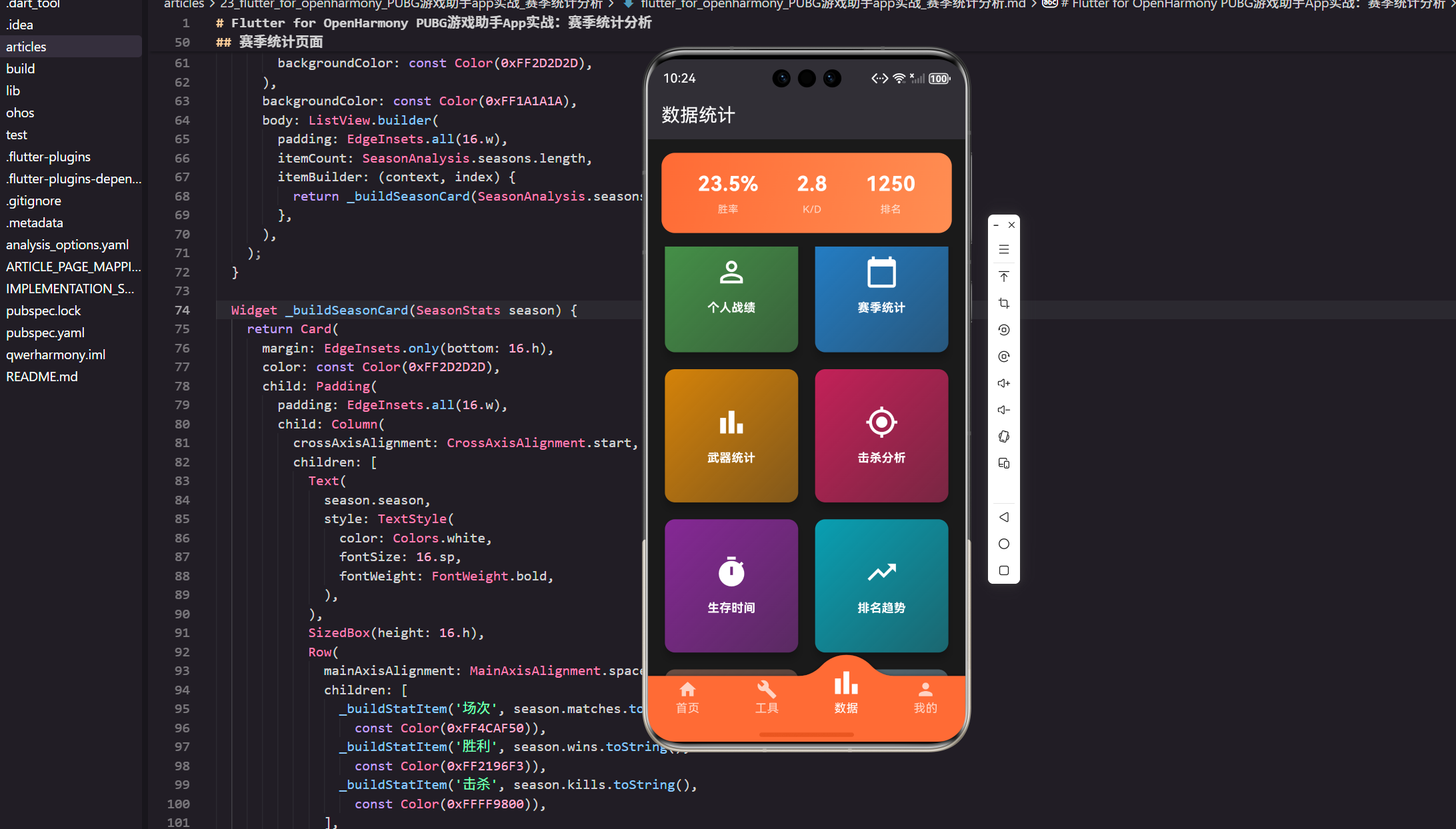
赛季统计这个功能做起来不难,但想让页面“像个产品”,通常得把三个点处理好:
- 数据口径:胜率、K/D 这类指标到底怎么算,分母为 0 时怎么处理。
- 页面状态:加载、空数据、异常时别让用户看到一片空白。
- 组件拆分:避免一个
build()写到 200 行,后期改样式会非常痛苦。
下面我用一个真实项目里常见的做法,把赛季统计拆成「模型 -> 数据仓库 -> 页面 -> 组件」四层来写,代码量不大,但结构清晰,方便后续把 mock 换成 API。
1. 数据模型:只存原始字段
class SeasonStats {
  final String season;
  final int matches;
  final int wins;
  final int kills;
  final int assists;

  const SeasonStats({
    required this.season,
    required this.matches,
    required this.wins,
    required this.kills,
    required this.assists,
  });
}
为什么模型里不直接放 winRate / kd
这里我倾向于只保存原始数据(场次、胜场、击杀等),指标用 getter 计算出来。
- 优点:换算法时只改一处;不会出现“wins 改了但 winRate 忘了同步”的脏数据。
- 习惯:后面接入接口时,你会发现接口大多也是给原始字段。
2. 指标计算:用 getter 做兜底
extension SeasonStatsMetrics on SeasonStats {
  double get winRate {
    if (matches <= 0) return 0;
    return wins * 100 / matches;
  }

  double get kd {
    if (matches <= 0) return 0;
    return kills / matches;
  }
}
这段代码解决的是“口径问题”
我在项目里经常会遇到 matches == 0 的情况:
- 新赛季刚开始(数据还没打过一局)
- 某些模式过滤后(只看单排、但本赛季没玩过单排)
这里用 <= 0 做兜底,页面就不会出现 NaN 或 Infinity 这种尴尬值。
3. 数据来源:先用仓库层承接 mock
class SeasonStatsRepository {
  Future<List<SeasonStats>> fetchSeasons() async {
    await Future<void>.delayed(const Duration(milliseconds: 350));

    final data = <Map<String, dynamic>>[
      {
        'season': '第1赛季',
        'matches': 100,
        'wins': 20,
        'kills': 300,
        'assists': 180,
      },
      {
        'season': '第2赛季',
        'matches': 120,
        'wins': 30,
        'kills': 400,
        'assists': 210,
      },
    ];

    return data
        .map(
          (e) => SeasonStats(
            season: e['season'] as String,
            matches: e['matches'] as int,
            wins: e['wins'] as int,
            kills: e['kills'] as int,
            assists: e['assists'] as int,
          ),
        )
        .toList(growable: false);
  }
}
为什么要多这一层 Repository
你当然可以直接在页面里写一个 List<SeasonStats> 常量,但仓库层的价值在于:
- 以后换成 HTTP 接口,只需要替换
fetchSeasons()的实现。 - 页面逻辑更干净:页面只关心“拿到列表怎么展示”。
- 模拟真实场景:
delayed()能把加载态流程跑起来,方便你把体验做完整。
4. 页面骨架:把加载/异常/空态走通
class SeasonAnalysisPage extends StatefulWidget {
const SeasonAnalysisPage({super.key});
State<SeasonAnalysisPage> createState() => _SeasonAnalysisPageState();
}
class _SeasonAnalysisPageState extends State<SeasonAnalysisPage> {
final _repo = SeasonStatsRepository();
late final Future<List<SeasonStats>> _future;
void initState() {
super.initState();
_future = _repo.fetchSeasons();
}
Widget build(BuildContext context) {
return Scaffold(
appBar: AppBar(
title: const Text('赛季统计'),
backgroundColor: const Color(0xFF2D2D2D),
),
backgroundColor: const Color(0xFF1A1A1A),
body: FutureBuilder<List<SeasonStats>>(
future: _future,
builder: (context, snapshot) {
if (snapshot.connectionState != ConnectionState.done) {
return const Center(child: CircularProgressIndicator());
}
if (snapshot.hasError) {
return Center(
child: Text(
'加载失败:${snapshot.error}',
style: const TextStyle(color: Colors.white70),
),
);
}
final seasons = snapshot.data ?? <SeasonStats>[];
if (seasons.isEmpty) {
return const Center(
child: Text('本赛季暂无数据', style: TextStyle(color: Colors.white70)),
);
}
return ListView.builder(
padding: EdgeInsets.all(16.w),
itemCount: seasons.length,
itemBuilder: (context, index) {
return SeasonCard(stats: seasons[index]);
},
);
},
),
);
}
}
这一段我主要在意两件事
- 状态完整:加载、异常、空列表,都有明确反馈。
- 避免重复请求:
Future放在initState()里缓存,滚动/重建不会反复拉数据。
如果你后面要加“下拉刷新”,再把 _future = _repo.fetchSeasons() 放到 setState() 里触发即可。
5. 卡片组件:从页面里抽出来
class SeasonCard extends StatelessWidget {
final SeasonStats stats;
const SeasonCard({super.key, required this.stats});
Widget build(BuildContext context) {
return Card(
margin: EdgeInsets.only(bottom: 16.h),
color: const Color(0xFF2D2D2D),
child: Padding(
padding: EdgeInsets.all(16.w),
child: Column(
crossAxisAlignment: CrossAxisAlignment.start,
children: [
Text(
stats.season,
style: TextStyle(
color: Colors.white,
fontSize: 16.sp,
fontWeight: FontWeight.bold,
),
),
SizedBox(height: 12.h),
Wrap(
spacing: 10.w,
runSpacing: 10.h,
children: [
StatChip(label: '场次', value: '${stats.matches}', color: const Color(0xFF4CAF50)),
StatChip(label: '胜利', value: '${stats.wins}', color: const Color(0xFF2196F3)),
StatChip(label: '击杀', value: '${stats.kills}', color: const Color(0xFFFF9800)),
StatChip(label: '助攻', value: '${stats.assists}', color: const Color(0xFF00BCD4)),
StatChip(label: '胜率', value: '${stats.winRate.toStringAsFixed(1)}%', color: const Color(0xFFE91E63)),
StatChip(label: 'K/D', value: stats.kd.toStringAsFixed(2), color: const Color(0xFF9C27B0)),
],
),
],
),
),
);
}
}
为什么我这里用 Wrap 而不是两行 Row
项目里经常会遇到:统计项后来从 5 个变成 6 个,或者你希望“击杀/助攻”这类字段在不同模式下显示/隐藏。
Wrap 的好处是:
- 数量变化时不容易爆布局
- 不同屏幕宽度下更稳(尤其你用
ScreenUtil做适配时)
6. 统计项组件:样式集中管理
class StatChip extends StatelessWidget {
final String label;
final String value;
final Color color;
const StatChip({
super.key,
required this.label,
required this.value,
required this.color,
});
Widget build(BuildContext context) {
return Container(
padding: EdgeInsets.symmetric(horizontal: 12.w, vertical: 8.h),
decoration: BoxDecoration(
color: color.withOpacity(0.18),
borderRadius: BorderRadius.circular(8.r),
),
child: Column(
mainAxisSize: MainAxisSize.min,
crossAxisAlignment: CrossAxisAlignment.start,
children: [
Text(
label,
style: TextStyle(color: Colors.white70, fontSize: 12.sp),
),
SizedBox(height: 6.h),
Text(
value,
style: TextStyle(
color: color,
fontSize: 14.sp,
fontWeight: FontWeight.bold,
),
),
],
),
);
}
}
组件拆出来的直接收益
- 改样式更省事:间距、圆角、透明度、字体大小都集中在一个地方。
- 复用更自然:你后面做“单赛季详情页”时,直接复用
SeasonCard/StatChip就够了。
小结
这个页面真正的“工程化点”不在 UI 多炫,而在于:
- 数据口径统一:指标计算集中处理,防止边界值炸掉。
- 状态体验完整:加载、异常、空态都能解释当前发生了什么。
- 可维护的结构:页面 + 组件分层,后续扩字段/换接口都不难。
欢迎加入开源鸿蒙跨平台社区:https://openharmonycrossplatform.csdn.net

开源鸿蒙跨平台开发社区汇聚开发者与厂商,共建“一次开发,多端部署”的开源生态,致力于降低跨端开发门槛,推动万物智联创新。
更多推荐

 12
12 0
0- 0


 已为社区贡献23条内容

所有评论(0)