Flutter for OpenHarmony 实战 文件存储与数据库操作完全指南
Flutter数据存储完全指南:从文件操作到SQLite数据库 本文详细介绍了Flutter应用开发中的数据存储方案。首先讲解文件系统操作,包括使用path_provider获取各类目录路径,以及文件的读写、删除等基本操作。然后重点介绍了SQLite数据库的使用,包括数据库初始化、表创建、版本升级等核心配置,以及完整的CRUD操作实现。文章提供了可直接使用的工具类代码,涵盖文件读写辅助类、目录操作
·
【Flutter for OpenHarmony 实战】Flutter文件存储与数据库操作完全指南
前言
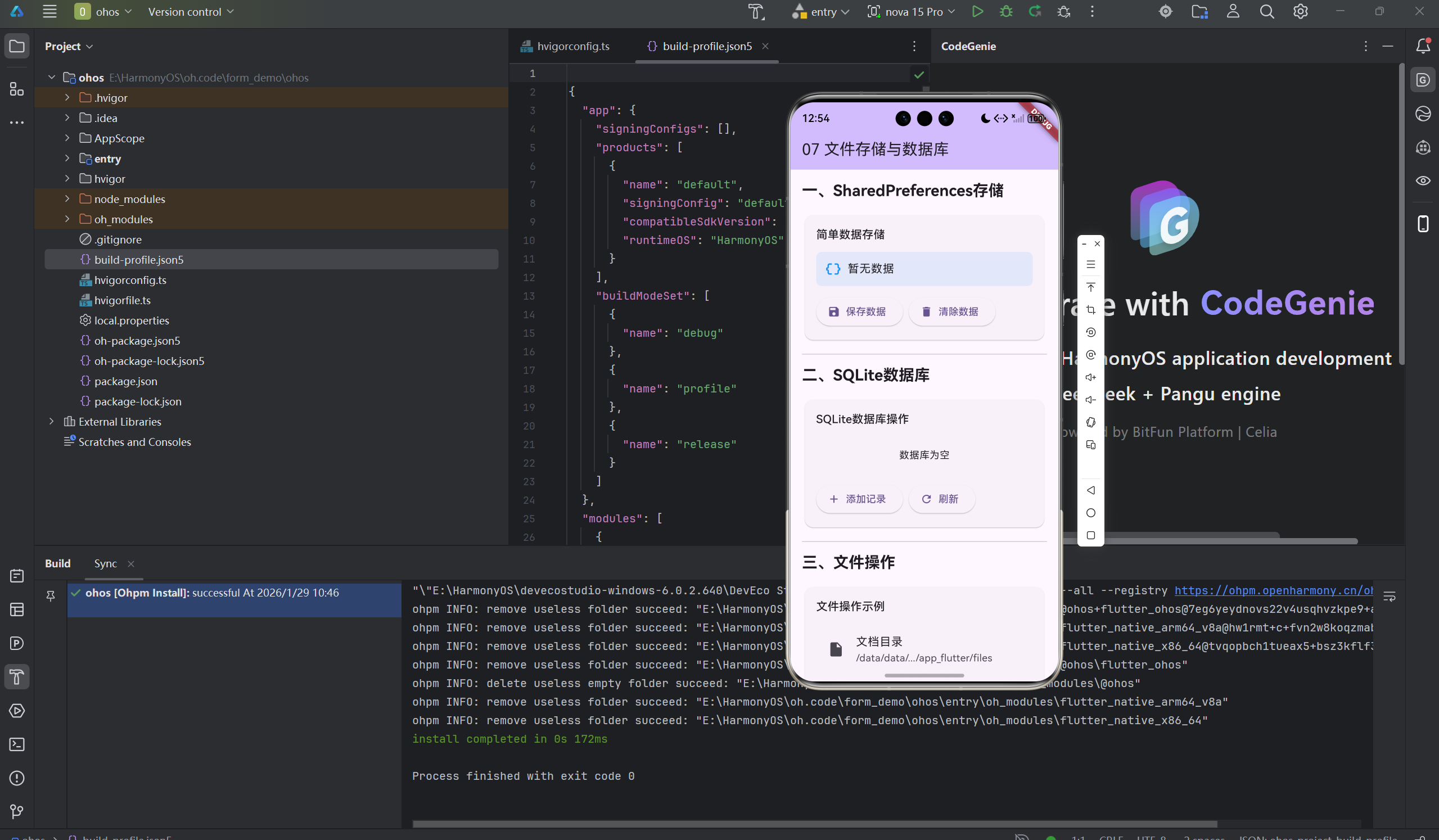
做应用开发,数据存储是绕不开的话题。简单的配置用SharedPreferences就够了,但复杂的业务数据就需要数据库。
Flutter中用sqflite操作SQLite很方便,但也有一些坑需要避开。这篇文章我想分享数据存储的实践经验。
一、文件系统操作
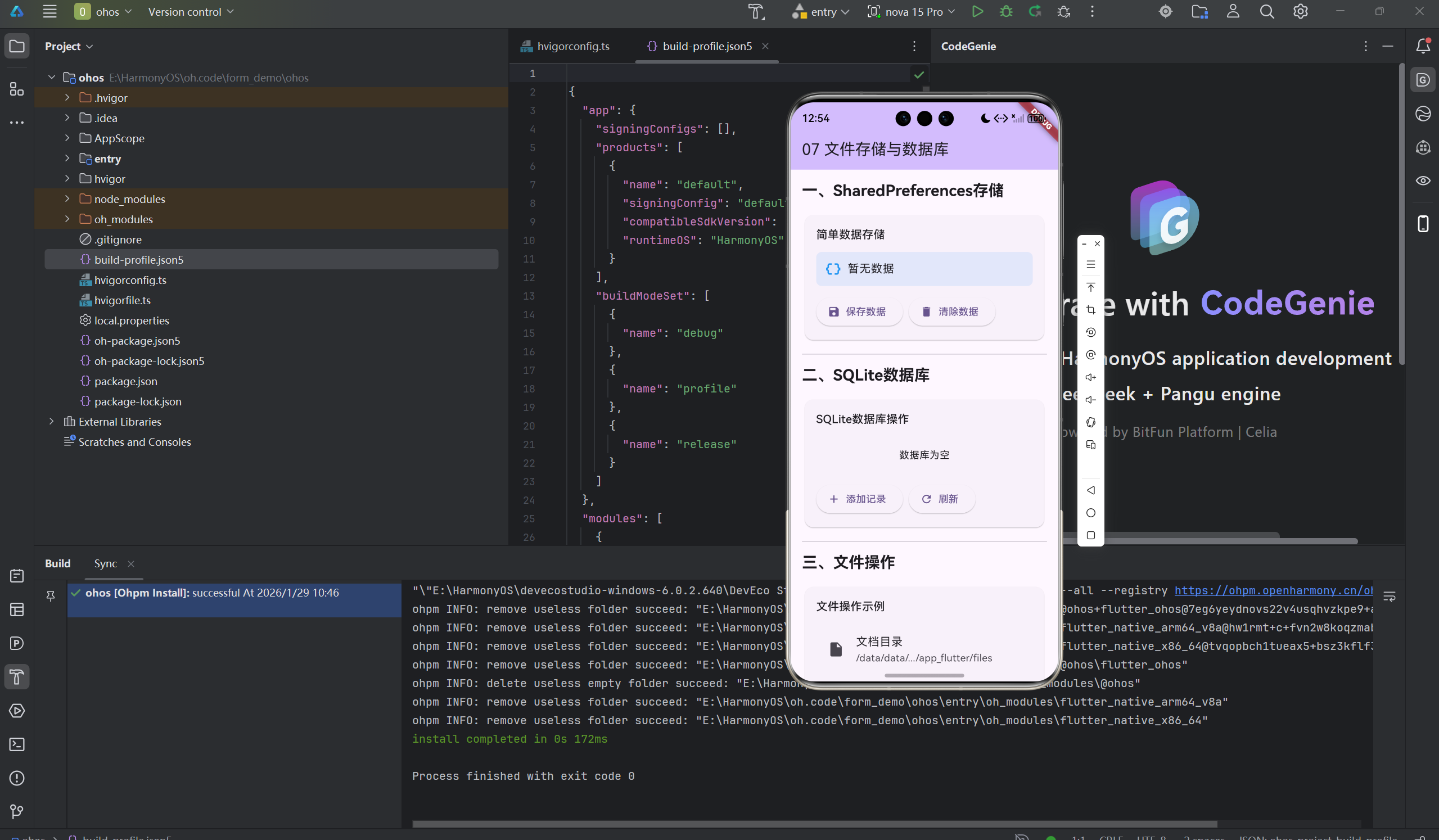
1.1 路径获取
dependencies:
  path_provider: ^2.1.1
import 'package:path_provider/path_provider.dart';

Future<void> getPaths() async {
  // 临时目录
  final tempDir = await getTemporaryDirectory();

  // 应用文档目录
  final appDocDir = await getApplicationDocumentsDirectory();

  // 应用支持目录
  final appSupportDir = await getApplicationSupportDirectory();

  // 外部存储目录
  final externalDir = await getExternalStorageDirectory();
}
1.2 文件读写
import 'dart:io';

class FileHelper {
  static Future<void> writeString(String path, String content) async {
    final file = File(path);
    await file.writeAsString(content);
  }

  static Future<String> readString(String path) async {
    final file = File(path);
    return await file.readAsString();
  }

  static Future<void> writeBytes(String path, List<int> bytes) async {
    final file = File(path);
    await file.writeAsBytes(bytes);
  }

  static Future<List<int>> readBytes(String path) async {
    final file = File(path);
    return await file.readAsBytes();
  }

  static Future<bool> exists(String path) async {
    return await File(path).exists();
  }

  static Future<void> delete(String path) async {
    final file = File(path);
    if (await file.exists()) {
      await file.delete();
    }
  }
}
1.3 目录操作
class DirectoryHelper {
  static Future<void> createDirectory(String path) async {
    final dir = Directory(path);
    if (!await dir.exists()) {
      await dir.create(recursive: true);
    }
  }

  static Future<List<FileSystemEntity>> listFiles(String path) async {
    final dir = Directory(path);
    return dir.listSync();
  }

  static Future<void> deleteDirectory(String path) async {
    final dir = Directory(path);
    if (await dir.exists()) {
      await dir.delete(recursive: true);
    }
  }
}
二、SQLite数据库
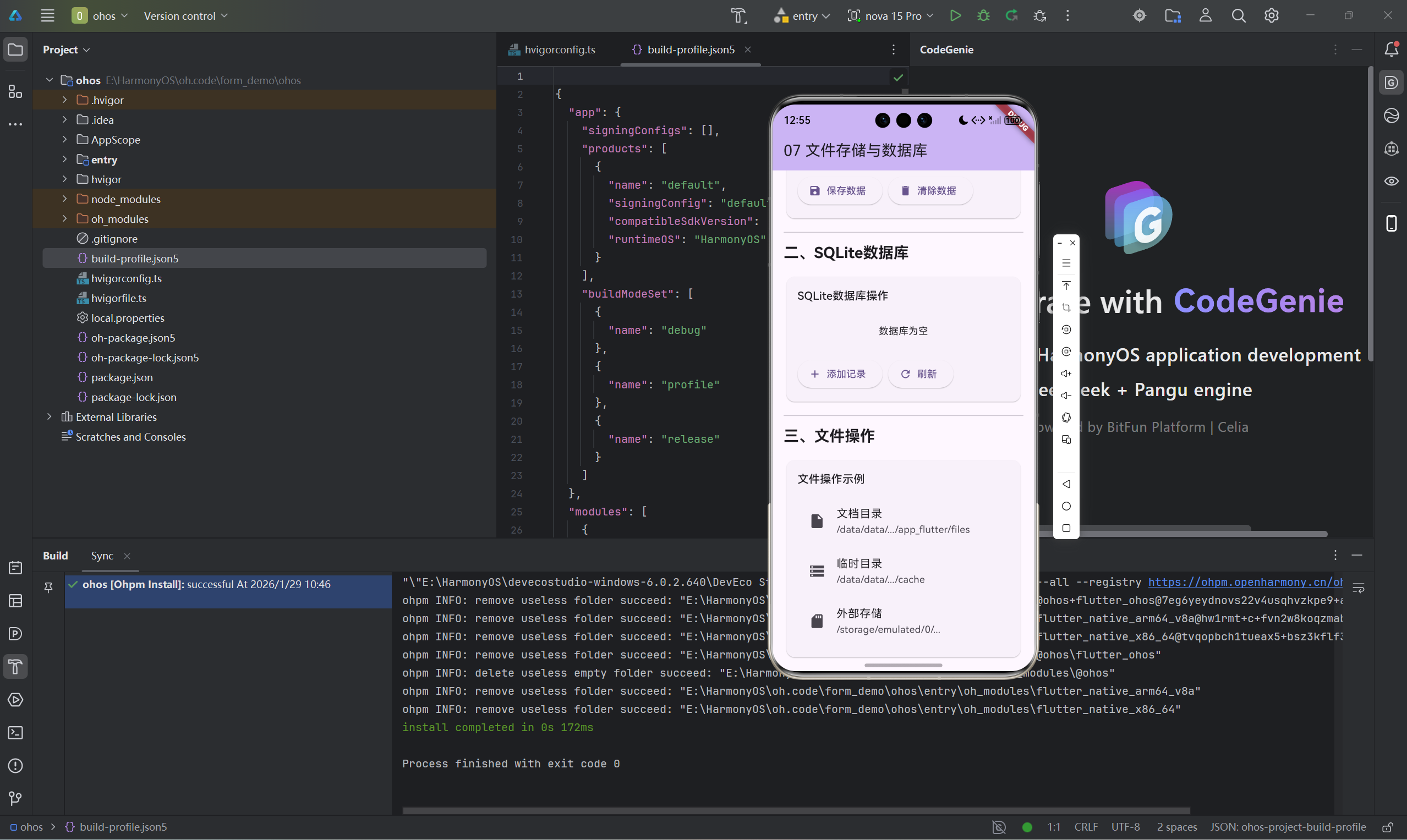
2.1 数据库辅助类
dependencies:
  sqflite: ^2.3.0
  path: ^1.8.0
import 'package:sqflite/sqflite.dart';
import 'package:path/path.dart';

class DatabaseHelper {
  static final DatabaseHelper _instance = DatabaseHelper._internal();
  static Database? _database;

  factory DatabaseHelper() => _instance;

  DatabaseHelper._internal();

  Future<Database> get database async {
    if (_database != null) return _database!;
    _database = await _initDatabase();
    return _database!;
  }

  Future<Database> _initDatabase() async {
    final dbPath = await getDatabasesPath();
    final path = join(dbPath, 'app.db');

    return await openDatabase(
      path,
      version: 1,
      onCreate: _onCreate,
      onUpgrade: _onUpgrade,
    );
  }

  Future<void> _onCreate(Database db, int version) async {
    await db.execute('''
      CREATE TABLE users (
        id INTEGER PRIMARY KEY AUTOINCREMENT,
        name TEXT NOT NULL,
        email TEXT NOT NULL UNIQUE,
        created_at INTEGER NOT NULL
      )
    ''');

    await db.execute('''
      CREATE TABLE todos (
        id INTEGER PRIMARY KEY AUTOINCREMENT,
        title TEXT NOT NULL,
        description TEXT,
        is_completed INTEGER DEFAULT 0,
        user_id INTEGER,
        created_at INTEGER NOT NULL,
        FOREIGN KEY (user_id) REFERENCES users (id)
      )
    ''');
  }

  Future<void> _onUpgrade(Database db, int oldVersion, int newVersion) async {
    if (oldVersion < 2) {
      await db.execute('ALTER TABLE users ADD COLUMN avatar TEXT');
    }
  }
}
2.2 CRUD操作
class UserDao {
  final DatabaseHelper _dbHelper = DatabaseHelper();

  Future<int> insert(User user) async {
    final db = await _dbHelper.database;
    return await db.insert('users', user.toMap());
  }

  Future<List<User>> queryAll() async {
    final db = await _dbHelper.database;
    final List<Map<String, dynamic>> maps = await db.query('users');
    return maps.map((map) => User.fromMap(map)).toList();
  }

  Future<User?> queryById(int id) async {
    final db = await _dbHelper.database;
    final List<Map<String, dynamic>> maps = await db.query(
      'users',
      where: 'id = ?',
      whereArgs: [id],
    );

    if (maps.isEmpty) return null;
    return User.fromMap(maps.first);
  }

  Future<int> update(User user) async {
    final db = await _dbHelper.database;
    return await db.update(
      'users',
      user.toMap(),
      where: 'id = ?',
      whereArgs: [user.id],
    );
  }

  Future<int> delete(int id) async {
    final db = await _dbHelper.database;
    return await db.delete(
      'users',
      where: 'id = ?',
      whereArgs: [id],
    );
  }
}
2.3 事务处理
class TransactionExample {
  final DatabaseHelper _dbHelper = DatabaseHelper();

  Future<void> transferData(int fromId, int toId) async {
    final db = await _dbHelper.database;

    await db.transaction((txn) async {
      await txn.update(
        'users',
        {'balance': 100},
        where: 'id = ?',
        whereArgs: [fromId],
      );

      await txn.update(
        'users',
        {'balance': 200},
        where: 'id = ?',
        whereArgs: [toId],
      );
    });
  }
}
三、数据持久化方案对比
3.1 方案对比
| 方案 | 适用场景 | 优点 | 缺点 |
|---|---|---|---|
| SharedPreferences | 简单配置 | 简单易用 | 不适合复杂数据 |
| SQLite | 结构化数据 | 功能强大、支持查询 | 相对复杂 |
| 文件存储 | 大文件、图片 | 灵活 | 需要手动管理 |
| ObjectBox | 高性能需求 | 快速、易用 | 需要代码生成 |
3.2 选择建议
class StorageFactory {
  static StorageService create(StorageType type) {
    switch (type) {
      case StorageType.preferences:
        return PreferencesStorageService();
      case StorageType.database:
        return DatabaseStorageService();
      case StorageType.file:
        return FileStorageService();
    }
  }
}

enum StorageType {
  preferences,
  database,
  file,
}
四、数据库最佳实践
4.1 单例模式
class DatabaseHelper {
  static final DatabaseHelper _instance = DatabaseHelper._internal();
  factory DatabaseHelper() => _instance;
  DatabaseHelper._internal();
}
4.2 数据库版本管理
class Migration {
  final int fromVersion;
  final int toVersion;
  final String migrationSql;

  const Migration({
    required this.fromVersion,
    required this.toVersion,
    required this.migrationSql,
  });
}

class MigrationManager {
  static const List<Migration> migrations = [
    Migration(
      fromVersion: 1,
      toVersion: 2,
      migrationSql: 'ALTER TABLE users ADD COLUMN avatar TEXT',
    ),
    Migration(
      fromVersion: 2,
      toVersion: 3,
      migrationSql: 'CREATE INDEX idx_user_email ON users(email)',
    ),
  ];

  static Future<void> migrate(Database db, int oldVersion, int newVersion) async {
    for (final migration in migrations) {
      if (oldVersion >= migration.fromVersion && newVersion >= migration.toVersion) {
        await db.execute(migration.migrationSql);
      }
    }
  }
}
4.3 性能优化
class PerformanceOptimizations {
  // 批量插入
  static Future<void> batchInsert(Database db, List<User> users) async {
    final batch = db.batch();
    for (final user in users) {
      batch.insert('users', user.toMap());
    }
    await batch.commit(noResult: true);
  }

  // 使用索引
  static Future<void> createIndex(Database db) async {
    await db.execute('CREATE INDEX idx_user_email ON users(email)');
  }

  // 查询优化
  static Future<List<User>> queryWithLimit(Database db, int limit, int offset) async {
    final maps = await db.query(
      'users',
      limit: limit,
      offset: offset,
    );
    return maps.map((map) => User.fromMap(map)).toList();
  }
}
总结
数据存储是应用的基础功能。
核心要点:
- 根据数据类型选择合适的存储方案
- SQLite适合结构化数据存储
- 使用事务保证数据一致性
- 注意数据库版本管理和迁移
- 合理使用索引和批量操作优化性能
选择建议:
- 简单配置:SharedPreferences
- 复杂数据:SQLite
- 大文件:文件存储
- 高性能:ObjectBox
好的数据存储设计让应用更可靠。
欢迎加入开源鸿蒙跨平台社区:开源鸿蒙跨平台开发者社区

开源鸿蒙跨平台开发社区汇聚开发者与厂商,共建“一次开发,多端部署”的开源生态,致力于降低跨端开发门槛,推动万物智联创新。
更多推荐


 2
2 0
0- 0


 已为社区贡献27条内容

所有评论(0)