Flutter框架跨平台鸿蒙开发——手工制作教程APP的开发流程
本文介绍了基于Flutter框架开发的手工制作教程APP,该应用支持跨平台运行,特别是在鸿蒙系统上的表现良好。APP核心功能包括教程浏览、分类筛选、搜索和收藏等,采用Flutter典型的三层架构设计:模型层定义数据结构,服务层处理业务逻辑,视图层负责UI展示。文章详细展示了各层代码实现,包括教程模型定义、数据服务处理以及主页面视图构建。该APP为手工爱好者提供了便捷的学习平台,涵盖纸艺、编织、陶艺
🚀运行效果展示
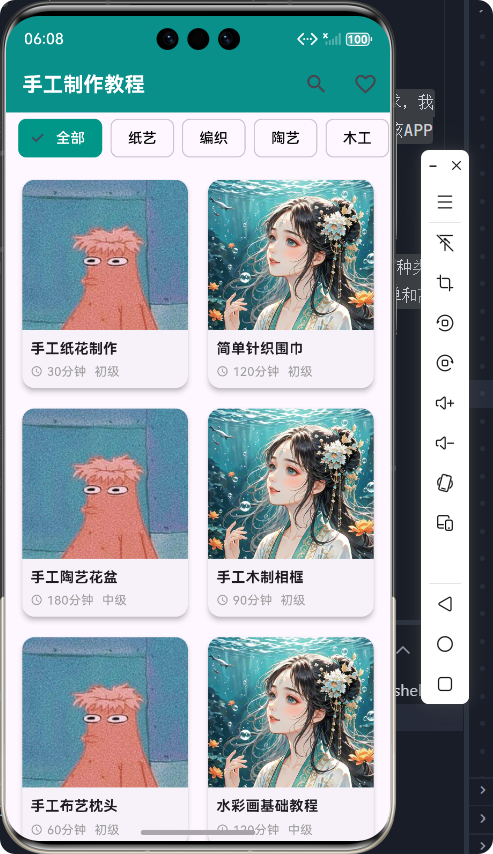
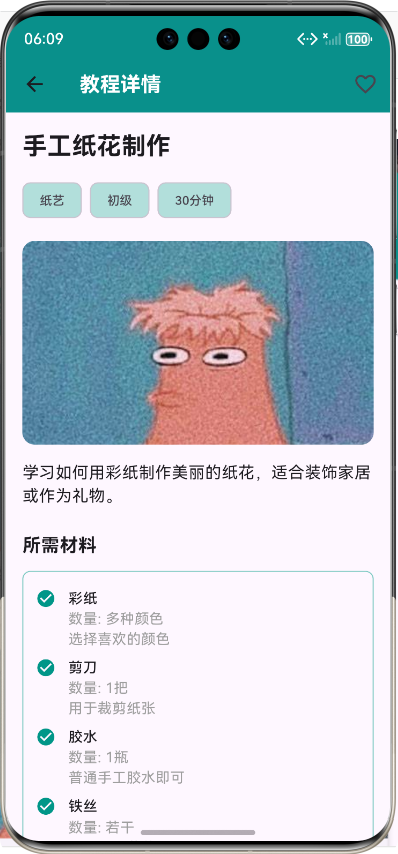
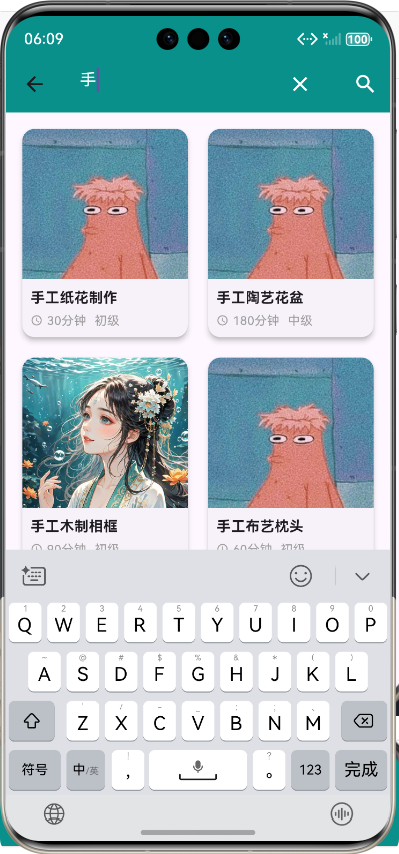
Flutter框架跨平台鸿蒙开发——手工制作教程APP的开发流程
前言
随着移动互联网的快速发展,手工制作作为一种减压和创意表达的方式,越来越受到人们的喜爱。为了满足手工爱好者的需求,我们开发了一款基于Flutter框架的手工制作教程APP,支持跨平台运行,特别是在鸿蒙系统上的良好表现。本文将详细介绍该APP的开发流程,包括核心功能实现、技术架构和开发经验分享。
APP介绍
手工制作教程APP是一款集教程浏览、分类筛选、搜索、收藏于一体的综合性手工制作学习平台。用户可以通过该APP浏览各种类型的手工制作教程,包括纸艺、编织、陶艺、木工、布艺、绘画等多个类别。每个教程都包含详细的步骤说明、所需材料清单和高清图片展示,帮助用户轻松学习各种手工制作技巧。
核心功能
- 教程浏览:用户可以浏览所有手工制作教程,查看教程封面、标题、难度和预计完成时间。
- 分类筛选:根据手工制作类型进行分类筛选,快速找到感兴趣的教程。
- 教程详情:查看教程的详细信息,包括所需材料、制作步骤和高清图片。
- 收藏功能:用户可以收藏喜欢的教程,方便后续查看。
- 搜索功能:通过关键词搜索教程,快速找到相关内容。
核心功能实现及代码展示
技术架构
本项目采用典型的Flutter三层架构:
- 模型层(Models):定义数据结构,包括教程信息、步骤、材料等。
- 服务层(Services):处理业务逻辑,包括数据获取、搜索、收藏等功能。
- 视图层(Screens):负责UI展示,包括教程列表、详情、搜索等页面。
1. 模型层设计
首先,我们定义了手工制作教程的核心模型,包括教程信息、步骤、材料等。
/// 手工制作教程模型
class CraftTutorial {
  /// 教程ID
  final String id;

  /// 教程标题
  final String title;

  /// 教程描述
  final String description;

  /// 教程分类
  final CraftCategory category;

  /// 教程难度
  final DifficultyLevel difficulty;

  /// 预计完成时间(分钟)
  final int estimatedTime;

  /// 教程封面图片URL
  final String coverImage;

  /// 教程步骤列表
  final List<CraftStep> steps;

  /// 所需材料列表
  final List<CraftMaterial> materials;

  /// 是否收藏
  bool isFavorite;

  /// 构造函数
  CraftTutorial({
    required this.id,
    required this.title,
    required this.description,
    required this.category,
    required this.difficulty,
    required this.estimatedTime,
    required this.coverImage,
    required this.steps,
    required this.materials,
    this.isFavorite = false,
  });
}
2. 数据源和服务层
我们创建了数据源来提供模拟数据,并通过服务层处理业务逻辑。
/// 手工制作教程服务
class CraftTutorialService {
  /// 数据源实例
  final CraftTutorialDataSource _dataSource = CraftTutorialDataSource();

  /// 获取所有教程
  ///
  /// 返回所有手工制作教程的列表
  Future<List<CraftTutorial>> getAllTutorials() async {
    // 模拟网络请求延迟
    await Future.delayed(Duration(milliseconds: 300));
    return _dataSource.getAllTutorials();
  }

  /// 根据分类获取教程
  ///
  /// [category] - 手工制作分类
  /// 返回指定分类的教程列表
  Future<List<CraftTutorial>> getTutorialsByCategory(CraftCategory category) async {
    // 模拟网络请求延迟
    await Future.delayed(Duration(milliseconds: 200));
    return _dataSource.getTutorialsByCategory(category);
  }

  /// 搜索教程
  ///
  /// [query] - 搜索关键词
  /// 返回匹配搜索关键词的教程列表
  Future<List<CraftTutorial>> searchTutorials(String query) async {
    // 模拟网络请求延迟
    await Future.delayed(Duration(milliseconds: 250));
    return _dataSource.searchTutorials(query);
  }

  /// 切换教程收藏状态
  ///
  /// [tutorial] - 要切换收藏状态的教程
  /// 返回更新后的教程
  Future<CraftTutorial> toggleFavorite(CraftTutorial tutorial) async {
    // 模拟网络请求延迟
    await Future.delayed(Duration(milliseconds: 100));
    tutorial.isFavorite = !tutorial.isFavorite;
    return tutorial;
  }
}
3. 视图层实现
3.1 主页面(教程列表和分类筛选)
主页面包含教程列表和分类筛选功能,用户可以通过分类标签快速筛选教程。
/// 手工制作教程主页面
class CraftHomeScreen extends StatefulWidget {
/// 构造函数
const CraftHomeScreen({Key? key}) : super(key: key);
_CraftHomeScreenState createState() => _CraftHomeScreenState();
}
class _CraftHomeScreenState extends State<CraftHomeScreen> {
/// 教程服务实例
final CraftTutorialService _service = CraftTutorialService();
/// 教程列表
List<CraftTutorial> _tutorials = [];
/// 分类列表
List<CraftCategory> _categories = [];
/// 当前选中的分类
CraftCategory? _selectedCategory;
/// 是否正在加载
bool _isLoading = true;
void initState() {
super.initState();
_loadData();
}
/// 加载数据
Future<void> _loadData() async {
try {
setState(() {
_isLoading = true;
});
// 获取所有分类
_categories = _service.getAllCategories();
// 获取所有教程
final tutorials = await _service.getAllTutorials();
setState(() {
_tutorials = tutorials;
_isLoading = false;
});
} catch (error) {
print('加载数据失败: $error');
setState(() {
_isLoading = false;
});
}
}
/// 根据分类筛选教程
Future<void> _filterByCategory(CraftCategory category) async {
try {
setState(() {
_isLoading = true;
_selectedCategory = category;
});
final tutorials = await _service.getTutorialsByCategory(category);
setState(() {
_tutorials = tutorials;
_isLoading = false;
});
} catch (error) {
print('筛选教程失败: $error');
setState(() {
_isLoading = false;
});
}
}
Widget build(BuildContext context) {
return Scaffold(
appBar: AppBar(
title: Text('手工制作教程'),
backgroundColor: Colors.teal,
actions: [
IconButton(
icon: Icon(Icons.search),
onPressed: () {
Navigator.push(
context,
MaterialPageRoute(builder: (context) => CraftSearchScreen()),
);
},
),
IconButton(
icon: Icon(Icons.favorite_border),
onPressed: () {
Navigator.push(
context,
MaterialPageRoute(builder: (context) => CraftFavoriteScreen()),
);
},
),
],
),
body: Column(
children: [
// 分类选择
_buildCategorySelector(),
// 教程列表
Expanded(
child: _isLoading
? Center(child: CircularProgressIndicator())
: _tutorials.isEmpty
? Center(child: Text('暂无教程'))
: GridView.builder(
padding: EdgeInsets.all(12),
gridDelegate: SliverGridDelegateWithFixedCrossAxisCount(
crossAxisCount: 2,
childAspectRatio: 0.8,
crossAxisSpacing: 12,
mainAxisSpacing: 12,
),
itemCount: _tutorials.length,
itemBuilder: (context, index) {
final tutorial = _tutorials[index];
return _buildTutorialCard(tutorial);
},
),
),
],
),
);
}
/// 构建分类选择器
Widget _buildCategorySelector() {
return Container(
height: 50,
child: ListView.builder(
scrollDirection: Axis.horizontal,
padding: EdgeInsets.symmetric(horizontal: 12),
itemCount: _categories.length + 1, // +1 是为了添加"全部"选项
itemBuilder: (context, index) {
if (index == 0) {
return Padding(
padding: EdgeInsets.only(right: 8),
child: ChoiceChip(
label: Text('全部'),
selected: _selectedCategory == null,
onSelected: (_) => _showAllTutorials(),
selectedColor: Colors.teal,
labelStyle: TextStyle(
color: _selectedCategory == null ? Colors.white : Colors.black,
),
),
);
}
final category = _categories[index - 1];
return Padding(
padding: EdgeInsets.only(right: 8),
child: ChoiceChip(
label: Text(_service.getCategoryDisplayName(category)),
selected: _selectedCategory == category,
onSelected: (_) => _filterByCategory(category),
selectedColor: Colors.teal,
labelStyle: TextStyle(
color: _selectedCategory == category ? Colors.white : Colors.black,
),
),
);
},
),
);
}
/// 构建教程卡片
Widget _buildTutorialCard(CraftTutorial tutorial) {
return GestureDetector(
onTap: () => _navigateToDetail(tutorial),
child: Card(
elevation: 4,
shape: RoundedRectangleBorder(
borderRadius: BorderRadius.circular(12),
),
child: Column(
crossAxisAlignment: CrossAxisAlignment.start,
children: [
// 教程封面图
Expanded(
child: Container(
width: double.infinity,
decoration: BoxDecoration(
borderRadius: BorderRadius.vertical(top: Radius.circular(12)),
image: DecorationImage(
image: NetworkImage(tutorial.coverImage),
fit: BoxFit.cover,
),
),
),
),
// 教程信息
Padding(
padding: EdgeInsets.all(8),
child: Column(
crossAxisAlignment: CrossAxisAlignment.start,
children: [
Text(
tutorial.title,
style: TextStyle(
fontWeight: FontWeight.bold,
fontSize: 14,
),
maxLines: 2,
overflow: TextOverflow.ellipsis,
),
SizedBox(height: 4),
Row(
children: [
Icon(
Icons.access_time,
size: 12,
color: Colors.grey,
),
SizedBox(width: 4),
Text(
'${tutorial.estimatedTime}分钟',
style: TextStyle(
fontSize: 12,
color: Colors.grey,
),
),
SizedBox(width: 8),
Text(
_service.getDifficultyDisplayName(tutorial.difficulty),
style: TextStyle(
fontSize: 12,
color: Colors.grey,
),
),
],
),
],
),
),
],
),
),
);
}
}
3.2 教程详情页面
教程详情页面展示教程的详细信息,包括所需材料、制作步骤和高清图片。
/// 手工制作教程详情页面
class CraftDetailScreen extends StatefulWidget {
/// 教程ID
final String tutorialId;
/// 构造函数
const CraftDetailScreen({Key? key, required this.tutorialId}) : super(key: key);
_CraftDetailScreenState createState() => _CraftDetailScreenState();
}
class _CraftDetailScreenState extends State<CraftDetailScreen> {
/// 教程服务实例
final CraftTutorialService _service = CraftTutorialService();
/// 当前教程
CraftTutorial? _tutorial;
/// 是否正在加载
bool _isLoading = true;
void initState() {
super.initState();
_loadTutorial();
}
/// 加载教程详情
Future<void> _loadTutorial() async {
try {
setState(() {
_isLoading = true;
});
final tutorial = await _service.getTutorialById(widget.tutorialId);
setState(() {
_tutorial = tutorial;
_isLoading = false;
});
} catch (error) {
print('加载教程详情失败: $error');
setState(() {
_isLoading = false;
});
}
}
/// 切换收藏状态
Future<void> _toggleFavorite() async {
if (_tutorial == null) return;
try {
final updatedTutorial = await _service.toggleFavorite(_tutorial!);
setState(() {
_tutorial = updatedTutorial;
});
} catch (error) {
print('切换收藏状态失败: $error');
}
}
Widget build(BuildContext context) {
if (_isLoading) {
return Scaffold(
appBar: AppBar(
title: Text('教程详情'),
backgroundColor: Colors.teal,
),
body: Center(child: CircularProgressIndicator()),
);
}
if (_tutorial == null) {
return Scaffold(
appBar: AppBar(
title: Text('教程详情'),
backgroundColor: Colors.teal,
),
body: Center(child: Text('教程不存在')),
);
}
return Scaffold(
appBar: AppBar(
title: Text('教程详情'),
backgroundColor: Colors.teal,
actions: [
IconButton(
icon: Icon(
_tutorial!.isFavorite ? Icons.favorite : Icons.favorite_border,
color: _tutorial!.isFavorite ? Colors.red : null,
),
onPressed: _toggleFavorite,
),
],
),
body: SingleChildScrollView(
padding: EdgeInsets.all(16),
child: Column(
crossAxisAlignment: CrossAxisAlignment.start,
children: [
// 教程标题
Text(
_tutorial!.title,
style: TextStyle(
fontSize: 24,
fontWeight: FontWeight.bold,
),
),
SizedBox(height: 12),
// 教程信息
Row(
children: [
Chip(
label: Text(
_service.getCategoryDisplayName(_tutorial!.category),
style: TextStyle(fontSize: 12),
),
backgroundColor: Colors.teal.shade100,
),
SizedBox(width: 8),
Chip(
label: Text(
_service.getDifficultyDisplayName(_tutorial!.difficulty),
style: TextStyle(fontSize: 12),
),
backgroundColor: Colors.teal.shade100,
),
SizedBox(width: 8),
Chip(
label: Text(
'${_tutorial!.estimatedTime}分钟',
style: TextStyle(fontSize: 12),
),
backgroundColor: Colors.teal.shade100,
),
],
),
SizedBox(height: 16),
// 教程封面图
Container(
width: double.infinity,
height: 200,
decoration: BoxDecoration(
borderRadius: BorderRadius.circular(12),
image: DecorationImage(
image: NetworkImage(_tutorial!.coverImage),
fit: BoxFit.cover,
),
),
),
SizedBox(height: 16),
// 教程描述
Text(
_tutorial!.description,
style: TextStyle(fontSize: 16),
),
SizedBox(height: 24),
// 所需材料
Text(
'所需材料',
style: TextStyle(
fontSize: 18,
fontWeight: FontWeight.bold,
),
),
SizedBox(height: 12),
Container(
decoration: BoxDecoration(
border: Border.all(color: Colors.teal.shade200),
borderRadius: BorderRadius.circular(8),
),
padding: EdgeInsets.all(12),
child: Column(
children: _tutorial!.materials.map((material) {
return Padding(
padding: EdgeInsets.symmetric(vertical: 4),
child: Row(
crossAxisAlignment: CrossAxisAlignment.start,
children: [
Icon(
Icons.check_circle,
color: Colors.teal,
size: 20,
),
SizedBox(width: 12),
Expanded(
child: Column(
crossAxisAlignment: CrossAxisAlignment.start,
children: [
Text(
material.name,
style: TextStyle(
fontWeight: FontWeight.w500,
),
),
Text(
'数量: ${material.quantity}',
style: TextStyle(
fontSize: 14,
color: Colors.grey,
),
),
if (material.description != null)
Text(
material.description!,
style: TextStyle(
fontSize: 14,
color: Colors.grey,
),
),
],
),
),
],
),
);
}).toList(),
),
),
SizedBox(height: 24),
// 教程步骤
Text(
'制作步骤',
style: TextStyle(
fontSize: 18,
fontWeight: FontWeight.bold,
),
),
SizedBox(height: 12),
Column(
children: _tutorial!.steps.asMap().entries.map((entry) {
int index = entry.key;
CraftStep step = entry.value;
return Padding(
padding: EdgeInsets.only(bottom: 20),
child: Column(
crossAxisAlignment: CrossAxisAlignment.start,
children: [
// 步骤标题
Row(
children: [
Container(
width: 32,
height: 32,
decoration: BoxDecoration(
color: Colors.teal,
borderRadius: BorderRadius.circular(16),
),
child: Center(
child: Text(
'${step.stepNumber}',
style: TextStyle(
color: Colors.white,
fontWeight: FontWeight.bold,
),
),
),
),
SizedBox(width: 12),
Text(
step.title,
style: TextStyle(
fontSize: 16,
fontWeight: FontWeight.bold,
),
),
],
),
SizedBox(height: 8),
// 步骤图片
Container(
width: double.infinity,
height: 200,
decoration: BoxDecoration(
borderRadius: BorderRadius.circular(8),
image: DecorationImage(
image: NetworkImage(step.imageUrl),
fit: BoxFit.cover,
),
),
),
SizedBox(height: 8),
// 步骤描述
Text(
step.description,
style: TextStyle(fontSize: 15),
),
],
),
);
}).toList(),
),
SizedBox(height: 40),
],
),
),
);
}
}
3.3 搜索和收藏功能
我们还实现了搜索和收藏功能,方便用户快速找到和保存喜欢的教程。
4. 路由配置
在main.dart文件中,我们配置了APP的路由和主题:
import 'package:flutter/material.dart';
import 'screens/craft_tutorial/craft_home_screen.dart';
/// 手工制作教程APP主入口
/// 用于启动手工制作教程APP应用
void main() {
runApp(const CraftTutorialApp());
}
/// 手工制作教程APP根组件
class CraftTutorialApp extends StatelessWidget {
/// 构造函数
const CraftTutorialApp({super.key});
Widget build(BuildContext context) {
return MaterialApp(
title: '手工制作教程',
theme: ThemeData(
primarySwatch: Colors.teal,
visualDensity: VisualDensity.adaptivePlatformDensity,
appBarTheme: const AppBarTheme(
backgroundColor: Colors.teal,
elevation: 4,
titleTextStyle: TextStyle(
fontSize: 20,
fontWeight: FontWeight.bold,
color: Colors.white,
),
),
elevatedButtonTheme: ElevatedButtonThemeData(
style: ElevatedButton.styleFrom(
backgroundColor: Colors.teal,
shape: RoundedRectangleBorder(
borderRadius: BorderRadius.circular(12.0),
),
),
),
cardTheme: CardTheme(
elevation: 4,
shape: RoundedRectangleBorder(
borderRadius: BorderRadius.circular(12),
),
),
),
debugShowCheckedModeBanner: false,
initialRoute: '/',
routes: {
'/': (context) => const CraftHomeScreen(),
},
);
}
}
开发流程
1. 需求分析与规划
在开发开始前,我们进行了详细的需求分析,确定了APP的核心功能和用户界面设计。我们参考了市面上类似的手工制作APP,分析了它们的优缺点,然后结合用户需求,设计了我们的APP功能和界面。
2. 技术选型
我们选择了Flutter作为开发框架,因为它具有以下优势:
- 跨平台能力:Flutter可以同时开发iOS、Android和鸿蒙应用,大大减少了开发工作量。
- 高性能:Flutter使用Dart语言和Skia渲染引擎,性能接近原生应用。
- 丰富的UI组件:Flutter提供了丰富的Material Design和Cupertino风格的UI组件,方便快速构建美观的界面。
- 热重载:Flutter的热重载功能可以实时查看代码修改效果,提高开发效率。
3. 项目结构设计
我们采用了清晰的项目结构,将代码分为模型层、服务层和视图层,便于代码管理和维护。
4. 数据模型设计
我们设计了合理的数据模型,包括教程信息、步骤、材料等,确保数据结构清晰且易于扩展。
5. UI界面开发
我们采用了响应式布局设计,确保APP在不同屏幕尺寸的设备上都能正常显示。我们使用了Material Design风格的UI组件,构建了美观、易用的用户界面。
6. 功能实现与测试
我们按照功能模块逐步实现了APP的各项功能,并进行了详细的测试,确保APP运行稳定、功能正常。
7. 鸿蒙平台适配
我们特别关注了鸿蒙平台的适配,确保APP在鸿蒙系统上能够正常运行,并且充分利用鸿蒙系统的特性。
开发经验分享
1. 响应式布局设计
在开发过程中,我们始终坚持使用响应式布局设计,避免使用固定宽度布局,确保APP在不同屏幕尺寸的设备上都能正常显示。我们使用了Flutter的MediaQuery和LayoutBuilder等组件,根据屏幕尺寸动态调整UI元素的大小和位置。
2. 性能优化
为了提高APP的性能,我们采取了以下措施:
- 延迟加载:对于网络请求,我们使用了延迟加载技术,避免一次性加载过多数据导致APP卡顿。
- 图片优化:我们使用了合适尺寸的图片,并通过网络图片缓存技术,减少图片加载时间。
- 状态管理:我们使用了Flutter的setState和FutureBuilder等组件,合理管理APP的状态,避免不必要的重建。
3. 用户体验优化
为了提高用户体验,我们采取了以下措施:
- 加载状态提示:在数据加载过程中,我们显示了加载指示器,让用户知道APP正在工作。
- 错误处理:我们对可能出现的错误进行了捕获和处理,并向用户显示友好的错误提示。
- 动画效果:我们添加了适当的动画效果,如页面切换动画、按钮点击动画等,提高APP的交互体验。
- 导航设计:我们设计了清晰的导航结构,让用户能够轻松找到所需的功能。
4. 鸿蒙平台适配
在鸿蒙平台适配过程中,我们注意了以下几点:
- 权限管理:我们按照鸿蒙系统的权限管理要求,正确申请和使用权限。
- API兼容性:我们确保使用的Flutter API在鸿蒙平台上兼容。
- 性能优化:我们针对鸿蒙平台的特性,进行了适当的性能优化,确保APP在鸿蒙系统上运行流畅。
总结
通过本次开发,我们成功创建了一款功能完整、界面美观的手工制作教程APP。该APP支持跨平台运行,特别是在鸿蒙系统上的良好表现,为手工爱好者提供了一个便捷的学习平台。
主要成果
- 完整的功能实现:我们实现了教程浏览、分类筛选、教程详情、收藏和搜索等核心功能。
- 美观的用户界面:我们采用了Material Design风格的UI组件,构建了美观、易用的用户界面。
- 良好的性能表现:我们通过合理的代码结构和性能优化,确保APP运行流畅。
- 跨平台兼容性:我们确保APP在不同平台上都能正常运行,特别是在鸿蒙系统上的良好表现。
未来展望
在未来的版本中,我们计划添加以下功能:
- 用户账户系统:允许用户注册和登录,同步收藏的教程和学习进度。
- 教程评论和评分:允许用户对教程进行评论和评分,帮助其他用户选择优质教程。
- 教程上传功能:允许用户上传自己的手工制作教程,分享创意和技巧。
- 视频教程支持:添加视频教程功能,提供更直观的学习体验。
- 社区功能:建立手工制作社区,让用户能够交流经验和分享作品。
通过不断的改进和创新,我们希望将手工制作教程APP打造成手工爱好者的首选学习平台,为推动手工制作文化的发展做出贡献。
流程图
手工制作教程APP开发流程
核心功能流程图
📚 参考资料
结语
手工制作教程APP的开发是一次愉快的学习和实践过程。通过使用Flutter框架,我们不仅实现了跨平台开发的目标,还提高了开发效率和代码质量。我们相信,随着Flutter和鸿蒙系统的不断发展,跨平台开发将会变得更加便捷和高效。
希望本文能够为正在学习Flutter和鸿蒙开发的开发者提供一些参考和启发,共同推动移动应用开发技术的进步。
欢迎加入开源鸿蒙跨平台社区:https://openharmonycrossplatform.csdn.net

开源鸿蒙跨平台开发社区汇聚开发者与厂商,共建“一次开发,多端部署”的开源生态,致力于降低跨端开发门槛,推动万物智联创新。
更多推荐


 4
4 0
0- 0


 已为社区贡献25条内容

所有评论(0)