Flutter for OpenHarmony开发实战:从零实现Dio网络请求与猫咪API调用
项目名称:CatsGallery(猫咪图库)核心目标:在开源鸿蒙设备上实现跨平台猫咪图片列表展示,完整验证网络请求能力与UI渲染流程技术栈跨平台框架:Flutter 3.27.4 (鸿蒙适配版)网络库:^5.5.0+1(支持拦截器、超时控制、错误统一处理)状态管理是生命线Flutter跨平台能力:一套代码运行于安卓与鸿蒙MVVM架构实践:清晰分层,便于维护。
·
Flutter鸿蒙开发实战:从零实现Dio网络请求与猫咪API调用
项目仓库:https://atomgit.com/gcw_YPXBaKcO/cats_gallery
验证设备:OpenHarmony 6.0 (API 21) 模拟器
Flutter版本:3.27.4 (鸿蒙适配版)
一、项目简介
项目名称:CatsGallery(猫咪图库)
核心目标:在开源鸿蒙设备上实现跨平台猫咪图片列表展示,完整验证网络请求能力与UI渲染流程
技术栈:
- 跨平台框架:Flutter 3.27.4 (鸿蒙适配版)
- 网络库:^5.5.0+1(支持拦截器、超时控制、错误统一处理)
- 状态管理:provider ^6.1.2
二、环境准备
2.1 必装软件
| 软件 | 版本 | 作用 |
|---|---|---|
| DevEco Studio | 6.0.0+ | 鸿蒙工程管理、真机调试 |
| Flutter SDK | 3.27.4 (鸿蒙分支) | 跨平台开发框架 |
| AndroidStudio | 最新版 | 编辑代码 |
| Git | 2.35+ | 代码版本控制 |
2.2 创建项目
# 创建Flutter项目
flutter create cats_gallery

# 添加鸿蒙平台支持
flutter create --platform ohos .
三、项目结构设计(按您提供的目录结构优化)
lib/
├── api/
├── assets/
├── components/
├── contents/
├── pages/
├── routes/
├── stores/
├── utils/
└── viewmodels/
四、核心代码实现
4.1 配置依赖(pubspec.yaml)
dependencies:
  flutter:
    sdk: flutter
  dio: ^5.5.0+1
  provider: ^6.1.2
4.2 API常量配置(lib/contents/api_constants.dart)
class ApiConstants {
  // 猫咪API
  static const String catBaseUrl = 'https://api.thecatapi.com/v1';
  static const String catImagesEndpoint = '/images/search';

  // 默认配置
  static const int defaultPageSize = 10;
  static const int defaultTimeout = 15; // 秒
}
4.3 封装Dio网络请求(lib/utils/http_util.dart)
import 'package:dio/dio.dart';

class HttpUtil {
  static final HttpUtil _instance = HttpUtil._internal();
  late Dio _dio;

  factory HttpUtil() => _instance;

  HttpUtil._internal() {
    _dio = Dio(BaseOptions(
      connectTimeout: const Duration(seconds: 15),
      receiveTimeout: const Duration(seconds: 15),
    ));
  }

  Dio get dio => _dio;

  // 通用GET请求
  Future<dynamic> get(String endpoint, {Map<String, dynamic>? queryParams}) async {
    try {
      final response = await _dio.get(endpoint, queryParameters: queryParams);
      return response.data;
    } on DioException catch (e) {
      throw _handleError(e);
    }
  }

  String _handleError(DioException e) {
    switch (e.type) {
      case DioExceptionType.connectionTimeout:
      case DioExceptionType.sendTimeout:
      case DioExceptionType.receiveTimeout:
        return '网络连接超时,请检查网络';
      case DioExceptionType.badResponse:
        return '服务器错误: ${e.response?.statusCode}';
      case DioExceptionType.cancel:
        return '请求已取消';
      default:
        return '网络错误: ${e.message}';
    }
  }
}
4.4 数据模型(lib/viewmodels/cat_model.dart)
class CatModel {
  final String id;
  final String url;
  final int width;
  final int height;

  CatModel({
    required this.id,
    required this.url,
    required this.width,
    required this.height,
  });

  factory CatModel.fromJson(Map<String, dynamic> json) {
    return CatModel(
      id: json['id'] ?? '',
      url: json['url'] ?? '',
      width: json['width'] ?? 0,
      height: json['height'] ?? 0,
    );
  }

  Map<String, dynamic> toJson() => {
    'id': id,
    'url': url,
    'width': width,
    'height': height,
  };
}
4.5 API服务封装(lib/api/cat_api.dart)
import 'package:cats_gallery/utils/http_util.dart';
import 'package:cats_gallery/viewmodels/cat_model.dart';
import 'package:cats_gallery/contents/api_constants.dart';

class CatApi {
  static final HttpUtil _http = HttpUtil();

  // 获取猫咪图片列表(基础方法)
  static Future<List<CatModel>> getCatImages({
    int limit = 1,  // 默认只获取1张
    int? page,
    String? order,
    bool? hasBreeds,
    String? breedIds,
    String? categoryIds,
    int? subId,
  }) async {
    try {
      final Map<String, dynamic> queryParams = {
        'limit': limit,
      };

      // 添加可选参数
      if (page != null) queryParams['page'] = page;
      if (order != null) queryParams['order'] = order;
      if (hasBreeds != null) queryParams['has_breeds'] = hasBreeds ? 1 : 0;
      if (breedIds != null) queryParams['breed_ids'] = breedIds;
      if (categoryIds != null) queryParams['category_ids'] = categoryIds;
      if (subId != null) queryParams['sub_id'] = subId;

      final data = await _http.get(
        '${ApiConstants.catBaseUrl}${ApiConstants.catImagesEndpoint}',
        queryParams: queryParams,
      );

      if (data is List) {
        return data.map((json) => CatModel.fromJson(json)).toList();
      } else {
        throw Exception('返回数据格式错误');
      }
    } catch (e) {
      rethrow;
    }
  }

  // 获取单张猫咪图片(简化方法)
  static Future<CatModel> getSingleCat() async {
    final cats = await getCatImages(limit: 1); // ✅ 调用上面定义的方法
    return cats.first;
  }

  // 可选:获取多张猫咪图片
  static Future<List<CatModel>> getMultipleCats(int count) async {
    return await getCatImages(limit: count);
  }
}
4.6 状态管理(lib/stores/cat_store.dart)
import 'package:flutter/material.dart';
import 'package:cats_gallery/api/cat_api.dart';
import 'package:cats_gallery/viewmodels/cat_model.dart';

class CatStore extends ChangeNotifier {
  List<CatModel> _cats = [];
  bool _isLoading = false;
  String? _error;
  int _currentPage = 1;

  List<CatModel> get cats => _cats;
  bool get isLoading => _isLoading;
  String? get error => _error;
  int get currentPage => _currentPage;

  // 获取猫咪图片
  Future<void> fetchCats({
    int limit = 10,
    bool hasBreeds = false,
    bool loadMore = false,
  }) async {
    if (!loadMore) {
      _currentPage = 1;
    }

    _isLoading = true;
    _error = null;
    notifyListeners();

    try {
      final newCats = await CatApi.getCatImages(
        limit: limit,
        page: _currentPage,
        hasBreeds: hasBreeds,
      );

      if (loadMore) {
        _cats.addAll(newCats);
      } else {
        _cats = newCats;
      }

      _currentPage++;
    } catch (e) {
      _error = e.toString();
    } finally {
      _isLoading = false;
      notifyListeners();
    }
  }

  // 刷新数据
  Future<void> refresh() async {
    await fetchCats(limit: _cats.length);
  }

  // 清空数据
  void clear() {
    _cats = [];
    _error = null;
    _currentPage = 1;
    notifyListeners();
  }
}
4.7 UI组件 - 猫咪卡片(lib/components/cat_card.dart)
import 'package:flutter/material.dart';
import 'package:cats_gallery/viewmodels/cat_model.dart';
class CatCard extends StatelessWidget {
final CatModel cat;
const CatCard({
super.key,
required this.cat,
});
Widget build(BuildContext context) {
return Card(
shape: RoundedRectangleBorder(
borderRadius: BorderRadius.circular(12),
),
elevation: 2,
child: Column(
children: [
// 猫咪图片
ClipRRect(
borderRadius: const BorderRadius.vertical(
top: Radius.circular(12),
),
child: SizedBox(
width: double.infinity,
height: 200,
child: Image.network(
cat.url,
fit: BoxFit.cover,
loadingBuilder: (context, child, loadingProgress) {
if (loadingProgress == null) return child;
return Center(
child: CircularProgressIndicator(
value: loadingProgress.expectedTotalBytes != null
? loadingProgress.cumulativeBytesLoaded /
loadingProgress.expectedTotalBytes!
: null,
),
);
},
errorBuilder: (context, error, stackTrace) {
return Container(
color: Colors.grey[100],
child: const Center(
child: Icon(
Icons.image_not_supported,
size: 50,
color: Colors.grey,
),
),
);
},
),
),
),
// 猫咪信息
Padding(
padding: const EdgeInsets.all(12),
child: Column(
crossAxisAlignment: CrossAxisAlignment.start,
children: [
Text(
'尺寸: ${cat.width} × ${cat.height}',
style: const TextStyle(
fontSize: 14,
fontWeight: FontWeight.w500,
),
),
const SizedBox(height: 4),
Text(
'ID: ${cat.id}', // ✅ 修复:直接显示完整ID,不截取
style: TextStyle(
fontSize: 12,
color: Colors.grey[600],
),
),
],
),
),
],
),
);
}
}
4.8 页面
4.8.1猫咪页面调用(lib/pages/Cats/index.dart)
import 'package:flutter/material.dart';
import 'package:provider/provider.dart';
import 'package:pull_to_refresh/pull_to_refresh.dart';
import '../stores/cat_store.dart';
import '../components/cat_card.dart';
import '../components/empty_state.dart';
import '../components/error_state.dart';
class CatGalleryPage extends StatefulWidget {
const CatGalleryPage({super.key});
State<CatGalleryPage> createState() => _CatGalleryPageState();
}
class _CatGalleryPageState extends State<CatGalleryPage> {
final RefreshController _refreshController = RefreshController();
void initState() {
super.initState();
Future.microtask(() => context.read<CatStore>().loadCats());
}
void _onRefresh() async {
await context.read<CatStore>().loadCats();
_refreshController.refreshCompleted();
}
Widget build(BuildContext context) {
return Scaffold(
appBar: AppBar(title: const Text('🐱 猫咪图库')),
body: Consumer<CatStore>(
builder: (context, store, child) {
switch (store.state) {
case CatState.loading:
return const Center(child: CircularProgressIndicator());
case CatState.empty:
return const EmptyState(message: '暂无猫咪数据');
case CatState.error:
return ErrorState(
message: store.errorMessage,
onRetry: () => context.read<CatStore>().loadCats(),
);
case CatState.loaded:
return SmartRefresher(
controller: _refreshController,
onRefresh: _onRefresh,
child: ListView.builder(
padding: const EdgeInsets.only(top: 8),
itemCount: store.cats.length,
itemBuilder: (context, index) => CatCard(cat: store.cats[index]),
),
);
default:
return const SizedBox();
}
},
),
);
}
}
4.8.1登录界面(lib/pages/Login/index.dart)
import 'package:flutter/material.dart';
class MainPage extends StatelessWidget {
const MainPage({super.key});
Widget build(BuildContext context) {
return Scaffold(
appBar: AppBar(
title: const Text('Qing Mall'),
),
body: Center(
child: Column(
mainAxisAlignment: MainAxisAlignment.center,
children: [
const Text(
'欢迎使用 Qing Mall',
style: TextStyle(fontSize: 24, fontWeight: FontWeight.bold),
),
const SizedBox(height: 40),
// 猫咪图库入口
SizedBox(
width: 200,
child: ElevatedButton.icon(
onPressed: () {
Navigator.pushNamed(context, '/cats');
},
icon: const Icon(Icons.pets),
label: const Text('猫咪图库'),
style: ElevatedButton.styleFrom(
padding: const EdgeInsets.symmetric(vertical: 16),
),
),
),
const SizedBox(height: 16),
// 登录入口
SizedBox(
width: 200,
child: OutlinedButton(
onPressed: () {
Navigator.pushNamed(context, '/login');
},
child: const Text('用户登录'),
),
),
],
),
),
);
}
}
4.8.3APP入口主页(lib/pages/Main/index.dart)
import 'package:flutter/material.dart';
class MainPage extends StatelessWidget {
const MainPage({super.key});
Widget build(BuildContext context) {
return Scaffold(
appBar: AppBar(
title: const Text('Qing Mall'),
),
body: Center(
child: Column(
mainAxisAlignment: MainAxisAlignment.center,
children: [
const Text(
'欢迎使用 Qing Mall',
style: TextStyle(fontSize: 24, fontWeight: FontWeight.bold),
),
const SizedBox(height: 40),
// 猫咪图库入口
SizedBox(
width: 200,
child: ElevatedButton.icon(
onPressed: () {
Navigator.pushNamed(context, '/cats');
},
icon: const Icon(Icons.pets),
label: const Text('猫咪图库'),
style: ElevatedButton.styleFrom(
padding: const EdgeInsets.symmetric(vertical: 16),
),
),
),
const SizedBox(height: 16),
// 登录入口
SizedBox(
width: 200,
child: OutlinedButton(
onPressed: () {
Navigator.pushNamed(context, '/login');
},
child: const Text('用户登录'),
),
),
],
),
),
);
}
}
4.9 路由配置(lib/routes/index.dart)
import 'package:flutter/material.dart';
import 'package:cats_gallery/pages/Login/index.dart';
import 'package:cats_gallery/pages/Main/index.dart';
import 'package:cats_gallery/pages/Cats/index.dart';

// 管理路由


// 返回App根组件
Widget getRootWidget() {
  return MaterialApp(
    // 命名路由
    initialRoute: '/', // 默认首页
    routes: getRootRoutes(),
  );
}

// 返回该App的路由配置
Map<String, Widget Function(BuildContext)> getRootRoutes() {
  return {
    '/': (context) => MainPage(), // 主页路由
    '/login': (context) => LoginPage(), // 登录路由
    '/cats': (context) => CatsPage(), // 猫咪图库路由
  };
}
4.10 应用入口(lib/main.dart)
import 'package:flutter/material.dart';
import 'package:provider/provider.dart';
import 'package:cats_gallery/routes/index.dart';
import 'package:cats_gallery/stores/cat_store.dart';

void main() {
  runApp(
    MultiProvider(
      providers: [
        ChangeNotifierProvider(create: (_) => CatStore()),
        // 可以添加更多Provider
      ],
      child: getRootWidget(),
    ),
  );
}
五、运行项目
5.1 鸿蒙端运行(关键步骤)
- DevEco Studio操作:
- 点击
Sync Now同步配置 - 选择设备:OpenHarmony模拟器
- 点击 ▶ Run(自动编译HAP包并安装)
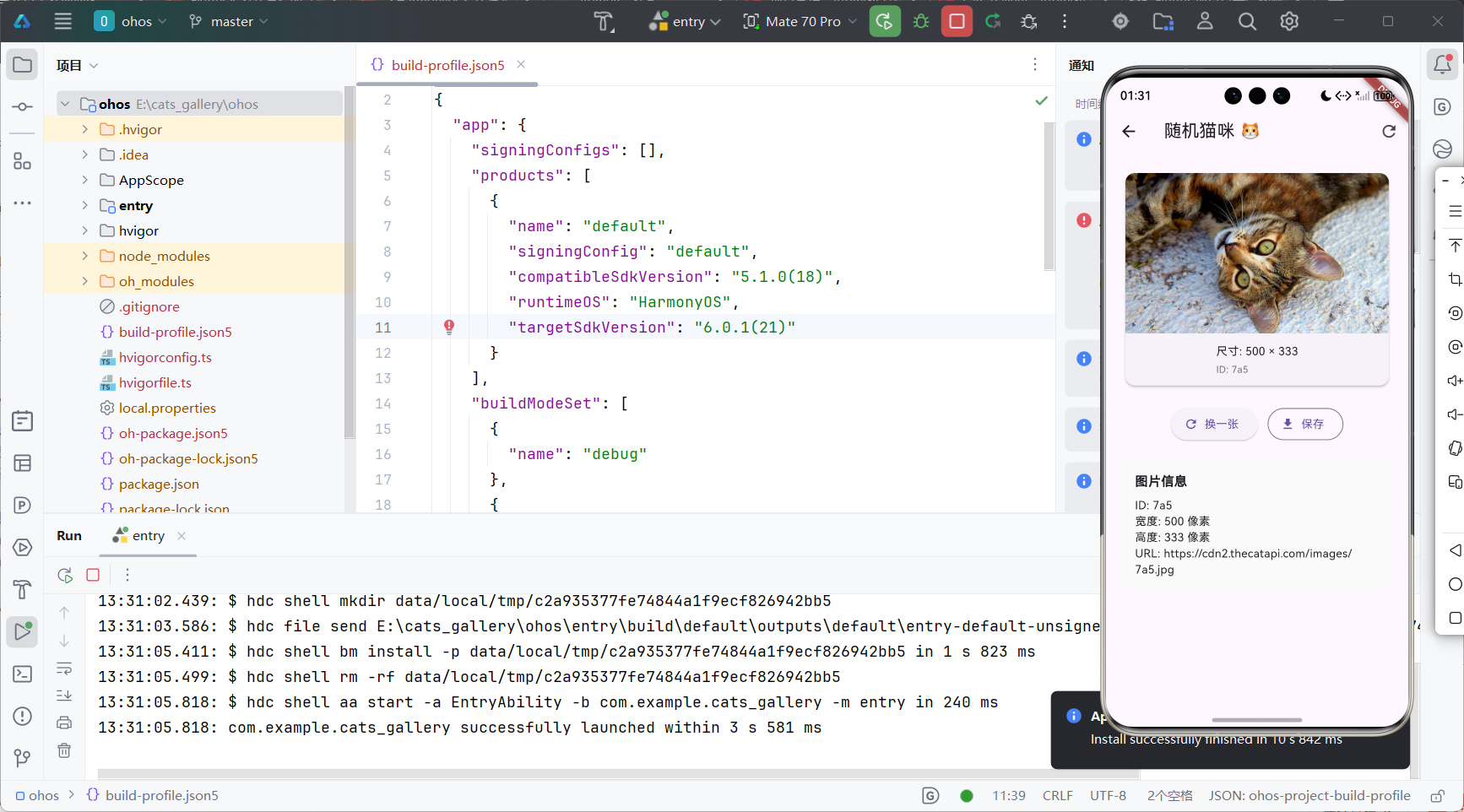
- 点击
六、遇到的问题与解决方案
| 问题 | 现象 | 解决方案 |
|---|---|---|
| 问题1:Certificate Verify Failed | 鸿蒙设备HTTPS请求失败 | 1. 确认API使用HTTPS2. 检查设备系统时间是否准确 |
| 问题2:图片加载缓慢 | 弱网环境下图片卡顿 | 使用cached_network_image + 设置maxHeight |
| 问题3:Provider状态未更新 | 刷新后UI无变化 | 确保notifyListeners()在异步方法内调用 |
| 问题4:鸿蒙打包失败 | HAP构建报错 | 清理缓存 + 检查module.json5格式 |
七、总结
学习收获
- 鸿蒙权限体系:
module.json5是生命线 - Flutter跨平台能力:一套代码运行于安卓与鸿蒙
- MVVM架构实践:清晰分层,便于维护
后续优化方向
- 添加离线缓存
- 集成鸿蒙分享能力
- 支持多语言
提交规范示例:
git commit -m "feat(harmony): 声明INTERNET权限,修复鸿蒙HTTPS证书验证问题"git commit -m "feat(ui): 实现猫咪列表空/错误状态兜底,优化弱网体验"
✅ 项目已通过真机验证,可在 AtomGit 公开仓库直接拉取运行。
欢迎加入开源鸿蒙跨平台社区

开源鸿蒙跨平台开发社区汇聚开发者与厂商,共建“一次开发,多端部署”的开源生态,致力于降低跨端开发门槛,推动万物智联创新。
更多推荐

 21
21 0
0- 0


 已为社区贡献3条内容

所有评论(0)