Flutter for OpenHarmony三国杀攻略App实战 - 卡组构建工具实现
在三国杀游戏中,合理的卡组配置是获胜的关键因素之一。不同的游戏模式和策略需要不同的卡牌搭配,而一个好用的卡组构建工具能够帮助玩家快速设计和优化自己的卡组。本文将实现一个功能完整的卡组构建工具,支持卡牌选择、数量调整、配置保存和策略分析等功能。通过本文的实现,我们构建了一个功能完整的卡组构建工具。这个工具不仅提供了基础的卡牌选择和数量调整功能,还包含了高级的分析、管理、分享等特性。核心功能亮点直观的
前言
在三国杀游戏中,合理的卡组配置是获胜的关键因素之一。不同的游戏模式和策略需要不同的卡牌搭配,而一个好用的卡组构建工具能够帮助玩家快速设计和优化自己的卡组。本文将实现一个功能完整的卡组构建工具,支持卡牌选择、数量调整、配置保存和策略分析等功能。
卡组构建系统设计
核心功能架构
卡组构建工具的核心功能包括卡牌管理、数量控制、配置保存和策略分析。这些功能相互配合,为玩家提供完整的卡组设计体验。
import 'package:flutter/material.dart';
import 'package:flutter_screenutil/flutter_screenutil.dart';
class DeckBuilderScreen extends StatefulWidget {
const DeckBuilderScreen({Key? key}) : super(key: key);
State<DeckBuilderScreen> createState() => _DeckBuilderScreenState();
}
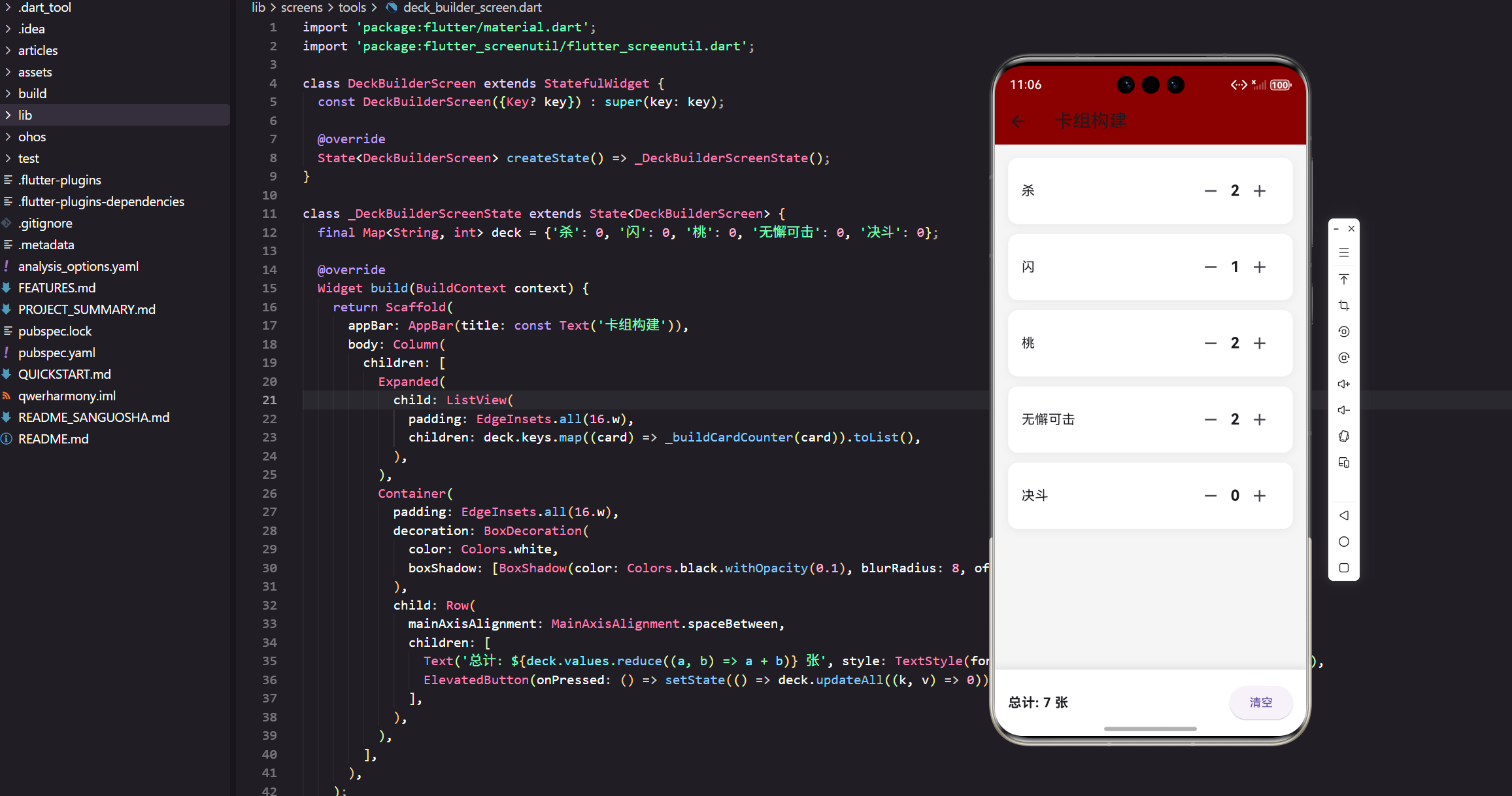
卡组构建页面使用 StatefulWidget 实现,因为需要管理卡牌数量的动态变化。flutter_screenutil 确保了在不同设备上的一致显示效果,这对于包含大量交互元素的页面特别重要。
数据结构设计
class _DeckBuilderScreenState extends State<DeckBuilderScreen> {
  final Map<String, int> deck = {'杀': 0, '闪': 0, '桃': 0, '无懈可击': 0, '决斗': 0};
使用 Map 数据结构来存储卡组信息,键是卡牌名称,值是卡牌数量。这种设计简洁明了,便于进行增删改查操作。初始化时所有卡牌数量都设为0,让用户从空白卡组开始构建。
页面布局实现
主体结构设计
Widget build(BuildContext context) {
return Scaffold(
appBar: AppBar(title: const Text('卡组构建')),
body: Column(
children: [
Expanded(
child: ListView(
padding: EdgeInsets.all(16.w),
children: deck.keys.map((card) => _buildCardCounter(card)).toList(),
),
),
Container(
padding: EdgeInsets.all(16.w),
decoration: BoxDecoration(
color: Colors.white,
boxShadow: [BoxShadow(color: Colors.black.withOpacity(0.1), blurRadius: 8, offset: const Offset(0, -2))],
),
child: Row(
mainAxisAlignment: MainAxisAlignment.spaceBetween,
children: [
Text('总计: ${deck.values.reduce((a, b) => a + b)} 张', style: TextStyle(fontSize: 16.sp, fontWeight: FontWeight.bold)),
ElevatedButton(onPressed: () => setState(() => deck.updateAll((k, v) => 0)), child: const Text('清空')),
],
),
),
],
),
);
}
页面采用 Column 布局,上方是可滚动的卡牌列表,下方是固定的统计和操作区域。Expanded 确保卡牌列表占用剩余的所有空间,底部容器使用阴影效果突出显示。总计统计实时显示当前卡组的卡牌总数。
卡牌计数器组件
Widget _buildCardCounter(String card) {
  return Container(
    margin: EdgeInsets.only(bottom: 12.h),
    padding: EdgeInsets.all(16.w),
    decoration: BoxDecoration(
      color: Colors.white,
      borderRadius: BorderRadius.circular(12.r),
      boxShadow: [BoxShadow(color: Colors.black.withOpacity(0.05), blurRadius: 8, offset: const Offset(0, 2))],
    ),
    child: Row(
      children: [
        Expanded(child: Text(card, style: TextStyle(fontSize: 16.sp))),
        IconButton(icon: const Icon(Icons.remove), onPressed: () => setState(() => deck[card] = (deck[card]! - 1).clamp(0, 99))),
        Text('${deck[card]}', style: TextStyle(fontSize: 18.sp, fontWeight: FontWeight.bold)),
        IconButton(icon: const Icon(Icons.add), onPressed: () => setState(() => deck[card] = (deck[card]! + 1).clamp(0, 99))),
      ],
    ),
  );
}
卡牌计数器使用 Row 布局,左侧是卡牌名称,右侧是数量控制区域。clamp(0, 99) 确保数量在合理范围内,避免负数或过大的值。IconButton 提供了直观的增减操作,数量显示使用粗体突出。
高级卡组功能实现
完整卡牌数据库
class CardDatabase {
  static const Map<String, Map<String, dynamic>> cards = {
    // 基本牌
    '杀': {
      'type': '基本牌',
      'description': '对距离1以内的角色造成1点伤害',
      'rarity': 'common',
      'cost': 1,
      'tags': ['攻击', '基础'],
    },
    '闪': {
      'type': '基本牌',
      'description': '抵消一张杀的效果',
      'rarity': 'common',
      'cost': 1,
      'tags': ['防御', '基础'],
    },
    '桃': {
      'type': '基本牌',
      'description': '回复1点体力',
      'rarity': 'common',
      'cost': 2,
      'tags': ['回复', '基础'],
    },
    // 锦囊牌
    '无懈可击': {
      'type': '锦囊牌',
      'description': '抵消一张锦囊牌的效果',
      'rarity': 'uncommon',
      'cost': 2,
      'tags': ['防御', '控制'],
    },
    '决斗': {
      'type': '锦囊牌',
      'description': '与目标角色轮流出杀',
      'rarity': 'uncommon',
      'cost': 3,
      'tags': ['攻击', '控制'],
    },
    '顺手牵羊': {
      'type': '锦囊牌',
      'description': '获得距离1以内角色的一张牌',
      'rarity': 'uncommon',
      'cost': 2,
      'tags': ['控制', '资源'],
    },
    // 装备牌
    '青釭剑': {
      'type': '装备牌',
      'description': '攻击距离+1,无视防具',
      'rarity': 'rare',
      'cost': 4,
      'tags': ['武器', '攻击'],
    },
  };

  static List<String> getCardsByType(String type) {
    return cards.entries
        .where((entry) => entry.value['type'] == type)
        .map((entry) => entry.key)
        .toList();
  }

  static List<String> getCardsByTag(String tag) {
    return cards.entries
        .where((entry) => (entry.value['tags'] as List<String>).contains(tag))
        .map((entry) => entry.key)
        .toList();
  }
}
完整的卡牌数据库包含了每张卡牌的类型、描述、稀有度、费用和标签等信息。这些数据为卡组分析和推荐功能提供了基础。
卡牌分类展示
class CategorizedDeckBuilder extends StatefulWidget {
const CategorizedDeckBuilder({Key? key}) : super(key: key);
State<CategorizedDeckBuilder> createState() => _CategorizedDeckBuilderState();
}
class _CategorizedDeckBuilderState extends State<CategorizedDeckBuilder>
with SingleTickerProviderStateMixin {
late TabController _tabController;
final Map<String, int> _deck = {};
void initState() {
super.initState();
_tabController = TabController(length: 3, vsync: this);
// 初始化卡组
for (String card in CardDatabase.cards.keys) {
_deck[card] = 0;
}
}
Widget build(BuildContext context) {
return Scaffold(
appBar: AppBar(
title: const Text('卡组构建'),
bottom: TabBar(
controller: _tabController,
tabs: const [
Tab(text: '基本牌'),
Tab(text: '锦囊牌'),
Tab(text: '装备牌'),
],
),
),
body: Column(
children: [
Expanded(
child: TabBarView(
controller: _tabController,
children: [
_buildCardTypeView('基本牌'),
_buildCardTypeView('锦囊牌'),
_buildCardTypeView('装备牌'),
],
),
),
_buildDeckSummary(),
],
),
);
}
Widget _buildCardTypeView(String cardType) {
final cards = CardDatabase.getCardsByType(cardType);
return ListView.builder(
padding: EdgeInsets.all(16.w),
itemCount: cards.length,
itemBuilder: (context, index) {
final card = cards[index];
final cardInfo = CardDatabase.cards[card]!;
return Container(
margin: EdgeInsets.only(bottom: 12.h),
padding: EdgeInsets.all(16.w),
decoration: BoxDecoration(
color: Colors.white,
borderRadius: BorderRadius.circular(12.r),
border: Border.all(
color: _getRarityColor(cardInfo['rarity']).withOpacity(0.3),
width: 2,
),
),
child: Column(
crossAxisAlignment: CrossAxisAlignment.start,
children: [
Row(
children: [
Expanded(
child: Column(
crossAxisAlignment: CrossAxisAlignment.start,
children: [
Text(card, style: TextStyle(fontSize: 16.sp, fontWeight: FontWeight.bold)),
SizedBox(height: 4.h),
Text(cardInfo['description'], style: TextStyle(fontSize: 12.sp, color: Colors.grey)),
],
),
),
_buildCardCounter(card),
],
),
SizedBox(height: 8.h),
Wrap(
spacing: 4.w,
children: (cardInfo['tags'] as List<String>).map((tag) =>
Chip(
label: Text(tag, style: TextStyle(fontSize: 10.sp)),
backgroundColor: _getTagColor(tag).withOpacity(0.2),
)
).toList(),
),
],
),
);
},
);
}
}
分类展示使用 TabBar 和 TabBarView 组合,让用户可以按卡牌类型浏览。每张卡牌都显示详细信息,包括描述和标签,边框颜色根据稀有度变化。
卡组分析功能
卡组统计分析
class DeckAnalyzer {
  static Map<String, dynamic> analyzeDeck(Map<String, int> deck) {
    int totalCards = deck.values.reduce((a, b) => a + b);
    Map<String, int> typeCount = {'基本牌': 0, '锦囊牌': 0, '装备牌': 0};
    Map<String, int> tagCount = {};
    int totalCost = 0;

    deck.forEach((card, count) {
      if (count > 0) {
        final cardInfo = CardDatabase.cards[card];
        if (cardInfo != null) {
          // 统计类型
          typeCount[cardInfo['type']] = (typeCount[cardInfo['type']] ?? 0) + count;

          // 统计标签
          for (String tag in cardInfo['tags']) {
            tagCount[tag] = (tagCount[tag] ?? 0) + count;
          }

          // 计算总费用
          totalCost += (cardInfo['cost'] as int) * count;
        }
      }
    });

    return {
      'totalCards': totalCards,
      'typeDistribution': typeCount,
      'tagDistribution': tagCount,
      'averageCost': totalCards > 0 ? totalCost / totalCards : 0,
      'deckRating': _calculateDeckRating(deck, typeCount, tagCount),
      'suggestions': _generateSuggestions(deck, typeCount, tagCount),
    };
  }

  static int _calculateDeckRating(Map<String, int> deck, Map<String, int> typeCount, Map<String, int> tagCount) {
    int rating = 50; // 基础评分

    // 卡牌数量评分
    int totalCards = deck.values.reduce((a, b) => a + b);
    if (totalCards >= 30 && totalCards <= 50) {
      rating += 20;
    } else if (totalCards >= 20 && totalCards <= 60) {
      rating += 10;
    }

    // 类型平衡评分
    int basicCards = typeCount['基本牌'] ?? 0;
    int trickCards = typeCount['锦囊牌'] ?? 0;
    int equipCards = typeCount['装备牌'] ?? 0;

    if (basicCards >= totalCards * 0.4 && basicCards <= totalCards * 0.6) rating += 10;
    if (trickCards >= totalCards * 0.2 && trickCards <= totalCards * 0.4) rating += 10;
    if (equipCards >= totalCards * 0.1 && equipCards <= totalCards * 0.3) rating += 10;

    return rating.clamp(0, 100);
  }

  static List<String> _generateSuggestions(Map<String, int> deck, Map<String, int> typeCount, Map<String, int> tagCount) {
    List<String> suggestions = [];
    int totalCards = deck.values.reduce((a, b) => a + b);

    if (totalCards < 30) {
      suggestions.add('建议增加卡牌数量到30-50张');
    }

    int attackCards = tagCount['攻击'] ?? 0;
    int defenseCards = tagCount['防御'] ?? 0;

    if (attackCards < totalCards * 0.3) {
      suggestions.add('攻击牌数量偏少,建议增加杀、决斗等攻击牌');
    }

    if (defenseCards < totalCards * 0.2) {
      suggestions.add('防御牌数量偏少,建议增加闪、无懈可击等防御牌');
    }

    if ((typeCount['基本牌'] ?? 0) < totalCards * 0.4) {
      suggestions.add('基本牌比例偏低,建议增加杀、闪、桃等基本牌');
    }

    return suggestions;
  }
}
卡组分析器提供了全面的统计分析,包括卡牌总数、类型分布、标签分布、平均费用等。评分系统根据多个维度给出卡组质量评估,建议系统为玩家提供优化方向。
分析结果展示
Widget _buildAnalysisPanel() {
  final analysis = DeckAnalyzer.analyzeDeck(_deck);

  return Container(
    margin: EdgeInsets.all(16.w),
    padding: EdgeInsets.all(16.w),
    decoration: BoxDecoration(
      color: Colors.blue.withOpacity(0.1),
      borderRadius: BorderRadius.circular(12.r),
    ),
    child: Column(
      crossAxisAlignment: CrossAxisAlignment.start,
      children: [
        Row(
          mainAxisAlignment: MainAxisAlignment.spaceBetween,
          children: [
            Text('卡组分析', style: TextStyle(fontSize: 16.sp, fontWeight: FontWeight.bold)),
            Container(
              padding: EdgeInsets.symmetric(horizontal: 8.w, vertical: 4.h),
              decoration: BoxDecoration(
                color: _getRatingColor(analysis['deckRating']),
                borderRadius: BorderRadius.circular(12.r),
              ),
              child: Text(
                '评分: ${analysis['deckRating']}',
                style: TextStyle(color: Colors.white, fontSize: 12.sp, fontWeight: FontWeight.bold),
              ),
            ),
          ],
        ),
        SizedBox(height: 12.h),
        _buildStatRow('总卡牌数', '${analysis['totalCards']}张'),
        _buildStatRow('平均费用', '${analysis['averageCost'].toStringAsFixed(1)}'),
        SizedBox(height: 12.h),
        Text('类型分布', style: TextStyle(fontSize: 14.sp, fontWeight: FontWeight.bold)),
        SizedBox(height: 8.h),
        ...(analysis['typeDistribution'] as Map<String, int>).entries.map((entry) =>
          _buildDistributionBar(entry.key, entry.value, analysis['totalCards'])
        ),
        if ((analysis['suggestions'] as List<String>).isNotEmpty) ...[
          SizedBox(height: 12.h),
          Text('优化建议', style: TextStyle(fontSize: 14.sp, fontWeight: FontWeight.bold)),
          SizedBox(height: 8.h),
          ...(analysis['suggestions'] as List<String>).map((suggestion) =>
            Padding(
              padding: EdgeInsets.only(bottom: 4.h),
              child: Row(
                crossAxisAlignment: CrossAxisAlignment.start,
                children: [
                  Text('• ', style: TextStyle(color: Colors.orange, fontWeight: FontWeight.bold)),
                  Expanded(child: Text(suggestion, style: TextStyle(fontSize: 12.sp))),
                ],
              ),
            )
          ),
        ],
      ],
    ),
  );
}
分析面板使用可视化的方式展示分析结果,包括评分徽章、统计数据、分布条形图和优化建议。不同的颜色编码帮助用户快速理解卡组的优缺点。
卡组保存与管理
卡组存储系统
class DeckStorage {
  static const String _decksKey = 'saved_decks';
  static List<Map<String, dynamic>> _savedDecks = [];

  static Future<void> loadDecks() async {
    final prefs = await SharedPreferences.getInstance();
    final decksJson = prefs.getString(_decksKey);
    if (decksJson != null) {
      final List<dynamic> decoded = json.decode(decksJson);
      _savedDecks = decoded.cast<Map<String, dynamic>>();
    }
  }

  static Future<void> saveDeck(String name, Map<String, int> deck) async {
    final deckData = {
      'name': name,
      'cards': deck,
      'createdAt': DateTime.now().toIso8601String(),
      'totalCards': deck.values.reduce((a, b) => a + b),
    };

    // 检查是否已存在同名卡组
    final existingIndex = _savedDecks.indexWhere((d) => d['name'] == name);
    if (existingIndex != -1) {
      _savedDecks[existingIndex] = deckData;
    } else {
      _savedDecks.add(deckData);
    }

    await _saveToStorage();
  }

  static Future<void> deleteDeck(String name) async {
    _savedDecks.removeWhere((deck) => deck['name'] == name);
    await _saveToStorage();
  }

  static Future<void> _saveToStorage() async {
    final prefs = await SharedPreferences.getInstance();
    final decksJson = json.encode(_savedDecks);
    await prefs.setString(_decksKey, decksJson);
  }

  static List<Map<String, dynamic>> getSavedDecks() {
    return List.from(_savedDecks);
  }

  static Map<String, int>? loadDeck(String name) {
    final deck = _savedDecks.firstWhere(
      (d) => d['name'] == name,
      orElse: () => {},
    );

    if (deck.isNotEmpty) {
      return Map<String, int>.from(deck['cards']);
    }
    return null;
  }
}
卡组存储系统使用 SharedPreferences 进行本地持久化,支持保存、加载、删除等基本操作。每个卡组都包含名称、卡牌配置、创建时间和总卡牌数等信息。
卡组管理界面
class DeckManagerScreen extends StatefulWidget {
const DeckManagerScreen({Key? key}) : super(key: key);
State<DeckManagerScreen> createState() => _DeckManagerScreenState();
}
class _DeckManagerScreenState extends State<DeckManagerScreen> {
List<Map<String, dynamic>> _savedDecks = [];
void initState() {
super.initState();
_loadDecks();
}
Future<void> _loadDecks() async {
await DeckStorage.loadDecks();
setState(() {
_savedDecks = DeckStorage.getSavedDecks();
});
}
Widget build(BuildContext context) {
return Scaffold(
appBar: AppBar(
title: const Text('卡组管理'),
actions: [
IconButton(
icon: const Icon(Icons.add),
onPressed: () => Navigator.push(
context,
MaterialPageRoute(builder: (context) => const DeckBuilderScreen()),
).then((_) => _loadDecks()),
),
],
),
body: _savedDecks.isEmpty
? _buildEmptyState()
: ListView.builder(
padding: EdgeInsets.all(16.w),
itemCount: _savedDecks.length,
itemBuilder: (context, index) => _buildDeckCard(_savedDecks[index]),
),
);
}
Widget _buildDeckCard(Map<String, dynamic> deckData) {
return Container(
margin: EdgeInsets.only(bottom: 12.h),
padding: EdgeInsets.all(16.w),
decoration: BoxDecoration(
color: Colors.white,
borderRadius: BorderRadius.circular(12.r),
boxShadow: [
BoxShadow(
color: Colors.black.withOpacity(0.05),
blurRadius: 8,
offset: const Offset(0, 2),
),
],
),
child: Column(
crossAxisAlignment: CrossAxisAlignment.start,
children: [
Row(
mainAxisAlignment: MainAxisAlignment.spaceBetween,
children: [
Expanded(
child: Column(
crossAxisAlignment: CrossAxisAlignment.start,
children: [
Text(
deckData['name'],
style: TextStyle(fontSize: 16.sp, fontWeight: FontWeight.bold),
),
SizedBox(height: 4.h),
Text(
'${deckData['totalCards']}张卡牌',
style: TextStyle(fontSize: 12.sp, color: Colors.grey),
),
],
),
),
PopupMenuButton<String>(
onSelected: (value) => _handleMenuAction(value, deckData),
itemBuilder: (context) => [
const PopupMenuItem(value: 'edit', child: Text('编辑')),
const PopupMenuItem(value: 'duplicate', child: Text('复制')),
const PopupMenuItem(value: 'delete', child: Text('删除')),
],
),
],
),
SizedBox(height: 8.h),
Text(
'创建时间: ${_formatDate(deckData['createdAt'])}',
style: TextStyle(fontSize: 10.sp, color: Colors.grey),
),
],
),
);
}
}
卡组管理界面提供了完整的CRUD操作,包括查看、编辑、复制和删除功能。使用 PopupMenuButton 提供操作菜单,界面简洁而功能完整。
预设卡组系统
经典卡组模板
class PresetDecks {
  static Map<String, Map<String, int>> getPresetDecks() {
    return {
      '平衡型': {
        '杀': 8,
        '闪': 6,
        '桃': 4,
        '无懈可击': 3,
        '决斗': 2,
        '顺手牵羊': 2,
        '过河拆桥': 2,
        '青釭剑': 1,
        '八卦阵': 1,
        '的卢': 1,
      },
      '攻击型': {
        '杀': 12,
        '闪': 4,
        '桃': 2,
        '决斗': 4,
        '万箭齐发': 2,
        '南蛮入侵': 2,
        '青釭剑': 2,
        '丈八蛇矛': 1,
        '方天画戟': 1,
      },
      '防御型': {
        '杀': 4,
        '闪': 10,
        '桃': 6,
        '无懈可击': 6,
        '八卦阵': 2,
        '仁王盾': 1,
        '白银狮子': 1,
        '的卢': 2,
        '绝影': 2,
      },
      '控制型': {
        '杀': 6,
        '闪': 5,
        '桃': 3,
        '无懈可击': 4,
        '顺手牵羊': 4,
        '过河拆桥': 4,
        '借刀杀人': 2,
        '无中生有': 2,
      },
    };
  }

  static Widget buildPresetDeckSelector(Function(Map<String, int>) onDeckSelected) {
    final presets = getPresetDecks();

    return Container(
      padding: EdgeInsets.all(16.w),
      child: Column(
        crossAxisAlignment: CrossAxisAlignment.start,
        children: [
          Text('预设卡组', style: TextStyle(fontSize: 16.sp, fontWeight: FontWeight.bold)),
          SizedBox(height: 12.h),
          GridView.builder(
            shrinkWrap: true,
            physics: const NeverScrollableScrollPhysics(),
            gridDelegate: SliverGridDelegateWithFixedCrossAxisCount(
              crossAxisCount: 2,
              childAspectRatio: 2,
              crossAxisSpacing: 12.w,
              mainAxisSpacing: 12.h,
            ),
            itemCount: presets.length,
            itemBuilder: (context, index) {
              final entry = presets.entries.elementAt(index);
              return GestureDetector(
                onTap: () => onDeckSelected(entry.value),
                child: Container(
                  decoration: BoxDecoration(
                    color: _getPresetColor(entry.key).withOpacity(0.1),
                    borderRadius: BorderRadius.circular(8.r),
                    border: Border.all(color: _getPresetColor(entry.key).withOpacity(0.3)),
                  ),
                  child: Center(
                    child: Column(
                      mainAxisAlignment: MainAxisAlignment.center,
                      children: [
                        Icon(_getPresetIcon(entry.key), color: _getPresetColor(entry.key)),
                        SizedBox(height: 4.h),
                        Text(entry.key, style: TextStyle(fontWeight: FontWeight.bold)),
                      ],
                    ),
                  ),
                ),
              );
            },
          ),
        ],
      ),
    );
  }
}
预设卡组系统提供了四种经典配置:平衡型、攻击型、防御型和控制型。每种配置都有不同的策略重点,帮助新手玩家快速上手。
卡组导入导出功能
卡组分享系统
class DeckSharing {
  static String encodeDeck(Map<String, int> deck, String name) {
    final deckData = {
      'name': name,
      'cards': deck,
      'version': '1.0',
      'timestamp': DateTime.now().millisecondsSinceEpoch,
    };

    final jsonString = json.encode(deckData);
    final bytes = utf8.encode(jsonString);
    return base64.encode(bytes);
  }

  static Map<String, dynamic>? decodeDeck(String encodedDeck) {
    try {
      final bytes = base64.decode(encodedDeck);
      final jsonString = utf8.decode(bytes);
      final deckData = json.decode(jsonString);

      return {
        'name': deckData['name'],
        'cards': Map<String, int>.from(deckData['cards']),
        'version': deckData['version'],
        'timestamp': deckData['timestamp'],
      };
    } catch (e) {
      return null;
    }
  }

  static Future<void> shareDeck(Map<String, int> deck, String name) async {
    final encodedDeck = encodeDeck(deck, name);
    final shareText = '我的三国杀卡组:$name\n卡组代码:$encodedDeck\n复制代码到应用中导入使用!';

    await Share.share(shareText);
  }

  static Widget buildImportDialog(BuildContext context, Function(Map<String, int>, String) onImport) {
    final controller = TextEditingController();

    return AlertDialog(
      title: const Text('导入卡组'),
      content: Column(
        mainAxisSize: MainAxisSize.min,
        children: [
          const Text('请粘贴卡组代码:'),
          SizedBox(height: 12.h),
          TextField(
            controller: controller,
            maxLines: 3,
            decoration: const InputDecoration(
              hintText: '粘贴卡组代码...',
              border: OutlineInputBorder(),
            ),
          ),
        ],
      ),
      actions: [
        TextButton(
          onPressed: () => Navigator.pop(context),
          child: const Text('取消'),
        ),
        ElevatedButton(
          onPressed: () {
            final deckData = decodeDeck(controller.text.trim());
            if (deckData != null) {
              onImport(deckData['cards'], deckData['name']);
              Navigator.pop(context);
            } else {
              ScaffoldMessenger.of(context).showSnackBar(
                const SnackBar(content: Text('无效的卡组代码')),
              );
            }
          },
          child: const Text('导入'),
        ),
      ],
    );
  }
}
卡组分享系统使用 Base64编码 来生成紧凑的分享代码,支持导出和导入功能。这让玩家可以轻松分享自己的卡组配置,促进社区交流。
总结
通过本文的实现,我们构建了一个功能完整的卡组构建工具。这个工具不仅提供了基础的卡牌选择和数量调整功能,还包含了高级的分析、管理、分享等特性。
核心功能亮点:
- 直观的卡牌数量调整界面
- 按类型分类的卡牌浏览
- 智能的卡组分析和评分系统
- 完整的卡组保存和管理功能
- 预设卡组模板系统
- 卡组导入导出和分享功能
- 实时的统计和建议反馈
这个卡组构建工具为玩家提供了专业级的卡组设计体验,帮助他们创建和优化适合不同策略的卡组配置。在下一篇文章中,我们将实现回合计时器功能,帮助玩家控制游戏节奏。
欢迎加入开源鸿蒙跨平台社区:https://openharmonycrossplatform.csdn.net

开源鸿蒙跨平台开发社区汇聚开发者与厂商,共建“一次开发,多端部署”的开源生态,致力于降低跨端开发门槛,推动万物智联创新。
更多推荐

 12
12 0
0- 0


 已为社区贡献29条内容

所有评论(0)