Flutter 框架跨平台鸿蒙开发 - 家庭香薰精油记录应用开发教程
数据模型设计:精油、使用记录、配方等完整的数据结构UI界面开发:Material Design 3风格的现代化界面功能实现动画效果:提升用户体验的流畅动画性能优化:列表优化、缓存管理、状态管理扩展功能:云端同步、社区分享、AI推荐测试策略:单元测试、Widget测试、集成测试这款应用不仅功能全面,而且代码结构清晰,易于维护和扩展。通过本教程的学习,你可以掌握Flutter应用开发的核心技能,为后续
Flutter家庭香薰精油记录应用开发教程
项目概述
本教程将带你开发一个功能完整的Flutter家庭香薰精油记录应用。这款应用专为香薰爱好者设计,提供精油收藏管理、使用记录追踪、配方分享和健康监测等功能,让用户科学合理地使用香薰精油,享受芳香疗法带来的身心愉悦。
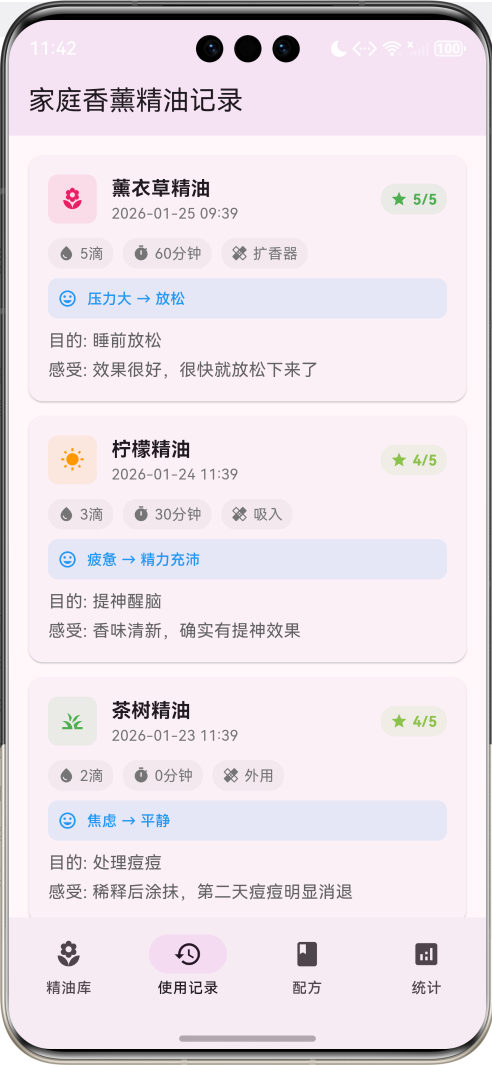
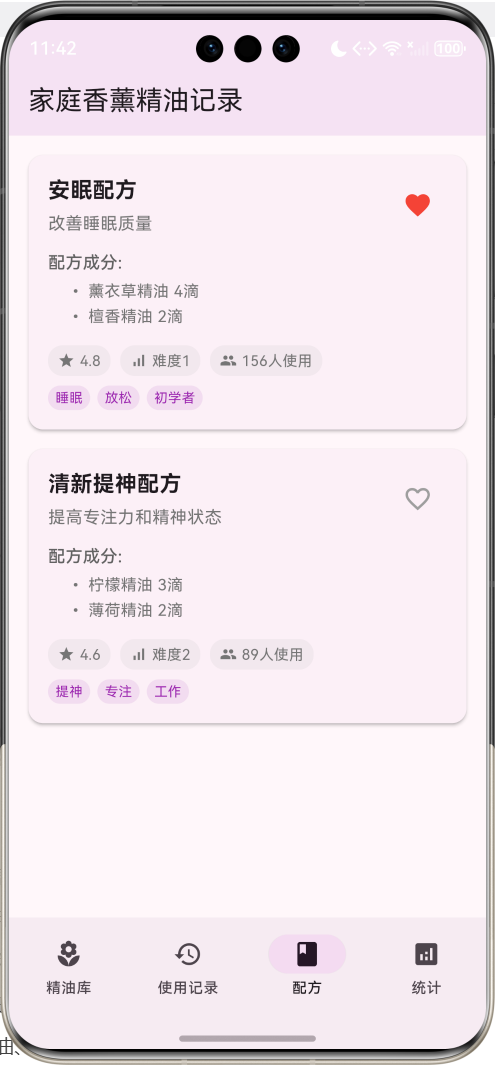
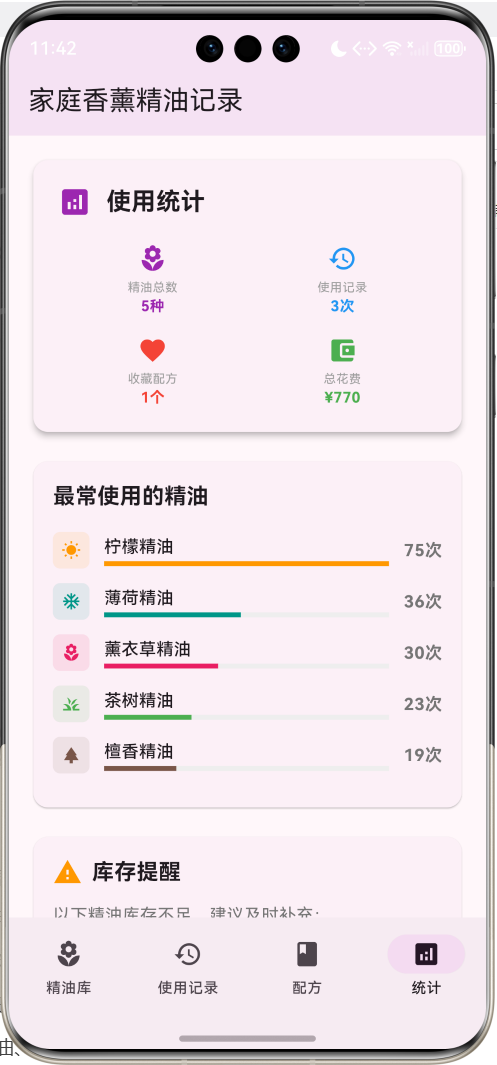
运行效果图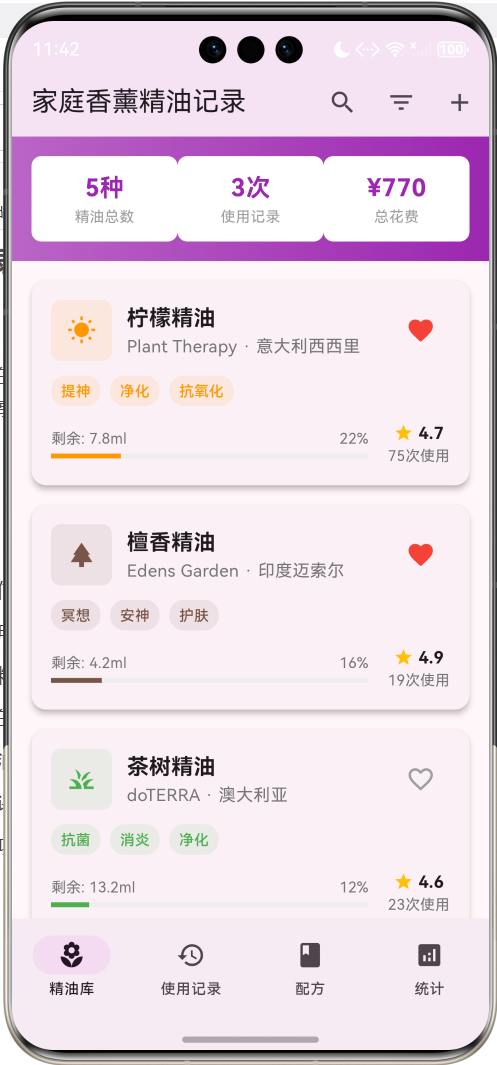
应用特色
- 精油库管理:详细记录精油信息,包括品牌、产地、功效、使用方法等
- 使用记录追踪:记录每次使用情况,包括用量、时间、效果评价
- 配方收藏系统:收藏和分享精油配方,支持自定义调配
- 健康监测功能:记录使用后的身体反应和心情变化
- 提醒设置:智能提醒补充精油、清洁扩香器等
- 统计分析:使用频率、效果评价、花费统计等数据分析
- 安全指南:精油使用注意事项和安全提醒
技术栈
- 框架:Flutter 3.x
- 语言:Dart
- UI组件:Material Design 3
- 状态管理:StatefulWidget
- 动画:AnimationController + Tween
- 数据存储:内存存储(可扩展为本地数据库)
项目结构设计
核心数据模型
1. 精油模型(EssentialOil)
class EssentialOil {
  final String id;              // 唯一标识
  final String name;            // 精油名称
  final String brand;           // 品牌
  final String origin;          // 产地
  final String category;        // 分类
  final List<String> benefits;  // 功效
  final String scent;           // 香味描述
  final double price;           // 价格
  final double volume;          // 容量(ml)
  final DateTime purchaseDate;  // 购买日期
  final DateTime expiryDate;    // 过期日期
  final String notes;           // 备注
  bool isFavorite;             // 是否收藏
  double remainingVolume;      // 剩余容量
  int usageCount;              // 使用次数
  double rating;               // 个人评分
  final List<String> photos;   // 照片
  final DateTime createdAt;    // 创建时间
}
2. 使用记录模型(UsageRecord)
class UsageRecord {
  final String id;              // 唯一标识
  final String oilId;           // 精油ID
  final String oilName;         // 精油名称
  final DateTime usageDate;     // 使用日期
  final String method;          // 使用方法
  final double amount;          // 使用量(滴)
  final int duration;           // 使用时长(分钟)
  final String purpose;         // 使用目的
  final String mood;            // 使用前心情
  final String afterMood;       // 使用后心情
  final int effectiveness;      // 效果评分(1-5)
  final String notes;           // 使用感受
  final List<String> symptoms;  // 缓解症状
  final DateTime createdAt;     // 记录时间
}
3. 配方模型(Recipe)
class Recipe {
  final String id;              // 唯一标识
  final String name;            // 配方名称
  final String description;     // 描述
  final String purpose;         // 用途
  final List<RecipeIngredient> ingredients; // 配方成分
  final String method;          // 调配方法
  final String usage;           // 使用方法
  final int difficulty;         // 难度等级(1-5)
  final double rating;          // 评分
  final String author;          // 作者
  final DateTime createdAt;     // 创建时间
  bool isFavorite;             // 是否收藏
  int usageCount;              // 使用次数
  final List<String> tags;     // 标签
  final String notes;          // 备注
}

class RecipeIngredient {
  final String oilId;           // 精油ID
  final String oilName;         // 精油名称
  final int drops;              // 滴数
  final String role;            // 作用(主调/中调/基调)
}
4. 分类枚举
enum OilCategory {
  floral,       // 花香类
  citrus,       // 柑橘类
  woody,        // 木质类
  herbal,       // 草本类
  spicy,        // 辛香类
  resinous,     // 树脂类
  minty,        // 薄荷类
  earthy,       // 土质类
}

enum UsageMethod {
  diffuser,     // 扩香器
  topical,      // 外用
  inhalation,   // 吸入
  bath,         // 泡澡
  massage,      // 按摩
  compress,     // 敷贴
}

enum MoodType {
  relaxed,      // 放松
  energetic,    // 精力充沛
  focused,      // 专注
  happy,        // 愉悦
  calm,         // 平静
  stressed,     // 压力大
  tired,        // 疲惫
  anxious,      // 焦虑
}
页面架构
应用采用底部导航栏设计,包含四个主要页面:
- 精油库页面:浏览所有精油,支持搜索和分类筛选
- 使用记录页面:查看和添加使用记录
- 配方页面:浏览和收藏精油配方
- 统计页面:查看使用统计和分析数据
详细实现步骤
第一步:项目初始化
创建新的Flutter项目:
flutter create essential_oil_tracker
cd essential_oil_tracker
第二步:主应用结构
class MyApp extends StatelessWidget {
const MyApp({super.key});
Widget build(BuildContext context) {
return MaterialApp(
title: '家庭香薰精油记录',
theme: ThemeData(
colorScheme: ColorScheme.fromSeed(seedColor: Colors.purple),
useMaterial3: true,
),
home: const EssentialOilHomePage(),
);
}
}
第三步:数据初始化
创建示例精油数据:
void _initializeEssentialOils() {
  _essentialOils = [
    EssentialOil(
      id: '1',
      name: '薰衣草精油',
      brand: 'Young Living',
      origin: '法国普罗旺斯',
      category: _getCategoryName(OilCategory.floral),
      benefits: ['放松', '助眠', '舒缓', '抗菌'],
      scent: '清香淡雅,带有草本香味',
      price: 168.0,
      volume: 15.0,
      purchaseDate: DateTime.now().subtract(const Duration(days: 60)),
      expiryDate: DateTime.now().add(const Duration(days: 1095)),
      notes: '最经典的精油之一,适合初学者使用',
      remainingVolume: 12.5,
      usageCount: _random.nextInt(50) + 20,
      rating: 4.8,
      photos: [],
      createdAt: DateTime.now().subtract(const Duration(days: 60)),
    ),
    // 更多精油数据...
  ];
}
第四步:精油列表页面
精油卡片组件
Widget _buildOilCard(EssentialOil oil) {
  final usagePercentage = (oil.volume - oil.remainingVolume) / oil.volume;
  final isLowStock = oil.remainingVolume / oil.volume < 0.2;

  return Card(
    elevation: 4,
    margin: const EdgeInsets.only(bottom: 16),
    child: InkWell(
      onTap: () => _showOilDetail(oil),
      child: Padding(
        padding: const EdgeInsets.all(16),
        child: Column(
          crossAxisAlignment: CrossAxisAlignment.start,
          children: [
            // 标题和收藏按钮
            Row(
              children: [
                Container(
                  width: 50,
                  height: 50,
                  decoration: BoxDecoration(
                    color: _getCategoryColor(oil.category).withValues(alpha: 0.1),
                    borderRadius: BorderRadius.circular(8),
                  ),
                  child: Icon(
                    _getCategoryIcon(oil.category),
                    color: _getCategoryColor(oil.category),
                    size: 24,
                  ),
                ),
                const SizedBox(width: 12),
                Expanded(
                  child: Column(
                    crossAxisAlignment: CrossAxisAlignment.start,
                    children: [
                      Text(
                        oil.name,
                        style: const TextStyle(
                          fontSize: 18,
                          fontWeight: FontWeight.bold,
                        ),
                      ),
                      Text(
                        '${oil.brand} · ${oil.origin}',
                        style: TextStyle(
                          color: Colors.grey.shade600,
                          fontSize: 14,
                        ),
                      ),
                    ],
                  ),
                ),
                IconButton(
                  icon: Icon(
                    oil.isFavorite ? Icons.favorite : Icons.favorite_border,
                    color: oil.isFavorite ? Colors.red : Colors.grey,
                  ),
                  onPressed: () => _toggleFavorite(oil),
                ),
              ],
            ),

            const SizedBox(height: 12),

            // 功效标签
            Wrap(
              spacing: 8,
              runSpacing: 4,
              children: oil.benefits.take(3).map((benefit) => Container(
                padding: const EdgeInsets.symmetric(horizontal: 8, vertical: 4),
                decoration: BoxDecoration(
                  color: _getCategoryColor(oil.category).withValues(alpha: 0.1),
                  borderRadius: BorderRadius.circular(12),
                ),
                child: Text(
                  benefit,
                  style: TextStyle(
                    fontSize: 12,
                    color: _getCategoryColor(oil.category),
                    fontWeight: FontWeight.w500,
                  ),
                ),
              )).toList(),
            ),

            const SizedBox(height: 12),

            // 使用进度和库存状态
            Row(
              children: [
                Expanded(
                  child: Column(
                    crossAxisAlignment: CrossAxisAlignment.start,
                    children: [
                      Row(
                        mainAxisAlignment: MainAxisAlignment.spaceBetween,
                        children: [
                          Text(
                            '剩余: ${oil.remainingVolume.toStringAsFixed(1)}ml',
                            style: TextStyle(
                              fontSize: 12,
                              color: isLowStock ? Colors.red : Colors.grey.shade600,
                              fontWeight: isLowStock ? FontWeight.bold : FontWeight.normal,
                            ),
                          ),
                          Text(
                            '${(usagePercentage * 100).toStringAsFixed(0)}%',
                            style: TextStyle(
                              fontSize: 12,
                              color: Colors.grey.shade600,
                            ),
                          ),
                        ],
                      ),
                      const SizedBox(height: 4),
                      LinearProgressIndicator(
                        value: usagePercentage,
                        backgroundColor: Colors.grey.shade200,
                        valueColor: AlwaysStoppedAnimation<Color>(
                          isLowStock ? Colors.red : _getCategoryColor(oil.category),
                        ),
                      ),
                    ],
                  ),
                ),
                const SizedBox(width: 16),
                Column(
                  children: [
                    Row(
                      children: [
                        const Icon(Icons.star, size: 16, color: Colors.amber),
                        const SizedBox(width: 4),
                        Text(
                          oil.rating.toStringAsFixed(1),
                          style: const TextStyle(
                            fontSize: 14,
                            fontWeight: FontWeight.bold,
                          ),
                        ),
                      ],
                    ),
                    Text(
                      '${oil.usageCount}次使用',
                      style: TextStyle(
                        fontSize: 12,
                        color: Colors.grey.shade600,
                      ),
                    ),
                  ],
                ),
              ],
            ),

            // 低库存警告
            if (isLowStock) ...[
              const SizedBox(height: 8),
              Container(
                width: double.infinity,
                padding: const EdgeInsets.all(8),
                decoration: BoxDecoration(
                  color: Colors.red.withValues(alpha: 0.1),
                  borderRadius: BorderRadius.circular(8),
                  border: Border.all(color: Colors.red.withValues(alpha: 0.3)),
                ),
                child: Row(
                  children: [
                    const Icon(Icons.warning, size: 16, color: Colors.red),
                    const SizedBox(width: 8),
                    const Text(
                      '库存不足,建议及时补充',
                      style: TextStyle(
                        fontSize: 12,
                        color: Colors.red,
                        fontWeight: FontWeight.w500,
                      ),
                    ),
                  ],
                ),
              ),
            ],
          ],
        ),
      ),
    ),
  );
}
搜索和筛选功能
void _filterOils() {
  setState(() {
    _filteredOils = _essentialOils.where((oil) {
      bool matchesSearch = _searchQuery.isEmpty ||
          oil.name.toLowerCase().contains(_searchQuery.toLowerCase()) ||
          oil.brand.toLowerCase().contains(_searchQuery.toLowerCase()) ||
          oil.benefits.any((benefit) =>
              benefit.toLowerCase().contains(_searchQuery.toLowerCase()));

      bool matchesCategory = _selectedCategory == null ||
          oil.category == _getCategoryName(_selectedCategory!);

      bool matchesFavorite = !_showFavoritesOnly || oil.isFavorite;

      bool matchesStock = !_showLowStockOnly ||
          (oil.remainingVolume / oil.volume < 0.2);

      return matchesSearch && matchesCategory && matchesFavorite && matchesStock;
    }).toList();

    // 排序
    switch (_sortBy) {
      case SortBy.name:
        _filteredOils.sort((a, b) => a.name.compareTo(b.name));
        break;
      case SortBy.usage:
        _filteredOils.sort((a, b) => b.usageCount.compareTo(a.usageCount));
        break;
      case SortBy.rating:
        _filteredOils.sort((a, b) => b.rating.compareTo(a.rating));
        break;
      case SortBy.stock:
        _filteredOils.sort((a, b) => a.remainingVolume.compareTo(b.remainingVolume));
        break;
    }
  });
}
第五步:使用记录功能
添加使用记录
void _showAddUsageDialog(EssentialOil oil) {
  showDialog(
    context: context,
    builder: (context) => AlertDialog(
      title: Text('记录使用 - ${oil.name}'),
      content: SingleChildScrollView(
        child: Column(
          mainAxisSize: MainAxisSize.min,
          children: [
            // 使用方法选择
            DropdownButtonFormField<UsageMethod>(
              decoration: const InputDecoration(labelText: '使用方法'),
              value: _selectedUsageMethod,
              items: UsageMethod.values.map((method) => DropdownMenuItem(
                value: method,
                child: Text(_getUsageMethodName(method)),
              )).toList(),
              onChanged: (value) => setState(() => _selectedUsageMethod = value),
            ),

            const SizedBox(height: 16),

            // 使用量输入
            TextFormField(
              controller: _amountController,
              decoration: const InputDecoration(
                labelText: '使用量(滴)',
                suffixText: '滴',
              ),
              keyboardType: TextInputType.number,
            ),

            const SizedBox(height: 16),

            // 使用时长
            TextFormField(
              controller: _durationController,
              decoration: const InputDecoration(
                labelText: '使用时长',
                suffixText: '分钟',
              ),
              keyboardType: TextInputType.number,
            ),

            const SizedBox(height: 16),

            // 使用目的
            TextFormField(
              controller: _purposeController,
              decoration: const InputDecoration(labelText: '使用目的'),
              maxLines: 2,
            ),

            const SizedBox(height: 16),

            // 心情选择
            Row(
              children: [
                Expanded(
                  child: DropdownButtonFormField<MoodType>(
                    decoration: const InputDecoration(labelText: '使用前心情'),
                    value: _beforeMood,
                    items: MoodType.values.map((mood) => DropdownMenuItem(
                      value: mood,
                      child: Text(_getMoodName(mood)),
                    )).toList(),
                    onChanged: (value) => setState(() => _beforeMood = value),
                  ),
                ),
                const SizedBox(width: 16),
                Expanded(
                  child: DropdownButtonFormField<MoodType>(
                    decoration: const InputDecoration(labelText: '使用后心情'),
                    value: _afterMood,
                    items: MoodType.values.map((mood) => DropdownMenuItem(
                      value: mood,
                      child: Text(_getMoodName(mood)),
                    )).toList(),
                    onChanged: (value) => setState(() => _afterMood = value),
                  ),
                ),
              ],
            ),

            const SizedBox(height: 16),

            // 效果评分
            Row(
              children: [
                const Text('效果评分: '),
                Expanded(
                  child: Slider(
                    value: _effectiveness.toDouble(),
                    min: 1,
                    max: 5,
                    divisions: 4,
                    label: _effectiveness.toString(),
                    onChanged: (value) => setState(() => _effectiveness = value.round()),
                  ),
                ),
                Text('$_effectiveness/5'),
              ],
            ),

            const SizedBox(height: 16),

            // 使用感受
            TextFormField(
              controller: _notesController,
              decoration: const InputDecoration(labelText: '使用感受'),
              maxLines: 3,
            ),
          ],
        ),
      ),
      actions: [
        TextButton(
          onPressed: () => Navigator.pop(context),
          child: const Text('取消'),
        ),
        ElevatedButton(
          onPressed: () => _saveUsageRecord(oil),
          child: const Text('保存'),
        ),
      ],
    ),
  );
}
使用记录卡片
Widget _buildUsageRecordCard(UsageRecord record) {
  final oil = _essentialOils.firstWhere((oil) => oil.id == record.oilId);

  return Card(
    margin: const EdgeInsets.only(bottom: 12),
    child: Padding(
      padding: const EdgeInsets.all(16),
      child: Column(
        crossAxisAlignment: CrossAxisAlignment.start,
        children: [
          // 标题行
          Row(
            children: [
              Container(
                width: 40,
                height: 40,
                decoration: BoxDecoration(
                  color: _getCategoryColor(oil.category).withValues(alpha: 0.1),
                  borderRadius: BorderRadius.circular(8),
                ),
                child: Icon(
                  _getCategoryIcon(oil.category),
                  color: _getCategoryColor(oil.category),
                  size: 20,
                ),
              ),
              const SizedBox(width: 12),
              Expanded(
                child: Column(
                  crossAxisAlignment: CrossAxisAlignment.start,
                  children: [
                    Text(
                      record.oilName,
                      style: const TextStyle(
                        fontSize: 16,
                        fontWeight: FontWeight.bold,
                      ),
                    ),
                    Text(
                      _formatDateTime(record.usageDate),
                      style: TextStyle(
                        fontSize: 12,
                        color: Colors.grey.shade600,
                      ),
                    ),
                  ],
                ),
              ),
              // 效果评分
              Container(
                padding: const EdgeInsets.symmetric(horizontal: 8, vertical: 4),
                decoration: BoxDecoration(
                  color: _getEffectivenessColor(record.effectiveness).withValues(alpha: 0.1),
                  borderRadius: BorderRadius.circular(12),
                ),
                child: Row(
                  mainAxisSize: MainAxisSize.min,
                  children: [
                    Icon(
                      Icons.star,
                      size: 14,
                      color: _getEffectivenessColor(record.effectiveness),
                    ),
                    const SizedBox(width: 4),
                    Text(
                      '${record.effectiveness}/5',
                      style: TextStyle(
                        fontSize: 12,
                        color: _getEffectivenessColor(record.effectiveness),
                        fontWeight: FontWeight.bold,
                      ),
                    ),
                  ],
                ),
              ),
            ],
          ),

          const SizedBox(height: 12),

          // 使用信息
          Row(
            children: [
              _buildInfoChip(Icons.water_drop, '${record.amount.toStringAsFixed(0)}滴'),
              const SizedBox(width: 8),
              _buildInfoChip(Icons.timer, '${record.duration}分钟'),
              const SizedBox(width: 8),
              _buildInfoChip(Icons.healing, _getUsageMethodName(UsageMethod.values.firstWhere(
                (method) => _getUsageMethodName(method) == record.method,
                orElse: () => UsageMethod.diffuser,
              ))),
            ],
          ),

          const SizedBox(height: 8),

          // 心情变化
          if (record.mood != record.afterMood) ...[
            Container(
              padding: const EdgeInsets.all(8),
              decoration: BoxDecoration(
                color: Colors.blue.withValues(alpha: 0.1),
                borderRadius: BorderRadius.circular(8),
              ),
              child: Row(
                children: [
                  const Icon(Icons.mood, size: 16, color: Colors.blue),
                  const SizedBox(width: 8),
                  Text(
                    '${record.mood} → ${record.afterMood}',
                    style: const TextStyle(
                      fontSize: 12,
                      color: Colors.blue,
                      fontWeight: FontWeight.w500,
                    ),
                  ),
                ],
              ),
            ),
            const SizedBox(height: 8),
          ],

          // 使用目的和感受
          if (record.purpose.isNotEmpty) ...[
            Text(
              '目的: ${record.purpose}',
              style: TextStyle(
                fontSize: 14,
                color: Colors.grey.shade700,
              ),
            ),
            const SizedBox(height: 4),
          ],

          if (record.notes.isNotEmpty) ...[
            Text(
              '感受: ${record.notes}',
              style: TextStyle(
                fontSize: 14,
                color: Colors.grey.shade700,
              ),
              maxLines: 2,
              overflow: TextOverflow.ellipsis,
            ),
          ],
        ],
      ),
    ),
  );
}
第六步:配方功能
配方卡片组件
Widget _buildRecipeCard(Recipe recipe) {
  return Card(
    elevation: 2,
    margin: const EdgeInsets.only(bottom: 16),
    child: InkWell(
      onTap: () => _showRecipeDetail(recipe),
      child: Padding(
        padding: const EdgeInsets.all(16),
        child: Column(
          crossAxisAlignment: CrossAxisAlignment.start,
          children: [
            // 标题和收藏
            Row(
              children: [
                Expanded(
                  child: Column(
                    crossAxisAlignment: CrossAxisAlignment.start,
                    children: [
                      Text(
                        recipe.name,
                        style: const TextStyle(
                          fontSize: 18,
                          fontWeight: FontWeight.bold,
                        ),
                      ),
                      const SizedBox(height: 4),
                      Text(
                        recipe.purpose,
                        style: TextStyle(
                          fontSize: 14,
                          color: Colors.grey.shade600,
                        ),
                      ),
                    ],
                  ),
                ),
                IconButton(
                  icon: Icon(
                    recipe.isFavorite ? Icons.favorite : Icons.favorite_border,
                    color: recipe.isFavorite ? Colors.red : Colors.grey,
                  ),
                  onPressed: () => _toggleRecipeFavorite(recipe),
                ),
              ],
            ),

            const SizedBox(height: 12),

            // 配方成分
            Text(
              '配方成分:',
              style: TextStyle(
                fontSize: 14,
                fontWeight: FontWeight.w500,
                color: Colors.grey.shade700,
              ),
            ),
            const SizedBox(height: 4),
            ...recipe.ingredients.take(3).map((ingredient) => Padding(
              padding: const EdgeInsets.only(left: 16, bottom: 2),
              child: Text(
                '• ${ingredient.oilName} ${ingredient.drops}滴',
                style: TextStyle(
                  fontSize: 13,
                  color: Colors.grey.shade600,
                ),
              ),
            )).toList(),

            if (recipe.ingredients.length > 3) ...[
              Padding(
                padding: const EdgeInsets.only(left: 16),
                child: Text(
                  '... 还有${recipe.ingredients.length - 3}种成分',
                  style: TextStyle(
                    fontSize: 13,
                    color: Colors.grey.shade500,
                    fontStyle: FontStyle.italic,
                  ),
                ),
              ),
            ],

            const SizedBox(height: 12),

            // 统计信息
            Row(
              children: [
                _buildInfoChip(Icons.star, recipe.rating.toStringAsFixed(1)),
                const SizedBox(width: 8),
                _buildInfoChip(Icons.signal_cellular_alt, '难度${recipe.difficulty}'),
                const SizedBox(width: 8),
                _buildInfoChip(Icons.people, '${recipe.usageCount}人使用'),
              ],
            ),

            const SizedBox(height: 8),

            // 标签
            if (recipe.tags.isNotEmpty) ...[
              Wrap(
                spacing: 6,
                runSpacing: 4,
                children: recipe.tags.take(4).map((tag) => Container(
                  padding: const EdgeInsets.symmetric(horizontal: 6, vertical: 2),
                  decoration: BoxDecoration(
                    color: Colors.purple.withValues(alpha: 0.1),
                    borderRadius: BorderRadius.circular(10),
                  ),
                  child: Text(
                    tag,
                    style: const TextStyle(
                      fontSize: 11,
                      color: Colors.purple,
                    ),
                  ),
                )).toList(),
              ),
            ],
          ],
        ),
      ),
    ),
  );
}
第七步:统计分析功能
统计页面
Widget _buildStatsPage() {
  final stats = _calculateStats();

  return SingleChildScrollView(
    padding: const EdgeInsets.all(16),
    child: Column(
      children: [
        // 总览卡片
        Card(
          elevation: 4,
          child: Padding(
            padding: const EdgeInsets.all(20),
            child: Column(
              crossAxisAlignment: CrossAxisAlignment.start,
              children: [
                const Row(
                  children: [
                    Icon(Icons.analytics, color: Colors.purple, size: 28),
                    SizedBox(width: 12),
                    Text(
                      '使用统计',
                      style: TextStyle(
                        fontSize: 20,
                        fontWeight: FontWeight.bold,
                      ),
                    ),
                  ],
                ),
                const SizedBox(height: 20),
                Row(
                  children: [
                    Expanded(
                      child: _buildStatItem(
                        '精油总数',
                        '${stats.totalOils}种',
                        Icons.local_florist,
                        Colors.purple,
                      ),
                    ),
                    Expanded(
                      child: _buildStatItem(
                        '使用记录',
                        '${stats.totalUsages}次',
                        Icons.history,
                        Colors.blue,
                      ),
                    ),
                  ],
                ),
                const SizedBox(height: 16),
                Row(
                  children: [
                    Expanded(
                      child: _buildStatItem(
                        '收藏配方',
                        '${stats.favoriteRecipes}个',
                        Icons.favorite,
                        Colors.red,
                      ),
                    ),
                    Expanded(
                      child: _buildStatItem(
                        '总花费',
                        '¥${stats.totalSpent.toStringAsFixed(0)}',
                        Icons.account_balance_wallet,
                        Colors.green,
                      ),
                    ),
                  ],
                ),
              ],
            ),
          ),
        ),

        const SizedBox(height: 16),

        // 使用频率图表
        Card(
          child: Padding(
            padding: const EdgeInsets.all(16),
            child: Column(
              crossAxisAlignment: CrossAxisAlignment.start,
              children: [
                const Text(
                  '最常使用的精油',
                  style: TextStyle(
                    fontSize: 18,
                    fontWeight: FontWeight.bold,
                  ),
                ),
                const SizedBox(height: 16),
                ...stats.topUsedOils.take(5).map((oil) => Padding(
                  padding: const EdgeInsets.only(bottom: 12),
                  child: Row(
                    children: [
                      Container(
                        width: 30,
                        height: 30,
                        decoration: BoxDecoration(
                          color: _getCategoryColor(oil.category).withValues(alpha: 0.1),
                          borderRadius: BorderRadius.circular(6),
                        ),
                        child: Icon(
                          _getCategoryIcon(oil.category),
                          size: 16,
                          color: _getCategoryColor(oil.category),
                        ),
                      ),
                      const SizedBox(width: 12),
                      Expanded(
                        child: Column(
                          crossAxisAlignment: CrossAxisAlignment.start,
                          children: [
                            Text(
                              oil.name,
                              style: const TextStyle(fontWeight: FontWeight.w500),
                            ),
                            const SizedBox(height: 2),
                            LinearProgressIndicator(
                              value: oil.usageCount / stats.maxUsageCount,
                              backgroundColor: Colors.grey.shade200,
                              valueColor: AlwaysStoppedAnimation<Color>(
                                _getCategoryColor(oil.category),
                              ),
                            ),
                          ],
                        ),
                      ),
                      const SizedBox(width: 12),
                      Text(
                        '${oil.usageCount}次',
                        style: TextStyle(
                          fontSize: 14,
                          fontWeight: FontWeight.bold,
                          color: Colors.grey.shade600,
                        ),
                      ),
                    ],
                  ),
                )).toList(),
              ],
            ),
          ),
        ),

        const SizedBox(height: 16),

        // 心情改善统计
        Card(
          child: Padding(
            padding: const EdgeInsets.all(16),
            child: Column(
              crossAxisAlignment: CrossAxisAlignment.start,
              children: [
                const Text(
                  '心情改善效果',
                  style: TextStyle(
                    fontSize: 18,
                    fontWeight: FontWeight.bold,
                  ),
                ),
                const SizedBox(height: 16),
                ...stats.moodImprovements.entries.map((entry) => Padding(
                  padding: const EdgeInsets.only(bottom: 8),
                  child: Row(
                    mainAxisAlignment: MainAxisAlignment.spaceBetween,
                    children: [
                      Text(entry.key),
                      Text(
                        '${entry.value}次',
                        style: const TextStyle(fontWeight: FontWeight.bold),
                      ),
                    ],
                  ),
                )).toList(),
              ],
            ),
          ),
        ),

        const SizedBox(height: 16),

        // 库存警告
        if (stats.lowStockOils.isNotEmpty) ...[
          Card(
            child: Padding(
              padding: const EdgeInsets.all(16),
              child: Column(
                crossAxisAlignment: CrossAxisAlignment.start,
                children: [
                  const Row(
                    children: [
                      Icon(Icons.warning, color: Colors.orange, size: 24),
                      SizedBox(width: 8),
                      Text(
                        '库存提醒',
                        style: TextStyle(
                          fontSize: 18,
                          fontWeight: FontWeight.bold,
                        ),
                      ),
                    ],
                  ),
                  const SizedBox(height: 12),
                  Text(
                    '以下精油库存不足,建议及时补充:',
                    style: TextStyle(color: Colors.grey.shade600),
                  ),
                  const SizedBox(height: 8),
                  ...stats.lowStockOils.map((oil) => Padding(
                    padding: const EdgeInsets.only(bottom: 4),
                    child: Row(
                      children: [
                        const Icon(Icons.circle, size: 8, color: Colors.orange),
                        const SizedBox(width: 8),
                        Text(oil.name),
                        const Spacer(),
                        Text(
                          '剩余${oil.remainingVolume.toStringAsFixed(1)}ml',
                          style: const TextStyle(
                            color: Colors.orange,
                            fontWeight: FontWeight.w500,
                          ),
                        ),
                      ],
                    ),
                  )).toList(),
                ],
              ),
            ),
          ),
        ],
      ],
    ),
  );
}
第八步:辅助功能
颜色和图标系统
Color _getCategoryColor(String category) {
  switch (category) {
    case '花香类': return Colors.pink;
    case '柑橘类': return Colors.orange;
    case '木质类': return Colors.brown;
    case '草本类': return Colors.green;
    case '辛香类': return Colors.red;
    case '树脂类': return Colors.amber;
    case '薄荷类': return Colors.teal;
    case '土质类': return Colors.grey;
    default: return Colors.purple;
  }
}

IconData _getCategoryIcon(String category) {
  switch (category) {
    case '花香类': return Icons.local_florist;
    case '柑橘类': return Icons.wb_sunny;
    case '木质类': return Icons.park;
    case '草本类': return Icons.grass;
    case '辛香类': return Icons.whatshot;
    case '树脂类': return Icons.opacity;
    case '薄荷类': return Icons.ac_unit;
    case '土质类': return Icons.terrain;
    default: return Icons.category;
  }
}

Color _getEffectivenessColor(int effectiveness) {
  switch (effectiveness) {
    case 5: return Colors.green;
    case 4: return Colors.lightGreen;
    case 3: return Colors.orange;
    case 2: return Colors.deepOrange;
    case 1: return Colors.red;
    default: return Colors.grey;
  }
}
数据统计计算
class OilStats {
  final int totalOils;
  final int totalUsages;
  final int favoriteRecipes;
  final double totalSpent;
  final List<EssentialOil> topUsedOils;
  final List<EssentialOil> lowStockOils;
  final Map<String, int> moodImprovements;
  final int maxUsageCount;

  OilStats({
    required this.totalOils,
    required this.totalUsages,
    required this.favoriteRecipes,
    required this.totalSpent,
    required this.topUsedOils,
    required this.lowStockOils,
    required this.moodImprovements,
    required this.maxUsageCount,
  });
}

OilStats _calculateStats() {
  final totalOils = _essentialOils.length;
  final totalUsages = _usageRecords.length;
  final favoriteRecipes = _recipes.where((r) => r.isFavorite).length;
  final totalSpent = _essentialOils.fold<double>(0, (sum, oil) => sum + oil.price);

  // 按使用次数排序
  final topUsedOils = List<EssentialOil>.from(_essentialOils)
    ..sort((a, b) => b.usageCount.compareTo(a.usageCount));

  final maxUsageCount = topUsedOils.isNotEmpty ? topUsedOils.first.usageCount : 0;

  // 低库存精油
  final lowStockOils = _essentialOils
      .where((oil) => oil.remainingVolume / oil.volume < 0.2)
      .toList();

  // 心情改善统计
  final moodImprovements = <String, int>{};
  for (final record in _usageRecords) {
    if (record.mood != record.afterMood) {
      final improvement = '${record.mood} → ${record.afterMood}';
      moodImprovements[improvement] = (moodImprovements[improvement] ?? 0) + 1;
    }
  }

  return OilStats(
    totalOils: totalOils,
    totalUsages: totalUsages,
    favoriteRecipes: favoriteRecipes,
    totalSpent: totalSpent,
    topUsedOils: topUsedOils,
    lowStockOils: lowStockOils,
    moodImprovements: moodImprovements,
    maxUsageCount: maxUsageCount,
  );
}
核心功能详解
1. 动画效果
应用中使用了多种动画效果来提升用户体验:
void _setupAnimations() {
  _fadeController = AnimationController(
    duration: const Duration(milliseconds: 500),
    vsync: this,
  );

  _fadeAnimation = Tween<double>(
    begin: 0.0,
    end: 1.0,
  ).animate(CurvedAnimation(
    parent: _fadeController,
    curve: Curves.easeInOut,
  ));

  _slideController = AnimationController(
    duration: const Duration(milliseconds: 300),
    vsync: this,
  );

  _slideAnimation = Tween<Offset>(
    begin: const Offset(0, 0.1),
    end: Offset.zero,
  ).animate(CurvedAnimation(
    parent: _slideController,
    curve: Curves.easeOut,
  ));
}
2. 数据持久化
使用SharedPreferences保存用户数据:
Future<void> _saveData() async {
  final prefs = await SharedPreferences.getInstance();

  // 保存精油数据
  final oilsJson = _essentialOils.map((oil) => oil.toJson()).toList();
  await prefs.setString('essential_oils', jsonEncode(oilsJson));

  // 保存使用记录
  final recordsJson = _usageRecords.map((record) => record.toJson()).toList();
  await prefs.setString('usage_records', jsonEncode(recordsJson));

  // 保存配方数据
  final recipesJson = _recipes.map((recipe) => recipe.toJson()).toList();
  await prefs.setString('recipes', jsonEncode(recipesJson));
}

Future<void> _loadData() async {
  final prefs = await SharedPreferences.getInstance();

  // 加载精油数据
  final oilsString = prefs.getString('essential_oils');
  if (oilsString != null) {
    final oilsJson = jsonDecode(oilsString) as List;
    _essentialOils = oilsJson.map((json) => EssentialOil.fromJson(json)).toList();
  }

  // 加载使用记录
  final recordsString = prefs.getString('usage_records');
  if (recordsString != null) {
    final recordsJson = jsonDecode(recordsString) as List;
    _usageRecords = recordsJson.map((json) => UsageRecord.fromJson(json)).toList();
  }

  // 加载配方数据
  final recipesString = prefs.getString('recipes');
  if (recipesString != null) {
    final recipesJson = jsonDecode(recipesString) as List;
    _recipes = recipesJson.map((json) => Recipe.fromJson(json)).toList();
  }
}
3. 通知提醒
集成本地通知功能:
class NotificationService {
  static final FlutterLocalNotificationsPlugin _notifications =
      FlutterLocalNotificationsPlugin();

  static Future<void> initialize() async {
    const androidSettings = AndroidInitializationSettings('@mipmap/ic_launcher');
    const iosSettings = DarwinInitializationSettings();

    const settings = InitializationSettings(
      android: androidSettings,
      iOS: iosSettings,
    );

    await _notifications.initialize(settings);
  }

  static Future<void> scheduleStockReminder(EssentialOil oil) async {
    await _notifications.schedule(
      oil.id.hashCode,
      '库存提醒',
      '${oil.name}库存不足,建议及时补充',
      DateTime.now().add(const Duration(days: 1)),
      const NotificationDetails(
        android: AndroidNotificationDetails(
          'stock_reminder',
          '库存提醒',
          channelDescription: '精油库存不足提醒',
          importance: Importance.high,
        ),
        iOS: DarwinNotificationDetails(),
      ),
    );
  }

  static Future<void> scheduleUsageReminder() async {
    await _notifications.periodicallyShow(
      0,
      '使用提醒',
      '今天还没有使用精油哦,记得享受芳香疗法的美好时光',
      RepeatInterval.daily,
      const NotificationDetails(
        android: AndroidNotificationDetails(
          'usage_reminder',
          '使用提醒',
          channelDescription: '每日使用提醒',
          importance: Importance.defaultImportance,
        ),
        iOS: DarwinNotificationDetails(),
      ),
    );
  }
}
性能优化
1. 列表优化
使用ListView.builder实现虚拟滚动:
ListView.builder(
  padding: const EdgeInsets.all(16),
  itemCount: _filteredOils.length,
  itemBuilder: (context, index) {
    final oil = _filteredOils[index];
    return _buildOilCard(oil);
  },
)
2. 图片缓存
实现图片缓存机制:
class ImageCacheManager {
  static final Map<String, ImageProvider> _cache = {};

  static ImageProvider getImage(String path) {
    if (_cache.containsKey(path)) {
      return _cache[path]!;
    }

    final image = path.startsWith('http')
        ? NetworkImage(path)
        : AssetImage(path) as ImageProvider;

    _cache[path] = image;
    return image;
  }

  static void clearCache() {
    _cache.clear();
  }
}
3. 状态管理优化
合理使用setState,避免不必要的重建:
void _updateOilUsage(String oilId, double amount) {
  setState(() {
    final oilIndex = _essentialOils.indexWhere((oil) => oil.id == oilId);
    if (oilIndex != -1) {
      _essentialOils[oilIndex].remainingVolume -= amount / 20; // 假设20滴=1ml
      _essentialOils[oilIndex].usageCount++;
    }
  });

  _saveData(); // 异步保存,不影响UI更新
}
扩展功能
1. 云端同步
可以集成Firebase实现数据云端同步:
dependencies:
  firebase_core: ^2.15.0
  cloud_firestore: ^4.8.4
  firebase_auth: ^4.7.2
2. 社区功能
添加用户社区,分享配方和使用心得:
class CommunityService {
  static Future<List<Recipe>> getSharedRecipes() async {
    // 从服务器获取共享配方
  }

  static Future<bool> shareRecipe(Recipe recipe) async {
    // 分享配方到社区
  }

  static Future<List<Review>> getReviews(String oilId) async {
    // 获取精油评价
  }
}
3. AI推荐
基于使用历史推荐精油和配方:
class RecommendationEngine {
  static List<EssentialOil> recommendOils(List<UsageRecord> history) {
    // 基于使用历史和效果评分推荐精油
  }

  static List<Recipe> recommendRecipes(String mood, String purpose) {
    // 基于心情和目的推荐配方
  }
}
测试策略
1. 单元测试
测试核心业务逻辑:
test('should calculate remaining volume correctly', () {
  final oil = EssentialOil(/* 参数 */);
  oil.remainingVolume = 10.0;

  // 模拟使用
  oil.remainingVolume -= 1.0;

  expect(oil.remainingVolume, 9.0);
});
2. Widget测试
测试UI组件:
testWidgets('should display oil name and brand', (WidgetTester tester) async {
  final oil = EssentialOil(/* 参数 */);

  await tester.pumpWidget(MaterialApp(
    home: Scaffold(body: OilCard(oil: oil)),
  ));

  expect(find.text(oil.name), findsOneWidget);
  expect(find.text(oil.brand), findsOneWidget);
});
3. 集成测试
测试完整用户流程:
testWidgets('should add usage record successfully', (WidgetTester tester) async {
  await tester.pumpWidget(MyApp());

  // 点击添加使用记录按钮
  await tester.tap(find.byIcon(Icons.add));
  await tester.pumpAndSettle();

  // 填写表单
  await tester.enterText(find.byType(TextFormField).first, '5');
  await tester.tap(find.text('保存'));
  await tester.pumpAndSettle();

  // 验证记录已添加
  expect(find.text('使用记录已保存'), findsOneWidget);
});
部署发布
1. Android打包
flutter build apk --release
2. iOS打包
flutter build ios --release
3. 应用商店发布
准备应用图标、截图和描述,提交到各大应用商店。
总结
本教程详细介绍了Flutter家庭香薰精油记录应用的完整开发过程,涵盖了:
- 数据模型设计:精油、使用记录、配方等完整的数据结构
- UI界面开发:Material Design 3风格的现代化界面
- 功能实现:精油管理、使用追踪、配方收藏、统计分析
- 动画效果:提升用户体验的流畅动画
- 性能优化:列表优化、缓存管理、状态管理
- 扩展功能:云端同步、社区分享、AI推荐
- 测试策略:单元测试、Widget测试、集成测试
这款应用不仅功能全面,而且代码结构清晰,易于维护和扩展。通过本教程的学习,你可以掌握Flutter应用开发的核心技能,为后续开发更复杂的应用打下坚实基础。
欢迎加入开源鸿蒙跨平台社区:https://openharmonycrossplatform.csdn.net

开源鸿蒙跨平台开发社区汇聚开发者与厂商,共建“一次开发,多端部署”的开源生态,致力于降低跨端开发门槛,推动万物智联创新。
更多推荐

 6
6 0
0- 0


 已为社区贡献30条内容

所有评论(0)