flutter_for_openharmony小区门禁管理app实战+物业总览实现
·
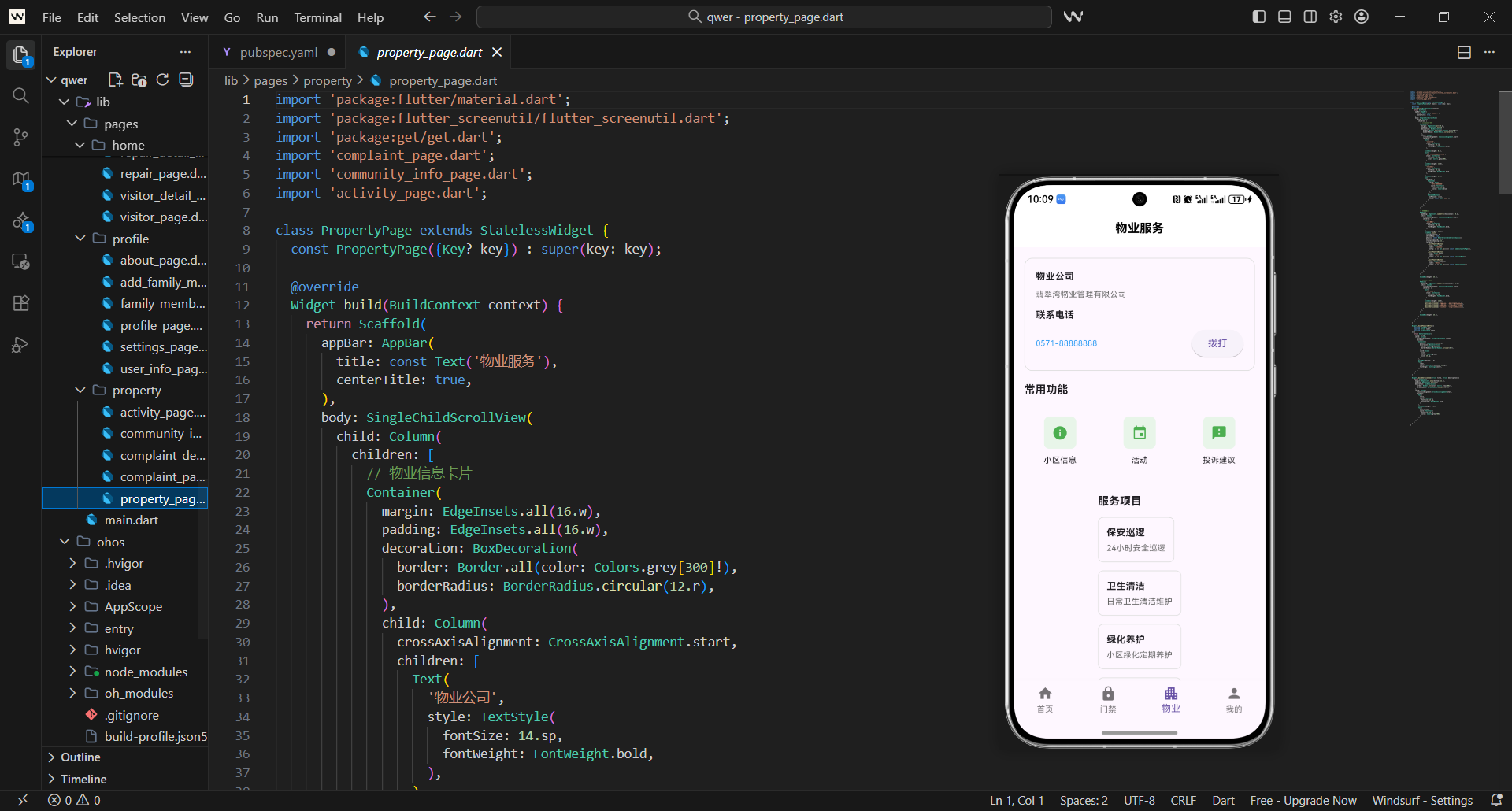
物业总览是小区管理系统中的重要功能,它为住户提供了了解物业服务、费用缴纳、报修服务、联系方式等综合信息的便捷渠道。
在实际项目中,物业总览页面需要解决几个关键问题:
- 如何集中展示物业的各项服务功能
- 如何支持费用查询和在线缴纳
- 如何提供报修服务的快速入口
- 如何展示物业公告和重要通知
这篇讲物业总览页面的实现,重点是如何让物业服务展示既全面又易于使用。
对应源码
lib/pages/property/property_page.dart
物业总览页面的设计思路是:功能集中 + 服务便捷 + 信息完整。
import 'package:flutter/material.dart';
import 'package:flutter_screenutil/flutter_screenutil.dart';
import 'package:get/get.dart';
import 'payment_page.dart';
import 'complaint_page.dart';
import 'community_info_page.dart';
import 'activity_page.dart';
class PropertyPage extends StatefulWidget {
const PropertyPage({Key? key}) : super(key: key);
State<PropertyPage> createState() => _PropertyPageState();
}
class _PropertyPageState extends State<PropertyPage> {
Map<String, dynamic> _propertyInfo = {};
List<Map<String, dynamic>> _announcements = [];
List<Map<String, dynamic>> _services = [];
bool _isLoading = false;
基础结构说明:
- 物业总览页面需要维护多种数据状态,所以用
StatefulWidget。 - 导入相关页面:缴费、投诉、社区信息、社区活动。
_propertyInfo存储物业基本信息。_announcements和_services存储公告和服务信息。
void initState() {
super.initState();
_loadPropertyData();
}
Widget build(BuildContext context) {
return Scaffold(
appBar: AppBar(
title: const Text('物业服务'),
centerTitle: true,
),
body: _isLoading
? const Center(child: CircularProgressIndicator())
: SingleChildScrollView(
padding: EdgeInsets.all(16.w),
child: Column(
children: [
// 物业信息卡片
_buildPropertyInfoCard(),
SizedBox(height: 24.h),
// 快捷服务
_buildQuickServices(),
SizedBox(height: 24.h),
// 最新公告
_buildAnnouncementsSection(),
SizedBox(height: 24.h),
// 服务入口
_buildServiceEntries(),
],
),
),
);
}
页面布局设计:
- 使用
SingleChildScrollView确保内容可滚动。 - 页面分为四个主要部分:物业信息、快捷服务、最新公告、服务入口。
- 加载状态显示进度器,提升用户体验。
- 各部分之间有适当间距,布局清晰。
  Widget _buildPropertyInfoCard() {
    return Container(
      width: double.infinity,
      padding: EdgeInsets.all(20.w),
      decoration: BoxDecoration(
        gradient: const LinearGradient(
          colors: [Color(0xFF6366F1), Color(0xFF8B5CF6)],
          begin: Alignment.topLeft,
          end: Alignment.bottomRight,
        ),
        borderRadius: BorderRadius.circular(16.r),
        boxShadow: [
          BoxShadow(
            color: Colors.indigo.withOpacity(0.3),
            blurRadius: 12.r,
            offset: Offset(0, 6.h),
          ),
        ],
      ),
      child: Column(
        crossAxisAlignment: CrossAxisAlignment.start,
        children: [
          Row(
            children: [
              Icon(
                Icons.apartment,
                color: Colors.white70,
                size: 24.sp,
              ),
              SizedBox(width: 8.w),
              Text(
                '物业服务',
                style: TextStyle(
                  color: Colors.white70,
                  fontSize: 12.sp,
                ),
              ),
            ],
          ),
          SizedBox(height: 16.h),

          Text(
            _propertyInfo['name'] ?? '翡翠湾物业',
            style: TextStyle(
              color: Colors.white,
              fontSize: 24.sp,
              fontWeight: FontWeight.bold,
            ),
          ),
          SizedBox(height: 8.h),

          Text(
            '24小时服务热线:${_propertyInfo['hotline'] ?? '400-123-4567}',
            style: TextStyle(
              color: Colors.white70,
              fontSize: 14.sp,
            ),
          ),
          SizedBox(height: 12.h),

          Row(
            children: [
              _buildInfoItem(
                icon: Icons.phone,
                label: '电话',
                value: _propertyInfo['phone'] ?? '400-123-4567',
              ),
              SizedBox(width: 24.w),
              _buildInfoItem(
                icon: Icons.email,
                label: '邮箱',
                value: _propertyInfo['email'] ?? 'property@example.com',
              ),
            ],
          ),
        ],
      ),
    );
  }
物业信息卡片:
- 靛蓝色渐变背景突出物业品牌。
- 显示物业公司名称、服务热线、电话、邮箱等信息。
- 使用
_buildInfoItem统一信息项样式。 - 信息层次清晰,便于快速联系。
  Widget _buildInfoItem({
    required IconData icon,
    required String label,
    required String value,
  }) {
    return Expanded(
      child: Row(
        children: [
          Icon(
            icon,
            color: Colors.white70,
            size: 16.sp,
          ),
          SizedBox(width: 4.w),
          Expanded(
            child: Column(
              crossAxisAlignment: CrossAxisAlignment.start,
              children: [
                Text(
                  label,
                  style: TextStyle(
                    color: Colors.white70,
                    fontSize: 10.sp,
                  ),
                ),
                Text(
                  value,
                  style: TextStyle(
                    color: Colors.white,
                    fontSize: 12.sp,
                    fontWeight: FontWeight.w500,
                  ),
                ),
              ],
            ),
          ),
        ],
      ),
    );
  }
信息项组件:
- 统一的信息项样式和布局。
- 图标、标签、值的标准排列。
- 标签使用半透明白色,值使用纯白色。
- 值使用
Expanded确保完整显示。
  Widget _buildQuickServices() {
    return Container(
      width: double.infinity,
      padding: EdgeInsets.all(20.w),
      decoration: BoxDecoration(
        color: Colors.white,
        borderRadius: BorderRadius.circular(12.r),
        boxShadow: [
          BoxShadow(
            color: Colors.grey.withOpacity(0.1),
            blurRadius: 8.r,
            offset: Offset(0, 2.h),
          ),
        ],
      ),
      child: Column(
        crossAxisAlignment: CrossAxisAlignment.start,
        children: [
          Text(
            '快捷服务',
            style: TextStyle(
              fontSize: 16.sp,
              fontWeight: FontWeight.bold,
            ),
          ),
          SizedBox(height: 16.h),

          GridView.count(
            shrinkWrap: true,
            physics: const NeverScrollableScrollPhysics(),
            crossAxisCount: 4,
            crossAxisSpacing: 12.w,
            mainAxisSpacing: 12.h,
            childAspectRatio: 1,
            children: [
              _buildServiceCard(
                icon: Icons.payment,
                title: '物业缴费',
                color: Colors.green,
                onTap: () => Get.to(() => const PaymentPage()),
              ),
              _buildServiceCard(
                icon: Icons.build,
                title: '在线报修',
                color: Colors.orange,
                onTap: () => Get.to(() => const ComplaintPage()),
              ),
              _buildServiceCard(
                icon: Icons.announcement,
                title: '社区公告',
                color: Colors.blue,
                onTap: () => Get.to(() => const CommunityInfoPage()),
              ),
              _buildServiceCard(
                icon: Icons.event,
                title: '社区活动',
                color: Colors.purple,
                onTap: () => Get.to(() => const ActivityPage()),
              ),
            ],
          ),
        ],
      ),
    );
  }
快捷服务区域:
- 4列网格布局展示常用服务。
- 包含物业缴费、在线报修、社区公告、社区活动。
- 使用
_buildServiceCard统一服务卡片样式。 - 网格布局充分利用屏幕空间。
  Widget _buildServiceCard({
    required IconData icon,
    required String title,
    required Color color,
    required VoidCallback onTap,
  }) {
    return GestureDetector(
      onTap: onTap,
      child: Container(
        decoration: BoxDecoration(
          color: color.withOpacity(0.1),
          borderRadius: BorderRadius.circular(8.r),
          border: Border.all(color: color.withOpacity(0.3)),
        ),
        child: Column(
          mainAxisAlignment: MainAxisAlignment.center,
          children: [
            Icon(
              icon,
              color: color,
              size: 24.sp,
            ),
            SizedBox(height: 8.h),
            Text(
              title,
              style: TextStyle(
                fontSize: 12.sp,
                color: color,
                fontWeight: FontWeight.w500,
              ),
              textAlign: TextAlign.center,
            ),
          ],
        ),
      ),
    );
  }
服务卡片组件:
- 彩色背景和边框的服务卡片设计。
- 图标、标题的垂直布局,居中对齐。
- 不同服务使用不同颜色区分。
- 点击触发相应的页面跳转。
  Widget _buildAnnouncementsSection() {
    return Container(
      width: double.infinity,
      padding: EdgeInsets.all(20.w),
      decoration: BoxDecoration(
        color: Colors.white,
        borderRadius: BorderRadius.circular(12.r),
        boxShadow: [
          BoxShadow(
            color: Colors.grey.withOpacity(0.1),
            blurRadius: 8.r,
            offset: Offset(0, 2.h),
          ),
        ],
      ),
      child: Column(
        crossAxisAlignment: CrossAxisAlignment.start,
        children: [
          Row(
            mainAxisAlignment: MainAxisAlignment.spaceBetween,
            children: [
              Text(
                '最新公告',
                style: TextStyle(
                  fontSize: 16.sp,
                  fontWeight: FontWeight.bold,
                ),
              ),
              TextButton(
                onPressed: () => _viewAllAnnouncements(),
                child: const Text('查看全部'),
              ),
            ],
          ),
          SizedBox(height: 16.h),

          if (_announcements.isEmpty)
            Container(
              width: double.infinity,
              padding: EdgeInsets.all(16.w),
              decoration: BoxDecoration(
                color: Colors.grey[50],
                borderRadius: BorderRadius.circular(8.r),
              ),
              child: Text(
                '暂无公告信息',
                style: TextStyle(
                  fontSize: 12.sp,
                  color: Colors.grey[600],
                ),
                textAlign: TextAlign.center,
              ),
            )
          else
            ..._announcements.take(3).map((announcement) => _buildAnnouncementItem(announcement)).toList(),
        ],
      ),
    );
  }
最新公告区域:
- 显示最新的3条公告信息。
- 右侧查看全部按钮,便于查看更多。
- 空状态显示暂无公告的提示。
- 使用
_buildAnnouncementItem构建公告项。
  Widget _buildAnnouncementItem(Map<String, dynamic> announcement) {
    return Container(
      margin: EdgeInsets.only(bottom: 12.h),
      padding: EdgeInsets.all(16.w),
      decoration: BoxDecoration(
        color: Colors.blue[50],
        borderRadius: BorderRadius.circular(8.r),
        border: Border.all(color: Colors.blue[200]!),
      ),
      child: Column(
        crossAxisAlignment: CrossAxisAlignment.start,
        children: [
          Row(
            mainAxisAlignment: MainAxisAlignment.spaceBetween,
            children: [
              Expanded(
                child: Text(
                  announcement['title'],
                  style: TextStyle(
                    fontSize: 14.sp,
                    fontWeight: FontWeight.bold,
                    color: Colors.blue[700],
                  ),
                  maxLines: 1,
                  overflow: TextOverflow.ellipsis,
                ),
              ),
              Container(
                padding: EdgeInsets.symmetric(
                  horizontal: 6.w,
                  vertical: 2.h,
                ),
                decoration: BoxDecoration(
                  color: _getAnnouncementTypeColor(announcement['type']),
                  borderRadius: BorderRadius.circular(8.r),
                ),
                child: Text(
                  _getAnnouncementTypeText(announcement['type']),
                  style: TextStyle(
                    fontSize: 10.sp,
                    color: Colors.white,
                  ),
                ),
              ),
            ],
          ),
          SizedBox(height: 8.h),

          Text(
            announcement['content'],
            style: TextStyle(
              fontSize: 12.sp,
              color: Colors.grey[700],
            ),
            maxLines: 2,
            overflow: TextOverflow.ellipsis,
          ),
          SizedBox(height: 8.h),

          Text(
            announcement['publishTime'],
            style: TextStyle(
              fontSize: 10.sp,
              color: Colors.grey[500],
            ),
          ),
        ],
      ),
    );
  }
公告项组件:
- 蓝色背景的公告卡片,与快捷服务区分。
- 显示公告标题、类型标签、内容、发布时间。
- 类型标签使用不同颜色区分公告重要性。
- 内容最多显示2行,超出部分省略。
  Color _getAnnouncementTypeColor(String type) {
    switch (type) {
      case 'important':
        return Colors.red;
      case 'notice':
        return Colors.blue;
      case 'activity':
        return Colors.green;
      default:
        return Colors.grey;
    }
  }

  String _getAnnouncementTypeText(String type) {
    switch (type) {
      case 'important':
        return '重要';
      case 'notice':
        return '通知';
      case 'activity':
        return '活动';
      default:
        return '其他';
    }
  }
公告类型处理:
_getAnnouncementTypeColor获取类型对应的颜色。_getAnnouncementTypeText获取类型的中文文本。- 重要(红色)、通知(蓝色)、活动(绿色)。
  Widget _buildServiceEntries() {
    return Container(
      width: double.infinity,
      padding: EdgeInsets.all(20.w),
      decoration: BoxDecoration(
        color: Colors.white,
        borderRadius: BorderRadius.circular(12.r),
        boxShadow: [
          BoxShadow(
            color: Colors.grey.withOpacity(0.1),
            blurRadius: 8.r,
            offset: Offset(0, 2.h),
          ),
        ],
      ),
      child: Column(
        crossAxisAlignment: CrossAxisAlignment.start,
        children: [
          Text(
            '服务入口',
            style: TextStyle(
              fontSize: 16.sp,
              fontWeight: FontWeight.bold,
            ),
          ),
          SizedBox(height: 16.h),

          ..._services.map((service) => _buildServiceEntry(service)).toList(),
        ],
      ),
    );
  }
服务入口区域:
- 显示更多物业服务的入口。
- 使用
_buildServiceEntry构建服务入口项。 - 垂直排列,信息展示清晰。
- 为用户提供全面的服务访问渠道。
  Widget _buildServiceEntry(Map<String, dynamic> service) {
    return Container(
      margin: EdgeInsets.only(bottom: 16.h),
      padding: EdgeInsets.all(16.w),
      decoration: BoxDecoration(
        color: Colors.grey[50],
        borderRadius: BorderRadius.circular(8.r),
        border: Border.all(color: Colors.grey[200]!),
      ),
      child: Row(
        children: [
          Container(
            width: 40.w,
            height: 40.w,
            decoration: BoxDecoration(
              color: Colors.white,
              borderRadius: BorderRadius.circular(8.r),
            ),
            child: Icon(
              _getServiceIcon(service['type']),
              color: Colors.blue,
              size: 20.sp,
            ),
          ),
          SizedBox(width: 12.w),
          Expanded(
            child: Column(
              crossAxisAlignment: CrossAxisAlignment.start,
              children: [
                Text(
                  service['name'],
                  style: TextStyle(
                    fontSize: 14.sp,
                    fontWeight: FontWeight.w500,
                  ),
                ),
                SizedBox(height: 4.h),
                Text(
                  service['description'],
                  style: TextStyle(
                    fontSize: 12.sp,
                    color: Colors.grey[600],
                  ),
                ),
              ],
            ),
          ),
          Icon(
            Icons.chevron_right,
            color: Colors.grey[400],
            size: 20.sp,
          ),
        ],
      ),
    );
  }
服务入口组件:
- 灰色背景的服务入口项设计。
- 图标、名称、描述的标准布局。
- 右侧箭头指示可点击进入。
- 整体设计简洁专业。
  IconData _getServiceIcon(String type) {
    switch (type) {
      case 'repair':
        return Icons.build;
      case 'cleaning':
        return Icons.cleaning_services;
      case 'security':
        return Icons.security;
      case 'delivery':
        return Icons.local_shipping;
      case 'parking':
        return Icons.local_parking;
      case 'mailbox':
        return Icons.mail;
      default:
        return Icons.miscellaneous_services;
    }
  }
服务图标映射:
- 根据服务类型返回对应图标。
- 支持多种服务类型:维修、清洁、安保等。
- 图标选择符合服务特征。
- 默认图标为通用服务图标。
  Future<void> _loadPropertyData() async {
    setState(() {
      _isLoading = true;
    });

    // 模拟加载物业数据
    await Future.delayed(const Duration(seconds: 1));

    final mockPropertyInfo = {
      'name': '翡翠湾物业服务有限公司',
      'hotline': '400-123-4567',
      'phone': '400-123-4567',
      'email': 'property@example.com',
    };

    final mockAnnouncements = [
      {
        'id': '1',
        'title': '春节期间物业服务安排通知',
        'type': 'important',
        'content': '春节期间,物业服务时间调整,请各位住户留意。2月10日至2月17日,客服热线服务时间为9:00-17:00。',
        'publishTime': '2024-01-20 10:00',
      },
      {
        'id': '2',
        'title': '电梯维护保养通知',
        'type': 'notice',
        'content': '为保障电梯安全运行,物业将于1月25日对3号楼电梯进行维护保养,届时将暂停使用。',
        'publishTime': '2024-01-18 14:30',
      },
      {
        'id': '3',
        'title': '社区春节联欢活动报名',
        'type': 'activity',
        'content': '春节联欢晚会将于2月8日举行,现在开始接受报名,欢迎各位住户踊跃参与。',
        'publishTime': '2024-01-15 09:00',
      },
    ];

    final mockServices = [
      {
        'type': 'repair',
        'name': '维修服务',
        'description': '24小时维修响应,专业团队上门服务',
      },
      {
        'type': 'cleaning',
        'name': '清洁服务',
        'description': '定期公共区域清洁,保持环境整洁',
      },
      {
        'type': 'security',
        'name': '安保服务',
        'description': '24小时安保巡逻,确保小区安全',
      },
      {
        'type': 'parking',
        'name': '停车管理',
        'description': '智能停车系统,便捷停车体验',
      },
    ];

    setState(() {
      _propertyInfo = mockPropertyInfo;
      _announcements = mockAnnouncements;
      _services = mockServices;
      _isLoading = false;
    });
  }
数据加载逻辑:
- 模拟异步加载物业数据。
- 包含完整的物业信息、公告列表、服务列表。
- 不同类型的公告:重要、通知、活动。
- 不同类型的服务:维修、清洁、安保、停车。
  void _viewAllAnnouncements() {
    ScaffoldMessenger.of(context).showSnackBar(
      const SnackBar(content: Text('查看全部公告功能开发中...')),
    );
  }
}
页面操作逻辑:
_viewAllAnnouncements查看全部公告(预留接口)。- 使用
SnackBar提供操作反馈。 - 实际项目中会跳转到公告详情页面。
用户体验设计
物业总览页面的用户体验重点:
- 功能集中:常用服务集中在快捷服务区域
- 信息完整:展示物业的全面联系信息
- 视觉层次:重要信息突出,次要信息弱化
- 操作便捷:一键访问各项服务功能
这些设计让物业服务获取变得简单高效。
服务整合策略
物业服务的整合考虑:
- 分类管理:按功能类型组织服务入口
- 优先级排序:常用服务放在显眼位置
- 统一入口:所有服务从物业总览进入
- 状态同步:服务状态实时更新
这些策略确保物业服务的有序管理。
欢迎加入开源鸿蒙跨平台社区:https://openharmonycrossplatform.csdn.net

开源鸿蒙跨平台开发社区汇聚开发者与厂商,共建“一次开发,多端部署”的开源生态,致力于降低跨端开发门槛,推动万物智联创新。
更多推荐
 11
11 0
0- 0


 已为社区贡献52条内容

所有评论(0)