Flutter框架适配鸿蒙:图片错误处理
在实际应用中,图片加载失败是不可避免的常见情况。可能的原因包括:网络中断、URL错误、服务器故障、权限问题、资源不存在等。良好的错误处理不仅能提升用户体验,还能帮助开发者快速定位问题。用户层面:友好的错误提示、重试机制、降级显示开发层面:错误日志、监控上报、问题追踪业务层面:备用资源、缓存策略、降级方案实践项建议原因错误提示清晰、友好的错误信息提升用户体验重试机制根据错误类型智能重试避免无效重试降
·
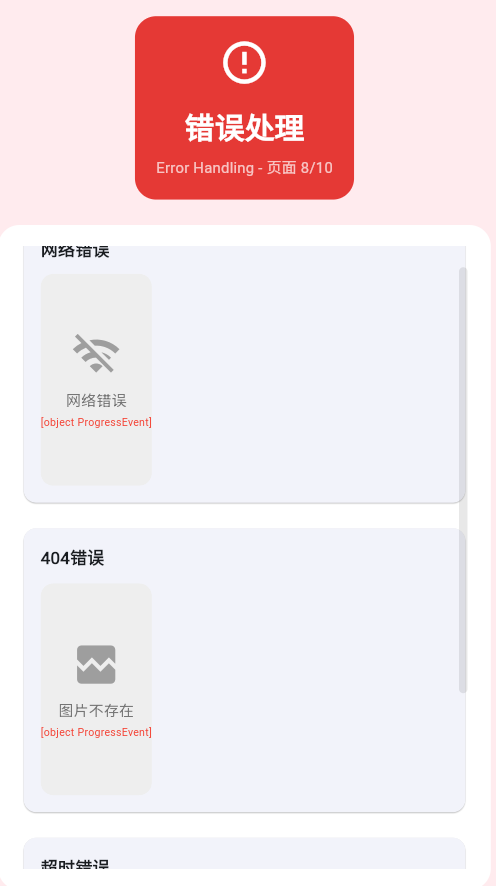
一、错误处理概述
在实际应用中,图片加载失败是不可避免的常见情况。可能的原因包括:网络中断、URL错误、服务器故障、权限问题、资源不存在等。良好的错误处理不仅能提升用户体验,还能帮助开发者快速定位问题。
图片加载失败时的错误处理涉及多个层面:
- 用户层面:友好的错误提示、重试机制、降级显示
- 开发层面:错误日志、监控上报、问题追踪
- 业务层面:备用资源、缓存策略、降级方案
错误类型分类
错误处理策略
| 错误类型 | 处理策略 | 用户体验 |
|---|---|---|
| 网络错误 | 显示离线占位图 + 重试按钮 | 指导性 |
| 资源不存在 | 显示默认图片 | 无感知 |
| 服务器错误 | 显示错误提示 + 延迟重试 | 等待性 |
| 加载超时 | 增加超时时间 + 重试 | 容错性 |
| 权限错误 | 显示权限提示 + 跳转授权 | 引导性 |
二、errorBuilder详解
errorBuilder参数说明
errorBuilder是Image组件的一个重要回调,用于处理加载失败的情况。
| 参数 | 类型 | 说明 |
|---|---|---|
| context | BuildContext | widget的构建上下文 |
| error | dynamic | 加载失败时的异常对象 |
| stackTrace | StackTrace | 堆栈跟踪信息 |
基础错误处理
Image.network(
  'https://example.com/invalid.jpg',
  errorBuilder: (context, error, stackTrace) {
    return Container(
      width: 200,
      height: 200,
      color: Colors.grey.shade300,
      child: Center(
        child: Icon(Icons.error),
      ),
    );
  },
)
获取错误详情
Image.network(
  imageUrl,
  errorBuilder: (context, error, stackTrace) {
    // 记录错误日志
    debugPrint('图片加载失败: ${error.toString()}');
    debugPrint('堆栈信息: $stackTrace');

    // 根据错误类型显示不同提示
    String errorMsg = '加载失败';
    IconData errorIcon = Icons.error;

    if (error is NetworkImageLoadException) {
      errorMsg = '网络错误';
      errorIcon = Icons.wifi_off;
    } else if (error is AssetImageLoadException) {
      errorMsg = '资源不存在';
      errorIcon = Icons.image_not_supported;
    }

    return Container(
      width: 200,
      height: 200,
      color: Colors.grey.shade300,
      child: Column(
        mainAxisAlignment: MainAxisAlignment.center,
        children: [
          Icon(errorIcon, size: 48, color: Colors.grey),
          SizedBox(height: 8),
          Text(
            errorMsg,
            style: TextStyle(color: Colors.grey.shade700),
          ),
        ],
      ),
    );
  },
)
错误日志上报
class ErrorReporting {
  static void reportImageError(String url, dynamic error, StackTrace stackTrace) {
    // 获取设备信息
    final platform = Theme.of(context).platform;
    final timestamp = DateTime.now();

    // 构建错误报告
    final errorReport = {
      'timestamp': timestamp.toIso8601String(),
      'imageUrl': url,
      'errorType': error.runtimeType.toString(),
      'errorMessage': error.toString(),
      'platform': platform,
    };

    // 发送到错误监控服务(示例)
    _sendToErrorMonitoring(errorReport);

    // 本地记录
    debugPrint('[Image Error] ${errorReport.toString()}');
  }

  static void _sendToErrorMonitoring(Map<String, dynamic> report) {
    // 实际项目中这里会调用Crashlytics等SDK
    // FirebaseCrashlytics.instance.recordError(
    //   report['errorMessage'],
    //   StackTrace.current,
    //   information: report,
    // );
  }
}

// 使用
Image.network(
  imageUrl,
  errorBuilder: (context, error, stackTrace) {
    ErrorReporting.reportImageError(imageUrl, error, stackTrace);
    return _buildErrorWidget();
  },
)
三、常见错误类型详解
网络错误
网络错误是最常见的图片加载错误,包括连接超时、DNS解析失败、服务器无响应等情况。
Image.network(
  'https://example.com/invalid.jpg',
  errorBuilder: (context, error, stackTrace) {
    // 判断错误类型
    if (error is SocketException) {
      return _buildErrorWidget('网络连接失败', Icons.wifi_off);
    } else if (error is HttpException) {
      return _buildErrorWidget('服务器错误', Icons.cloud_off);
    }

    return _buildErrorWidget('网络错误', Icons.wifi_off);
  },
)

Widget _buildErrorWidget(String message, IconData icon) {
  return Container(
    width: 200,
    height: 200,
    color: Colors.grey.shade300,
    child: Column(
      mainAxisAlignment: MainAxisAlignment.center,
      children: [
        Icon(icon, size: 48, color: Colors.grey),
        SizedBox(height: 8),
        Text(message, style: TextStyle(color: Colors.grey)),
      ],
    ),
  );
}
HTTP状态码错误处理
Image.network(
  imageUrl,
  errorBuilder: (context, error, stackTrace) {
    if (error is HttpException) {
      final statusCode = error.message?.hashCode ?? 0;

      switch (statusCode) {
        case 404:
          return _buildErrorWidget('图片不存在', Icons.broken_image);
        case 401:
          return _buildErrorWidget('未授权', Icons.lock);
        case 403:
          return _buildErrorWidget('访问被拒绝', Icons.block);
        case 500:
          return _buildErrorWidget('服务器错误', Icons.error_outline);
        default:
          return _buildErrorWidget('加载失败', Icons.error);
      }
    }

    return _buildErrorWidget('未知错误', Icons.error_outline);
  },
)
资源不存在
本地资源文件不存在时,需要提供合适的降级方案。
Image.asset(
  'assets/not-exist.png',
  errorBuilder: (context, error, stackTrace) {
    // 记录资源缺失
    debugPrint('资源文件缺失: ${error.toString()}');

    // 返回占位图或默认图标
    return Container(
      width: 200,
      height: 200,
      decoration: BoxDecoration(
        color: Colors.grey.shade200,
        borderRadius: BorderRadius.circular(8),
      ),
      child: Column(
        mainAxisAlignment: MainAxisAlignment.center,
        children: [
          Icon(Icons.image_not_supported, size: 48, color: Colors.grey),
          SizedBox(height: 8),
          Text('资源不存在', style: TextStyle(color: Colors.grey)),
        ],
      ),
    );
  },
)
超时处理
class TimeoutImage extends StatefulWidget {
final String url;
final Duration timeout;
const TimeoutImage({
super.key,
required this.url,
this.timeout = const Duration(seconds: 10),
});
State<TimeoutImage> createState() => _TimeoutImageState();
}
class _TimeoutImageState extends State<TimeoutImage> {
bool _isTimeout = false;
void initState() {
super.initState();
// 设置超时检测
Future.delayed(widget.timeout, () {
if (mounted) {
setState(() {
_isTimeout = true;
});
}
});
}
Widget build(BuildContext context) {
return Image.network(
widget.url,
errorBuilder: (context, error, stackTrace) {
if (_isTimeout) {
return _buildErrorWidget('加载超时', Icons.timer_off');
}
return _buildErrorWidget('加载失败', Icons.error);
},
);
}
Widget _buildErrorWidget(String message, IconData icon) {
return Container(
width: 200,
height: 200,
color: Colors.grey.shade300,
child: Column(
mainAxisAlignment: MainAxisAlignment.center,
children: [
Icon(icon, size: 48, color: Colors.grey),
SizedBox(height: 8),
Text(message, style: TextStyle(color: Colors.grey)),
],
),
);
}
}
四、重试机制详解
基础重试功能
class RetryableImage extends StatefulWidget {
final String imageUrl;
final int maxRetries;
const RetryableImage({
super.key,
required this.imageUrl,
this.maxRetries = 3,
});
State<RetryableImage> createState() => _RetryableImageState();
}
class _RetryableImageState extends State<RetryableImage> {
int _retryCount = 0;
bool _isLoading = false;
Widget build(BuildContext context) {
return _isLoading
? Center(child: CircularProgressIndicator())
: Image.network(
widget.imageUrl,
errorBuilder: (context, error, stackTrace) {
if (_retryCount >= widget.maxRetries) {
return _buildFinalError();
}
return GestureDetector(
onTap: () {
setState(() {
_retryCount++;
_isLoading = true;
});
// 模拟延迟后重试
Future.delayed(Duration(milliseconds: 500), () {
if (mounted) {
setState(() {
_isLoading = false;
});
}
});
},
child: Container(
width: 200,
height: 200,
color: Colors.grey.shade300,
child: Column(
mainAxisAlignment: MainAxisAlignment.center,
children: [
Icon(Icons.refresh, size: 48),
SizedBox(height: 8),
Text('点击重试 ($_retryCount/${widget.maxRetries})'),
],
),
),
);
},
);
}
Widget _buildFinalError() {
return Container(
width: 200,
height: 200,
color: Colors.red.shade50,
child: Column(
mainAxisAlignment: MainAxisAlignment.center,
children: [
Icon(Icons.error_outline, size: 48, color: Colors.red),
SizedBox(height: 8),
Text('加载失败', style: TextStyle(color: Colors.red)),
Text('已达到最大重试次数', style: TextStyle(fontSize: 12)),
],
),
);
}
}
自动重试机制
class AutoRetryImage extends StatefulWidget {
final String imageUrl;
final int maxRetries;
final Duration retryDelay;
const AutoRetryImage({
super.key,
required this.imageUrl,
this.maxRetries = 3,
this.retryDelay = const Duration(seconds: 2),
});
State<AutoRetryImage> createState() => _AutoRetryImageState();
}
class _AutoRetryImageState extends State<AutoRetryImage> {
int _retryCount = 0;
Timer? _retryTimer;
bool _isLoading = false;
void dispose() {
_retryTimer?.cancel();
super.dispose();
}
void _scheduleRetry() {
if (_retryCount >= widget.maxRetries) return;
_retryTimer?.cancel();
_retryTimer = Timer(widget.retryDelay, () {
if (mounted) {
setState(() {
_retryCount++;
});
}
});
}
Widget build(BuildContext context) {
return Image.network(
'${widget.imageUrl}?retry=$_retryCount', // 添加参数避免缓存
errorBuilder: (context, error, stackTrace) {
if (_retryCount >= widget.maxRetries) {
return _buildFinalError();
}
// 首次失败时自动开始重试倒计时
if (_retryCount == 0) {
_scheduleRetry();
}
final remainingTime = widget.maxRetries - _retryCount;
return Container(
width: 200,
height: 200,
color: Colors.orange.shade50,
child: Column(
mainAxisAlignment: MainAxisAlignment.center,
children: [
CircularProgressIndicator(),
SizedBox(height: 16),
Text('自动重试中...'),
Text('剩余次数: $remainingTime'),
],
),
);
},
);
}
Widget _buildFinalError() {
return Container(
width: 200,
height: 200,
color: Colors.red.shade50,
child: Column(
mainAxisAlignment: MainAxisAlignment.center,
children: [
Icon(Icons.error_outline, size: 48, color: Colors.red),
SizedBox(height: 8),
Text('加载失败', style: TextStyle(color: Colors.red)),
],
),
);
}
}
智能重试策略
class SmartRetryImage extends StatefulWidget {
final String imageUrl;
const SmartRetryImage({super.key, required this.imageUrl});
State<SmartRetryImage> createState() => _SmartRetryImageState();
}
class _SmartRetryImageState extends State<SmartRetryImage> {
int _retryCount = 0;
bool _isLoading = false;
// 指数退避策略:每次重试间隔加倍
Duration get _retryDelay => Duration(seconds: 2 << _retryCount);
Widget build(BuildContext context) {
return Image.network(
widget.imageUrl,
errorBuilder: (context, error, stackTrace) {
// 根据错误类型决定是否重试
if (!_shouldRetry(error)) {
return _buildNonRetryableError(error);
}
if (_retryCount >= 5) {
return _buildMaxRetriesError();
}
return _buildRetryableError(error);
},
);
}
bool _shouldRetry(dynamic error) {
// 某些错误不适合重试
if (error is HttpException) {
final statusCode = error.message.hashCode; // 简化示例
if (statusCode == 404 || statusCode == 403 || statusCode == 401) {
return false;
}
}
return true;
}
Widget _buildNonRetryableError(dynamic error) {
return Container(
width: 200,
height: 200,
color: Colors.grey.shade300,
child: Column(
mainAxisAlignment: MainAxisAlignment.center,
children: [
Icon(Icons.block, size: 48, color: Colors.grey),
SizedBox(height: 8),
Text('无法加载'),
],
),
);
}
Widget _buildMaxRetriesError() {
return Container(
width: 200,
height: 200,
color: Colors.red.shade50,
child: Column(
mainAxisAlignment: MainAxisAlignment.center,
children: [
Icon(Icons.error_outline, size: 48, color: Colors.red),
SizedBox(height: 8),
Text('重试次数已达上限'),
],
),
);
}
Widget _buildRetryableError(dynamic error) {
return GestureDetector(
onTap: () {
setState(() {
_retryCount++;
_isLoading = true;
});
Future.delayed(Duration(milliseconds: 500), () {
if (mounted) {
setState(() {
_isLoading = false;
});
}
});
},
child: Container(
width: 200,
height: 200,
color: Colors.orange.shade50,
child: Column(
mainAxisAlignment: MainAxisAlignment.center,
children: [
_isLoading
? SizedBox(
width: 24,
height: 24,
child: CircularProgressIndicator(strokeWidth: 2),
)
: Icon(Icons.refresh, size: 48),
SizedBox(height: 8),
Text('点击重试'),
Text('${_retryCount + 1}/5',
style: TextStyle(fontSize: 12, color: Colors.grey)),
],
),
),
);
}
}
五、完整示例代码
class ImageErrorExample extends StatelessWidget {
const ImageErrorExample({super.key});
Widget build(BuildContext context) {
return Scaffold(
appBar: AppBar(title: Text('图片错误处理演示')),
body: DefaultTabController(
length: 3,
child: Column(
children: [
TabBar(
tabs: [
Tab(text: '错误类型'),
Tab(text: '重试机制'),
Tab(text: '综合处理'),
],
),
Expanded(
child: TabBarView(
children: [
_buildErrorTypes(),
_buildRetryMechanisms(),
_buildComprehensiveHandling(),
],
),
),
],
),
),
);
}
Widget _buildErrorTypes() {
return ListView(
padding: EdgeInsets.all(16),
children: [
_buildErrorCard(
'网络错误',
Icons.wifi_off,
'https://example.com/invalid.jpg',
(context, error, stackTrace) {
return Container(
height: 150,
color: Colors.grey.shade300,
child: Center(
child: Column(
mainAxisAlignment: MainAxisAlignment.center,
children: [
Icon(Icons.wifi_off, color: Colors.grey, size: 48),
SizedBox(height: 8),
Text('网络错误'),
],
),
),
);
},
),
SizedBox(height: 16),
_buildErrorCard(
'资源错误',
Icons.image_not_supported,
'assets/not-exist.png',
(context, error, stackTrace) {
return Container(
height: 150,
color: Colors.grey.shade300,
child: Center(
child: Column(
mainAxisAlignment: MainAxisAlignment.center,
children: [
Icon(Icons.image_not_supported, color: Colors.grey, size: 48),
SizedBox(height: 8),
Text('资源不存在'),
],
),
),
);
},
),
SizedBox(height: 16),
_buildErrorCard(
'服务器错误',
Icons.cloud_off,
'https://httpstat.us/500',
(context, error, stackTrace) {
return Container(
height: 150,
color: Colors.red.shade50,
child: Center(
child: Column(
mainAxisAlignment: MainAxisAlignment.center,
children: [
Icon(Icons.cloud_off, color: Colors.red, size: 48),
SizedBox(height: 8),
Text('服务器错误'),
],
),
),
);
},
),
],
);
}
Widget _buildRetryMechanisms() {
return ListView(
padding: EdgeInsets.all(16),
children: [
Card(
child: Padding(
padding: EdgeInsets.all(16),
child: Column(
crossAxisAlignment: CrossAxisAlignment.start,
children: [
Text(
'手动重试',
style: TextStyle(fontSize: 18, fontWeight: FontWeight.bold),
),
SizedBox(height: 12),
RetryableImage(
imageUrl: 'https://example.com/invalid.jpg',
maxRetries: 3,
),
],
),
),
),
SizedBox(height: 16),
Card(
child: Padding(
padding: EdgeInsets.all(16),
child: Column(
crossAxisAlignment: CrossAxisAlignment.start,
children: [
Text(
'自动重试',
style: TextStyle(fontSize: 18, fontWeight: FontWeight.bold),
),
SizedBox(height: 12),
AutoRetryImage(
imageUrl: 'https://example.com/invalid.jpg',
maxRetries: 3,
retryDelay: Duration(seconds: 2),
),
],
),
),
),
],
);
}
Widget _buildComprehensiveHandling() {
return ListView(
padding: EdgeInsets.all(16),
children: [
Card(
child: Padding(
padding: EdgeInsets.all(16),
child: Column(
crossAxisAlignment: CrossAxisAlignment.start,
children: [
Text(
'综合错误处理',
style: TextStyle(fontSize: 18, fontWeight: FontWeight.bold),
),
SizedBox(height: 12),
SmartRetryImage(
imageUrl: 'https://example.com/invalid.jpg',
),
SizedBox(height: 16),
Text(
'这个组件会根据错误类型智能决定是否重试,使用指数退避策略,并提供清晰的用户反馈。',
style: TextStyle(color: Colors.grey.shade600),
),
],
),
),
),
SizedBox(height: 16),
Card(
child: Padding(
padding: EdgeInsets.all(16),
child: Column(
crossAxisAlignment: CrossAxisAlignment.start,
children: [
Text(
'降级处理示例',
style: TextStyle(fontSize: 18, fontWeight: FontWeight.bold),
),
SizedBox(height: 12),
Image.network(
'https://example.com/invalid.jpg',
width: 200,
height: 200,
fit: BoxFit.cover,
errorBuilder: (context, error, stackTrace) {
// 尝试加载备用图片
return Image.network(
'https://via.placeholder.com/200',
width: 200,
height: 200,
fit: BoxFit.cover,
errorBuilder: (context, error, stackTrace) {
// 最终降级到占位图
return Container(
width: 200,
height: 200,
decoration: BoxDecoration(
color: Colors.grey.shade300,
borderRadius: BorderRadius.circular(8),
),
child: Icon(
Icons.broken_image,
size: 64,
color: Colors.grey,
),
);
},
);
},
),
],
),
),
),
],
);
}
Widget _buildErrorCard(
String title,
IconData icon,
String imageUrl,
ImageErrorWidgetBuilder errorBuilder,
) {
return Card(
elevation: 2,
child: Padding(
padding: EdgeInsets.all(16),
child: Column(
crossAxisAlignment: CrossAxisAlignment.start,
children: [
Row(
children: [
Icon(icon),
SizedBox(width: 8),
Text(
title,
style: TextStyle(fontSize: 16, fontWeight: FontWeight.bold),
),
],
),
SizedBox(height: 12),
imageUrl.startsWith('http')
? Image.network(
imageUrl,
errorBuilder: errorBuilder,
)
: Image.asset(
imageUrl,
errorBuilder: errorBuilder,
),
],
),
),
);
}
}
六、降级方案与备用资源
多级降级策略
class FallbackImage extends StatelessWidget {
final String primaryUrl;
final String? fallbackUrl;
final Widget placeholder;
const FallbackImage({
super.key,
required this.primaryUrl,
this.fallbackUrl,
required this.placeholder,
});
Widget build(BuildContext context) {
return Image.network(
primaryUrl,
errorBuilder: (context, error, stackTrace) {
// 第一级:尝试备用URL
if (fallbackUrl != null) {
return Image.network(
fallbackUrl!,
errorBuilder: (context, error, stackTrace) {
// 第二级:显示占位图
return placeholder;
},
);
}
// 直接显示占位图
return placeholder;
},
);
}
}
// 使用示例
FallbackImage(
primaryUrl: 'https://example.com/high-res.jpg',
fallbackUrl: 'https://example.com/low-res.jpg',
placeholder: Container(
width: 200,
height: 200,
color: Colors.grey.shade200,
child: Icon(Icons.image),
),
)
本地缓存降级
class CachedFallbackImage extends StatefulWidget {
final String imageUrl;
final String cacheKey;
const CachedFallbackImage({
super.key,
required this.imageUrl,
required this.cacheKey,
});
State<CachedFallbackImage> createState() => _CachedFallbackImageState();
}
class _CachedFallbackImageState extends State<CachedFallbackImage> {
Uint8List? _cachedImage;
void initState() {
super.initState();
_loadCachedImage();
}
Future<void> _loadCachedImage() async {
// 从SharedPreferences读取缓存
final prefs = await SharedPreferences.getInstance();
final imageData = prefs.getString('image_${widget.cacheKey}');
if (imageData != null) {
setState(() {
_cachedImage = base64Decode(imageData);
});
}
}
Future<void> _saveToCache(Uint8List imageData) async {
final prefs = await SharedPreferences.getInstance();
await prefs.setString(
'image_${widget.cacheKey}',
base64Encode(imageData),
);
}
Widget build(BuildContext context) {
return Image.network(
widget.imageUrl,
loadingBuilder: (context, child, loadingProgress) {
if (loadingProgress != null && _cachedImage != null) {
// 显示缓存的图片
return Image.memory(_cachedImage!);
}
return child;
},
errorBuilder: (context, error, stackTrace) {
// 网络加载失败,使用缓存
if (_cachedImage != null) {
return Image.memory(_cachedImage!);
}
// 完全没有缓存,显示占位图
return Container(
width: 200,
height: 200,
color: Colors.grey.shade200,
child: Icon(Icons.image_not_supported),
);
},
);
}
}
七、监控与日志
错误统计
class ImageErrorMonitor {
  static final Map<String, int> _errorCounts = {};

  static void logError(String url, dynamic error) {
    final errorType = error.runtimeType.toString();
    _errorCounts[errorType] = (_errorCounts[errorType] ?? 0) + 1;

    // 打印统计信息
    debugPrint('=== 图片错误统计 ===');
    _errorCounts.forEach((type, count) {
      debugPrint('$type: $count 次');
    });
  }

  static Map<String, int> getErrorStats() {
    return Map.from(_errorCounts);
  }
}

// 使用
Image.network(
  imageUrl,
  errorBuilder: (context, error, stackTrace) {
    ImageErrorMonitor.logError(imageUrl, error);
    return _buildErrorWidget();
  },
)
性能监控
class ImagePerformanceTracker {
  static final Map<String, DateTime> _loadStartTimes = {};

  static void startLoad(String url) {
    _loadStartTimes[url] = DateTime.now();
  }

  static void endLoad(String url, bool success) {
    final startTime = _loadStartTimes[url];
    if (startTime != null) {
      final duration = DateTime.now().difference(startTime);
      debugPrint('图片加载 ${success ? "成功" : "失败"}: $url');
      debugPrint('耗时: ${duration.inMilliseconds}ms');

      _loadStartTimes.remove(url);
    }
  }
}

// 使用
Image.network(
  imageUrl,
  loadingBuilder: (context, child, loadingProgress) {
    if (loadingProgress == null) {
      ImagePerformanceTracker.endLoad(imageUrl, true);
      return child;
    } else if (_loadStartTimes[imageUrl] == null) {
      ImagePerformanceTracker.startLoad(imageUrl);
    }
    return CircularProgressIndicator();
  },
  errorBuilder: (context, error, stackTrace) {
    ImagePerformanceTracker.endLoad(imageUrl, false);
    return _buildErrorWidget();
  },
)
八、最佳实践总结
| 实践项 | 建议 | 原因 |
|---|---|---|
| 错误提示 | 清晰、友好的错误信息 | 提升用户体验 |
| 重试机制 | 根据错误类型智能重试 | 避免无效重试 |
| 降级方案 | 准备备用资源 | 保证功能可用性 |
| 日志记录 | 详细记录错误信息 | 便于问题排查 |
| 监控上报 | 集成错误监控服务 | 及时发现问题 |
| 缓存策略 | 合理使用缓存 | 减少重复错误 |
| 超时处理 | 设置合理的超时时间 | 避免长时间等待 |
| 网络检测 | 提前检测网络状态 | 及时提示用户 |
欢迎加入开源鸿蒙跨平台社区:https://openharmonycrossplatform.csdn.net

开源鸿蒙跨平台开发社区汇聚开发者与厂商,共建“一次开发,多端部署”的开源生态,致力于降低跨端开发门槛,推动万物智联创新。
更多推荐
 11
11 0
0- 0


 已为社区贡献15条内容

所有评论(0)