Flutter框架跨平台鸿蒙开发——HarmonyOS API调用
HarmonyOS提供丰富的系统API,Flutter通过Platform Channel可以调用这些API。fill:#333;important;important;fill:none;color:#333;color:#333;important;fill:none;fill:#333;height:1em;调用调用调用返回返回返回结果Flutter系统API能力APIKit API|| A
一、API概述
HarmonyOS提供丰富的系统API,Flutter通过Platform Channel可以调用这些API。
| API类型 | 说明 | 示例 |
|---|---|---|
| 系统API | 核心系统功能 | 设备信息、网络 |
| 能力API | 特定领域能力 | 传感器、定位 |
| Kit API | 高级功能封装 | UI Kit、网络Kit |
1.1 API分类
系统API提供基础系统功能,如设备信息、网络状态。能力API提供特定领域的能力,如传感器、摄像头、定位。Kit API提供高级功能封装,如UI Kit、网络Kit。第三方API提供扩展能力,如支付、地图。
1.2 Platform Channel
MethodChannel用于方法调用通道。EventChannel用于事件监听通道。BasicMessageChannel用于消息传递通道。使用域名前缀命名避免冲突。
// 定义Channel
static const platform = MethodChannel('com.example.demo/location');

// 调用HarmonyOS方法
Future<Location> getLocation() async {
  try {
    final result = await platform.invokeMethod('getLocation');
    return Location.fromJson(result);
  } on PlatformException catch (e) {
    throw Exception('获取位置失败: ${e.message}');
  }
}
1.3 数据类型转换
null、bool、int、double、String等基本类型可以直接传递。List和Map等集合类型也可以传递。自动进行序列化/反序列化。不能传递函数、闭包等复杂类型。
| Dart类型 | HarmonyOS类型 | 说明 |
|---|---|---|
| null | null | 空值 |
| bool | boolean | 布尔值 |
| int | int | 整数 |
| double | double | 浮点数 |
| String | String | 字符串 |
| List | Array | 数组 |
| Map | Object | 对象 |
1.4 插件架构
Plugin类是Flutter端插件入口。Platform Interface是平台接口定义。HarmonyOS实现是HarmonyOS端实现。通过插件调用系统API。
1.5 权限管理
在module.json5中声明权限。运行时动态请求敏感权限。调用前检查权限状态。处理权限授予结果。
1.6 错误处理
PlatformException是平台异常类型。根据错误码区分错误。友好提示错误原因。某些错误可以重试。
try {
  final result = await platform.invokeMethod('api');
} on PlatformException catch (e) {
  switch (e.code) {
    case 'PERMISSION_DENIED':
      print('权限被拒绝');
      break;
    case 'API_NOT_AVAILABLE':
      print('API不可用');
      break;
    default:
      print('未知错误: ${e.message}');
  }
} catch (e) {
  print('其他错误: $e');
}
1.7 性能考虑
每次调用都有序列化开销。尽量批量处理减少调用次数。缓存API返回结果。使用async/await避免阻塞。
1.8 安全性
验证来自Native的数据。只申请必要权限。不在日志中输出敏感信息。发布时混淆关键代码。
二、调用流程
2.1 完整流程
Flutter端调用方法。参数序列化为可传输格式。HarmonyOS端执行API。结果反序列化返回Flutter。
2.2 方法定义
使用域名格式避免冲突。使用有意义的名称。使用自定义类封装结果。使用类型转换确保类型正确。
// Flutter端
static const platform = MethodChannel('com.example.demo/device');

Future<DeviceInfo> getDeviceInfo() async {
  final result = await platform.invokeMethod('getDeviceInfo');
  return DeviceInfo(
    model: result['model'],
    osVersion: result['osVersion'],
    apiLevel: result['apiLevel'],
  );
}
2.3 Native实现
在插件中注册方法。根据method名称分发。返回JSON格式结果。抛出异常返回错误。
// HarmonyOS端
import { MethodChannel } from '@ohos/flutter_ohos';

export class DevicePlugin {
  private static CHANNEL = 'com.example.demo/device';

  static register(flutterPlugin: FlutterPlugin) {
    flutterPlugin.registerMethodChannel(
      this.CHANNEL,
      async (call: MethodCall) => {
        if (call.method === 'getDeviceInfo') {
          return this.getDeviceInfo();
        }
        throw new Error('Method not found');
      }
    );
  }

  private static async getDeviceInfo() {
    return {
      model: 'HarmonyOS Device',
      osVersion: '4.0',
      apiLevel: 11,
    };
  }
}
2.4 参数传递
直接传递基本类型。使用Map传递多个参数。Native端需要类型转换。验证参数有效性。
// Flutter端发送参数
Future<void> setPreference(String key, String value) async {
  await platform.invokeMethod('setPreference', {
    'key': key,
    'value': value,
  });
}

// HarmonyOS端接收参数
async setPreference(call: MethodCall) {
  const { key, value } = call.arguments;
  await Preferences.put(key, value);
  return 'success';
}
2.5 返回值处理
直接返回基本类型。返回Map,转换为自定义类。返回List,转换为自定义列表。处理嵌套数据结构。
// 处理不同类型的返回值
Future<dynamic> callApi() async {
  final result = await platform.invokeMethod('api');

  if (result is Map) {
    return MyData.fromJson(result);
  } else if (result is List) {
    return result.map((e) => MyData.fromJson(e)).toList();
  } else {
    return result;
  }
}
2.6 错误返回
返回包含code和message的对象。Flutter端转换为PlatformException。根据错误码分类处理。根据错误提示用户。
// HarmonyOS端抛出错误
async getPermission() {
  const granted = await checkPermission();
  if (!granted) {
    throw {
      code: 'PERMISSION_DENIED',
      message: '权限被拒绝',
    };
  }
  return 'granted';
}

// Flutter端捕获错误
try {
  await platform.invokeMethod('getPermission');
} on PlatformException catch (e) {
  print('错误码: ${e.code}');
  print('错误信息: ${e.message}');
}
2.7 异步操作
HarmonyOS端使用async/await。可以返回Promise。Flutter端使用await等待。设置超时避免无限等待。
// HarmonyOS端异步操作
async asyncOperation() {
  await new Promise(resolve => setTimeout(resolve, 1000));
  return { result: 'done' };
}

// Flutter端等待结果
final result = await platform.invokeMethod('asyncOperation');
print('结果: ${result['result']}');
2.8 方法缓存
使用方法名和参数生成键。先检查缓存。调用后更新缓存。提供清理方法。
class CachedMethodCall {
  final Map<String, dynamic> _cache = {};
  final MethodChannel _channel;

  CachedMethodCall(this._channel);

  Future<T> call<T>(String method, dynamic args) async {
    final key = '$method:${jsonEncode(args)}';

    if (_cache.containsKey(key)) {
      return _cache[key] as T;
    }

    final result = await _channel.invokeMethod(method, args);
    _cache[key] = result;
    return result as T;
  }

  void clear() {
    _cache.clear();
  }
}
三、常用API
3.1 设备信息API
获取设备品牌、型号。获取HarmonyOS版本。获取API级别。
| 属性 | 说明 | 示例 |
|---|---|---|
| brand | 设备品牌 | Huawei |
| model | 设备型号 | Mate 60 |
| osVersion | 系统版本 | 4.0 |
| apiLevel | API级别 | 11 |
Future<DeviceInfo> getDeviceInfo() async {
  final result = await platform.invokeMethod('getDeviceInfo');
  return DeviceInfo(
    brand: result['brand'],
    model: result['model'],
    osVersion: result['osVersion'],
    apiLevel: result['apiLevel'],
    manufacturer: result['manufacturer'],
  );
}
3.2 定位服务API
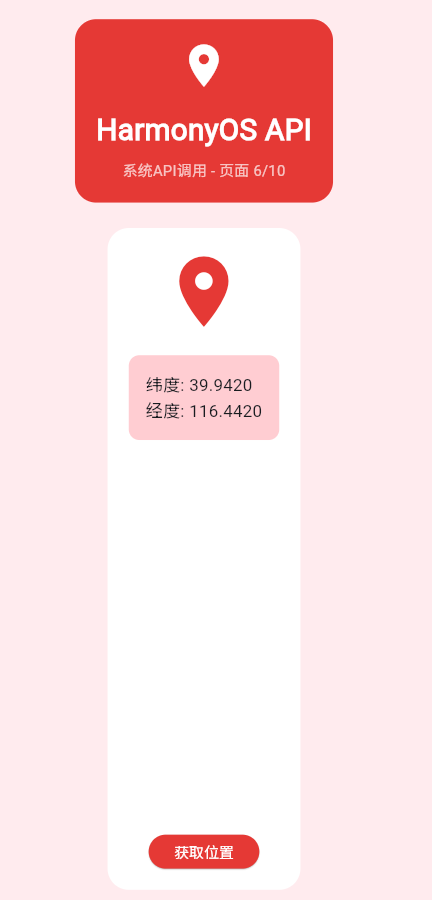
获取当前位置坐标。获取定位精度。获取定位时间。检查定位权限。
Future<Location> getCurrentLocation() async {
  try {
    final result = await platform.invokeMethod('getCurrentLocation');
    return Location(
      latitude: result['latitude'],
      longitude: result['longitude'],
      accuracy: result['accuracy'],
      timestamp: DateTime.fromMillisecondsSinceEpoch(result['timestamp']),
    );
  } on PlatformException catch (e) {
    if (e.code == 'PERMISSION_DENIED') {
      throw Exception('位置权限被拒绝');
    }
    throw Exception('获取位置失败: ${e.message}');
  }
}
3.3 网络状态API
检查网络是否连接。获取网络类型。获取WiFi名称。获取信号强度。
| 属性 | 说明 | 可能值 |
|---|---|---|
| isConnected | 是否连接 | true/false |
| type | 网络类型 | wifi/mobile/none |
| wifiName | WiFi名称 | 字符串 |
| strength | 信号强度 | 0-4 |
Future<NetworkStatus> getNetworkStatus() async {
  final result = await platform.invokeMethod('getNetworkStatus');
  return NetworkStatus(
    isConnected: result['isConnected'],
    type: NetworkType.values[result['type']],
    wifiName: result['wifiName'],
    strength: result['strength'],
  );
}
3.4 传感器API
获取加速度数据。获取旋转数据。获取环境光强度。检测物体距离。
Stream<SensorData> getAccelerometer() {
  final controller = StreamController<SensorData>();

  platform.setMethodCallHandler((call) async {
    if (call.method == 'onAccelerometerChanged') {
      final data = SensorData(
        x: call.arguments['x'],
        y: call.arguments['y'],
        z: call.arguments['z'],
        timestamp: DateTime.now(),
      );
      controller.add(data);
    }
  });

  platform.invokeMethod('startAccelerometer');

  return controller.stream;
}
3.5 摄像头API
调用摄像头拍照。录制视频。预览摄像头画面。配置摄像头参数。
Future<String> takePicture() async {
  final result = await platform.invokeMethod('takePicture');
  return result['path']; // 返回图片路径
}

Future<void> openCamera() async {
  await platform.invokeMethod('openCamera');
}
3.6 存储API
获取存储路径。读写文件内容。创建、删除目录。检查存储权限。
Future<String> getExternalStoragePath() async {
  final result = await platform.invokeMethod('getExternalStoragePath');
  return result['path'];
}

Future<String> saveFile(String path, Uint8List data) async {
  final result = await platform.invokeMethod('saveFile', {
    'path': path,
    'data': data,
  });
  return result['savedPath'];
}
3.7 通知API
显示系统通知。取消指定通知。创建通知渠道。请求通知权限。
Future<void> showNotification({
  required String title,
  required String body,
  String? icon,
}) async {
  await platform.invokeMethod('showNotification', {
    'title': title,
    'body': body,
    'icon': icon,
  });
}

Future<void> cancelNotification(int id) async {
  await platform.invokeMethod('cancelNotification', {'id': id});
}
3.8 分享API
分享文本内容。分享图片文件。分享URL链接。选择分享目标。
Future<void> shareText(String text) async {
  await platform.invokeMethod('shareText', {
    'text': text,
  });
}

Future<void> shareFile(String path) async {
  await platform.invokeMethod('shareFile', {
    'path': path,
  });
}
四、调用方式
4.1 MethodChannel
一次调用一个方法。返回Future等待结果。Flutter和Native均可发起。支持类型化参数。
// 创建MethodChannel
static const platform = MethodChannel('com.example.demo/api');

// 调用方法
Future<String> callMethod() async {
  try {
    final result = await platform.invokeMethod('methodName', {
      'param1': 'value1',
      'param2': 'value2',
    });
    return result;
  } on PlatformException catch (e) {
    print('错误: ${e.message}');
    rethrow;
  }
}
| 特性 | 说明 |
|---|---|
| 一对一 | 一次调用一个方法 |
| 异步 | 返回Future |
| 双向 | Flutter和Native均可发起 |
| 类型化 | 支持类型化参数 |
4.2 EventChannel
持续接收事件。支持多个监听者。需要及时取消订阅。处理流错误。
// 创建EventChannel
static const eventChannel = EventChannel('com.example.demo/events');

// 监听事件
StreamSubscription? _subscription;

void startListening() {
  _subscription = eventChannel.receiveBroadcastStream().listen(
    (event) {
      print('收到事件: $event');
    },
    onError: (error) {
      print('错误: $error');
    },
    onDone: () {
      print('流结束');
    },
  );
}

void stopListening() {
  _subscription?.cancel();
}
4.3 BasicMessageChannel
双向消息通信。使用StringCodec编码。设置消息处理器。可以返回回复。
// 创建BasicMessageChannel
static const messageChannel = BasicMessageChannel<String>(
  'com.example.demo/messages',
  StringCodec(),
);

// 发送消息
Future<void> sendMessage(String message) async {
  try {
    final reply = await messageChannel.send(message);
    print('回复: $reply');
  } catch (e) {
    print('发送失败: $e');
  }
}

// 接收消息
void setMessageHandler() {
  messageChannel.setMessageHandler((message) async {
    print('收到消息: $message');
    return '回复: $message';
  });
}
4.4 混合使用
MethodChannel一次性数据获取。EventChannel持续数据监听。两种方式配合使用。保持数据同步。
class HybridChannel {
  static const methodChannel = MethodChannel('com.example.demo/method');
  static const eventChannel = EventChannel('com.example.demo/event');

  // 方法调用获取数据
  Future<Data> fetchData() async {
    final result = await methodChannel.invokeMethod('fetch');
    return Data.fromJson(result);
  }

  // 事件监听数据更新
  Stream<Data> dataUpdates() {
    return eventChannel.receiveBroadcastStream().map(
      (event) => Data.fromJson(event),
    );
  }
}
4.5 批量调用
串行调用依次执行每个调用。并行调用同时执行多个调用。单个失败不影响其他。收集所有结果。
Future<List<Result>> batchCall(List<Request> requests) async {
  // 串行调用
  final results = <Result>[];
  for (final request in requests) {
    final result = await platform.invokeMethod(
      request.method,
      request.params,
    );
    results.add(Result.fromJson(result));
  }
  return results;

  // 并行调用
  final futures = requests.map((request) async {
    final result = await platform.invokeMethod(
      request.method,
      request.params,
    );
    return Result.fromJson(result);
  });
  return await Future.wait(futures);
}
4.6 调用优化
缓存调用结果。调用前检查缓存。调用后更新缓存。提供清理方法。
class OptimizedChannel {
  final MethodChannel _channel;
  final Map<String, dynamic> _cache = {};

  OptimizedChannel(this._channel);

  Future<T> callWithCache<T>(
    String method,
    dynamic params, {
    Duration? cacheDuration,
  }) async {
    final key = '$method:${jsonEncode(params)}';

    if (_cache.containsKey(key)) {
      final cached = _cache[key] as CacheEntry;
      if (!cached.isExpired(cacheDuration)) {
        return cached.value as T;
      }
    }

    final result = await _channel.invokeMethod(method, params);
    _cache[key] = CacheEntry(result);
    return result as T;
  }

  void clearCache() {
    _cache.clear();
  }
}
4.7 重试机制
设置最大重试次数。使用指数退避。只对特定错误重试。重试失败后抛出异常。
Future<T> callWithRetry<T>(
  String method,
  dynamic params, {
  int maxRetries = 3,
  Duration delay = const Duration(seconds: 1),
}) async {
  int attempt = 0;

  while (attempt < maxRetries) {
    try {
      final result = await platform.invokeMethod(method, params);
      return result as T;
    } on PlatformException catch (e) {
      attempt++;
      if (attempt >= maxRetries) {
        rethrow;
      }
      await Future.delayed(delay * attempt);
    }
  }

  throw Exception('重试失败');
}
4.8 超时控制
为调用设置超时。超时后抛出异常。友好提示超时。超时后可选择重试。
Future<T> callWithTimeout<T>(
  String method,
  dynamic params,
  Duration timeout,
) async {
  return platform
      .invokeMethod(method, params)
      .timeout(
        timeout,
        onTimeout: () {
          throw TimeoutException('调用超时');
        },
      );
}

// 使用示例
try {
  final result = await callWithTimeout(
    'fetchData',
    {},
    Duration(seconds: 5),
  );
  print('结果: $result');
} on TimeoutException catch (e) {
  print('超时: $e');
} catch (e) {
  print('错误: $e');
}
五、错误处理
5.1 错误类型
| 错误类型 | 原因 | 处理方式 |
|---|---|---|
| PlatformException | 原生方法错误 | 捕获异常并提示 |
| MissingPluginException | 插件未注册 | 检查集成配置 |
| TimeoutException | 调用超时 | 增加超时时间 |
| FormatException | 数据格式错误 | 验证数据格式 |
PlatformException是原生平台抛出的异常。MissingPluginException是插件未正确注册。TimeoutException是调用超时异常。FormatException是数据格式错误。
5.2 错误捕获
处理平台异常。处理插件缺失。处理超时异常。处理其他异常。
try {
  final result = await platform.invokeMethod('api');
} on PlatformException catch (e) {
  switch (e.code) {
    case 'PERMISSION_DENIED':
      print('权限被拒绝');
      requestPermission();
      break;
    case 'API_NOT_AVAILABLE':
      print('API不可用');
      showAlternative();
      break;
    default:
      print('未知错误: ${e.message}');
      showError(e.message);
  }
} on MissingPluginException catch (e) {
  print('插件未注册: $e');
  showPluginError();
} on TimeoutException catch (e) {
  print('调用超时: $e');
  retryCall();
} catch (e) {
  print('其他错误: $e');
  logError(e);
}
5.3 错误码
定义所有错误码。关联错误码和消息。统一错误处理逻辑。支持多语言错误消息。
class ErrorCode {
  static const String SUCCESS = '0';
  static const String PERMISSION_DENIED = '1';
  static const String API_NOT_AVAILABLE = '2';
  static const String INVALID_PARAM = '3';
  static const String TIMEOUT = '4';
  static const String UNKNOWN_ERROR = '999';

  static String getMessage(String code) {
    switch (code) {
      case SUCCESS:
        return '成功';
      case PERMISSION_DENIED:
        return '权限被拒绝';
      case API_NOT_AVAILABLE:
        return 'API不可用';
      case INVALID_PARAM:
        return '参数无效';
      case TIMEOUT:
        return '请求超时';
      default:
        return '未知错误';
    }
  }
}
5.4 错误恢复
自动重试失败操作。使用指数退避。回调通知错误。重试失败后抛出。
class ErrorHandler {
  static Future<T> handle<T>(
    Future<T> Function() operation, {
    int maxRetries = 3,
    Duration? delay,
    void Function(dynamic)? onError,
  }) async {
    int attempt = 0;

    while (attempt < maxRetries) {
      try {
        return await operation();
      } catch (e) {
        attempt++;
        onError?.call(e);

        if (attempt >= maxRetries) {
          rethrow;
        }

        await Future.delayed(delay ?? Duration(seconds: attempt));
      }
    }

    throw Exception('恢复失败');
  }
}

// 使用
final result = await ErrorHandler.handle(
  () => platform.invokeMethod('api'),
  maxRetries: 3,
  delay: Duration(seconds: 2),
  onError: (error) {
    print('错误: $error,正在重试...');
  },
);
5.5 用户提示
使用SnackBar提示错误。提供重试操作。操作成功提示。根据类型定制样式。
void showError(String message) {
  ScaffoldMessenger.of(context).showSnackBar(
    SnackBar(
      content: Text(message),
      backgroundColor: Colors.red,
      action: SnackBarAction(
        label: '重试',
        textColor: Colors.white,
        onPressed: () {
          retry();
        },
      ),
    ),
  );
}

void showSuccess(String message) {
  ScaffoldMessenger.of(context).showSnackBar(
    SnackBar(
      content: Text(message),
      backgroundColor: Colors.green,
    ),
  );
}
5.6 错误日志
记录错误和堆栈。上报到错误追踪系统。使用分析工具分析。根据错误持续改进。
class ErrorLogger {
  static void log(dynamic error, StackTrace? stackTrace) {
    print('错误: $error');
    print('堆栈: $stackTrace');

    reportError(error, stackTrace);
  }

  static void reportError(dynamic error, StackTrace? stackTrace) {
    // 上报到错误追踪系统
  }
}

// 使用
try {
  await platform.invokeMethod('api');
} catch (e, stackTrace) {
  ErrorLogger.log(e, stackTrace);
  showError('操作失败');
}
5.7 错误分类
权限错误请求必要权限。网络错误提示检查网络。参数错误修正参数后重试。超时错误增加超时或重试。
5.8 最佳实践
总是捕获异常避免崩溃。区分错误类型不同处理。提供用户反馈。记录错误日志。
六、性能优化
6.1 调用优化
减少调用次数。缓存API返回结果。并行执行减少总耗时。提前加载提升响应速度。
| 优化策略 | 方法 | 效果 |
|---|---|---|
| 批量调用 | 一次调用多个方法 | 减少序列化开销 |
| 缓存结果 | 缓存API返回结果 | 避免重复调用 |
| 异步并行 | 并行执行多个调用 | 减少总耗时 |
| 预加载 | 提前加载可能需要的API | 提升响应速度 |
6.2 减少序列化
传递ID而不是数据。批量处理数据。减少调用次数。能在Flutter端处理的不调用Native。
// 不好的做法:频繁传递大数据
Future<void> badApproach() async {
  for (var i = 0; i < 100; i++) {
    final largeData = generateLargeData();
    await platform.invokeMethod('process', largeData);
  }
}

// 好的做法:传递引用或ID
Future<void> goodApproach() async {
  final ids = <String>[];
  for (var i = 0; i < 100; i++) {
    final id = saveData(generateLargeData());
    ids.add(id);
  }

  await platform.invokeMethod('processBatch', {'ids': ids});
}
6.3 并行调用
使用Future.wait并行执行多个Future。单个失败不影响其他。统一收集所有结果。为整体设置超时。
Future<AllData> fetchAllData() async {
  final results = await Future.wait([
    fetchDeviceData(),
    fetchUserData(),
    fetchAppData(),
  ]);

  return AllData(
    device: results[0],
    user: results[1],
    app: results[2],
  );
}
6.4 缓存策略
使用唯一键标识。设置缓存有效期。提供清除方法。注意缓存大小。
class ApiCache {
  final Map<String, CacheEntry> _cache = {};

  Future<T> get<T>(String key, Future<T> Function() fetcher, {
    Duration? duration,
  }) async {
    final entry = _cache[key];

    if (entry != null && !entry.isExpired(duration)) {
      return entry.value as T;
    }

    final value = await fetcher();
    _cache[key] = CacheEntry(value);
    return value;
  }

  void clear(String key) {
    _cache.remove(key);
  }

  void clearAll() {
    _cache.clear();
  }
}

class CacheEntry {
  final dynamic value;
  final DateTime timestamp;

  CacheEntry(this.value) : timestamp = DateTime.now();

  bool isExpired(Duration? duration) {
    if (duration == null) return false;
    return DateTime.now().difference(timestamp) > duration;
  }
}
6.5 延迟加载
按需加载数据。加载中标记避免重复加载。只加载一次。减少不必要加载。
class LazyLoader {
  final MethodChannel _channel;
  final Map<String, Future<dynamic>> _loading = {};

  LazyLoader(this._channel);

  Future<T> load<T>(String key, Future<T> Function() loader) {
    if (!_loading.containsKey(key)) {
      _loading[key] = loader();
    }
    return _loading[key] as Future<T>;
  }

  Future<T> loadOnce<T>(String key, Future<T> Function() loader) async {
    if (!_loading.containsKey(key)) {
      _loading[key] = loader();
    }
    return await _loading[key] as T;
  }
}
6.6 资源复用
复用Channel对象。使用单例管理Channel。提供清理方法。减少创建开销。
class ChannelPool {
  static final Map<String, MethodChannel> _pool = {};

  static MethodChannel get(String channelName) {
    if (!_pool.containsKey(channelName)) {
      _pool[channelName] = MethodChannel(channelName);
    }
    return _pool[channelName]!;
  }

  static void clear() {
    _pool.clear();
  }
}

// 使用
final channel = ChannelPool.get('com.example.demo/api');
final result = await channel.invokeMethod('method');
6.7 监控指标
测量调用耗时。计算平均耗时。分析性能瓶颈。根据数据优化。
class PerformanceMonitor {
  static final _metrics = <String, List<int>>{};

  static void startMeasure(String name) {
    _metrics[name] = [];
  }

  static Future<T> measure<T>(
    String name,
    Future<T> Function() operation,
  ) async {
    final stopwatch = Stopwatch()..start();

    try {
      return await operation();
    } finally {
      stopwatch.stop();
      _metrics[name]!.add(stopwatch.elapsedMilliseconds);
      print('$name: ${stopwatch.elapsedMilliseconds}ms');
    }
  }

  static Map<String, int> getAverageMetrics() {
    final averages = <String, int>{};
    _metrics.forEach((name, durations) {
      if (durations.isNotEmpty) {
        final avg = durations.reduce((a, b) => a + b) / durations.length;
        averages[name] = avg.toInt();
      }
    });
    return averages;
  }
}
6.8 优化检查清单
合并多个调用为一次。缓存不变的数据。可以并行的调用使用Future.wait。减少序列化开销。按需加载数据。复用Channel等资源。设置超时时间。妥善处理错误。
| 检查项 | 说明 |
|---|---|
| 减少调用次数 | 合并多个调用为一次 |
| 使用缓存 | 缓存不变的数据 |
| 并行执行 | 可以并行的调用使用Future.wait |
| 传递小数据 | 减少序列化开销 |
| 延迟加载 | 按需加载数据 |
| 资源复用 | 复用Channel等资源 |
| 超时控制 | 避免长时间等待 |
| 错误处理 | 妥善处理错误 |
七、最佳实践
7.1 架构设计
清晰的层次结构。每层职责明确。使用依赖注入。使用接口抽象。
7.2 代码组织
定义抽象接口。各平台独立实现。提供统一访问方式。便于单元测试。
// platform_interface.dart
abstract class DeviceApiPlatform {
Future<DeviceInfo> getDeviceInfo();
static DeviceApiPlatform get instance => _instance;
static DeviceApiPlatform _instance = DeviceApiHarmonyOS();
static set instance(DeviceApiPlatform instance) {
_instance = instance;
}
}
// harmonyos.dart
class DeviceApiHarmonyOS extends DeviceApiPlatform {
static const _channel = MethodChannel('com.example.demo/device');
Future<DeviceInfo> getDeviceInfo() async {
final result = await _channel.invokeMethod('getDeviceInfo');
return DeviceInfo.fromJson(result);
}
}
7.3 命名规范
使用域名格式命名Channel。使用驼峰命名方法。使用驼峰命名参数。使用大写下划线命名常量。
| 类型 | 命名 | 示例 |
|---|---|---|
| Channel | 域名反向+功能 | com.example.demo.device |
| 方法 | 驼峰命名 | getDeviceInfo |
| 参数 | 驼峰命名 | userId |
| 常量 | 大写下划线 | MAX_RETRIES |
7.4 数据模型
使用final修饰不可变类。从JSON创建对象。转换为JSON。使用类型转换。
class DeviceInfo {
  final String brand;
  final String model;
  final String osVersion;
  final int apiLevel;

  DeviceInfo({
    required this.brand,
    required this.model,
    required this.osVersion,
    required this.apiLevel,
  });

  factory DeviceInfo.fromJson(Map<String, dynamic> json) {
    return DeviceInfo(
      brand: json['brand'] as String,
      model: json['model'] as String,
      osVersion: json['osVersion'] as String,
      apiLevel: json['apiLevel'] as int,
    );
  }

  Map<String, dynamic> toJson() {
    return {
      'brand': brand,
      'model': model,
      'osVersion': osVersion,
      'apiLevel': apiLevel,
    };
  }
}
7.5 权限处理
检查权限状态。动态请求权限。确保有权限。友好提示授权原因。
class PermissionHandler {
  static Future<bool> checkPermission(String permission) async {
    try {
      final result = await platform.invokeMethod(
        'checkPermission',
        {'permission': permission},
      );
      return result['granted'] as bool;
    } catch (e) {
      return false;
    }
  }

  static Future<bool> requestPermission(String permission) async {
    try {
      final result = await platform.invokeMethod(
        'requestPermission',
        {'permission': permission},
      );
      return result['granted'] as bool;
    } catch (e) {
      return false;
    }
  }

  static Future<bool> ensurePermission(String permission) async {
    if (await checkPermission(permission)) {
      return true;
    }
    return await requestPermission(permission);
  }
}
7.6 日志记录
使用统一标签。记录方法调用。记录返回结果。记录错误信息。
class ApiLogger {
  static const String _tag = 'PlatformAPI';

  static void log(String method, dynamic params) {
    print('[$_tag] 调用方法: $method');
    print('[$_tag] 参数: $params');
  }

  static void logResult(String method, dynamic result) {
    print('[$_tag] 方法返回: $method');
    print('[$_tag] 结果: $result');
  }

  static void logError(String method, dynamic error) {
    print('[$_tag] 方法错误: $method');
    print('[$_tag] 错误: $error');
  }
}

// 使用
ApiLogger.log('getDeviceInfo', {});
try {
  final result = await platform.invokeMethod('getDeviceInfo');
  ApiLogger.logResult('getDeviceInfo', result);
} catch (e) {
  ApiLogger.logError('getDeviceInfo', e);
}
7.7 测试策略
创建Mock实现。测试业务逻辑。测试完整流程。各平台独立测试。
class MockDeviceApi extends DeviceApiPlatform {
Future<DeviceInfo> getDeviceInfo() async {
return DeviceInfo(
brand: 'Mock Brand',
model: 'Mock Model',
osVersion: '4.0',
apiLevel: 11,
);
}
}
void main() {
test('测试设备信息API', () async {
DeviceApiPlatform.instance = MockDeviceApi();
final info = await DeviceApiPlatform.instance.getDeviceInfo();
expect(info.brand, 'Mock Brand');
expect(info.model, 'Mock Model');
});
}
7.8 安全建议
只申请必要权限。验证来自Native的数据。妥善处理异常。不在日志中记录敏感信息。
| 建议 | 原因 | 实践 |
|---|---|---|
| 权限最小化 | 保护用户隐私 | 只申请必要权限 |
| 数据验证 | 防止注入攻击 | 验证Native返回的数据 |
| 错误处理 | 避免崩溃 | 妥善处理所有异常 |
| 日志脱敏 | 保护敏感信息 | 不在日志中输出敏感数据 |
八、常见问题
8.1 插件未注册
MissingPluginException异常。确保在main.dart中注册插件。
void main() {
  DeviceApiHarmonyOS.register();
  runApp(MyApp());
}
8.2 方法未找到
调用方法时提示方法未找到。确保Native端实现了方法。
// Flutter端
await platform.invokeMethod('myMethod');

// HarmonyOS端
plugin.registerMethodChannel('myMethod', async (call) => {
  if (call.method === 'myMethod') {
    return { result: 'success' };
  }
  throw new Error('Method not found');
});
8.3 参数类型错误
参数类型不匹配导致错误。确保类型正确。
final result = await platform.invokeMethod('method', {
  'number': 123,          // 使用int
  'string': 'hello',      // 使用String
  'bool': true,           // 使用bool
  'list': [1, 2, 3],      // 使用List
  'map': {'key': 'value'}, // 使用Map
});
8.4 调用超时
调用时间过长导致超时。处理超时异常。
try {
  final result = await platform
      .invokeMethod('method')
      .timeout(Duration(seconds: 10));
} on TimeoutException catch (e) {
  print('超时: $e');
  // 重试或提示用户
}
8.5 内存泄漏
忘记取消订阅导致内存泄漏。在dispose中取消订阅。
class MyWidget extends StatefulWidget {
_MyWidgetState createState() => _MyWidgetState();
}
class _MyWidgetState extends State<MyWidget> {
StreamSubscription? _subscription;
void initState() {
super.initState();
_subscription = eventChannel.receiveBroadcastStream().listen((event) {
print('事件: $event');
});
}
void dispose() {
_subscription?.cancel();
super.dispose();
}
Widget build(BuildContext context) {
return Container();
}
}
8.6 权限被拒绝
权限被拒绝导致API调用失败。请求权限并友好提示用户。
Future<void> requestAndCall() async {
  final granted = await PermissionHandler.requestPermission('location');

  if (!granted) {
    showDialog(
      context: context,
      builder: (context) => AlertDialog(
        title: Text('需要位置权限'),
        content: Text('请授予位置权限以使用此功能'),
        actions: [
          TextButton(
            onPressed: () {
              Navigator.pop(context);
              openAppSettings();
            },
            child: Text('去设置'),
          ),
        ],
      ),
    );
    return;
  }

  final location = await getCurrentLocation();
}
8.7 数据格式错误
返回的数据格式不符合预期。验证数据格式。
try {
  final result = await platform.invokeMethod('getData');

  if (result is! Map) {
    throw FormatException('期望Map类型');
  }

  if (!result.containsKey('id')) {
    throw FormatException('缺少id字段');
  }

  final id = result['id'] as String;
  final name = result['name'] as String?;

  print('ID: $id, Name: $name');
} on FormatException catch (e) {
  print('格式错误: $e');
}
8.8 调试技巧
在Native端输出日志。在Native端设置断点。使用抓包工具抓包。使用分析工具分析性能。
欢迎加入开源鸿蒙跨平台社区:https://openharmonycrossplatform.csdn.net

开源鸿蒙跨平台开发社区汇聚开发者与厂商,共建“一次开发,多端部署”的开源生态,致力于降低跨端开发门槛,推动万物智联创新。
更多推荐
 28
28 0
0- 0



 已为社区贡献20条内容

所有评论(0)