flutter_for_openharmony口腔护理app实战+口腔问题实现
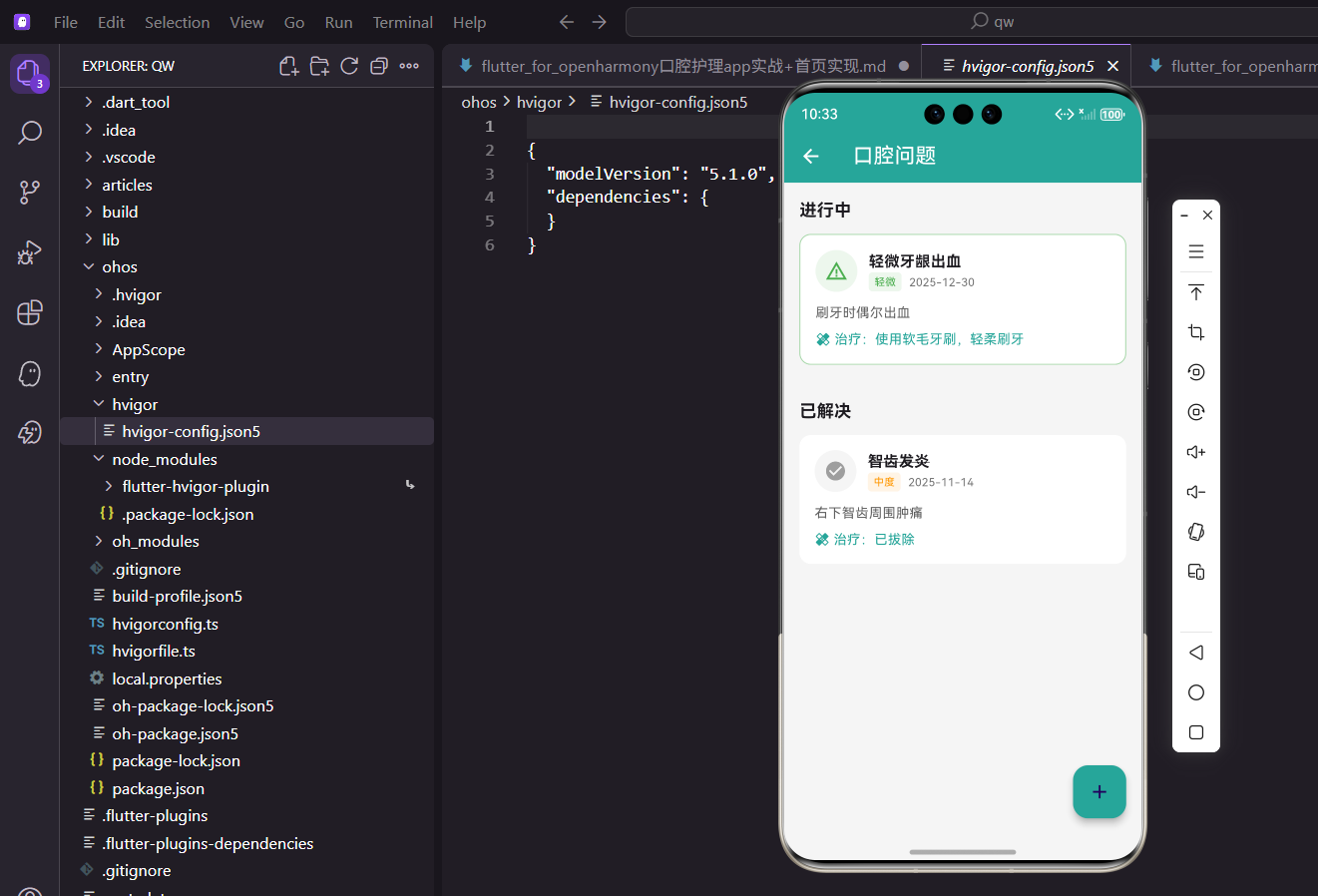
本文介绍了Flutter中实现口腔问题管理功能的设计方案。该功能支持分类显示"进行中"和"已解决"两类问题,并使用颜色标识轻微(绿色)、中度(橙色)、严重(红色)三个严重等级。页面采用卡片式布局,已解决问题显示灰色勾选图标并添加删除线,进行中问题则根据严重程度显示不同颜色的警告图标和边框。实现方案包含数据分类处理、卡片组件设计以及状态可视化展示等核心功能,帮
引言
口腔问题的追踪和管理是口腔护理应用的重要功能。用户可能会遇到龋齿、牙龈炎、牙周病等各种口腔问题,记录这些问题的发现时间、严重程度、治疗方案和解决状态,有助于用户更好地管理自己的口腔健康。
本文将介绍如何在 Flutter 中实现一个带有状态分类和严重程度标识的口腔问题管理功能。
功能设计
口腔问题页面需要实现以下功能:
- 状态分类:将问题分为"进行中"和"已解决"两类
- 严重程度:使用颜色标识轻微、中度、严重三个等级
- 详细信息:展示问题描述和治疗方案
- 添加问题:支持记录新发现的口腔问题
页面基础结构
口腔问题页面使用 StatelessWidget 实现:
class OralIssuePage extends StatelessWidget {
const OralIssuePage({super.key});
Widget build(BuildContext context) {
return Scaffold(
appBar: AppBar(title: const Text('口腔问题')),
floatingActionButton: FloatingActionButton(
onPressed: () => _showAddDialog(context),
backgroundColor: const Color(0xFF26A69A),
child: const Icon(Icons.add),
),
页面结构与其他记录页面保持一致。
数据分类处理
将口腔问题按解决状态分类:
      body: Consumer<AppProvider>(
        builder: (context, provider, _) {
          if (provider.oralIssues.isEmpty) {
            return const Center(child: Text('暂无口腔问题记录'));
          }

          final active = provider.oralIssues
              .where((i) => !i.isResolved).toList();
          final resolved = provider.oralIssues
              .where((i) => i.isResolved).toList();
使用 where 方法过滤出进行中和已解决的问题列表。
分类列表展示
使用 SingleChildScrollView 和 Column 展示分类列表:
          return SingleChildScrollView(
            padding: const EdgeInsets.all(16),
            child: Column(
              crossAxisAlignment: CrossAxisAlignment.start,
              children: [
                if (active.isNotEmpty) ...[
                  const Text('进行中',
                      style: TextStyle(fontSize: 18, fontWeight: FontWeight.bold)),
                  const SizedBox(height: 12),
                  ...active.map((issue) => _buildIssueCard(issue, false)),
                  const SizedBox(height: 24),
                ],
                if (resolved.isNotEmpty) ...[
                  const Text('已解决',
                      style: TextStyle(fontSize: 18, fontWeight: FontWeight.bold)),
                  const SizedBox(height: 12),
                  ...resolved.map((issue) => _buildIssueCard(issue, true)),
                ],
              ],
            ),
          );
        },
      ),
    );
  }
使用条件渲染,只有存在对应状态的问题时才显示该分类。展开运算符将问题列表映射为卡片组件。
严重程度颜色映射
根据严重程度确定颜色和标签:
Widget _buildIssueCard(dynamic issue, bool isResolved) {
  Color severityColor;
  String severityLabel;
  switch (issue.severity) {
    case 'mild':
      severityColor = Colors.green;
      severityLabel = '轻微';
      break;
    case 'moderate':
      severityColor = Colors.orange;
      severityLabel = '中度';
      break;
    case 'severe':
      severityColor = Colors.red;
      severityLabel = '严重';
      break;
    default:
      severityColor = Colors.grey;
      severityLabel = '未知';
  }
三种严重程度使用直观的颜色:绿色表示轻微,橙色表示中度,红色表示严重。
问题卡片设计
问题卡片根据状态显示不同样式:
  return Container(
    margin: const EdgeInsets.only(bottom: 12),
    padding: const EdgeInsets.all(16),
    decoration: BoxDecoration(
      color: Colors.white,
      borderRadius: BorderRadius.circular(12),
      border: isResolved ? null : Border.all(color: severityColor.withOpacity(0.5)),
    ),
进行中的问题添加严重程度颜色的边框,已解决的问题不显示边框。
卡片头部展示图标和问题名称:
    child: Column(
      crossAxisAlignment: CrossAxisAlignment.start,
      children: [
        Row(
          children: [
            Container(
              padding: const EdgeInsets.all(10),
              decoration: BoxDecoration(
                color: (isResolved ? Colors.grey : severityColor).withOpacity(0.1),
                shape: BoxShape.circle,
              ),
              child: Icon(
                isResolved ? Icons.check_circle : Icons.warning_amber,
                color: isResolved ? Colors.grey : severityColor,
              ),
            ),
已解决的问题使用灰色和勾选图标,进行中的问题使用严重程度颜色和警告图标。
问题名称和标签:
            const SizedBox(width: 12),
            Expanded(
              child: Column(
                crossAxisAlignment: CrossAxisAlignment.start,
                children: [
                  Text(
                    issue.name,
                    style: TextStyle(
                      fontWeight: FontWeight.bold,
                      fontSize: 16,
                      decoration: isResolved ? TextDecoration.lineThrough : null,
                    ),
                  ),
已解决的问题名称添加删除线效果,直观地表示问题已处理。
严重程度标签和发现日期:
                  Row(
                    children: [
                      Container(
                        padding: const EdgeInsets.symmetric(horizontal: 6, vertical: 2),
                        decoration: BoxDecoration(
                          color: severityColor.withOpacity(0.1),
                          borderRadius: BorderRadius.circular(4),
                        ),
                        child: Text(severityLabel,
                            style: TextStyle(color: severityColor, fontSize: 11)),
                      ),
                      const SizedBox(width: 8),
                      Text(
                        DateFormat('yyyy-MM-dd').format(issue.discoveredDate),
                        style: TextStyle(color: Colors.grey.shade600, fontSize: 12),
                      ),
                    ],
                  ),
                ],
              ),
            ),
          ],
        ),
严重程度标签使用小型彩色标签形式,发现日期显示在旁边。
问题描述和治疗方案:
        const SizedBox(height: 12),
        Text(issue.description, style: TextStyle(color: Colors.grey.shade700)),
        if (issue.treatment != null) ...[
          const SizedBox(height: 8),
          Row(
            children: [
              const Icon(Icons.healing, size: 16, color: Color(0xFF26A69A)),
              const SizedBox(width: 4),
              Text('治疗:${issue.treatment}',
                   style: const TextStyle(color: Color(0xFF26A69A))),
            ],
          ),
        ],
      ],
    ),
  );
}
问题描述使用灰色文字,治疗方案使用主题色突出显示,配合治疗图标。
添加问题对话框
添加口腔问题的对话框(简化版):
void _showAddDialog(BuildContext context) {
  ScaffoldMessenger.of(context).showSnackBar(
    const SnackBar(content: Text('添加口腔问题功能开发中')),
  );
}
实际项目中需要实现完整的表单对话框。
数据模型定义
口腔问题的数据模型:
class OralIssue {
  final String id;
  final String name;
  final String description;
  final String severity;
  final DateTime discoveredDate;
  final String? treatment;
  final bool isResolved;
  final DateTime? resolvedDate;

  OralIssue({
    String? id,
    required this.name,
    required this.description,
    required this.severity,
    required this.discoveredDate,
    this.treatment,
    this.isResolved = false,
    this.resolvedDate,
  }) : id = id ?? DateTime.now().millisecondsSinceEpoch.toString();
}
模型包含问题名称、描述、严重程度、发现日期、治疗方案、解决状态和解决日期等字段。
Provider 数据管理
在 AppProvider 中管理口腔问题:
List<OralIssue> _oralIssues = [];
List<OralIssue> get oralIssues => _oralIssues;

void addOralIssue(OralIssue issue) {
  _oralIssues.insert(0, issue);
  notifyListeners();
}

void resolveOralIssue(String id) {
  final index = _oralIssues.indexWhere((i) => i.id == id);
  if (index != -1) {
    final old = _oralIssues[index];
    _oralIssues[index] = OralIssue(
      id: old.id,
      name: old.name,
      description: old.description,
      severity: old.severity,
      discoveredDate: old.discoveredDate,
      treatment: old.treatment,
      isResolved: true,
      resolvedDate: DateTime.now(),
    );
    notifyListeners();
  }
}
提供添加问题和标记解决的方法。
测试数据生成
生成测试数据:
void initTestData() {
  _oralIssues = [
    OralIssue(
      name: '轻微牙龈出血',
      description: '刷牙时偶尔出血',
      severity: 'mild',
      discoveredDate: DateTime.now().subtract(const Duration(days: 7)),
      treatment: '使用软毛牙刷,注意刷牙力度',
    ),
    OralIssue(
      name: '龋齿',
      description: '左下第一磨牙有龋洞',
      severity: 'moderate',
      discoveredDate: DateTime.now().subtract(const Duration(days: 30)),
      treatment: '已预约补牙',
    ),
    OralIssue(
      name: '牙结石',
      description: '下前牙内侧有牙结石',
      severity: 'mild',
      discoveredDate: DateTime.now().subtract(const Duration(days: 60)),
      treatment: '洗牙清除',
      isResolved: true,
      resolvedDate: DateTime.now().subtract(const Duration(days: 30)),
    ),
  ];
}
测试数据包含不同严重程度和状态的问题。
完整添加对话框实现
实现完整的添加口腔问题对话框:
void _showAddDialog(BuildContext context) {
  final nameController = TextEditingController();
  final descController = TextEditingController();
  final treatmentController = TextEditingController();
  String severity = 'mild';

  showDialog(
    context: context,
    builder: (ctx) => StatefulBuilder(
      builder: (context, setState) => AlertDialog(
        title: const Text('添加口腔问题'),
        content: SingleChildScrollView(
          child: Column(
            mainAxisSize: MainAxisSize.min,
            children: [
              TextField(
                controller: nameController,
                decoration: const InputDecoration(labelText: '问题名称'),
              ),
              const SizedBox(height: 12),
              TextField(
                controller: descController,
                decoration: const InputDecoration(labelText: '问题描述'),
                maxLines: 2,
              ),
              const SizedBox(height: 12),
              DropdownButtonFormField<String>(
                value: severity,
                decoration: const InputDecoration(labelText: '严重程度'),
                items: const [
                  DropdownMenuItem(value: 'mild', child: Text('轻微')),
                  DropdownMenuItem(value: 'moderate', child: Text('中度')),
                  DropdownMenuItem(value: 'severe', child: Text('严重')),
                ],
                onChanged: (v) => setState(() => severity = v!),
              ),
              const SizedBox(height: 12),
              TextField(
                controller: treatmentController,
                decoration: const InputDecoration(
                  labelText: '治疗方案(可选)',
                  hintText: '如:已预约医生',
                ),
              ),
            ],
          ),
        ),
        actions: [
          TextButton(
            onPressed: () => Navigator.pop(ctx),
            child: const Text('取消'),
          ),
          ElevatedButton(
            onPressed: () {
              if (nameController.text.isEmpty || descController.text.isEmpty) {
                return;
              }
              final issue = OralIssue(
                name: nameController.text,
                description: descController.text,
                severity: severity,
                discoveredDate: DateTime.now(),
                treatment: treatmentController.text.isEmpty
                    ? null : treatmentController.text,
              );
              context.read<AppProvider>().addOralIssue(issue);
              Navigator.pop(ctx);
            },
            child: const Text('保存'),
          ),
        ],
      ),
    ),
  );
}
表单包含问题名称、描述、严重程度和治疗方案等输入字段。
标记解决功能
为问题卡片添加标记解决的操作:
GestureDetector(
  onLongPress: () {
    if (!issue.isResolved) {
      showDialog(
        context: context,
        builder: (ctx) => AlertDialog(
          title: const Text('标记为已解决'),
          content: Text('确定将"${issue.name}"标记为已解决吗?'),
          actions: [
            TextButton(
              onPressed: () => Navigator.pop(ctx),
              child: const Text('取消'),
            ),
            ElevatedButton(
              onPressed: () {
                provider.resolveOralIssue(issue.id);
                Navigator.pop(ctx);
              },
              child: const Text('确定'),
            ),
          ],
        ),
      );
    }
  },
  child: _buildIssueCard(issue, isResolved),
)
长按进行中的问题可以将其标记为已解决。
问题统计信息
统计口腔问题相关数据:
int get activeIssueCount =>
    _oralIssues.where((i) => !i.isResolved).length;

int get resolvedIssueCount =>
    _oralIssues.where((i) => i.isResolved).length;

Map<String, int> getSeverityStats() {
  final stats = {'mild': 0, 'moderate': 0, 'severe': 0};
  for (var issue in _oralIssues.where((i) => !i.isResolved)) {
    stats[issue.severity] = (stats[issue.severity] ?? 0) + 1;
  }
  return stats;
}
统计进行中和已解决的问题数量,以及各严重程度的分布。
页面顶部统计卡片
在列表上方添加统计信息:
Container(
  padding: const EdgeInsets.all(16),
  margin: const EdgeInsets.only(bottom: 16),
  decoration: BoxDecoration(
    color: Colors.white,
    borderRadius: BorderRadius.circular(12),
  ),
  child: Row(
    mainAxisAlignment: MainAxisAlignment.spaceAround,
    children: [
      _buildStatColumn('进行中', activeCount, Colors.orange),
      _buildStatColumn('已解决', resolvedCount, Colors.green),
    ],
  ),
)
展示进行中和已解决的问题数量。
严重程度分布图
可以添加严重程度分布的可视化:
Row(
  mainAxisAlignment: MainAxisAlignment.spaceEvenly,
  children: [
    _buildSeverityIndicator('轻微', stats['mild']!, Colors.green),
    _buildSeverityIndicator('中度', stats['moderate']!, Colors.orange),
    _buildSeverityIndicator('严重', stats['severe']!, Colors.red),
  ],
)

Widget _buildSeverityIndicator(String label, int count, Color color) {
  return Column(
    children: [
      Container(
        width: 40,
        height: 40,
        decoration: BoxDecoration(
          color: color.withOpacity(0.1),
          shape: BoxShape.circle,
        ),
        child: Center(
          child: Text('$count',
              style: TextStyle(fontWeight: FontWeight.bold, color: color)),
        ),
      ),
      const SizedBox(height: 4),
      Text(label, style: TextStyle(color: Colors.grey.shade600, fontSize: 12)),
    ],
  );
}
使用圆形指示器展示各严重程度的问题数量。
问题提醒功能
根据问题状态给出提醒:
String getIssueReminder() {
  final severeCount = _oralIssues
      .where((i) => !i.isResolved && i.severity == 'severe').length;

  if (severeCount > 0) {
    return '您有$severeCount个严重问题需要尽快处理';
  }

  final activeCount = _oralIssues.where((i) => !i.isResolved).length;
  if (activeCount > 0) {
    return '您有$activeCount个口腔问题正在处理中';
  }

  return '太棒了!目前没有需要处理的口腔问题';
}
根据问题严重程度给出不同级别的提醒。
空状态优化
为空状态添加引导:
if (provider.oralIssues.isEmpty) {
  return Center(
    child: Column(
      mainAxisAlignment: MainAxisAlignment.center,
      children: [
        Icon(Icons.check_circle, size: 64, color: Colors.green.shade300),
        const SizedBox(height: 16),
        Text('暂无口腔问题', style: TextStyle(color: Colors.grey.shade500)),
        const SizedBox(height: 8),
        Text('继续保持良好的口腔护理习惯',
             style: TextStyle(color: Colors.grey.shade400, fontSize: 12)),
      ],
    ),
  );
}
空状态使用绿色勾选图标,表示口腔健康状况良好。
总结
本文详细介绍了口腔护理 App 中口腔问题功能的实现。通过状态分类和严重程度颜色编码,我们构建了一个直观易用的问题管理页面。核心技术点包括:
- 使用
where方法按状态分类数据 - 通过颜色和图标区分严重程度
- 使用删除线效果标识已解决问题
- 条件渲染处理可选的治疗方案
口腔问题管理功能帮助用户追踪和处理口腔健康问题,是口腔护理应用的重要组成部分。
欢迎加入开源鸿蒙跨平台社区:https://openharmonycrossplatform.csdn.net

开源鸿蒙跨平台开发社区汇聚开发者与厂商,共建“一次开发,多端部署”的开源生态,致力于降低跨端开发门槛,推动万物智联创新。
更多推荐


 6
6 0
0- 0


 已为社区贡献11条内容

所有评论(0)