React Native for OpenHarmony 实战:时区转换实现
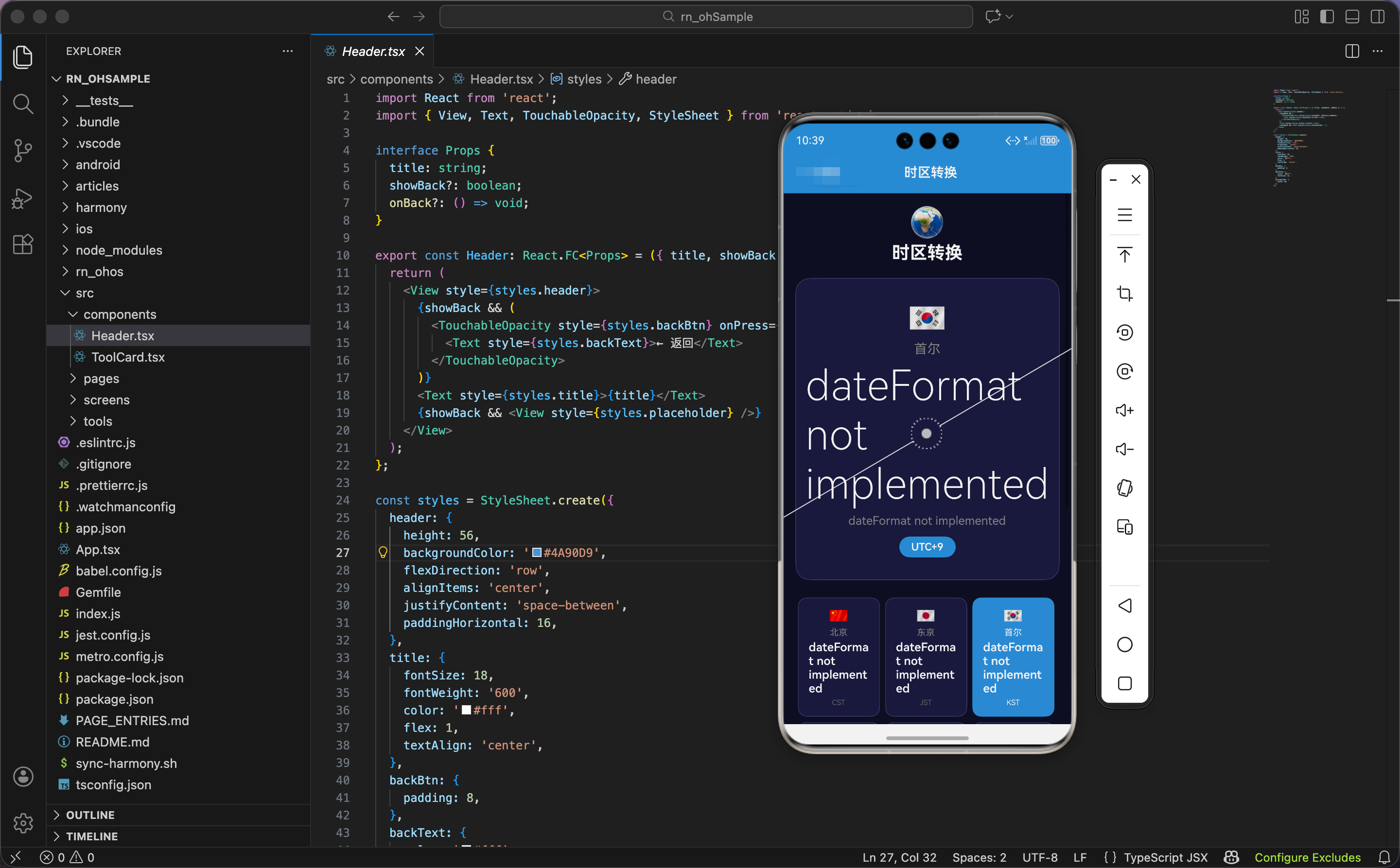
今天我们用 React Native 实现一个时区转换工具,实时显示全球 12 个城市的时间。
时区数据
import React, { useState, useEffect, useRef } from 'react';
import { View, Text, TouchableOpacity, StyleSheet, ScrollView, Animated } from 'react-native';

const timezones = [
  { name: '北京', offset: 8, code: 'CST', emoji: '🇨🇳' },
  { name: '东京', offset: 9, code: 'JST', emoji: '🇯🇵' },
  { name: '首尔', offset: 9, code: 'KST', emoji: '🇰🇷' },
  { name: '新加坡', offset: 8, code: 'SGT', emoji: '🇸🇬' },
  { name: '悉尼', offset: 11, code: 'AEDT', emoji: '🇦🇺' },
  { name: '伦敦', offset: 0, code: 'GMT', emoji: '🇬🇧' },
  { name: '巴黎', offset: 1, code: 'CET', emoji: '🇫🇷' },
  { name: '莫斯科', offset: 3, code: 'MSK', emoji: '🇷🇺' },
  { name: '纽约', offset: -5, code: 'EST', emoji: '🇺🇸' },
  { name: '洛杉矶', offset: -8, code: 'PST', emoji: '🇺🇸' },
  { name: '迪拜', offset: 4, code: 'GST', emoji: '🇦🇪' },
  { name: '孟买', offset: 5.5, code: 'IST', emoji: '🇮🇳' },
];
时区数据数组,包含 12 个城市的信息。
每个时区的属性:
name:城市名称offset:UTC 偏移量(小时)code:时区代码emoji:国旗 emoji
为什么选这 12 个城市?因为这是全球主要城市,覆盖不同时区。北京(东八区)、东京(东九区)、伦敦(零时区)、纽约(西五区)、洛杉矶(西八区)等。
为什么孟买的偏移量是 5.5?因为印度时区是 UTC+5:30,不是整数小时。有些国家的时区是半小时或 15 分钟偏移。
状态设计
export const TimezoneConverter: React.FC = () => {
  const [baseTime, setBaseTime] = useState(new Date());
  const [selectedZone, setSelectedZone] = useState(timezones[0]);

  const pulseAnim = useRef(new Animated.Value(1)).current;
  const cardAnims = useRef(timezones.map(() => new Animated.Value(0))).current;
  const selectAnim = useRef(new Animated.Value(1)).current;
状态设计包含基准时间、选中时区、动画值。
基准时间:baseTime 是 Date 对象,存储当前时间。
选中时区:selectedZone 是时区对象,默认值 timezones[0](北京)。
三个动画值:
pulseAnim:主时钟的脉冲动画cardAnims:时区卡片的动画数组,12 个元素selectAnim:主时钟的缩放动画
为什么用 Date 对象?因为 JavaScript 的 Date 对象能处理时区转换。通过 UTC 时间戳和偏移量,可以计算任意时区的时间。
定时器和动画初始化
  useEffect(() => {
    const timer = setInterval(() => setBaseTime(new Date()), 1000);

    Animated.loop(
      Animated.sequence([
        Animated.timing(pulseAnim, { toValue: 1.02, duration: 1000, useNativeDriver: true }),
        Animated.timing(pulseAnim, { toValue: 1, duration: 1000, useNativeDriver: true }),
      ])
    ).start();

    cardAnims.forEach((anim, i) => {
      setTimeout(() => {
        Animated.spring(anim, { toValue: 1, friction: 5, useNativeDriver: true }).start();
      }, i * 50);
    });

    return () => clearInterval(timer);
  }, []);
组件挂载时,启动定时器和动画。
定时器:每秒更新一次 baseTime,让时间实时变化。
脉冲动画:循环动画,主时钟不断放大缩小。
卡片动画:遍历卡片动画数组,依次启动弹簧动画。每个卡片延迟 i * 50 毫秒,营造"加载"效果。
清理定时器:return () => clearInterval(timer) 在组件卸载时清理定时器,避免内存泄漏。
为什么每秒更新时间?因为时间是秒级变化的,每秒更新一次能保证时间准确。如果更新太慢(比如每分钟),时间会不准确。如果更新太快(比如每 100ms),会浪费性能。
选择时区
  const handleSelect = (tz: typeof timezones[0]) => {
    Animated.sequence([
      Animated.timing(selectAnim, { toValue: 0.95, duration: 100, useNativeDriver: true }),
      Animated.spring(selectAnim, { toValue: 1, friction: 4, useNativeDriver: true }),
    ]).start();
    setSelectedZone(tz);
  };
选择时区函数触发动画,设置选中时区。
序列动画:主时钟缩小到 95% 再弹回到 100%,营造"切换"的感觉。
设置选中时区:setSelectedZone(tz) 更新选中时区,主时钟显示新时区的时间。
计算时区时间
  const getTimeInZone = (offset: number) => {
    const utc = baseTime.getTime() + baseTime.getTimezoneOffset() * 60000;
    const zoneTime = new Date(utc + offset * 3600000);
    return zoneTime.toLocaleTimeString('zh-CN', { hour: '2-digit', minute: '2-digit', second: '2-digit' });
  };
计算指定时区的时间。
获取 UTC 时间戳:
baseTime.getTime():获取本地时间的时间戳(毫秒)baseTime.getTimezoneOffset():获取本地时区的偏移量(分钟),比如北京是 -480(UTC+8)baseTime.getTimezoneOffset() * 60000:转换成毫秒utc = baseTime.getTime() + baseTime.getTimezoneOffset() * 60000:计算 UTC 时间戳
计算目标时区时间戳:
offset * 3600000:偏移量转换成毫秒(小时 × 3600 × 1000)utc + offset * 3600000:UTC 时间戳加上偏移量
格式化时间:
toLocaleTimeString('zh-CN', ...):格式化成中文时间字符串hour: '2-digit', minute: '2-digit', second: '2-digit':时分秒都用两位数
为什么要先转成 UTC?因为 JavaScript 的 Date 对象默认使用本地时区。要计算其他时区的时间,必须先转成 UTC(零时区),再加上目标时区的偏移量。
举例:北京时间 2024-01-01 12:00:00,计算纽约时间(UTC-5)。
- 本地时间戳:1704081600000
- 本地偏移量:-480 分钟(UTC+8)
- UTC 时间戳:1704081600000 + (-480) × 60000 = 1704052800000
- 纽约时间戳:1704052800000 + (-5) × 3600000 = 1704034800000
- 纽约时间:2023-12-31 23:00:00
计算时区日期
  const getDateInZone = (offset: number) => {
    const utc = baseTime.getTime() + baseTime.getTimezoneOffset() * 60000;
    const zoneTime = new Date(utc + offset * 3600000);
    return zoneTime.toLocaleDateString('zh-CN', { month: 'short', day: 'numeric', weekday: 'short' });
  };
计算指定时区的日期。
计算逻辑:同 getTimeInZone,先转成 UTC,再加上偏移量。
格式化日期:
toLocaleDateString('zh-CN', ...):格式化成中文日期字符串month: 'short':月份简写(比如"1月")day: 'numeric':日期数字(比如"1")weekday: 'short':星期简写(比如"周一")
为什么要显示日期?因为不同时区可能是不同的日期。比如北京时间 2024-01-01 00:30:00,纽约时间是 2023-12-31 11:30:00,日期不同。
界面渲染:头部和主时钟
  return (
    <ScrollView style={styles.container}>
      <View style={styles.header}>
        <Text style={styles.headerIcon}>🌍</Text>
        <Text style={styles.headerTitle}>时区转换</Text>
      </View>

      <Animated.View style={[styles.mainClock, { transform: [{ scale: selectAnim }] }]}>
        <Text style={styles.mainEmoji}>{selectedZone.emoji}</Text>
        <Text style={styles.mainCity}>{selectedZone.name}</Text>
        <Animated.Text style={[styles.mainTime, { transform: [{ scale: pulseAnim }] }]}>
          {getTimeInZone(selectedZone.offset)}
        </Animated.Text>
        <Text style={styles.mainDate}>{getDateInZone(selectedZone.offset)}</Text>
        <View style={styles.offsetBadge}>
          <Text style={styles.mainOffset}>UTC{selectedZone.offset >= 0 ? '+' : ''}{selectedZone.offset}</Text>
        </View>
      </Animated.View>
头部显示标题,主时钟显示选中时区的时间。
头部:
- 图标:🌍 地球
- 标题:时区转换
主时钟:
- 应用缩放动画(选择时区时触发)
- 国旗 emoji:字号 40
- 城市名称:灰色,字号 18
- 时间:白色,字号 56,应用脉冲动画
- 日期:灰色,字号 16
- UTC 偏移量:蓝色徽章,白色文字
为什么时间字号这么大?因为时间是主要信息,大字号让用户一眼看到。字号 56 + 脉冲动画,让时间成为视觉焦点。
为什么显示 UTC 偏移量?因为偏移量能帮助用户理解时区。比如"UTC+8"表示比 UTC 快 8 小时,"UTC-5"表示比 UTC 慢 5 小时。
时区卡片网格
      <View style={styles.grid}>
        {timezones.map((tz, i) => (
          <Animated.View key={tz.name} style={{
            width: '31%', margin: '1%',
            transform: [{ scale: cardAnims[i] }],
            opacity: cardAnims[i],
          }}>
            <TouchableOpacity
              style={[styles.zoneCard, selectedZone.name === tz.name && styles.zoneCardActive]}
              onPress={() => handleSelect(tz)}
              activeOpacity={0.7}
            >
              <Text style={styles.zoneEmoji}>{tz.emoji}</Text>
              <Text style={[styles.zoneName, selectedZone.name === tz.name && styles.zoneTextActive]}>{tz.name}</Text>
              <Text style={[styles.zoneTime, selectedZone.name === tz.name && styles.zoneTextActive]}>{getTimeInZone(tz.offset)}</Text>
              <Text style={[styles.zoneOffset, selectedZone.name === tz.name && styles.zoneTextActive]}>{tz.code}</Text>
            </TouchableOpacity>
          </Animated.View>
        ))}
      </View>
    </ScrollView>
  );
};
时区卡片网格显示所有时区。
网格布局:
flexDirection: 'row'和flexWrap: 'wrap':自动换行- 每个卡片宽度 31%,间距 1%,一行 3 个
卡片动画:
- 应用缩放和透明度动画
- 依次出现,营造"加载"效果
卡片内容:
- 国旗 emoji:字号 20
- 城市名称:灰色,字号 12
- 时间:白色,字号 16,加粗
- 时区代码:灰色,字号 10
激活状态:
- 选中的卡片用蓝色背景
- 选中的卡片文字用白色
为什么用网格布局?因为 12 个时区卡片很多,网格布局能充分利用空间。一行 3 个,4 行刚好显示完。
鸿蒙 ArkTS 对比:时区转换
@State baseTime: Date = new Date()
@State selectedZone: any = timezones[0]

aboutToAppear() {
  setInterval(() => {
    this.baseTime = new Date()
  }, 1000)
}

getTimeInZone(offset: number): string {
  const utc = this.baseTime.getTime() + this.baseTime.getTimezoneOffset() * 60000
  const zoneTime = new Date(utc + offset * 3600000)
  return zoneTime.toLocaleTimeString('zh-CN', { hour: '2-digit', minute: '2-digit', second: '2-digit' })
}

build() {
  Column() {
    Text('时区转换')
      .fontSize(24)
      .fontWeight(FontWeight.Bold)

    Column() {
      Text(this.selectedZone.emoji)
        .fontSize(40)
      Text(this.selectedZone.name)
        .fontSize(18)
        .fontColor('#888')
      Text(this.getTimeInZone(this.selectedZone.offset))
        .fontSize(56)
        .fontWeight(FontWeight.Lighter)
      Text(`UTC${this.selectedZone.offset >= 0 ? '+' : ''}${this.selectedZone.offset}`)
        .fontSize(14)
    }

    Grid() {
      ForEach(timezones, (tz: any) => {
        GridItem() {
          Column() {
            Text(tz.emoji).fontSize(20)
            Text(tz.name).fontSize(12).fontColor('#888')
            Text(this.getTimeInZone(tz.offset)).fontSize(16).fontWeight(FontWeight.Bold)
            Text(tz.code).fontSize(10).fontColor('#666')
          }
          .backgroundColor(this.selectedZone.name === tz.name ? '#4A90D9' : '#1a1a3e')
          .onClick(() => {
            this.selectedZone = tz
          })
        }
      })
    }
    .columnsTemplate('1fr 1fr 1fr')
  }
}
ArkTS 中的时区转换逻辑完全一样。核心是 UTC 时间戳转换:先转成 UTC,再加上偏移量。getTime()、getTimezoneOffset()、toLocaleTimeString() 都是标准 JavaScript API,跨平台通用。
样式定义
const styles = StyleSheet.create({
  container: { flex: 1, backgroundColor: '#0f0f23', padding: 16 },
  header: { alignItems: 'center', marginBottom: 20 },
  headerIcon: { fontSize: 40, marginBottom: 4 },
  headerTitle: { fontSize: 24, fontWeight: '700', color: '#fff' },
  mainClock: { alignItems: 'center', paddingVertical: 30, marginBottom: 20, backgroundColor: '#1a1a3e', borderRadius: 20, borderWidth: 1, borderColor: '#3a3a6a' },
  mainEmoji: { fontSize: 40, marginBottom: 8 },
  mainCity: { color: '#888', fontSize: 18 },
  mainTime: { color: '#fff', fontSize: 56, fontWeight: '200', marginVertical: 8 },
  mainDate: { color: '#888', fontSize: 16 },
  offsetBadge: { backgroundColor: '#4A90D9', paddingHorizontal: 16, paddingVertical: 6, borderRadius: 20, marginTop: 12 },
  mainOffset: { color: '#fff', fontSize: 14, fontWeight: '600' },
  grid: { flexDirection: 'row', flexWrap: 'wrap' },
  zoneCard: { backgroundColor: '#1a1a3e', padding: 12, borderRadius: 12, alignItems: 'center', borderWidth: 1, borderColor: '#3a3a6a' },
  zoneCardActive: { backgroundColor: '#4A90D9', borderColor: '#4A90D9' },
  zoneEmoji: { fontSize: 20, marginBottom: 4 },
  zoneName: { color: '#888', fontSize: 12 },
  zoneTime: { color: '#fff', fontSize: 16, fontWeight: '600', marginVertical: 4 },
  zoneOffset: { color: '#666', fontSize: 10 },
  zoneTextActive: { color: '#fff' },
});
容器用深蓝黑色背景。主时钟居中对齐,时间字号 56,字重 200(很细)。时区卡片用网格布局,每个卡片宽度 31%。选中的卡片用蓝色背景。
小结
这个时区转换工具展示了时区计算和实时更新的实现。用 UTC 时间戳和偏移量计算任意时区的时间,定时器每秒更新时间。网格布局显示 12 个时区,脉冲动画让主时钟更醒目。
欢迎加入开源鸿蒙跨平台社区:https://openharmonycrossplatform.csdn.net

开源鸿蒙跨平台开发社区汇聚开发者与厂商,共建“一次开发,多端部署”的开源生态,致力于降低跨端开发门槛,推动万物智联创新。
更多推荐

 16
16 0
0- 0


 已为社区贡献16条内容

所有评论(0)