Flutter for OpenHarmony 猫咪管家App实战:健康管理模块开发
本文介绍了一个猫咪健康管理系统的实现方案。系统采用Dart语言开发,主要包含健康数据模型、数据管理和界面展示三部分。健康记录类型通过枚举定义,支持疫苗、驱虫等6种分类。数据管理模块提供按猫咪、类型、时间等多维度查询功能,并支持到期提醒。界面采用响应式设计,包含健康概览卡片、记录列表和添加表单等功能模块,通过颜色标签直观展示猫咪健康状态。系统可帮助宠物主人全面记录和管理猫咪的健康信息,包括疫苗接种、
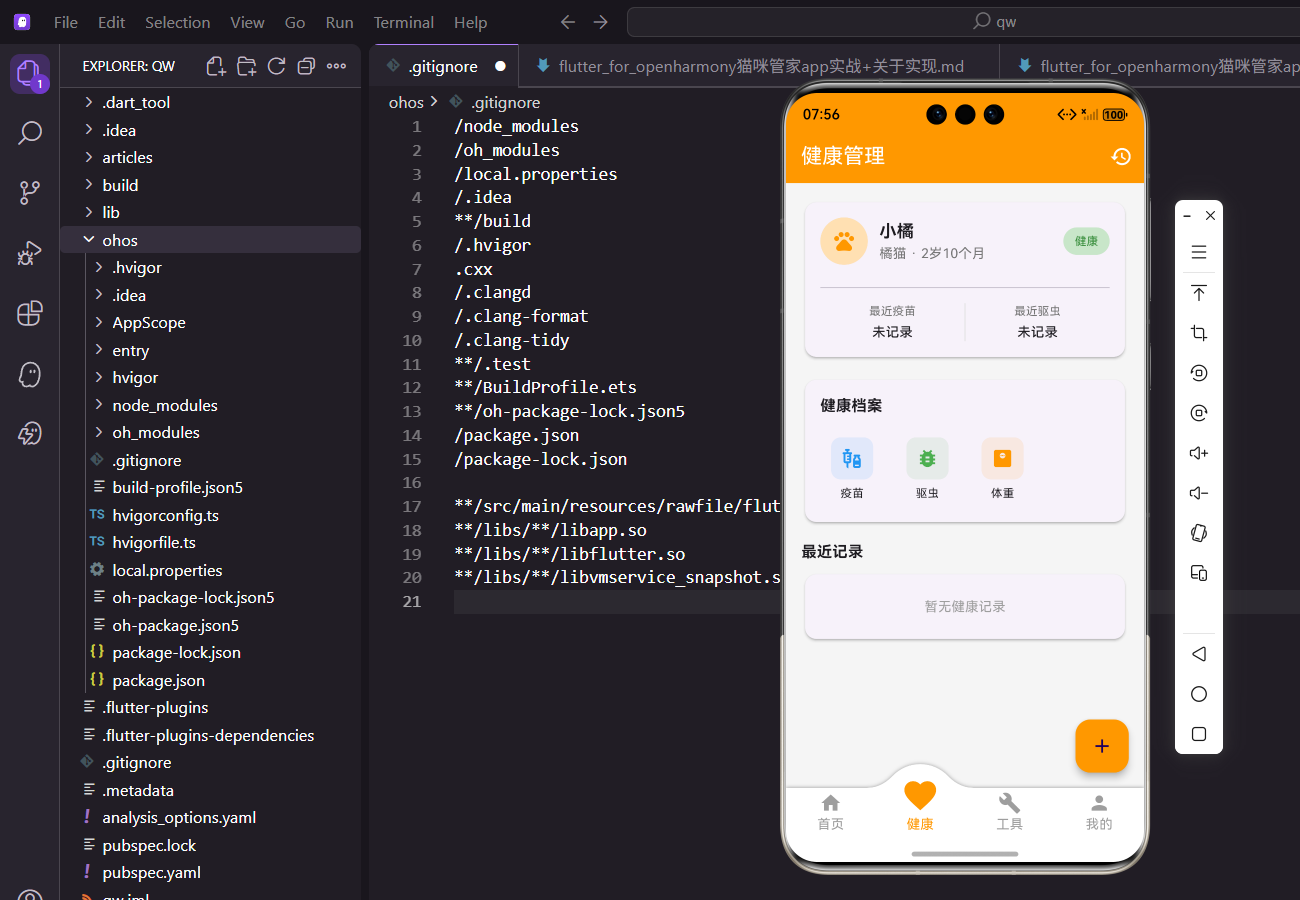
猫咪的健康是铲屎官最关心的事,疫苗、驱虫、体检这些都得记清楚。这篇来实现健康管理模块,让这些信息一目了然。
一、健康数据模型
先定义健康记录的类型:
enum HealthRecordType {
  vaccination,
  deworming,
  checkup,
  surgery,
  medication,
  other,
}
用枚举定义记录类型,比字符串更安全。
涵盖了疫苗、驱虫、体检、手术、用药等常见场景。
健康记录模型:
class HealthRecord {
  final String id;
  final String catId;
  final HealthRecordType type;
  final String title;
  final String? description;
  final DateTime date;
  final String? hospital;
  final String? doctor;
  final double? cost;
  final DateTime? nextDate;
  final DateTime createdAt;
catId关联到具体的猫咪。nextDate记录下次预约时间,方便提醒。
类型转中文的方法:
String get typeString {
  switch (type) {
    case HealthRecordType.vaccination:
      return '疫苗接种';
    case HealthRecordType.deworming:
      return '驱虫';
    case HealthRecordType.checkup:
      return '体检';
    case HealthRecordType.surgery:
      return '手术';
    case HealthRecordType.medication:
      return '用药';
    case HealthRecordType.other:
      return '其他';
  }
}
用 getter 方法返回中文名称。
界面上直接调用record.typeString就行。
二、健康数据管理
HealthProvider 负责管理所有健康记录:
class HealthProvider with ChangeNotifier {
  final List<HealthRecord> _healthRecords = [];

  List<HealthRecord> get healthRecords => List.unmodifiable(_healthRecords);
List.unmodifiable返回不可修改的列表。
外部只能读取,不能直接修改内部数据。
按猫咪查询记录:
List<HealthRecord> getRecordsForCat(String catId) {
  return _healthRecords.where((r) => r.catId == catId).toList()
    ..sort((a, b) => b.date.compareTo(a.date));
}
过滤出指定猫咪的记录,按日期倒序排列。
最新的记录排在最前面。
按类型查询:
List<HealthRecord> getRecordsByType(String catId, HealthRecordType type) {
  return _healthRecords
      .where((r) => r.catId == catId && r.type == type)
      .toList()
    ..sort((a, b) => b.date.compareTo(a.date));
}
同时按猫咪和类型过滤。
比如只看疫苗记录或只看驱虫记录。
获取即将到期的记录:
List<HealthRecord> getUpcomingRecords(String catId) {
  final now = DateTime.now();
  return _healthRecords
      .where((r) => r.catId == catId && r.nextDate != null && r.nextDate!.isAfter(now))
      .toList()
    ..sort((a, b) => a.nextDate!.compareTo(b.nextDate!));
}
筛选有下次预约且还没过期的记录。
按预约时间正序排列,最近的排前面。
获取最近一次疫苗:
HealthRecord? getLatestVaccination(String catId) {
  final vaccinations = getRecordsByType(catId, HealthRecordType.vaccination);
  return vaccinations.isNotEmpty ? vaccinations.first : null;
}
复用
getRecordsByType方法。
列表已经排好序,第一个就是最新的。
三、健康管理页面
页面用 Consumer2 同时监听两个 Provider:
body: Consumer2<CatProvider, HealthProvider>(
  builder: (context, catProvider, healthProvider, child) {
    final selectedCat = catProvider.selectedCat;
    if (selectedCat == null) {
      return const Center(child: Text('请先添加猫咪'));
    }
    return _buildHealthContent(context, selectedCat, healthProvider);
  },
),
Consumer2可以同时监听两个 Provider。
没有猫咪时显示提示,有猫咪才渲染内容。
AppBar 右边加个历史记录按钮:
appBar: AppBar(
  title: const Text('健康管理'),
  actions: [
    IconButton(
      icon: const Icon(Icons.history),
      onPressed: () {
        final cat = context.read<CatProvider>().selectedCat;
        if (cat != null) {
          Navigator.push(context, MaterialPageRoute(
            builder: (_) => HealthRecordListScreen(catId: cat.id),
          ));
        }
      },
    ),
  ],
),
点击跳转到完整的健康记录列表。
用context.read读取当前选中的猫咪。
悬浮按钮添加新记录:
floatingActionButton: FloatingActionButton(
  onPressed: () {
    final cat = context.read<CatProvider>().selectedCat;
    if (cat != null) {
      Navigator.push(context, MaterialPageRoute(
        builder: (_) => AddHealthRecordScreen(catId: cat.id),
      ));
    }
  },
  backgroundColor: Colors.orange,
  child: const Icon(Icons.add),
),
传入当前猫咪的 id,新记录会关联到这只猫。
橙色和整体主题一致。
四、健康概览卡片
卡片顶部显示猫咪信息:
Widget _buildHealthOverviewCard(BuildContext context, cat, HealthRecord? vaccination, HealthRecord? deworming) {
  return Card(
    child: Padding(
      padding: EdgeInsets.all(16.w),
      child: Column(
        crossAxisAlignment: CrossAxisAlignment.start,
        children: [
          Row(
            children: [
              CircleAvatar(
                radius: 25.r,
                backgroundColor: Colors.orange[100],
                child: Icon(Icons.pets, color: Colors.orange, size: 25.sp),
              ),
头像加名字,让用户确认是哪只猫。
多猫家庭切换后能立即看到变化。
健康状态标签:
Container(
  padding: EdgeInsets.symmetric(horizontal: 12.w, vertical: 6.h),
  decoration: BoxDecoration(
    color: Colors.green[100],
    borderRadius: BorderRadius.circular(20.r),
  ),
  child: Text(
    '健康',
    style: TextStyle(color: Colors.green[700], fontSize: 12.sp),
  ),
),
绿色标签表示健康状态良好。
后续可以根据记录情况动态显示。
疫苗和驱虫信息并排:
Row(
  children: [
    Expanded(
      child: _buildHealthInfoItem(
        '最近疫苗',
        vaccination != null
            ? DateFormat('yyyy-MM-dd').format(vaccination.date)
            : '未记录',
        vaccination?.nextDate != null
            ? '下次: ${DateFormat('MM-dd').format(vaccination!.nextDate!)}'
            : null,
      ),
    ),
    Container(width: 1, height: 40.h, color: Colors.grey[300]),
用竖线分隔两列信息。
有下次预约时显示提醒。
五、健康信息项组件
三行文字的展示:
Widget _buildHealthInfoItem(String title, String value, String? subtitle) {
  return Column(
    children: [
      Text(
        title,
        style: TextStyle(fontSize: 12.sp, color: Colors.grey[600]),
      ),
      SizedBox(height: 4.h),
      Text(
        value,
        style: TextStyle(fontSize: 14.sp, fontWeight: FontWeight.w500),
      ),
      if (subtitle != null) ...[
        SizedBox(height: 2.h),
        Text(
          subtitle,
          style: TextStyle(fontSize: 11.sp, color: Colors.orange),
        ),
      ],
    ],
  );
}
标题灰色小字,值黑色中等粗细。
副标题用橙色突出下次预约时间。
六、健康档案分类
用 GridView 展示分类入口:
Widget _buildHealthCategories(BuildContext context, String catId) {
  return Card(
    child: Padding(
      padding: EdgeInsets.all(16.w),
      child: Column(
        crossAxisAlignment: CrossAxisAlignment.start,
        children: [
          Text(
            '健康档案',
            style: TextStyle(fontSize: 16.sp, fontWeight: FontWeight.bold),
          ),
          SizedBox(height: 16.h),
          GridView.count(
            shrinkWrap: true,
            physics: const NeverScrollableScrollPhysics(),
            crossAxisCount: 4,
            mainAxisSpacing: 12.h,
            crossAxisSpacing: 12.w,
GridView.count固定列数为 4。shrinkWrap让高度自适应内容。
分类项:
children: [
  _buildCategoryItem(
    context,
    Icons.vaccines,
    '疫苗',
    Colors.blue,
    () => Navigator.push(context, MaterialPageRoute(
      builder: (_) => VaccinationScreen(catId: catId),
    )),
  ),
  _buildCategoryItem(
    context,
    Icons.bug_report,
    '驱虫',
    Colors.green,
    () => Navigator.push(context, MaterialPageRoute(
      builder: (_) => DewormingScreen(catId: catId),
    )),
  ),
  _buildCategoryItem(
    context,
    Icons.monitor_weight,
    '体重',
    Colors.orange,
    () => Navigator.push(context, MaterialPageRoute(
      builder: (_) => WeightChartScreen(catId: catId),
    )),
  ),
],
三个分类:疫苗、驱虫、体重。
每个用不同颜色区分。
七、分类项组件
图标加文字的布局:
Widget _buildCategoryItem(
  BuildContext context,
  IconData icon,
  String label,
  Color color,
  VoidCallback onTap,
) {
  return GestureDetector(
    onTap: onTap,
    child: Column(
      mainAxisAlignment: MainAxisAlignment.center,
      children: [
        Container(
          padding: EdgeInsets.all(10.w),
          decoration: BoxDecoration(
            color: color.withOpacity(0.1),
            borderRadius: BorderRadius.circular(10.r),
          ),
          child: Icon(icon, color: color, size: 24.sp),
        ),
        SizedBox(height: 6.h),
        Text(
          label,
          style: TextStyle(fontSize: 12.sp),
        ),
      ],
    ),
  );
}
图标放在带背景的容器里。
点击整个区域都能响应。
八、即将到期提醒
条件渲染提醒区块:
if (upcomingRecords.isNotEmpty) ...[
  Text(
    '即将到期',
    style: TextStyle(fontSize: 16.sp, fontWeight: FontWeight.bold),
  ),
  SizedBox(height: 8.h),
  _buildUpcomingEvents(upcomingRecords),
  SizedBox(height: 16.h),
],
有即将到期的记录才显示这个区块。
展开运算符让代码更简洁。
提醒列表:
Widget _buildUpcomingEvents(List<HealthRecord> records) {
  return Card(
    color: Colors.orange[50],
    child: ListView.separated(
      shrinkWrap: true,
      physics: const NeverScrollableScrollPhysics(),
      itemCount: records.length > 3 ? 3 : records.length,
      separatorBuilder: (_, __) => Divider(height: 1, color: Colors.orange[100]),
卡片用浅橙色背景,突出提醒的重要性。
最多显示 3 条。
计算剩余天数:
itemBuilder: (context, index) {
  final record = records[index];
  final daysUntil = record.nextDate!.difference(DateTime.now()).inDays;
  return ListTile(
    leading: CircleAvatar(
      backgroundColor: Colors.orange[100],
      child: Icon(Icons.event, color: Colors.orange, size: 20.sp),
    ),
    title: Text(record.title),
    subtitle: Text(record.typeString),
difference计算两个日期的差值。inDays转换成天数。
剩余天数标签:
trailing: Container(
  padding: EdgeInsets.symmetric(horizontal: 8.w, vertical: 4.h),
  decoration: BoxDecoration(
    color: daysUntil <= 7 ? Colors.red[100] : Colors.orange[100],
    borderRadius: BorderRadius.circular(12.r),
  ),
  child: Text(
    '$daysUntil天后',
    style: TextStyle(
      color: daysUntil <= 7 ? Colors.red : Colors.orange[800],
      fontSize: 12.sp,
    ),
  ),
),
7 天内用红色警示,超过 7 天用橙色。
让用户一眼看出紧急程度。
九、最近记录列表
空状态处理:
Widget _buildRecentRecords(BuildContext context, List<HealthRecord> records) {
  if (records.isEmpty) {
    return Card(
      child: Padding(
        padding: EdgeInsets.all(24.w),
        child: Center(
          child: Text(
            '暂无健康记录',
            style: TextStyle(color: Colors.grey[500]),
          ),
        ),
      ),
    );
  }
没有记录时显示友好提示。
不是直接隐藏,用户知道这里是干什么的。
记录列表:
return Card(
  child: ListView.separated(
    shrinkWrap: true,
    physics: const NeverScrollableScrollPhysics(),
    itemCount: records.length > 5 ? 5 : records.length,
    separatorBuilder: (_, __) => const Divider(height: 1),
    itemBuilder: (context, index) {
      final record = records[index];
      return ListTile(
        leading: CircleAvatar(
          backgroundColor: Colors.blue[100],
          child: Icon(Icons.medical_services, color: Colors.blue, size: 20.sp),
        ),
        title: Text(record.title),
        subtitle: Text('${record.typeString} · ${record.hospital ?? ""}'),
        trailing: Text(
          DateFormat('MM-dd').format(record.date),
          style: TextStyle(color: Colors.grey[600]),
        ),
      );
    },
  ),
);
最多显示 5 条最近记录。
副标题显示类型和医院。
十、医疗费用统计
Provider 里还有费用统计方法:
double getTotalMedicalCost(String catId, {DateTime? startDate, DateTime? endDate}) {
  var records = _healthRecords.where((r) => r.catId == catId && r.cost != null);
  if (startDate != null) {
    records = records.where((r) => r.date.isAfter(startDate));
  }
  if (endDate != null) {
    records = records.where((r) => r.date.isBefore(endDate));
  }
  return records.fold(0.0, (sum, r) => sum + (r.cost ?? 0));
}
支持按时间范围筛选。
fold方法累加所有费用。
小结
健康管理模块涉及数据模型设计、多 Provider 协作、条件渲染等知识点。即将到期提醒是个很实用的功能,能帮铲屎官记住重要的健康事项。
欢迎加入开源鸿蒙跨平台社区:https://openharmonycrossplatform.csdn.net

开源鸿蒙跨平台开发社区汇聚开发者与厂商,共建“一次开发,多端部署”的开源生态,致力于降低跨端开发门槛,推动万物智联创新。
更多推荐

 8
8 0
0- 0


 已为社区贡献6条内容

所有评论(0)