Flutter跨平台开发适配OpenHarmony:文件夹管理功能实战
平台检测先行:在所有文件操作前进行平台检测,避免直接使用平台特定 API通道封装复用:将 Platform Channel 调用封装为独立的服务类,提高代码可维护性错误处理全面:为所有文件操作添加完善的错误处理,提供用户友好的提示信息性能监控持续:使用 DevTools 监控文件操作的性能,持续优化瓶颈点测试覆盖全面:编写单元测试和集成测试,覆盖不同平台的文件夹操作场景用户体验优先:提供加载状态、
1. 引言
在现代笔记类应用中,文件夹管理是组织内容的基础功能。一个优秀的文件夹系统应支持创建、重命名、删除、移动等操作,并提供清晰的树形结构展示。当我们将 Flutter 应用迁移到 OpenHarmony 平台时,面临的最大挑战是如何在跨平台框架中调用平台特有的文件系统 API。
本文将通过一个完整的文件夹管理实战案例,详细介绍如何利用 Flutter 的跨平台能力适配 OpenHarmony,实现一套代码在多平台(包括 OpenHarmony)上稳定运行的文件夹管理功能。
2. 跨平台兼容性挑战与解决方案
Flutter 与 OpenHarmony 在文件系统 API 上存在显著差异。在 Flutter 中,我们通常使用 path_provider 插件获取应用目录,而 OpenHarmony 则需要使用 @ohos.file.fs 模块。直接使用 Flutter 的文件 API 在 OpenHarmony 上会导致兼容性问题。
解决方案:平台检测与条件执行
通过 kIsWeb 和 Platform 类判断当前运行平台,为 OpenHarmony 单独实现文件路径获取和操作逻辑。
// 跨平台文件路径获取示例
Future<String> getFolderBasePath() async {
  if (kIsWeb) {
    return '/virtual_folder';
  } else if (Platform.isAndroid || Platform.isIOS) {
    final dir = await getApplicationDocumentsDirectory();
    return dir.path;
  } else {
    // OpenHarmony 专用路径获取
    return await _getOpenHarmonyBasePath();
  }
}

// OpenHarmony 路径获取实现
Future<String> _getOpenHarmonyBasePath() async {
  try {
    // 通过 Platform Channel 调用原生 API
    final result = await MethodChannel('com.example.app/file')
        .invokeMethod('getBasePath');
    return result;
  } catch (e) {
    print('获取 OpenHarmony 基础路径失败: $e');
    return 'data/local/tmp';
  }
}
3. 文件夹管理功能实现
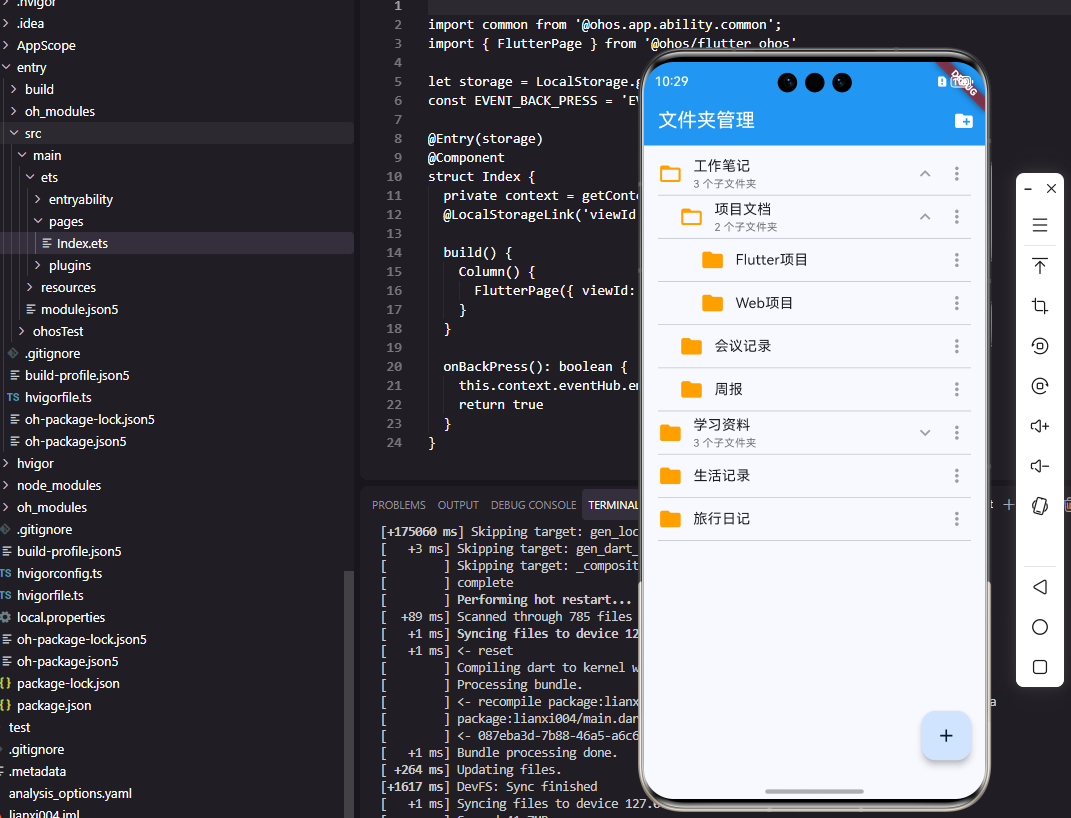
3.1 树形文件夹列表展示
树形结构是文件夹管理的核心可视化形式。我们使用递归组件实现无限层级的文件夹树。
class FolderItem extends StatefulWidget {
final Folder folder;
final int depth;
final Function(Folder) onFolderTap;
final Function(Folder) onFolderLongPress;
const FolderItem({
required this.folder,
this.depth = 0,
required this.onFolderTap,
required this.onFolderLongPress,
});
_FolderItemState createState() => _FolderItemState();
}
class _FolderItemState extends State<FolderItem> {
bool _isExpanded = false;
Widget build(BuildContext context) {
return Column(
children: [
InkWell(
onTap: () => widget.onFolderTap(widget.folder),
onLongPress: () => widget.onFolderLongPress(widget.folder),
child: Container(
padding: EdgeInsets.only(
left: widget.depth * 24.0,
top: 12,
bottom: 12,
),
child: Row(
children: [
// 文件夹图标
Icon(
_isExpanded ? Icons.folder_open : Icons.folder,
color: Colors.amber[700],
size: 24,
),
SizedBox(width: 12),
// 文件夹名称
Expanded(
child: Text(
widget.folder.name,
style: TextStyle(
fontSize: 16,
fontWeight: FontWeight.w500,
),
),
),
// 展开/折叠箭头
if (widget.folder.children.isNotEmpty)
IconButton(
icon: Icon(
_isExpanded
? Icons.expand_less
: Icons.expand_more,
),
onPressed: () {
setState(() => _isExpanded = !_isExpanded);
},
padding: EdgeInsets.zero,
constraints: BoxConstraints(),
),
],
),
),
),
// 递归渲染子文件夹
if (_isExpanded && widget.folder.children.isNotEmpty)
...widget.folder.children.map(
(child) => FolderItem(
folder: child,
depth: widget.depth + 1,
onFolderTap: widget.onFolderTap,
onFolderLongPress: widget.onFolderLongPress,
),
),
],
);
}
}
关键点解析:
depth参数控制缩进,形成视觉层级_isExpanded状态变量管理子文件夹的显示/隐藏- 递归渲染支持无限嵌套的文件夹结构
- 通过
onFolderTap和onFolderLongPress回调处理用户交互
3.2 OpenHarmony原生层实现
在 OpenHarmony 原生层,我们需要设置 Method Channel 并实现文件操作逻辑。
// EntryAbility.ets - OpenHarmony 原生层
import { MethodChannel } from '@ohos/flutter_ohos';
import fs from '@ohos.file.fs';

export default class EntryAbility extends UIAbility {
  private _folderChannel: MethodChannel | null = null;

  onWindowStageCreate(windowStage: window.WindowStage) {
    // 获取应用沙箱路径
    const context = this.context;
    const basePath = context.filesDir;

    // 设置 Method Channel
    this._folderChannel = new MethodChannel(
      flutterEngine.dartExecutor,
      'com.example.app/folder'
    );

    // 设置方法处理器
    this._folderChannel.setMethodCallHandler(
      async (call, result) => {
        switch (call.method) {
          case 'createFolder':
            await this._createFolder(call.arguments, result);
            break;
          case 'renameFolder':
            await this._renameFolder(call.arguments, result);
            break;
          case 'deleteFolder':
            await this._deleteFolder(call.arguments, result);
            break;
          default:
            result.notImplemented();
        }
      }
    );
  }

  // 创建文件夹实现
  private async _createFolder(args: any, result: MethodResult) {
    try {
      const parentPath = args['parentPath'] as string;
      const folderName = args['folderName'] as string;
      const fullPath = `${parentPath}/${folderName}`;

      // 使用 @ohos.file.fs 创建目录
      await fs.mkdir(fullPath);
      result.success(fullPath);
    } catch (err) {
      result.error('CREATE_ERROR', err.message, null);
    }
  }

  // 重命名文件夹实现
  private async _renameFolder(args: any, result: MethodResult) {
    try {
      const oldPath = args['oldPath'] as string;
      const newName = args['newName'] as string;
      const newPath = `${path.dirname(oldPath)}/${newName}`;

      // 检查新名称是否已存在
      const exists = await fs.access(newPath);
      if (exists) {
        result.error('NAME_EXISTS', '文件夹名称已存在', null);
        return;
      }

      // 执行重命名
      await fs.rename(oldPath, newPath);
      result.success(newPath);
    } catch (err) {
      result.error('RENAME_ERROR', err.message, null);
    }
  }
}
3.3 创建文件夹功能
创建文件夹是基础操作,需要通过对话框收集用户输入。
Future<void> showCreateFolderDialog(BuildContext context, Folder? parent) async {
  final nameController = TextEditingController();
  final GlobalKey<FormState> formKey = GlobalKey();

  return showDialog(
    context: context,
    builder: (context) => AlertDialog(
      title: Text('新建文件夹'),
      content: Form(
        key: formKey,
        child: TextFormField(
          controller: nameController,
          autofocus: true,
          decoration: InputDecoration(
            hintText: '请输入文件夹名称',
            border: OutlineInputBorder(),
          ),
          validator: (value) {
            if (value == null || value.isEmpty) {
              return '文件夹名称不能为空';
            }
            if (value.contains('/') || value.contains('\\')) {
              return '名称不能包含路径分隔符';
            }
            return null;
          },
        ),
      ),
      actions: [
        TextButton(
          onPressed: () => Navigator.pop(context),
          child: Text('取消'),
        ),
        ElevatedButton(
          onPressed: () async {
            if (formKey.currentState!.validate()) {
              final folderName = nameController.text.trim();
              final success = await _createFolder(folderName, parent);
              if (success && context.mounted) {
                Navigator.pop(context);
              }
            }
          },
          child: Text('创建'),
        ),
      ],
    ),
  );
}

Future<bool> _createFolder(String name, Folder? parent) async {
  try {
    String parentPath = parent?.path ?? await getFolderBasePath();

    // 跨平台创建文件夹
    if (Platform.isAndroid || Platform.isIOS) {
      final dir = Directory('$parentPath/$name');
      await dir.create();
      return true;
    } else if (await _isOpenHarmony()) {
      // 通过 Platform Channel 调用 OpenHarmony 原生方法
      final result = await MethodChannel('com.example.app/folder')
          .invokeMethod('createFolder', {
            'parentPath': parentPath,
            'folderName': name,
          });
      return result != null;
    }
    return false;
  } catch (e) {
    print('创建文件夹失败: $e');
    ScaffoldMessenger.of(context).showSnackBar(
      SnackBar(content: Text('创建失败: ${e.toString()}')),
    );
    return false;
  }
}
3.4 文件夹操作菜单
通过长按菜单提供重命名、删除、移动等高级操作。
class FolderOptionsMenu extends StatelessWidget {
final Folder folder;
final Function(Folder) onRename;
final Function(Folder) onDelete;
final Function(Folder) onMove;
const FolderOptionsMenu({
required this.folder,
required this.onRename,
required this.onDelete,
required this.onMove,
});
Widget build(BuildContext context) {
return PopupMenuButton<FolderOperation>(
icon: Icon(Icons.more_vert),
onSelected: (operation) {
switch (operation) {
case FolderOperation.rename:
onRename(folder);
break;
case FolderOperation.delete:
onDelete(folder);
break;
case FolderOperation.move:
onMove(folder);
break;
}
},
itemBuilder: (context) => [
PopupMenuItem(
value: FolderOperation.rename,
child: Row(
children: [
Icon(Icons.edit, size: 20),
SizedBox(width: 8),
Text('重命名'),
],
),
),
PopupMenuItem(
value: FolderOperation.delete,
child: Row(
children: [
Icon(Icons.delete, color: Colors.red, size: 20),
SizedBox(width: 8),
Text('删除', style: TextStyle(color: Colors.red)),
],
),
),
PopupMenuItem(
value: FolderOperation.move,
child: Row(
children: [
Icon(Icons.drive_file_move, size: 20),
SizedBox(width: 8),
Text('移动到...'),
],
),
),
],
);
}
}
enum FolderOperation { rename, delete, move }
4. 关键API使用场景及注意事项
4.1 Platform Channel 通信
Platform Channel 是 Flutter 与原生平台通信的桥梁,在 OpenHarmony 适配中至关重要。
使用场景:
- 文件系统操作(创建、重命名、删除文件夹)
- 获取平台特有的路径信息
- 调用 OpenHarmony 特有的系统 API
注意事项:
- 通道命名规范:使用反向域名格式,如
'com.example.app/folder' - 错误处理:原生层必须捕获异常并通过
result.error()返回 - 数据类型映射:Dart 与 TypeScript 之间的数据类型需要正确转换
- 异步处理:所有通道调用都是异步的,需要妥善处理
async/await
4.2 @ohos.file.fs 模块
OpenHarmony 的文件系统 API 模块,提供完整的文件操作能力。
核心 API 示例:
// 检查文件夹是否存在
async function folderExists(path: string): Promise<boolean> {
  try {
    return await fs.access(path);
  } catch {
    return false;
  }
}

// 递归删除文件夹
async function deleteFolderRecursive(path: string): Promise<void> {
  const stat = await fs.stat(path);
  if (!stat.isDirectory()) {
    await fs.unlink(path);
    return;
  }

  const files = await fs.readdir(path);
  for (const file of files) {
    const curPath = `${path}/${file}`;
    await deleteFolderRecursive(curPath);
  }

  await fs.rmdir(path);
}

// 获取文件夹大小
async function getFolderSize(path: string): Promise<number> {
  let totalSize = 0;

  const stat = await fs.stat(path);
  if (stat.isFile()) {
    return stat.size;
  }

  const files = await fs.readdir(path);
  for (const file of files) {
    const curPath = `${path}/${file}`;
    totalSize += await getFolderSize(curPath);
  }

  return totalSize;
}
注意事项:
- 权限配置:需要在
module.json5中声明文件访问权限 - 沙箱限制:应用只能访问自己的沙箱目录,除非申请了特殊权限
- 异步安全:文件操作是 I/O 密集型任务,必须使用异步 API 避免阻塞 UI
- 错误处理:所有文件操作都可能失败,需要完善的错误处理机制
5. 性能优化实践
5.1 懒加载与虚拟化
对于包含大量文件夹的树形结构,直接渲染所有节点会导致性能问题。
class LazyFolderTree extends StatefulWidget {
final Folder rootFolder;
const LazyFolderTree({required this.rootFolder});
_LazyFolderTreeState createState() => _LazyFolderTreeState();
}
class _LazyFolderTreeState extends State<LazyFolderTree> {
final Map<String, bool> _loadedChildren = {};
Future<void> _loadChildrenIfNeeded(Folder folder) async {
if (!_loadedChildren.containsKey(folder.id) && folder.children.isEmpty) {
// 从后端加载子文件夹
final children = await _loadFolderChildren(folder.id);
setState(() {
folder.children = children;
_loadedChildren[folder.id] = true;
});
}
}
Widget build(BuildContext context) {
return ListView.builder(
itemCount: _visibleFolders.length,
itemBuilder: (context, index) {
final folder = _visibleFolders[index];
return FutureBuilder(
future: _loadChildrenIfNeeded(folder),
builder: (context, snapshot) {
return FolderItem(
folder: folder,
onFolderTap: (f) => _loadChildrenIfNeeded(f),
);
},
);
},
);
}
}
5.2 操作流程优化
文件夹管理操作需要清晰的用户反馈和错误处理机制。下图展示了完整的操作流程:
5.3 内存与状态管理
使用 Provider 或 Riverpod 进行状态管理,确保文件夹数据的一致性和性能。
class FolderProvider with ChangeNotifier {
  final Map<String, Folder> _folders = {};
  Folder? _rootFolder;

  // 添加文件夹
  void addFolder(Folder folder) {
    _folders[folder.id] = folder;
    if (folder.parentId == null) {
      _rootFolder = folder;
    } else {
      _folders[folder.parentId]?.children.add(folder);
    }
    notifyListeners();
  }

  // 删除文件夹
  void deleteFolder(String folderId) {
    final folder = _folders[folderId];
    if (folder == null) return;

    // 递归删除所有子文件夹
    _removeFolderRecursive(folderId);

    // 从父文件夹中移除
    if (folder.parentId != null) {
      _folders[folder.parentId]?.children.removeWhere(
        (f) => f.id == folderId,
      );
    }

    notifyListeners();
  }

  // 递归移除文件夹
  void _removeFolderRecursive(String folderId) {
    final folder = _folders[folderId];
    if (folder == null) return;

    for (final child in folder.children) {
      _removeFolderRecursive(child.id);
    }

    _folders.remove(folderId);
  }
}
6. 最佳实践总结
- 平台检测先行:在所有文件操作前进行平台检测,避免直接使用平台特定 API
- 通道封装复用:将 Platform Channel 调用封装为独立的服务类,提高代码可维护性
- 错误处理全面:为所有文件操作添加完善的错误处理,提供用户友好的提示信息
- 性能监控持续:使用 DevTools 监控文件操作的性能,持续优化瓶颈点
- 测试覆盖全面:编写单元测试和集成测试,覆盖不同平台的文件夹操作场景
- 用户体验优先:提供加载状态、成功反馈和错误提示,确保流畅的用户体验
7. 结语
通过本文的实战案例,我们展示了如何使用 Flutter 开发适配 OpenHarmony 的文件夹管理功能。关键点在于理解 Flutter 与 OpenHarmony 的交互机制,合理设计跨平台架构,并通过 Platform Channel 调用原生文件系统 API。
跨平台开发不是简单的代码移植,而是需要对不同平台的特性有深入理解,并通过合理的架构设计实现真正的"一次编写,多端运行"。希望本文的实践经验能为你的 Flutter + OpenHarmony 开发之旅提供有价值的参考。
欢迎大家加入开源鸿蒙跨平台开发者社区,一起探索更多鸿蒙跨平台开发技术!

开源鸿蒙跨平台开发社区汇聚开发者与厂商,共建“一次开发,多端部署”的开源生态,致力于降低跨端开发门槛,推动万物智联创新。
更多推荐

 11
11 0
0- 0


 已为社区贡献60条内容

所有评论(0)