flutter_for_openharmony家庭药箱管理app实战+服药记录实现
摘要:服药记录功能帮助用户追踪用药历史,提高服药依从性。系统采用日期分组展示设计,通过不同颜色标识按时服药(绿色)、延迟服药(橙色)和漏服(红色)三种状态。记录模型包含药品名称、服药人、计划/实际服药时间等关键字段,支持医生调整治疗方案。界面实现上,采用卡片式布局按日期倒序排列,当天记录突出显示,空状态提供引导提示。该设计直观展示用药规律,便于用户和医生评估服药情况。(149字)
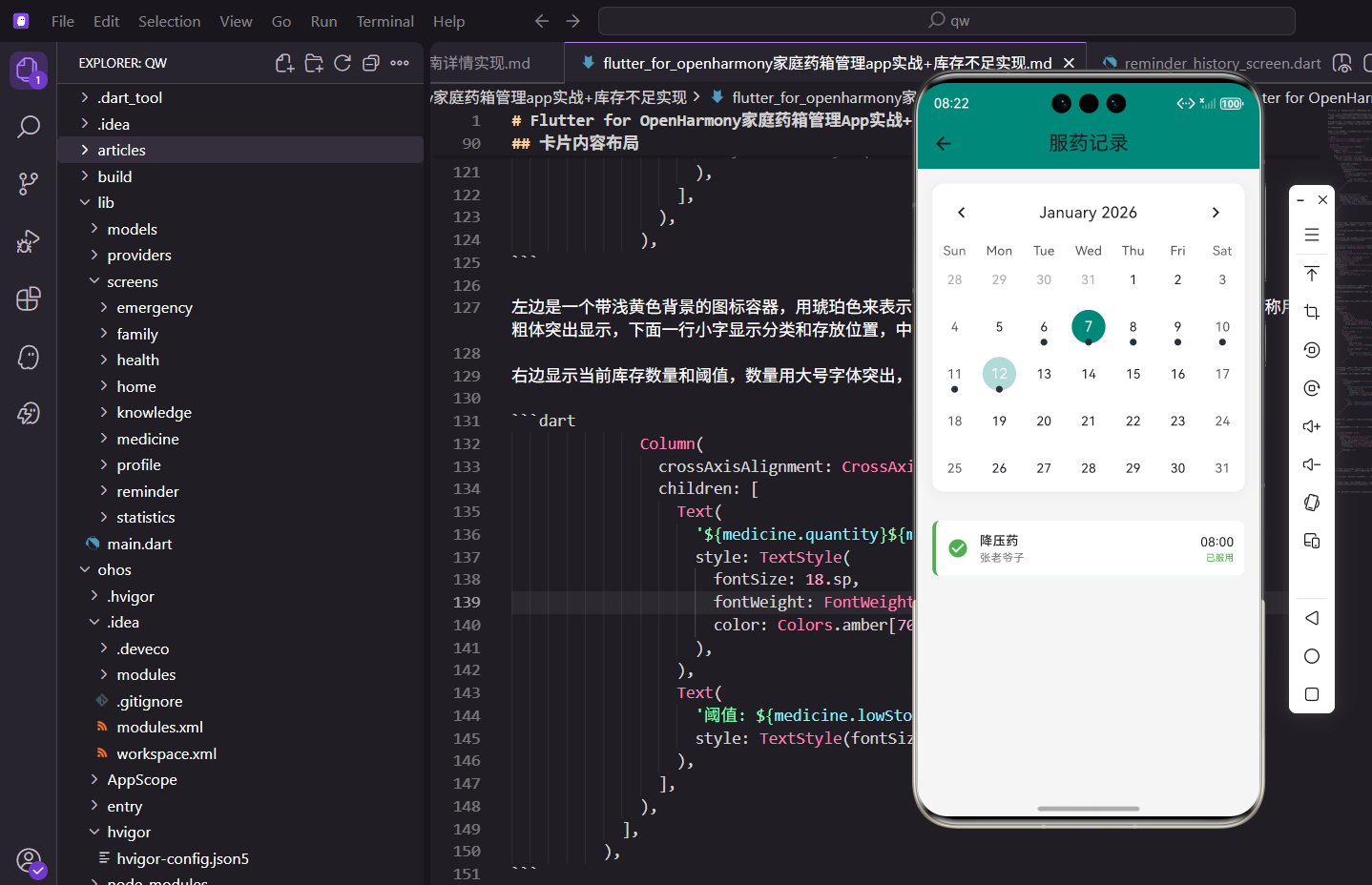
服药记录功能帮助用户追踪用药历史,了解服药的规律性和依从性。通过记录每次服药的时间和状态,用户可以回顾用药情况,医生也能据此调整治疗方案。
功能设计思路
服药记录页面按日期倒序展示所有服药记录,每条记录包含药品名称、服药人、服药时间和状态。使用不同颜色标识按时服药、延迟服药和漏服三种状态。
记录模型设计
服药记录包含完整的服药信息:
class MedicationRecord {
  final String id;
  final String reminderId;
  final String medicineName;
  final String memberName;
  final DateTime scheduledTime;
  final DateTime? actualTime;
  final String status; // 'taken', 'delayed', 'missed'
  final String? notes;

  MedicationRecord({
    required this.id,
    required this.reminderId,
    required this.medicineName,
    required this.memberName,
    required this.scheduledTime,
    this.actualTime,
    required this.status,
    this.notes,
  });
}
scheduledTime是计划服药时间,actualTime是实际服药时间。status表示服药状态:taken(已服用)、delayed(延迟服用)、missed(漏服)。这种设计让我们能够准确追踪每次服药的情况,为后续的依从性分析提供数据基础。
页面结构实现
记录列表按日期分组:
Widget build(BuildContext context) {
return Scaffold(
appBar: AppBar(title: const Text('服药记录')),
body: Consumer<ReminderProvider>(
builder: (context, provider, child) {
final records = provider.medicationRecords;
if (records.isEmpty) {
return Center(
child: Column(
mainAxisAlignment: MainAxisAlignment.center,
children: [
Icon(Icons.history, size: 64.sp, color: Colors.grey[300]),
SizedBox(height: 16.h),
Text('暂无服药记录', style: TextStyle(color: Colors.grey[500], fontSize: 16.sp)),
],
),
);
}
// 按日期分组
final groupedRecords = <String, List<MedicationRecord>>{};
for (var record in records) {
final dateKey = DateFormat('yyyy-MM-dd').format(record.scheduledTime);
groupedRecords.putIfAbsent(dateKey, () => []);
groupedRecords[dateKey]!.add(record);
}
return ListView.builder(
padding: EdgeInsets.all(16.w),
itemCount: groupedRecords.length,
itemBuilder: (context, index) {
final dateKey = groupedRecords.keys.elementAt(index);
final dayRecords = groupedRecords[dateKey]!;
return _buildDateSection(dateKey, dayRecords);
},
);
},
),
);
}
使用Map按日期分组记录,日期作为key,记录列表作为value。这种分组让用户能够按天查看服药情况,更容易发现用药规律和问题。空状态使用大号图标和提示文字,引导用户开始记录服药信息。
日期分组展示
每个日期显示为一个独立的区块:
Widget _buildDateSection(String dateKey, List<MedicationRecord> records) {
  final date = DateTime.parse(dateKey);
  final isToday = DateFormat('yyyy-MM-dd').format(DateTime.now()) == dateKey;

  return Column(
    crossAxisAlignment: CrossAxisAlignment.start,
    children: [
      Container(
        padding: EdgeInsets.symmetric(horizontal: 12.w, vertical: 6.h),
        decoration: BoxDecoration(
          color: isToday ? const Color(0xFF00897B).withOpacity(0.1) : Colors.grey[100],
          borderRadius: BorderRadius.circular(20.r),
        ),
        child: Text(
          isToday ? '今天' : DateFormat('MM月dd日 EEEE', 'zh_CN').format(date),
          style: TextStyle(
            fontSize: 14.sp,
            fontWeight: FontWeight.w500,
            color: isToday ? const Color(0xFF00897B) : Colors.grey[700],
          ),
        ),
      ),
      SizedBox(height: 8.h),
      ...records.map((record) => _buildRecordCard(record)),
      SizedBox(height: 16.h),
    ],
  );
}
今天的日期使用主题色背景和"今天"文字,其他日期使用灰色背景和完整日期。这种设计让用户能够快速定位到今天的记录,了解当天的服药情况。日期标签使用圆角胶囊形状,视觉上更加友好。
记录卡片设计
每条记录显示完整的服药信息:
Widget _buildRecordCard(MedicationRecord record) {
  Color statusColor;
  IconData statusIcon;
  String statusText;

  switch (record.status) {
    case 'taken':
      statusColor = Colors.green;
      statusIcon = Icons.check_circle;
      statusText = '已服用';
      break;
    case 'delayed':
      statusColor = Colors.orange;
      statusIcon = Icons.access_time;
      statusText = '延迟服用';
      break;
    case 'missed':
      statusColor = Colors.red;
      statusIcon = Icons.cancel;
      statusText = '漏服';
      break;
    default:
      statusColor = Colors.grey;
      statusIcon = Icons.help;
      statusText = '未知';
  }

  return Container(
    margin: EdgeInsets.only(bottom: 8.h),
    padding: EdgeInsets.all(12.w),
    decoration: BoxDecoration(
      color: Colors.white,
      borderRadius: BorderRadius.circular(12.r),
      border: Border(left: BorderSide(color: statusColor, width: 4.w)),
      boxShadow: [
        BoxShadow(color: Colors.black.withOpacity(0.05), blurRadius: 10, offset: const Offset(0, 2)),
      ],
    ),
    child: Row(
      children: [
        Container(
          width: 40.w,
          height: 40.w,
          decoration: BoxDecoration(
            color: statusColor.withOpacity(0.1),
            shape: BoxShape.circle,
          ),
          child: Icon(statusIcon, color: statusColor, size: 20.sp),
        ),
        SizedBox(width: 12.w),
        Expanded(
          child: Column(
            crossAxisAlignment: CrossAxisAlignment.start,
            children: [
              Text(
                record.medicineName,
                style: TextStyle(fontSize: 16.sp, fontWeight: FontWeight.bold),
              ),
              SizedBox(height: 4.h),
              Text(
                record.memberName,
                style: TextStyle(fontSize: 12.sp, color: Colors.grey[600]),
              ),
            ],
          ),
        ),
        Column(
          crossAxisAlignment: CrossAxisAlignment.end,
          children: [
            Text(
              DateFormat('HH:mm').format(record.scheduledTime),
              style: TextStyle(fontSize: 14.sp, fontWeight: FontWeight.w500),
            ),
            Container(
              margin: EdgeInsets.only(top: 4.h),
              padding: EdgeInsets.symmetric(horizontal: 6.w, vertical: 2.h),
              decoration: BoxDecoration(
                color: statusColor.withOpacity(0.1),
                borderRadius: BorderRadius.circular(10.r),
              ),
              child: Text(
                statusText,
                style: TextStyle(fontSize: 10.sp, color: statusColor),
              ),
            ),
          ],
        ),
      ],
    ),
  );
}
状态颜色编码:已服用使用绿色,延迟服用使用橙色,漏服使用红色。每种状态有对应的图标和文字。
左侧边框:使用状态颜色的边框,让用户能够快速识别记录状态。这种设计在列表中特别有效,用户扫一眼就能看出服药情况。
时间显示:显示计划服药时间,让用户知道这是哪个时间点的提醒。状态标签显示在时间下方,形成完整的信息组合。
记录生成逻辑
Provider中实现记录生成:
void generateMedicationRecords() {
  final now = DateTime.now();

  for (var reminder in _reminders.where((r) => r.isActive)) {
    for (var time in reminder.reminderTimes) {
      if (time.isBefore(now)) {
        // 检查是否已有记录
        final hasRecord = _medicationRecords.any((r) =>
            r.reminderId == reminder.id &&
            r.scheduledTime.year == time.year &&
            r.scheduledTime.month == time.month &&
            r.scheduledTime.day == time.day &&
            r.scheduledTime.hour == time.hour &&
            r.scheduledTime.minute == time.minute);

        if (!hasRecord) {
          // 生成漏服记录
          _medicationRecords.add(MedicationRecord(
            id: const Uuid().v4(),
            reminderId: reminder.id,
            medicineName: reminder.medicineName,
            memberName: reminder.memberName,
            scheduledTime: time,
            status: 'missed',
          ));
        }
      }
    }
  }

  notifyListeners();
}
定期检查所有启用的提醒,如果提醒时间已过且没有记录,生成漏服记录。这种自动记录机制确保了数据的完整性,用户不需要手动记录每次漏服,系统会自动追踪。这对于分析用药依从性非常重要。
手动记录服药
用户可以手动标记已服药:
void markAsTaken(String reminderId, DateTime scheduledTime) {
  final record = MedicationRecord(
    id: const Uuid().v4(),
    reminderId: reminderId,
    medicineName: '...',
    memberName: '...',
    scheduledTime: scheduledTime,
    actualTime: DateTime.now(),
    status: _isDelayed(scheduledTime, DateTime.now()) ? 'delayed' : 'taken',
  );

  _medicationRecords.add(record);
  notifyListeners();
}

bool _isDelayed(DateTime scheduled, DateTime actual) {
  final diff = actual.difference(scheduled).inMinutes;
  return diff > 30; // 超过30分钟算延迟
}
记录实际服药时间,比较计划时间和实际时间判断是否延迟。超过30分钟标记为延迟服用。这个时间阈值可以根据实际需求调整,帮助用户了解自己的服药准时性。
统计信息
可以基于记录计算服药依从性:
double get adherenceRate {
  if (_medicationRecords.isEmpty) return 0;
  final takenCount = _medicationRecords.where((r) => r.status == 'taken' || r.status == 'delayed').length;
  return takenCount / _medicationRecords.length;
}
依从性 = (已服用 + 延迟服用) / 总记录数。这个指标反映了用户的用药规律性,是评估治疗效果的重要参考。医生可以根据这个数据调整治疗方案,用户也能了解自己的用药习惯。
总结
服药记录功能通过自动生成和手动标记,完整追踪用药历史。颜色编码和左侧边框让不同状态一目了然,日期分组让记录查看更加便捷。Provider管理记录数据,支持统计分析。
依从性报告生成
基于服药记录生成依从性报告:
Widget _buildAdherenceReport() {
  final provider = context.read<ReminderProvider>();
  final records = provider.medicationRecords;

  if (records.isEmpty) {
    return const SizedBox.shrink();
  }

  final takenCount = records.where((r) => r.status == 'taken').length;
  final delayedCount = records.where((r) => r.status == 'delayed').length;
  final missedCount = records.where((r) => r.status == 'missed').length;
  final totalCount = records.length;

  final adherenceRate = (takenCount + delayedCount) / totalCount * 100;

  return Container(
    margin: EdgeInsets.all(16.w),
    padding: EdgeInsets.all(16.w),
    decoration: BoxDecoration(
      color: Colors.white,
      borderRadius: BorderRadius.circular(12.r),
      boxShadow: [
        BoxShadow(color: Colors.black.withOpacity(0.05), blurRadius: 10, offset: const Offset(0, 2)),
      ],
    ),
    child: Column(
      crossAxisAlignment: CrossAxisAlignment.start,
      children: [
        Text('用药依从性报告', style: TextStyle(fontSize: 16.sp, fontWeight: FontWeight.bold)),
        SizedBox(height: 16.h),
        Row(
          mainAxisAlignment: MainAxisAlignment.spaceAround,
          children: [
            _buildStatItem('按时服用', takenCount.toString(), Colors.green),
            _buildStatItem('延迟服用', delayedCount.toString(), Colors.orange),
            _buildStatItem('漏服', missedCount.toString(), Colors.red),
          ],
        ),
        SizedBox(height: 16.h),
        LinearProgressIndicator(
          value: adherenceRate / 100,
          backgroundColor: Colors.grey[200],
          valueColor: AlwaysStoppedAnimation<Color>(
            adherenceRate >= 80 ? Colors.green : (adherenceRate >= 60 ? Colors.orange : Colors.red),
          ),
        ),
        SizedBox(height: 8.h),
        Text(
          '依从性:${adherenceRate.toStringAsFixed(1)}%',
          style: TextStyle(fontSize: 14.sp, fontWeight: FontWeight.w500),
        ),
      ],
    ),
  );
}

Widget _buildStatItem(String label, String value, Color color) {
  return Column(
    children: [
      Text(value, style: TextStyle(fontSize: 24.sp, fontWeight: FontWeight.bold, color: color)),
      SizedBox(height: 4.h),
      Text(label, style: TextStyle(fontSize: 12.sp, color: Colors.grey[600])),
    ],
  );
}
依从性报告显示按时服用、延迟服用和漏服的数量,以及总体依从性百分比。进度条使用不同颜色表示依从性水平:80%以上为绿色,60-80%为橙色,60%以下为红色。
记录筛选功能
支持按状态和日期范围筛选记录:
String? _statusFilter;
DateTimeRange? _dateRange;

List<MedicationRecord> _filterRecords(List<MedicationRecord> records) {
  var filtered = records;

  if (_statusFilter != null) {
    filtered = filtered.where((r) => r.status == _statusFilter).toList();
  }

  if (_dateRange != null) {
    filtered = filtered.where((r) =>
        r.scheduledTime.isAfter(_dateRange!.start) &&
        r.scheduledTime.isBefore(_dateRange!.end.add(const Duration(days: 1)))).toList();
  }

  return filtered;
}

Widget _buildFilterBar() {
  return Row(
    children: [
      Expanded(
        child: DropdownButtonFormField<String>(
          value: _statusFilter,
          decoration: InputDecoration(
            labelText: '状态',
            border: OutlineInputBorder(borderRadius: BorderRadius.circular(8.r)),
            contentPadding: EdgeInsets.symmetric(horizontal: 12.w),
          ),
          items: [
            const DropdownMenuItem(value: null, child: Text('全部')),
            const DropdownMenuItem(value: 'taken', child: Text('已服用')),
            const DropdownMenuItem(value: 'delayed', child: Text('延迟服用')),
            const DropdownMenuItem(value: 'missed', child: Text('漏服')),
          ],
          onChanged: (v) => setState(() => _statusFilter = v),
        ),
      ),
      SizedBox(width: 12.w),
      IconButton(
        icon: const Icon(Icons.date_range),
        onPressed: _selectDateRange,
      ),
    ],
  );
}
筛选功能让用户可以快速查看特定状态或时间段的记录。状态筛选使用下拉框,日期范围使用日期选择器。
导出记录功能
支持导出服药记录为CSV格式:
Future<void> _exportRecords() async {
  final records = context.read<ReminderProvider>().medicationRecords;

  final csvData = StringBuffer();
  csvData.writeln('日期,时间,药品名称,服药人,状态');

  for (final record in records) {
    final date = DateFormat('yyyy-MM-dd').format(record.scheduledTime);
    final time = DateFormat('HH:mm').format(record.scheduledTime);
    final status = record.status == 'taken' ? '已服用' : (record.status == 'delayed' ? '延迟服用' : '漏服');
    csvData.writeln('$date,$time,${record.medicineName},${record.memberName},$status');
  }

  // 保存或分享CSV文件
  Get.snackbar('导出成功', '服药记录已导出', snackPosition: SnackPosition.BOTTOM);
}
导出功能将服药记录转换为CSV格式,方便用户在电脑上查看或分析,也可以提供给医生作为用药依从性的参考。
提醒补服功能
对于漏服的记录,提供补服提醒:
void _showMakeUpReminder(MedicationRecord record) {
  showDialog(
    context: context,
    builder: (context) => AlertDialog(
      title: const Text('补服提醒'),
      content: Text('您漏服了${record.medicineName},是否现在补服?'),
      actions: [
        TextButton(
          onPressed: () => Navigator.pop(context),
          child: const Text('稍后'),
        ),
        TextButton(
          onPressed: () {
            Navigator.pop(context);
            _markAsTaken(record);
          },
          child: const Text('已补服'),
        ),
      ],
    ),
  );
}
补服提醒帮助用户及时补充漏服的药物,提高用药依从性。
欢迎加入开源鸿蒙跨平台社区:https://openharmonycrossplatform.csdn.net

开源鸿蒙跨平台开发社区汇聚开发者与厂商,共建“一次开发,多端部署”的开源生态,致力于降低跨端开发门槛,推动万物智联创新。
更多推荐

 19
19 0
0- 0


 已为社区贡献30条内容

所有评论(0)