Flutter for OpenHarmony 万能游戏库App实战 - 游戏优惠详情实现
本文介绍了一个游戏优惠详情页面的实现方案,包含价格对比、评分展示和快速购买功能。页面采用清晰的信息架构和视觉设计,使用SingleChildScrollView支持滚动浏览。核心功能包括:1) 游戏封面展示(16:9比例);2) 游戏名称和商店信息;3) 醒目的价格对比卡片(现价/原价/折扣);4) 评分信息展示;5) 一键购买功能。代码通过安全转换和默认值处理防止空异常,采用异步操作最佳实践确保
游戏优惠详情页面是用户做出购买决策的关键。这篇文章我们来实现一个信息丰富的优惠详情页面,包括价格对比、评分展示、以及快速购买功能。通过清晰的信息架构和视觉设计,帮助用户快速了解优惠信息。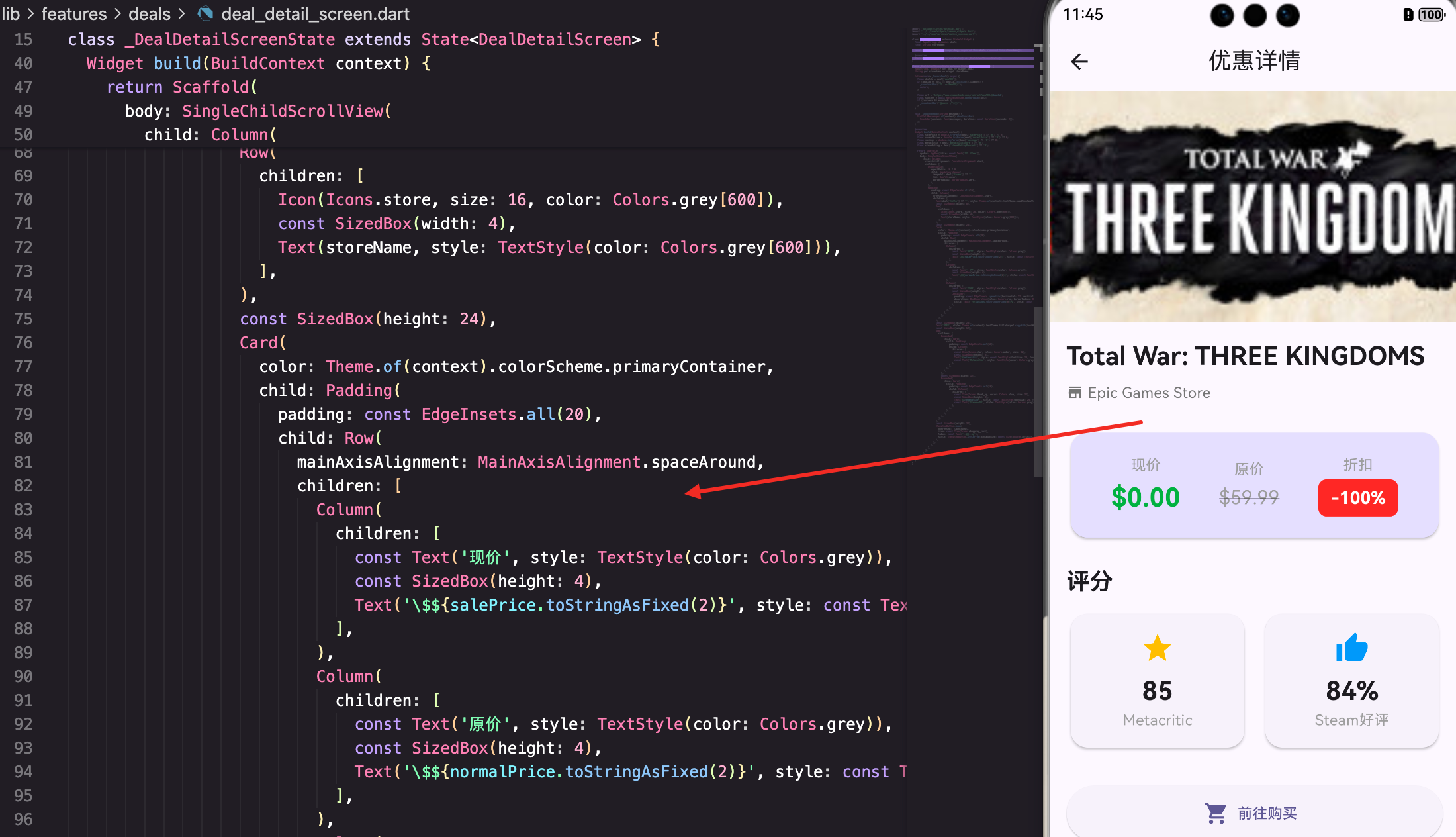
页面的基本结构
DealDetailScreen是一个无状态的Widget,接收优惠信息和商店名称作为参数:
class DealDetailScreen extends StatefulWidget {
final Map<String, dynamic> deal;
final String storeName;
const DealDetailScreen({super.key, required this.deal, required this.storeName});
State<DealDetailScreen> createState() => _DealDetailScreenState();
}
class _DealDetailScreenState extends State<DealDetailScreen> {
Map<String, dynamic> get deal => widget.deal;
String get storeName => widget.storeName;
使用getter来简化对deal和storeName的访问。这样在代码中可以直接用deal而不是widget.deal。
打开购买链接
_launchDeal方法处理打开优惠链接的逻辑:
  Future<void> _launchDeal() async {
    final dealId = deal['dealID'];
    if (dealId == null || dealId.toString().isEmpty) {
      _showSnackBar('优惠链接不可用');
      return;
    }

    final url = 'https://www.cheapshark.com/redirect?dealID=$dealId';
    final success = await NativeService.openBrowser(url);
    if (!success && mounted) {
      _showSnackBar('无法打开浏览器');
    }
  }
先检查dealID是否存在。如果不存在就显示错误提示。
使用NativeService.openBrowser来打开系统浏览器。这样能避免在应用内打开网页,提供更好的用户体验。
检查mounted确保页面还存在,这是异步操作的最佳实践。
_showSnackBar方法显示提示信息:
  void _showSnackBar(String message) {
    ScaffoldMessenger.of(context).showSnackBar(
      SnackBar(content: Text(message), duration: const Duration(seconds: 2)),
    );
  }
SnackBar会在屏幕底部显示2秒的提示信息。
页面的整体布局
页面用SingleChildScrollView包装,支持内容超出屏幕时滚动:
Widget build(BuildContext context) {
final salePrice = double.tryParse(deal['salePrice'] ?? '0') ?? 0;
final normalPrice = double.tryParse(deal['normalPrice'] ?? '0') ?? 0;
final savings = double.tryParse(deal['savings'] ?? '0') ?? 0;
final metacritic = deal['metacriticScore'] ?? '0';
final steamRating = deal['steamRatingPercent'] ?? '0';
return Scaffold(
appBar: AppBar(title: const Text('优惠详情')),
body: SingleChildScrollView(
child: Column(
crossAxisAlignment: CrossAxisAlignment.start,
children: [
先提取所有需要的数据,使用tryParse来安全地转换字符串为数字。
用??提供默认值,这样能防止null异常。
游戏封面图片
页面顶部显示游戏的封面图片:
            AspectRatio(
              aspectRatio: 16 / 9,
              child: AppNetworkImage(
                imageUrl: deal['thumb'] ?? '',
                fit: BoxFit.cover,
                borderRadius: BorderRadius.zero,
              ),
            ),
AspectRatio确保图片的宽高比为16:9,这样能保持一致的视觉效果。
fit: BoxFit.cover确保图片填满整个容器。
游戏信息区域
游戏名称和商店信息展示在图片下方:
            Padding(
              padding: const EdgeInsets.all(16),
              child: Column(
                crossAxisAlignment: CrossAxisAlignment.start,
                children: [
                  Text(deal['title'] ?? '', style: Theme.of(context).textTheme.headlineSmall?.copyWith(fontWeight: FontWeight.bold)),
                  const SizedBox(height: 8),
                  Row(
                    children: [
                      Icon(Icons.store, size: 16, color: Colors.grey[600]),
                      const SizedBox(width: 4),
                      Text(storeName, style: TextStyle(color: Colors.grey[600])),
                    ],
                  ),
游戏名称用headlineSmall样式,加粗显示。
商店名称前面加一个商店图标,这样能更直观地表达信息。
价格信息卡片
价格信息用一个高亮的Card展示:
                  const SizedBox(height: 24),
                  Card(
                    color: Theme.of(context).colorScheme.primaryContainer,
                    child: Padding(
                      padding: const EdgeInsets.all(20),
                      child: Row(
                        mainAxisAlignment: MainAxisAlignment.spaceAround,
                        children: [
                          Column(
                            children: [
                              const Text('现价', style: TextStyle(color: Colors.grey)),
                              const SizedBox(height: 4),
                              Text('\${salePrice.toStringAsFixed(2)}', style: const TextStyle(fontSize: 24, fontWeight: FontWeight.bold, color: Colors.green)),
                            ],
                          ),
                          Column(
                            children: [
                              const Text('原价', style: TextStyle(color: Colors.grey)),
                              const SizedBox(height: 4),
                              Text('\${normalPrice.toStringAsFixed(2)}', style: const TextStyle(fontSize: 18, decoration: TextDecoration.lineThrough, color: Colors.grey)),
                            ],
                          ),
                          Column(
                            children: [
                              const Text('折扣', style: TextStyle(color: Colors.grey)),
                              const SizedBox(height: 4),
                              Container(
                                padding: const EdgeInsets.symmetric(horizontal: 12, vertical: 6),
                                decoration: BoxDecoration(color: Colors.red, borderRadius: BorderRadius.circular(8)),
                                child: Text('-${savings.toStringAsFixed(0)}%', style: const TextStyle(color: Colors.white, fontWeight: FontWeight.bold, fontSize: 16)),
                              ),
                            ],
                          ),
                        ],
                      ),
                    ),
                  ),
Card用primaryContainer颜色,这样能突出显示价格信息。
用Row的spaceAround来均匀分布三个价格信息。
现价用绿色加粗显示,原价用删除线灰色显示,折扣用红色背景显示。这样的视觉对比能帮助用户快速理解价格信息。
评分信息展示
评分信息用两个并排的Card展示:
                  const SizedBox(height: 24),
                  Text('评分', style: Theme.of(context).textTheme.titleLarge?.copyWith(fontWeight: FontWeight.bold)),
                  const SizedBox(height: 12),
                  Row(
                    children: [
                      Expanded(
                        child: Card(
                          child: Padding(
                            padding: const EdgeInsets.all(16),
                            child: Column(
                              children: [
                                const Icon(Icons.star, color: Colors.amber, size: 32),
                                const SizedBox(height: 8),
                                Text('$metacritic', style: const TextStyle(fontSize: 24, fontWeight: FontWeight.bold)),
                                const Text('Metacritic', style: TextStyle(color: Colors.grey)),
                              ],
                            ),
                          ),
                        ),
                      ),
                      const SizedBox(width: 12),
                      Expanded(
                        child: Card(
                          child: Padding(
                            padding: const EdgeInsets.all(16),
                            child: Column(
                              children: [
                                const Icon(Icons.thumb_up, color: Colors.blue, size: 32),
                                const SizedBox(height: 8),
                                Text('$steamRating%', style: const TextStyle(fontSize: 24, fontWeight: FontWeight.bold)),
                                const Text('Steam好评', style: TextStyle(color: Colors.grey)),
                              ],
                            ),
                          ),
                        ),
                      ),
                    ],
                  ),
用两个Expanded的Card并排显示Metacritic和Steam的评分。
每个评分用不同的图标和颜色来区分:Metacritic用星星和琥珀色,Steam用竖起大拇指和蓝色。
这样的设计能清晰地展示多个评分来源,帮助用户做出更好的决策。
购买按钮
页面底部是一个大的购买按钮:
                  const SizedBox(height: 32),
                  ElevatedButton.icon(
                    onPressed: _launchDeal,
                    icon: const Icon(Icons.shopping_cart),
                    label: const Text('前往购买'),
                    style: ElevatedButton.styleFrom(minimumSize: const Size(double.infinity, 52)),
                  ),
按钮占满整个宽度,高度为52像素,这样能提供更好的可点击性。
用shopping_cart图标和"前往购买"文字,清晰地表达按钮的功能。
总结
这篇文章我们实现了一个信息丰富的游戏优惠详情页面。涉及到的知识点包括:
- 数据提取和转换 - 安全地从Map中提取和转换数据
- 视觉层级 - 通过颜色、大小、排版来建立清晰的信息层级
- 原生集成 - 调用原生方法打开系统浏览器
- 响应式布局 - 使用Expanded和Row实现响应式的价格和评分展示
- 用户反馈 - 使用SnackBar提供及时的用户反馈
优惠详情页面虽然功能相对简单,但通过精心的设计和布局,能为用户提供一个清晰、高效的购买决策界面。
欢迎加入开源鸿蒙跨平台社区:https://openharmonycrossplatform.csdn.net

开源鸿蒙跨平台开发社区汇聚开发者与厂商,共建“一次开发,多端部署”的开源生态,致力于降低跨端开发门槛,推动万物智联创新。
更多推荐


 17
17 0
0- 0


 已为社区贡献27条内容

所有评论(0)