RN for OpenHarmony英雄联盟助手App实战:版本资讯实现
本文介绍了OpenHarmony平台上版本资讯页面的实现过程,重点分析了三个核心技术点: 网络请求封装:基于原生fetch实现了带超时机制的统一请求方法,采用{data,error,status}的响应结构简化调用方处理逻辑,通过Promise.race实现请求超时控制。 API服务层:在基础http模块上封装版本相关API,使用防御性编程返回空数组而非null,并设置有效兜底版本号保证后续请求可
案例开源地址:https://atomgit.com/nutpi/rn_openharmony_lol
版本资讯页面看起来简单,但它涉及到几个有意思的技术点:时间线布局的实现、条件样式的处理、以及如何优雅地封装网络请求。这篇文章我们就来拆解这个页面的实现过程。
页面功能概述
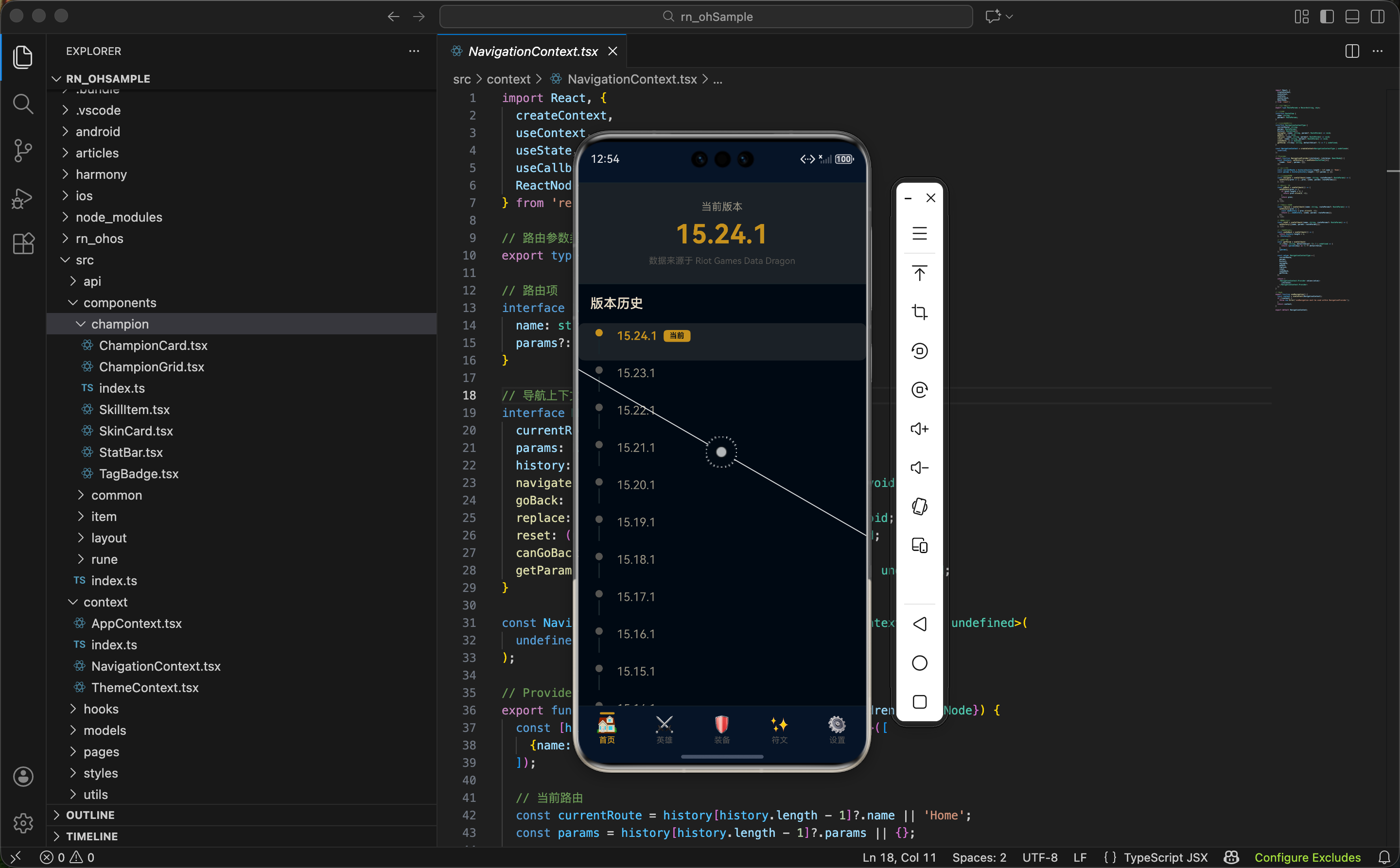
版本资讯页面主要展示三块内容:
- 当前版本卡片:突出显示 App 正在使用的数据版本
- 版本历史时间线:以时间线的形式展示最近的版本记录
- 说明卡片:告诉用户数据来源和更新机制
这个页面的数据来自 Riot Games 的 Data Dragon API,它会返回一个版本号数组,最新的版本排在最前面。
网络请求的封装
在写页面之前,我们先看看网络请求是怎么封装的。很多同学可能习惯直接用 axios,但在 OpenHarmony 平台上,为了避免第三方库的兼容性问题,我们选择基于原生 fetch 自己封装。
定义响应类型
interface HttpResponse<T> {
  data: T | null;
  error: string | null;
  status: number;
}
为什么这样设计响应结构?
统一的响应结构让调用方可以用一致的方式处理成功和失败的情况:
data:请求成功时存放返回数据,失败时为 nullerror:请求失败时存放错误信息,成功时为 nullstatus:HTTP 状态码,方便调试和特殊处理这种设计避免了 try-catch 的嵌套,代码更扁平。
超时处理
const DEFAULT_TIMEOUT = 15000;

const timeoutPromise = (ms: number): Promise<never> => {
  return new Promise((_, reject) => {
    setTimeout(() => reject(new Error('请求超时')), ms);
  });
};
超时机制的实现原理:
原生
fetch不支持超时设置,我们通过Promise.race来实现:
- 创建一个会在指定时间后 reject 的 Promise
- 让它和 fetch 请求"赛跑"
- 谁先完成就用谁的结果
如果 fetch 在 15 秒内没返回,timeoutPromise 就会先 reject,从而触发超时错误。
核心请求方法
async function request<T>(
  url: string,
  options: RequestOptions = {},
): Promise<HttpResponse<T>> {
  const {method = 'GET', headers = {}, body, timeout = DEFAULT_TIMEOUT} = options;

  const config: RequestInit = {
    method,
    headers: {'Content-Type': 'application/json', ...headers},
  };

  if (body && method !== 'GET') {
    config.body = JSON.stringify(body);
  }
参数解构与默认值:
使用解构赋值配合默认值,让函数调用更灵活:
- 不传 method 默认是 GET
- 不传 timeout 默认是 15 秒
- headers 会和默认的 Content-Type 合并
  try {
    const response = await Promise.race([
      fetch(url, config),
      timeoutPromise(timeout),
    ]);

    const data = await response.json();

    if (!response.ok) {
      return {data: null, error: `HTTP Error: ${response.status}`, status: response.status};
    }

    return {data, error: null, status: response.status};
  } catch (error: any) {
    return {data: null, error: error.message || '网络请求失败', status: 0};
  }
}
错误处理策略:
这里把所有错误都"吞掉"并转换成统一的响应格式,而不是抛出异常。这样做的好处是:
- 调用方不需要写 try-catch
- 错误信息通过
error字段传递,处理方式一致status: 0表示网络层面的错误(超时、断网等)
版本 API 的封装
有了基础的 http 模块,封装版本相关的 API 就很简单了:
import http from './http';
import endpoints from './endpoints';

export async function getVersions(): Promise<string[]> {
  const response = await http.get<string[]>(endpoints.versions);

  if (response.error || !response.data) {
    console.error('获取版本列表失败:', response.error);
    return [];
  }

  return response.data;
}
防御性编程:
即使请求失败,也返回空数组而不是 null 或 undefined。这样调用方可以放心地对返回值做 map、slice 等操作,不用担心空指针异常。
export async function getLatestVersion(): Promise<string> {
  const versions = await getVersions();
  return versions[0] || '15.1.1';
}
兜底值的设置:
versions[0] || '15.1.1'确保即使获取版本列表失败,也能返回一个有效的版本号。这个兜底值应该是一个确实存在的版本,这样后续用这个版本号去请求其他数据时不会出错。
页面组件实现
状态定义与数据加载
import React, {useEffect, useState} from 'react';
import {View, Text, ScrollView, StyleSheet} from 'react-native';
import {colors} from '../../styles/colors';
import {useApp} from '../../context/AppContext';
import {versionApi} from '../../api';
import {Loading} from '../../components/common';

export function NewsPage() {
  const {state} = useApp();
  const [versions, setVersions] = useState<string[]>([]);
  const [loading, setLoading] = useState(true);

  useEffect(() => {
    async function loadVersions() {
      const data = await versionApi.getVersions();
      setVersions(data.slice(0, 20));
      setLoading(false);
    }
    loadVersions();
  }, []);
为什么只取前 20 个版本?
Data Dragon 的版本列表包含了从游戏上线至今的所有版本,数量非常多。全部展示既没必要,也会影响渲染性能。取最近 20 个版本足够用户了解近期的更新情况。
空依赖数组
[]的含义:
useEffect的第二个参数是空数组,表示这个 effect 只在组件挂载时执行一次。版本列表是相对静态的数据,不需要频繁刷新。
当前版本卡片
<View style={styles.currentVersion}>
  <Text style={styles.currentLabel}>当前版本</Text>
  <Text style={styles.currentValue}>{state.version}</Text>
  <Text style={styles.currentDesc}>数据来源于 Riot Games Data Dragon</Text>
</View>
样式设计思路:
currentVersion: {
  backgroundColor: colors.backgroundCard,
  padding: 24,
  alignItems: 'center',
  borderBottomWidth: 1,
  borderBottomColor: colors.border,
},
currentValue: {
  fontSize: 36,
  fontWeight: 'bold',
  color: colors.textGold,
  marginBottom: 8,
},
版本号用 36px 的金色大字体,是整个页面视觉上最突出的元素。底部的分隔线把这个卡片和下面的内容区分开。
时间线布局的实现
时间线是这个页面最有意思的部分。每个版本项由左侧的圆点+连接线和右侧的版本信息组成:
{versions.map((version, index) => (
  <View
    key={version}
    style={[
      styles.versionItem,
      version === state.version && styles.versionItemActive,
    ]}>
    <View style={styles.versionDot}>
      <View style={[styles.dot, version === state.version && styles.dotActive]} />
      {index < versions.length - 1 && <View style={styles.line} />}
    </View>
    <View style={styles.versionContent}>
      <Text style={[styles.versionText, version === state.version && styles.versionTextActive]}>
        {version}
      </Text>
      {version === state.version && (
        <View style={styles.currentBadge}>
          <Text style={styles.currentBadgeText}>当前</Text>
        </View>
      )}
    </View>
  </View>
))}
条件样式的写法:
style={[styles.versionItem, version === state.version && styles.versionItemActive]}React Native 的 style 属性支持数组,数组中的样式会按顺序合并。当条件为 false 时,
&&表达式返回 false,RN 会忽略这个值。这是一种简洁的条件样式写法。
时间线连接线的处理:
{index < versions.length - 1 && <View style={styles.line} />}最后一个版本项不需要连接线,通过判断 index 来控制。这个细节很容易被忽略,但对视觉效果影响很大。
时间线样式详解
versionDot: {
  width: 24,
  alignItems: 'center',
},
dot: {
  width: 10,
  height: 10,
  borderRadius: 5,
  backgroundColor: colors.textMuted,
},
dotActive: {
  backgroundColor: colors.primary,
},
line: {
  width: 2,
  flex: 1,
  backgroundColor: colors.border,
  marginTop: 4,
},
布局原理分析:
versionDot是一个固定宽度的容器,用来放圆点和连接线- 圆点是一个正方形 View,通过
borderRadius: 5(宽高的一半)变成圆形- 连接线用
flex: 1填充剩余空间,marginTop: 4让它和圆点之间有一点间隙- 当前版本的圆点用
colors.primary(金色)高亮显示
versionItem: {
  flexDirection: 'row',
  paddingVertical: 8,
},
versionItemActive: {
  backgroundColor: colors.backgroundCard,
  marginHorizontal: -16,
  paddingHorizontal: 16,
  borderRadius: 8,
},
负 margin 技巧:
marginHorizontal: -16配合paddingHorizontal: 16,让当前版本的背景色能够延伸到容器边缘,而内容位置保持不变。这是一个常用的"出血"效果实现方式。
当前版本标签
{version === state.version && (
  <View style={styles.currentBadge}>
    <Text style={styles.currentBadgeText}>当前</Text>
  </View>
)}
标签样式:
currentBadge: {
  backgroundColor: colors.primary,
  paddingHorizontal: 8,
  paddingVertical: 2,
  borderRadius: 4,
  marginLeft: 8,
},
currentBadgeText: {
  fontSize: 10,
  color: colors.background,
  fontWeight: '600',
},
小标签用金色背景配深色文字,和圆点的高亮颜色呼应。
fontSize: 10保持标签的精致感,不会喧宾夺主。
说明卡片
<View style={styles.infoCard}>
  <Text style={styles.infoTitle}>📢 关于版本更新</Text>
  <Text style={styles.infoText}>
    本应用数据来源于 Riot Games 官方 Data Dragon 服务。
    {'\n\n'}
    每当英雄联盟发布新版本时,Data Dragon 会同步更新英雄、装备、符文等数据。
    {'\n\n'}
    应用会自动获取最新版本数据,确保您查看的信息始终是最新的。
  </Text>
</View>
多行文本的换行:
在 JSX 中,直接写换行符是无效的,需要用
{'\n'}来表示。{'\n\n'}就是两个换行,相当于段落之间的空行。
卡片样式:
infoCard: {
  margin: 16,
  padding: 16,
  backgroundColor: colors.backgroundCard,
  borderRadius: 8,
  borderWidth: 1,
  borderColor: colors.border,
},
infoText: {
  fontSize: 14,
  color: colors.textSecondary,
  lineHeight: 22,
},
lineHeight: 22增加行高,让多行文本更易读。边框和圆角让卡片有层次感,和页面其他元素区分开。
完整样式一览
为了方便参考,这里列出页面的完整样式定义:
const styles = StyleSheet.create({
  container: {
    flex: 1,
    backgroundColor: colors.background,
  },
  section: {
    padding: 16,
  },
  sectionTitle: {
    fontSize: 18,
    fontWeight: '600',
    color: colors.textPrimary,
    marginBottom: 16,
  },
  versionContent: {
    flex: 1,
    flexDirection: 'row',
    alignItems: 'center',
    marginLeft: 12,
    paddingBottom: 16,
  },
  versionText: {
    fontSize: 16,
    color: colors.textSecondary,
  },
  versionTextActive: {
    color: colors.textGold,
    fontWeight: '600',
  },
  bottomSpace: {
    height: 20,
  },
});
样式复用的思考:
section和sectionTitle这类通用样式在多个页面都会用到。实际项目中可以考虑抽到公共样式文件,但要注意不要过度抽象,只有真正重复的样式才值得抽取。
可以优化的点
当前实现已经能满足基本需求,但还有一些可以优化的方向:
-
下拉刷新:添加 RefreshControl,让用户可以手动刷新版本列表
-
版本详情:点击某个版本时,跳转到该版本的更新日志页面(需要额外的 API 支持)
-
版本对比:选择两个版本,对比它们之间的数据变化
-
缓存机制:版本列表变化不频繁,可以缓存到本地,减少网络请求
这些优化可以根据实际需求逐步添加,不必一开始就做得很复杂。
小结
这篇文章我们实现了版本资讯页面,重点讲解了:
- 网络请求封装:基于 fetch 实现统一的请求方法,包含超时处理和错误处理
- 时间线布局:通过 flexbox 实现圆点+连接线的时间线效果
- 条件样式:使用数组语法实现样式的条件合并
- 负 margin 技巧:实现背景色的"出血"效果
下一篇我们会实现英雄图鉴页面,这是一个数据量较大的列表页,会涉及到搜索、筛选、性能优化等话题。
欢迎加入开源鸿蒙跨平台社区:https://openharmonycrossplatform.csdn.net

开源鸿蒙跨平台开发社区汇聚开发者与厂商,共建“一次开发,多端部署”的开源生态,致力于降低跨端开发门槛,推动万物智联创新。
更多推荐
 8
8 0
0- 0


 已为社区贡献2条内容

所有评论(0)