Flutter & OpenHarmony 社交App用户卡片组件设计实现
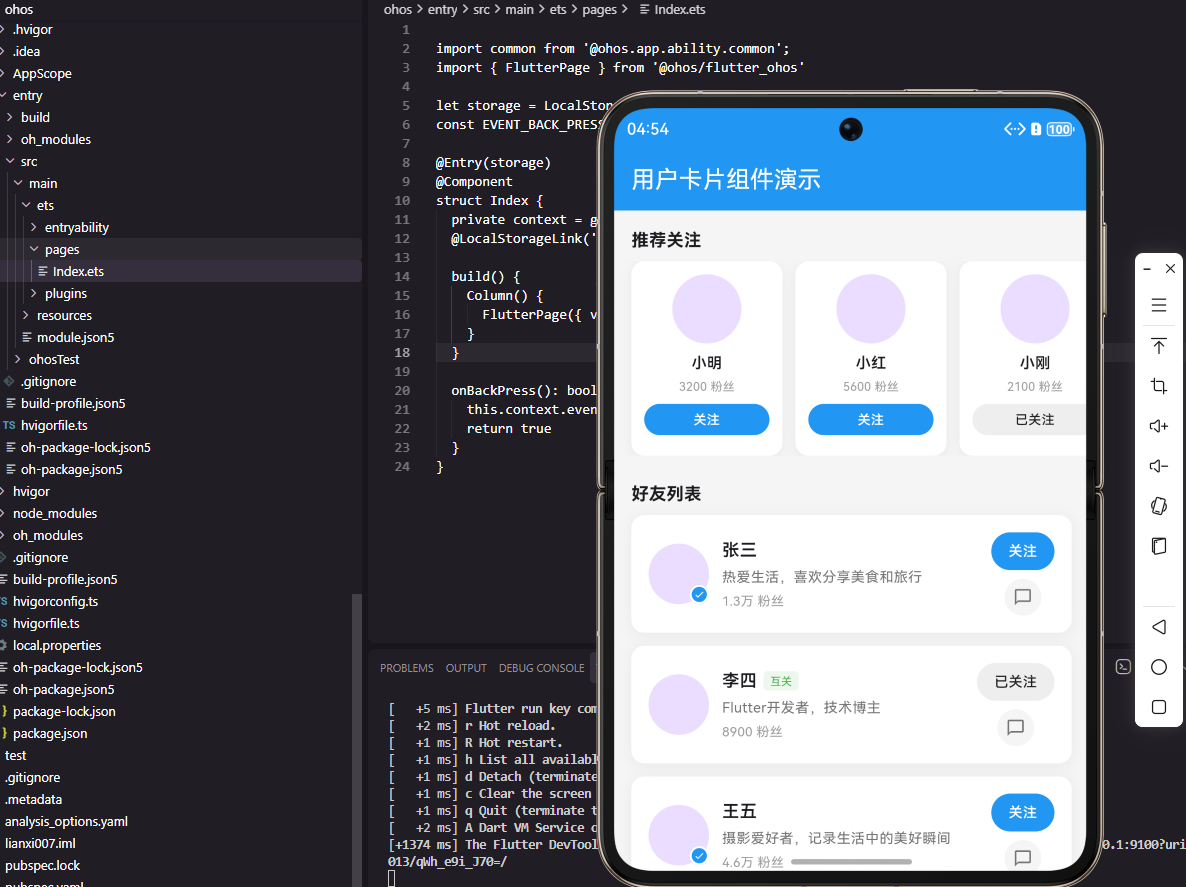
本文介绍了如何在Flutter和OpenHarmony平台上实现用户卡片组件。首先设计了UserInfo数据模型,包含用户基本信息、关注状态等属性。Flutter实现部分详细展示了用户卡片的构建过程,包括头像区域(带认证标识)、用户信息区域(昵称、简介、粉丝数)和操作按钮区域(关注、私信)。组件采用响应式设计,处理不同状态下的UI变化,如互关标识显示、关注按钮状态切换等。通过合理的布局和视觉设计,
前言
用户卡片是社交应用中展示用户信息的核心组件,广泛应用于好友推荐、搜索结果、关注列表等场景。一个优秀的用户卡片需要清晰展示头像、昵称、简介、粉丝数等信息,同时提供关注、私信等交互功能。本文将详细讲解如何在Flutter和OpenHarmony平台上构建功能完善的用户卡片组件。
用户数据模型设计
首先定义用户信息的数据模型。
class UserInfo {
  final String id;
  final String name;
  final String avatar;
  final String bio;
  final int followerCount;
  final bool isFollowing;
  final bool isVerified;
  final bool isMutual;

  UserInfo({
    required this.id,
    required this.name,
    required this.avatar,
    required this.bio,
    required this.followerCount,
    this.isFollowing = false,
    this.isVerified = false,
    this.isMutual = false,
  });

  UserInfo copyWith({bool? isFollowing}) {
    return UserInfo(
      id: id,
      name: name,
      avatar: avatar,
      bio: bio,
      followerCount: followerCount,
      isFollowing: isFollowing ?? this.isFollowing,
      isVerified: isVerified,
      isMutual: isMutual,
    );
  }
}
UserInfo模型包含用户的基本信息。id是唯一标识,name是昵称,avatar是头像URL,bio是个人简介。followerCount记录粉丝数量,isFollowing表示当前用户是否已关注,isVerified表示是否认证用户,isMutual表示是否互相关注。copyWith方法用于创建状态变化后的新实例,遵循不可变数据原则。
Flutter用户卡片实现
实现标准的用户卡片组件。
class UserCard extends StatelessWidget {
final UserInfo user;
final VoidCallback onTap;
final VoidCallback onFollowTap;
final VoidCallback? onMessageTap;
const UserCard({
Key? key,
required this.user,
required this.onTap,
required this.onFollowTap,
this.onMessageTap,
}) : super(key: key);
Widget build(BuildContext context) {
return GestureDetector(
onTap: onTap,
child: Container(
padding: const EdgeInsets.all(16),
decoration: BoxDecoration(
color: Colors.white,
borderRadius: BorderRadius.circular(12),
boxShadow: [
BoxShadow(
color: Colors.black.withOpacity(0.05),
blurRadius: 10,
offset: const Offset(0, 2),
),
],
),
child: Row(
children: [
_buildAvatar(),
const SizedBox(width: 12),
_buildUserInfo(),
const SizedBox(width: 12),
_buildActions(),
],
),
),
);
}
UserCard组件接收用户数据和三个回调函数。onTap处理卡片点击进入用户主页,onFollowTap处理关注按钮点击,onMessageTap是可选的私信按钮回调。整体采用Row横向布局,包含头像、用户信息和操作按钮三个区域。Container添加圆角和阴影效果,提升视觉层次感。
  Widget _buildAvatar() {
    return Stack(
      children: [
        CircleAvatar(
          radius: 28,
          backgroundImage: NetworkImage(user.avatar),
          onBackgroundImageError: (_, __) {},
        ),
        if (user.isVerified)
          Positioned(
            right: 0,
            bottom: 0,
            child: Container(
              width: 18,
              height: 18,
              decoration: BoxDecoration(
                color: Colors.blue,
                shape: BoxShape.circle,
                border: Border.all(color: Colors.white, width: 2),
              ),
              child: const Icon(
                Icons.check,
                size: 10,
                color: Colors.white,
              ),
            ),
          ),
      ],
    );
  }
_buildAvatar方法构建头像区域。使用Stack叠加布局,在头像右下角显示认证标识。CircleAvatar显示圆形头像,radius设置半径为28。onBackgroundImageError处理图片加载失败的情况。认证标识使用Positioned定位到右下角,蓝色圆形背景配合白色对勾图标,白色边框与头像形成视觉分隔。
  Widget _buildUserInfo() {
    return Expanded(
      child: Column(
        crossAxisAlignment: CrossAxisAlignment.start,
        children: [
          Row(
            children: [
              Flexible(
                child: Text(
                  user.name,
                  style: const TextStyle(
                    fontSize: 16,
                    fontWeight: FontWeight.w600,
                  ),
                  maxLines: 1,
                  overflow: TextOverflow.ellipsis,
                ),
              ),
              if (user.isMutual) ...[
                const SizedBox(width: 6),
                Container(
                  padding: const EdgeInsets.symmetric(
                      horizontal: 6, vertical: 2),
                  decoration: BoxDecoration(
                    color: Colors.green.withOpacity(0.1),
                    borderRadius: BorderRadius.circular(4),
                  ),
                  child: const Text(
                    '互关',
                    style: TextStyle(
                      fontSize: 10,
                      color: Colors.green,
                    ),
                  ),
                ),
              ],
            ],
          ),
          const SizedBox(height: 4),
          Text(
            user.bio,
            style: TextStyle(
              fontSize: 13,
              color: Colors.grey[600],
            ),
            maxLines: 1,
            overflow: TextOverflow.ellipsis,
          ),
          const SizedBox(height: 4),
          Text(
            '${_formatCount(user.followerCount)} 粉丝',
            style: const TextStyle(
              fontSize: 12,
              color: Colors.grey,
            ),
          ),
        ],
      ),
    );
  }
_buildUserInfo方法构建用户信息区域。Expanded确保该区域占据剩余空间。用户名使用Flexible包裹,配合ellipsis处理长名称溢出。互关标签使用绿色背景和文字,与关注状态形成区分。个人简介限制单行显示,粉丝数使用_formatCount格式化大数字。
  Widget _buildActions() {
    return Column(
      children: [
        _buildFollowButton(),
        if (onMessageTap != null) ...[
          const SizedBox(height: 8),
          GestureDetector(
            onTap: onMessageTap,
            child: Container(
              padding: const EdgeInsets.all(8),
              decoration: BoxDecoration(
                color: Colors.grey[100],
                shape: BoxShape.circle,
              ),
              child: Icon(
                Icons.chat_bubble_outline,
                size: 18,
                color: Colors.grey[600],
              ),
            ),
          ),
        ],
      ],
    );
  }

  Widget _buildFollowButton() {
    return GestureDetector(
      onTap: onFollowTap,
      child: Container(
        padding: const EdgeInsets.symmetric(horizontal: 16, vertical: 8),
        decoration: BoxDecoration(
          color: user.isFollowing ? Colors.grey[200] : Colors.blue,
          borderRadius: BorderRadius.circular(20),
        ),
        child: Text(
          user.isFollowing ? '已关注' : '关注',
          style: TextStyle(
            color: user.isFollowing ? Colors.black87 : Colors.white,
            fontSize: 13,
            fontWeight: FontWeight.w500,
          ),
        ),
      ),
    );
  }
_buildActions方法构建操作按钮区域。关注按钮根据isFollowing状态切换样式,未关注显示蓝色背景白色文字,已关注显示灰色背景黑色文字。私信按钮是可选的,使用圆形灰色背景配合聊天图标。按钮采用胶囊形状设计,符合现代UI风格。
  String _formatCount(int count) {
    if (count >= 10000) return '${(count / 10000).toStringAsFixed(1)}万';
    return count.toString();
  }
}
_formatCount方法格式化粉丝数量。超过1万的数字转换为"X.X万"格式,提高可读性。toStringAsFixed(1)保留一位小数。
紧凑型用户卡片
实现适用于横向滚动列表的紧凑型卡片。
class CompactUserCard extends StatelessWidget {
final UserInfo user;
final VoidCallback onTap;
final VoidCallback onFollowTap;
const CompactUserCard({
Key? key,
required this.user,
required this.onTap,
required this.onFollowTap,
}) : super(key: key);
Widget build(BuildContext context) {
return GestureDetector(
onTap: onTap,
child: Container(
width: 140,
padding: const EdgeInsets.all(12),
decoration: BoxDecoration(
color: Colors.white,
borderRadius: BorderRadius.circular(12),
boxShadow: [
BoxShadow(
color: Colors.black.withOpacity(0.05),
blurRadius: 8,
offset: const Offset(0, 2),
),
],
),
child: Column(
mainAxisSize: MainAxisSize.min,
children: [
CircleAvatar(
radius: 32,
backgroundImage: NetworkImage(user.avatar),
onBackgroundImageError: (_, __) {},
),
const SizedBox(height: 8),
Text(
user.name,
style: const TextStyle(
fontSize: 14,
fontWeight: FontWeight.w600,
),
maxLines: 1,
overflow: TextOverflow.ellipsis,
),
const SizedBox(height: 4),
Text(
'${_formatCount(user.followerCount)} 粉丝',
style: const TextStyle(
fontSize: 11,
color: Colors.grey,
),
),
const SizedBox(height: 8),
_buildFollowButton(),
],
),
),
);
}
CompactUserCard采用垂直布局,固定宽度140适合横向滚动展示。头像居中显示,下方依次是昵称、粉丝数和关注按钮。mainAxisSize.min确保卡片高度自适应内容。这种布局常用于"推荐关注"等场景。
  Widget _buildFollowButton() {
    return GestureDetector(
      onTap: onFollowTap,
      child: Container(
        width: double.infinity,
        padding: const EdgeInsets.symmetric(vertical: 6),
        decoration: BoxDecoration(
          color: user.isFollowing ? Colors.grey[200] : Colors.blue,
          borderRadius: BorderRadius.circular(16),
        ),
        child: Text(
          user.isFollowing ? '已关注' : '关注',
          textAlign: TextAlign.center,
          style: TextStyle(
            color: user.isFollowing ? Colors.black87 : Colors.white,
            fontSize: 12,
            fontWeight: FontWeight.w500,
          ),
        ),
      ),
    );
  }

  String _formatCount(int count) {
    if (count >= 10000) return '${(count / 10000).toStringAsFixed(1)}万';
    return count.toString();
  }
}
紧凑型卡片的关注按钮宽度撑满容器,文字居中显示。按钮高度较小,与整体紧凑风格保持一致。
OpenHarmony ArkTS实现
鸿蒙系统上的用户卡片实现。
interface UserInfo {
  id: string
  name: string
  avatar: string
  bio: string
  followerCount: number
  isFollowing: boolean
  isVerified: boolean
  isMutual: boolean
}

@Component
struct UserCard {
  @Prop user: UserInfo
  onTap: () => void = () => {}
  onFollowTap: () => void = () => {}
  onMessageTap?: () => void

  build() {
    Row() {
      this.AvatarSection()
      this.InfoSection()
      this.ActionSection()
    }
    .width('100%')
    .padding(16)
    .backgroundColor(Color.White)
    .borderRadius(12)
    .shadow({ radius: 10, color: '#0D000000', offsetY: 2 })
    .onClick(() => this.onTap())
  }
ArkTS使用interface定义用户数据类型。@Component装饰器声明组件,@Prop接收父组件传递的用户数据。Row实现横向布局,shadow添加阴影效果。
  @Builder
  AvatarSection() {
    Stack() {
      Image(this.user.avatar)
        .width(56)
        .height(56)
        .borderRadius(28)
        .objectFit(ImageFit.Cover)

      if (this.user.isVerified) {
        Row() {
          Image($r('app.media.ic_verified'))
            .width(10)
            .height(10)
        }
        .width(18)
        .height(18)
        .backgroundColor('#007AFF')
        .borderRadius(9)
        .border({ width: 2, color: Color.White })
        .justifyContent(FlexAlign.Center)
        .position({ right: 0, bottom: 0 })
      }
    }
    .width(56)
    .height(56)
  }
@Builder定义头像区域构建方法。Stack实现叠加布局,认证标识使用position定位到右下角。Image组件加载网络头像,borderRadius设置圆形裁剪。
  @Builder
  InfoSection() {
    Column() {
      Row() {
        Text(this.user.name)
          .fontSize(16)
          .fontWeight(FontWeight.Medium)
          .maxLines(1)
          .textOverflow({ overflow: TextOverflow.Ellipsis })
          .layoutWeight(1)

        if (this.user.isMutual) {
          Text('互关')
            .fontSize(10)
            .fontColor('#34C759')
            .backgroundColor('#E8F8EC')
            .borderRadius(4)
            .padding({ left: 6, right: 6, top: 2, bottom: 2 })
            .margin({ left: 6 })
        }
      }
      .width('100%')

      Text(this.user.bio)
        .fontSize(13)
        .fontColor('#8E8E93')
        .maxLines(1)
        .textOverflow({ overflow: TextOverflow.Ellipsis })
        .margin({ top: 4 })

      Text(this.formatCount(this.user.followerCount) + ' 粉丝')
        .fontSize(12)
        .fontColor('#AEAEB2')
        .margin({ top: 4 })
    }
    .layoutWeight(1)
    .alignItems(HorizontalAlign.Start)
    .margin({ left: 12, right: 12 })
  }
InfoSection构建用户信息区域。layoutWeight(1)使该区域占据剩余空间。Text组件配置maxLines和textOverflow处理文本溢出。互关标签使用绿色配色方案。
  @Builder
  ActionSection() {
    Column() {
      Button(this.user.isFollowing ? '已关注' : '关注')
        .fontSize(13)
        .fontColor(this.user.isFollowing ? '#1C1C1E' : Color.White)
        .backgroundColor(this.user.isFollowing ? '#E5E5EA' : '#007AFF')
        .borderRadius(20)
        .height(32)
        .padding({ left: 16, right: 16 })
        .onClick(() => this.onFollowTap())

      if (this.onMessageTap) {
        Button() {
          Image($r('app.media.ic_message'))
            .width(18)
            .height(18)
        }
        .width(36)
        .height(36)
        .backgroundColor('#F2F2F7')
        .borderRadius(18)
        .margin({ top: 8 })
        .onClick(() => this.onMessageTap!())
      }
    }
  }

  formatCount(count: number): string {
    if (count >= 10000) {
      return (count / 10000).toFixed(1) + '万'
    }
    return count.toString()
  }
}
ActionSection构建操作按钮区域。Button组件根据关注状态切换样式。私信按钮使用可选链调用,仅在传入回调时显示。formatCount方法格式化粉丝数量。
紧凑型卡片ArkTS实现
@Component
struct CompactUserCard {
  @Prop user: UserInfo
  onTap: () => void = () => {}
  onFollowTap: () => void = () => {}

  build() {
    Column() {
      Image(this.user.avatar)
        .width(64)
        .height(64)
        .borderRadius(32)
        .objectFit(ImageFit.Cover)

      Text(this.user.name)
        .fontSize(14)
        .fontWeight(FontWeight.Medium)
        .maxLines(1)
        .textOverflow({ overflow: TextOverflow.Ellipsis })
        .margin({ top: 8 })

      Text(this.formatCount(this.user.followerCount) + ' 粉丝')
        .fontSize(11)
        .fontColor('#AEAEB2')
        .margin({ top: 4 })

      Button(this.user.isFollowing ? '已关注' : '关注')
        .fontSize(12)
        .fontColor(this.user.isFollowing ? '#1C1C1E' : Color.White)
        .backgroundColor(this.user.isFollowing ? '#E5E5EA' : '#007AFF')
        .borderRadius(16)
        .width('100%')
        .height(28)
        .margin({ top: 8 })
        .onClick(() => this.onFollowTap())
    }
    .width(140)
    .padding(12)
    .backgroundColor(Color.White)
    .borderRadius(12)
    .shadow({ radius: 8, color: '#0D000000', offsetY: 2 })
    .onClick(() => this.onTap())
  }

  formatCount(count: number): string {
    if (count >= 10000) {
      return (count / 10000).toFixed(1) + '万'
    }
    return count.toString()
  }
}
CompactUserCard使用Column垂直布局,固定宽度140。头像居中显示,关注按钮宽度撑满容器。整体风格简洁紧凑,适合横向滚动列表展示。
用户卡片列表
在Flutter中实现用户卡片列表:
class UserCardList extends StatefulWidget {
final List<UserInfo> users;
final Function(UserInfo) onUserTap;
final Function(UserInfo) onFollowTap;
const UserCardList({
Key? key,
required this.users,
required this.onUserTap,
required this.onFollowTap,
}) : super(key: key);
State<UserCardList> createState() => _UserCardListState();
}
class _UserCardListState extends State<UserCardList> {
late List<UserInfo> _users;
void initState() {
super.initState();
_users = List.from(widget.users);
}
Widget build(BuildContext context) {
return ListView.separated(
padding: const EdgeInsets.all(16),
itemCount: _users.length,
separatorBuilder: (_, __) => const SizedBox(height: 12),
itemBuilder: (context, index) {
final user = _users[index];
return UserCard(
user: user,
onTap: () => widget.onUserTap(user),
onFollowTap: () => _toggleFollow(index),
);
},
);
}
void _toggleFollow(int index) {
setState(() {
_users[index] = _users[index].copyWith(
isFollowing: !_users[index].isFollowing,
);
});
widget.onFollowTap(_users[index]);
}
}
UserCardList管理用户列表和关注状态。ListView.separated在卡片之间添加间距。_toggleFollow方法使用copyWith创建新的用户实例,更新关注状态后触发重建。这种方式保持了数据的不可变性,便于状态管理。
横向推荐列表
实现横向滚动的推荐用户列表:
class RecommendUserList extends StatelessWidget {
final List<UserInfo> users;
final Function(UserInfo) onUserTap;
final Function(UserInfo) onFollowTap;
const RecommendUserList({
Key? key,
required this.users,
required this.onUserTap,
required this.onFollowTap,
}) : super(key: key);
Widget build(BuildContext context) {
return SizedBox(
height: 180,
child: ListView.separated(
scrollDirection: Axis.horizontal,
padding: const EdgeInsets.symmetric(horizontal: 16),
itemCount: users.length,
separatorBuilder: (_, __) => const SizedBox(width: 12),
itemBuilder: (context, index) {
final user = users[index];
return CompactUserCard(
user: user,
onTap: () => onUserTap(user),
onFollowTap: () => onFollowTap(user),
);
},
),
);
}
}
RecommendUserList使用横向滚动的ListView展示紧凑型用户卡片。scrollDirection设置为Axis.horizontal实现横向滚动。SizedBox固定高度确保列表区域大小一致。这种布局常用于首页的"推荐关注"模块。
总结
本文详细介绍了用户卡片组件在Flutter和OpenHarmony两个平台上的实现。用户卡片是社交应用的核心组件,需要清晰展示用户信息并提供便捷的交互功能。标准卡片适合列表展示,紧凑型卡片适合横向滚动推荐。两个平台都采用了相似的布局结构和交互设计,确保跨平台体验一致。在实际项目中,还可以扩展骨架屏加载、滑动删除、批量操作等功能。
欢迎加入开源鸿蒙跨平台社区:https://openharmonycrossplatform.csdn.net

开源鸿蒙跨平台开发社区汇聚开发者与厂商,共建“一次开发,多端部署”的开源生态,致力于降低跨端开发门槛,推动万物智联创新。
更多推荐
 6
6 0
0- 0


 已为社区贡献5条内容

所有评论(0)