Flutter & OpenHarmony 运动App运动目标设定组件开发
本文介绍了Flutter与OpenHarmony平台上运动目标设定功能的实现方案。通过FitnessGoal数据模型支持步数、距离等五种目标类型,提供灵活的目标配置和进度追踪。OpenHarmony存储服务使用dataPreferences实现目标数据的持久化管理。Flutter界面包含目标设定表单和进度卡片,采用ChoiceChip和Slider等交互组件优化用户体验。该方案实现了多维度目标设定
前言
运动目标设定是健身应用中激励用户持续运动的核心功能。科学合理的目标能够帮助用户保持运动动力,逐步提升运动能力。本文将详细介绍如何在Flutter与OpenHarmony平台上实现一个完善的运动目标设定组件,包括多维度目标配置、进度追踪、智能提醒、成就激励等功能模块的完整实现方案。
目标设定需要考虑用户的个人情况和运动习惯,既不能太容易达成失去挑战性,也不能太难导致用户放弃。我们需要提供灵活的目标配置选项,实时的进度反馈,以及适时的激励机制,帮助用户在运动道路上不断前进。
Flutter目标数据模型
enum GoalType { steps, distance, calories, duration, workouts }

class FitnessGoal {
  final String id;
  final GoalType type;
  final double targetValue;
  final double currentValue;
  final DateTime startDate;
  final DateTime endDate;
  final String period;

  FitnessGoal({
    required this.id,
    required this.type,
    required this.targetValue,
    this.currentValue = 0,
    required this.startDate,
    required this.endDate,
    required this.period,
  });

  double get progress => (currentValue / targetValue).clamp(0.0, 1.0);
  bool get isCompleted => currentValue >= targetValue;

  String get typeLabel {
    switch (type) {
      case GoalType.steps: return '步数';
      case GoalType.distance: return '距离';
      case GoalType.calories: return '卡路里';
      case GoalType.duration: return '运动时长';
      case GoalType.workouts: return '运动次数';
    }
  }
}
目标数据模型定义了运动目标的完整结构。我们支持五种目标类型:步数、距离、卡路里、运动时长和运动次数,覆盖了用户最常关注的运动指标。每个目标包含唯一标识、目标值、当前进度、起止日期和周期类型。progress属性自动计算完成百分比,isCompleted属性判断目标是否已达成。typeLabel属性返回目标类型的中文名称,用于UI展示。这种设计支持日目标、周目标、月目标等不同周期的目标设定。
OpenHarmony目标存储服务
import dataPreferences from '@ohos.data.preferences';

class GoalStorageService {
  private preferences: dataPreferences.Preferences | null = null;

  async initialize(context: Context): Promise<void> {
    this.preferences = await dataPreferences.getPreferences(context, 'fitness_goals');
  }

  async saveGoal(goal: object): Promise<void> {
    if (this.preferences) {
      let goals = await this.getGoals();
      goals.push(goal);
      await this.preferences.put('goals', JSON.stringify(goals));
      await this.preferences.flush();
    }
  }

  async getGoals(): Promise<Array<object>> {
    if (this.preferences) {
      let goalsJson = await this.preferences.get('goals', '[]') as string;
      return JSON.parse(goalsJson);
    }
    return [];
  }

  async updateGoalProgress(goalId: string, newValue: number): Promise<void> {
    let goals = await this.getGoals();
    let index = goals.findIndex((g: object) => g['id'] === goalId);
    if (index >= 0) {
      goals[index]['currentValue'] = newValue;
      await this.preferences?.put('goals', JSON.stringify(goals));
      await this.preferences?.flush();
    }
  }
}
目标存储服务负责目标数据的持久化管理。我们使用dataPreferences存储目标列表,以JSON字符串形式保存。saveGoal方法将新目标追加到列表中,getGoals方法获取所有目标,updateGoalProgress方法更新指定目标的进度值。通过goalId进行目标定位,确保更新操作的准确性。flush方法确保数据写入磁盘,防止应用异常退出导致数据丢失。这种设计支持用户同时设定多个不同类型的目标,并独立追踪每个目标的进度。
Flutter目标设定表单
class GoalSettingForm extends StatefulWidget {
final Function(FitnessGoal) onGoalCreated;
const GoalSettingForm({Key? key, required this.onGoalCreated}) : super(key: key);
State<GoalSettingForm> createState() => _GoalSettingFormState();
}
class _GoalSettingFormState extends State<GoalSettingForm> {
GoalType _selectedType = GoalType.steps;
double _targetValue = 10000;
String _period = 'daily';
Widget build(BuildContext context) {
return Column(
crossAxisAlignment: CrossAxisAlignment.start,
children: [
Text('选择目标类型', style: TextStyle(fontWeight: FontWeight.bold)),
SizedBox(height: 8),
Wrap(
spacing: 8,
children: GoalType.values.map((type) {
return ChoiceChip(
label: Text(_getTypeLabel(type)),
selected: _selectedType == type,
onSelected: (selected) {
if (selected) setState(() => _selectedType = type);
},
);
}).toList(),
),
SizedBox(height: 16),
Text('设定目标值', style: TextStyle(fontWeight: FontWeight.bold)),
Slider(
value: _targetValue,
min: _getMinValue(),
max: _getMaxValue(),
divisions: 100,
label: '${_targetValue.toInt()}',
onChanged: (value) => setState(() => _targetValue = value),
),
],
);
}
String _getTypeLabel(GoalType type) {
switch (type) {
case GoalType.steps: return '步数';
case GoalType.distance: return '距离(km)';
case GoalType.calories: return '卡路里';
case GoalType.duration: return '时长(分钟)';
case GoalType.workouts: return '次数';
}
}
double _getMinValue() => _selectedType == GoalType.workouts ? 1 : 1000;
double _getMaxValue() => _selectedType == GoalType.workouts ? 30 : 50000;
}
目标设定表单提供了直观的目标配置界面。我们使用ChoiceChip组件让用户选择目标类型,选中状态通过颜色变化清晰标识。Slider组件用于设定目标值,滑动操作比输入数字更加便捷,特别适合移动端使用。不同目标类型有不同的取值范围,步数目标范围可能是1000-50000,而运动次数目标范围是1-30。label属性在滑动时显示当前值,提供即时反馈。这种设计降低了目标设定的门槛,让用户能够快速创建符合自己需求的运动目标。
Flutter目标进度卡片
class GoalProgressCard extends StatelessWidget {
final FitnessGoal goal;
const GoalProgressCard({Key? key, required this.goal}) : super(key: key);
Widget build(BuildContext context) {
return Card(
elevation: 2,
shape: RoundedRectangleBorder(borderRadius: BorderRadius.circular(16)),
child: Padding(
padding: EdgeInsets.all(16),
child: Column(
crossAxisAlignment: CrossAxisAlignment.start,
children: [
Row(
mainAxisAlignment: MainAxisAlignment.spaceBetween,
children: [
Text(goal.typeLabel, style: TextStyle(fontSize: 16, fontWeight: FontWeight.bold)),
if (goal.isCompleted)
Icon(Icons.check_circle, color: Colors.green),
],
),
SizedBox(height: 12),
LinearProgressIndicator(
value: goal.progress,
backgroundColor: Colors.grey[200],
valueColor: AlwaysStoppedAnimation(goal.isCompleted ? Colors.green : Colors.blue),
),
SizedBox(height: 8),
Row(
mainAxisAlignment: MainAxisAlignment.spaceBetween,
children: [
Text('${goal.currentValue.toInt()} / ${goal.targetValue.toInt()}'),
Text('${(goal.progress * 100).toStringAsFixed(0)}%'),
],
),
],
),
),
);
}
}
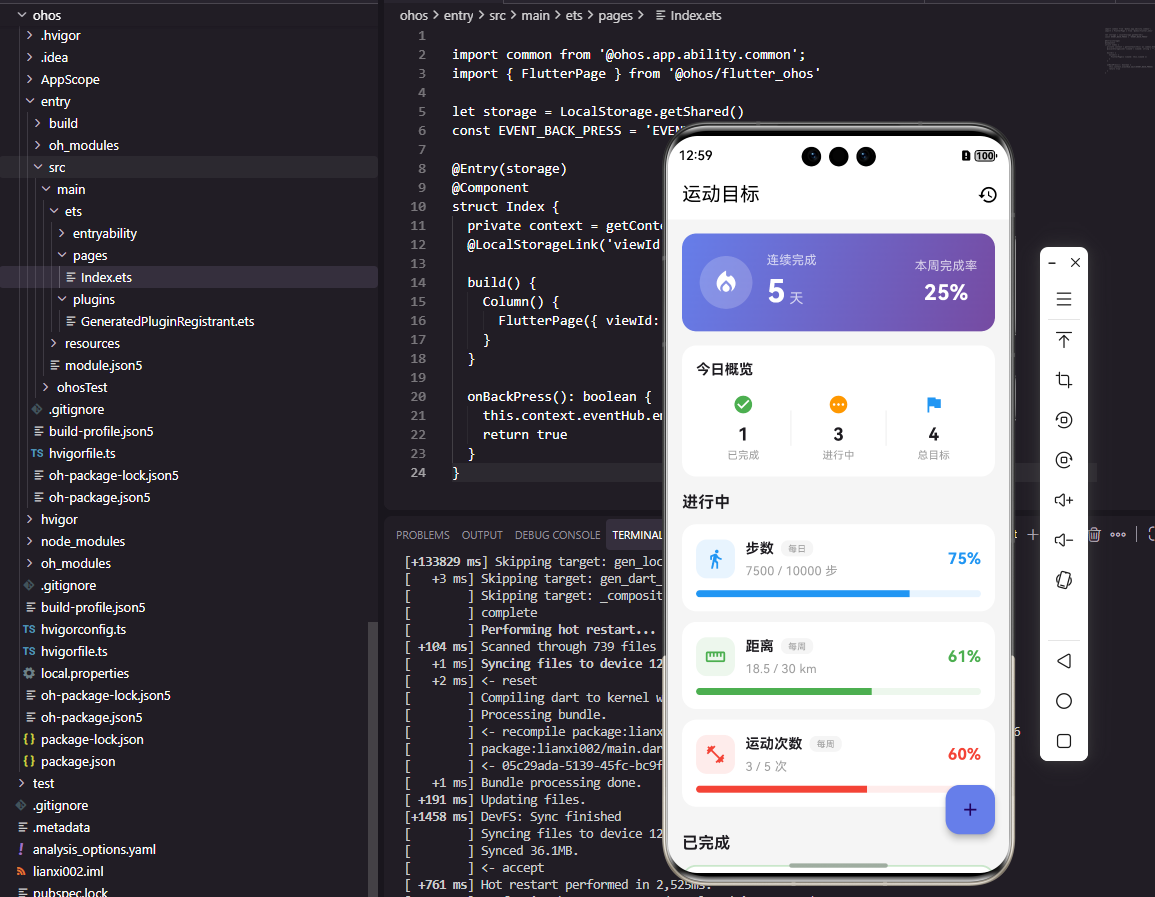
目标进度卡片以紧凑的形式展示单个目标的完成情况。卡片顶部显示目标类型名称,已完成的目标会显示绿色勾选图标,提供即时的成就反馈。进度条直观展示完成百分比,已完成目标使用绿色,进行中目标使用蓝色。底部显示具体的数值进度和百分比,让用户了解还需要多少努力才能达成目标。这种设计信息密度适中,既不会信息过载,又能提供足够的进度细节,帮助用户保持对目标的关注。
OpenHarmony目标提醒服务
import notificationManager from '@ohos.notificationManager';

class GoalReminderService {
  async sendProgressReminder(goalType: string, progress: number): Promise<void> {
    let content = progress < 0.5
      ? `您的${goalType}目标完成了${Math.round(progress * 100)}%,继续加油!`
      : `太棒了!${goalType}目标已完成${Math.round(progress * 100)}%,即将达成!`;

    let notificationRequest: notificationManager.NotificationRequest = {
      id: Date.now(),
      content: {
        notificationContentType: notificationManager.ContentType.NOTIFICATION_CONTENT_BASIC_TEXT,
        normal: {
          title: '运动目标提醒',
          text: content,
        }
      }
    };

    await notificationManager.publish(notificationRequest);
  }

  async sendCompletionNotification(goalType: string): Promise<void> {
    let notificationRequest: notificationManager.NotificationRequest = {
      id: Date.now(),
      content: {
        notificationContentType: notificationManager.ContentType.NOTIFICATION_CONTENT_BASIC_TEXT,
        normal: {
          title: '🎉 目标达成!',
          text: `恭喜您完成了今日的${goalType}目标!`,
        }
      }
    };

    await notificationManager.publish(notificationRequest);
  }
}
目标提醒服务通过系统通知激励用户完成目标。sendProgressReminder方法根据当前进度发送不同内容的提醒,进度低于50%时鼓励用户继续努力,进度高于50%时告诉用户即将达成,这种差异化的文案更能激发用户的动力。sendCompletionNotification方法在目标达成时发送庆祝通知,使用emoji增加趣味性。通知ID使用时间戳确保唯一性,避免覆盖之前的通知。这种提醒机制让用户即使不打开应用也能了解目标进度,保持运动的积极性。
Flutter目标列表组件
class GoalListView extends StatelessWidget {
final List<FitnessGoal> goals;
final Function(String) onGoalTap;
const GoalListView({
Key? key,
required this.goals,
required this.onGoalTap,
}) : super(key: key);
Widget build(BuildContext context) {
List<FitnessGoal> activeGoals = goals.where((g) => !g.isCompleted).toList();
List<FitnessGoal> completedGoals = goals.where((g) => g.isCompleted).toList();
return ListView(
padding: EdgeInsets.all(16),
children: [
if (activeGoals.isNotEmpty) ...[
Text('进行中', style: TextStyle(fontSize: 18, fontWeight: FontWeight.bold)),
SizedBox(height: 8),
...activeGoals.map((goal) => Padding(
padding: EdgeInsets.only(bottom: 8),
child: GestureDetector(
onTap: () => onGoalTap(goal.id),
child: GoalProgressCard(goal: goal),
),
)),
],
if (completedGoals.isNotEmpty) ...[
SizedBox(height: 16),
Text('已完成', style: TextStyle(fontSize: 18, fontWeight: FontWeight.bold)),
SizedBox(height: 8),
...completedGoals.map((goal) => Padding(
padding: EdgeInsets.only(bottom: 8),
child: GoalProgressCard(goal: goal),
)),
],
],
);
}
}
目标列表组件将用户的所有目标分类展示。我们将目标分为"进行中"和"已完成"两个分组,让用户能够快速区分需要关注的目标和已经达成的目标。使用ListView支持滚动,适应目标数量较多的情况。每个目标卡片可点击,触发onGoalTap回调,用于查看目标详情或进行编辑。spread运算符(…)将目标列表展开为独立的子组件,配合条件判断实现分组的动态显示。这种设计让用户对自己的目标状态一目了然。
OpenHarmony目标统计服务
class GoalStatisticsService {
  calculateCompletionRate(goals: Array<object>): number {
    if (goals.length === 0) return 0;
    let completedCount = goals.filter((g: object) => g['currentValue'] >= g['targetValue']).length;
    return completedCount / goals.length;
  }

  calculateStreak(completionHistory: Array<boolean>): number {
    let streak = 0;
    for (let i = completionHistory.length - 1; i >= 0; i--) {
      if (completionHistory[i]) {
        streak++;
      } else {
        break;
      }
    }
    return streak;
  }

  generateWeeklyReport(weeklyGoals: Array<object>): object {
    let totalGoals = weeklyGoals.length;
    let completedGoals = weeklyGoals.filter((g: object) => g['currentValue'] >= g['targetValue']).length;
    let avgProgress = weeklyGoals.reduce((sum: number, g: object) => {
      return sum + Math.min(g['currentValue'] / g['targetValue'], 1);
    }, 0) / totalGoals;

    return {
      totalGoals: totalGoals,
      completedGoals: completedGoals,
      completionRate: completedGoals / totalGoals,
      averageProgress: avgProgress,
    };
  }
}
目标统计服务提供目标完成情况的数据分析。calculateCompletionRate方法计算目标完成率,即已完成目标数量占总目标数量的比例。calculateStreak方法计算连续完成天数,从最近一天向前遍历,遇到未完成的日期就停止计数,连续完成天数是激励用户的重要指标。generateWeeklyReport方法生成周报数据,包含总目标数、已完成数、完成率和平均进度。这些统计数据帮助用户了解自己的目标执行情况,发现需要改进的地方。
Flutter目标达成动画
class GoalCompletionAnimation extends StatefulWidget {
final VoidCallback onAnimationComplete;
const GoalCompletionAnimation({Key? key, required this.onAnimationComplete}) : super(key: key);
State<GoalCompletionAnimation> createState() => _GoalCompletionAnimationState();
}
class _GoalCompletionAnimationState extends State<GoalCompletionAnimation>
with SingleTickerProviderStateMixin {
late AnimationController _controller;
late Animation<double> _scaleAnimation;
void initState() {
super.initState();
_controller = AnimationController(
duration: Duration(milliseconds: 800),
vsync: this,
);
_scaleAnimation = Tween<double>(begin: 0.0, end: 1.0).animate(
CurvedAnimation(parent: _controller, curve: Curves.elasticOut),
);
_controller.forward().then((_) {
Future.delayed(Duration(seconds: 1), widget.onAnimationComplete);
});
}
Widget build(BuildContext context) {
return ScaleTransition(
scale: _scaleAnimation,
child: Container(
padding: EdgeInsets.all(32),
decoration: BoxDecoration(
color: Colors.green,
shape: BoxShape.circle,
),
child: Icon(Icons.check, color: Colors.white, size: 64),
),
);
}
void dispose() {
_controller.dispose();
super.dispose();
}
}
目标达成动画为用户提供视觉上的成就反馈。我们使用AnimationController控制动画时长和播放,ScaleTransition实现缩放效果。动画曲线选择elasticOut,产生弹性回弹的效果,增加趣味性和惊喜感。绿色圆形背景配合白色勾选图标,清晰传达"完成"的含义。动画播放完成后延迟1秒调用回调函数,给用户足够的时间欣赏成就。这种即时的正向反馈能够显著提升用户的满足感,激励他们继续完成更多目标。
Flutter智能目标推荐
class GoalRecommendation {
  static FitnessGoal recommendGoal(List<FitnessGoal> historicalGoals, GoalType type) {
    List<FitnessGoal> typeGoals = historicalGoals.where((g) => g.type == type).toList();

    if (typeGoals.isEmpty) {
      return _getDefaultGoal(type);
    }

    double avgTarget = typeGoals.map((g) => g.targetValue).reduce((a, b) => a + b) / typeGoals.length;
    double avgAchieved = typeGoals.map((g) => g.currentValue).reduce((a, b) => a + b) / typeGoals.length;
    double completionRate = avgAchieved / avgTarget;

    double recommendedTarget;
    if (completionRate > 0.9) {
      recommendedTarget = avgTarget * 1.1;
    } else if (completionRate < 0.5) {
      recommendedTarget = avgTarget * 0.9;
    } else {
      recommendedTarget = avgTarget;
    }

    return FitnessGoal(
      id: DateTime.now().millisecondsSinceEpoch.toString(),
      type: type,
      targetValue: recommendedTarget,
      startDate: DateTime.now(),
      endDate: DateTime.now().add(Duration(days: 1)),
      period: 'daily',
    );
  }

  static FitnessGoal _getDefaultGoal(GoalType type) {
    double defaultValue;
    switch (type) {
      case GoalType.steps: defaultValue = 8000; break;
      case GoalType.distance: defaultValue = 5; break;
      case GoalType.calories: defaultValue = 300; break;
      case GoalType.duration: defaultValue = 30; break;
      case GoalType.workouts: defaultValue = 1; break;
    }
    return FitnessGoal(
      id: DateTime.now().millisecondsSinceEpoch.toString(),
      type: type,
      targetValue: defaultValue,
      startDate: DateTime.now(),
      endDate: DateTime.now().add(Duration(days: 1)),
      period: 'daily',
    );
  }
}
智能目标推荐根据用户的历史表现自动调整目标难度。我们分析用户过去同类型目标的平均目标值和平均完成值,计算完成率。如果完成率超过90%,说明目标太容易,推荐提高10%;如果完成率低于50%,说明目标太难,推荐降低10%;否则保持原有难度。对于没有历史数据的新用户,提供合理的默认目标值,如8000步、5公里等。这种自适应的目标推荐机制帮助用户找到适合自己的挑战难度,既不会因为太简单而失去动力,也不会因为太难而放弃。
总结
本文全面介绍了Flutter与OpenHarmony平台上运动目标设定组件的实现方案。从目标数据模型到存储服务,从设定表单到进度展示,从提醒通知到达成动画,涵盖了目标功能的各个方面。通过灵活的目标配置、实时的进度追踪和智能的目标推荐,我们可以构建出一个能够有效激励用户持续运动的目标管理模块,帮助用户在健身道路上不断进步。欢迎加入开源鸿蒙跨平台社区:https://openharmonycrossplatform.csdn.net

开源鸿蒙跨平台开发社区汇聚开发者与厂商,共建“一次开发,多端部署”的开源生态,致力于降低跨端开发门槛,推动万物智联创新。
更多推荐
 10
10 0
0- 0


 已为社区贡献13条内容

所有评论(0)