Flutter Path Provider 包在鸿蒙平台的使用指南
Path Provider 是 Flutter 的跨平台文件路径获取插件,支持 Android、iOS、macOS、Linux、Windows 和鸿蒙系统。通过 Git 方式引入依赖后,开发者可以获取临时目录、应用文档目录、缓存目录等多种系统路径。在鸿蒙平台上,插件提供了完整的文件访问能力,包括获取外部存储目录、下载目录等常用路径(但不支持 getLibraryDirectory API)。使用示
1. 插件介绍
Path Provider 是一个用于 Flutter 应用获取设备文件系统路径的核心插件,它提供了一组 API 来访问不同平台上的常用文件目录。通过这个插件,开发者可以轻松获取临时目录、应用文档目录、缓存目录等路径,无需关心底层平台的实现细节。
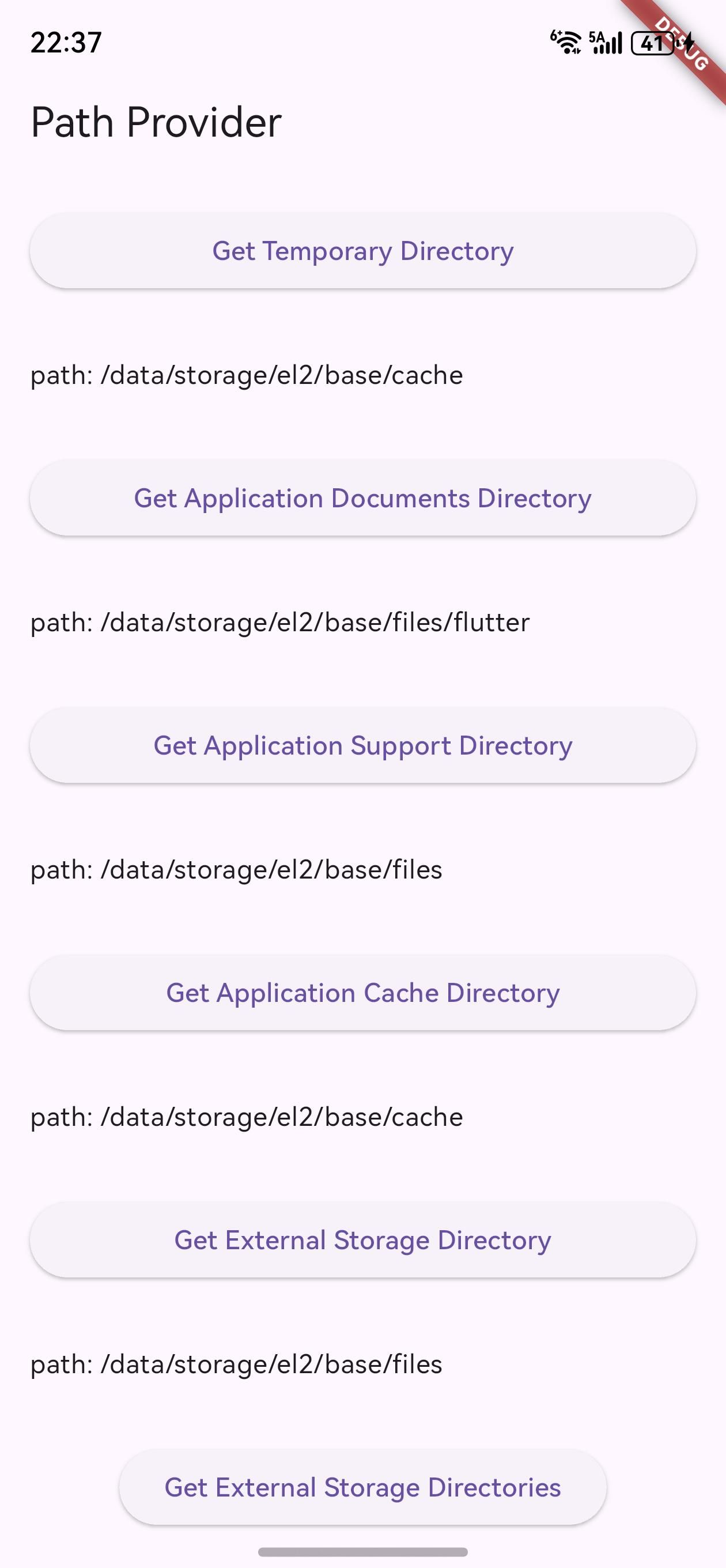
主要特性
- 跨平台支持:统一的 API 接口,适配 Android、iOS、macOS、Linux、Windows 和鸿蒙系统
- 安全可靠:访问路径经过各平台安全验证,符合系统权限要求
- 性能优化:轻量级实现,无额外性能开销
- 全面覆盖:支持获取多种常用文件目录类型
鸿蒙平台支持
Path Provider 包通过专门的 path_provider_ohos 实现支持鸿蒙系统,为鸿蒙应用提供了完整的文件路径访问能力,确保 Flutter 应用在鸿蒙平台上能够正常读写文件。
2. 依赖配置
由于需要使用自定义修改版本,我们将通过 Git 形式引入依赖。
2.1 配置 pubspec.yaml
在 Flutter 项目的 pubspec.yaml 文件中,添加以下依赖配置:
dependencies:
  flutter:
    sdk: flutter
  path_provider:
    git:
      url: "https://gitcode.com/openharmony-tpc/flutter_packages.git"
      path: "packages/path_provider/path_provider"
2.2 安装依赖
添加依赖后,执行以下命令获取包:
flutter pub get
3. API 调用
Path Provider 包提供了一系列静态方法来获取不同类型的文件目录路径。以下是鸿蒙平台上支持的主要 API 及其用法:
3.1 获取临时目录
临时目录适用于存储下载文件的缓存,系统可能随时清除此目录中的文件。
import 'dart:io';
import 'package:path_provider/path_provider.dart';

Future<Directory> getTempDir() async {
  Directory tempDir = await getTemporaryDirectory();
  print('临时目录路径: ${tempDir.path}');
  return tempDir;
}
3.2 获取应用支持目录
应用支持目录用于存储应用的支持文件,不会暴露给用户。
Future<Directory> getAppSupportDir() async {
  Directory supportDir = await getApplicationSupportDirectory();
  print('应用支持目录路径: ${supportDir.path}');
  return supportDir;
}
3.3 获取应用文档目录
应用文档目录用于存储用户生成的数据或应用不能重新创建的文件。
Future<Directory> getAppDocsDir() async {
  Directory docsDir = await getApplicationDocumentsDirectory();
  print('应用文档目录路径: ${docsDir.path}');
  return docsDir;
}
3.4 获取应用缓存目录
应用缓存目录用于存储应用特定的缓存文件。
Future<Directory> getAppCacheDir() async {
  Directory cacheDir = await getApplicationCacheDirectory();
  print('应用缓存目录路径: ${cacheDir.path}');
  return cacheDir;
}
3.5 获取外部存储目录
外部存储目录用于访问设备的外部存储(如SD卡)。
Future<Directory?> getExtStorageDir() async {
  Directory? extDir = await getExternalStorageDirectory();
  if (extDir != null) {
    print('外部存储目录路径: ${extDir.path}');
  }
  return extDir;
}
3.6 获取外部缓存目录
获取应用在外部存储上的缓存目录路径列表。
Future<List<Directory>?> getExtCacheDirs() async {
  List<Directory>? extCacheDirs = await getExternalCacheDirectories();
  if (extCacheDirs != null) {
    for (Directory dir in extCacheDirs) {
      print('外部缓存目录路径: ${dir.path}');
    }
  }
  return extCacheDirs;
}
3.7 获取外部存储目录(按类型)
根据指定类型获取外部存储目录路径列表。
import 'package:path_provider/path_provider.dart';

Future<List<Directory>?> getExtStorageDirsByType() async {
  // 获取图片类型的外部存储目录
  List<Directory>? pictureDirs = await getExternalStorageDirectories(
    type: StorageDirectory.pictures,
  );

  if (pictureDirs != null) {
    for (Directory dir in pictureDirs) {
      print('图片目录路径: ${dir.path}');
    }
  }

  return pictureDirs;
}
3.8 获取下载目录
获取设备的下载目录路径。
Future<Directory?> getDownloadsDir() async {
  Directory? downloadsDir = await getDownloadsDirectory();
  if (downloadsDir != null) {
    print('下载目录路径: ${downloadsDir.path}');
  }
  return downloadsDir;
}
3.9 不支持的 API
在鸿蒙平台上,getLibraryDirectory() 方法不被支持,调用时会抛出 UnsupportedError。
Future<void> tryGetLibraryDir() async {
  try {
    Directory libraryDir = await getLibraryDirectory();
    print('库目录路径: ${libraryDir.path}');
  } catch (e) {
    print('错误: $e');
    // 预期会抛出 UnsupportedError: getLibraryPath is not supported on OHOS
  }
}
4. 完整示例
以下是一个完整的示例,演示如何在鸿蒙应用中使用 Path Provider 包获取各种文件目录:
import 'dart:io';
import 'package:flutter/material.dart';
import 'package:path_provider/path_provider.dart';
void main() {
runApp(const MyApp());
}
class MyApp extends StatelessWidget {
const MyApp({Key? key}) : super(key: key);
Widget build(BuildContext context) {
return MaterialApp(
title: 'Path Provider Demo',
theme: ThemeData(
primarySwatch: Colors.blue,
),
home: const MyHomePage(),
);
}
}
class MyHomePage extends StatefulWidget {
const MyHomePage({Key? key}) : super(key: key);
State<MyHomePage> createState() => _MyHomePageState();
}
class _MyHomePageState extends State<MyHomePage> {
String _output = '';
Future<void> _getAllPaths() async {
StringBuffer output = StringBuffer();
// 获取临时目录
Directory tempDir = await getTemporaryDirectory();
output.writeln('临时目录: ${tempDir.path}');
// 获取应用支持目录
Directory supportDir = await getApplicationSupportDirectory();
output.writeln('应用支持目录: ${supportDir.path}');
// 获取应用文档目录
Directory docsDir = await getApplicationDocumentsDirectory();
output.writeln('应用文档目录: ${docsDir.path}');
// 获取应用缓存目录
Directory cacheDir = await getApplicationCacheDirectory();
output.writeln('应用缓存目录: ${cacheDir.path}');
// 获取外部存储目录
Directory? extDir = await getExternalStorageDirectory();
if (extDir != null) {
output.writeln('外部存储目录: ${extDir.path}');
} else {
output.writeln('外部存储目录: 不可用');
}
// 获取下载目录
Directory? downloadsDir = await getDownloadsDirectory();
if (downloadsDir != null) {
output.writeln('下载目录: ${downloadsDir.path}');
} else {
output.writeln('下载目录: 不可用');
}
setState(() {
_output = output.toString();
});
}
Widget build(BuildContext context) {
return Scaffold(
appBar: AppBar(
title: const Text('Path Provider Demo'),
),
body: Center(
child: Column(
mainAxisAlignment: MainAxisAlignment.center,
children: <Widget>[
ElevatedButton(
onPressed: _getAllPaths,
child: const Text('获取所有文件目录路径'),
),
const SizedBox(height: 20),
Expanded(
child: SingleChildScrollView(
padding: const EdgeInsets.all(16.0),
child: Text(_output),
),
),
],
),
),
);
}
}
5. 鸿蒙平台注意事项
-
权限要求:
- 访问外部存储需要申请相应的权限
- 在鸿蒙应用中,需要在
config.json5中添加文件访问权限
-
路径差异:
- 鸿蒙系统的文件系统结构与其他平台有所不同
- Path Provider 会自动适配,返回符合鸿蒙系统规范的路径
-
不支持的功能:
getLibraryDirectory()方法在鸿蒙平台上不被支持- 调用时会抛出
UnsupportedError,需要进行异常处理
-
性能考虑:
- 文件系统操作可能较为耗时,建议在异步方法中执行
- 避免在 UI 线程中进行大量文件操作
6. 总结
Path Provider 是 Flutter 开发中不可或缺的文件系统访问工具,它为鸿蒙平台提供了完整的文件目录访问能力。通过本文的介绍,开发者可以:
- 了解 Path Provider 包的基本功能和鸿蒙平台支持情况
- 掌握通过 Git 形式引入自定义修改版本的依赖配置方法
- 熟悉主要 API 的调用方式和使用场景
- 了解在鸿蒙平台上使用时的注意事项
使用 Path Provider 包,开发者可以轻松获取各种文件目录路径,实现文件的读写、缓存管理等功能,为 Flutter 应用在鸿蒙平台上提供良好的文件系统交互体验。
欢迎加入开源鸿蒙跨平台社区: https://openharmonycrossplatform.csdn.net

开源鸿蒙跨平台开发社区汇聚开发者与厂商,共建“一次开发,多端部署”的开源生态,致力于降低跨端开发门槛,推动万物智联创新。
更多推荐
 16
16 0
0- 0


 已为社区贡献14条内容

所有评论(0)