可以写简历的音视频项目-异地情侣影院
本文介绍了基于QT框架开发的异地情侣影院项目的关键技术实现。项目采用客户端-服务器架构,支持音视频同步播放、文字聊天等功能。重点阐述了三种核心信令协议:1)播放链接推送(src)支持网络流和本地文件两种模式;2)播放控制推送(snc)包含播放/暂停/跳转/同步/停止等命令,其中同步机制通过服务端每秒发送播放进度实现;3)文字聊天(msg)实现简单即时通讯。项目在QT6.5.3/6.6.3环境下运行
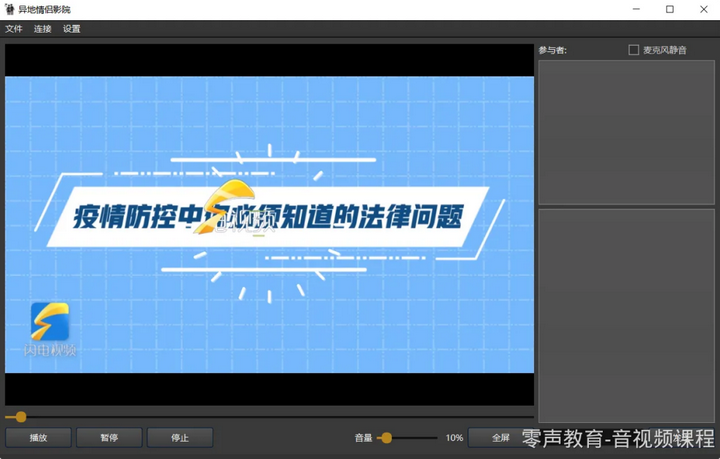
1 编译器环境
-
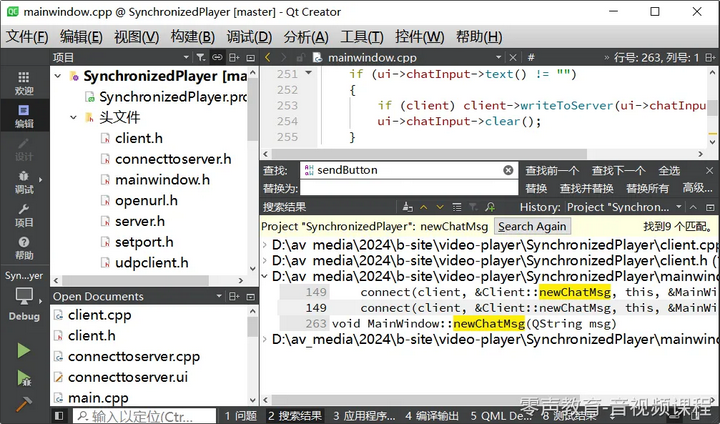
可以正常编译运行的环境:QT6.5.3和QT6.6.3 mingw64编译器
-
有异常的环境:QT6.7有bug,不能正常初始化MediaPlayer
视频讲解及源码领取:可以写简历的音视频项目-异地情侣影院(上)-有源码和演示
2 项目框架图
这里我们重点讲解播放链接推送、播放控制推送和文字聊天推送,语音聊天大家可以自行研究。
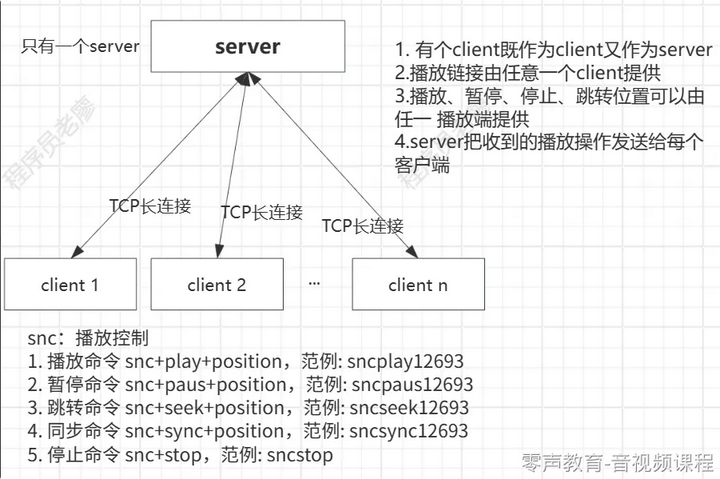
server有QList<QTcpSocket*> clients; 保存客户端列表。
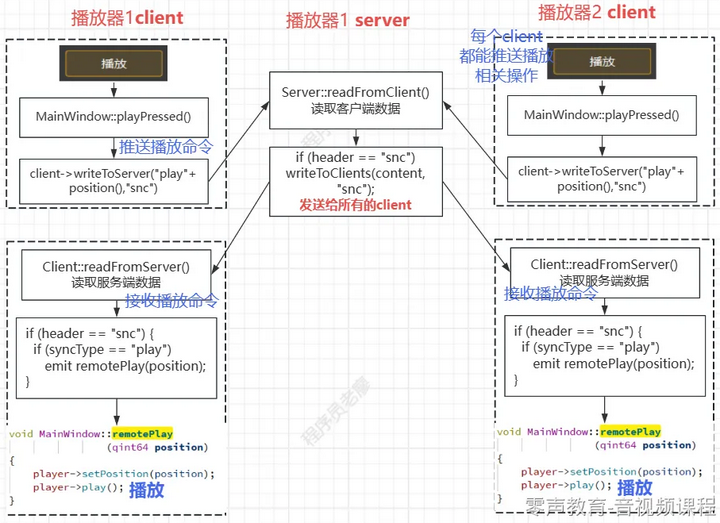
以play播放命令为例,播放器1⻆色为server和client1,由播放器1发起play播放命令,则流程如下所示(播放器2也一样可以发起play播放命令)
3 信令分析
信令主要类型:
src:播放源推送
-
网络流链接推送:src+net+url
-
本地文件路径推送:src+lcl+url
snc:播放控制命令
-
播放命令 snc+play+position,范例: sncplay12693
-
暂停命令 snc+paus+position,范例: sncpaus12693
-
跳转命令 snc+seek+position,范例: sncseek12693
-
同步命令 snc+sync+position,范例: sncsync12693,每秒server发送一次给所有client
-
停止命令 snc+stop,范例: sncstop
msg:文字聊天
-
文字聊天推送:msg+username: + content
后续的讲解,只讲解client的推送和接收数据,server直接参考前面项目框架图的讲解。
3.1 播放链接推送
src:播放链接
1. 推送网络流链接命令src+net+url,范例:
srcnethttps://stream7.iqilu.com/10339/upload_transcode/202002/09/20200209104902N3v5Vpxuvb.mp4
2. 推送本地文件链接命令src+lcl+url,此时需要各个端本地有对应的文件路径,范例:
srclcl/E:/rec_video/00-音视频高级教程-课程简介.mp4
这里我们只讲解网络流链接。
推送
操作:文件->打开链接->触发
void MainWindow::on_actionOpen_URL_triggered()
{
 openURL* urlWindow = new openURL(this); //退出对话框
 urlWindow->setWindowTitle("Open URL");
 urlWindow->show();
 // 绑定信号槽,如果对话框点击ok将触发setVideoSource函数的调⽤
 connect(urlWindow, SIGNAL(urlSet(QString)), this, SLOT(setVideoSource(Q
String)));
}
这个是弹出的对话框
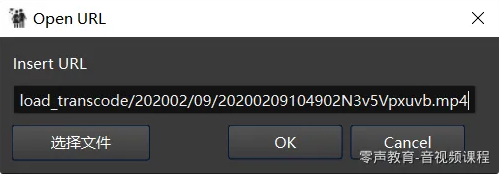
在对话框输入可以播放的url,然后点击ok,点击ok后触发openURL::on_openURLbuttonBox_accepted(),在该函数里获取url并发送信号urlSet(url)。
void openURL::on_openURLbuttonBox_accepted()
{
 QString url = ui->urlInput->text();
 emit urlSet(url);
}
MainWindow::setVideoSource()响应,这里把url播放链接推送给所有的client。
void MainWindow::setVideoSource(QString url)
{
 qDebug() << "MainWindow::setVideoSource url: " << url;
 if (client) client->writeToServer(url, "srcnet");
 else player->setSource(QUrl(url));
}
接收
接收端
connect(client, &Client::remoteSetVideoSource, this, &MainWindow::remoteSetVideoSource);
void Client::readFromServer()
{
 while (socket->canReadLine())
 {
 QByteArray buffer = socket->readLine();
 QString header = buffer.mid(0, 3);
 QString content = buffer.mid(3).trimmed();
 qInfo() << "Client::readFromServer -- header: " << header << ", co
ntent: " << content;
 if (header == "snc")
 {
 ..........
 }
 else if (header == "msg")
 {
 ...........
 }
 else if (header == "src")
 {
 QString srcType = content.mid(0, 3);
 content = content.mid(3);
 if (srcType == "net") //⽹络流
 {
 emit remoteSetVideoSource(content);
 }
 if (srcType == "lcl") //本地⽂件
 {
 emit remoteSetLocalVideoSource(content);
 }
 emit newChatMsg("Souce set:" + content);
 }
MainWindow::remoteSetVideoSource
void MainWindow::remoteSetVideoSource(QString src)
{
 player->setSource(QUrl(src));
}
3.2 播放控制推送
snc:播放控制
1. 播放命令 snc+play+position,范例: sncplay12693
2. 暂停命令 snc+paus+position,范例: sncpaus12693
3. 跳转命令 snc+seek+position,范例: sncseek12693
4. 同步命令 snc+sync+position,范例: sncsync12693,每秒server发送一次给所有client
5. 停止命令 snc+stop,范例: sncstop
播放、暂停、跳转、停止我们都很容易理解,重点是同步命令snc+sync+position,server怎么做的,client收到sync命令后又怎么处理的
推送
难点在于同步推送,作为server的一端,每秒推送一次当前进度给其他client
server每秒获取一次当前播放进度并推送给所有的client
// 时间戳线程,server端定时将播放进度发送给所有client
void MainWindow::sendTimestampThreaded()
{
 if (server)
 {
 QThread *sendTimestampThread = QThread::create(&MainWindow::sendTi
mestamp, this);
 connect(this, &MainWindow::destroyed, sendTimestampThread, &QThrea
d::quit);
 connect(sendTimestampThread, &QThread::finished, sendTimestampThre
ad, &QThread::deleteLater);
 sendTimestampThread->start();
 }
}
// server每秒获取当前播放进度推送给其他client
void MainWindow::sendTimestamp()
{
 while(true)
 {
// qInfo() << player->position();
 server->writeToClients(QString::number(player->position()), "sncsy
nc");
 QObject().thread()->usleep(1000*1000*1); //every 1 second send syn
c info
 }
}
接收
client收到snssync 同步信息
//client接收server的信息
void Client::readFromServer()
{
 while (socket->canReadLine())
 {
 QByteArray buffer = socket->readLine();
 QString header = buffer.mid(0, 3);
 QString content = buffer.mid(3).trimmed();
 qInfo() << "Client::readFromServer -- header: " << header << ", co
ntent: " << content;
 if (header == "snc")
 {
 qInfo() << "Sync info from Server: " << content;
 QString syncType = content.mid(0, 4);
 qint64 position = content.mid(4).toLongLong();
 if (syncType == "play")
 {
 emit remotePlay(position);
 }
 else if (syncType == "paus")
 {
 emit remotePause(position);
 }
 else if (syncType == "stop")
 {
 emit remoteStop();
 }
 else if (syncType == "seek")
 {
 emit remoteSeek(position);
 }
 else if (syncType == "sync")
 {
 emit remoteSync(position);
 }
 }
 ............
remoteSync 找到这个绑定的响应函数 MainWindow::remoteSync,具体的同步算法也很简单,误差200ms内不做处理,超过200ms则seek到对应的位置。
void MainWindow::remoteSync(qint64 position)
{
 //误差200ms内不做处理
 if (abs(player->position() - position) > 200) player->setPosition(posit
ion);
}
3.3 文字聊天推送
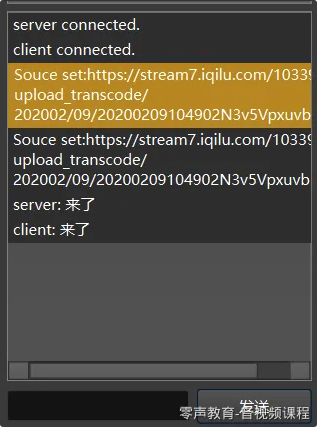
聊天消息命令:msg+username: + content,⽐如username为server,范例为msgserver: 来了,
显示的时候只需要显示server: 来了
client 推送 -> server ,server通过tcp发送给每个client -> client接收。
这里我们只讲client 推送 和 client接收。
推送
void MainWindow::on_chatInput_returnPressed()
{
 if (ui->chatInput->text() != "")
 {
 if (client) client->writeToServer(ui->chatInput->text(), "msg");
 ui->chatInput->clear();
 }
}
接收
client收到消息
void Client::readFromServer()
{
 while (socket->canReadLine())
 {
 QByteArray buffer = socket->readLine();
 QString header = buffer.mid(0, 3);
 QString content = buffer.mid(3).trimmed();
 qInfo() << "Client::readFromServer -- header: " << header << ", co
ntent: " << content;
 if (header == "snc")
 {
 ............
 }
 else if (header == "msg")
 {
 qInfo() << "Message from Server: " << content;
 emit newChatMsg(content); //收到消息
 }
 .......

 }
}
然后触发void MainWindow::newChatMsg(QString msg)函数的调用
void MainWindow::newChatMsg(QString msg)
{
 QListWidgetItem* item = new QListWidgetItem(ui->chatWidget);
 item->setText(msg);
 ui->chatWidget->addItem(item); //显示当条消息
 ui->chatWidget->scrollToBottom();
}
4 扩展思路
1. 当前server其实也是在一个播放端上的,可以考虑把server抽取出来部署到公网,此时就需要选择其中一个client作为master,由这个master 发送同步信息。
2. 将mediaplayer改成使用ffmpeg
3. 增加变速机制等
4. 支持播放列表拉取
5 语音聊天框架
待续,比较降噪

开源鸿蒙跨平台开发社区汇聚开发者与厂商,共建“一次开发,多端部署”的开源生态,致力于降低跨端开发门槛,推动万物智联创新。
更多推荐
 27
27 0
0- 0


 已为社区贡献2条内容

所有评论(0)