Qt网络编程基础——tcp简易通讯
首先列出Qt中Tcp通信的流程图:1.QT下的服务端1).socket函数变为QTcpServer2).bind ,listen 统一为listen同时没有accept,当有一个链接过来的时候,会产生一个信号:newconnection,可以从对应的槽函数中取出建立好的套接字(对方的)QTcpSocket如果成功和对方建立好链接,通信套接字会自动触发connected信号...
·
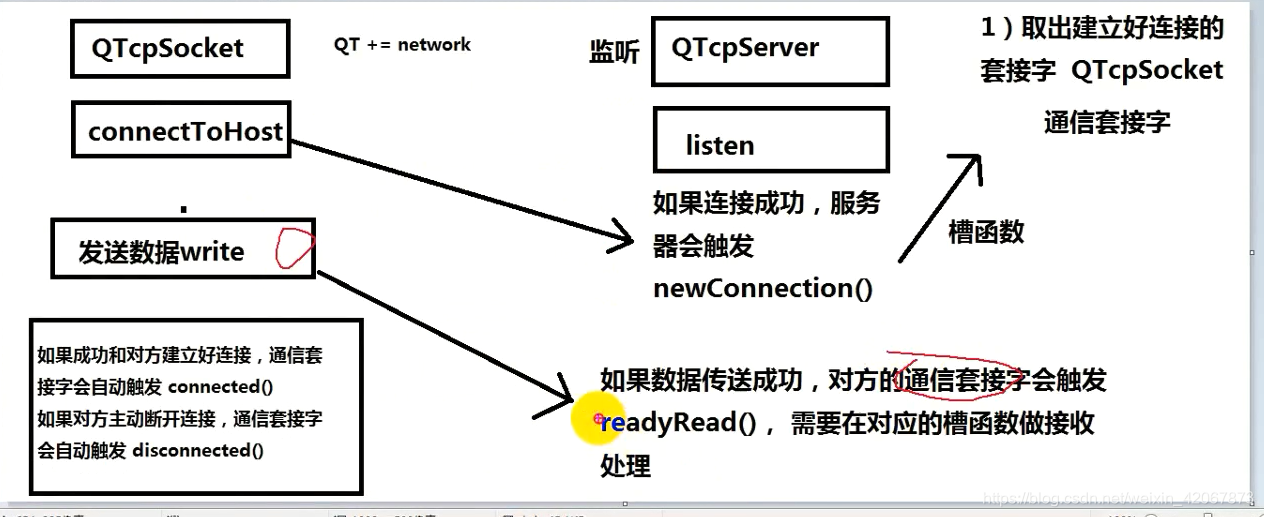
首先列出Qt中Tcp通信的流程图:
1.QT下的服务端
1).socket函数变为QTcpServer

2).bind ,listen 统一为listen

同时没有accept,当有一个链接过来的时候,会产生一个信号:newconnection,可以从对应的槽函数中取出建立好的套接字(对方的)QTcpSocket

如果成功和对方建立好链接,通信套接字会自动触发connected信号

3).read :

对方发送数据过来,链接的套接字(通信套接字)就会触发(本机的)readyRead信号,需要在对应的槽函数中接收数据

4).write,

发送数据,对方的(客户端的)套接字(通信套接字)就会触发readyRead信号,需要在对应的槽函数中接收数据

如果对方主动断开连接,对方的(客户端的)套接字(通信套接字)会自动触发disconnected信号
2.QT下的客户端:
1).socket函数变为 QTcpSocket

2).connect变为connetToHost()

如果成功和对方建立好链接,就会自动触发connected信号

3).read :

对方发送数据过来,链接的套接字(通信套接字)就会触发(本机的)readyRead信号,需要在对应的槽函数中接收数据

4).write,

发送数据,对方的(服务器的)套接字(通信套接字)就会触发readyRead信号,需要在对应的槽函数中接收数据

如果对方主动断开连接,就会自动触发disconnected信号
*************************************************************************************************************************************************
下面列出具体实现
server端:
头文件:
#ifndef SERVERWIDGET_H
#define SERVERWIDGET_H

#include <QWidget>
#include <QTcpServer>
#include <QTcpSocket>

namespace Ui {
class ServerWidget;
}

class ServerWidget : public QWidget
{
    Q_OBJECT

public:
    explicit ServerWidget(QWidget *parent = 0);
    ~ServerWidget();

private slots:
    void on_pb_send_clicked();

    void on_pushButton_2_clicked();

private:
    Ui::ServerWidget *ui;

    QTcpServer *tcpServer;
    QTcpSocket *tcpSocket;
};

#endif // SERVERWIDGET_H
具体实现:
#include "serverwidget.h"
#include "ui_serverwidget.h"
#include <QString>
#include <QIODevice>

ServerWidget::ServerWidget(QWidget *parent) :
    QWidget(parent),
    ui(new Ui::ServerWidget)
{
    ui->setupUi(this);
    tcpServer = NULL;
    tcpSocket = NULL;

    setWindowTitle("服务器: 8888");

    //建立监听套接字,并指定父对象
    tcpServer = new QTcpServer(this);

    //监听
    tcpServer->listen(QHostAddress::Any, 8888);

    connect(tcpServer, &QTcpServer::newConnection,
            [=]()
            {
                //取出建立好的套接字
                tcpSocket = tcpServer->nextPendingConnection();

                //获取对方的IP和端口
                QString ip = tcpSocket->peerAddress().toString();
                qint16 port = tcpSocket->peerPort();

                QString tmp = QString("[%1:%2]: 成功链接").arg(ip).arg(port);

                ui->te_read->setText(tmp.toUtf8().data());
                connect(tcpSocket, &QTcpSocket::readyRead,
                [=]()
                {
                    //从套接字里面取出内容
                    QByteArray array = tcpSocket->readAll();
                    ui->te_read->append(array);
                }
                );
            }
            );
}

ServerWidget::~ServerWidget()
{
    delete ui;
}

void ServerWidget::on_pb_send_clicked()
{
    if(tcpSocket == NULL)
    {
        return;
    }
    //获取编辑区内容
    QString str = ui->te_write->toPlainText();

    //给对方发数据,使用套接字tcpSocket
    tcpSocket->write(str.toUtf8().data());
}

void ServerWidget::on_pushButton_2_clicked()
{
    //做出错处理
    if(tcpSocket == NULL)
    {
        return;
    }
    //主动和客户端断开连接
    tcpSocket->disconnectFromHost();

    tcpSocket->close();
    tcpSocket = NULL;
}
client端:
头文件:
#ifndef CLIENTWIDGET_H
#define CLIENTWIDGET_H

#include <QWidget>
#include <QTcpSocket>

namespace Ui {
class clientWidget;
}

class clientWidget : public QWidget
{
    Q_OBJECT

public:
    explicit clientWidget(QWidget *parent = 0);
    ~clientWidget();

private slots:
    void on_pb_send_clicked();

    void on_pb_close_clicked();

    void on_pb_connect_clicked();

private:
    Ui::clientWidget *ui;
    QTcpSocket *tcpSocket;
};

#endif // CLIENTWIDGET_H
具体实现:
#include "clientwidget.h"
#include "ui_clientwidget.h"
#include <QHostAddress>

clientWidget::clientWidget(QWidget *parent) :
    QWidget(parent),
    ui(new Ui::clientWidget)
{
    ui->setupUi(this);
    setWindowTitle("客户端");

    //显示为通信套接字开辟空间和指定父对象
    tcpSocket = new QTcpSocket(this);

    connect(tcpSocket, &QTcpSocket::connected,
            [=]()
            {
                ui->te_read->setText("成功和服务器连接");
            }
            );

    connect(tcpSocket, &QTcpSocket::readyRead,
            [=]()
            {
                //读取对方发送的数据
                QByteArray array = tcpSocket->readAll();

                //把数据追加到阅读区
                ui->te_read->append(array);
            }
            );
}

clientWidget::~clientWidget()
{
    delete ui;
}

void clientWidget::on_pb_send_clicked()
{
    // 获取编辑区内容
    QString str = ui->te_write->toPlainText();

    //发送数据
    tcpSocket->write(str.toUtf8().data());
}

void clientWidget::on_pb_close_clicked()
{
    tcpSocket->disconnectFromHost();
    tcpSocket->close();

}

void clientWidget::on_pb_connect_clicked()
{
    //获取服务器ip和port
    QString ip = ui->le_ip->text();
    qint16 port = ui->le_port->text().toInt();

    //主动链接服务器
    tcpSocket->connectToHost(QHostAddress(ip), port);
}

开源鸿蒙跨平台开发社区汇聚开发者与厂商,共建“一次开发,多端部署”的开源生态,致力于降低跨端开发门槛,推动万物智联创新。
更多推荐


 0
0 0
0- 0


 已为社区贡献5条内容

所有评论(0)