Qt浅谈之五十二显示shape表格并自动搜索图片
·
一、简介
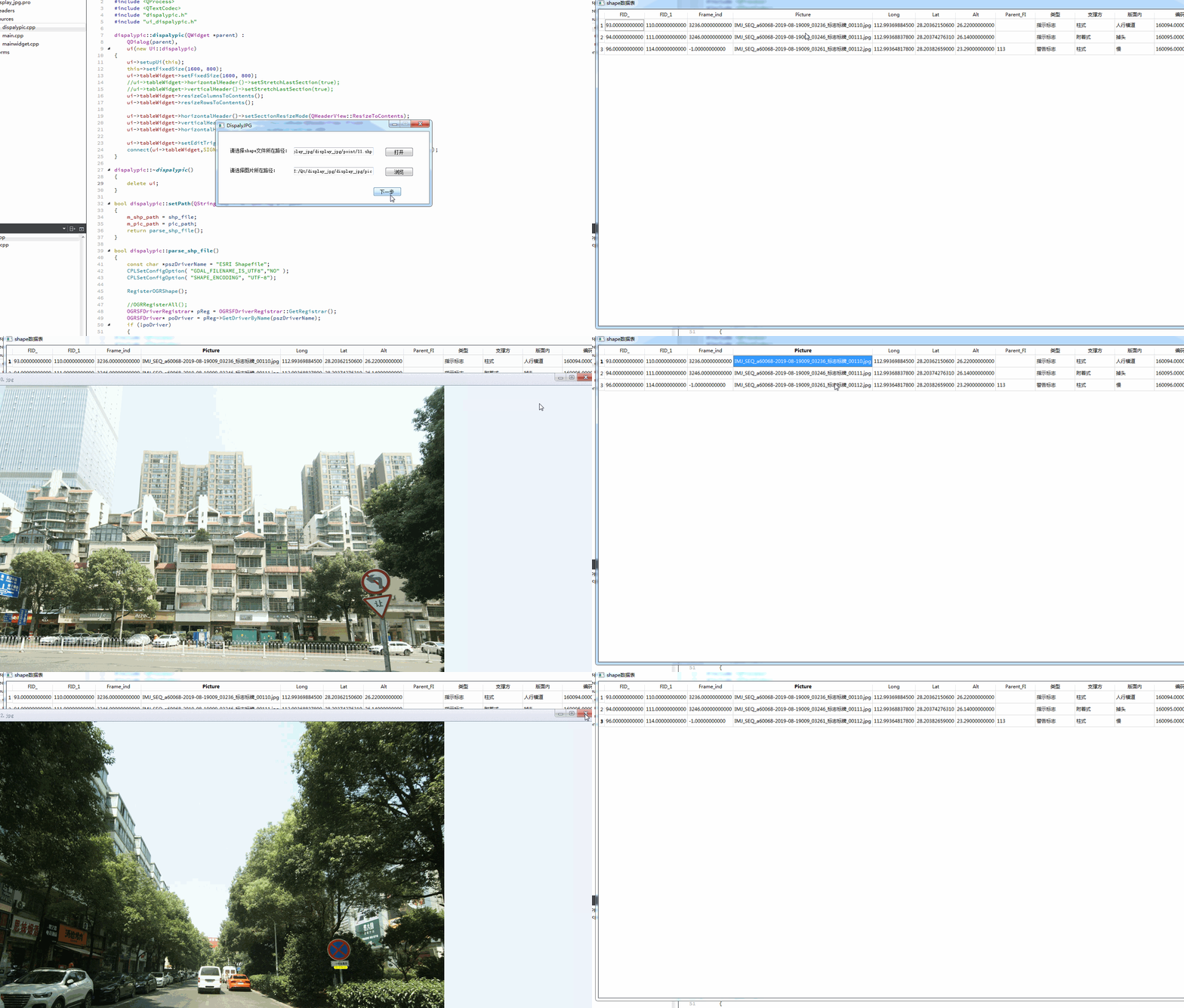
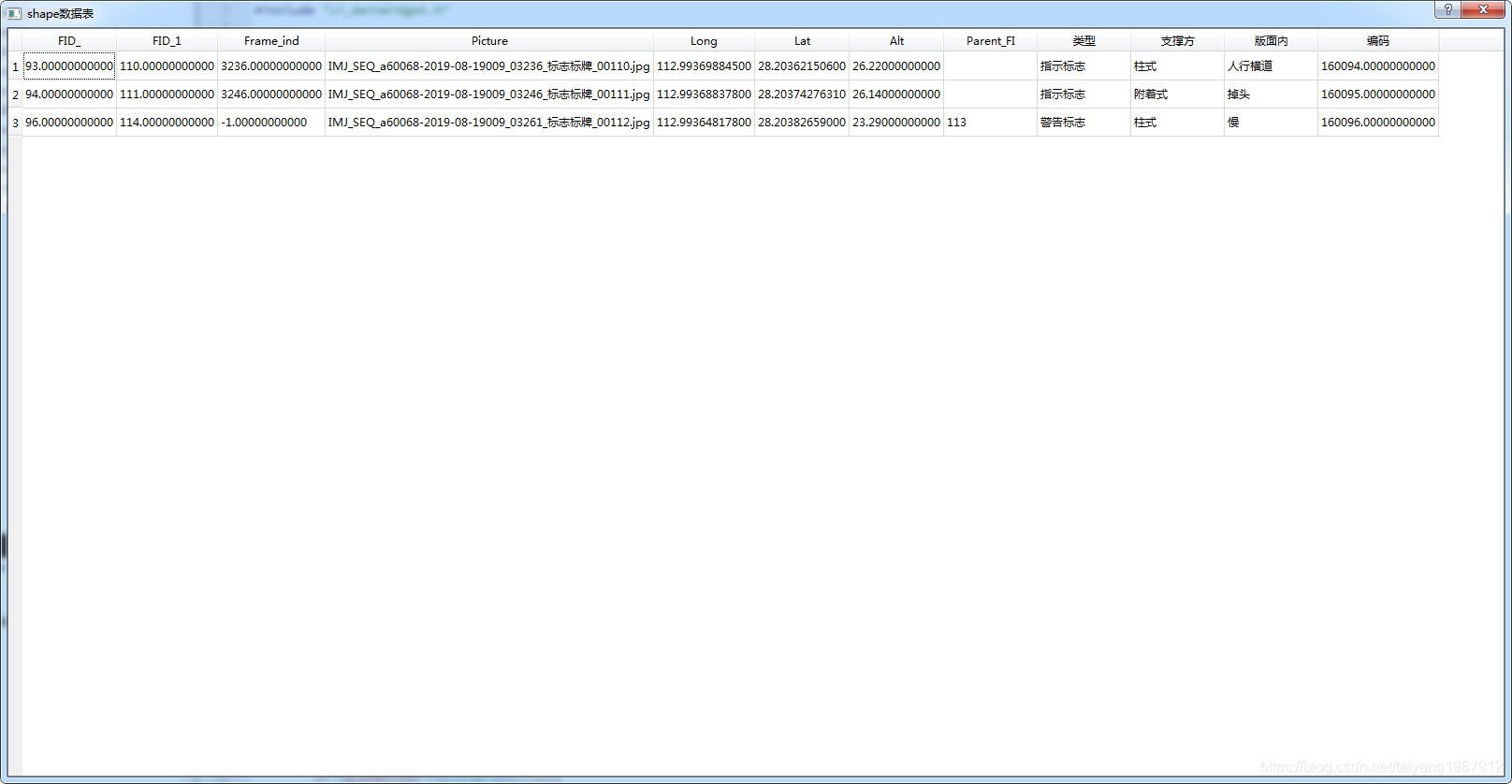
Qt版本(Qt_5_9_5_MinGW_32bit,Qt更高版本是64位需要编译第三方64位库)下,加载shape文件并显示,然后点击对应的图片字段弹出图片,使用于特殊环境下图片的筛选。同时也要处理显示的中文乱码问题。完整代码已上传csdn。
二、详解
1、代码
(1)dispalypic.h
#ifndef DISPALYPIC_H
#define DISPALYPIC_H

#include <QDialog>
#include "ogrsf_frmts.h"

namespace Ui {
class dispalypic;
}

class dispalypic : public QDialog
{
    Q_OBJECT

public:
    explicit dispalypic(QWidget *parent = nullptr);
    ~dispalypic();
    bool setPath(QString shp_file, QString pic_path);

private slots:
    void slotDoubleClicked(int row, int column);

private:
    bool parse_shp_file();
    QString utf8_to_gbk(const char *source);

private:
    Ui::dispalypic *ui;
    QString m_shp_path;
    QString m_pic_path;
};

#endif // DISPALYPIC_H
(2)dispalypic.cpp
#include <QDir>
#include <QProcess>
#include <QTextCodec>
#include "dispalypic.h"
#include "ui_dispalypic.h"

dispalypic::dispalypic(QWidget *parent) :
    QDialog(parent),
    ui(new Ui::dispalypic)
{
    ui->setupUi(this);
    this->setFixedSize(1600, 800);
    ui->tableWidget->setFixedSize(1600, 800);
    //ui->tableWidget->horizontalHeader()->setStretchLastSection(true);
    //ui->tableWidget->verticalHeader()->setStretchLastSection(true);
    ui->tableWidget->resizeColumnsToContents();
    ui->tableWidget->resizeRowsToContents();

    ui->tableWidget->horizontalHeader()->setSectionResizeMode(QHeaderView::ResizeToContents);
    ui->tableWidget->verticalHeader()->setSectionResizeMode(QHeaderView::Fixed);
    ui->tableWidget->horizontalHeader()->setMinimumSectionSize(100);

    ui->tableWidget->setEditTriggers(QAbstractItemView::NoEditTriggers);
    connect(ui->tableWidget,SIGNAL(cellDoubleClicked(int,int)),this,SLOT(slotDoubleClicked(int,int)));
}

dispalypic::~dispalypic()
{
    delete ui;
}

bool dispalypic::setPath(QString shp_file, QString pic_path)
{
    m_shp_path = shp_file;
    m_pic_path = pic_path;
    return parse_shp_file();
}

bool dispalypic::parse_shp_file()
{
    const char *pszDriverName = "ESRI Shapefile";
    CPLSetConfigOption( "GDAL_FILENAME_IS_UTF8","NO" );
    CPLSetConfigOption( "SHAPE_ENCODING", "UTF-8");

    RegisterOGRShape();

    //OGRRegisterAll();
    OGRSFDriverRegistrar* pReg = OGRSFDriverRegistrar::GetRegistrar();
    OGRSFDriver* poDriver = pReg->GetDriverByName(pszDriverName);
    if (!poDriver)
    {
        return false;
    }
    OGRDataSource *poDS = poDriver->Open( m_shp_path.toLocal8Bit().data(), FALSE );
    if (!poDS)  return false;
    OGRLayer *poLayer = poDS->GetLayer(0);
    poLayer->ResetReading();

    OGRFeatureDefn *m_FDef = poLayer->GetLayerDefn();
    QStringList header;
    for(int index= 0; index < m_FDef->GetFieldCount(); index++ )
    {
        OGRFieldDefn *m_Field = m_FDef->GetFieldDefn( index );
        //printf( "--------%s", m_Field->GetNameRef() );
        //const char *data = m_Field->GetNameRef();
        QString v_data = utf8_to_gbk(m_Field->GetNameRef());
        header.append(v_data);
    }
    ui->tableWidget->setColumnCount(m_FDef->GetFieldCount());
    ui->tableWidget->setHorizontalHeaderLabels(header);
    //printf( "\n");

    poLayer->ResetReading();

    OGRFeature *poFeature = NULL;
    int m_record_lines = 0;
    ui->tableWidget->setRowCount(poLayer->GetFeatureCount());
    while( (poFeature = poLayer->GetNextFeature()) != NULL )
    {
        OGRFeatureDefn *poFDefn = poLayer->GetLayerDefn();
        for(int iField = 0; iField < poFDefn->GetFieldCount(); iField++ )
        {
//            OGRFieldDefn *poFieldDefn = poFDefn->GetFieldDefn( iField );
//            printf( "--------%s\n", poFieldDefn->GetNameRef() );
           //根据字段值得类型,选择对应的输出
//            if( poFieldDefn->GetType() == OFTInteger )
//                printf( "%d,", poFeature->GetFieldAsInteger( iField ) );
//            else if( poFieldDefn->GetType() == OFTReal )
//                printf( "%.3f,", poFeature->GetFieldAsDouble(iField) );
//            else if( poFieldDefn->GetType() == OFTString )
//                printf( "%s,", poFeature->GetFieldAsString(iField) );
//            else
//                printf( "%s,", poFeature->GetFieldAsString(iField) );
            //QString v_data = QStringLiteral("%1").arg(poFeature->GetFieldAsString(iField));
            QString v_data = utf8_to_gbk(poFeature->GetFieldAsString(iField));
            ui->tableWidget->setItem(m_record_lines,iField,new QTableWidgetItem(v_data));
        }
        m_record_lines++;
        OGRFeature::DestroyFeature( poFeature );
    }
    OGRDataSource::DestroyDataSource( poDS );
    return true;
}

void dispalypic::slotDoubleClicked(int row, int column)
{
    QString v_text = ui->tableWidget->item(row, column)->text().trimmed();
    if (v_text.contains("jpg", Qt::CaseInsensitive) || v_text.contains("png", Qt::CaseInsensitive))
    {
        QString v_file = QStringLiteral("%1\\%2").arg(m_pic_path).arg(v_text);
        if (QFile::exists(v_file))
        {
            QProcess::startDetached("C:\\Program Files (x86)\\HDPicViewer\\HDPicViewer.exe", QStringList(v_file));
        }
    }
}

QString dispalypic::utf8_to_gbk(const char *source)
{
    QTextCodec::ConverterState state;
    QTextCodec *codec = QTextCodec::codecForName("UTF-8");
    QString text = codec->toUnicode( source, strlen(source), &state);
    if (state.invalidChars > 0)
    {
        text = QTextCodec::codecForName( "GBK" )->toUnicode(source);
    }
    else
    {
        text = source;
    }
    return text;
}
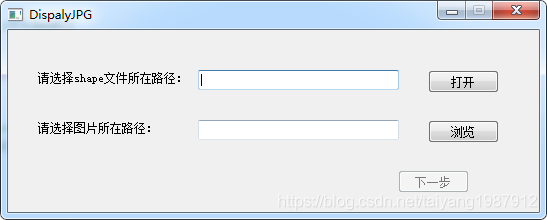
2、编译运行
三、总结
(1)上述代码只是为了解决工作中的问题,具体的业务代码需自己扩展。需要下载:HD图片查看器1.2.0.22.ex,图片浏览工具。
(2)完整的代码已上传到csdn上:https://download.csdn.net/download/taiyang1987912/11914388
(3)若有问题或建议,请留言,在此感谢!

开源鸿蒙跨平台开发社区汇聚开发者与厂商,共建“一次开发,多端部署”的开源生态,致力于降低跨端开发门槛,推动万物智联创新。
更多推荐

 0
0 0
0- 0


 已为社区贡献2条内容

所有评论(0)