Android DSL
Kotlin DSL(领域特定语言)是一种使用 Kotlin 语言编写的,用于解决特定问题领域的语言。DSL 使得代码更易读、易写,因为它的语法和领域问题的语法更接近。Kotlin 的强大类型系统和灵活性使得创建 DSL 变得更加容易。
·
文章目录
Android DSL
概述
Kotlin DSL(领域特定语言)是一种使用 Kotlin 语言编写的,用于解决特定问题领域的语言。DSL 使得代码更易读、易写,因为它的语法和领域问题的语法更接近。Kotlin 的强大类型系统和灵活性使得创建 DSL 变得更加容易。
使用DSL构建HTML
定义接口:
interface IElement {

    // 拼接HTML字符串,每个元素都需要实现
    fun render(builder: StringBuilder, indent: String): String
}
实现父类:
/**
 * 需要传入标签名和内容
 * 每个元素都有标签名,如:<p>hello</p>、<img />
 */
open class BaseElement(val tagName: String, val content: String = "") : IElement {

    private val children = mutableListOf<BaseElement>() //元素内的所有子元素
    private val _attributes = mutableMapOf<String, String>() //元素的属性名和属性值
    protected val attributes get() = _attributes

    protected fun addElement(element: BaseElement) {
        this.children.add(element)
    }

    protected fun renderAttributes(): String {
        val builder = StringBuilder()
        if (attributes.isNotEmpty()) {
            for ((attrName, attrValue) in attributes) {
                builder.append(""" $attrName="$attrValue"""")
            }
        }
        return builder.toString()
    }

    override fun render(builder: StringBuilder, indent: String): String {
        builder.append("$indent<$tagName")
        builder.append(renderAttributes())
        builder.append(">\n")
        if (content.isNotBlank()) {
            builder.append("    $indent$content\n")
        }
        children.forEach {
            it.render(builder, "    $indent")
        }
        builder.append("$indent</$tagName>\n")
        return builder.toString()
    }

    operator fun invoke(): String {
        val builder = StringBuilder()
        return render(builder, "")
    }
}
实现子元素:
fun html(block: Html.() -> Unit): Html {
    val html = Html()
    html.block()
    return html
}

// <html>标签
class Html() : BaseElement("html") {
    fun head(block: Head.() -> Unit): Head {
        val head = Head()
        head.block()
        addElement(head)
        return head
    }

    fun body(block: Body.() -> Unit): Body {
        val body = Body()
        body.block()
        addElement(body)
        return body
    }
}

// <head>标签
class Head : BaseElement("head") {
    fun title(block: () -> String): Title {
        val content = block()
        val title = Title(content)
        addElement(title)
        return title
    }
}

// <title>标签
class Title(content: String) : BaseElement("title", content)

// <body>标签
class Body : BaseElement("body") {
    fun h1(block: () -> String): H1 {
        val content = block()
        val h1 = H1(content)
        addElement(h1)
        return h1
    }

    fun p(block: () -> String): P {
        val content = block()
        val p = P(content)
        addElement(p)
        return p
    }

    fun a(href: String = "", block: () -> String): A {
        val content = block()
        val a = A(content).apply {
            this.href = href
        }
        addElement(a)
        return a
    }

    fun img(src: String = "", alt: String = ""): Img {
        val img = Img().apply {
            this.src = src
            this.alt = alt
        }
        addElement(img)
        return img
    }
}

// <h1>标签
class H1(content: String) : BaseElement("h1", content)

// <p>标签
class P(content: String) : BaseElement("p", content)

// <a>标签
class A(content: String) : BaseElement("a", content) {
    var href: String
        get() = attributes["href"]!!
        set(value) {
            attributes["href"] = value
        }
}

// <img>标签
class Img : BaseElement("img") {
    var src: String
        get() = attributes["src"]!!
        set(value) {
            attributes["src"] = value
        }

    var alt: String
        get() = attributes["alt"]!!
        set(value) {
            attributes["alt"] = value
        }

    override fun render(builder: StringBuilder, indent: String): String {
        return builder.append("$indent<$tagName")
            .append(renderAttributes())
            .append(" />\n")
            .toString()
    }
}
使用:
class MainActivity : AppCompatActivity() {
    override fun onCreate(savedInstanceState: Bundle?) {
        super.onCreate(savedInstanceState)
        setContentView(R.layout.activity_main)
        val webView: WebView = findViewById(R.id.webView)

        val htmlStr = getHtmlStr()
        webView.loadData(htmlStr, "text/html", "UTF-8")
    }

    private fun getHtmlStr(): String {
        return html {
            head {
                title {
                    "hello Kotlin"
                }
            }
            body {
                h1 {
                    "hello world DSL"
                }
                p {
                    "--------------------------"
                }
                img(
                    src = "https://img-home.csdnimg.cn/images/20201124032511.png",
                    alt = "hello DSL"
                )
                p {
                    "=========================="
                }
                a(href = "https://blog.csdn.net/qq_14876133") {
                    "Kotlin"
                }
            }
        }()
    }
}
效果:
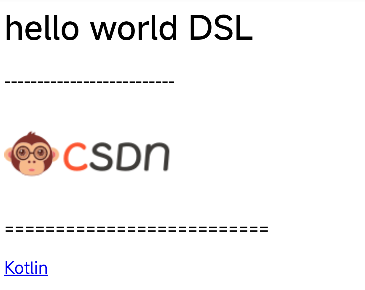
输出的html字符串:
<html>
        <head>
            <title>
                hello Kotlin
            </title>
        </head>
        <body>
            <h1>
                hello world DSL
            </h1>
            <p>
                --------------------------
            </p>
            <img src="https://img-home.csdnimg.cn/images/20201124032511.png" alt="hello DSL" />
            <p>
                ==========================
            </p>
            <a href="https://blog.csdn.net/qq_14876133">
                Kotlin
            </a>
        </body>
    </html>
代码下载

开源鸿蒙跨平台开发社区汇聚开发者与厂商,共建“一次开发,多端部署”的开源生态,致力于降低跨端开发门槛,推动万物智联创新。
更多推荐
 0
0 0
0- 0


 已为社区贡献40条内容

所有评论(0)