Flutter中BLE蓝牙通讯的实现
·
背景:
之前用java写过安卓端的BLE蓝牙通讯测试的demo,最近学习了Flutter相关知识,准备以BLE蓝牙测试为例,写一个flutte的BLE蓝牙测试demo。之前的demo请参考:安卓BLE蓝牙通讯
实现:
- 权限
① 在android下的AndroidManifest.xml文件中添加安卓设备所需权限。
    <uses-permission android:name="android.permission.BLUETOOTH" />
    <uses-permission android:name="android.permission.BLUETOOTH_ADMIN" />
    <uses-permission android:name="android.permission.BLUETOOTH_CONNECT" />
    <uses-permission android:name="android.permission.ACCESS_COARSE_LOCATION" />
    <uses-permission android:name="android.permission.ACCESS_FINE_LOCATION" />
    <uses-permission android:name="android.permission.BLUETOOTH_SCAN" />
    <uses-permission android:name="android.permission.BLUETOOTH_ADVERTISE" />
② 在ios下的Info.plist文件中添加ios设备所需权限。
	<key>NSBluetoothAlwaysUsageDescription</key>
    <string>需要使用蓝牙来连接设备</string>
    <key>NSBluetoothPeripheralUsageDescription</key>
    <string>需要使用蓝牙来连接设备</string>

    <key>NSLocationWhenInUseUsageDescription</key>
    <string>需要使用位置权限来搜索附近的蓝牙设备</string>
    <key>NSLocationAlwaysAndWhenInUseUsageDescription</key>
    <string>需要使用位置权限来搜索附近的蓝牙设备</string>
- 动态权限申请
① 创建一个PermissionUtil来管理权限获取。
import 'package:permission_handler/permission_handler.dart';

class PermissionUtil {
  /// 请求蓝牙和位置信息权限
  static Future<bool> requestBluetoothConnectPermission() async {
    Map<Permission, PermissionStatus> permission = await [
      Permission.bluetoothConnect,
      Permission.bluetoothScan,
      Permission.bluetoothAdvertise,
      Permission.location,
    ].request();

    if (await Permission.bluetoothConnect.isGranted) {
      print("蓝牙连接权限申请通过");
    } else {
      print("蓝牙连接权限申请失败");
      return false;
    }

    if (await Permission.bluetoothScan.isGranted) {
      print("蓝牙扫描权限申请通过");
    } else {
      print("蓝牙扫描权限申请失败");
      return false;
    }

    if (await Permission.bluetoothAdvertise.isGranted) {
      print("蓝牙广播权限申请通过");
    } else {
      print("蓝牙广播权限申请失败");
      return false;
    }

    if (await Permission.location.isGranted) {
      print("位置权限申请通过");
    } else {
      print("位置权限申请失败");
      return false;
    }

    return true;
  }
}
② 在主页面中调用动态权限获取
PermissionUtil.requestBluetoothConnectPermission();
③ 在蓝牙扫描时调用权限检测。
  // 扫描蓝牙
  void scanDevices() {
    PermissionUtil.requestBluetoothConnectPermission().then((hasPermission) {
      if(hasPermission) {
        // 权限获取成功
        devices.clear();
        BleManager.getInstance().setCallback(this);
        BleManager.getInstance().startScan(
          timeout: Duration(seconds: 10),
        );
      } else {
        // 权限获取失败
        SnackBarManager.instance.showSnackBar("权限获取失败", "请先授予权限");
      }
    });
  }
④ ios设备无需进行动态权限获取。
3. 创建一个蓝牙管理类
① 创建一个蓝牙管理类来管理连接的扫描、连接、通讯等。
import 'package:bluetooth/util/constants/ble_config.dart';
import 'package:bluetooth/util/snack_bar_manager.dart';
import 'package:flutter_blue_plus/flutter_blue_plus.dart';

import '../inter/ble_callback.dart';

class BleManager {
  static BleManager? _instance;

  BluetoothDevice? _device;
  BluetoothCharacteristic? _writeCharacteristic;
  BluetoothCharacteristic? _notifyCharacteristic;

  // 回调接口
  BleCallback? _callback;

  // 设置回调
  void setCallback(BleCallback callback) {
    _callback = callback;
  }

  // 私有构造函数
  BleManager._();

  // 单例模式
  static BleManager getInstance() {
    _instance ??= BleManager._();
    return _instance!;
  }

  // 检查蓝牙是否可用
  Future<bool> isAvailable() async {
    return await FlutterBluePlus.isAvailable;
  }

  // 检查蓝牙是否开启
  Future<bool> isOn() async {
    return await FlutterBluePlus.isOn;
  }

  // 开始扫描
  Future<void> startScan({
    Duration? timeout,
    List<Guid>? withServices,
  }) async {
    if (!(await isOn())) {
      SnackBarManager.instance.showSnackBar("蓝牙未开启", "请打开蓝牙");
    }

    // 停止之前的扫描
    await stopScan();

    // 监听扫描结果
    FlutterBluePlus.scanResults.listen((results) {
      for (ScanResult result in results) {
        // print("扫描结果: ${result.device.name} - ${result.device.remoteId}");
        if (_callback != null) {
          _callback!.onScanResult(result.device);
        }
      }
    });

    // 开始扫描
    print("开始扫描");
    await FlutterBluePlus.startScan(
      timeout: timeout ?? const Duration(seconds: 4),
      withServices: withServices ?? [],
    );
  }

  // 停止扫描
  Future<void> stopScan() async {
    await FlutterBluePlus.stopScan();
  }

  BluetoothDevice? getDeviceFromAddress(String address) {
    try {
      BluetoothDevice device = BluetoothDevice.fromId(address);
      return device;
    } catch (e) {
      print('获取设备失败: $e');
      return null;
    }
  }

  // 连接设备
  Future<bool> connect(BluetoothDevice device) async {
    try {
      await device.connect(
        timeout: const Duration(seconds: 4),
        autoConnect: false,
      );

      _device = device;

      // 添加断开连接监听
      device.connectionState.listen((BluetoothConnectionState state) {
        if (state == BluetoothConnectionState.disconnected) {
          // 设备断开连接
          if (_callback != null) {
            _callback!.onDisconnected();
          }
          _device = null;
          _writeCharacteristic = null;
          _notifyCharacteristic = null;
        }
      });

      // 发现服务
      List<BluetoothService> services = await device.discoverServices();
      for (BluetoothService service in services) {
        if (service.uuid.toString() == BleConfig.SERVICE_UUID) {
          for (BluetoothCharacteristic characteristic in service.characteristics) {
            if (characteristic.uuid.toString() == BleConfig.WRITE_CHARACTERISTIC_UUID) {
              _writeCharacteristic = characteristic;
            }

            if (characteristic.uuid.toString() == BleConfig.NOTIFY_CHARACTERISTIC_UUID) {
              _notifyCharacteristic = characteristic;
            }
          }
        }
      }

      if (_notifyCharacteristic != null) {
        // 设置通知
        await enableNotification();
        if (_callback != null) {
          _callback!.onConnectSuccess();
        }
        return true;
      } else {
        print("未找到指定特征值");
        return false;
      }
    } catch (e) {
      if (_callback != null) {
        _callback!.onConnectFailed(e.toString());
      }
      disconnect();
      return false;
    }
  }

  // 断开连接
  Future<void> disconnect() async {
    if (_device != null) {
      await _device!.disconnect();
      _device = null;
      _notifyCharacteristic = null;
      _writeCharacteristic = null;
    }
  }

  // 发送数据
  Future<bool> sendData(List<int> data) async {
    if (_writeCharacteristic != null) {
      await _writeCharacteristic!.write(data);
      return true;
    } else {
      print("未持有WRITE_UUID");
      return false;
    }
  }

  // 启用通知
  Future<void> enableNotification() async {
    if (_notifyCharacteristic != null) {
      await _notifyCharacteristic!.setNotifyValue(true);
      _notifyCharacteristic!.value.listen((value) {
        if (_callback != null) {
          _callback!.onDataReceived(value);
        }
      });
    } else {
      print("未持有NOTIFY_UUID");
    }
  }

  // 获取连接状态
  bool isConnected() {
    return _device != null && _notifyCharacteristic != null;
  }
}
② 创建BleCallback来处理连接回调。
import 'package:flutter_blue_plus/flutter_blue_plus.dart';

mixin BleCallback {
  // 扫描结果回调
  void onScanResult(BluetoothDevice device);

  // 连接成功回调
  void onConnectSuccess();

  // 断开连接回调
  void onDisconnected();

  // 连接失败回调
  void onConnectFailed(String error);

  // 数据接收回调
  void onDataReceived(List<int> data);
}
③ 统一管理蓝牙的UUID。
class BleConfig {
  // 服务和特征值 UUID
  static const String SERVICE_UUID = "0783b03e-8535-b5a0-7140-a304d2495cb7";

  static const String WRITE_CHARACTERISTIC_UUID = "0783b03e-8535-b5a0-7140-a304d2495cba";

  static const String NOTIFY_CHARACTERISTIC_UUID = "0783b03e-8535-b5a0-7140-a304d2495cb8";
}
- 创建页面来展示蓝牙通讯
① 创建一个页面来展示蓝牙的连接和通讯状况。
import 'package:flutter/material.dart';
import 'package:get/get.dart';

import '../home/home_contolller.dart';

class BluetoothInfoPage extends StatelessWidget {
  const BluetoothInfoPage({super.key});

  @override
  Widget build(BuildContext context) {
    return GetBuilder<HomeController>(builder: (controller) {
      return Scaffold(
        appBar: AppBar(
          title: Text('蓝牙信息'),
        ),
        body: Padding(
          padding: const EdgeInsets.all(16.0),
          child: Column(
            crossAxisAlignment: CrossAxisAlignment.start,
            children: [
              Obx(() =>
                  Text("连接状态: ${controller.bluetoothInfo.value
                      .isConnected ? "已连接" : "未连接"}")),
              SizedBox(height: 8),
              Obx(() =>
                  Text("蓝牙名称: ${controller.bluetoothInfo.value
                      .name}")),
              SizedBox(height: 8),
              Obx(() =>
                  Text("蓝牙地址: ${controller.bluetoothInfo.value
                      .address}")),
              SizedBox(height: 16),
              Row(
                children: [
                  Expanded(
                    child: TextField(
                      onChanged: (value) {
                        controller.sentMessage.value = value; // 更新发送的消息
                      },
                      decoration: InputDecoration(
                        labelText: '发送的报文',
                      ),
                    ),
                  ),
                  IconButton(
                    icon: Icon(Icons.send),
                    onPressed: () {
                      controller.sendMessage();
                    },
                    tooltip: '发送消息',
                  ),
                ],
              ),
              SizedBox(height: 16),
              const Text("接收的报文:", style: TextStyle(fontSize: 16, fontWeight: FontWeight.bold)),
              const SizedBox(height: 8),

              // 接收报文内容区域和按钮
              Row(
                crossAxisAlignment: CrossAxisAlignment.start,
                children: [
                  // 接收报文内容
                  Expanded(
                    child: Container(
                      height: 200, // 固定高度
                      decoration: BoxDecoration(
                        border: Border.all(color: Colors.grey),
                        borderRadius: BorderRadius.circular(4),
                      ),
                      child: Obx(() => SingleChildScrollView(
                        child: Padding(
                          padding: const EdgeInsets.all(8.0),
                          child: Text(controller.receivedMessage.value),
                        ),
                      )),
                    ),
                  ),

                  // 右侧按钮
                  SizedBox(
                    height: 200,  // 与内容区域等高
                    child: Center(  // 使用 Center 包裹按钮
                      child: IconButton(
                        icon: Icon(Icons.delete),
                        onPressed: () {
                          controller.clearMessage();
                        },
                        tooltip: '清空接收内容',
                      ),
                    ),
                  ),
                ],
              ),
            ],
          ),
        ),
      );
    });
  }
}
② 创建一个页面来实现蓝牙的扫描和连接。
import 'package:flutter/cupertino.dart';
import 'package:flutter/material.dart';
import 'package:get/get_state_manager/src/rx_flutter/rx_obx_widget.dart';
import 'package:get/get_state_manager/src/simple/get_state.dart';

import '../home/home_contolller.dart';

class BluetoothListPage extends StatelessWidget {
  const BluetoothListPage({super.key});

  @override
  Widget build(BuildContext context) {
    return GetBuilder<HomeController>(builder: (controller)
    {
      return Scaffold(
        appBar: AppBar(
          title: Text('蓝牙设备列表'),
        ),
        body: Obx(() {
          return RefreshIndicator(
            onRefresh: () async {
              controller.scanDevices(); // 下拉刷新时重新扫描
            },
            child: ListView.builder(
              itemCount: controller.devices.length,
              itemBuilder: (context, index) {
                final device = controller.devices[index];
                return Card(
                  margin: EdgeInsets.symmetric(horizontal: 12, vertical: 6),
                  elevation: 2,
                  child: ListTile(
                    contentPadding: EdgeInsets.symmetric(horizontal: 16, vertical: 8),
                    title: Text(
                      device.name,
                      style: TextStyle(
                          fontWeight: FontWeight.bold,
                          fontSize: 16
                      ),
                    ),
                    subtitle: Column(
                      crossAxisAlignment: CrossAxisAlignment.start,
                      children: [
                        SizedBox(height: 4),
                        Text(
                            device.address,
                            style: TextStyle(fontSize: 14)
                        ),
                      ],
                    ),
                    trailing: Container(
                      padding: EdgeInsets.symmetric(horizontal: 12, vertical: 6),
                      decoration: BoxDecoration(
                          color: device.isConnected ? Colors.green[100] : Colors.grey[200],
                          borderRadius: BorderRadius.circular(12)
                      ),
                      child: Text(
                        device.isConnected ? "已连接" : "未连接",
                        style: TextStyle(
                            color: device.isConnected ? Colors.green[700] : Colors.grey[700],
                            fontSize: 14
                        ),
                      ),
                    ),
                    onTap: () {
                      controller.connectToDevice(context, device);
                    },
                  ),
                );
              },
            )
          );
        }),
      );
    });
  }
}
- 创建一个Controller来管理页面的数据。
① 创建一个HomeController来管理页面数据以及蓝牙的实际连接、通讯等。
import 'package:bluetooth/util/ble_manager.dart';
import 'package:bluetooth/util/permission_util.dart';
import 'package:bluetooth/util/ua200_receiver.dart';
import 'package:flutter/material.dart';
import 'package:flutter_blue_plus/flutter_blue_plus.dart';
import 'package:get/get.dart';

import '../../data/bluetooth_device_info.dart';
import '../../inter/ble_callback.dart';
import '../../util/snack_bar_manager.dart';
import '../../widget/loading_dialog.dart';
import '../ble/bluetooth_info_page.dart';
import '../ble/bluetooth_list_page.dart';

class HomeController extends GetxController with BleCallback {
  final List<Widget> pageList = [
    const BluetoothInfoPage(),
    const BluetoothListPage(),
  ];

  /// 当前界面的索引值
  int currentIndex = 0;

  var bluetoothInfo = BluetoothDeviceInfo(
    name: "",
    address: "",
    isConnected: false,
  ).obs;

  var sentMessage = "".obs;
  var receivedMessage = "".obs;

  var devices = <BluetoothDeviceInfo>[].obs;

  changeIndex(int index) {
    currentIndex = index;
    update();
    if (devices.isEmpty && currentIndex == 1) {
      scanDevices();
    }
  }

  @override
  void onInit() {
    super.onInit();
    PermissionUtil.requestBluetoothConnectPermission();
  }

  @override
  void onReady() {
    super.onReady();
  }

  // 扫描蓝牙
  void scanDevices() {
    PermissionUtil.requestBluetoothConnectPermission().then((hasPermission) {
      if(hasPermission) {
        // 权限获取成功
        devices.clear();
        BleManager.getInstance().setCallback(this);
        BleManager.getInstance().startScan(
          timeout: Duration(seconds: 10),
        );
      } else {
        // 权限获取失败
        SnackBarManager.instance.showSnackBar("权限获取失败", "请先授予权限");
      }
    });
  }

  Future<void> connectToDevice(BuildContext context, BluetoothDeviceInfo device) async {
    if (device.isConnected) {
      // 如果设备已连接,则断开连接
      device.isConnected = false; // 断开连接
      BleManager.getInstance().disconnect();
      bluetoothInfo.value = device;
      devices.refresh();
      return;
    }

    for (var dev in devices) {
      dev.isConnected = false; // 先将所有设备的连接状态设为 false
    }

    // 显示连接中的状态框
    // showDialog(
    //   context: context,
    //   barrierDismissible: false,
    //   builder: (context) {
    //     return const LoadingDialog();
    //   },
    // );
    LoadingDialog.show("连接中...");

    // 这里可以判断连接是否成功
    var dev = BleManager.getInstance().getDeviceFromAddress(device.address);
    if (dev != null) {
      BleManager.getInstance().connect(dev).then((success) {
        if (success) {
          // 连接成功
          LoadingDialog.hide(); // 关闭连接中的状态框

          device.isConnected = true; // 将选中的设备连接状态设为 true
          devices.remove(device); // 移除该设备
          devices.insert(0, device); // 将设备插入到列表顶部
          bluetoothInfo.value = device;
        } else {
          LoadingDialog.hide(); // 关闭连接中的状态框
          SnackBarManager.instance.showSnackBar("连接失败", "无法连接到 ${device.name},请重试。");
        }
      });
    } else {
      LoadingDialog.hide(); // 关闭连接中的状态框
      SnackBarManager.instance.showSnackBar("连接异常", "");
    }
  }

  void sendMessage() {
    // 发送消息的逻辑
    print("发送消息: ${sentMessage.value}");
    var data = sentMessage.value.codeUnits;
    BleManager.getInstance().sendData(data).then((result) {
      if (result) {
        print("消息发送成功");
      } else {
        print("消息发送失败");
        SnackBarManager.instance.showSnackBar("消息发送失败", "请检查蓝牙连接状态");
      }
    });
  }

  void clearMessage() {
    receivedMessage.value = "";
  }

  @override
  void onClose() {
    super.onClose();
  }

  @override
  void onScanResult(BluetoothDevice device) {
    if (device.name.isEmpty) {
      return;
    }
    if (devices.any((dev) => dev.address == device.remoteId.toString())) {
      return;
    }
    print('扫描到设备: ${device.name}, 地址: ${device.remoteId}');
    var dev = BluetoothDeviceInfo(name: device.name, address: device.remoteId.toString());
    devices.add(dev);
  }

  @override
  void onConnectSuccess() {
    print('连接成功');
  }

  @override
  void onDisconnected() {
    print('断开连接');
    SnackBarManager.instance.showSnackBar("蓝牙断开连接", "");
    bluetoothInfo.value.isConnected = false;
    for (var device in devices) {
      device.isConnected = false;
    }
    bluetoothInfo.refresh();
    devices.refresh();
  }

  @override
  void onConnectFailed(String error) {
    print('连接失败: $error');
  }

  @override
  void onDataReceived(List<int> data) {
    print('收到数据: $data');
    var receivedData = Ua200Receiver.getBleData(data);
    if (receivedData != "") {
      print('收到数据: $receivedData');
      receivedMessage.value = '$receivedData\n${receivedMessage.value}';
    }
  }
}
onDataReceived接收的数据为byte数组,可根据自己BLE蓝牙协议进行解析,此demo收发皆使用string转byte后进行通讯。
-
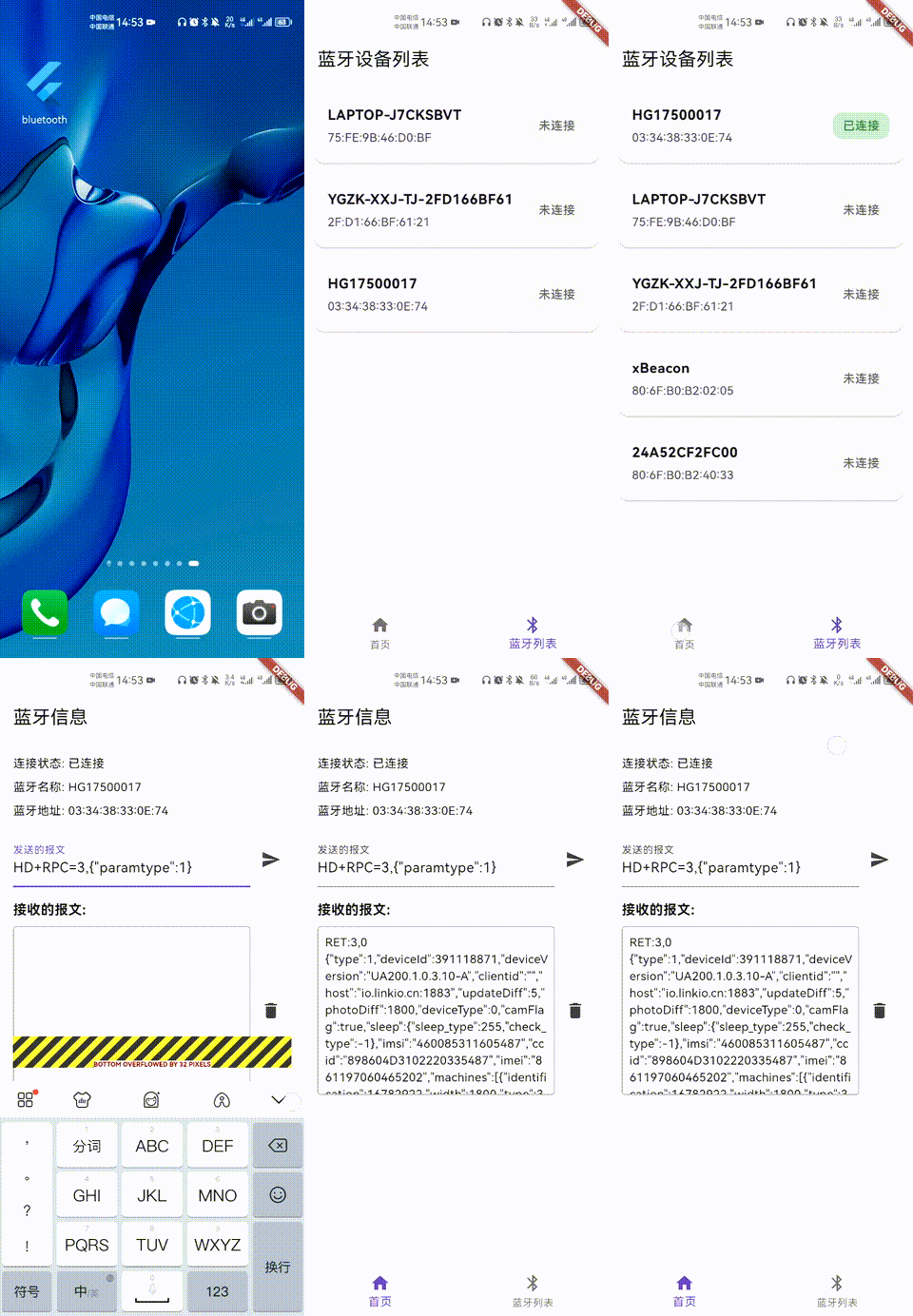
实现效果

开源鸿蒙跨平台开发社区汇聚开发者与厂商,共建“一次开发,多端部署”的开源生态,致力于降低跨端开发门槛,推动万物智联创新。
更多推荐

 11
11 0
0- 0


 已为社区贡献3条内容

所有评论(0)