第三篇 fluter组件应用
·
第三篇 fluter组件应用
一、有状态部件Stateful widget?
第二篇我们说到stateless widget是不可变的,这意味着他们的属性不能改变,所有值都是保持不变的
Stateful widgets 持有的状态可能在widget生命周期中发生变化. 实现一个 stateful widget 至少需要两个类:以生成随机数为例子
1.StatefulWidget类
class RandomWords extends StatefulWidget {
  @override
  createState() => new RandomWordsState();//RandomWords widget除了创建State类之外几乎没有其他任何东西
}
2.State类
class RandomWordsState extends State<RandomWords> {
  @override
  Widget build(BuildContext context) {
    final wordPair = new WordPair.random();
    return new Text(wordPair.asPascalCase);
  }
}
3.在myApp调用RandomWords
import 'package:flutter/material.dart';
import 'package:english_words/english_words.dart';
void main() {
  runApp(new MyApp());
}
class MyApp extends StatelessWidget {
  const MyApp({Key? key}) : super(key: key);

  // This widget is the root of your application.
  @override
  Widget build(BuildContext context) {
    //final wordPair = new WordPair.random();
    return  MaterialApp(
      title: 'Flutter Demo',
      home: new Scaffold(
        appBar: new AppBar(
          title: new Text('Welcome to Flutter'),
        ),
        body: new Center(
          //child: new Text('Hccceo World'),
          //child: new Text(wordPair.asPascalCase),
          child: new RandomWords(),//调用我
        ),
      ),
    );
  }
}
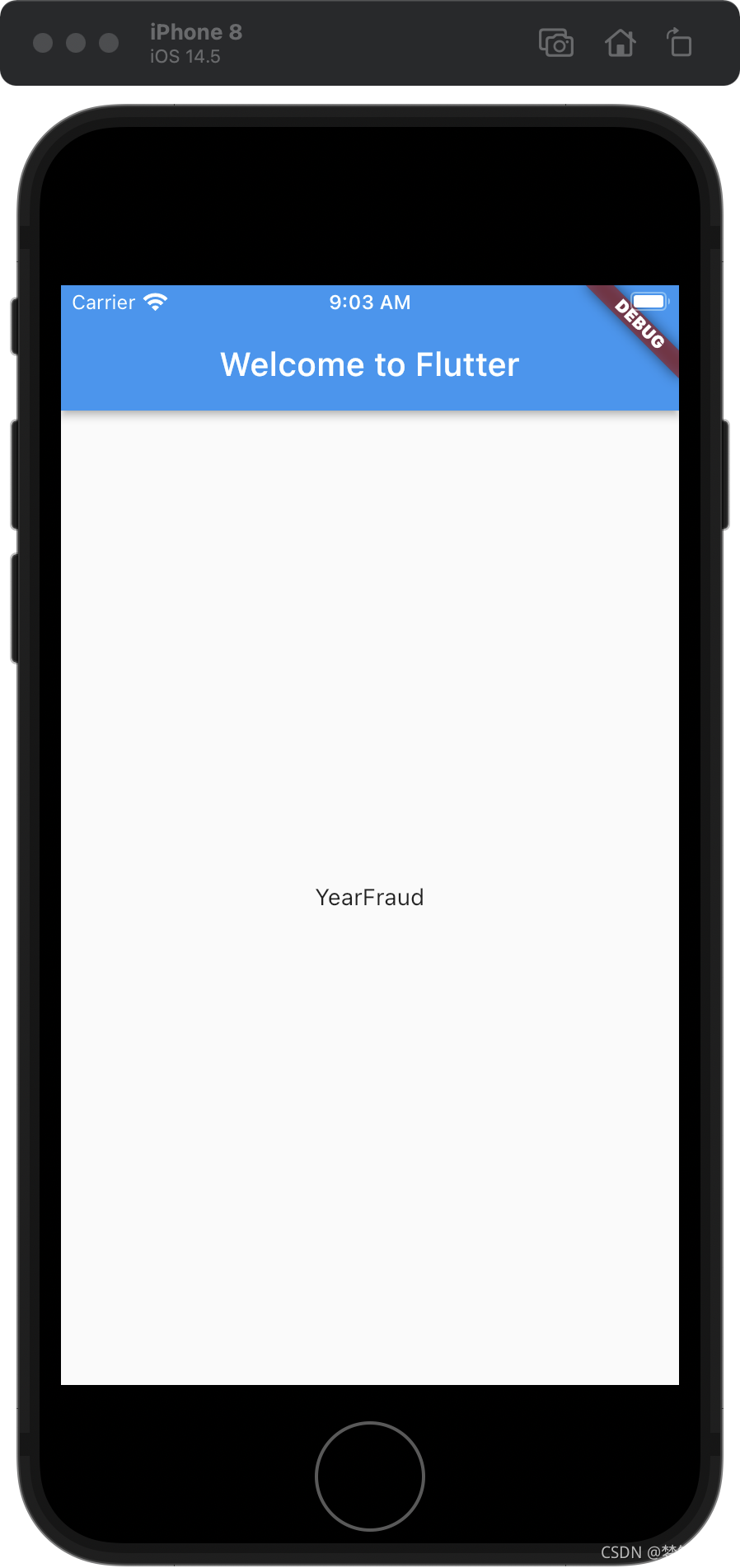
每次热重载或保存应用程序时都会显示一个单词对。
二、无限滚动ListView
1.RandomWordsState类
扩展RandomWordsState,当用户滚动listview时自动生成单词对,并显示
class RandomWordsState extends State<RandomWords> {
  @override
  Widget build(BuildContext context) {
    // final wordPair = new WordPair.random(); // 删除这两行
    // return new Text(wordPair.asPascalCase);
    return new Scaffold (
      appBar: new AppBar(
        title: new Text('Startup Name Generator'),
      ),
      body: _buildSuggestions(),
    );
  }

  //1.变量以下划线(_)开头,在Dart语言中使用下划线前缀标识符,会强制其变成私有的。
  final _suggestions = <WordPair>[];//_suggestions列表以保存建议的单词对

  final _biggerFont = const TextStyle(fontSize: 18.0);//biggerFont变量来增大字体大小

//2.添加一个 _buildSuggestions() 函数. 此方法构建显示建议单词对的ListView。

Widget _buildSuggestions(){
  return new ListView.builder(
        padding: const EdgeInsets.all(16.0),


      itemBuilder: (context,i){
        // 在每一列之前,添加一个1像素高的分隔线widget
        if (i.isOdd) return new Divider();
        // 语法 "i ~/ 2" 表示i除以2,但返回值是整形(向下取整),比如i为:1, 2, 3, 4, 5
        // 时,结果为0, 1, 1, 2, 2, 这可以计算出ListView中减去分隔线后的实际单词对数量
        final index = i ~/ 2;
        // 如果是建议列表中最后一个单词对
        if (index >= _suggestions.length) {
          // ...接着再生成10个单词对,然后添加到建议列表
          _suggestions.addAll(generateWordPairs().take(10));
        }
        return _buildRow(_suggestions[index]);
      }
  );
}

  Widget _buildRow(WordPair pair) {
    return new ListTile(
      title: new Text(
        pair.asPascalCase,
        style: _biggerFont,
      ),
    );
  }
}
2.将myapp中的home交给RandomWordsState管理
原来的home
class MyApp extends StatelessWidget {
  const MyApp({Key? key}) : super(key: key);

  // This widget is the root of your application.
  @override
  Widget build(BuildContext context) {

    return  MaterialApp(
      title: 'Flutter Demo',
      //此处做修改
      home: new Scaffold(
        appBar: new AppBar(
          title: new Text('Welcome to Flutter'),
        ),
        body: new Center(

          child: new RandomWords(),
        ),
      ),
    );
  }
}
现在的
class MyApp extends StatelessWidget {
  const MyApp({Key? key}) : super(key: key);

  // This widget is the root of your application.
  @override
  Widget build(BuildContext context) {
    //final wordPair = new WordPair.random();
    return  MaterialApp(
      title: 'Flutter Demo',
      home: new RandomWords(),
    );
  }
}
总结
MaterialApp:我理解的就是iOS 里面的一个app,里面的title是导航栏,home是包含一整个view,Scaffold就是我们要的view,包含导航栏以及以下的所有内容
Scaffold的appBar就是导航栏
Scaffold的body就是导航栏以下的view
在以上的内容里,我们把home里的scaffold交给RandomWordsState管理,home里就不需要scaffold了

开源鸿蒙跨平台开发社区汇聚开发者与厂商,共建“一次开发,多端部署”的开源生态,致力于降低跨端开发门槛,推动万物智联创新。
更多推荐


 0
0 0
0- 0


 已为社区贡献4条内容

所有评论(0)