Flutter 项目实战 实现上传头像和个人资料 (五)
实现局部刷新 , 当用户点击导航栏保存按钮时展现一个提交资料的进度 (网络请求) , 这时只会刷新导航栏的保存按钮 , 不会对整个界面进行刷新 ./Controller提供编辑资料的接口//Service层实现用户资料编辑//根据token获取userId//编辑个人资资料界面//编辑资料导航栏//上传个人头像//选择常驻城市//编辑微信账号//编辑昵称//选择生日//选择职业//交友目的//期望
/ 编辑个人资资料界面 /
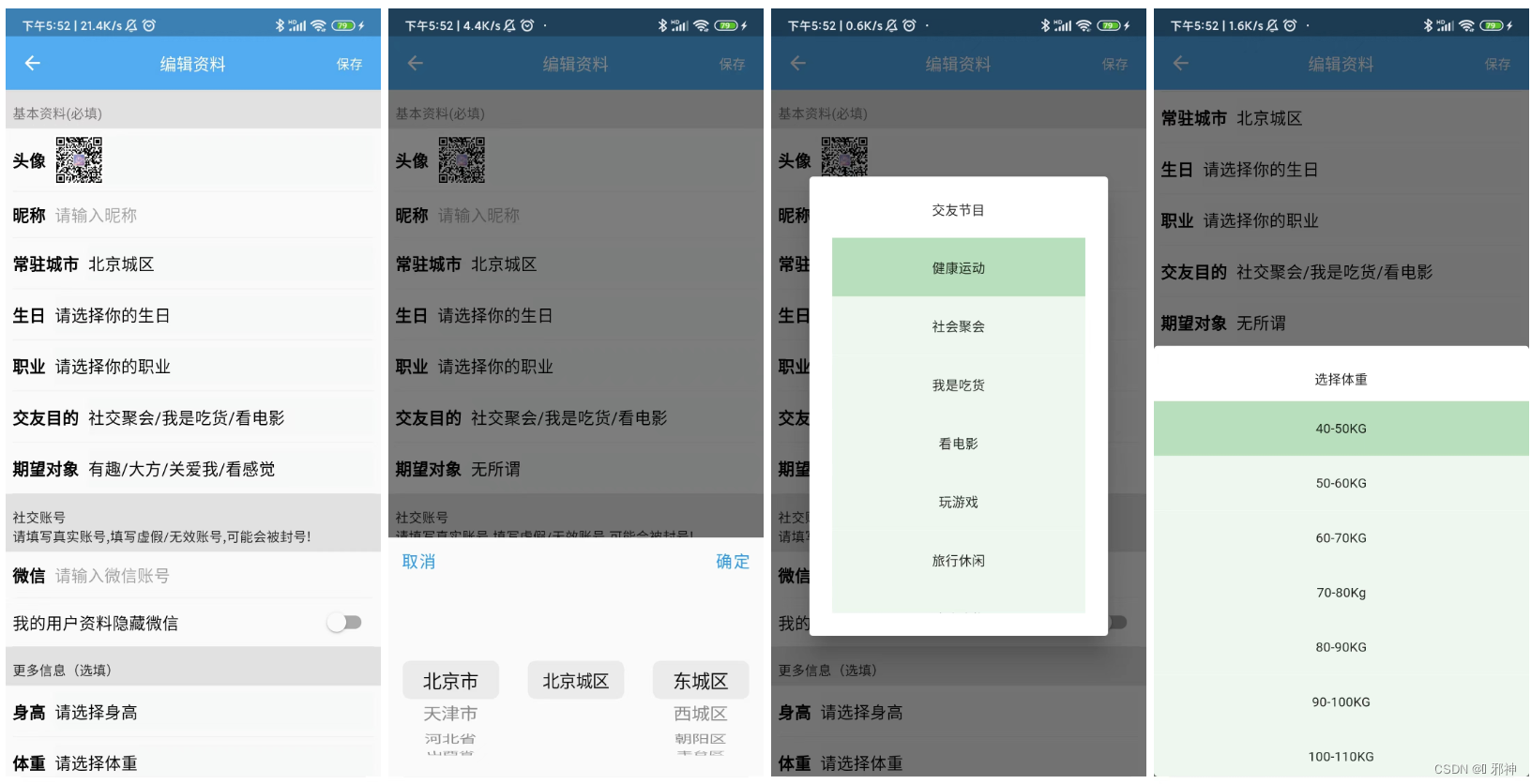
/ 编辑资料导航栏 /
ValueListenableBuilder通过 ValueListenableBuilder 实现局部刷新 , 当用户点击导航栏保存按钮时展现一个提交资料的进度 (网络请求) , 这时只会刷新导航栏的保存按钮 , 不会对整个界面进行刷新 .
Widget saveWidget(final PEditIntro _pEditIntro,
    final ValueNotifier<bool> _valueNotifierSave,
    final Map<String, String> _editIntroMap) {
  return ValueListenableBuilder<bool>(
      builder: (BuildContext context, bool value, Widget? child) {
        return value
            ? Container(
                width: 180.w,
                alignment: Alignment.center,
                child: CircularProgressIndicator(
                  strokeWidth: 12.w,
                  backgroundColor: Colors.blue,
                  valueColor: const AlwaysStoppedAnimation<Color>(Colors.red),
                ),
              )
            : child!;
      },
      valueListenable: _valueNotifierSave,
      child: GestureDetector(
        onTap: () {
          _pEditIntro.editIntro(_editIntroMap);
        },
        child: Container(
          width: 180.w,
          color: Colors.red.withOpacity(0.0),
          alignment: Alignment.center,
          child: Text(
            '保存',
            style: TextStyle(fontSize: 40.sp),
          ),
        ),
      ));
}
AppBar( title: Text( "编辑资料", style: TextStyle(fontSize: 50.sp), ), centerTitle: true, backgroundColor: Colors.blue.withOpacity(0.8), elevation: 0.0, actions: [ saveWidget(_pEditIntro, _valueNotifierSave, _editIntroMap), ], ),

/ 上传个人头像 /
在 pubspec.yaml 配置 image_picker 依赖 (any用版本号代替也可以)
image_picker: any #选择手机图片选择图片实现头像上传
edit_intro_page.dart
...

onTap: () async {
                  /// 隐藏软键盘
                  FocusScope.of(context).requestFocus(FocusNode());
                  final ImagePicker _picker = ImagePicker();
                  final XFile? image =
                      await _picker.pickImage(source: ImageSource.gallery);
                  String imagePath = image!.path;
                  logV('上传头像地址:$imagePath');
                  _pEditIntro.uploadHead(imagePath);
                },

...
m_edit_intro.dart
@override
  uploadHead(String file, SuccessCallback s, FailureCallback f) async {
    /// 获取要上传图片的名称
    var _fileName = file.substring(file.lastIndexOf("/") + 1, file.length);
    MultipartFile _fromFile = await MultipartFile.fromFile(
      file,
      filename: _fileName,
    );
    HttpManager().upLoad(
      url: '/upload/file',
      tag: tag,
      data: FormData.fromMap({
        'file': _fromFile,
        'type': 'head',
      }),
      options: Options(
        contentType: "multipart/form-data",
      ),
      successCallback: (data) {
        s(data);
      },
      errorCallback: (data) {
        f(data);
      },
    );
  }
http_manager.dart
...

upLoad({
    String? url,
    data,
    Map<String, dynamic>? params,
    Options? options,
    HttpSuccessCallback? successCallback,
    HttpFailureCallback? errorCallback,
    @required String? tag,
  }) async {
    return _request(
      url: url!,
      data: data,
      method: POST,
      params: params,
      options: options,
      successCallback: successCallback!,
      errorCallback: errorCallback!,
      tag: tag!,
    );
  }
...
/ 分割线 /
Container lineWidget() {
  return Container(
    width: double.infinity,
    height: 1.h,
    margin: EdgeInsets.only(left: 20.w, right: 20.w),
    color: Colors.black.withOpacity(0.1),
  );
}
/ 编辑昵称 /
nick_name_widget.dart
Container nickNameWidget(final Map<String, String> _editIntroMap){
 return  Container(
    margin: EdgeInsets.only(left: 20.w, right: 20.w),
    child: CusTextField(
          (nickName) {
        _editIntroMap['nick_name'] = '$nickName';
      },
      hintText: '请输入昵称',
      keyboardType: TextInputType.number,
      hintColorValue: 0x5C000000,
      textAlign: TextAlign.start,
      inputFontSize: 50.sp,
      fieldDel: TYPE.fieldDelWhite,
      cursorColor: 0xff000000,
      inputColorValue: 0xff000000,
      labelText: Text(
        '昵称\t\t',
        style: TextStyle(
            fontSize: 50.sp,
            color: Colors.black,
            fontWeight: FontWeight.bold),
      ),
    ),
  );
}
/ 选择常驻城市 /
pubspec.yaml 添加 city_pickers 插件依赖配置 ( any可以替换成版本号 )
city_pickers: any #加载城市列表city_widget.dart
...

onTap: () async {
                  /// 隐藏软键盘
                  FocusScope.of(context).requestFocus(FocusNode());
                  Result? result = await CityPickers.showCityPicker(
                      context: context,
                      cancelWidget: Text(
                        '取消',
                        style: TextStyle(fontSize: 50.sp),
                      ),
                      confirmWidget: Text(
                        '确定',
                        style: TextStyle(fontSize: 50.sp),
                      ),
                      height: 250);
                  if (result != null) {
                    String _city = '${result.cityName}';
                    _valueNotifierCity.value = _city;
                    _editIntroMap['city'] = _city;
                  }
                },

...
/ 选择生日 /
pubspec.yaml 添加 city_pickers 插件依赖配置 ( any可以替换成版本号 )
flutter_datetime_picker: any #加载日期选择列表birthday_widget.dart
...

onTap: () async {
                  /// 隐藏软键盘
                  FocusScope.of(context).requestFocus(FocusNode());
                  DatePicker.showDatePicker(context,
                      showTitleActions: true,
                      minTime: DateTime(1949, 01, 01),
                      maxTime: DateTime.now(),
                      onConfirm: (DateTime date) {
                        String showDate = '${date.year}-' +
                            '${date.month}-' +
                            '${date.day}';
                        _valueNotifierBirthday.value = showDate;
                        _editIntroMap['birthday'] = showDate;
                      },
                      currentTime: DateTime.now(),
                      locale: LocaleType.zh);
                },

...
/ 选择职业 /
select_job_page.dart
...

body: Row(
          children: [
            Expanded(
              child: JobWidget(
                jobs: _jobs,
                jobCallBack: (List<JobNameEntity> jobNames) {
                  _jobNameGlobalKey.currentState?.changeJobNames(jobNames);
                },
              ),
              flex: 2,
            ),
            Container(
              width: 1.w,
              height: double.infinity,
              color: Colors.black.withOpacity(0.2),
            ),
            Expanded(
              child: JobNameWidget(
                key: _jobNameGlobalKey,
                callback: (jobName) {
                  Navigator.pop(context, jobName);
                },
              ),
              flex: 3,
            )
          ],
        )

...
job_widget.dart
...

onTap: () async {
                  /// 隐藏软键盘
                  FocusScope.of(context).requestFocus(FocusNode());
                  String jobName = await Navigator.push(context,
                      MaterialPageRoute(builder: (context) {
                        /// 选择职业
                        return const SelectJobPage();
                      }));
                  _valueNotifierJob.value = jobName;
                  _editIntroMap['job'] = jobName;
                },

...
/ 交友目的 /
make_friend_widget.dart
...

/// 交友目的
Future<void> _makeFriendShow(BuildContext context,
    IMakeFriendCallBack iMakeFriendCallBack) async {
  var makeFriends = [
    '健康运动',
    '社会聚会',
    '我是吃货',
    '看电影',
    '玩游戏',
    '旅行休闲',
    '陪我购物',
    '连麦聊天',
    '其他'
  ];
  return showDialog<void>(
    context: context,
    barrierDismissible: false, // user must tap button!
    builder: (BuildContext context) {

...
... onTap: () async { /// 隐藏软键盘 FocusScope.of(context).requestFocus(FocusNode()); _makeFriendShow(context,(makeFriend) { _valueNotifierMakeFriendShow.value = makeFriend; _editIntroMap['make_fir_pur'] = makeFriend; }); }, ...
/ 期望对象 /
expect_partner_widget.dart
...

/// 期望对象
Future<void> _expectPartner(BuildContext context,
    IExpectPartnerCallBack iExpectPartnerCallBack) async {
  var expectPartner = [
    '看脸',
    '有趣',
    '大方',
    '关爱我',
    '看感觉',
    '无所谓',
  ];

  return showDialog<void>(
    context: context,
    barrierDismissible: false, // user must tap button!
    builder: (BuildContext context) {
      int _selectIndex = 0;
      return AlertDialog(
        content: StatefulBuilder(

...
... onTap: () async { /// 隐藏软键盘 FocusScope.of(context).requestFocus(FocusNode()); _expectPartner(context,(expectPartner) { _valueNotifierExpectPartner.value = expectPartner; _editIntroMap['expect'] = expectPartner; }); }, ...
/ 编辑微信账号 /
wx_account_widget.dart
Widget wxAccountWidget(final Map<String, String> _editIntroMap){
  return  Container(
    margin: EdgeInsets.only(left: 20.w, right: 20.w),
    child: CusTextField(
          (wxAccount) {
        _editIntroMap['wx_account'] = '$wxAccount';
      },
      hintText: '请输入微信账号',
      keyboardType: TextInputType.number,
      hintColorValue: 0x5C000000,
      textAlign: TextAlign.start,
      inputFontSize: 50.sp,
      fieldDel: TYPE.fieldDelWhite,
      cursorColor: 0xff000000,
      inputColorValue: 0xff000000,
      labelText: Text(
        '微信\t\t',
        style: TextStyle(
            fontSize: 50.sp,
            color: Colors.black,
            fontWeight: FontWeight.bold),
      ),
    ),
  );
}
/ 控制微信隐藏与显示 /
hide_wx_widget.dart
...

 Switch(
                value: _valueNotifierHideWx.value,
                onChanged: (value) {
                  /// 隐藏软键盘
                  FocusScope.of(context).requestFocus(FocusNode());
                  _valueNotifierHideWx.value = value;
                  _editIntroMap['is_hide_wx'] = '${value ? 1 : 0}';
                })

...
/ 选择身高 /
height_widget.dart
...

///  身高
Future<void> _selectHeight(
    BuildContext context,ISelectHeightCallBack iSelectHeightCallBack) async {
  var _selectHeight = [
    '130-135CM',
    '135-140CM',
    '140-145CM',
    '145-150CM',
    '150-155CM',
    '155-160CM',
    '160-165CM',
    '165-170CM',
    '170-175CM',
    '175-180CM',
    '180-185CM',
    '185-190CM',
  ];

  return showDialog<void>(
    context: context,
    barrierDismissible: false, // user must tap button!
    builder: (BuildContext context) {
      int _selectIndex = 0;
      return AlertDialog(
        alignment: Alignment.bottomCenter,
        insetPadding: const EdgeInsets.all(0.0),
        contentPadding: EdgeInsets.only(left: 0.0, right: 0.0, top: 40.h),
        content: StatefulBuilder(
          builder: (BuildContext context, StateSetter setState) {

...
/ SpringBoot工程创建IntroMapper.xml /
<?xml version="1.0" encoding="UTF-8"?>
<!DOCTYPE mapper PUBLIC "-//mybatis.org//DTD Mapper 3.0//EN" "http://mybatis.org/dtd/mybatis-3-mapper.dtd">
<mapper namespace="com.xm.chat.dao.IntroMapper">

    <resultMap type="com.xm.chat.entity.admin.Intro" id="BaseResultMap">
        <result property="id" column="id"/>
        <result property="head" column="head"/>
        <result property="nick_name" column="nick_name"/>
        <result property="city" column="city"/>
        <result property="birthday" column="birthday"/>
        <result property="job" column="job"/>
        <result property="make_fir_pur" column="make_fir_pur"/>
        <result property="expect" column="expect"/>
        <result property="wx_account" column="wx_account"/>
        <result property="is_hide_wx" column="is_hide_wx"/>
        <result property="height" column="height"/>
        <result property="weight" column="weight"/>
        <result property="per_intro" column="per_intro"/>
        <result property="user_id" column="user_id"/>
    </resultMap>

    <!--编辑资料|插入资料-->
    <insert id="editIntro" parameterType="com.xm.chat.entity.admin.Intro">
    insert into tb_intro(head,nick_name,city,birthday,job,make_fir_pur,expect,
    wx_account,is_hide_wx,height,weight,per_intro,user_id
    )values(#{head},#{nick_name},#{city}
    ,#{birthday},#{job},#{make_fir_pur},#{expect},#{wx_account},
    #{is_hide_wx},#{height},#{weight},#{per_intro},#{user_id})
    </insert>

    <!--编辑资料资料|根据userId查询用户资料信息-->
    <select id="selectByUserIdCount" parameterType="String" resultMap="BaseResultMap">
        select *
        from tb_intro
        where user_id = #{user_id}
    </select>

    <!--编辑资料|修改资料-->
    <update id="updateByUserIdIntro" parameterType="com.xm.chat.entity.admin.Intro">
    update tb_intro set head=#{head},nick_name=#{nick_name},city=#{city},birthday=#{birthday},
    job=#{job},make_fir_pur=#{make_fir_pur},expect=#{expect},
    wx_account=#{wx_account},is_hide_wx=#{is_hide_wx},
    height=#{height},weight=#{weight},per_intro=#{per_intro}
    where user_id=#{user_id}
    </update>
</mapper>
/ Service层实现用户资料编辑 /
IntroServiceImpl.java
...

 @Autowired
    private IntroMapper introMapper;

    @Override
    public String editIntro(Intro intro) {
        if (introMapper.editIntro(intro) > 0) {
            return ServiceResultEnum.SUCCESS.getResult();
        }
        return ServiceResultEnum.DB_ERROR.getResult();
    }

...
/ Controller提供编辑资料的接口 /
IntroController.java
...

@Resource
    IntroService introService;

    // 编辑资料
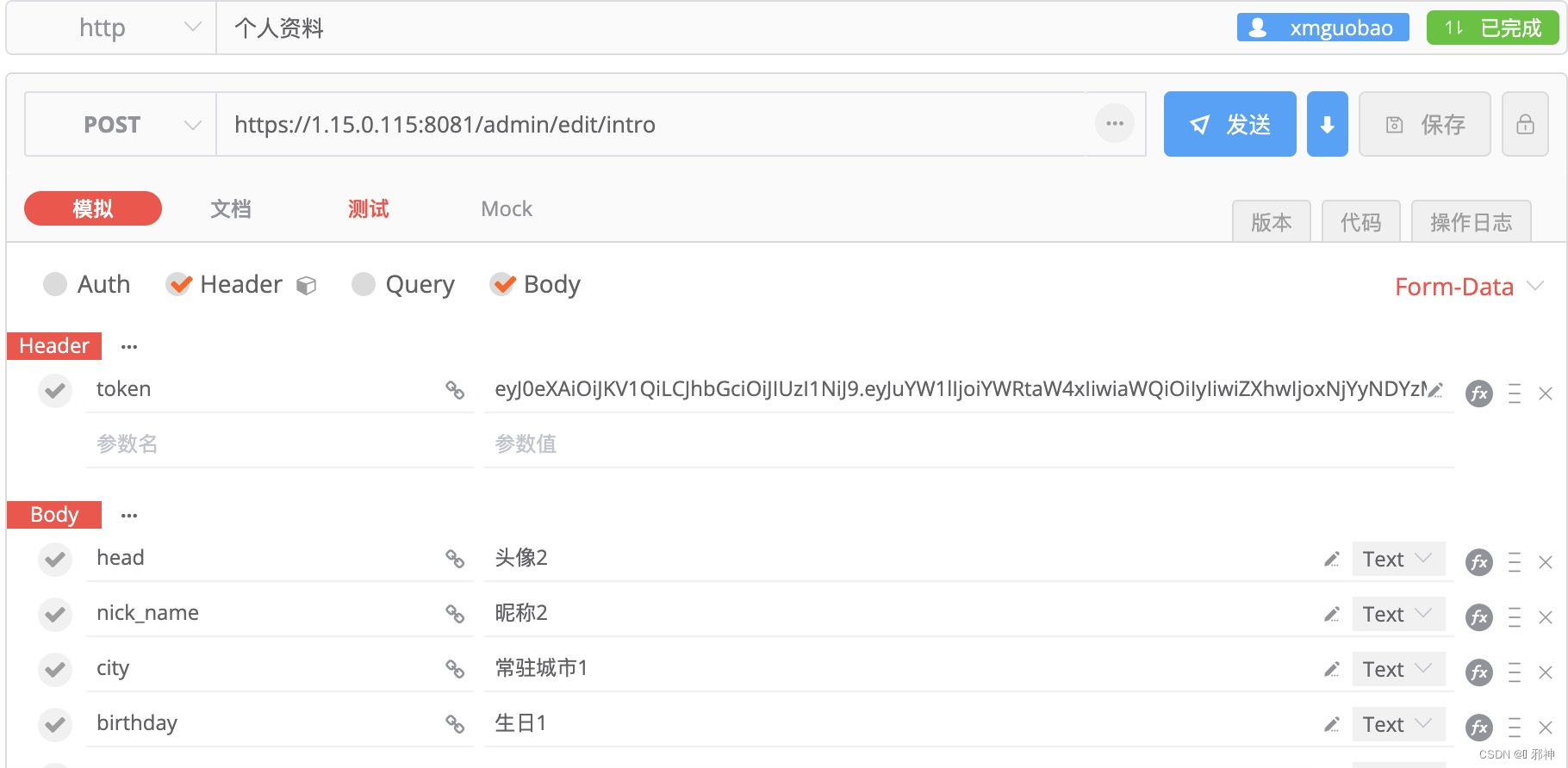
    @RequestMapping(value = "/edit/intro", method = RequestMethod.POST)
    @ResponseBody
    public Result editIntro(HttpServletRequest request,
                            @ModelAttribute Intro intro) {
        if (Objects.isNull(intro.getHead())) {
            return ResultGenerator.genFailResult("参数异常!");
        }
        // 用户ID
        String userId = JwtUtils.getClaimUserId(request);

        intro.setUser_id(userId);
        Intro introResult = introService.selectByUserIdCount(userId);
        if (introResult != null) {
            // 修改资料
            String result = introService.updateByUserIdIntro(intro);
            if (ServiceResultEnum.SUCCESS.getResult().equals(result)) {
                return ResultGenerator.genSuccessResult();
            } else {
                return ResultGenerator.genFailResult(result);
            }
        } else {
            //插入资料
            String result = introService.editIntro(intro);
            if (ServiceResultEnum.SUCCESS.getResult().equals(result)) {
                return ResultGenerator.genSuccessResult();
            } else {
                return ResultGenerator.genFailResult(result);
            }
        }
    }

...
/ 根据token获取userId /
根据登录时客户端传递给服务端的token进行解析获取userId
 /**
     * 根据token获取userId
     * @param request
     * @return
     */
    public static String getClaimUserId(HttpServletRequest request){
        String token = request.getHeader("token");
        DecodedJWT verify = JwtUtils.verifyToken(token);
        String userId = verify.getClaim("id").asString();
        return userId;
    }

开源鸿蒙跨平台开发社区汇聚开发者与厂商,共建“一次开发,多端部署”的开源生态,致力于降低跨端开发门槛,推动万物智联创新。
更多推荐



 2
2 0
0- 0


 已为社区贡献10条内容

所有评论(0)