Flutter 项目实战 登录界面 (一)
登录界面样式//登录界面样式//登录界面样式//登录界面样式//登录界面样式//登录界面样式//登录界面样式//登录界面样式//登录界面样式//登录界面样式//登录界面样式//登录界面样式//登录界面样式//登录界面样式//登录界面样式//登录界面样式//登录界面样式//登录界面样式//登录界面样式//............
·
/ 登录界面样式 /
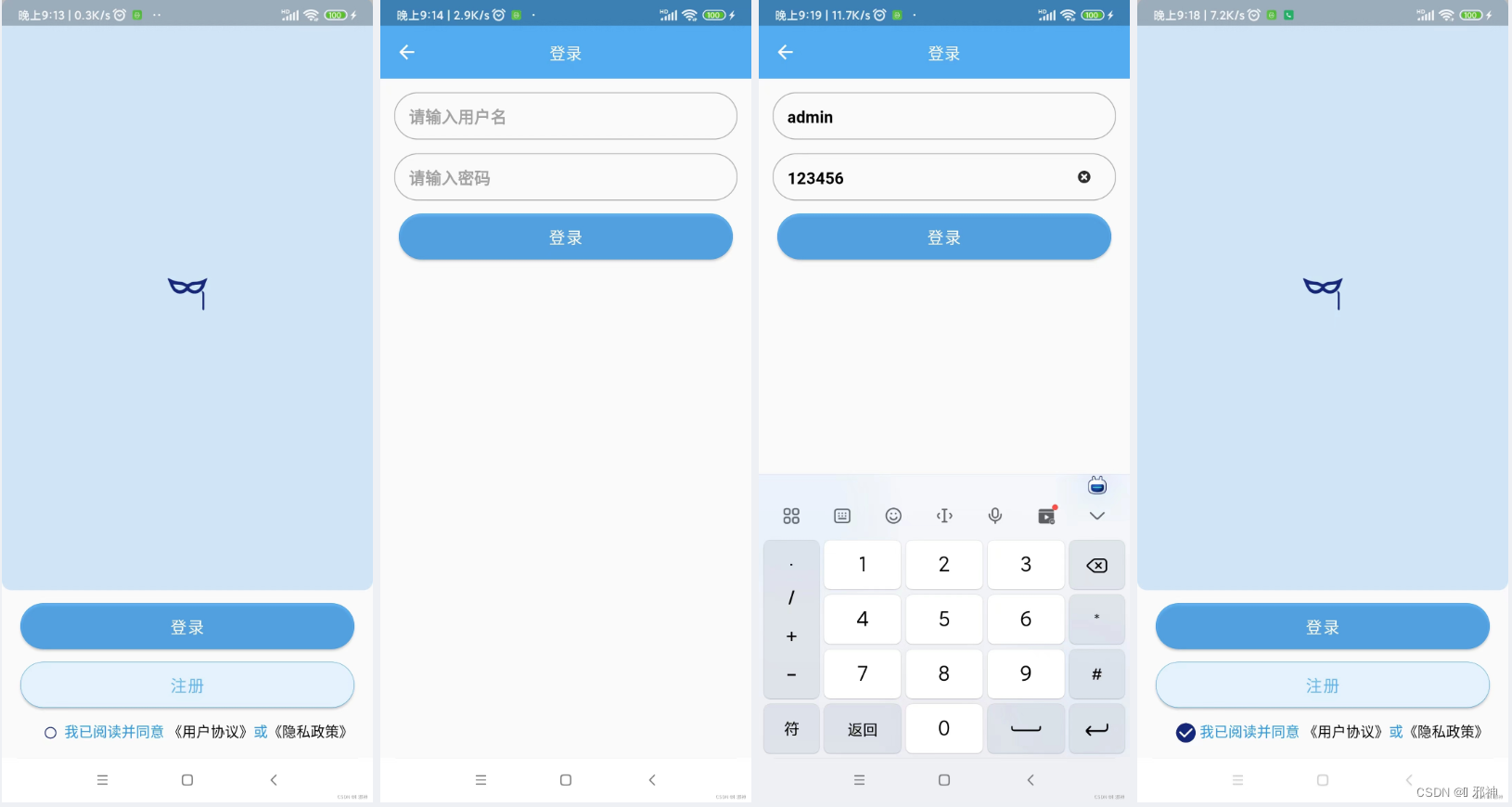
/ 开发者环境 /
Android Studio 版本
Flutter SDK 版本 ( 用 flutter --version 命令查看 )
Flutter 2.8.1 • channel stable • https://github.com.cnpmjs.org/flutter/flutter.git
Framework • revision 77d935af4d (8 months ago) • 2021-12-16 08:37:33 -0800
Engine • revision 890a5fca2e
Tools • Dart 2.15.1
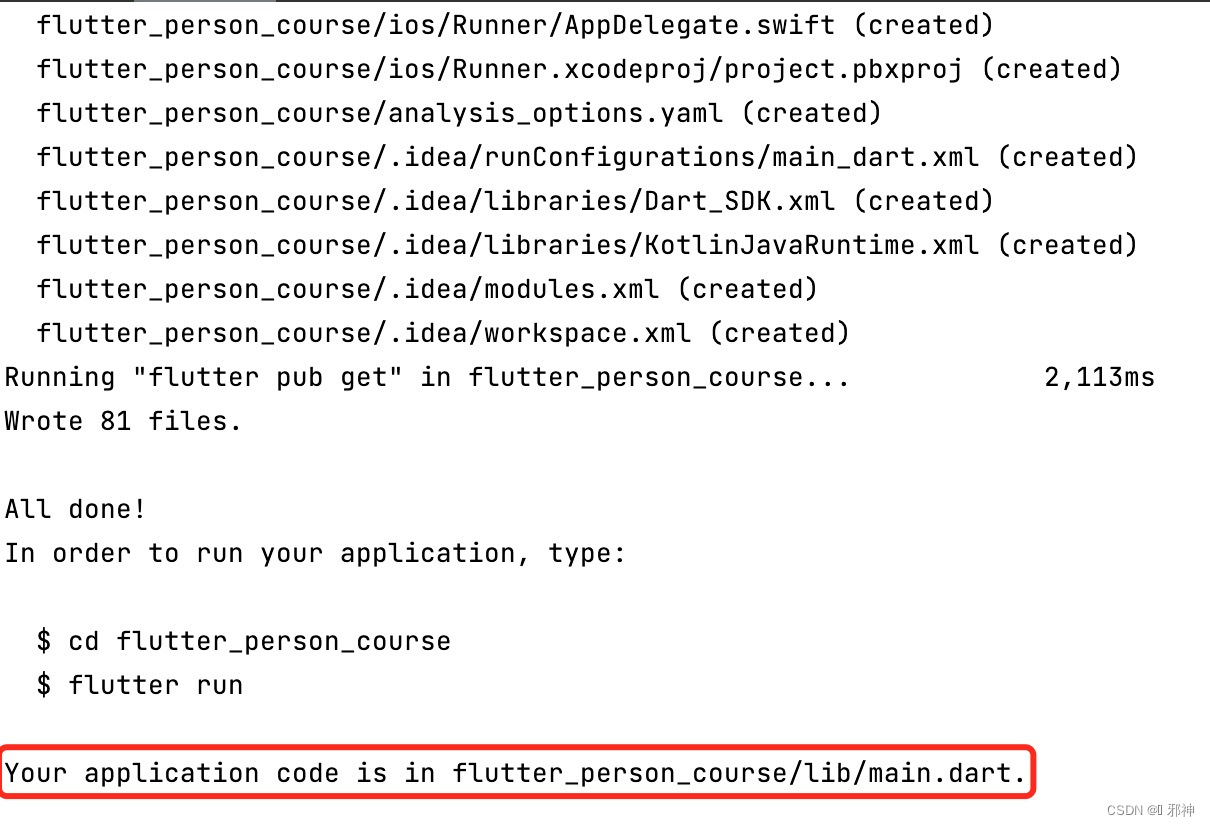
用命令创建工程 ( flutter create flutter_person_course )
配置 build.gradle 文件仓库地址
repositories {
        // google()
        maven { url'https://maven.aliyun.com/repository/public/' }

        maven { url'https://maven.aliyun.com/repository/google/' }

        maven { url'https://maven.aliyun.com/repository/jcenter/' }

        maven { url'https://maven.aliyun.com/repository/central/' }
        mavenCentral()

}
配置 gradle 下载地址 ( gradle-wrapper.properties文件 )
distributionBase=GRADLE_USER_HOME
distributionUrl=https\://services.gradle.org/distributions/gradle-7.2-bin.zip
distributionPath=wrapper/dists
zipStorePath=wrapper/dists
zipStoreBase=GRADLE_USER_HOME
/ 配置图片资源 /
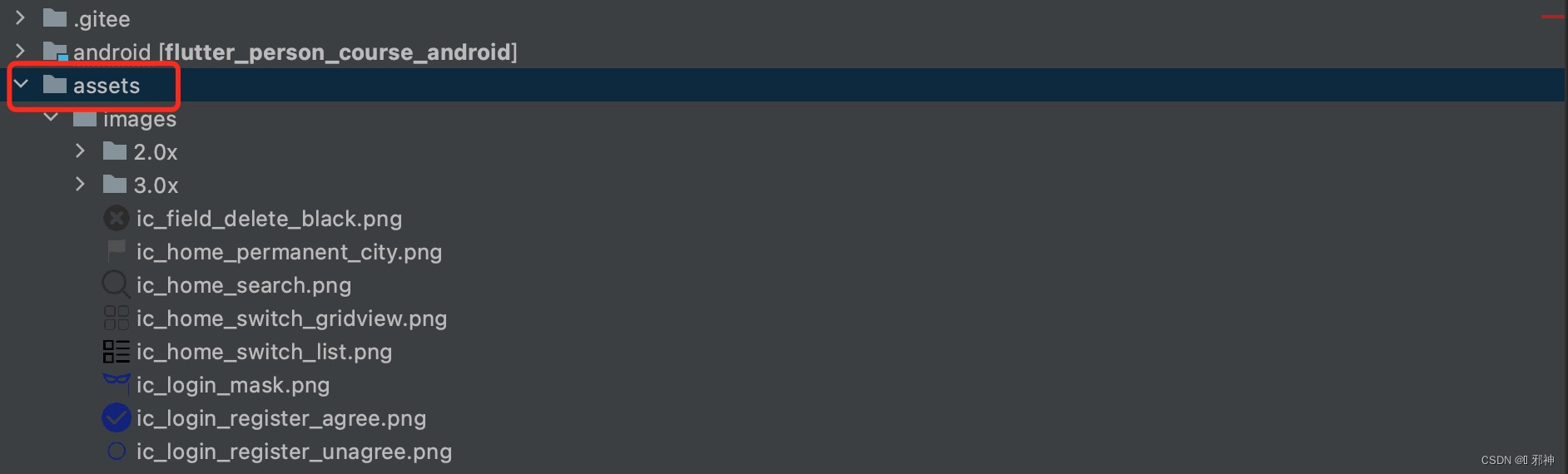
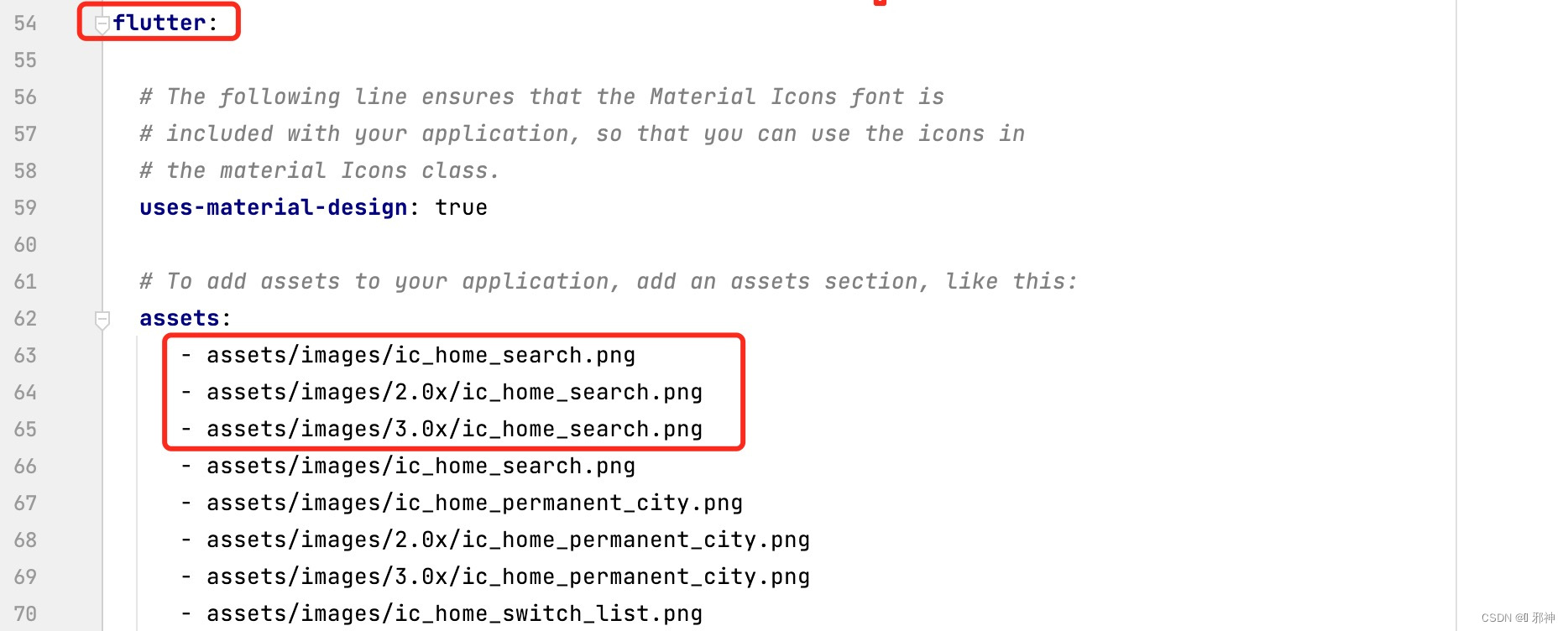
切换工程到 project 状态并创建 assets 文件夹
在 pubspec.yaml 文件里面配置图片资源文件
/ 创建BaseStatefulWidget /
import 'package:flutter/material.dart';

abstract class BaseStatefulWidget extends StatefulWidget {
  const BaseStatefulWidget({Key? key}) : super(key: key);

  @override
  BaseState createState() => getState();

  ///子类实现
  BaseState getState();
}

abstract class BaseState<V extends BaseStatefulWidget>
    extends State<V>{


  @override
  Widget build(BuildContext context) {
     return buildWidget();
  }

  Widget buildWidget();
}
/ 配置flutter_screenutil插件 /
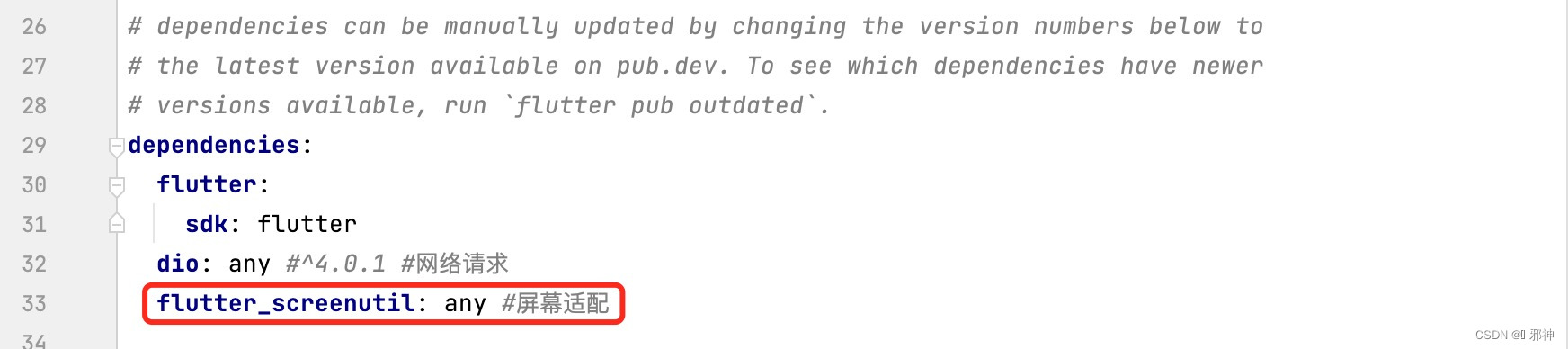
pubspec.yaml 配置 flutter_screenutil 插件依赖
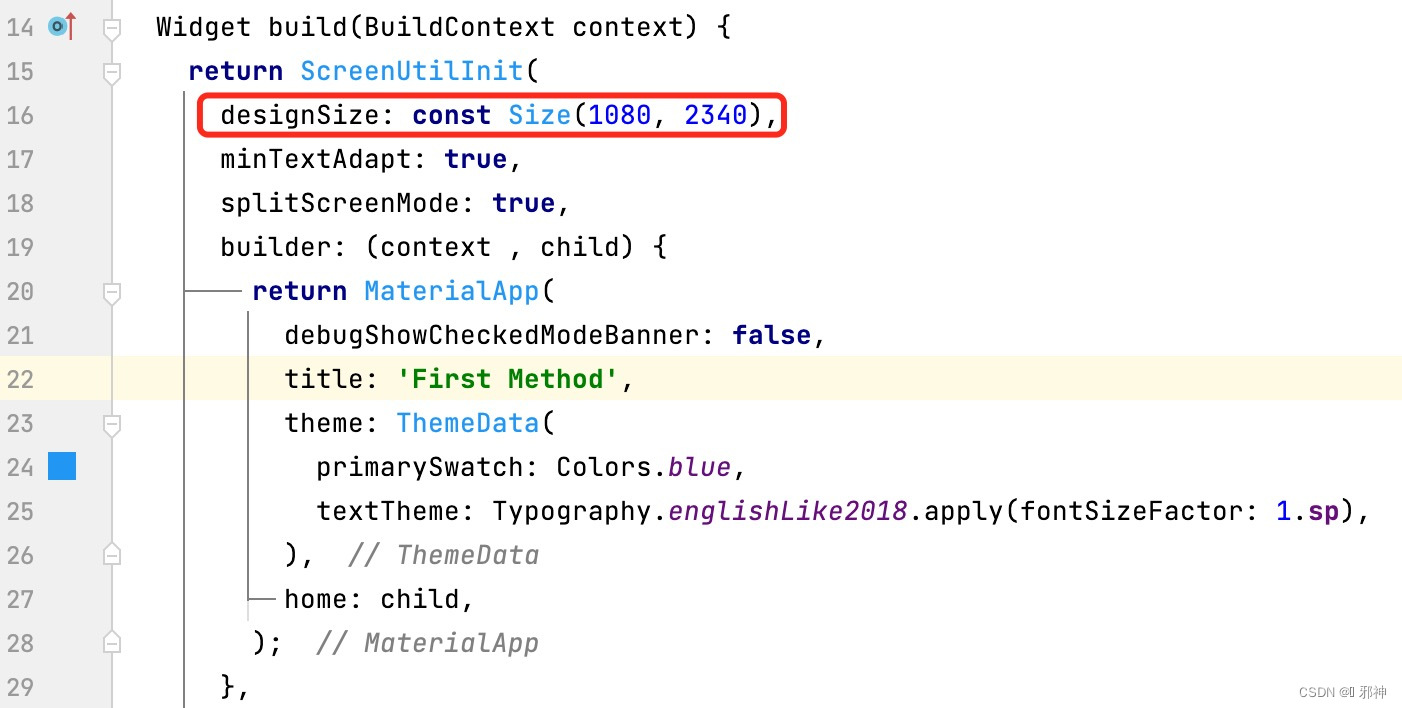
根据UI设计的尺寸进行初始化配置
我的初始化配置是 以1080x2340 为基准(设置字体大小可用.sp,设置宽度用.w,设置高度用.h,设置半径用.r)
/ 登录、注册首页 /
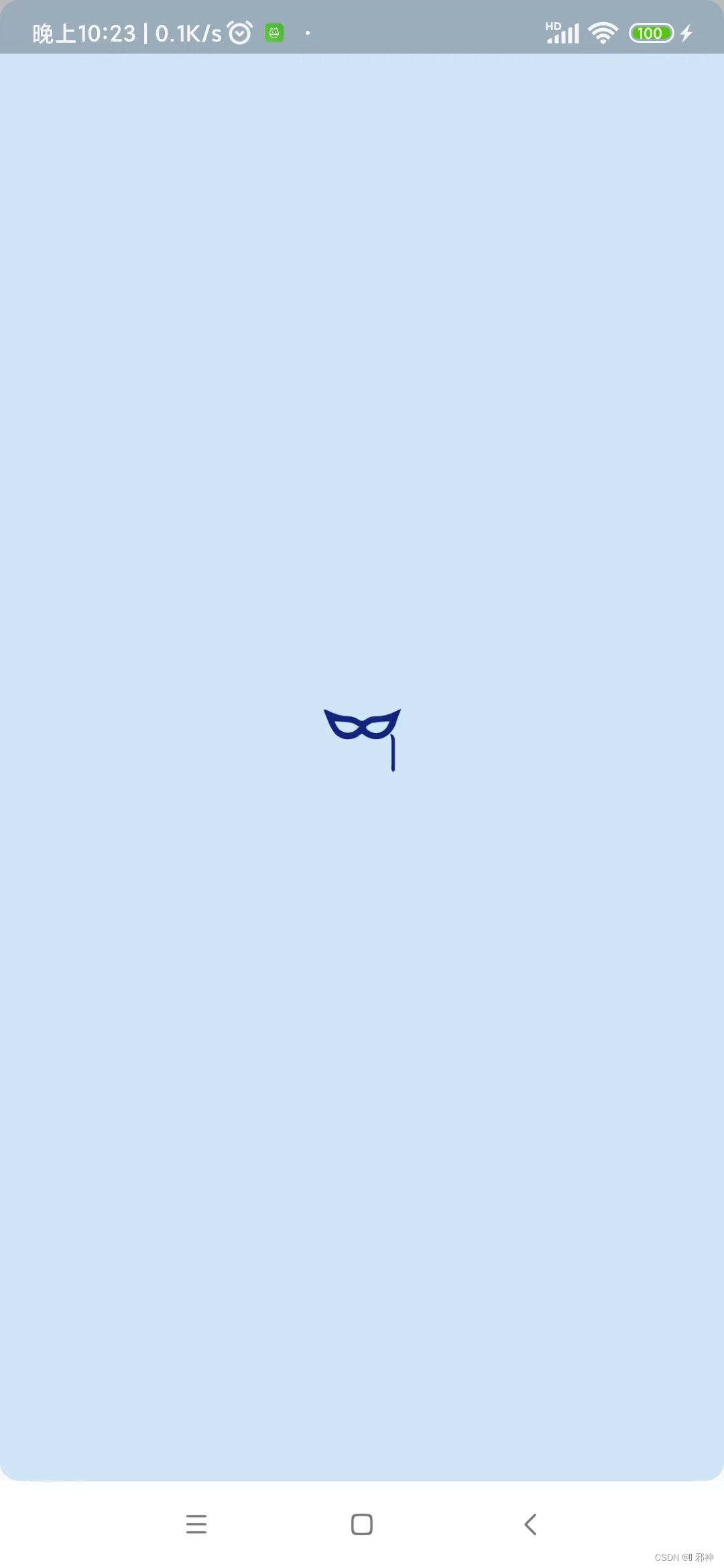
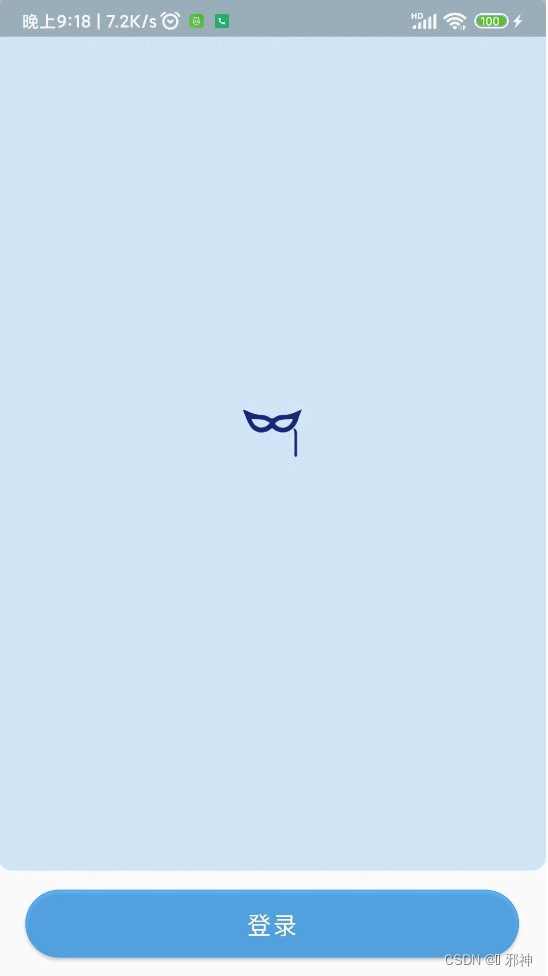
顶部图片
Scaffold(
        appBar: null,
        body: Column(
          children: [
            /// 顶部图片
            Expanded(
              child: Container(
                  width: double.infinity,
                  height: MediaQuery.of(context).size.width,
                  child: Image.asset('assets/images/ic_login_mask.png'),
                  decoration: BoxDecoration(
                      color: Colors.blue.withOpacity(0.2),
                      borderRadius: BorderRadius.all(Radius.circular(28.w)))),
              flex: 1,
            ),
          ],
        ))
登录按钮
Padding(
              child: MaterialButton(
                minWidth: MediaQuery.of(context).size.width * 0.9,
                onPressed: () {
                  Navigator.push(context, MaterialPageRoute(builder: (context) {
                    return const LoginPage();
                  }));
                },
                padding: EdgeInsets.only(top: 34.h, bottom: 34.h),
                color: Colors.blue.withOpacity(0.7),
                shape: RoundedRectangleBorder(
                  //边框颜色
                  side: BorderSide(
                    color: Colors.blue,
                    width: 1.w,
                  ),
                  //边框圆角
                  borderRadius: BorderRadius.all(
                    Radius.circular(68.w),
                  ),
                ),
                child: Text(
                  "登录",
                  style: TextStyle(color: Colors.white, fontSize: 50.sp),
                ),
              ),
              padding: EdgeInsets.only(top: 40.h),
            )
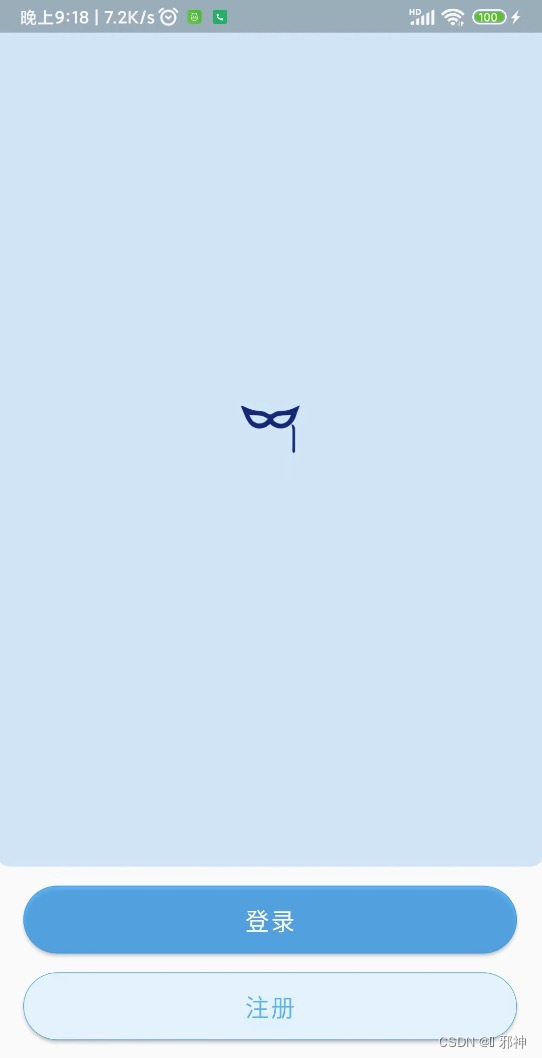
注册按钮
Padding(
              child: MaterialButton(
                minWidth: MediaQuery.of(context).size.width * 0.9,
                padding: EdgeInsets.only(top: 34.h, bottom: 34.h),
                onPressed: () {},
                color: const Color(0xFFE3F2FD),
                shape: RoundedRectangleBorder(
                  //边框颜色
                  side: BorderSide(
                    color: Colors.blue,
                    width: 1.w,
                  ),
                  //边框圆角
                  borderRadius: BorderRadius.all(
                    Radius.circular(68.w),
                  ),
                ),
                child: Text(
                  "注册",
                  style: TextStyle(
                      color: Colors.blue.withOpacity(0.7), fontSize: 50.sp),
                ),
              ),
              padding: EdgeInsets.only(top: 40.h),
            )
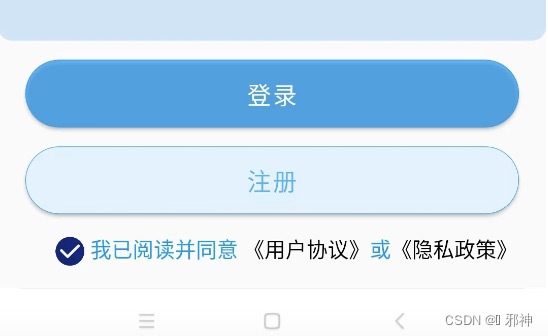
用户协议、隐私政策
/// 用户协议、隐私政策
class AgreeWidget extends StatefulWidget {
  const AgreeWidget({Key? key}) : super(key: key);

  @override
  State<StatefulWidget> createState() {
    return AgreeWidgetState();
  }
}

class AgreeWidgetState extends State<AgreeWidget> {
  ///用户协议隐私政策💍
  TapGestureRecognizer? _userAgreeTapGesRec, _priAgreeTapGesRec;
  bool _checkAgree = false;

  @override
  void initState() {
    // TODO: implement initState
    super.initState();
    _userAgreeTapGesRec = TapGestureRecognizer();
    _priAgreeTapGesRec = TapGestureRecognizer();
  }

  @override
  void dispose() {
    // TODO: implement dispose
    super.dispose();
    _userAgreeTapGesRec?.dispose();
    _priAgreeTapGesRec?.dispose();
  }

  @override
  Widget build(BuildContext context) {
    // TODO: implement build
    return RichText(
      //文字居中
      textAlign: TextAlign.center,
      //文字区域
      text: TextSpan(
        children: [
          WidgetSpan(
              alignment: PlaceholderAlignment.middle,
              child: GestureDetector(
                onTap: () {
                  setState(() {
                    _checkAgree = !_checkAgree;
                  });
                },
                child: Container(
                  color: Colors.transparent,
                  padding: const EdgeInsets.only(
                      left: 20.0, top: 16.0, bottom: 16.0),
                  child: Image.asset(
                    _checkAgree
                        ? "assets/images/ic_login_register_agree.png"
                        : "assets/images/ic_login_register_unagree.png",
                    width: 60.w,
                    height: 60.h,
                  ),
                ),
              )),
          TextSpan(
            text: "\t我已阅读并同意\t",
            style: TextStyle(color: Colors.blue, fontSize: 44.sp),
          ),
          TextSpan(
            text: "《用户协议》",
            style: TextStyle(color: Colors.black, fontSize: 44.sp),
            //点击事件
            recognizer: _userAgreeTapGesRec!..onTap = () {},
          ),
          TextSpan(
            text: "或",
            style: TextStyle(color: Colors.blue, fontSize: 44.sp),
          ),
          TextSpan(
            text: "《隐私政策》",
            style: TextStyle(color: Colors.black, fontSize: 44.sp),
            //点击事件
            recognizer: _priAgreeTapGesRec!..onTap = () {},
          )
        ],
      ),
    );
  }
}
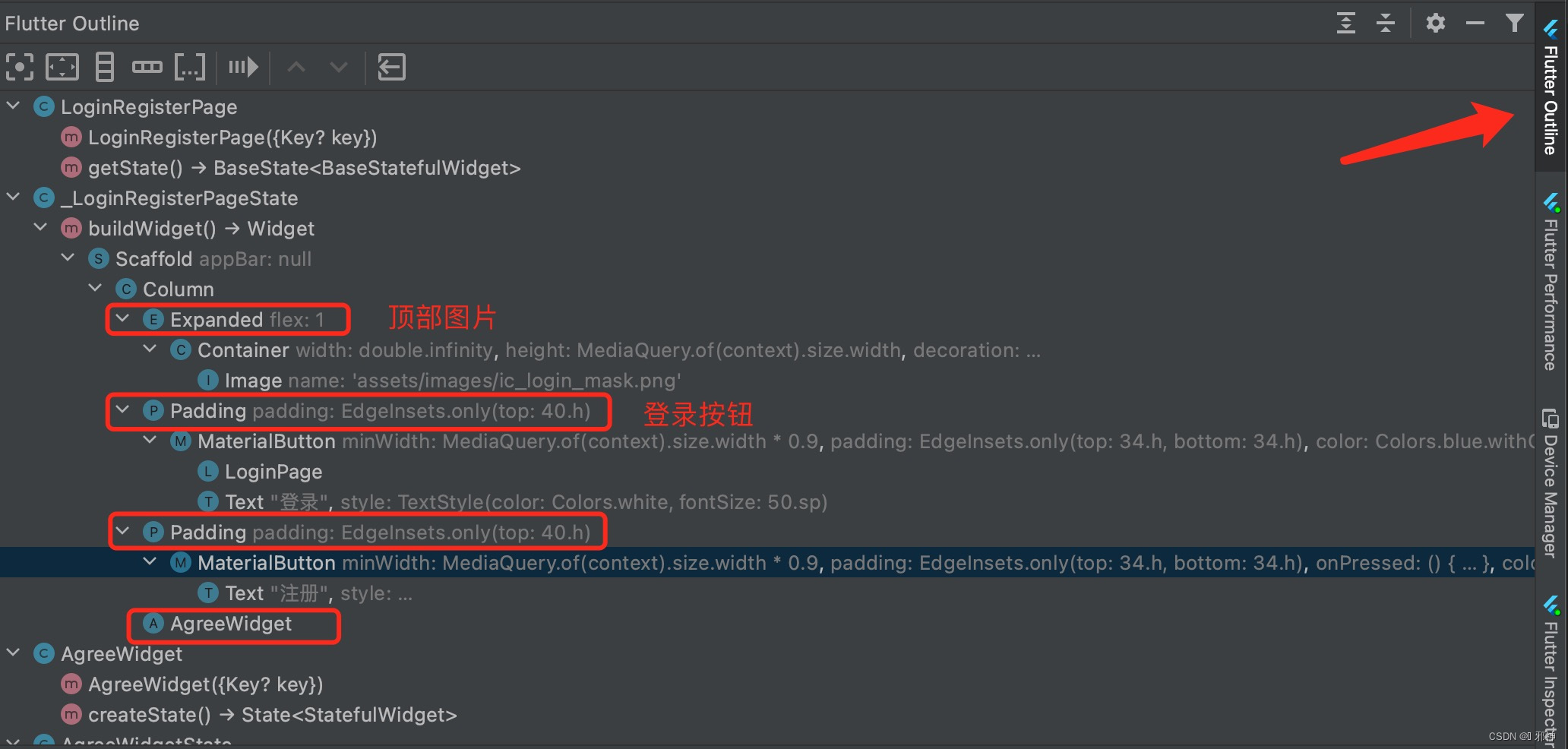
/ Flutter Outline 查看布局嵌套 /
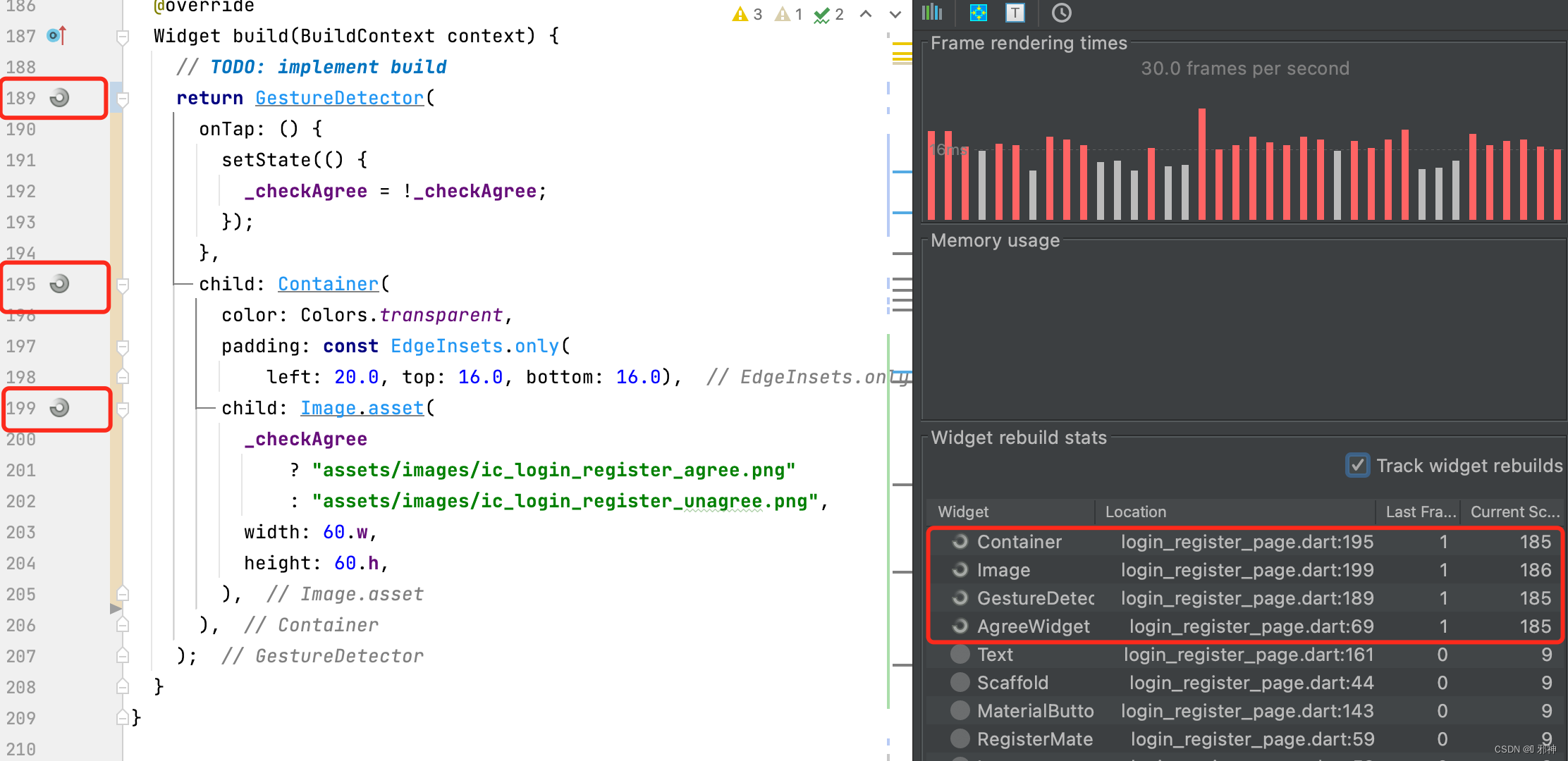
/ 同意协议优化局部刷新 /
 RichText(
              //文字居中
              textAlign: TextAlign.center,
              //文字区域
              text: TextSpan(
                children: [
                  const WidgetSpan(
                      alignment: PlaceholderAlignment.middle,
                      child: AgreeWidget()),
                  TextSpan(
                    text: "\t我已阅读并同意\t",
                    style: TextStyle(color: Colors.blue, fontSize: 44.sp),
                  ),
                  TextSpan(
                    text: "《用户协议》",
                    style: TextStyle(color: Colors.black, fontSize: 44.sp),
                    //点击事件
                    recognizer: _userAgreeTapGesRec!..onTap = () {},
                  ),
                  TextSpan(
                    text: "或",
                    style: TextStyle(color: Colors.blue, fontSize: 44.sp),
                  ),
                  TextSpan(
                    text: "《隐私政策》",
                    style: TextStyle(color: Colors.black, fontSize: 44.sp),
                    //点击事件
                    recognizer: _priAgreeTapGesRec!..onTap = () {},
                  )
                ],
              ),
            ),
/// 用户协议、隐私政策 class AgreeWidget extends StatefulWidget { const AgreeWidget({Key? key}) : super(key: key); @override State<StatefulWidget> createState() { return AgreeWidgetState(); } } class AgreeWidgetState extends State<AgreeWidget> { bool _checkAgree = false; @override Widget build(BuildContext context) { // TODO: implement build return GestureDetector( onTap: () { setState(() { _checkAgree = !_checkAgree; }); }, child: Container( color: Colors.transparent, padding: const EdgeInsets.only( left: 20.0, top: 16.0, bottom: 16.0), child: Image.asset( _checkAgree ? "assets/images/ic_login_register_agree.png" : "assets/images/ic_login_register_unagree.png", width: 60.w, height: 60.h, ), ), ); } }
/ 登录编辑框 /
import 'package:flutter/material.dart';
import 'package:flutter_screenutil/src/size_extension.dart';

///图标类型+黑色图标+白色图标
enum TYPE { fieldDelWhite, fieldDelBlack }

///自定义编辑
class CusTextField extends StatefulWidget {
  final InputValueCallBack? _inputValueCallBack;

  ///编辑框输入颜色值
  final int inputColorValue;

  ///默认文本的颜色值
  final int hintColorValue;

  ///编辑框默认提示文本
  final hintText;

  ///边框
  final border;

  ///标题
  final Widget? labelText;

  ///编辑框输入文本大小
  final inputFontSize;

  ///文本后缀(可以是单位)
  final String? preFixLabel;

  ///文本位置(左边|右边|中间)
  final TextAlign? textAlign;

  final keyboardType;

  //文本行数
  final int? maxLine;

  ///一键删除图片
  final fieldDel;

  ///光标颜色
  final cursorColor;

  final crossAxisAlignmentType;

  ///编辑框文本长度
  final int? maxLength;

  final inputFontWeight, hintFontWeight;

  /// 初始化值
  final String firstValue;

  ///提交
  ValueChanged<String>? onSubmitted;
  bool? isHaveFous;

  CusTextField(this._inputValueCallBack,
      {Key? key, this.inputColorValue = 0xffFFFFFF,
      this.hintColorValue = 0xffFFFFFF,
      this.hintText = '',
      this.border,
      this.labelText,
      this.inputFontSize,
      this.preFixLabel = '',
      this.textAlign = TextAlign.right,
      this.maxLine = 1,
      this.keyboardType,
      this.fieldDel,
      this.cursorColor = 0xff000000,
      this.crossAxisAlignmentType = CrossAxisAlignment.center,
      this.maxLength,
      this.inputFontWeight = FontWeight.bold,
      this.hintFontWeight = FontWeight.bold,
      this.firstValue = '',
      this.onSubmitted,
      this.isHaveFous}) : super(key: key);

  @override
  _CusTextFieldState createState() => _CusTextFieldState();
}

class _CusTextFieldState extends State<CusTextField> {
  //定义一个controller
  TextEditingController? _controller;
  bool _isShoDel = false;

  ///是否获取焦点
  bool _isFocus = false;

  final FocusNode _focusNode = FocusNode();

  var _fieldDel;

  @override
  void initState() {
    // TODO: implement initState
    super.initState();
    switch (widget.fieldDel) {
      case TYPE.fieldDelWhite:
        _fieldDel = 'assets/images/ic_field_delete_black.png';
        break;
      case TYPE.fieldDelBlack:
        _fieldDel = 'assets/images/ic_field_delete_black.png';
        break;
      default:
        _fieldDel = 'assets/images/ic_field_delete_black.png';
        break;
    }

    /// 编辑初始值
    _controller = TextEditingController();
    _controller!.addListener(() {
      _inputContro(_controller!.text, false);
    });
    _focusNode.addListener(() {
      setState(() {
        _isFocus = _focusNode.hasFocus;
      });
    });
  }

  void _inputContro(v, bool isInput) {
    ///编辑框输入文本长度
    int _valueLength = '$v'.length;

    ///编辑框输入文本大于0
    _isShoDel = (_valueLength > 0);

    ///编辑框文本输入文本存在值时或者等于为空时刷新编辑框
    if (_valueLength <= 1 && isInput) {
      setState(() {});
    }

    ///粘贴
    if (!isInput) {
      setState(() {});
    }
    _inputValue(v);
  }

  @override
  Widget build(BuildContext context) {
    if (widget.isHaveFous ?? false) {
      FocusScope.of(context).requestFocus(_focusNode);
      widget.isHaveFous = false;
    }
    return Row(
      crossAxisAlignment: widget.crossAxisAlignmentType,
      children: [
        widget.labelText ?? Container(),
        Expanded(
          flex: 1,
          child: TextField(
            textAlign: (widget.textAlign)!,
            maxLines: widget.maxLine!,
            maxLength: widget.maxLength,
            focusNode: _focusNode,

            ///光标颜色
            cursorColor: Color(widget.cursorColor),

            ///编辑框首次不自动获取焦点
            autofocus: false,
            keyboardType: widget.keyboardType ?? TextInputType.number,
            style: TextStyle(
                fontSize: widget.inputFontSize ?? 0.0,
                fontWeight: widget.inputFontWeight,

                ///文本输入或文本为空时的颜色值
                color:
                    Color(_isShoDel ? (widget.inputColorValue) : 0xffFFFFFF)),
            decoration: InputDecoration(
              ///默认文本
              hintText: '${widget.hintText ?? ''}',
              hintStyle: TextStyle(
                color: Color(widget.hintColorValue),
                fontWeight: widget.hintFontWeight,
              ),
              contentPadding: const EdgeInsets.only(left: 0.0, right: 0.0),

              ///边框
              border: widget.border ?? InputBorder.none,
            ),

            onChanged: (v) {
              _inputContro(v, true);
            },
            onSubmitted: widget.onSubmitted,
            controller: _controller, //设置controller
          ),
        ),
        Offstage(
          offstage: !(_isShoDel && _isFocus),
          child: GestureDetector(
            onTap: () {
              _controller!.clear();
              _inputContro('', false);
            },
            child: Container(
              alignment: Alignment.center,
              width: 100.w,
              height: 100.h,
              color: Colors.blue.withOpacity(0.0),
              child: Image.asset(_fieldDel, width: 44.w, height: 44.h),
            ),
          ),
        ),
      ],
    );
  }

  void _inputValue(v) {
    String _curV = '$v'.replaceAll(' ', '');

    ///编辑框输入值
    widget._inputValueCallBack!(_curV);
  }
}

///编辑框输入值
typedef InputValueCallBack = void Function(dynamic inputValue);
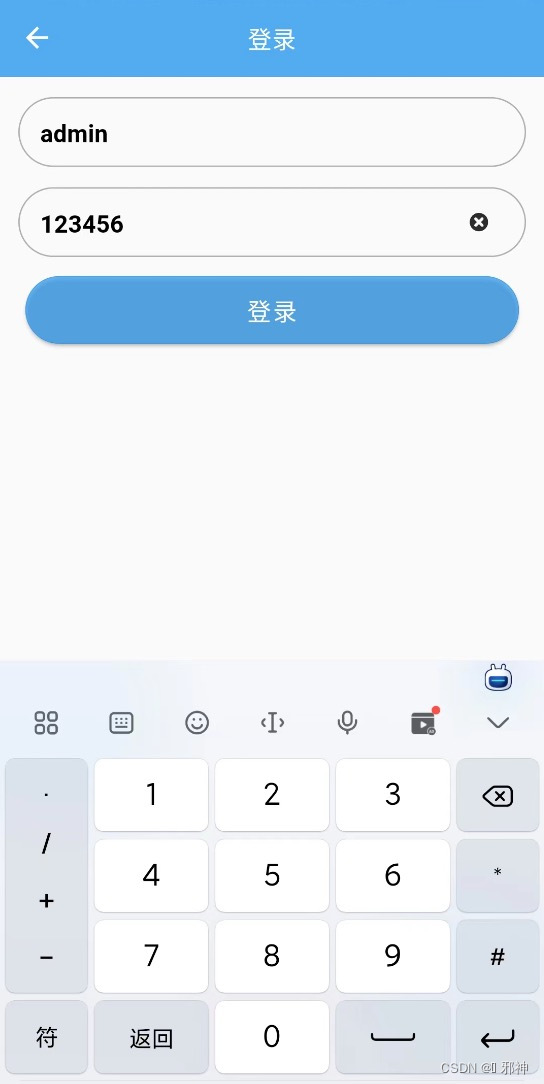
实现输入用户名编辑框
Container(
                margin: EdgeInsets.only(left: 40.w, right: 40.w, top: 40.w),
                padding: EdgeInsets.only(
                  left: 40.w,
                  right: 40.w,
                ),
                child: CusTextField((phoneNum) {},
                    hintText: '请输入用户名',
                    keyboardType: TextInputType.number,
                    hintColorValue: 0x5C000000,
                    textAlign: TextAlign.start,
                    inputFontSize: 50.sp,
                    fieldDel: TYPE.fieldDelWhite,
                    cursorColor: 0xff000000,
                    inputColorValue: 0xff000000,
                    labelText: Container()),
                decoration: BoxDecoration(
                    border: Border.all(
                        color: const Color(0xff000000).withOpacity(0.3)),
                    borderRadius:
                        const BorderRadius.all(Radius.circular(28.0)))),
实现输入密码编辑框
Container(
                margin: EdgeInsets.only(left: 40.w, right: 40.w, top: 40.w),
                padding: EdgeInsets.only(
                  left: 40.w,
                  right: 40.w,
                ),
                child: CusTextField((phoneNum) {},
                    hintText: '请输入密码',
                    keyboardType: TextInputType.number,
                    hintColorValue: 0x5C000000,
                    textAlign: TextAlign.start,
                    inputFontSize: 50.sp,
                    fieldDel: TYPE.fieldDelWhite,
                    cursorColor: 0xff000000,
                    inputColorValue: 0xff000000,
                    labelText: Container()),
                decoration: BoxDecoration(
                    border: Border.all(
                        color: const Color(0xff000000).withOpacity(0.3)),
                    borderRadius:
                    const BorderRadius.all(Radius.circular(28.0)))),
实现登录按钮
 /// 登录
            Padding(
              child: MaterialButton(
                minWidth: MediaQuery.of(context).size.width * 0.9,
                onPressed: () {

                },
                padding: EdgeInsets.only(top: 34.h, bottom: 34.h),
                color: Colors.blue.withOpacity(0.7),
                shape: RoundedRectangleBorder(
                  //边框颜色
                  side: BorderSide(
                    color: Colors.blue,
                    width: 1.w,
                  ),
                  //边框圆角
                  borderRadius: BorderRadius.all(
                    Radius.circular(68.w),
                  ),
                ),
                child: Text(
                  "登录",
                  style: TextStyle(color: Colors.white, fontSize: 50.sp),
                ),
              ),
              padding: EdgeInsets.only(top: 40.h),
            ),

开源鸿蒙跨平台开发社区汇聚开发者与厂商,共建“一次开发,多端部署”的开源生态,致力于降低跨端开发门槛,推动万物智联创新。
更多推荐
 0
0 0
0- 0


 已为社区贡献10条内容

所有评论(0)