Flutter for OpenHarmony 第三方库实战:安全密码管理器 —— cryptography_flutter
在数字化时代,我们每个人都拥有大量的在线账户:社交媒体、电子邮件、银行账户、购物平台等等。为每个账户设置独特且复杂的密码是安全的基础,但记忆这些密码却是一个巨大的挑战。这就是密码管理器存在的意义——它帮助我们安全地存储和管理所有密码,我们只需要记住一个主密码。🔐 军事级加密保护:使用 AES-GCM 256位加密算法,配合 SHA-256 哈希函数生成密钥,确保存储的密码数据无法被破解。即使设备
欢迎加入开源鸿蒙跨平台社区:https://openharmonycrossplatform.csdn.net
🚀 项目概述:我们要构建什么?
在数字化时代,我们每个人都拥有大量的在线账户:社交媒体、电子邮件、银行账户、购物平台等等。为每个账户设置独特且复杂的密码是安全的基础,但记忆这些密码却是一个巨大的挑战。这就是密码管理器存在的意义——它帮助我们安全地存储和管理所有密码,我们只需要记住一个主密码。
本文将构建一个功能完整的安全密码管理器,它具备以下核心特性:
🔐 军事级加密保护:使用 AES-GCM 256位加密算法,配合 SHA-256 哈希函数生成密钥,确保存储的密码数据无法被破解。即使设备被root或数据被提取,攻击者也无法解密密码内容。
👤 生物识别快捷解锁:支持指纹识别和面部识别,让用户无需每次输入主密码,既安全又便捷。生物识别数据由系统安全芯片保护,应用无法直接访问原始生物特征。
💾 本地安全存储:所有密码数据仅存储在用户设备本地,不上传到任何云端服务器,从根本上杜绝了数据泄露的风险。
📱 流畅的交互体验:通过侧滑手势快速复制密码或删除条目,支持分类管理和搜索功能,让密码管理变得轻松高效。
🎯 核心功能一览
| 功能模块 | 实现库 | 核心能力 |
|---|---|---|
| 🔐 数据加密 | cryptography_flutter | AES-GCM加密、SHA-256密钥生成 |
| 👤 生物识别 | local_auth | 指纹/面部识别解锁 |
| 💾 数据存储 | shared_preferences | 加密数据本地持久化 |
| 📱 交互操作 | flutter_slidable | 侧滑复制、删除操作 |
💡 为什么选择这四个库?
1️⃣ cryptography_flutter - 专业级加密
这是一个基于 Dart 语言的加密库,提供了现代化的加密算法实现。它支持 AES-GCM(高级加密标准-伽罗瓦/计数器模式)、ChaCha20-Poly1305 等认证加密算法,能够同时保证数据的机密性和完整性。SHA-256 哈希函数可以将用户输入的主密码转换为固定长度的加密密钥(32字节),适合 AES-256 加密。该库针对 OpenHarmony 平台进行了原生适配,使用系统底层的加密 API,性能优异且安全可靠。
2️⃣ local_auth - 便捷安全解锁
这是 Flutter 官方提供的生物识别认证库,支持指纹识别、面部识别、虹膜识别等多种生物认证方式。它提供了统一的跨平台 API,开发者无需关心底层硬件差异。库会自动处理权限请求、错误重试、锁定保护等复杂逻辑,并提供了友好的错误提示信息。在 OpenHarmony 平台上,它使用系统的生物识别框架,确保认证过程的安全性。
3️⃣ shared_preferences - 轻量持久化
这是 Flutter 官方提供的轻量级键值对存储方案,适合存储小量数据。它的 API 简洁易用,所有操作都是异步的,不会阻塞 UI 线程。支持存储字符串、整数、布尔值、浮点数、字符串列表等多种数据类型。在 OpenHarmony 平台上,数据存储在应用沙盒内,其他应用无法访问,保证了数据的安全性。
4️⃣ flutter_slidable - 流畅交互
这是一个纯 Dart 实现的列表滑动操作库,无需任何原生适配即可在所有平台上运行。它提供了丰富的滑动动画效果和自定义选项,支持从左侧或右侧滑动,可以配置多个操作按钮。交互体验流畅自然,符合 Material Design 设计规范,是提升应用交互品质的理想选择。
📦 第一步:环境配置
1.1 添加依赖
在开始编码之前,我们需要先配置项目的依赖。打开项目根目录下的 pubspec.yaml 文件,在 dependencies 部分添加以下内容。
这里需要注意的是,由于我们针对 OpenHarmony 平台开发,因此使用的是经过 OpenHarmony 适配的版本。cryptography_ohos 是加密库的 OpenHarmony 适配版本,local_auth 和 shared_preferences 使用的是官方仓库的 OpenHarmony 适配分支。flutter_slidable 是纯 Dart 实现,无需特殊适配,直接使用 pub.dev 上的版本即可。
dependencies:
  flutter:
    sdk: flutter

  # 加密解密库(OpenHarmony 适配版本)
  cryptography_ohos:
    git:
      url: https://atomgit.com/openharmony-sig/fluttertpc_cryptography_flutter.git
      path: cryptography_ohos

  # 生物识别认证(OpenHarmony 适配版本)
  local_auth:
    git:
      url: "https://atomgit.com/openharmony-tpc/flutter_packages.git"
      path: "packages/local_auth/local_auth"

  # 轻量级存储(OpenHarmony 适配版本)
  shared_preferences:
    git:
      url: "https://atomgit.com/openharmony-tpc/flutter_packages.git"
      path: "packages/shared_preferences/shared_preferences"

  # 列表滑动操作
  flutter_slidable: ^3.1.1
1.2 执行依赖安装
配置完成后,在项目根目录执行以下命令来下载并安装所有依赖包。Flutter 会自动解析依赖关系,下载所需的包到本地缓存。
flutter pub get
🔐 第二步:加密服务模块详解
2.1 加密原理概述
在深入代码之前,让我们先理解密码管理器的加密原理。整个加密流程分为两个阶段:密钥派生和数据加密。
密钥派生阶段:用户输入的主密码(如 “MySecret123”)不能直接用于加密,因为:
- 用户密码长度不固定,无法直接作为 AES-256 的密钥
- 需要将任意长度的密码转换为固定长度的密钥
因此,我们使用 SHA-256 哈希算法,将主密码转换为 256 位(32 字节)的密钥:
- SHA-256 输出固定 32 字节的哈希值,正好适合 AES-256 加密
- 单向哈希,无法从密钥反推原始密码
- 相同密码始终生成相同的密钥
数据加密阶段:使用 AES-GCM 算法对密码数据进行加密。AES-GCM 的优势在于:
- 同时提供加密和认证,可以检测数据是否被篡改
- 使用 256 位密钥,安全强度高
- 性能优异,适合移动设备
加密后的数据格式为:Nonce(12字节) + MAC(16字节) + 密文,将这三部分合并后进行 Base64 编码存储。
2.2 加密服务实现
下面是加密服务的完整实现代码。这个类继承自 ChangeNotifier,可以被 Flutter 的状态管理系统监听。它提供了初始化、加密、解密和密码哈希四个核心功能。
initialize 方法接收用户的主密码,使用 SHA-256 算法生成主密钥。SHA-256 会输出 32 字节的哈希值,正好适合 AES-256 加密。
encrypt 方法使用 AES-GCM 算法加密明文密码。每次加密都会生成新的随机 Nonce,确保相同明文加密后的密文不同。加密结果包含 Nonce、MAC 和密文三部分,便于后续解密。
decrypt 方法执行加密的逆过程,从 Base64 编码的密文中提取 Nonce、MAC 和密文,然后使用主密钥解密。如果数据被篡改或密钥错误,解密会抛出异常。
hashPassword 方法用于生成主密码的哈希值,用于后续验证用户输入的主密码是否正确。注意这个哈希值与加密密钥是分开存储的。
import 'dart:convert';
import 'package:flutter/foundation.dart';
import 'package:cryptography/cryptography.dart';

class CryptoService extends ChangeNotifier {
  final AesGcm _algorithm = AesGcm.with256bits();
  SecretKey? _masterKey;

  bool get isInitialized => _masterKey != null;

  Future<void> initialize(String masterPassword) async {
    final sha256 = Sha256();
    final hash = await sha256.hash(utf8.encode(masterPassword));
    _masterKey = SecretKey(hash.bytes);

    notifyListeners();
  }

  Future<String> encrypt(String plaintext) async {
    if (_masterKey == null) {
      throw Exception('加密服务未初始化');
    }

    final nonce = _algorithm.newNonce();
    final secretBox = await _algorithm.encrypt(
      utf8.encode(plaintext),
      secretKey: _masterKey!,
      nonce: nonce,
    );

    final combined = <int>[
      ...nonce,
      ...secretBox.mac.bytes,
      ...secretBox.cipherText,
    ];

    return base64Encode(combined);
  }

  Future<String> decrypt(String ciphertext) async {
    if (_masterKey == null) {
      throw Exception('加密服务未初始化');
    }

    final combined = base64Decode(ciphertext);

    final nonce = combined.sublist(0, 12);
    final macBytes = combined.sublist(12, 28);
    final cipherBytes = combined.sublist(28);

    final secretBox = SecretBox(
      cipherBytes,
      nonce: nonce,
      mac: Mac(macBytes),
    );

    final decrypted = await _algorithm.decrypt(
      secretBox,
      secretKey: _masterKey!,
    );

    return utf8.decode(decrypted);
  }

  Future<String> hashPassword(String password) async {
    final sha256 = Sha256();
    final hash = await sha256.hash(utf8.encode(password));
    return base64Encode(hash.bytes);
  }

  void clear() {
    _masterKey = null;
    notifyListeners();
  }
}
👤 第三步:生物识别服务模块详解
3.1 生物识别工作原理
生物识别认证是现代移动应用的重要安全特性。它利用用户独特的生物特征(指纹、面部等)来验证身份,相比传统密码更加便捷和安全。
在 OpenHarmony 平台上,生物识别的工作流程如下:
- 可用性检查:首先需要检查设备是否支持生物识别,以及用户是否已经录入生物特征。有些设备可能没有指纹传感器,或者用户尚未设置指纹。
- 发起认证:调用认证 API 时,系统会显示标准的生物识别对话框,提示用户进行指纹按压或面部扫描。
- 结果处理:认证结果可能是成功、失败或错误。错误情况包括:用户取消、生物特征不匹配、尝试次数过多被锁定等。
- 安全存储:生物特征数据由系统安全芯片(如 TEE)保护,应用无法直接访问原始数据,只能获得认证结果。
3.2 生物识别服务实现
下面的 AuthService 类封装了所有生物识别相关的功能。它使用 LocalAuthentication 类与系统生物识别框架交互。
checkBiometricAvailability 方法在应用启动时调用,检查设备的生物识别能力。canCheckBiometrics 返回设备是否支持生物识别,getAvailableBiometrics 返回可用的生物识别类型列表(指纹、面部、虹膜等)。
authenticate 方法发起一次生物识别认证。localizedReason 参数是显示给用户的提示文字。AuthenticationOptions 可以配置认证行为:
stickyAuth:认证会话在应用切换到后台时保持biometricOnly:是否只允许生物识别,不允许使用设备密码作为备选useErrorDialogs:是否使用系统默认的错误对话框
错误处理是生物识别的重要部分。PlatformException 包含错误码,我们可以根据不同的错误码提供针对性的提示。例如,lockedOut 表示尝试次数过多被暂时锁定,permanentlyLockedOut 表示需要用户去系统设置中重新配置生物识别。
import 'package:flutter/foundation.dart';
import 'package:flutter/services.dart';
import 'package:local_auth/local_auth.dart';
import 'package:local_auth/error_codes.dart' as auth_error;

class AuthService extends ChangeNotifier {
  final LocalAuthentication _localAuth = LocalAuthentication();

  bool _isAuthenticated = false;
  bool _isBiometricAvailable = false;
  List<BiometricType> _availableBiometrics = [];
  String? _errorMessage;

  bool get isAuthenticated => _isAuthenticated;
  bool get isBiometricAvailable => _isBiometricAvailable;
  List<BiometricType> get availableBiometrics => _availableBiometrics;
  String? get errorMessage => _errorMessage;

  Future<void> checkBiometricAvailability() async {
    try {
      _isBiometricAvailable = await _localAuth.canCheckBiometrics;
      _availableBiometrics = await _localAuth.getAvailableBiometrics();
      _errorMessage = null;
    } catch (e) {
      _errorMessage = '检查生物识别失败: $e';
      _isBiometricAvailable = false;
      _availableBiometrics = [];
    }
    notifyListeners();
  }

  Future<bool> authenticate({String reason = '请验证身份以解锁密码管理器'}) async {
    try {
      _errorMessage = null;

      final didAuthenticate = await _localAuth.authenticate(
        localizedReason: reason,
        options: const AuthenticationOptions(
          stickyAuth: true,
          biometricOnly: false,
          useErrorDialogs: true,
        ),
      );

      _isAuthenticated = didAuthenticate;
      notifyListeners();
      return didAuthenticate;
    } on PlatformException catch (e) {
      _handleAuthError(e);
      return false;
    } catch (e) {
      _errorMessage = '认证失败: $e';
      notifyListeners();
      return false;
    }
  }

  void _handleAuthError(PlatformException error) {
    switch (error.code) {
      case auth_error.notAvailable:
        _errorMessage = '生物识别不可用';
        break;
      case auth_error.notEnrolled:
        _errorMessage = '未录入生物识别信息';
        break;
      case auth_error.lockedOut:
        _errorMessage = '生物识别已被锁定,请稍后重试';
        break;
      case auth_error.permanentlyLockedOut:
        _errorMessage = '生物识别已永久锁定,请使用其他方式解锁';
        break;
      case auth_error.passcodeNotSet:
        _errorMessage = '未设置设备密码';
        break;
      default:
        _errorMessage = '认证错误: ${error.message}';
    }
    notifyListeners();
  }

  void logout() {
    _isAuthenticated = false;
    notifyListeners();
  }

  String get biometricTypeText {
    if (_availableBiometrics.isEmpty) return '无';

    if (_availableBiometrics.contains(BiometricType.face)) {
      return '面部识别';
    } else if (_availableBiometrics.contains(BiometricType.fingerprint)) {
      return '指纹识别';
    } else if (_availableBiometrics.contains(BiometricType.iris)) {
      return '虹膜识别';
    }

    return '生物识别';
  }
}
💾 第四步:密码存储服务模块详解
4.1 数据模型设计
在实现存储服务之前,我们需要先设计密码条目的数据模型。一个好的数据模型应该:
- 包含必要信息:密码条目需要包含标题(如"淘宝账号")、用户名、加密后的密码、网站地址、备注等信息
- 支持分类管理:用户可能希望将密码按类别整理,如"社交"、“金融”、"工作"等
- 记录时间戳:创建时间和更新时间可以帮助用户追踪密码的变更历史
- 便于序列化:数据需要能够转换为 JSON 格式进行持久化存储
4.2 密码数据模型
PasswordEntry 类定义了单个密码条目的数据结构。它使用 fromJson 工厂构造函数从 JSON 数据创建实例,使用 toJson 方法将实例转换为 JSON 数据。copyWith 方法用于创建修改部分属性后的副本,这在更新操作中非常有用。
注意 encryptedPassword 字段存储的是加密后的密码,而不是明文密码。明文密码只在解密后临时显示,不会被持久化存储。
class PasswordEntry {
  final String id;
  final String title;
  final String username;
  final String encryptedPassword;
  final String? website;
  final String? notes;
  final String category;
  final DateTime createdAt;
  final DateTime updatedAt;

  PasswordEntry({
    required this.id,
    required this.title,
    required this.username,
    required this.encryptedPassword,
    this.website,
    this.notes,
    this.category = '默认',
    required this.createdAt,
    required this.updatedAt,
  });

  Map<String, dynamic> toJson() => {
    'id': id,
    'title': title,
    'username': username,
    'encryptedPassword': encryptedPassword,
    'website': website,
    'notes': notes,
    'category': category,
    'createdAt': createdAt.toIso8601String(),
    'updatedAt': updatedAt.toIso8601String(),
  };

  factory PasswordEntry.fromJson(Map<String, dynamic> json) {
    return PasswordEntry(
      id: json['id'] as String,
      title: json['title'] as String,
      username: json['username'] as String,
      encryptedPassword: json['encryptedPassword'] as String,
      website: json['website'] as String?,
      notes: json['notes'] as String?,
      category: json['category'] as String? ?? '默认',
      createdAt: DateTime.parse(json['createdAt'] as String),
      updatedAt: DateTime.parse(json['updatedAt'] as String),
    );
  }

  PasswordEntry copyWith({
    String? id,
    String? title,
    String? username,
    String? encryptedPassword,
    String? website,
    String? notes,
    String? category,
    DateTime? createdAt,
    DateTime? updatedAt,
  }) {
    return PasswordEntry(
      id: id ?? this.id,
      title: title ?? this.title,
      username: username ?? this.username,
      encryptedPassword: encryptedPassword ?? this.encryptedPassword,
      website: website ?? this.website,
      notes: notes ?? this.notes,
      category: category ?? this.category,
      createdAt: createdAt ?? this.createdAt,
      updatedAt: updatedAt ?? this.updatedAt,
    );
  }
}
4.3 密码存储服务
PasswordStore 类负责管理密码条目的持久化存储。它使用 shared_preferences 将数据存储在本地。
存储策略如下:
- 密码条目列表被序列化为 JSON 字符串,存储在单个键下
- 主密码的哈希值单独存储,用于验证用户身份
- 所有写操作都会触发
notifyListeners(),通知 UI 刷新
initialize 方法在应用启动时调用,加载已存储的数据。addEntry、updateEntry、deleteEntry 方法分别用于添加、更新和删除密码条目。searchEntries 方法支持按标题、用户名或网站搜索。getEntriesByCategory 方法用于按分类筛选。
import 'dart:convert';
import 'package:flutter/foundation.dart';
import 'package:shared_preferences/shared_preferences.dart';

class PasswordStore extends ChangeNotifier {
  static const String _entriesKey = 'password_entries';
  static const String _masterPasswordHashKey = 'master_password_hash';

  SharedPreferences? _prefs;
  List<PasswordEntry> _entries = [];
  String? _masterPasswordHash;
  bool _isLoading = false;
  String? _errorMessage;

  List<PasswordEntry> get entries => List.unmodifiable(_entries);
  String? get masterPasswordHash => _masterPasswordHash;
  bool get isLoading => _isLoading;
  String? get errorMessage => _errorMessage;
  bool get hasMasterPassword => _masterPasswordHash != null;

  Future<void> initialize() async {
    _isLoading = true;
    notifyListeners();

    try {
      _prefs = await SharedPreferences.getInstance();
      _masterPasswordHash = _prefs!.getString(_masterPasswordHashKey);
      await _loadEntries();
      _errorMessage = null;
    } catch (e) {
      _errorMessage = '初始化失败: $e';
    }

    _isLoading = false;
    notifyListeners();
  }

  Future<void> _loadEntries() async {
    final entriesJson = _prefs!.getString(_entriesKey);
    if (entriesJson != null) {
      final List<dynamic> list = jsonDecode(entriesJson);
      _entries = list.map((e) => PasswordEntry.fromJson(e)).toList();
    } else {
      _entries = [];
    }
  }

  Future<void> _saveEntries() async {
    final entriesJson = jsonEncode(_entries.map((e) => e.toJson()).toList());
    await _prefs!.setString(_entriesKey, entriesJson);
  }

  Future<void> setMasterPassword(String hash) async {
    _masterPasswordHash = hash;
    await _prefs!.setString(_masterPasswordHashKey, hash);
    notifyListeners();
  }

  Future<void> addEntry(PasswordEntry entry) async {
    _entries.add(entry);
    await _saveEntries();
    notifyListeners();
  }

  Future<void> updateEntry(PasswordEntry entry) async {
    final index = _entries.indexWhere((e) => e.id == entry.id);
    if (index != -1) {
      _entries[index] = entry;
      await _saveEntries();
      notifyListeners();
    }
  }

  Future<void> deleteEntry(String id) async {
    _entries.removeWhere((e) => e.id == id);
    await _saveEntries();
    notifyListeners();
  }

  PasswordEntry? getEntry(String id) {
    try {
      return _entries.firstWhere((e) => e.id == id);
    } catch (e) {
      return null;
    }
  }

  List<PasswordEntry> searchEntries(String query) {
    if (query.isEmpty) return _entries;

    final lowerQuery = query.toLowerCase();
    return _entries.where((e) {
      return e.title.toLowerCase().contains(lowerQuery) ||
          e.username.toLowerCase().contains(lowerQuery) ||
          (e.website?.toLowerCase().contains(lowerQuery) ?? false);
    }).toList();
  }

  List<PasswordEntry> getEntriesByCategory(String category) {
    return _entries.where((e) => e.category == category).toList();
  }

  List<String> get categories {
    return _entries.map((e) => e.category).toSet().toList();
  }

  Future<void> clearAll() async {
    _entries = [];
    _masterPasswordHash = null;
    await _prefs!.remove(_entriesKey);
    await _prefs!.remove(_masterPasswordHashKey);
    notifyListeners();
  }
}
🔧 第五步:完整实战应用
5.1 应用架构说明
现在我们已经准备好了所有服务模块,接下来将它们组合成一个完整的应用。应用的整体架构如下:
页面流程:
SplashPage:启动页,初始化服务,判断是否需要设置主密码SetupPage:首次使用时设置主密码UnlockPage:解锁页面,支持生物识别和密码解锁MainPage:主页面,显示密码列表,支持增删改查AddEditPage:添加/编辑密码条目页面
状态管理:
- 使用
ChangeNotifier模式管理状态 - 服务类继承
ChangeNotifier,在数据变化时通知监听者 - 页面通过
addListener监听服务状态变化
交互设计:
- 使用
flutter_slidable实现侧滑操作 - 左滑显示"复制"按钮,右滑显示"删除"按钮
- 点击条目查看详情,长按显示操作菜单
5.2 完整代码
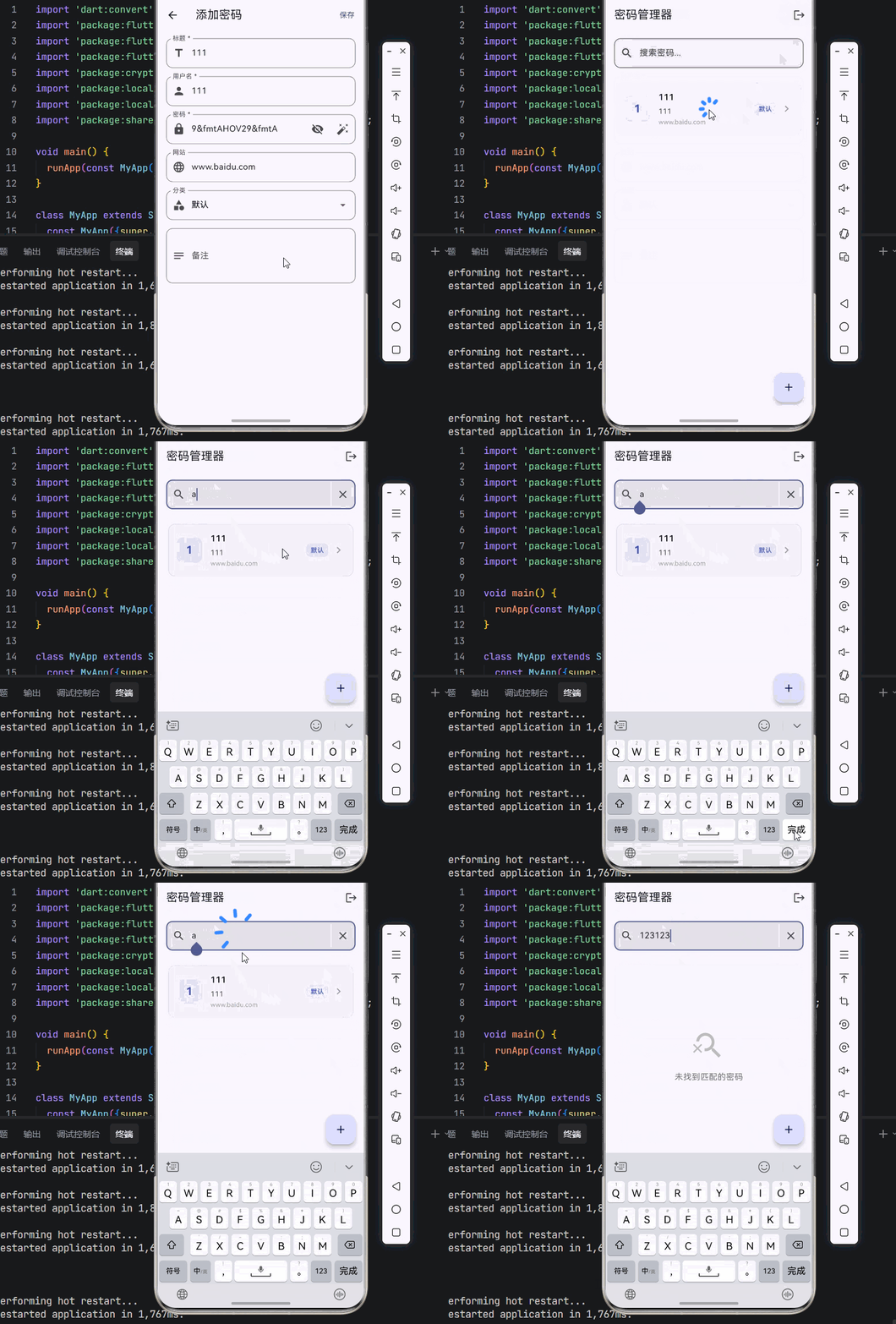
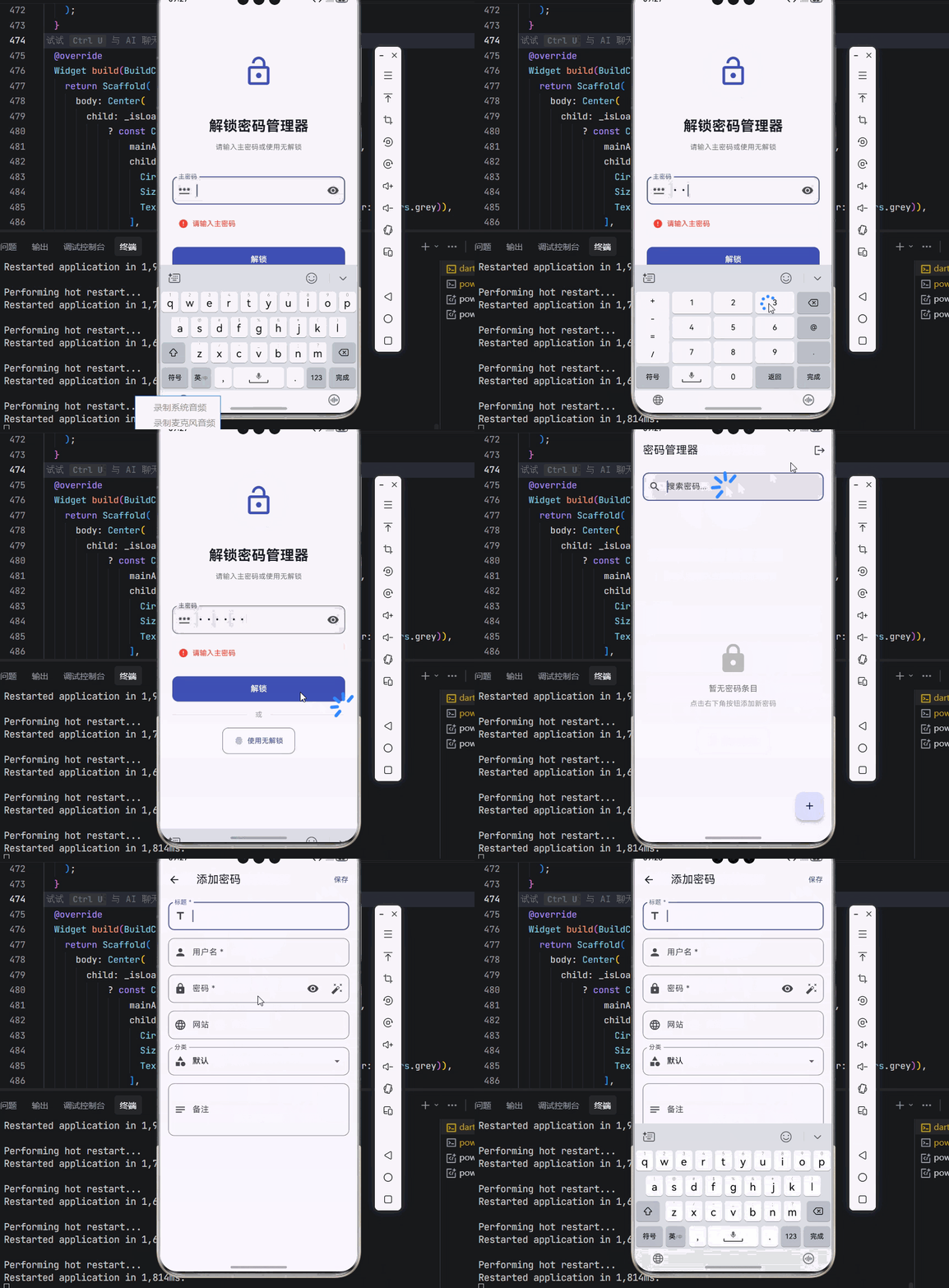
使用说明:
- 首次运行时,会提示设置主密码
- 设置主密码后,进入主页面
- 点击右下角的浮动按钮添加新密码
- 在列表中侧滑可以快速复制或删除
- 点击条目可以查看详情和解密后的密码
- 退出后再次打开需要使用主密码或生物识别解锁
import 'dart:convert';
import 'package:flutter/material.dart';
import 'package:flutter/services.dart';
import 'package:flutter_slidable/flutter_slidable.dart';
import 'package:cryptography/cryptography.dart';
import 'package:local_auth/local_auth.dart';
import 'package:local_auth/error_codes.dart' as auth_error;
import 'package:shared_preferences/shared_preferences.dart';
void main() {
runApp(const MyApp());
}
class MyApp extends StatelessWidget {
const MyApp({super.key});
Widget build(BuildContext context) {
return MaterialApp(
title: '安全密码管理器',
theme: ThemeData(
colorScheme: ColorScheme.fromSeed(seedColor: Colors.indigo),
useMaterial3: true,
),
home: const SplashPage(),
debugShowCheckedModeBanner: false,
);
}
}
// ==================== 数据模型 ====================
class PasswordEntry {
final String id;
final String title;
final String username;
final String encryptedPassword;
final String? website;
final String? notes;
final String category;
final DateTime createdAt;
final DateTime updatedAt;
PasswordEntry({
required this.id,
required this.title,
required this.username,
required this.encryptedPassword,
this.website,
this.notes,
this.category = '默认',
required this.createdAt,
required this.updatedAt,
});
Map<String, dynamic> toJson() => {
'id': id,
'title': title,
'username': username,
'encryptedPassword': encryptedPassword,
'website': website,
'notes': notes,
'category': category,
'createdAt': createdAt.toIso8601String(),
'updatedAt': updatedAt.toIso8601String(),
};
factory PasswordEntry.fromJson(Map<String, dynamic> json) {
return PasswordEntry(
id: json['id'] as String,
title: json['title'] as String,
username: json['username'] as String,
encryptedPassword: json['encryptedPassword'] as String,
website: json['website'] as String?,
notes: json['notes'] as String?,
category: json['category'] as String? ?? '默认',
createdAt: DateTime.parse(json['createdAt'] as String),
updatedAt: DateTime.parse(json['updatedAt'] as String),
);
}
PasswordEntry copyWith({
String? id,
String? title,
String? username,
String? encryptedPassword,
String? website,
String? notes,
String? category,
DateTime? createdAt,
DateTime? updatedAt,
}) {
return PasswordEntry(
id: id ?? this.id,
title: title ?? this.title,
username: username ?? this.username,
encryptedPassword: encryptedPassword ?? this.encryptedPassword,
website: website ?? this.website,
notes: notes ?? this.notes,
category: category ?? this.category,
createdAt: createdAt ?? this.createdAt,
updatedAt: updatedAt ?? this.updatedAt,
);
}
}
// ==================== 加密服务 ====================
class CryptoService extends ChangeNotifier {
final AesGcm _algorithm = AesGcm.with256bits();
SecretKey? _masterKey;
bool get isInitialized => _masterKey != null;
Future<void> initialize(String masterPassword) async {
final sha256 = Sha256();
final hash = await sha256.hash(utf8.encode(masterPassword));
_masterKey = SecretKey(hash.bytes);
notifyListeners();
}
Future<String> encrypt(String plaintext) async {
if (_masterKey == null) {
throw Exception('加密服务未初始化');
}
final nonce = _algorithm.newNonce();
final secretBox = await _algorithm.encrypt(
utf8.encode(plaintext),
secretKey: _masterKey!,
nonce: nonce,
);
final combined = <int>[
...nonce,
...secretBox.mac.bytes,
...secretBox.cipherText,
];
return base64Encode(combined);
}
Future<String> decrypt(String ciphertext) async {
if (_masterKey == null) {
throw Exception('加密服务未初始化');
}
final combined = base64Decode(ciphertext);
final nonce = combined.sublist(0, 12);
final macBytes = combined.sublist(12, 28);
final cipherBytes = combined.sublist(28);
final secretBox = SecretBox(
cipherBytes,
nonce: nonce,
mac: Mac(macBytes),
);
final decrypted = await _algorithm.decrypt(
secretBox,
secretKey: _masterKey!,
);
return utf8.decode(decrypted);
}
Future<String> hashPassword(String password) async {
final sha256 = Sha256();
final hash = await sha256.hash(utf8.encode(password));
return base64Encode(hash.bytes);
}
void clear() {
_masterKey = null;
notifyListeners();
}
}
// ==================== 认证服务 ====================
class AuthService extends ChangeNotifier {
final LocalAuthentication _localAuth = LocalAuthentication();
bool _isAuthenticated = false;
bool _isBiometricAvailable = false;
List<BiometricType> _availableBiometrics = [];
String? _errorMessage;
bool get isAuthenticated => _isAuthenticated;
bool get isBiometricAvailable => _isBiometricAvailable;
List<BiometricType> get availableBiometrics => _availableBiometrics;
String? get errorMessage => _errorMessage;
Future<void> checkBiometricAvailability() async {
try {
_isBiometricAvailable = await _localAuth.canCheckBiometrics;
_availableBiometrics = await _localAuth.getAvailableBiometrics();
_errorMessage = null;
} catch (e) {
_errorMessage = '检查生物识别失败: $e';
_isBiometricAvailable = false;
_availableBiometrics = [];
}
notifyListeners();
}
Future<bool> authenticate({String reason = '请验证身份以解锁密码管理器'}) async {
try {
_errorMessage = null;
final didAuthenticate = await _localAuth.authenticate(
localizedReason: reason,
options: const AuthenticationOptions(
stickyAuth: true,
biometricOnly: false,
useErrorDialogs: true,
),
);
_isAuthenticated = didAuthenticate;
notifyListeners();
return didAuthenticate;
} on PlatformException catch (e) {
_handleAuthError(e);
return false;
} catch (e) {
_errorMessage = '认证失败: $e';
notifyListeners();
return false;
}
}
void _handleAuthError(PlatformException error) {
switch (error.code) {
case auth_error.notAvailable:
_errorMessage = '生物识别不可用';
break;
case auth_error.notEnrolled:
_errorMessage = '未录入生物识别信息';
break;
case auth_error.lockedOut:
_errorMessage = '生物识别已被锁定,请稍后重试';
break;
case auth_error.permanentlyLockedOut:
_errorMessage = '生物识别已永久锁定,请使用其他方式解锁';
break;
case auth_error.passcodeNotSet:
_errorMessage = '未设置设备密码';
break;
default:
_errorMessage = '认证错误: ${error.message}';
}
notifyListeners();
}
void logout() {
_isAuthenticated = false;
notifyListeners();
}
String get biometricTypeText {
if (_availableBiometrics.isEmpty) return '无';
if (_availableBiometrics.contains(BiometricType.face)) {
return '面部识别';
} else if (_availableBiometrics.contains(BiometricType.fingerprint)) {
return '指纹识别';
} else if (_availableBiometrics.contains(BiometricType.iris)) {
return '虹膜识别';
}
return '生物识别';
}
}
// ==================== 存储服务 ====================
class PasswordStore extends ChangeNotifier {
static const String _entriesKey = 'password_entries';
static const String _masterPasswordHashKey = 'master_password_hash';
SharedPreferences? _prefs;
List<PasswordEntry> _entries = [];
String? _masterPasswordHash;
bool _isLoading = false;
String? _errorMessage;
List<PasswordEntry> get entries => List.unmodifiable(_entries);
String? get masterPasswordHash => _masterPasswordHash;
bool get isLoading => _isLoading;
String? get errorMessage => _errorMessage;
bool get hasMasterPassword => _masterPasswordHash != null;
Future<void> initialize() async {
_isLoading = true;
notifyListeners();
try {
_prefs = await SharedPreferences.getInstance();
_masterPasswordHash = _prefs!.getString(_masterPasswordHashKey);
await _loadEntries();
_errorMessage = null;
} catch (e) {
_errorMessage = '初始化失败: $e';
}
_isLoading = false;
notifyListeners();
}
Future<void> _loadEntries() async {
final entriesJson = _prefs!.getString(_entriesKey);
if (entriesJson != null) {
final List<dynamic> list = jsonDecode(entriesJson);
_entries = list.map((e) => PasswordEntry.fromJson(e)).toList();
} else {
_entries = [];
}
}
Future<void> _saveEntries() async {
final entriesJson = jsonEncode(_entries.map((e) => e.toJson()).toList());
await _prefs!.setString(_entriesKey, entriesJson);
}
Future<void> setMasterPassword(String hash) async {
_masterPasswordHash = hash;
await _prefs!.setString(_masterPasswordHashKey, hash);
notifyListeners();
}
Future<void> addEntry(PasswordEntry entry) async {
_entries.add(entry);
await _saveEntries();
notifyListeners();
}
Future<void> updateEntry(PasswordEntry entry) async {
final index = _entries.indexWhere((e) => e.id == entry.id);
if (index != -1) {
_entries[index] = entry;
await _saveEntries();
notifyListeners();
}
}
Future<void> deleteEntry(String id) async {
_entries.removeWhere((e) => e.id == id);
await _saveEntries();
notifyListeners();
}
PasswordEntry? getEntry(String id) {
try {
return _entries.firstWhere((e) => e.id == id);
} catch (e) {
return null;
}
}
List<PasswordEntry> searchEntries(String query) {
if (query.isEmpty) return _entries;
final lowerQuery = query.toLowerCase();
return _entries.where((e) {
return e.title.toLowerCase().contains(lowerQuery) ||
e.username.toLowerCase().contains(lowerQuery) ||
(e.website?.toLowerCase().contains(lowerQuery) ?? false);
}).toList();
}
List<PasswordEntry> getEntriesByCategory(String category) {
return _entries.where((e) => e.category == category).toList();
}
List<String> get categories {
return _entries.map((e) => e.category).toSet().toList();
}
Future<void> clearAll() async {
_entries = [];
_masterPasswordHash = null;
await _prefs!.remove(_entriesKey);
await _prefs!.remove(_masterPasswordHashKey);
notifyListeners();
}
}
// ==================== 启动页 ====================
class SplashPage extends StatefulWidget {
const SplashPage({super.key});
State<SplashPage> createState() => _SplashPageState();
}
class _SplashPageState extends State<SplashPage> {
final AuthService _authService = AuthService();
final CryptoService _cryptoService = CryptoService();
final PasswordStore _passwordStore = PasswordStore();
bool _isLoading = true;
String? _error;
void initState() {
super.initState();
_initialize();
}
Future<void> _initialize() async {
try {
await _passwordStore.initialize();
await _authService.checkBiometricAvailability();
if (!mounted) return;
setState(() {
_isLoading = false;
});
if (!_passwordStore.hasMasterPassword) {
_navigateToSetup();
} else {
_navigateToUnlock();
}
} catch (e) {
if (!mounted) return;
setState(() {
_isLoading = false;
_error = '初始化失败: $e';
});
}
}
void _navigateToSetup() {
Navigator.pushReplacement(
context,
MaterialPageRoute(
builder: (context) => SetupPage(
cryptoService: _cryptoService,
passwordStore: _passwordStore,
),
),
);
}
void _navigateToUnlock() {
Navigator.pushReplacement(
context,
MaterialPageRoute(
builder: (context) => UnlockPage(
authService: _authService,
cryptoService: _cryptoService,
passwordStore: _passwordStore,
),
),
);
}
Widget build(BuildContext context) {
return Scaffold(
body: Center(
child: _isLoading
? const Column(
mainAxisAlignment: MainAxisAlignment.center,
children: [
CircularProgressIndicator(),
SizedBox(height: 16),
Text('正在初始化...', style: TextStyle(color: Colors.grey)),
],
)
: _error != null
? Column(
mainAxisAlignment: MainAxisAlignment.center,
children: [
const Icon(Icons.error_outline, size: 48, color: Colors.red),
const SizedBox(height: 16),
Text(_error!, style: const TextStyle(color: Colors.red)),
const SizedBox(height: 16),
ElevatedButton(
onPressed: () {
setState(() {
_isLoading = true;
_error = null;
});
_initialize();
},
child: const Text('重试'),
),
],
)
: const Text('加载中...'),
),
);
}
}
// ==================== 设置主密码页 ====================
class SetupPage extends StatefulWidget {
final CryptoService cryptoService;
final PasswordStore passwordStore;
const SetupPage({
super.key,
required this.cryptoService,
required this.passwordStore,
});
State<SetupPage> createState() => _SetupPageState();
}
class _SetupPageState extends State<SetupPage> {
final _passwordController = TextEditingController();
final _confirmController = TextEditingController();
bool _obscurePassword = true;
bool _obscureConfirm = true;
bool _isLoading = false;
String? _errorMessage;
void dispose() {
_passwordController.dispose();
_confirmController.dispose();
super.dispose();
}
Future<void> _setup() async {
final password = _passwordController.text;
final confirm = _confirmController.text;
if (password.length < 6) {
setState(() => _errorMessage = '密码至少需要6个字符');
return;
}
if (password != confirm) {
setState(() => _errorMessage = '两次输入的密码不一致');
return;
}
setState(() {
_isLoading = true;
_errorMessage = null;
});
try {
await widget.cryptoService.initialize(password);
final hash = await widget.cryptoService.hashPassword(password);
await widget.passwordStore.setMasterPassword(hash);
if (mounted) {
Navigator.pushReplacement(
context,
MaterialPageRoute(
builder: (context) => MainPage(
authService: AuthService(),
cryptoService: widget.cryptoService,
passwordStore: widget.passwordStore,
),
),
);
}
} catch (e) {
if (mounted) {
setState(() => _errorMessage = '设置失败: $e');
}
}
if (mounted) {
setState(() => _isLoading = false);
}
}
Widget build(BuildContext context) {
return Scaffold(
body: SafeArea(
child: SingleChildScrollView(
padding: const EdgeInsets.all(24),
child: Column(
mainAxisAlignment: MainAxisAlignment.center,
children: [
const SizedBox(height: 48),
Container(
padding: const EdgeInsets.all(24),
decoration: BoxDecoration(
color: Colors.indigo.withAlpha(25),
shape: BoxShape.circle,
),
child: const Icon(Icons.lock, size: 64, color: Colors.indigo),
),
const SizedBox(height: 32),
const Text(
'设置主密码',
style: TextStyle(fontSize: 28, fontWeight: FontWeight.bold),
),
const SizedBox(height: 12),
Text(
'主密码将用于加密您的所有密码数据\n请牢记此密码,忘记后将无法恢复',
textAlign: TextAlign.center,
style: TextStyle(color: Colors.grey[600], height: 1.5),
),
const SizedBox(height: 48),
TextField(
controller: _passwordController,
obscureText: _obscurePassword,
decoration: InputDecoration(
labelText: '主密码',
prefixIcon: const Icon(Icons.password),
suffixIcon: IconButton(
icon: Icon(_obscurePassword ? Icons.visibility : Icons.visibility_off),
onPressed: () => setState(() => _obscurePassword = !_obscurePassword),
),
border: OutlineInputBorder(
borderRadius: BorderRadius.circular(12),
),
filled: true,
),
),
const SizedBox(height: 16),
TextField(
controller: _confirmController,
obscureText: _obscureConfirm,
decoration: InputDecoration(
labelText: '确认密码',
prefixIcon: const Icon(Icons.check_circle_outline),
suffixIcon: IconButton(
icon: Icon(_obscureConfirm ? Icons.visibility : Icons.visibility_off),
onPressed: () => setState(() => _obscureConfirm = !_obscureConfirm),
),
border: OutlineInputBorder(
borderRadius: BorderRadius.circular(12),
),
filled: true,
),
),
if (_errorMessage != null) ...[
const SizedBox(height: 16),
Container(
padding: const EdgeInsets.all(12),
decoration: BoxDecoration(
color: Colors.red.withAlpha(25),
borderRadius: BorderRadius.circular(8),
),
child: Row(
children: [
const Icon(Icons.error, color: Colors.red, size: 20),
const SizedBox(width: 8),
Expanded(
child: Text(_errorMessage!, style: const TextStyle(color: Colors.red)),
),
],
),
),
],
const SizedBox(height: 32),
SizedBox(
width: double.infinity,
height: 50,
child: ElevatedButton(
onPressed: _isLoading ? null : _setup,
style: ElevatedButton.styleFrom(
backgroundColor: Colors.indigo,
foregroundColor: Colors.white,
shape: RoundedRectangleBorder(
borderRadius: BorderRadius.circular(12),
),
),
child: _isLoading
? const SizedBox(
width: 24,
height: 24,
child: CircularProgressIndicator(
strokeWidth: 2,
color: Colors.white,
),
)
: const Text('创建主密码', style: TextStyle(fontSize: 16)),
),
),
const SizedBox(height: 16),
Text(
'建议使用6位以上包含字母和数字的密码',
style: TextStyle(color: Colors.grey[500], fontSize: 12),
),
],
),
),
),
);
}
}
// ==================== 解锁页 ====================
class UnlockPage extends StatefulWidget {
final AuthService authService;
final CryptoService cryptoService;
final PasswordStore passwordStore;
const UnlockPage({
super.key,
required this.authService,
required this.cryptoService,
required this.passwordStore,
});
State<UnlockPage> createState() => _UnlockPageState();
}
class _UnlockPageState extends State<UnlockPage> {
final _passwordController = TextEditingController();
bool _obscurePassword = true;
bool _isLoading = false;
String? _errorMessage;
void dispose() {
_passwordController.dispose();
super.dispose();
}
Future<void> _unlockWithPassword() async {
final password = _passwordController.text;
if (password.isEmpty) {
setState(() => _errorMessage = '请输入主密码');
return;
}
setState(() {
_isLoading = true;
_errorMessage = null;
});
try {
final hash = await widget.cryptoService.hashPassword(password);
if (!mounted) return;
if (hash == widget.passwordStore.masterPasswordHash) {
await widget.cryptoService.initialize(password);
if (mounted) {
Navigator.pushReplacement(
context,
MaterialPageRoute(
builder: (context) => MainPage(
authService: widget.authService,
cryptoService: widget.cryptoService,
passwordStore: widget.passwordStore,
),
),
);
}
return;
} else {
setState(() => _errorMessage = '密码错误');
}
} catch (e) {
if (!mounted) return;
setState(() => _errorMessage = '解锁失败: $e');
}
if (mounted) {
setState(() => _isLoading = false);
}
}
Future<void> _unlockWithBiometric() async {
setState(() {
_isLoading = true;
_errorMessage = null;
});
final success = await widget.authService.authenticate();
if (!mounted) return;
if (success) {
Navigator.pushReplacement(
context,
MaterialPageRoute(
builder: (context) => MainPage(
authService: widget.authService,
cryptoService: widget.cryptoService,
passwordStore: widget.passwordStore,
),
),
);
return;
} else {
setState(() {
_errorMessage = widget.authService.errorMessage ?? '生物识别失败';
});
}
setState(() => _isLoading = false);
}
Widget build(BuildContext context) {
return Scaffold(
body: SafeArea(
child: SingleChildScrollView(
padding: const EdgeInsets.all(24),
child: Column(
mainAxisAlignment: MainAxisAlignment.center,
children: [
const SizedBox(height: 48),
Container(
padding: const EdgeInsets.all(24),
decoration: BoxDecoration(
color: Colors.indigo.withAlpha(25),
shape: BoxShape.circle,
),
child: const Icon(Icons.lock_open, size: 64, color: Colors.indigo),
),
const SizedBox(height: 32),
const Text(
'解锁密码管理器',
style: TextStyle(fontSize: 28, fontWeight: FontWeight.bold),
),
const SizedBox(height: 12),
Text(
'请输入主密码或使用${widget.authService.biometricTypeText}解锁',
textAlign: TextAlign.center,
style: TextStyle(color: Colors.grey[600]),
),
const SizedBox(height: 48),
TextField(
controller: _passwordController,
obscureText: _obscurePassword,
onSubmitted: (_) => _unlockWithPassword(),
decoration: InputDecoration(
labelText: '主密码',
prefixIcon: const Icon(Icons.password),
suffixIcon: IconButton(
icon: Icon(_obscurePassword ? Icons.visibility : Icons.visibility_off),
onPressed: () => setState(() => _obscurePassword = !_obscurePassword),
),
border: OutlineInputBorder(
borderRadius: BorderRadius.circular(12),
),
filled: true,
),
),
if (_errorMessage != null) ...[
const SizedBox(height: 16),
Container(
padding: const EdgeInsets.all(12),
decoration: BoxDecoration(
color: Colors.red.withAlpha(25),
borderRadius: BorderRadius.circular(8),
),
child: Row(
children: [
const Icon(Icons.error, color: Colors.red, size: 20),
const SizedBox(width: 8),
Expanded(
child: Text(_errorMessage!, style: const TextStyle(color: Colors.red)),
),
],
),
),
],
const SizedBox(height: 24),
SizedBox(
width: double.infinity,
height: 50,
child: ElevatedButton(
onPressed: _isLoading ? null : _unlockWithPassword,
style: ElevatedButton.styleFrom(
backgroundColor: Colors.indigo,
foregroundColor: Colors.white,
shape: RoundedRectangleBorder(
borderRadius: BorderRadius.circular(12),
),
),
child: _isLoading
? const SizedBox(
width: 24,
height: 24,
child: CircularProgressIndicator(
strokeWidth: 2,
color: Colors.white,
),
)
: const Text('解锁', style: TextStyle(fontSize: 16)),
),
),
if (widget.authService.isBiometricAvailable) ...[
const SizedBox(height: 16),
Row(
children: [
Expanded(child: Divider(color: Colors.grey[300])),
const Padding(
padding: EdgeInsets.symmetric(horizontal: 16),
child: Text('或', style: TextStyle(color: Colors.grey)),
),
Expanded(child: Divider(color: Colors.grey[300])),
],
),
const SizedBox(height: 16),
OutlinedButton.icon(
onPressed: _isLoading ? null : _unlockWithBiometric,
icon: Icon(
widget.authService.availableBiometrics.contains(BiometricType.face)
? Icons.face
: Icons.fingerprint,
),
label: Text('使用${widget.authService.biometricTypeText}解锁'),
style: OutlinedButton.styleFrom(
padding: const EdgeInsets.symmetric(horizontal: 24, vertical: 16),
shape: RoundedRectangleBorder(
borderRadius: BorderRadius.circular(12),
),
),
),
],
],
),
),
),
);
}
}
// ==================== 主页面 ====================
class MainPage extends StatefulWidget {
final AuthService authService;
final CryptoService cryptoService;
final PasswordStore passwordStore;
const MainPage({
super.key,
required this.authService,
required this.cryptoService,
required this.passwordStore,
});
State<MainPage> createState() => _MainPageState();
}
class _MainPageState extends State<MainPage> {
final TextEditingController _searchController = TextEditingController();
String _searchQuery = '';
void initState() {
super.initState();
widget.passwordStore.addListener(() => setState(() {}));
}
void dispose() {
_searchController.dispose();
super.dispose();
}
List<PasswordEntry> get _filteredEntries {
return widget.passwordStore.searchEntries(_searchQuery);
}
void _navigateToAddEdit([PasswordEntry? entry]) async {
await Navigator.push(
context,
MaterialPageRoute(
builder: (context) => AddEditPage(
cryptoService: widget.cryptoService,
passwordStore: widget.passwordStore,
entry: entry,
),
),
);
}
void _copyPassword(PasswordEntry entry) async {
try {
final password = await widget.cryptoService.decrypt(entry.encryptedPassword);
await Clipboard.setData(ClipboardData(text: password));
if (mounted) {
ScaffoldMessenger.of(context).showSnackBar(
const SnackBar(
content: Text('密码已复制到剪贴板'),
behavior: SnackBarBehavior.floating,
),
);
}
} catch (e) {
if (mounted) {
ScaffoldMessenger.of(context).showSnackBar(
SnackBar(
content: Text('复制失败: $e'),
backgroundColor: Colors.red,
),
);
}
}
}
void _deleteEntry(PasswordEntry entry) async {
final confirmed = await showDialog<bool>(
context: context,
builder: (context) => AlertDialog(
title: const Text('删除确认'),
content: Text('确定要删除 "${entry.title}" 吗?'),
actions: [
TextButton(
onPressed: () => Navigator.pop(context, false),
child: const Text('取消'),
),
TextButton(
onPressed: () => Navigator.pop(context, true),
style: TextButton.styleFrom(foregroundColor: Colors.red),
child: const Text('删除'),
),
],
),
);
if (confirmed == true) {
await widget.passwordStore.deleteEntry(entry.id);
}
}
void _logout() async {
final confirmed = await showDialog<bool>(
context: context,
builder: (context) => AlertDialog(
title: const Text('退出确认'),
content: const Text('确定要退出登录吗?'),
actions: [
TextButton(
onPressed: () => Navigator.pop(context, false),
child: const Text('取消'),
),
TextButton(
onPressed: () => Navigator.pop(context, true),
style: TextButton.styleFrom(foregroundColor: Colors.red),
child: const Text('退出'),
),
],
),
);
if (confirmed == true) {
widget.cryptoService.clear();
widget.authService.logout();
Navigator.pushReplacement(
context,
MaterialPageRoute(
builder: (context) => SplashPage(),
),
);
}
}
Widget build(BuildContext context) {
return Scaffold(
appBar: AppBar(
title: const Text('密码管理器'),
elevation: 0,
actions: [
IconButton(
icon: const Icon(Icons.logout),
onPressed: _logout,
tooltip: '退出登录',
),
],
),
body: Column(
children: [
Container(
padding: const EdgeInsets.all(16),
child: TextField(
controller: _searchController,
onChanged: (value) => setState(() => _searchQuery = value),
decoration: InputDecoration(
hintText: '搜索密码...',
prefixIcon: const Icon(Icons.search),
suffixIcon: _searchQuery.isNotEmpty
? IconButton(
icon: const Icon(Icons.clear),
onPressed: () {
_searchController.clear();
setState(() => _searchQuery = '');
},
)
: null,
border: OutlineInputBorder(
borderRadius: BorderRadius.circular(12),
),
filled: true,
),
),
),
Expanded(
child: _filteredEntries.isEmpty
? Center(
child: Column(
mainAxisAlignment: MainAxisAlignment.center,
children: [
Icon(
_searchQuery.isEmpty ? Icons.lock : Icons.search_off,
size: 64,
color: Colors.grey[400],
),
const SizedBox(height: 16),
Text(
_searchQuery.isEmpty ? '暂无密码条目' : '未找到匹配的密码',
style: TextStyle(color: Colors.grey[600], fontSize: 16),
),
if (_searchQuery.isEmpty) ...[
const SizedBox(height: 8),
Text(
'点击右下角按钮添加新密码',
style: TextStyle(color: Colors.grey[500], fontSize: 14),
),
],
],
),
)
: ListView.builder(
padding: const EdgeInsets.symmetric(horizontal: 16, vertical: 8),
itemCount: _filteredEntries.length,
itemBuilder: (context, index) {
final entry = _filteredEntries[index];
return _buildPasswordCard(entry);
},
),
),
],
),
floatingActionButton: FloatingActionButton(
onPressed: () => _navigateToAddEdit(),
child: const Icon(Icons.add),
),
);
}
Widget _buildPasswordCard(PasswordEntry entry) {
return Padding(
padding: const EdgeInsets.only(bottom: 8),
child: Slidable(
endActionPane: ActionPane(
motion: const DrawerMotion(),
children: [
SlidableAction(
onPressed: (_) => _copyPassword(entry),
backgroundColor: Colors.blue,
foregroundColor: Colors.white,
icon: Icons.copy,
label: '复制',
borderRadius: const BorderRadius.horizontal(left: Radius.circular(12)),
),
SlidableAction(
onPressed: (_) => _deleteEntry(entry),
backgroundColor: Colors.red,
foregroundColor: Colors.white,
icon: Icons.delete,
label: '删除',
borderRadius: const BorderRadius.horizontal(right: Radius.circular(12)),
),
],
),
child: Card(
elevation: 0,
shape: RoundedRectangleBorder(
borderRadius: BorderRadius.circular(12),
side: BorderSide(color: Colors.grey.withAlpha(50)),
),
child: ListTile(
contentPadding: const EdgeInsets.symmetric(horizontal: 16, vertical: 8),
leading: Container(
width: 48,
height: 48,
decoration: BoxDecoration(
color: Colors.indigo.withAlpha(25),
borderRadius: BorderRadius.circular(12),
),
child: Center(
child: Text(
entry.title.isNotEmpty ? entry.title[0].toUpperCase() : '?',
style: const TextStyle(
fontSize: 20,
fontWeight: FontWeight.bold,
color: Colors.indigo,
),
),
),
),
title: Text(
entry.title,
style: const TextStyle(fontWeight: FontWeight.w600),
),
subtitle: Column(
crossAxisAlignment: CrossAxisAlignment.start,
children: [
const SizedBox(height: 4),
Text(entry.username),
if (entry.website != null) ...[
const SizedBox(height: 2),
Text(
entry.website!,
style: TextStyle(color: Colors.grey[500], fontSize: 12),
),
],
],
),
trailing: Row(
mainAxisSize: MainAxisSize.min,
children: [
Container(
padding: const EdgeInsets.symmetric(horizontal: 8, vertical: 4),
decoration: BoxDecoration(
color: Colors.indigo.withAlpha(25),
borderRadius: BorderRadius.circular(8),
),
child: Text(
entry.category,
style: const TextStyle(
color: Colors.indigo,
fontSize: 12,
),
),
),
const SizedBox(width: 8),
const Icon(Icons.chevron_right, color: Colors.grey),
],
),
onTap: () => _navigateToAddEdit(entry),
),
),
),
);
}
}
// ==================== 添加/编辑页面 ====================
class AddEditPage extends StatefulWidget {
final CryptoService cryptoService;
final PasswordStore passwordStore;
final PasswordEntry? entry;
const AddEditPage({
super.key,
required this.cryptoService,
required this.passwordStore,
this.entry,
});
State<AddEditPage> createState() => _AddEditPageState();
}
class _AddEditPageState extends State<AddEditPage> {
final _formKey = GlobalKey<FormState>();
final _titleController = TextEditingController();
final _usernameController = TextEditingController();
final _passwordController = TextEditingController();
final _websiteController = TextEditingController();
final _notesController = TextEditingController();
String _category = '默认';
bool _obscurePassword = true;
bool _isLoading = false;
String? _decryptedPassword;
final List<String> _categories = ['默认', '社交', '金融', '工作', '购物', '其他'];
bool get isEditing => widget.entry != null;
void initState() {
super.initState();
if (isEditing) {
_titleController.text = widget.entry!.title;
_usernameController.text = widget.entry!.username;
_websiteController.text = widget.entry!.website ?? '';
_notesController.text = widget.entry!.notes ?? '';
_category = widget.entry!.category;
_loadDecryptedPassword();
}
}
Future<void> _loadDecryptedPassword() async {
try {
final password = await widget.cryptoService.decrypt(widget.entry!.encryptedPassword);
if (mounted) {
setState(() {
_decryptedPassword = password;
_passwordController.text = password;
});
}
} catch (e) {
debugPrint('解密密码失败: $e');
}
}
void dispose() {
_titleController.dispose();
_usernameController.dispose();
_passwordController.dispose();
_websiteController.dispose();
_notesController.dispose();
super.dispose();
}
Future<void> _save() async {
if (!_formKey.currentState!.validate()) return;
setState(() => _isLoading = true);
try {
final encryptedPassword = await widget.cryptoService.encrypt(_passwordController.text);
final entry = PasswordEntry(
id: isEditing ? widget.entry!.id : DateTime.now().millisecondsSinceEpoch.toString(),
title: _titleController.text,
username: _usernameController.text,
encryptedPassword: encryptedPassword,
website: _websiteController.text.isEmpty ? null : _websiteController.text,
notes: _notesController.text.isEmpty ? null : _notesController.text,
category: _category,
createdAt: isEditing ? widget.entry!.createdAt : DateTime.now(),
updatedAt: DateTime.now(),
);
if (isEditing) {
await widget.passwordStore.updateEntry(entry);
} else {
await widget.passwordStore.addEntry(entry);
}
if (mounted) Navigator.pop(context);
} catch (e) {
if (mounted) {
ScaffoldMessenger.of(context).showSnackBar(
SnackBar(
content: Text('保存失败: $e'),
backgroundColor: Colors.red,
),
);
}
}
if (mounted) {
setState(() => _isLoading = false);
}
}
void _generatePassword() {
const chars = 'abcdefghijklmnopqrstuvwxyzABCDEFGHIJKLMNOPQRSTUVWXYZ0123456789!@#\$%^&*';
final random = DateTime.now().millisecondsSinceEpoch;
final password = List.generate(16, (i) => chars[(random + i * 7) % chars.length]).join();
setState(() {
_passwordController.text = password;
});
}
Widget build(BuildContext context) {
return Scaffold(
appBar: AppBar(
title: Text(isEditing ? '编辑密码' : '添加密码'),
actions: [
TextButton(
onPressed: _isLoading ? null : _save,
child: _isLoading
? const SizedBox(
width: 20,
height: 20,
child: CircularProgressIndicator(strokeWidth: 2),
)
: const Text('保存'),
),
],
),
body: Form(
key: _formKey,
child: ListView(
padding: const EdgeInsets.all(16),
children: [
TextFormField(
controller: _titleController,
decoration: InputDecoration(
labelText: '标题 *',
prefixIcon: const Icon(Icons.title),
border: OutlineInputBorder(
borderRadius: BorderRadius.circular(12),
),
),
validator: (value) {
if (value == null || value.isEmpty) {
return '请输入标题';
}
return null;
},
),
const SizedBox(height: 16),
TextFormField(
controller: _usernameController,
decoration: InputDecoration(
labelText: '用户名 *',
prefixIcon: const Icon(Icons.person),
border: OutlineInputBorder(
borderRadius: BorderRadius.circular(12),
),
),
validator: (value) {
if (value == null || value.isEmpty) {
return '请输入用户名';
}
return null;
},
),
const SizedBox(height: 16),
TextFormField(
controller: _passwordController,
obscureText: _obscurePassword,
decoration: InputDecoration(
labelText: '密码 *',
prefixIcon: const Icon(Icons.lock),
suffixIcon: Row(
mainAxisSize: MainAxisSize.min,
children: [
IconButton(
icon: Icon(_obscurePassword ? Icons.visibility : Icons.visibility_off),
onPressed: () => setState(() => _obscurePassword = !_obscurePassword),
),
IconButton(
icon: const Icon(Icons.auto_fix_high),
onPressed: _generatePassword,
tooltip: '生成随机密码',
),
],
),
border: OutlineInputBorder(
borderRadius: BorderRadius.circular(12),
),
),
validator: (value) {
if (value == null || value.isEmpty) {
return '请输入密码';
}
return null;
},
),
const SizedBox(height: 16),
TextFormField(
controller: _websiteController,
decoration: InputDecoration(
labelText: '网站',
prefixIcon: const Icon(Icons.language),
border: OutlineInputBorder(
borderRadius: BorderRadius.circular(12),
),
),
keyboardType: TextInputType.url,
),
const SizedBox(height: 16),
DropdownButtonFormField<String>(
value: _category,
decoration: InputDecoration(
labelText: '分类',
prefixIcon: const Icon(Icons.category),
border: OutlineInputBorder(
borderRadius: BorderRadius.circular(12),
),
),
items: _categories.map((c) => DropdownMenuItem(value: c, child: Text(c))).toList(),
onChanged: (value) => setState(() => _category = value!),
),
const SizedBox(height: 16),
TextFormField(
controller: _notesController,
decoration: InputDecoration(
labelText: '备注',
prefixIcon: const Icon(Icons.notes),
border: OutlineInputBorder(
borderRadius: BorderRadius.circular(12),
),
),
maxLines: 3,
),
],
),
),
);
}
}
🎉 总结
本文详细介绍了如何使用 cryptography_flutter、local_auth、shared_preferences 和 flutter_slidable 四个库构建一个功能完整的安全密码管理器。
核心要点回顾:
- 加密安全:使用 SHA-256 从主密码生成密钥,使用 AES-GCM 加密密码数据,确保即使数据泄露也无法被解密。
- 生物识别:集成系统的生物识别功能,支持指纹和面部识别,提供便捷的解锁体验。
- 本地存储:所有数据仅存储在用户设备上,不上传云端,从根本上杜绝数据泄露风险。
- 流畅交互:使用侧滑手势快速复制或删除密码,提升操作效率。
安全建议:
- 在生产环境中,可以考虑使用 PBKDF2 或 Argon2 等密钥派生函数增加安全性
- 考虑添加自动锁定功能,在应用进入后台一段时间后自动锁定
- 可以添加密码强度检测和弱密码提醒功能
- 建议添加数据导出和导入功能,方便用户备份和迁移

开源鸿蒙跨平台开发社区汇聚开发者与厂商,共建“一次开发,多端部署”的开源生态,致力于降低跨端开发门槛,推动万物智联创新。
更多推荐


 10
10 0
0- 0


 已为社区贡献56条内容

所有评论(0)