QT分局管理:基本布局(四)
·
(1)新建Qt Widget Application,项目名UserInfo,基类QDialog,取消创建界面;
(2)打开dialog.h头文件,在头文件中声明对话框中的各个控件,添加代码
#ifndef DIALOG_H
#define DIALOG_H

#include <QDialog>
//添加头文件
#include <QLabel>
#include <QLineEdit>
#include <QComboBox>
#include <QTextEdit>
#include <QGridLayout>
class Dialog : public QDialog
{
    Q_OBJECT

public:
    Dialog(QWidget *parent = 0);
    ~Dialog();
private://添加代码如下
    //左侧
    QLabel *UserNameLabel;
    QLabel *NameLabel;
    QLabel *SexLabel;
    QLabel *DepartmentLabel;
    QLabel *AgeLabel;
    QLabel *OtherLabel;
    QLineEdit *NameLineEdit;
    QLineEdit *UserNameLineEdit;
    QComboBox *SexComboBox;
    QTextEdit *DepartmentTextEdit;
    QLineEdit *AgeLineEdit;
    QGridLayout *LeftLayout;
    //右侧
    QLabel *HeadLabel;//右上角
    QLabel *HeadIconLabel;
    QPushButton *UpdateHeadBtn;
    QHBoxLayout *TopRightLayout;
    QLabel *IntroductionLabel;
    QTextEdit *IntroductionTextEdit;
    QVBoxLayout *RightLayout;
    //底部
    QPushButton *OkBtn;
    QPushButton *CancelBtn;
    QHBoxLayout *ButtomLayout;
};

#endif // DIALOG_H
#include "dialog.h"
//添加头文件
#include <QLabel>
#include <QLineEdit>
#include <QComboBox>
#include <QPushButton>
#include <QFrame>
#include <QGridLayout>
#include <QPixmap>
#include <QHBoxLayout>
Dialog::Dialog(QWidget *parent)
    : QDialog(parent)
{
    setWindowTitle(tr("UserInfo"));
    /***********左侧*********/
    UserNameLabel =new QLabel(tr("用户名"));
    UserNameLineEdit =new QLineEdit;
    NameLabel =new QLabel(tr("姓名"));
    NameLineEdit =new QLineEdit;
    SexLabel=new QLabel(tr("性别:"));
    SexComboBox=new QComboBox;
    SexComboBox->addItem(tr("女"));
    SexComboBox->addItem(tr("男"));
    DepartmentLabel =new QLabel(tr("部门:"));
    DepartmentTextEdit =new QTextEdit;
    AgeLabel =new QLabel(tr("年龄: "));
    AgeLineEdit =new QLineEdit;
    OtherLabel =new QLabel(tr("备注:"));
    OtherLabel->setFrameStyle(QFrame::Panel|QFrame::Sunken);
    //设置控件的风格,setFrameStyle()是QFrame的方法,参数以或|的方式设定控件的面板风格,由形状(QFrame::Shape)和阴影(QFrame::shadow)两项配合决定。其中形状包括六种,分别是NoFrame,Panel,Box,HLine,VLine,WinPanel;阴影包括三种,Plain,Raised,Sunken.
    LeftLayout=new QGridLayout();
    //想布局中加入需要的控件
    LeftLayout->addWidget(UserNameLabel,0,0);
    LeftLayout->addWidget(UserNameLineEdit,0,1);
    LeftLayout->addWidget(NameLabel,1,0);
    LeftLayout->addWidget(NameLineEdit,1,1);
    LeftLayout->addWidget(SexLabel,2,0);
    LeftLayout->addWidget(SexComboBox,2,1);
    LeftLayout->addWidget(DepartmentLabel,3,0);
    LeftLayout->addWidget(DepartmentTextEdit,3,1);
    LeftLayout->addWidget(AgeLabel,4,0);
    LeftLayout->addWidget(AgeLineEdit,4,1);
    LeftLayout->addWidget(OtherLabel,5,0,1,2);
    LeftLayout->setColumnStretch(0,1);
    LeftLayout->setColumnStretch(1,3);
    //设定两列分别占用空间的比例,本例设定为1:3,即使对话框大小改变了,两列之间的宽度比依然保存不变
    /**********右侧***********/
    HeadLabel =new QLabel(tr("头像: "));
    HeadIconLabel =new QLabel;
    QPixmap icon("312.png");
    HeadIconLabel->setPixmap(icon);
    HeadIconLabel->resize(icon.width(),icon.height());
    UpdateHeadBtn =new QPushButton(tr("更新:"));
    //完成右上侧头像选择区的布局
    TopRightLayout =new QHBoxLayout();
    TopRightLayout->setSpacing(20);
    TopRightLayout->addWidget(HeadLabel);
    TopRightLayout->addWidget(HeadIconLabel);
    TopRightLayout->addWidget(UpdateHeadBtn);
    IntroductionLabel =new QLabel(tr("个人说明: "));
    IntroductionTextEdit =new QTextEdit;
    //完成右侧的布局
    RightLayout =new QVBoxLayout();
    RightLayout->setMargin(10);
    RightLayout->addLayout(TopRightLayout);
    RightLayout->addWidget(IntroductionLabel);
    RightLayout->addWidget(IntroductionTextEdit);
    /*******底部********/
    OkBtn =new QPushButton(tr("确定"));
    CancelBtn =new QPushButton(tr("取消"));
    //
    ButtomLayout =new QHBoxLayout();
    ButtomLayout->addStretch();
    ButtomLayout->addWidget(OkBtn);
    ButtomLayout->addWidget(CancelBtn);
    /************/
    QGridLayout *mainLayout =new QGridLayout(this);
    mainLayout->setMargin(15);
    mainLayout->setSpacing(10);
    mainLayout->addLayout(LeftLayout,0,0);
    mainLayout->addLayout(RightLayout,0,1);
    mainLayout->addLayout(ButtomLayout,1,0,1,2);
    mainLayout->setSizeConstraint(QLayout::SetFixedSize);
    //设置最优化显式,即使控件按其sizeHint()的大小显式,并且使用户无法改变对话框大小。
}

Dialog::~Dialog()
{

}
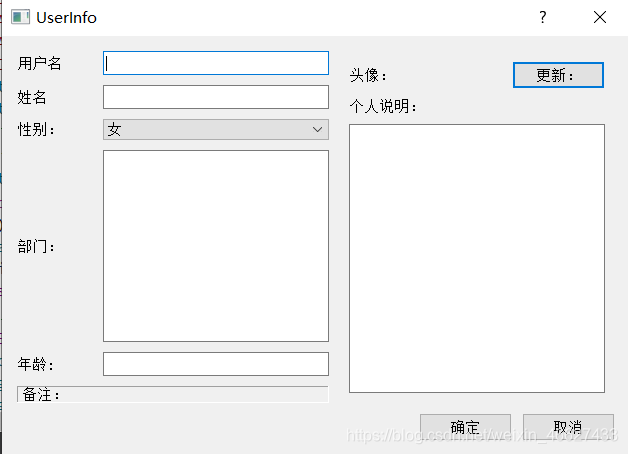
具体函数参考:

开源鸿蒙跨平台开发社区汇聚开发者与厂商,共建“一次开发,多端部署”的开源生态,致力于降低跨端开发门槛,推动万物智联创新。
更多推荐

 0
0 0
0- 0


 已为社区贡献3条内容

所有评论(0)