

协程不安全 和 协程安全
重点 (Top highlight)
In part 2 of the Cancellation and Exceptions in Coroutines series, we learnt the importance of cancelling work when it’s no longer needed. On Android, you can use the CoroutineScopes provided by Jetpack: viewModelScope or lifecycleScope that cancel any running work when their scope completes — that is when the Activity/Fragment/Lifecycle completes. If you’re creating your own CoroutineScope, make sure you tie it to a Job and call cancel when needed.
在“ 协程中的取消和异常”系列的第2部分中 ,我们了解了在不再需要工作时取消工作的重要性。 在Android上,您可以使用Jetpack提供的CoroutineScope : viewModelScope或lifecycleScope ,当它们的作用域完成时,即Activity/Fragment/Lifecycle完成时,它们会取消任何正在运行的工作。 如果要创建自己的CoroutineScope ,请确保将其绑定到Job并在需要时调用cancel。
However, there are cases when you want an operation to complete even if the user navigated away from a screen. As such, you don’t want the work to be cancelled (e.g. writing to a database or making a certain network request to your server).
但是,在某些情况下,即使用户离开屏幕导航,也希望完成操作。 因此,您不希望取消工作(例如,写入数据库或向服务器发出某些网络请求)。
Keep reading for a pattern to achieve this!
继续阅读以了解实现此目标的模式!
协程还是WorkManager? (Coroutines or WorkManager?)
Coroutines will run as long as your application process is alive. If you need to run operations that should outlive the process (e.g. sending logs to your remote server), use WorkManager instead on Android. WorkManager is the library to use for critical operations that are expected to execute at some point in the future.
只要您的应用程序处于活动状态,协程就会运行。 如果您需要运行超出该过程的操作(例如,将日志发送到远程服务器),请在Android上使用WorkManager 。 WorkManager是用于预期在将来某个时候执行的关键操作的库。
Use coroutines for operations that are valid in the current process and can be cancelled if the user kills the app (e.g. making a network request you want to cache). What’s the pattern to trigger these operations?
将协程用于当前进程中有效的操作,如果用户终止了该应用程序(例如,发出要缓存的网络请求),则可以取消协程。 触发这些操作的模式是什么?
协程最佳实践 (Coroutines best practices)
Since this pattern builds upon other coroutine best practices; let’s recap them:
由于这种模式建立在其他协程最佳实践的基础上; 让我们回顾一下:
1.将调度程序注入类 (1. Inject Dispatchers into classes)
Don’t hardcode them when creating new coroutines or calling withContext.
创建新的协程或调用withContext时,请勿对其进行硬编码。
✅ Benefits: ease of testing as you can easily replace them for both unit and instrumentation tests.
✅ 好处 :易于测试,因为您可以轻松地将它们替换为单元测试和仪器测试。
2. ViewModel / Presenter层应创建协程 (2. The ViewModel/Presenter layer should create coroutines)
If it’s a UI-only operation, then the UI layer can do it. If you think this is not possible in your project, it’s likely you’re not following best practice #1 (i.e. it’s more difficult to test VMs that don’t inject Dispatchers; in that case exposing suspend functions makes it doable).
如果这是仅UI的操作,则UI层可以执行此操作。 如果您认为这在您的项目中是不可能的,则可能您没有遵循最佳实践#1(即,测试不注入Dispatchers VM更加困难;在这种情况下,公开暂停功能使其可行)。
✅ Benefits: The UI layer should be dumb and not directly trigger any business logic. Instead, defer that responsibility to the ViewModel/Presenter layer. Testing the UI layer requires instrumentation tests in Android which need an emulator to run.
好处 :UI层应该是哑的,并且不能直接触发任何业务逻辑。 而是将这一责任推迟到ViewModel / Presenter层。 测试UI层需要在Android中进行仪器测试,该模拟器需要运行模拟器。
3. ViewModel / Presenter层下面的层应公开暂停功能和流 (3. The layers below the ViewModel/Presenter layer should expose suspend functions and Flows)
If you need to create coroutines, use coroutineScope or supervisorScope. If you need them to follow a different scope, this is what this article is about! Keep reading!
如果需要创建协程,请使用coroutineScope或supervisorScope 。 如果您需要他们遵循不同的范围,这就是本文的目的! 继续阅读!
✅ Benefits: The caller (generally the ViewModel layer) can control the execution and lifecycle of the work happening in those layers, being able to cancel when needed.
好处 :调用者(通常是ViewModel层)可以控制在这些层中进行的工作的执行和生命周期,可以在需要时取消。
协程中不应取消的操作 (Operations that shouldn’t be cancelled in Coroutines)
Imagine we have a ViewModel and a Repository in our app with the following logic:
假设我们的应用程序中有一个ViewModel和一个存储库,其逻辑如下:
class MyViewModel(private val repo: Repository) : ViewModel() {
  fun callRepo() {
    viewModelScope.launch {
      repo.doWork()
    }
  }
}class Repository(private val ioDispatcher: CoroutineDispatcher) {
  suspend fun doWork() {
    withContext(ioDispatcher) {
      doSomeOtherWork()      veryImportantOperation() // This shouldn’t be cancelled
    }
  }
}
We don’t want veryImportantOperation() to be controlled by viewModelScope as it could be cancelled at any point. We want that operation to outlive viewModelScope. How can we achieve that?
我们不希望由viewModelScope控制veryImportantOperation() ,因为它可以随时被取消。 我们希望该操作超过viewModelScope 。 我们如何实现这一目标?
To do this, create your own scope in the Application class and call those operations in coroutines started by it. That scope should be injected in the classes that need it.
为此, 请在Application类中创建您自己的作用域,然后在由它启动的协程中调用这些操作 。 该范围应该注入需要它的类中。
The benefits of creating your own CoroutineScope vs other solutions we’ll see later (like GlobalScope) is that you can configure it as you wish. Do you need a CoroutineExceptionHandler? Do you have your own thread pool you use as a Dispatcher? Place all that common configuration there in its CoroutineContext!
与稍后将看到的其他解决方案(例如GlobalScope ) CoroutineScope ,创建自己的CoroutineScope的好处是您可以根据需要对其进行配置。 您需要一个CoroutineExceptionHandler吗? 您是否有用作Dispatcher的线程池? 将所有常用配置放在其CoroutineContext !
You can call it applicationScope and it must contain a SupervisorJob() so that failures in coroutines don’t propagate in the hierarchy (as seen in part 3 of the series):
您可以将其称为applicationScope ,它必须包含一个SupervisorJob()以便协程中的故障不会在层次结构中传播(如该系列的第3部分所示 ):
class MyApplication : Application() {
  // No need to cancel this scope as it'll be torn down with the process  val applicationScope = CoroutineScope(SupervisorJob() + otherConfig)}
We don’t need to cancel this scope since we want it to remain active as long as the application process is alive, so we don’t hold a reference to the SupervisorJob. We can use this scope to run coroutines that need a longer lifetime than the calling scope might offer in our app.
我们不需要取消该作用域,因为只要应用程序进程处于活动状态,我们就希望它保持活动状态,因此我们没有对SupervisorJob的引用。 我们可以使用此作用域来运行需要比应用程序中调用作用域更长的生命周期的协程。
For operations that shouldn’t be cancelled, call them from a coroutine created by an application CoroutineScope
对于不应取消的操作,请从应用程序CoroutineScope创建的协程中调用它们
Whenever you create a new Repository instance, pass in the applicationScope we created above. For tests, check out the Testing section below.
每当您创建新的Repository实例时,都要传递我们在上面创建的applicationScope 。 对于测试,请查看下面的“ 测试”部分。
使用哪个协程生成器? (Which coroutine builder to use?)
Depending on veryImportantOperation’s behavior, you’d need to start a new coroutine using either launch or async:
根据veryImportantOperation的行为,您需要使用启动或异步启动新的协程:
If it needs to return a result, use
asyncand callawaitto wait for it to finish.如果需要返回结果,请使用
async并调用await等待其完成。If not, use
launchand wait for it to finish withjoin. Note that as explained in part 3 of the series, you have to handle exceptions manually inside the launch block.如果不是,请使用
launch并等待它以join结束。 请注意,如本系列第3部分所述 ,您必须在启动块内部手动处理异常。
This is how you’d trigger the coroutine using launch:
这是您使用launch触发协程的方式:
class Repository(
  private val externalScope: CoroutineScope,
  private val ioDispatcher: CoroutineDispatcher
) {
  suspend fun doWork() {
    withContext(ioDispatcher) {
      doSomeOtherWork()      externalScope.launch {        // if this can throw an exception, wrap inside try/catch
        // or rely on a CoroutineExceptionHandler installed
        // in the externalScope's CoroutineScope
        veryImportantOperation()      }.join()    }
  }
}
or using async:
或使用async :
class Repository(
  private val externalScope: CoroutineScope,
  private val ioDispatcher: CoroutineDispatcher
) {
  suspend fun doWork(): Any { // Use a specific type in Result
    withContext(ioDispatcher) {
      doSomeOtherWork()      return externalScope.async {
        // Exceptions are exposed when calling await, they will be
        // propagated in the coroutine that called doWork. Watch
        // out! They will be ignored if the calling context cancels.
        veryImportantOperation()      }.await()
    }
  }
}
In any case, the ViewModel code doesn’t change and with the above, even if the viewModelScope gets destroyed, the work using externalScope will keep running. Furthermore, doWork() won’t return until veryImportantOperation() completes as with any other suspend call.
在任何情况下,ViewModel代码都不会更改,并且即使上面的viewModelScope被破坏,即使viewModelScope被销毁,使用externalScope的工作仍将继续运行。 此外,直到veryImportantOperation()像其他任何暂停调用一样完成后, doWork()才会返回。
那更简单的事情呢? (What about something simpler?)
Another pattern that could serve some use cases (and it’s probably the first solution anyone would come up with) is wrapping veryImportantOperation in the externalScope’s context using withContext as follows:
可以为某些用例服务的另一种模式(这可能是任何人都会想到的第一个解决方案)是使用withContext将veryImportantOperation包装在externalScope的上下文中,如下所示:
class Repository(
  private val externalScope: CoroutineScope,
  private val ioDispatcher: CoroutineDispatcher
) {
  suspend fun doWork() {
    withContext(ioDispatcher) {
      doSomeOtherWork()      withContext(externalScope.coroutineContext) {
        veryImportantOperation()
      }
    }
  }
}
However, this approach has some caveats that you should be aware of:
但是,此方法有一些警告,您应该注意:
If the coroutine that calls
doWorkis cancelled whileveryImportantOperationis getting executed, it will keep executing until the next cancellation point, not afterveryImportantOperationfinishes executing.如果在执行
veryImportantOperation取消调用doWork的协程,则它将继续执行直到下一个取消点,而不是在veryImportantOperation完成执行之后。CoroutineExceptionHandlers don’t work as you’d expect when the context is used inwithContextsince the exception will be re-thrown.当在
withContext使用上下文时,CoroutineExceptionHandler无法正常工作,因为异常将被重新抛出。
测试中 (Testing)
As we’ll need to inject both Dispatchers and CoroutineScopes, what should you inject in those cases?
由于我们需要同时注入Dispatcher和CoroutineScope ,因此在这些情况下应该注入什么?
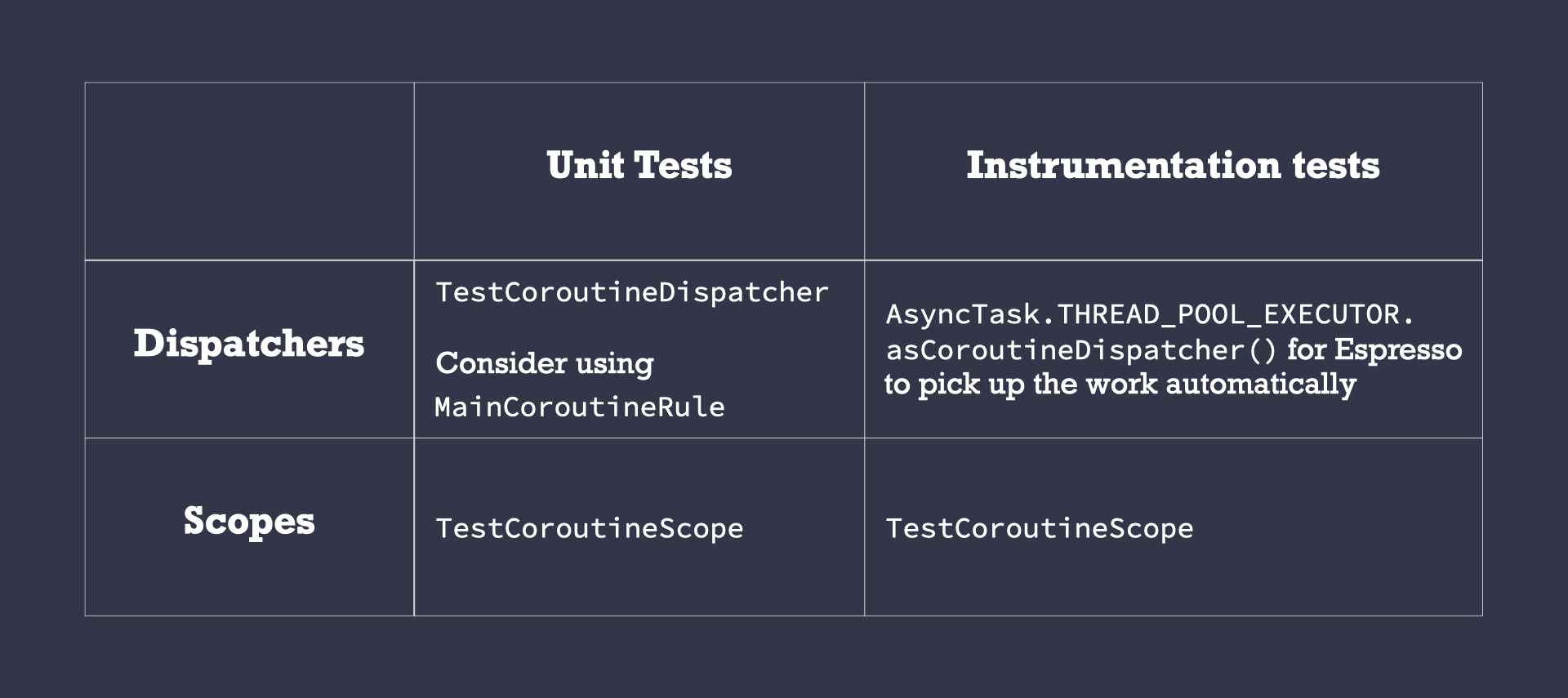
🔖 Legend: TestCoroutineDispatcher, MainCoroutineRule, TestCoroutineScope, AsyncTask.THREAD_POOL_EXECUTOR.asCoroutineDispatcher()
🔖 图例 : TestCoroutineDispatcher , MainCoroutineRule , TestCoroutineScope , AsyncTask.THREAD_POOL_EXECUTOR.asCoroutineDispatcher()
备择方案 (Alternatives)
There are other ways to implement this behavior with Coroutines. However, those solutions cannot be applied systematically in all use cases. Let’s see some alternatives and why/when you should/shouldn’t use them.
还有其他方法可以通过协同程序实现此行为。 但是,这些解决方案无法在所有用例中得到系统应用。 让我们看看一些替代方案,以及为什么/何时/不应该使用它们。
❌GlobalScope (❌ GlobalScope)
There are multiple reasons why you shouldn’t use GlobalScope:
有多个原因导致您不应该使用GlobalScope :
Promotes hard-coding values. It might be tempting to hardcode
Dispatchersif you useGlobalScopestraight-away. That’s a bad practice!提升硬编码值 。 如果直接使用
GlobalScope,可能很容易对Dispatchers进行硬编码。 这是一个坏习惯!It makes testing very hard. As your code is going to be executed in an uncontrolled scope, you won’t be able to manage execution of work started by it.
这使得测试非常困难 。 由于您的代码将在不受控制的范围内执行,因此您将无法管理由其启动的工作的执行。
You can’t have a common CoroutineContext for all coroutines built into the scope as we did with the
applicationScope. Instead, you’d have to pass a commonCoroutineContextto all coroutines started byGlobalScope.像我们对
applicationScope所做的那样, 您无法为作用域中内置的所有协程拥有一个通用的CoroutineContext 。 相反,您必须将通用的CoroutineContext传递给GlobalScope启动的所有协程。
Recommendation: Don’t use it directly.
建议:不要直接使用它。
Android Android中的ProcessLifecycleOwner范围 (❌ ProcessLifecycleOwner scope in Android)
In Android, there’s an applicationScope available in the androidx.lifecycle:lifecycle-process library, accessed with ProcessLifecycleOwner.get().lifecycleScope.
在Android中, androidx.lifecycle:lifecycle-process库中有一个applicationScope可用,可通过ProcessLifecycleOwner.get().lifecycleScope访问。
In this case, you’d inject a LifecycleOwner instead of a CoroutineScope as we did before. In production, you’d pass in ProcessLifecycleOwner.get() and in unit tests, you can create a fake LifecycleOwner using LifecycleRegistry.
在这种情况下,您将注入LifecycleOwner而不是像以前那样注入CoroutineScope 。 在生产中,你会传递ProcessLifecycleOwner.get()并在单元测试中,你可以创建一个假的LifecycleOwner使用LifecycleRegistry 。
Notice that the default CoroutineContext of this scope uses Dispatchers.Main.immediate which might not be desirable for background work. As with GlobalScope, you’d have to pass a common CoroutineContext to all coroutines started by GlobalScope.
请注意,此范围的默认CoroutineContext使用Dispatchers.Main.immediate ,这对于后台工作可能不是理想的。 与GlobalScope ,您必须将通用的CoroutineContext传递给GlobalScope启动的所有协程。
Because of all the above, this alternative requires more work than just creating a CoroutineScope in the Application class. Also, I don’t personally like having classes related to the Android lifecycle in layers below the ViewModel/Presenter as these layers should be platform agnostic.
由于上述所有CoroutineScope ,与在Application类中创建CoroutineScope相比,此替代方法需要更多的工作。 另外,我个人不喜欢在ViewModel / Presenter下面的层中有与Android生命周期相关的类,因为这些层应该与平台无关。
Recommendation: Don’t use it directly.
建议:不要直接使用它 。
⚠️免责声明 (⚠️ Disclaimer)
If it turns out that the CoroutineContext of your applicationScope matches the GlobalScope or ProcessLifecycleOwner.get().lifecycleScope one, you can directly assign them as follows:
如果事实证明您的applicationScope的CoroutineContext与GlobalScope或ProcessLifecycleOwner.get().lifecycleScope匹配,则可以按如下所示直接分配它们:
class MyApplication : Application() {val applicationScope = GlobalScope
}
You still get all the benefits mentioned above and you can easily change it if needed in the future.
您仍然可以获得上述所有好处 ,并且将来可以根据需要轻松进行更改。
使用NonCancellable (❌ ✅ Using NonCancellable)
As seen in part 2 of the series, you can use withContext(NonCancellable) to be able to call suspend functions in a cancelled coroutine. We suggested using it to perform cleanup code that can suspend. However, you shouldn’t abuse it.
从该系列的第2部分中可以看到,可以使用withContext(NonCancellable)来在已取消的协程中调用暂停函数。 我们建议使用它来执行可以暂停的清理代码。 但是,您不应该滥用它。
Doing this is very risky as you lose control of the execution of the coroutine. It’s true that it produces more concise and easier to read code but the problems this can cause in the future are unpredictable.
这样做会带来很大的风险,因为您无法控制协程的执行。 的确,它可以产生更简洁,更易于阅读的代码,但这在将来可能引起的问题是无法预测的。
Example of its usage:
其用法示例:
class Repository(
  private val ioDispatcher: CoroutineDispatcher
) {
  suspend fun doWork() {
    withContext(ioDispatcher) {
      doSomeOtherWork()     withContext(NonCancellable) {
        veryImportantOperation()
      }
    }
  }
}
As very tempting as it can be to do, you might not always know what’s behind veryImportantOperation(): maybe it’s an external library, maybe the implementation is behind an interface, … What problems can happen?
尽管可能很诱人,但您可能并不总是知道veryImportantOperation()的背后是什么:也许是外部库,实现是在接口后面,……会发生什么问题?
- You won’t be able to stop those operations in tests. 您将无法在测试中停止这些操作。
An endless loop that uses
delaywon’t be able to cancel anymore.使用
delay的无限循环将无法再取消。Collecting a
Flowwithin it makes the Flow non-cancellable from the outside.在其中收集
Flow将使该流无法从外部取消。- … …
These problems can lead to subtle and very hard to debug bugs.
这些问题可能会导致难以调试的错误。
Recommendation: use it ONLY for suspending cleanup code.
建议:仅将其用于挂起清理代码。
Whenever you need some work to run beyond its current scope, we recommend creating a custom scope in your Application class and running coroutines within it. Avoid using GlobalScope, ProcessLifecycleOwner scope and NonCancellable for this type of work.
每当您需要做一些工作来超出其当前范围时,建议您在Application类中创建一个自定义范围并在其中运行协程。 避免对此类工作使用GlobalScope , ProcessLifecycleOwner范围和NonCancellable 。
协程不安全 和 协程安全


 已为社区贡献113条内容

所有评论(0)