

kotlin 集合api
If you are an Android developer and looking to build an app asynchronously you might be using RxJava as it has an operator for almost everything. RxJava has become one of the most important things to know in Android.
如果您是Android开发人员,并且希望异步构建应用程序,则您可能会使用RxJava,因为它具有适用于几乎所有内容的运算符。 RxJava已成为Android中最重要的知识之一。
But with Kotlin a lot of people tend to use Co-routines. With Kotlin Coroutine 1.2.0 alpha release Jetbrains came up with Flow API as part of it. With Flow in Kotlin now you can handle a stream of data that emits values sequentially.
但是,有了Kotlin,很多人倾向于使用协同例程。 在Kotlin Coroutine 1.2.0 alpha版本中,Jetbrains附带了Flow API。 现在,借助Kotlin中的Flow,您可以处理按顺序发出值的数据流。
A flow is an asynchronous version of a Sequence, a type of collection whose values are lazily produced. Just like a sequence, a flow produces each value on-demand whenever the value is needed, and flows can contain an infinite number of values.
流是Sequence的异步版本, Sequence是一种其值是延迟生成的集合的类型。 就像序列一样,只要需要该值,流就会按需生成每个值,并且流可以包含无数个值。
In Kotlin, Coroutine is just the scheduler part of RxJava but now with Flow APIs coming along side it, it can be alternative to RxJava in Android.
在Kotlin中,Coroutine只是RxJava的调度程序部分,但是现在伴随有Flow API,它可以替代Android中的RxJava。
In this blog, we will see how Flow APIs work in Kotlin and how can we start using it in our android projects. We will cover the following topics,
在此博客中,我们将看到Flow API在Kotlin中如何工作以及如何在我们的android项目中开始使用它。 我们将涵盖以下主题,
- Types of flow 流量类型
- Why Needs Flow 为什么需要流动
- What is Flow APIs in Kotlin Coroutines? Kotlin协程中的Flow API是什么?
- How does flow run 流量如何运行
- When does flow run 流程何时运行
- Start Integrating Flow APIs in your project 开始在您的项目中集成Flow API
- Builders in Flows 流中的建设者
- Few examples using Flow Operators. 很少有使用Flow Operators的例子。
Now let’s discuss one by one:-
现在让我们一一讨论:
流的类型? (Types of Flow?)
Flows are based on suspending functions and they are completely sequential, while a coroutine is an instance of computation that, like a thread, can run concurrently with the other code.
流基于挂起函数,并且它们是完全顺序的,而协程是像线程一样可以与其他代码并行运行的计算实例。
顺序流 (Sequential flows)
To get a better feel of the sequential nature of flows, take a look at the same example flow that emits ten integers with 100 ms delay between them:
为了更好地了解流的顺序性质,请看一下同一示例流,该流发出十个整数,它们之间的延迟为100毫秒:
Let us confirm that collecting it takes around a second:
让我们确认收集它大约需要一秒钟:
val time = measureTimeMillis {
 ints.collect { println(it) }
}
println(“Collected in $time ms”)
After execute out will be as below
执行完后将如下
1
2
3
4
5
6
7
8
9
10
Collected in 1041 ms
But what happens if the collector is also slow and adds its own 100 ms delay before printing each element?
但是,如果收集器也很慢并且在打印每个元素之前增加了自己的100 ms延迟,会发生什么情况?
val time = measureTimeMillis {
 ints.collect {         delay(100)
        println(it)
        emit(it)    }
}
println(“Collected in $time ms”)
It takes around 2 seconds to complete because both emitter and collector are parts of a sequential execution here and it alternates between them:
完成此过程大约需要2秒钟,因为此处的发射器和收集器都是顺序执行的一部分,并且在它们之间交替进行:

并发协程 (Concurrent coroutines)
Can we structure this execution so that the whole operation completes faster, changing neither emitter’s nor collector’s code? Yes, we can. We need to decouple the emitter and the collector — run the emitter in a separate coroutine from the collector so that they can be concurrent. But with two separate coroutines, we cannot simply emit the elements by a function call; we need to establish some communication between two coroutines. That is exactly what channels are designed to do². You can send the elements via a channel from one coroutine and receive them in another one so that the whole execution would look like this:
我们是否可以通过结构化该执行过程,使整个操作更快地完成,而无需更改发射器或收集器的代码? 我们可以。 我们需要分离发射器和收集器-将发射器与收集器在单独的协程中运行,以便它们可以并发运行 。 但是,对于两个独立的协程,我们不能简单地通过函数调用来发出元素。 我们需要在两个协程之间建立一些通信 。 这正是通道设计要执行的操作² 。 您可以通过一个协程中的一个通道发送元素,并在另一个协程中接收它们,以便整个执行如下所示:

This is a common communication pattern and it can be encapsulated into an operator on flows. Build-in produce builder from kotlinx.coroutines the library makes this pattern especially easy to implement since it combines launching a new coroutine and creating a channel, and consumeEach function pairs with it on the consumer side. We use coroutineScope so that concurrency is structured³ and to avoid leaking the producer coroutine outside of the scope:
这是一种常见的通信模式,可以将其封装到流中的运算符中。 来自kotlinx.coroutines produce器,该库使启动此模式特别容易,因为它结合了启动新的协程和创建通道的功能,并且在消费者端将其与consumeEach功能配对。 我们使用coroutineScope使并发结构化为³,并避免将生产者协程泄漏到范围之外:
Running the same emitter and collector code as before but with the above buffer() the operator in between them gives the desired speedup in execution time:
运行与以前相同的发射器和收集器代码,但使用上面的buffer() ,它们之间的运算符将提供所需的执行时间加速:
val time = measureTimeMillis {
    ints.buffer().collect {
        delay(100)
        println(it)
    }
}
println("Collected in $time ms")
After executing the above code the output will be as below:-
执行上述代码后,输出将如下所示:
1
2
3
4
5
6
7
8
9
10
Collected in 1321 ms
为什么需要流量? (Why Needs Flow?)
Flow includes full support for coroutines. That means you can build, transform, and consume a Flow using coroutines. You can also control concurrency, which means coordinating the execution of several coroutines declaratively with Flow.
Flow包括对协程的全面支持。 这意味着您可以使用协程构建,转换和使用Flow 。 您还可以控制并发性,这意味着与Flow声明性地协调几个协程的执行。
A Flow is an async sequence of values
流是值的异步序列
Flowproduces values one at a time (instead of all at once) that can generate values from async operations like network requests, database calls, or other async code. It supports coroutines throughout its API, so you can transform a flow using coroutines as well!
Flow生成一个值(而不是一次生成),这些值可以从异步操作(如网络请求,数据库调用或其他异步代码)生成值。 它在整个API中都支持协程,因此您也可以使用协程来转换流程!
Flow can be used in a fully-reactive programming style. If you've used something like RxJava before, Flow provides similar functionality. Application logic can be expressed succinctly by transforming a flow with functional operators such as map, flatMapLatest, combine, and so on.
Flow可以以完全React性的编程风格使用。 如果您以前使用过RxJava类的RxJava , Flow提供类似的功能。 应用逻辑可以简洁地通过变换用的函数运算符,如流动被表达map , flatMapLatest , combine ,依此类推。
Flow also supports suspending functions on most operators. This lets you do sequential async tasks inside an operator like map. By using suspending operations inside of a flow, it often results in shorter and easier to read code than the equivalent code in a fully-reactive style.
Flow还支持大多数操作员的挂起功能。 这使您可以在map运算符中执行顺序异步任务。 通过在流内部使用挂起操作,与完全React式的等效代码相比,它通常导致代码更短,更易于阅读。
Kotlin协程中的Flow API是什么? (What is Flow APIs in Kotlin Coroutines?)
Flow API in Kotlin is a better way to handle the stream of data asynchronously that executes sequentially.
Kotlin中的Flow API是一种更好的异步处理顺序执行的数据流的方法。
So, in RxJava, Observables type is an example of a structure that represents a stream of items. Its body does not get executed until it is subscribed to by a subscriber. and once it is subscribed, subscriber starts getting the data items emitted. Similarly, Flow works on the same condition where the code inside a flow builder does not run until the flow is collected.
因此,在RxJava中,Observables类型是表示项目流的结构的示例。 在订阅者订阅之前,其主体不会执行。 订阅后,订阅者便开始获取发射的数据项。 类似地,Flow在相同的条件下工作,即在流收集器中流构建器内部的代码不会运行。
流量如何运行 (How does flow run)
To get used to how Flow produces values on demand (or lazily), take a look at the following flow that emits the values (1, 2, 3) and prints before, during, and after each item is produced.
为了适应Flow如何按需(或懒惰地)生成值,请看下面的流程,该流程发出值(1, 2, 3) ,并在生产每个项目之前,之中和之后进行打印。
fun makeFlow() = flow {
   println("sending first value")
   emit(1)
   println("first value collected, sending another value")
   emit(2)
   println("second value collected, sending a third value")
   emit(3)
   println("done")
}
scope.launch {
   makeFlow().collect { value ->
       println("got $value")
   }
   println("flow is completed")
}
If you run this, it produces this output:
如果运行此命令,它将产生以下输出:
sending first value
got 1
first value collected, sending another value
got 2
second value collected, sending a third value
got 3
done
flow is completed
You can see how execution bounces between the collect lambda and the flow builder. Every time the flow builder calls emit, it suspends until the element is completely processed. Then, when another value is requested from the flow, it resumes from where it left off until it calls emit again. When the flow builder completes, the Flow is canceled and collect resumes, letting and the calling coroutine prints "flow is completed."
你可以看到执行之间如何弹跳collect拉姆达和flow生成器。 每次流生成器调用emit ,它都会suspends直到元素被完全处理。 然后,当从流中请求另一个值时,它将从中断的地方resumes ,直到再次调用emit。 flow构建器完成后,将取消该Flow并继续collect ,并让调用协程打印“流已完成”。
The call collect is very important. Flow uses suspending operators like collect instead of exposing an Iterator interface so that it always knows when it's being actively consumed. More importantly, it knows when the caller can't request any more values so it can cleanup resources.
通话collect非常重要。 Flow使用像collect这样的挂起运算符,而不是公开Iterator接口,以便它始终知道何时被主动使用。 更重要的是,它知道调用者何时无法再请求更多值,因此可以清理资源。
Flowis built from the ground up using coroutines. By using thesuspendandresumemechanism of coroutines, they can synchronize the execution of the producer (flow) with the consumer (collect).使用协程从头开始构建
Flow。 通过使用协程的suspend和resume机制,它们可以使生产者(flow)的执行与消费者(collect)的执行同步。If you’ve used reactive streams and are familiar with the concept of backpressure, it is implemented in
Flowby suspending a coroutine.如果您使用了React流并且熟悉背压的概念,则可以通过挂起协程在
Flow实现它。
流程何时运行 (When does a flow run)
The Flow in the above example starts running when the collect operator runs. Creating a new Flow by calling the flow builder or other APIs does not cause any work to execute. The suspending operator collect is called a terminal operator in Flow. There are other suspending terminal operators such as toList, first and single shipped with kotlinx-coroutines, and you can build your own.
上例中的Flow在collect运算符运行时开始运行。 通过调用flow构建器或其他API创建新Flow不会导致执行任何工作。 挂起的运算符collect在Flow称为终端运算符。 kotlinx-coroutines附带有其他一些挂起的终端操作符,例如toList , first和single ,您可以构建自己的终端操作符。
By default Flow will execute:
默认情况下, Flow将执行:
- Every time a terminal operator is applied without memory of the last run 每次应用终端操作员时都不会存储上一次运行的操作
- Until the terminal operator is canceled 直到取消终端操作员
- When the last value has been fully processed, and another value has been requested 当最后一个值已被完全处理,并且已请求另一个值时
These rules are the default behavior of
Flowand it is possible to make aFlowthat has memory, doesn't restart for every terminal operator, and executes independently of collection with built-in or custom transformations of aFlow.这些规则是
Flow的默认行为,它可以使Flow具有内存,而不是为每个终端操作员重新启动,并且可以通过Flow内置或自定义转换独立于集合执行。Executing a
Flowis called collecting a flow. By default, aFlowwill not do anything until it has been collected which means applying any terminal operator.执行
Flow称为收集流。 默认情况下,Flow在收集完毕之前不会执行任何操作,这意味着应用任何终端运算符。
myFlow.toList() // toList collects this flow and adds the values to a List
myFlow.toList() // toList collects this flow and adds the values to a ListWe also say an individual value is collected from the
Flowby a terminal operator.我们还说终端操作员从
Flow收集了一个单独的值。
myFlow.collect { item -> println("$item has been collected") }
myFlow.collect { item -> println("$item has been collected") }
Because of these rules, a Flow can participate in structured concurrency, and it's safe to start long-running coroutines from a Flow. There's no chance a Flow will leak resources, since they're always cleaned up using coroutine cooperative cancellation rules when the caller is canceled.
由于这些规则, Flow可以参与结构化并发,并且可以安全地从Flow启动长期运行的协程。 Flow不会泄漏资源,因为在取消调用方时总是使用协程协作取消规则来清理资源。
Let's modify the flow above to only look at the first two elements using the take operator, then collect it twice.
让我们修改上面的流程,以使用take运算符仅查看前两个元素,然后收集两次。
scope.launch {
   val repeatableFlow = makeFlow().take(2)  // we only care about the first two elements
   println("first collection")
   repeatableFlow.collect()
   println("collecting again")
   repeatableFlow.collect()
   println("second collection completed")
}
Running this code, you’ll see this output:
运行此代码,您将看到以下输出:
first collection
sending first value
first value collected, sending another value
collecting again
sending first value
first value collected, sending another value
second collection completed
The flow lambda starts from the top each time collect is called. This is important if the flow performed expensive work like making a network request. Also, since we applied the take(2) operator, the flow will only produce two values. It will not resume the flow lambda again after the second call to emit, so the line "second value collected..." will never print.
每次调用collect时, flow lambda从顶部开始。 如果流程执行网络请求之类的昂贵工作,则这一点很重要。 另外,由于我们应用了take(2)运算符,因此流程将仅产生两个值。 在emit第二次调用之后,它将不会再次恢复流lambda,因此将永远不会打印“ second value collect ...”行。
By default, a
Flowwill restart from the top every time a terminal operator is applied. This is important if theFlowperforms expensive work, such as making a network request.默认情况下,每次应用终端操作员时,
Flow将从顶部重新启动。 如果Flow执行昂贵的工作(例如发出网络请求),则这一点很重要。
开始在您的项目中集成Flow API (Start Integrating Flow APIs in your project)
Let us create an android project and then let’s start integrating the Kotlin Flow APIs.
让我们创建一个android项目,然后开始集成Kotlin Flow API。
步骤01。 (Step 01.)
Add the following in the app’s build.gradle,
在应用程序的build.gradle中添加以下内容,
implementation "org.jetbrains.kotlinx:kotlinx-coroutines-core:1.3.3"
implementation "org.jetbrains.kotlinx:kotlinx-coroutines-android:1.3.3"
and in the project’s build.gradle add,
然后在项目的build.gradle中添加
classpath "org.jetbrains.kotlin:kotlin-gradle-plugin:1.3.61"步骤02。 (Step 02.)
In MainActivity’s layout file let’s create a UI that will have a button.
在MainActivity的布局文件中,我们创建一个具有按钮的UI。
<?xml version="1.0" encoding="utf-8"?>
<androidx.constraintlayout.widget.ConstraintLayout
    xmlns:android="http://schemas.android.com/apk/res/android"
    xmlns:app="http://schemas.android.com/apk/res-auto"
    xmlns:tools="http://schemas.android.com/tools"
    android:layout_width="match_parent"
    android:layout_height="match_parent"
    tools:context=".MainActivity">
    <Button
        android:id="@+id/button"
        android:layout_width="wrap_content"
        android:layout_height="wrap_content"
        app:layout_constraintBottom_toBottomOf="parent"
        android:text="Launch Kotlin Flow"
        app:layout_constraintLeft_toLeftOf="parent"
        app:layout_constraintRight_toRightOf="parent"
        app:layout_constraintTop_toTopOf="parent" /></androidx.constraintlayout.widget.ConstraintLayout>
步骤03。 (Step 03.)
Now, let’s begin the implementation of Flow APIs in MainActivity. In onCreate() function of Activity lets add two function like,
现在,让我们开始在MainActivity中实现Flow API。 在Activity的onCreate ()函数中,我们可以添加两个函数,例如:
override fun onCreate(savedInstanceState: Bundle?) {super.onCreate(savedInstanceState)
    setContentView(R.layout.activity_main)
    setupFlow()
    setupClicks()
}
Here, setupFlow() is the function where we will define the flow and setupClicks() is the function where we will click the button to display the data which is emitted from the flow.
在这里, setupFlow ()是我们将定义流的函数,而setupClicks ()是我们将单击按钮以显示从流中发出的数据的函数。
We will declare a lateinit variable of Flow of Int type,
我们将声明一个Int类型的Flow的lateinit变量,
lateinit var flow: Flow<Int>步骤04。 (Step 04.)
Now, in setupFlow() I will emit items after 500milliseconds delay.
现在,在setupFlow ()中,我将在延迟500毫秒后发出项目。
fun setupFlow(){
    flow = flow {
        Log.d(TAG, "Start flow")
        (0..10).forEach {// Emit items with 500 milliseconds delay
            delay(500)
            Log.d(TAG, "Emitting $it")
            emit(it)        }
    }.flowOn(Dispatchers.Default)
}
Here,
这里,
-
We will emit numbers from 0 to 10 at 500ms delay.
我们将以500ms的延迟发出从0到10的数字。
-
To emit the number we will use emit() which collects the value emitted. It is part of FlowCollector which can be used as a receiver.
为了发出数字,我们将使用generate()来收集发出的值。 它是FlowCollector的一部分,可以用作接收器。
-
and, at last, we use flowOn operator which means that shall be used to change the context of the flow emission. Here, we can use different Dispatchers like IO, Default, etc.
最后,我们使用flowOn运算符,这意味着应使用它来更改流发射的上下文。 在这里,我们可以使用不同的Dispatcher,例如IO,Default等。
flowOn() is like subscribeOn() in RxJava
flowOn()就像RxJava中的subscriptionOn()一样
步骤05。 (Step 05.)
Now, we need to write setupClicks() function where we need to print the values which we will emit from the flow.
现在,我们需要编写setupClicks()函数,在此我们需要打印将从流中发出的值。
private fun setupClicks() {
    button.setOnClickListener {
        CoroutineScope(Dispatchers.Main).launch {
            flow.collect {
                Log.d(TAG, it.toString())
            }
        }
    }
}
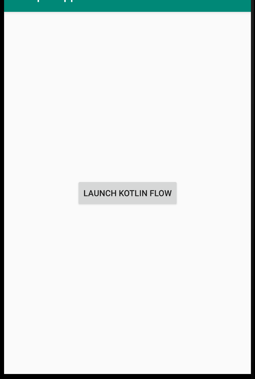
When we click the button we will print the values one by one.
当我们单击按钮时,我们将一一打印这些值。
Here,
这里,
-
flow.collect now will start extracting/collection the value from the flow on the Main thread as Dispatchers.Main is used in launch coroutine builder in CoroutineScope
flow.collect现在将开始作为Dispatchers从Main线程上的流中提取/收集值。Main用于CoroutineScope中的启动coroutine构建器
- Now, the screen looks like, 现在,屏幕看起来像
- And the output which will be printed in Logcat is, 而将在Logcat中打印的输出是,
D/MainActivity: Start flow
D/MainActivity: Emitting 0
D/MainActivity: 0
D/MainActivity: Emitting 1
D/MainActivity: 1
D/MainActivity: Emitting 2
D/MainActivity: 2
D/MainActivity: Emitting 3
D/MainActivity: 3
D/MainActivity: Emitting 4
D/MainActivity: 4
D/MainActivity: Emitting 5
D/MainActivity: 5
D/MainActivity: Emitting 6
D/MainActivity: 6
D/MainActivity: Emitting 7
D/MainActivity: 7
D/MainActivity: Emitting 8
D/MainActivity: 8
D/MainActivity: Emitting 9
D/MainActivity: 9
D/MainActivity: Emitting 10
D/MainActivity: 10
As you can see Flow starts only when the button is clicked as it prints Start Flow and then starts emitting. This is what I meant by Flows are cold.
如您所见,流只有在单击按钮时才开始,因为它会打印“ 开始流” ,然后开始发射。 这就是我的意思, 流量很冷。
Let’s say we update the setupFlow() function like,
假设我们像这样更新setupFlow ()函数,
private fun setupFlow() {
    flow = flow {
        Log.d(TAG, "Start flow")
        (0..10).forEach {// Emit items with 500 milliseconds delay
            delay(500)
            Log.d(TAG, "Emitting $it")
            emit(it)
        }
    }.map {
        it * it
    }.flowOn(Dispatchers.Default)
}
Here you can see we added map operator which will take each and every item will square itself and print the value.
在这里,您可以看到我们添加了地图运算符,该运算符将获取每个项目并将其自身平方并打印值。
Anything, written above flowOn will run in background thread.
在flowOn上面编写的所有内容都将在后台线程中运行。
建设者流 (Builders in Flow)
Flow builders are nothing but the way to build Flows. There are 4 types of flow builders,
流构建器不过是构建流的方法。 流量生成器有4种类型,
-
flowOf() — It is used to create flow from a given set of values. For Eg.
flowOf()—用于从一组给定的值创建流。 例如
flowOf(4, 2, 5, 1, 7).onEach { delay(400) }.flowOn(Dispatcher.Default)Here, flowOf() takes fixed values and prints each of them after a delay of 400ms. When we attach a collector to the flow, we get the output
在这里,flowOf()取固定值,并在400ms的延迟后打印每个值。 当我们将收集器附加到流时,我们得到输出
D/MainActivity: 4
D/MainActivity: 2
D/MainActivity: 5
D/MainActivity: 1
D/MainActivity: 7-
asFlow() — It is an extension function that helps to convert type into flows. For Eg,
asFlow()—这是一个扩展功能,有助于将类型转换为流。 例如
(1..5).asFlow().onEach{ delay(300)}.flowOn(Dispatchers.Default)Here, we converted a range of values from 1 to 5 as flow and emitted each of them at a delay of 300ms. When we attach a collector to the flow, we get the output,
在这里,我们将值的范围从1转换为5,并以300ms的延迟发射它们中的每一个。 当我们将收集器附加到流时,我们得到输出,
D/MainActivity: 1
D/MainActivity: 2
D/MainActivity: 3
D/MainActivity: 4
D/MainActivity: 5
The output is the number being printed from 1 to 5, whichever were present in the range.
输出是从1到5打印的数字,无论该数字在该范围内。
-
flow{} — This example has been explained in the Android Example above. This is a builder function to construct arbitrary flows.
flow {}-此示例已在上面的Android示例中进行了说明。 这是一个构造函数,用于构造任意流。
-
channelFlow{} — This builder creates cold-flow with the elements using send provided by the builder itself. For Example,
channelFlow {} —此构建器使用构建器本身提供的send与元素创建冷流。 例如,
channelFlow
{
     (0..10).forEach
      {
         send(it)
      }
}.flowOn(Dispatchers.Default)
This will print,
这将打印,
D/MainActivity: 0
D/MainActivity: 1
D/MainActivity: 2
D/MainActivity: 3
D/MainActivity: 4
D/MainActivity: 5
D/MainActivity: 6
D/MainActivity: 7
D/MainActivity: 8
D/MainActivity: 9
D/MainActivity: 10
flowOn() is like subscribeOn() in RxJava
flowOn()就像RxJava中的subscriptionOn()一样
Now, finally, let’s discuss how to use an operator of Flow in your project
现在,最后,让我们讨论如何在项目中使用Flow运算符
邮编 (Zip Operator)
If you remember from above Android Example, we have two functions setupFlow() and setupClicks(). We will modify both functions in MainActivity.
如果您还记得上面的Android示例,我们有两个函数setupFlow ()和setupClicks ()。 我们将在MainActivity中修改这两个函数。
First, we will declare two lateinit variables of Flow of String type,
首先,我们将声明两个String类型的Flow的Lateinit变量,
lateinit var flowOne: Flow<String>
lateinit var flowTwo: Flow<String>
Now, the two functions setupFlow() and setupClicks() will be called in onCreate() of MainActivity.
现在,两个函数setupFlow ()和setupClicks ()将在MainActivity的onCreate()中调用。
override fun onCreate(savedInstanceState: Bundle?) {
    ...
    setupFlow()
    setupClicks()}
and in the setupFlow() we will initialize two flows to the two variables,
然后在setupFlow()中,将两个流初始化为两个变量,
private fun setupFlow() {
    flowOne = flowOf("Himanshu", "Amit", "Janishar").flowOn(Dispatchers.Default)
    flowTwo = flowOf("Singh", "Shekhar", "Ali").flowOn(Dispatchers.Default)}
and in setupClicks() we will zip both the flows using zip operator,
在setupClicks ()中,我们将使用zip运算符将两个流都压缩,
private fun setupClicks() {
     button.setOnClickListener
      {
         CoroutineScope(Dispatchers.Main).launch
            {
               flowOne.zip(flowTwo)
                  { firstString, secondString ->
                         "$firstString $secondString"
                           }.collect {
                               Log.d(TAG, it)
                            }
                   }
              }
        }
Here,
这里,
- when the button is clicked the scope is launched. 单击该按钮时,将启动范围。
-
flowOne is zipped with flowTwo to give a pair of values that we have created a string and,
用flowTwo压缩flowOne,以提供一对我们创建了字符串的值,并且
- then we collect it and print it in Logcat. The resulting output will be, 然后我们收集它并在Logcat中打印。 结果输出将是
D/MainActivity: Himanshu SinghD/MainActivity: Amit ShekharD/MainActivity: Janishar AliNote: Consider if both flows doesn’t have the same number of item, then the flow will stop as soon as one of the flow completes.
注意:请考虑一下,如果两个流没有相同的项目数,则其中一个流完成后,该流将立即停止。
To check out the project, click here
Thanks for Reading…
谢谢阅读…
翻译自: https://medium.com/@abhiappmobiledeveloper/kotlin-flow-api-54994c60a9ae
kotlin 集合api




 已为社区贡献8条内容

所有评论(0)