

firebase使用
Deep linking is used for promoting apps with social media campaigns or sharing data with other users to link to specific content within a specific app whether your app is already installed or not.
深层链接用于通过社交媒体活动推广应用程序,或与其他用户共享数据以链接到特定应用程序中的特定内容(无论您是否已安装您的应用程序)。
Firebase Dynamic Links provides a rich feature for handling deep linking for applications and websites. The best part is that Firebase deep linking is free, for any scale.
Firebase动态链接提供了丰富的功能,可以处理应用程序和网站的深层链接。 最好的部分是,无论规模大小,Firebase深度链接都是免费的。
In this article, I will explain how to create and use Dynamic Links in Flutter. If you wish to learn more about Firebase Dynamic Links, you can check out the following video:
在本文中,我将解释如何在Flutter中创建和使用动态链接。 如果您想了解有关Firebase动态链接的更多信息,可以观看以下视频:
Firebase Dynamic Links handles the following scenarios:
Firebase动态链接可处理以下情况:
- When a user opens Dynamic Links, if your app isn’t installed, the user is redirected to the Play Store or App Store to install your app. 当用户打开动态链接时,如果未安装您的应用程序,则该用户将被重定向到Play商店或App Store以安装您的应用程序。
- If your app installed and the app is not open in the foreground/background, then the app is opened on a device. 如果已安装您的应用程序,但该应用程序未在前景/背景中打开,则该应用程序将在设备上打开。
- If the app is in the foreground/background, then the user can get a dynamic link in the registered listener. 如果应用位于前台/后台,则用户可以在注册的侦听器中获得动态链接。
You need to follow the below steps for creating and receiving Dynamic Links.
您需要按照以下步骤创建和接收动态链接。
1.在Firebase控制台中设置URL P 修复 (1. Set Up URL Prefix in the Firebase Console)
Open the Firebase console and select your Firebase project in which you want to add deep linking.
打开Firebase控制台,然后选择要在其中添加深层链接的Firebase项目。
- Create an Android and IOS app in the Firebase project. 在Firebase项目中创建一个Android和IOS应用。
Open Dynamic Links from the side drawer’s Grow section.
从侧面抽屉的“ 增长”部分打开“ 动态链接 ”。
For creating a domain for the link, click on the Get Started button.
要为链接创建域,请单击“入门”。 按钮。
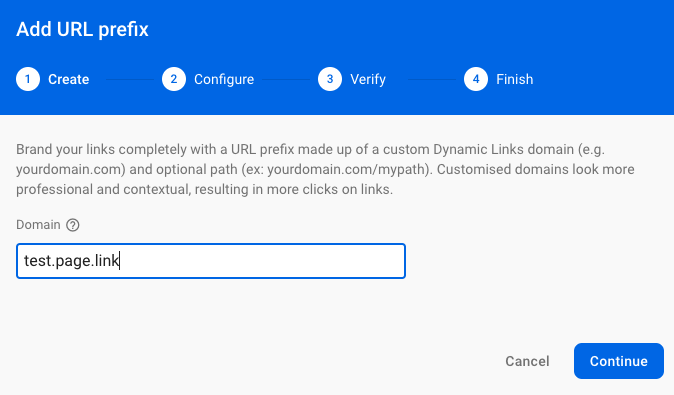
Then, create a URL prefix. A URL prefix is a domain name that uses the dynamic links.
然后,创建一个URL前缀 。 URL前缀是使用动态链接的域名。
Create a tab, add the custom, unique domain name of your app. For example, test.page.link. Here, the domain name is postfixed with
page.link.创建一个标签,添加应用程序的自定义唯一域名。 例如,test.page.link。 在此,域名以
page.link后缀。- Then, follow: Configure → Verify → Finish steps. 然后,遵循:配置→验证→完成步骤。
2. iOS应用程序的配置 (2. Configuration for an iOS App)
Open Project Settings in the Firebase console and select iOS application.
在Firebase控制台中打开“ 项目设置” ,然后选择iOS应用程序。
Add the App Store Id of the application. You can find your App Store ID in your app’s URL. In the example below,
123456789is the App Store ID. https://itunes.apple.com/us/app/yourapp/id123456789.添加应用程序的App Store ID 。 您可以在应用程序的URL中找到应用程序商店ID。 在下面的示例中,应用商店ID是
123456789。 https://itunes.apple.com/us/app/yourapp/id 123456789 。- If your application is not published yet, you can use another published app ID for testing purposes (Note: Don’t forget to replace this with another project ID when your app goes live). 如果您的应用程序尚未发布,则可以使用另一个已发布的应用程序ID进行测试(请注意:当您的应用程序上线时,请不要忘记将其替换为另一个项目ID)。
Add the Team Id. You can find your Team ID in the Apple Member Centre under the provisioning profile.
添加团队ID 。 您可以在Apple会员中心的配置文件中找到您的团队ID。
We need to add some configurations in Xcode. Follow the below steps.
我们需要在Xcode中添加一些配置。 请遵循以下步骤。
Under the Signing & Capabilities tab, you want to turn on an associated domain and add the domain to the list. Your domain name looks like this: applinks:test.page.link. Here,
test.page.linkis the URL domain that we have created in the Firebase console.在签名和功能下 标签,您要打开关联的域并将该域添加到列表中。 您的域名如下所示:applinks:test.page.link。 在这里,
test.page.link是我们在Firebase控制台中创建的URL域。

Note: Make sure that your provisioning profile supports the associated domain’s capability.
注意 :确保您的配置文件支持关联域的功能。
In the Info tab of your project, create a new URL Type that will be used by the dynamic links.
在项目的“ 信息”选项卡中,创建新的URL类型 ,以供动态链接使用。
Add the Identifier field as Bundle ID and URL Schema as your bundle ID which will look like
com.example.test.添加标识符 领域 作为Bundle ID和URL Schema作为您的bundle ID,看起来像
com.example.test。

We can confirm that the Firebase project is properly configured to use Dynamic Links in the application by opening the apple-app-site-association file that is hosted on your Dynamic Links domain. For example:
通过打开动态链接域中托管的apple-app-site-association文件,我们可以确认Firebase项目已正确配置为在应用程序中使用动态链接。 例如:
https://test.page.link/apple-app-site-associationIf your app is connected, then the file contains a reference to your app’s App Store ID and bundle ID. For example:
如果您的应用程序已连接,则该文件包含对应用程序的App Store ID和捆绑软件ID的引用。 例如:
{"applinks":{"apps":[],
"details":[{"appID":"1234567890.com.example.test","paths":["/*"]}]}}Note: There is no additional configuration required to use dynamic links in an Android app.
注意 :在Android应用程序中使用动态链接不需要任何其他配置。
3.在Flutter项目中添加依赖项 (3. Add Dependency in a Flutter Project)
You must include the plugin to use dynamic links. Add the firebase_dynamic_links plugin in the pubspec.yaml file.
您必须包含插件才能使用动态链接。 添加firebase_dynamic_links在插件pubspec.yaml 文件。
dependencies:
  firebase_dynamic_links: ^0.5.0+11
4.创建动态链接 (4. Create Dynamic Links)
There are four ways in which you can create Dynamic Links. Here, I will explain two ways to create links. For more details about other ways, refer to the Firebase documentation.
您可以通过四种方式创建动态链接。 在这里,我将解释创建链接的两种方法。 有关其他方式的更多详细信息,请参阅Firebase文档 。
使用Firebase控制台创建动态链接 (Create Dynamic Links using the Firebase console)
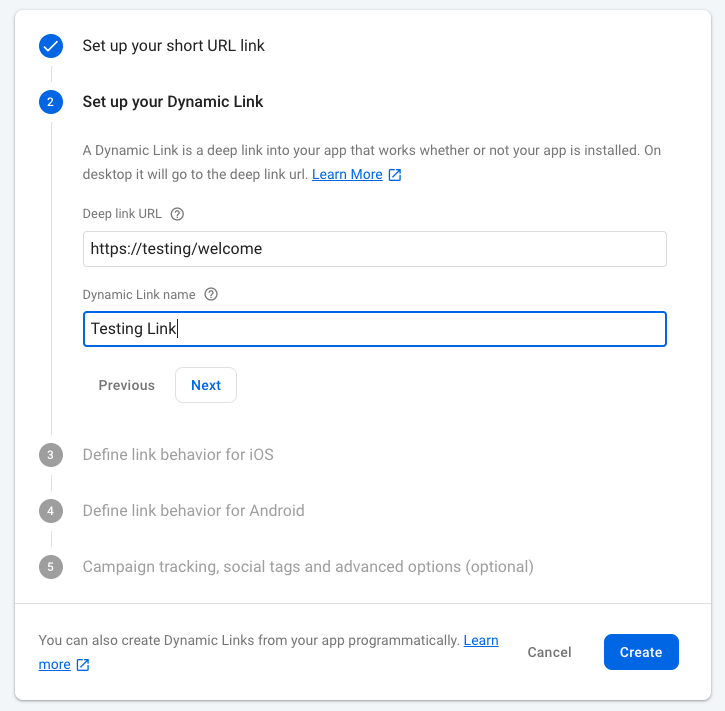
Select Dynamic Links from the side drawer’s Grow section then click on New Dynamic Link.
选择 从侧面看抽屉的的Grow部分动态链接然后单击New动态链接 。
Follow all the steps given in the below image. After that, you get a final link like this: https://test.page.link/FwrkDi.
请按照下图给出的所有步骤。 之后,您将获得如下最终链接: https : //test.page.link/FwrkDi 。
以编程方式创建动态链接 (Create Dynamic Links programmatically)
You can create a link programmatically by setting the following parameters and using the DynamicLinkParameters.buildUrl() method. To create a short link, use the DynamicLinkParameters.buildShortLink() method.
您可以通过设置以下参数并使用DynamicLinkParameters.buildUrl()方法以编程方式创建链接。 若要创建短链接,请使用DynamicLinkParameters.buildShortLink()方法。
You can pass multiple parameters like ?userId=1&category=education. If you do not want to pass parameters in the link then remove ?userId=1 from URL.
您可以传递多个参数,例如?userId = 1&category = education 。 如果您不想在链接中传递参数,请从URL中删除?userId = 1 。
Future<String> createDynamicLink() async {


  var parameters = DynamicLinkParameters(
    uriPrefix: 'https://test.page.link',
    link: Uri.parse('https://test/welcome?userId=1'),
    androidParameters: AndroidParameters(
      packageName: "com.exmple.test",
    ),
    iosParameters: IosParameters(
      bundleId: "com.exmple.test",
      appStoreId: '1498909115',
    ),
  );
  var dynamicUrl = await parameters.buildUrl();
  var shortLink = await parameters.buildShortLink();
  var shortUrl = shortLink.shortUrl;


  return shortUrl.toString();
}
5. 接收应用程序中的链接 (5. Receive Link in Application)
Now, to get a link in the application, initialize Dynamic Links in your app’s main widget.
现在,要在应用程序中获取链接,请在应用程序的主窗口小部件中初始化动态链接。
To receive a dynamic link, call the getInitialLink() method from FirebaseDynamicLinks which gets the link that opened the app (or null if it was not opened via a dynamic link). You need to add a two to three-second delay because sometimes, the link gets null when the app opens the first time.
要接收动态链接,请从FirebaseDynamicLinks调用getInitialLink()方法,该方法获取打开应用程序的链接(如果未通过动态链接打开,则为null)。 您需要添加两到三秒的延迟,因为有时,当应用程序首次打开时,链接会为空。
Configure listeners for link callbacks when the application is in the foreground or in the background calling onLink.
当应用程序在前台或后台调用onLink时,为链接回调配置侦听onLink 。
class MainWidgetState extends State<MainWidget> {
  @override
  void initState() {
    super.initState();
    this.initDynamicLinks();
  }
  initDynamicLinks(BuildContext context) async {
    await Future.delayed(Duration(seconds: 3));
    var data = await FirebaseDynamicLinks.instance.getInitialLink();
    var deepLink = data?.link;
    final queryParams = deepLink.queryParameters;
    if (queryParams.length > 0) {
      var userName = queryParams['userId'];
    }
    FirebaseDynamicLinks.instance.onLink(onSuccess: (dynamicLink)
      async {
      var deepLink = dynamicLink?.link;
      debugPrint('DynamicLinks onLink $deepLink');
    }, onError: (e) async {
      debugPrint('DynamicLinks onError $e');
    });
  }
}
就是这样 (And That’s It)
We have seen how to create and receive Firebase Dynamic Links. I hope that you’ve been able to see the benefits of Firebase Dynamic Links from this and how super easy it is to get set up!
我们已经了解了如何创建和接收Firebase动态链接。 希望您能够从中看到Firebase动态链接的好处,以及设置起来超级容易!
firebase使用


 已为社区贡献113条内容


所有评论(0)