Flutter for OpenHarmony 商城App实战 - 商品详情实现
本文介绍了在Flutter for OpenHarmony中实现商品详情页的关键技术。主要内容包括:1) 购物车数据结构的实现,使用Map存储商品项并支持状态通知;2) 购物车作用域设计,通过InheritedNotifier实现全局共享;3) 商品详情页面的异步数据加载和UI构建。这些技术点涵盖了电商应用中商品详情页的核心功能需求,为开发者提供了完整的实现方案。
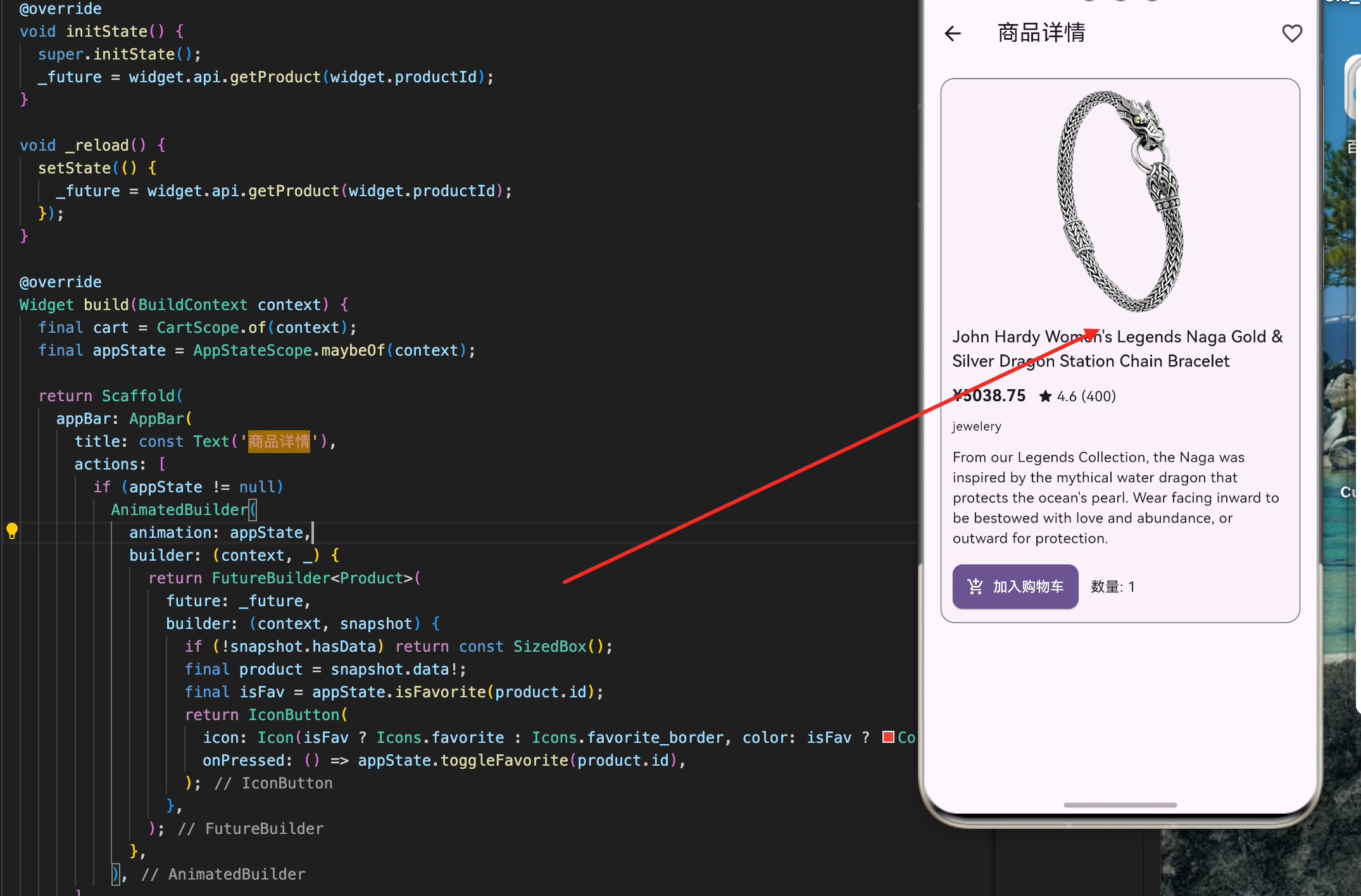
商品详情页是用户了解商品的重要入口。在这个页面上,用户可以查看商品的完整信息、高清图片、详细描述、用户评分等,并可以进行收藏和加入购物车等操作。本文将详细讲解如何在 Flutter for OpenHarmony 项目中实现一个功能完整的商品详情页面,包括异步数据加载、收藏功能、购物车集成和浏览记录等。
购物车数据结构
购物车是电商应用的核心功能。我们需要定义购物车项和购物车类来管理用户选择的商品。
// 购物车中的单个商品项
class CartItem {
  CartItem({
    required this.product,    // 商品对象
    required this.quantity,   // 商品数量
  });

  final Product product;
  int quantity;

  // 计算该商品的小计(美元)
  double get subtotalUsd => product.priceUsd * quantity;
}

// 购物车类,继承自ChangeNotifier以支持状态通知
class Cart extends ChangeNotifier {
  // 使用Map存储购物车项,key为商品ID,value为CartItem
  final Map<int, CartItem> _items = <int, CartItem>{};

  // 获取购物车中的所有商品
  List<CartItem> get items => _items.values.toList(growable: false);

  // 计算购物车中的总商品数量
  int get totalItems => _items.values.fold<int>(0, (sum, e) => sum + e.quantity);

  // 计算购物车的总价(美元)
  double get totalUsd => _items.values.fold<double>(0, (sum, e) => sum + e.subtotalUsd);

  // 获取指定商品的数量
  int quantityOf(int productId) => _items[productId]?.quantity ?? 0;

  // 添加商品到购物车
  void add(Product product) {
    // 检查购物车中是否已有该商品
    final existing = _items[product.id];
    if (existing != null) {
      // 如果已有,则增加数量
      existing.quantity += 1;
    } else {
      // 如果没有,则创建新的CartItem
      _items[product.id] = CartItem(product: product, quantity: 1);
    }
    // 通知所有监听者购物车已改变
    notifyListeners();
  }

  // 减少商品数量
  void removeOne(int productId) {
    final existing = _items[productId];
    if (existing == null) return;

    // 减少数量
    existing.quantity -= 1;
    // 如果数量为0,则从购物车中移除
    if (existing.quantity <= 0) {
      _items.remove(productId);
    }
    notifyListeners();
  }

  // 设置商品的具体数量
  void setQuantity(int productId, int quantity) {
    // 如果数量为0或负数,则移除该商品
    if (quantity <= 0) {
      _items.remove(productId);
      notifyListeners();
      return;
    }

    final existing = _items[productId];
    if (existing == null) return;

    // 更新数量
    existing.quantity = quantity;
    notifyListeners();
  }

  // 清空购物车
  void clear() {
    if (_items.isEmpty) return;
    _items.clear();
    notifyListeners();
  }
}
这个购物车实现展示了如何管理购物车数据:
数据结构设计:
- 使用
Map<int, CartItem>存储购物车项,以商品ID为key - 这样可以快速查找和更新商品
- 避免了重复的商品项
ChangeNotifier 模式:
- 继承自
ChangeNotifier支持状态通知 - 每次修改购物车时调用
notifyListeners() - 所有监听购物车的组件都会自动更新
计算属性:
totalItems使用fold累加所有商品数量totalUsd计算购物车总价quantityOf快速查询商品数量
购物车作用域
CartScope 是一个 InheritedNotifier,用于在整个应用中共享购物车实例。
class CartScope extends InheritedNotifier<Cart> {
  const CartScope({
    super.key,
    required Cart cart,      // 购物车实例
    required super.child,    // 子组件
  }) : super(notifier: cart);

  // 静态方法,用于获取购物车实例
  static Cart of(BuildContext context) {
    // 查找最近的CartScope
    final CartScope? scope = context.dependOnInheritedWidgetOfExactType<CartScope>();

    // 如果没有找到CartScope,抛出错误
    if (scope == null) {
      throw FlutterError(
        'CartScope.of() called with a context that does not contain a CartScope.'
      );
    }

    // 获取购物车实例
    final Cart? cart = scope.notifier;
    if (cart == null) {
      throw FlutterError('CartScope found but cart is null.');
    }

    return cart;
  }
}
这个作用域类展示了如何使用 InheritedNotifier:
InheritedNotifier 的优势:
- 继承自
InheritedNotifier<Cart>,自动处理状态通知 - 子组件可以通过
CartScope.of(context)获取购物车实例 - 当购物车状态改变时,所有依赖的组件自动重建
错误处理:
- 如果没有找到
CartScope,抛出有意义的错误信息 - 帮助开发者快速定位问题
- 防止应用在运行时崩溃
商品详情页面
ProductDetailsPage 是商品详情的主页面,负责加载商品数据、显示商品信息和处理用户交互。
class ProductDetailsPage extends StatefulWidget {
const ProductDetailsPage({
super.key,
required this.api, // API实例
required this.productId, // 商品ID
required this.currency, // 当前货币
required this.usdToCurrencyRate, // 汇率
});
final FakeStoreApi api;
final int productId;
final String currency;
final double usdToCurrencyRate;
State<ProductDetailsPage> createState() => _ProductDetailsPageState();
}
class _ProductDetailsPageState extends State<ProductDetailsPage> {
// 存储异步操作的Future对象
late Future<Product> _future;
void initState() {
super.initState();
// 页面初始化时加载商品详情
_future = widget.api.getProduct(widget.productId);
}
// 重新加载商品详情
void _reload() {
setState(() {
// 创建新的Future对象,触发重新加载
_future = widget.api.getProduct(widget.productId);
});
}
这段代码展示了详情页的初始化:
Future 管理:
- 使用
late关键字延迟初始化_future - 在
initState中根据商品ID加载详情 - 每次重新加载时创建新的Future对象
参数传递:
- 接收商品ID、货币、汇率等参数
- 这些参数用于加载和显示商品信息
详情页的UI构建
详情页的UI包含商品图片、标题、价格、评分、描述和操作按钮。
Widget build(BuildContext context) {
// 获取购物车实例
final cart = CartScope.of(context);
// 获取应用状态(用于收藏功能)
final appState = AppStateScope.maybeOf(context);
return Scaffold(
appBar: AppBar(
title: const Text('商品详情'),
// 导航栏右侧的收藏按钮
actions: [
if (appState != null)
AnimatedBuilder(
animation: appState,
builder: (context, _) {
return FutureBuilder<Product>(
future: _future,
builder: (context, snapshot) {
// 如果商品数据未加载,不显示按钮
if (!snapshot.hasData) return const SizedBox();
final product = snapshot.data!;
// 检查商品是否已收藏
final isFav = appState.isFavorite(product.id);
return IconButton(
// 根据收藏状态显示不同的图标
icon: Icon(
isFav ? Icons.favorite : Icons.favorite_border,
color: isFav ? Colors.red : null,
),
// 点击时切换收藏状态
onPressed: () => appState.toggleFavorite(product.id),
);
},
);
},
),
],
),
body: FutureBuilder<Product>(
future: _future,
builder: (context, snapshot) {
// 加载中状态
if (snapshot.connectionState != ConnectionState.done) {
return const LoadingView(label: '加载详情中...');
}
// 错误状态
if (snapshot.hasError) {
return ErrorView(
title: '加载商品失败',
message: '${snapshot.error}',
onRetry: _reload,
);
}
final product = snapshot.data;
// 如果商品不存在
if (product == null) {
return const ErrorView(title: '无数据', message: '商品不存在');
}
// 添加到最近浏览记录
WidgetsBinding.instance.addPostFrameCallback((_) {
appState?.addRecentViewed(product);
});
// 显示商品详情
return ListView(
padding: const EdgeInsets.all(12),
children: <Widget>[
ShopCard(
child: Column(
crossAxisAlignment: CrossAxisAlignment.start,
children: <Widget>[
// 商品图片
Center(
child: Image.network(
product.imageUrl,
height: 220,
fit: BoxFit.contain,
// 图片加载失败时显示空白区域
errorBuilder: (_, __, ___) => const SizedBox(height: 220),
),
),
const SizedBox(height: 12),
// 商品标题
Text(
product.title,
style: Theme.of(context).textTheme.titleMedium,
),
const SizedBox(height: 10),
// 价格和评分
Row(
children: <Widget>[
// 显示转换后的价格
PriceText(
amount: product.priceUsd * widget.usdToCurrencyRate,
currency: widget.currency,
),
const SizedBox(width: 12),
// 显示评分
Text(
'★ ${product.rating.toStringAsFixed(1)} '
'(${product.ratingCount})',
),
],
),
const SizedBox(height: 10),
// 商品分类
Text(
product.category,
style: Theme.of(context).textTheme.bodySmall,
),
const SizedBox(height: 12),
// 商品描述
Text(product.description),
const SizedBox(height: 14),
// 加入购物车按钮和数量显示
Row(
children: <Widget>[
ShopButton(
label: '加入购物车',
icon: Icons.add_shopping_cart,
onPressed: () => cart.add(product),
),
const SizedBox(width: 12),
// 显示购物车中该商品的数量
AnimatedBuilder(
animation: cart,
builder: (context, _) {
final qty = cart.quantityOf(product.id);
return Text('数量: $qty');
},
),
],
),
],
),
),
],
);
},
),
);
}
这段代码展示了详情页的完整UI构建:
异步状态处理:
- 使用
FutureBuilder处理商品数据的加载 - 显示加载中、错误和成功三种状态
- 提供重试按钮让用户重新加载
收藏功能:
- 使用
AnimatedBuilder监听应用状态变化 - 根据收藏状态显示不同的图标
- 点击按钮切换收藏状态
浏览记录:
- 使用
addPostFrameCallback在页面渲染完成后添加浏览记录 - 避免在构建过程中修改状态
购物车集成:
- 获取购物车实例并添加商品
- 实时显示购物车中该商品的数量
- 使用
AnimatedBuilder监听购物车变化
收藏功能实现
收藏功能允许用户保存喜欢的商品。这需要在应用状态中维护一个收藏列表。
// 在AppState中维护收藏列表
final Set<int> _favoriteIds = {};

// 获取收藏列表
Set<int> get favoriteIds => Set.unmodifiable(_favoriteIds);

// 检查商品是否已收藏
bool isFavorite(int productId) => _favoriteIds.contains(productId);

// 切换收藏状态
void toggleFavorite(int productId) {
  if (_favoriteIds.contains(productId)) {
    // 如果已收藏,则移除
    _favoriteIds.remove(productId);
  } else {
    // 如果未收藏,则添加
    _favoriteIds.add(productId);
  }
  notifyListeners();
}
这个收藏功能的实现展示了如何管理用户偏好:
数据结构:
- 使用
Set<int>存储收藏的商品ID - Set 提供了快速的查找和去重功能
- 避免了重复的收藏记录
状态管理:
isFavorite快速检查商品是否已收藏toggleFavorite切换收藏状态- 每次修改后调用
notifyListeners()通知UI更新
浏览记录功能
浏览记录功能记录用户查看过的商品,用于个性化推荐。
// 在AppState中维护浏览记录
final List<Product> _recentViewed = [];

// 获取浏览记录
List<Product> get recentViewed => List.unmodifiable(_recentViewed);

// 添加到浏览记录
void addRecentViewed(Product product) {
  // 移除重复的商品
  _recentViewed.removeWhere((p) => p.id == product.id);

  // 添加到列表开头
  _recentViewed.insert(0, product);

  // 限制浏览记录的数量(最多20条)
  if (_recentViewed.length > 20) {
    _recentViewed.removeLast();
  }

  notifyListeners();
}

// 清空浏览记录
void clearRecentViewed() {
  _recentViewed.clear();
  notifyListeners();
}
这个浏览记录功能展示了如何实现用户行为追踪:
去重处理:
- 在添加新记录前移除重复的商品
- 确保每个商品只出现一次
- 最新浏览的商品显示在最前面
数量限制:
- 限制浏览记录最多保存20条
- 防止内存占用过多
- 保留最近的浏览记录
用户体验:
- 用户可以清空浏览记录
- 浏览记录用于个性化推荐
- 提高用户的购物体验
总结
商品详情页的实现涉及多个重要的技术点。首先是购物车的数据结构和状态管理,使用 ChangeNotifier 实现状态通知。其次是 CartScope 的使用,在整个应用中共享购物车实例。再次是异步数据加载和错误处理,提供良好的用户体验。最后是收藏和浏览记录功能,增强应用的个性化能力。
这种设计确保了商品详情页的功能完整性和用户体验的流畅性。用户可以轻松查看商品信息、收藏喜欢的商品、添加到购物车,整个流程自然而直观。
欢迎加入开源鸿蒙跨平台社区:https://openharmonycrossplatform.csdn.net

开源鸿蒙跨平台开发社区汇聚开发者与厂商,共建“一次开发,多端部署”的开源生态,致力于降低跨端开发门槛,推动万物智联创新。
更多推荐


 17
17 0
0- 0


 已为社区贡献29条内容

所有评论(0)