Flutter: 主题ThemeData
ThemeData 是MaterialDesign Widget库的主题数据,Material库的Widget需要遵守相应的涉及规范。 这些涉及规范可自定部分都定义在ThemeData,所以我们可以通过ThemeData来自定义应用主题。 通过Theme.of方法来获取当前的ThemeData. Material Design设计规范中有些是不能自定义的,如导航栏高度,ThemeData只包含..
·
ThemeData 是MaterialDesign Widget库的主题数据,Material库的Widget需要遵守相应的涉及规范。 这些涉及规范可自定部分都定义在ThemeData,所以我们可以通过ThemeData来自定义应用主题。 通过Theme.of方法来获取当前的ThemeData. Material Design设计规范中有些是不能自定义的,如导航栏高度,ThemeData只包含了可自定义部分。
注:
theme: ThemeData(
  /**
   * primarySwatch是主题颜色的一个样本。通过这个样本可以在一些条件下生成一些其他的属性。
   * 例如,若没有指定primaryColor,并且当前主题不是深色主题,那么primaryColor就会默认为primarySwatch指定的颜色,
   * 还有一些相似的属性:accentColor、indicatorColor等也会受到primarySwatch的影响。
   */
  primarySwatch: Colors.blue,
),
实战:单个路由换肤(ThemeData),掌握局部覆盖全局
import 'package:flutter/material.dart';
/**
* @date on 2019/6/30
* @author Yinlei
* @packagename
* @email 1099129793@qq.com
* @describe ThemeData.
*/
void main() => runApp(MyApp());
/**
 * 实现一个路由换肤功能。
 */
class MyApp extends StatelessWidget {
  @override
  Widget build(BuildContext context) {
    return MaterialApp(
      title: 'Flutter Demo',
      theme: ThemeData(
        primarySwatch: Colors.blue,
      ),
      home: ThemeRouteDemo(),
    );
  }
}

class ThemeRouteDemo extends StatefulWidget {
  @override
  _ThemeRouteDemoState createState() => _ThemeRouteDemoState();
}

class _ThemeRouteDemoState extends State<ThemeRouteDemo> {

  Color _themeColor = Colors.green; //当前路由主题色


  @override
  Widget build(BuildContext context) {
    ThemeData themeData = Theme.of(context);
    return Theme(
      data: ThemeData(
        primarySwatch: _themeColor,//用于导航栏、FloatingActionButton的背景色等
        iconTheme: IconThemeData(color: _themeColor),//用于Icon颜色
      ),
      child: Scaffold(
        appBar: AppBar(
          title: Text('ThemeData实现路由换肤'),
        ),
        body: Column(
          mainAxisAlignment: MainAxisAlignment.center,
          children: <Widget>[
            //第一行Icon使用主题中的iconTheme
            Row(
              mainAxisAlignment: MainAxisAlignment.center,
              children: <Widget>[
                Icon(Icons.favorite),
                Icon(Icons.pregnant_woman),
                Text(' 颜色跟随主题'),
              ],
            ),

            //给第二行Icon自定义颜色(固定为某个颜色)
            Theme(
              data: themeData.copyWith(
                iconTheme: themeData.iconTheme.copyWith(
                  color: Colors.orange,
                ),
              ),
              child:Row(
                mainAxisAlignment: MainAxisAlignment.center,
                children: <Widget>[
                  Icon(Icons.send),
                  Icon(Icons.explore),
                  Text(' 颜色固定橘黄色'),
                ],
              ),
            ),
          ],
        ),
        floatingActionButton: FloatingActionButton(
          onPressed: () =>
          setState(() =>
            _themeColor = _themeColor==Colors.green ? Colors.orange : Colors.green,
          ),
          child: Icon(Icons.palette),
        ),
      ),
    );
  }
}
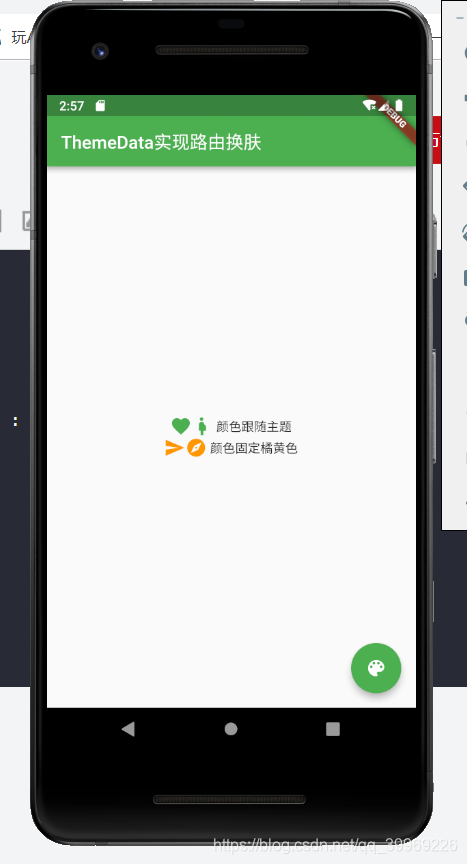
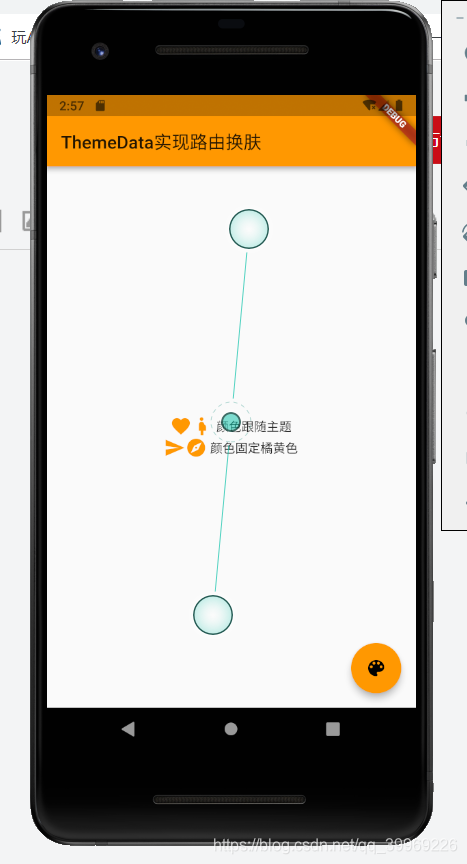
代码相关解释:
1.可以通过局部主题覆盖全局主题。上述代码中的通过Theme组件为第二行图标指定固定颜色(橘黄色)一样。Flutter会经常使用这种方法来自定义子树主题。
2.Flutter是怎么让局部主题覆盖全局主题的?
答:主要是因为Widget中使用主题样式是通过Theme.of(BuildContext context)来获取的。
源码如下:
static ThemeData of(BuildContext context, { bool shadowThemeOnly = false }) {
    final _InheritedTheme inheritedTheme = context.inheritFromWidgetOfExactType(_InheritedTheme);
    if (shadowThemeOnly) {
      if (inheritedTheme == null || inheritedTheme.theme.isMaterialAppTheme)
        return null;
      return inheritedTheme.theme.data;
    }

    final MaterialLocalizations localizations = MaterialLocalizations.of(context);
    final ScriptCategory category = localizations?.scriptCategory ?? ScriptCategory.englishLike;
    final ThemeData theme = inheritedTheme?.theme?.data ?? _kFallbackTheme;
    return ThemeData.localize(theme, theme.typography.geometryThemeFor(category));
  }
官方解释如下:
/// The data from the closest [Theme] instance that encloses the given
  /// context.
  ///
  /// If the given context is enclosed in a [Localizations] widget providing
  /// [MaterialLocalizations], the returned data is localized according to the
  /// nearest available [MaterialLocalizations].
  ///
  /// Defaults to [new ThemeData.fallback] if there is no [Theme] in the given
  /// build context.
  ///
  /// If [shadowThemeOnly] is true and the closest [Theme] ancestor was
  /// installed by the [MaterialApp] — in other words if the closest [Theme]
  /// ancestor does not shadow the application's theme — then this returns null.
  /// This argument should be used in situations where its useful to wrap a
  /// route's widgets with a [Theme], but only when the application's overall
  /// theme is being shadowed by a [Theme] widget that is deeper in the tree.
  /// See [isMaterialAppTheme].
  ///
  /// Typical usage is as follows:
  ///
  /// ```dart
  /// @override
  /// Widget build(BuildContext context) {
  ///   return Text(
  ///     'Example',
  ///     style: Theme.of(context).textTheme.title,
  ///   );
  /// }
  /// ```
  ///
  /// When the [Theme] is actually created in the same `build` function
  /// (possibly indirectly, e.g. as part of a [MaterialApp]), the `context`
  /// argument to the `build` function can't be used to find the [Theme] (since
  /// it's "above" the widget being returned). In such cases, the following
  /// technique with a [Builder] can be used to provide a new scope with a
  /// [BuildContext] that is "under" the [Theme]:
  ///
  /// ```dart
  /// @override
  /// Widget build(BuildContext context) {
  ///   return MaterialApp(
  ///     theme: ThemeData.light(),
  ///     body: Builder(
  ///       // Create an inner BuildContext so that we can refer to
  ///       // the Theme with Theme.of().
  ///       builder: (BuildContext context) {
  ///         return Center(
  ///           child: Text(
  ///             'Example',
  ///             style: Theme.of(context).textTheme.title,
  ///           ),
  ///         );
  ///       },
  ///     ),
  ///   );
  /// }
  /// ```
final _InheritedTheme inheritedTheme = context.inheritFromWidgetOfExactType(_InheritedTheme);
这句代码意思是会在Widget树中从当前未知向上查找第一个类型为_InheritedTheme的Widget。所以当局部使用Theme后,其子树中Theme.of()找到的第一个_InheritedTheme便是该Theme的。
如果是相对于整个应用换肤,可以修改MaterialApp的theme属性。

开源鸿蒙跨平台开发社区汇聚开发者与厂商,共建“一次开发,多端部署”的开源生态,致力于降低跨端开发门槛,推动万物智联创新。
更多推荐
 3
3 0
0- 0


 已为社区贡献7条内容

所有评论(0)