Kotlin协程源码分析-2 调用挂起函数
引语我们假设有如下挂起函数//com.example.studycoroutine.chapter.CoroutineRun.ktsuspend fun suspendFun(): Int {return 1;}上面的代码在kotlin编译的时候会变成如下函数@Nullablepublic static final Object suspendFun( Contin...
引语
我们假设有如下挂起函数
//com.example.studycoroutine.chapter.CoroutineRun.kt
suspend fun suspendFun(): Int {
    return 1;
}
上面的代码在kotlin编译的时候会变成如下函数
 @Nullable
  public static final Object suspendFun( Continuation completion) {
    return Boxing.boxInt(1);
  }
也就是说所有的挂起函数(suspend关键字修饰的函数)在编译后会变成一个传入Continuation函数.
多看一个例子:
suspend fun suspendFunHaveOneParameter(msg: String): String {
    return "incoming parameter [$msg]";
}
编译后
  @Nullable
  public static final Object suspendFunHaveOneParameter( String msg,  Continuation completion) {
    return "incoming parameter [" + msg + ']';
  }
Continuation是什么
首先看看看类定义(先看一眼即可)
//kotlin.coroutines.Continuation.kt

/**
 * Interface representing a continuation after a suspension point that returns a value of type `T`.
 */
@SinceKotlin("1.3")
public interface Continuation<in T> {
    /**
     * 协程上下文。
     * 上下文就是用来装数据的集合,比如Android 的上下文获得图片资源等
     */
    public val context: CoroutineContext

    /**
     * 挂起恢复的回调,先了解即可
     */
    public fun resumeWith(result: Result<T>)
}
- 这里涉及两个问题:
Continuation是什么- 在我们自己编写的
kotlin代码中怎么拿到这个Continuation参数
当然这里我们先缓缓这两个问题,我们怎么调用这两个函数?
在常规的情况的我们无法直接调用对应的suspend函数(如下图),因为我们知道编译后函数会多一个Continuation参数,所以现在大家对于为何不能直接调用suspend函数调用理解的更加深刻。所以我们想调用此类函数,就必须传入Continuation参数(或在其他suspend函数调用会自动依赖编译器生成传入,后续文章再讲)。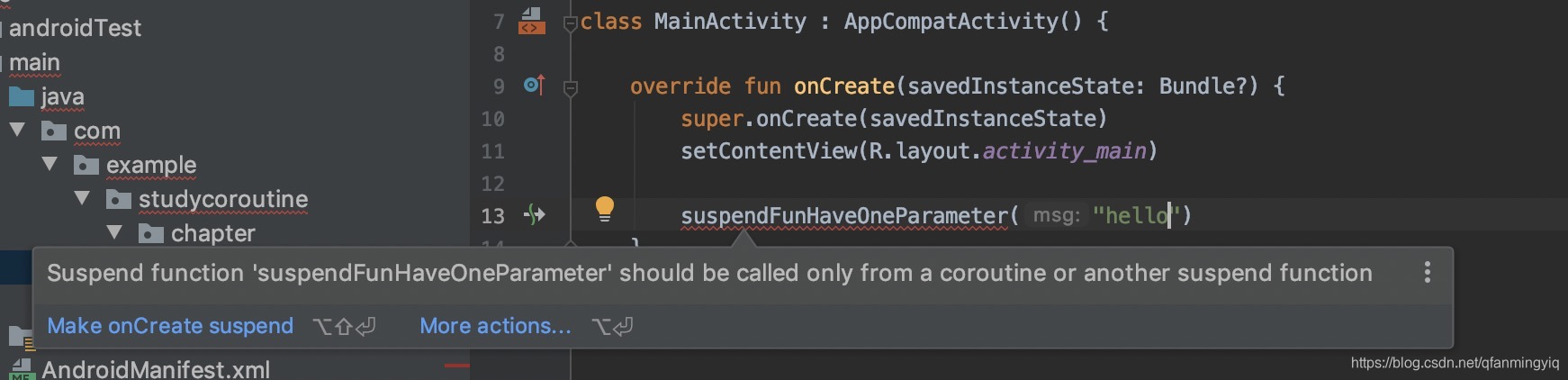
- 总结能调用方法有两种:
- 在
suspend函数中调用其他suspend函数(编译器黑魔法,后续文章讲解本文跳过) - 自己创建
Continuation,进行调用( 本文讲解主要点)
创建Continuation调用suspend函数
- 如何创建
Continuation?
我们可以从Kotlin 核心库源码分析得到我们想要的结果。
添加依赖:implementation 'org.jetbrains.kotlinx:kotlinx-coroutines-core:1.3.4'(这个只是封装了协程工具类,不需要也可以写出协程。比如 GlobalScope.launch就封装在这个库)
然后分析如下代码调用:
  GlobalScope.launch {
            println("MainActivity.onCreate")
        }
查看launch函数声明
//kotlinx.coroutines.Builders.common.kt
public fun CoroutineScope.launch(
    context: CoroutineContext = EmptyCoroutineContext,
    start: CoroutineStart = CoroutineStart.DEFAULT,
    block: suspend CoroutineScope.() -> Unit
): Job {
    val newContext = newCoroutineContext(context)
    val coroutine = if (start.isLazy)
        LazyStandaloneCoroutine(newContext, block) else
        StandaloneCoroutine(newContext, active = true)
    coroutine.start(start, coroutine, block)
    return coroutine
}
来看下核心的几行代码,下面的代码返回一个类对象实现类Continuation接口的类而已(这个后面我们会自己实现)
   val coroutine = if (start.isLazy)
        LazyStandaloneCoroutine(newContext, block) else
        StandaloneCoroutine(newContext, active = true)
由于文本不讲解基础使用,所以继续跟源码会调用CoroutineStart类的invoke函数
   public operator fun <T> invoke(block: suspend () -> T, completion: Continuation<T>) =
       when (this) {
           CoroutineStart.DEFAULT -> block.startCoroutineCancellable(completion)
           CoroutineStart.ATOMIC -> block.startCoroutine(completion)
           CoroutineStart.UNDISPATCHED -> block.startCoroutineUndispatched(completion)
           CoroutineStart.LAZY -> Unit // will start lazily
       }
我们这里只看如下部分CoroutineStart.ATOMIC -> block.startCoroutine(completion)
继续跟进去startCoroutine函数会调用到kotlin.coroutines.Continuation.kt
public fun <T> (suspend () -> T).startCoroutine(
    completion: Continuation<T>
) {
    createCoroutineUnintercepted(completion).intercepted().resume(Unit)
}
看得到这里即可。
-
createCoroutineUnintercepted创建一个continuation传入一个completion对象,这个对象是调用suspend函数会回调到此对象的resumeWith -
intercepted拦截器可以用于切换线程等,这里可以忽视 -
resume调用suspend函数并传入对应的continuation -
以上便是核心库的调用逻辑,总结上面的源码分析结果:
- 创建一个
Continuation对象 - 然后调用
Continuation.kt对于suspend的lambda的扩展函数startCoroutine函数即可(这里是对lambda对象扩展,不是函数你之后可以在这个lambda表达式中调用suspend函数) suspend的lambda中调用其他suspend函数
注意:suspend的lambda不等价suspend函数!!!!!
我们来自己实践下
第一步创建个Continuation对象
//com.example.studycoroutine.chapter.two.MyCoroutine.kt
class MyCoroutine() : Continuation<String> {
    override fun resumeWith(result: Result<String>) {

      logD("MyCoroutine 回调resumeWith 返回的结果 " + result.getOrNull())
    }

    override val context: CoroutineContext
        get() = kotlin.coroutines.EmptyCoroutineContext

}
第二步和第三部调用Continuation.kt的startCoroutine函数即可
//com.example.studycoroutine.chapter.two.CoroutineRun.kt
suspend fun mySuspendFun(): String {
    return "hello";
}
fun testOne(){

    val myCoroutineFun: suspend () -> String = {
        logD("返回 hello结果")
          mySuspendFun()

    }

    val myCoroutine = MyCoroutine()
    val coroutine = myCoroutineFun.startCoroutine(myCoroutine)

}
输出:
[main] 返回 hello结果
[main] MyCoroutine 回调resumeWith 返回的结果 hello
当然还有一些其他使用方式Continuation.kt中
//kotlin.coroutines.Continuation.kt
//创建一个createCoroutine后面调用resume即可调用挂起函数
public fun <T> (suspend () -> T).createCoroutine(
    completion: Continuation<T>
): Continuation<Unit> =
    SafeContinuation(createCoroutineUnintercepted(completion).intercepted(), COROUTINE_SUSPENDED)

//创建一个createCoroutine并直接调用resume
public fun <R, T> (suspend R.() -> T).startCoroutine(
    receiver: R,
    completion: Continuation<T>
) {
    createCoroutineUnintercepted(receiver, completion).intercepted().resume(Unit)
}
于是掉用suspend 函数还可以这样写
//com.example.studycoroutine.chapter.two.CoroutineRun.kt
fun testOne(){

    val myCoroutineFun: suspend () -> String = {
        logD("返回 hello结果")
         mySuspendFun()
    }

    val myCoroutine = MyCoroutine()

    //这种写法是下面的封装而已
    //myCoroutineFun.startCoroutine(myCoroutine)


    val createCoroutine = myCoroutineFun.createCoroutine(myCoroutine)
    createCoroutine.resume(Unit)

}

开源鸿蒙跨平台开发社区汇聚开发者与厂商,共建“一次开发,多端部署”的开源生态,致力于降低跨端开发门槛,推动万物智联创新。
更多推荐



 3
3 0
0- 0


 已为社区贡献11条内容

所有评论(0)