使用Android Studio设置Kotlin | Android与Kotlin
Since after the google has announced the kotlin as its official language for android app development, it has been significantly raised in the market and development fields. Many apps are already built in with kotlin such as Udacity, Nova launcher, Reddit, Pinterest etc.
自从Google宣布Kotlin作为android应用程序开发的正式语言以来,它在市场和开发领域得到了极大的发展。 Kotlin已经内置了许多应用程序,例如Udacity,Nova启动器,Reddit,Pinterest等。
With this article let’s start the journey towards developing android apps with kotlin. First of all, if you are new to kotlin I would recommend you to first start with kotlin. Once you get familiar with it will be quite interesting to start the ride.
通过本文,我们开始使用Kotlin开发Android应用程序的旅程。 首先,如果您不熟悉Kotlin,我建议您先从Kotlin开始 。 熟悉后,开始骑行会很有趣。
To start with it, Just install android studiov3.0 or higher, as kotlin is fully supported in versions>=3.0. Also, it's easy to create new projects with Kotlin files, add Kotlin files to your existing project, and convert Java language code to Kotlin. You can use it in the previous version too. But it will add a few more steps in the project compilation. We will discuss them too.
首先,只需安装android studiov3.0或更高版本,因为kotlin在版本> = 3.0中完全受支持 。 同样,使用Kotlin文件创建新项目,将Kotlin文件添加到现有项目中以及将Java语言代码转换为Kotlin都很容易。 您也可以在以前的版本中使用它。 但这将在项目编译中添加更多步骤。 我们也将讨论它们。
Steps for android studio version 3.0 or higher:
android studio 3.0或更高版本的步骤:
-
Open android studio.
打开android studio。
-
Create new project.
创建新项目。
-
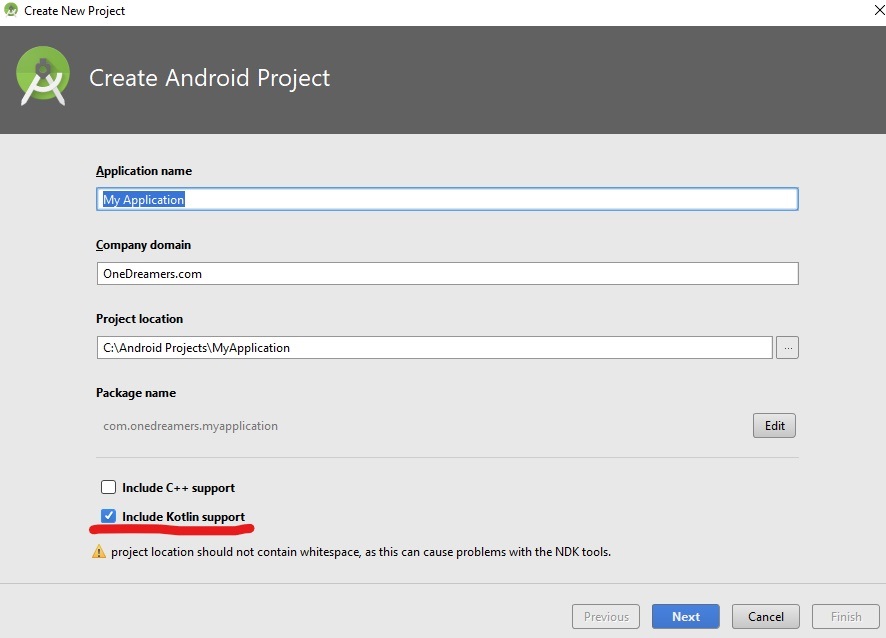
A window will appear. Name your project, don’t forget to check include kotlin support checkbox.
将出现一个窗口。 为您的项目命名,不要忘记选中“包括kotlin支持”复选框。
-
Select form factors and target android devices.
选择外形尺寸并定位android设备。
-
Select Empty Activity (or as per your need).
选择清空活动(或根据您的需要)。
-
Click finish, project will start refreshing.
单击完成,项目将开始刷新。
-
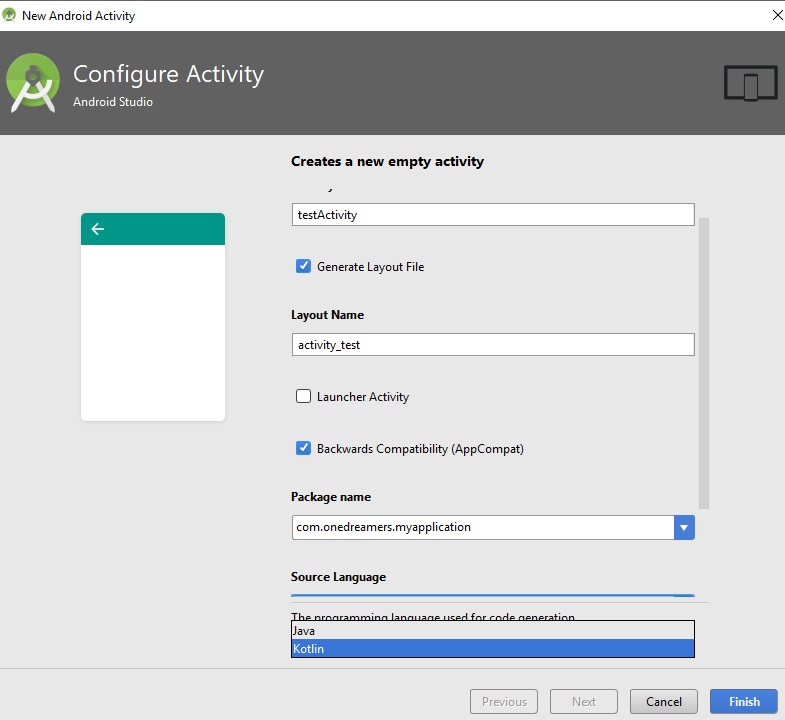
If you wish to create new activity in kotlin then select kotlin as source languagefromthe dropdown.
如果您想在kotlin中创建新活动,请从下拉列表中选择kotlin作为源语言。
-
Few files will be created by android studio. But the source file now will be in .kt extension.
android studio创建的文件很少。 但是源文件现在将以.kt扩展名。
-
You are done.
大功告成
On previous versions of android studio,
在早期版本的android studio中,
1) Install kotlin plugin first. Just head over to Settings → Plugins.
1)首先安装kotlin插件 。 只需转到设置→插件 。
2) Then click tools → kotlin → configure kotlin in project.
2)然后单击工具→Kotlin→在项目中配置Kotlin 。
3) The project will be automatically configured, If not then
3)项目将被自动配置,否则
-
Add these lines in project level build.gradle dependencies block:
将这些行添加到项目级别的build.gradle依赖项块中 :
    classpath'com.android.tools.build:gradle:2.3.3'
    classpath"org.jetbrains.kotlin:kotlin-gradle-plugin:$kotlin_version"
-
Add this lines in module level build.gradle file at the top of the page
在页面顶部的模块级别build.gradle文件中添加此行
-
apply plugin: 'kotlin-android' apply plugin: 'kotlin-android-extensions' // kotlin extension to add extra feature and reduce lines of code -
In the dependency block
在依赖块中
-
compile "org.jetbrains.kotlin:kotlin-stdlib-jre7:$kotlin_version"4) Refresh / build your project.
4)刷新/构建您的项目。
5) You are done.
5)完成。
Conclusion:
结论:
So from this article, you can now easily setup Kotlin in the android studio. If you face any doubt or confusion just write it down in the comment section. In the next article, we will build our first android app with kotlin. And then we will try to get more insights, features that kotlin provides for android. Just stay connected. Good day!
因此,从本文开始,您现在可以在android studio中轻松设置Kotlin 。 如果您有任何疑问或困惑,请将其写下来。 在下一篇文章中,我们将使用kotlin构建我们的第一个android应用。 然后,我们将尝试获得更多的见解,kotlin为android提供的功能。 保持联系。 美好的一天!
翻译自: https://www.includehelp.com/kotlin/setup-kotlin-with-android-studio.aspx

开源鸿蒙跨平台开发社区汇聚开发者与厂商,共建“一次开发,多端部署”的开源生态,致力于降低跨端开发门槛,推动万物智联创新。
更多推荐


 0
0 0
0- 0


 已为社区贡献9条内容

所有评论(0)