如何在React Native中使用可触摸的高光组件?
Touchable highlight in reacts native works like buttons that take an event handler.
触摸式高亮显示响应本机作品,例如带有事件处理程序的按钮。
It is very easy to use and straight forward.
它非常易于使用和直接。
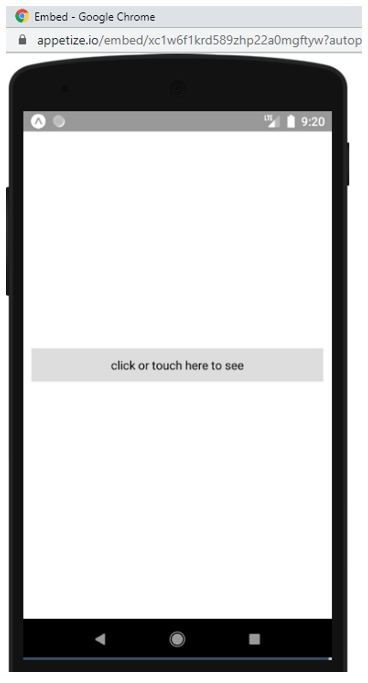
In the code below, we will create a touchable high light zone and create an event that will be called when the area is touched or clicked.
在下面的代码中,我们将创建一个可触摸的高光区域,并创建一个事件,该事件在触摸或单击该区域时将被调用。
Just like in React JS, we, first of all, begin by importing the component, in this case, we are importing from react-native.
就像在React JS中一样,我们首先从导入组件开始,在这种情况下,我们是从react-native导入的。
In your App.js File, type the following,
在您的App.js文件中,键入以下内容,
import React, { Component } from 'react'
import {
  StyleSheet,
  TouchableHighlight,
  Text,
  View,
} from 'react-native'

export default class App extends Component {

  onPress = () => {
    console.log ('area has been pressed');
  }

 render() {
    return (
      <View style={styles.container}>
        <TouchableHighlight
         style={styles.button}
         onPress={this.onPress}
        >
         <Text> click or touch here to see </Text>
        </TouchableHighlight>

      </View>
    )
  }
}

const styles = StyleSheet.create({
  container: {
    flex: 1,
    justifyContent: 'center',
    paddingHorizontal: 10
  },
  button: {
    alignItems: 'center',
    backgroundColor: '#DDDDDD',
    padding: 10
  },
  countContainer: {
    alignItems: 'center',
    padding: 10
  },
  countText: {
    color: '#FF00FF'
  }
})
The touchable highlight has an opening and closing tag, and also uses an event handler.
可触摸的突出显示具有开始和结束标签,并且还使用事件处理程序。
Clicking on the sentence above will print a phrase on the console.
单击上面的句子将在控制台上打印一个短语。
Touchable highlight accepts style as an attribute and also uses other attributes that can be found on the documentation of react native’s official website.
可触摸的突出显示接受样式作为属性,并且还使用其他可以在react native的官方网站文档中找到的属性。
Thanks for coding with me! See you @ the next article. Feel free to drop a comment or question. God Bless You!
感谢您与我编码! 下次见。 随意发表评论或问题。 上帝祝福你!
翻译自: https://www.includehelp.com/react-js/how-to-use-touchable-high-light-component-in-react-native.aspx

开源鸿蒙跨平台开发社区汇聚开发者与厂商,共建“一次开发,多端部署”的开源生态,致力于降低跨端开发门槛,推动万物智联创新。
更多推荐

 0
0 0
0- 0


 已为社区贡献9条内容

所有评论(0)