React-Native UI学习之轮播图(三)
1.UI布局的学习,学习使用引用第三方轮播图的插件;2.在项目目录中新建一个pages文件夹,在pages下新建Index.js的文件;3.在终端cd到工程目录下,安装使用的第三方插件 Swiper;$ npm install react-native-swiper --save$ npm i react-timer-mixin --save4.安装成功后,在Index.js文件下写代
·
1.UI布局的学习,学习使用引用第三方轮播图的插件;
2.在项目目录中新建一个pages文件夹,在pages下新建Index.js的文件; 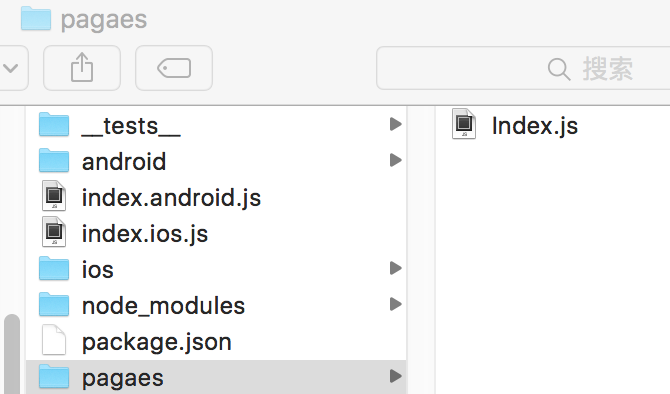
3.在终端cd到工程目录下,安装使用的第三方插件 Swiper;
$ npm install react-native-swiper --save
$ npm i react-timer-mixin --save
4.安装成功后,在Index.js文件下写代码;
import React, { Component } from 'react';
/**
 * 第三方轮播图的插件 地址:https://github.com/leecade/react-native-swiper
 */
import Swiper from 'react-native-swiper'

import {
    AppRegistry,
    StyleSheet,
    Text,
    View,
    Image,
    NavigatorIOS,
    TouchableHighlight,
    ScrollView,
} from 'react-native';

var  sliderImgs = [
    'https://images3.c-ctrip.com/SBU/apph5/201505/16/app_home_ad16_640_128.png',
    'https://images3.c-ctrip.com/rk/apph5/C1/201505/app_home_ad49_640_128.png',
    'https://images3.c-ctrip.com/rk/apph5/D1/201506/app_home_ad05_640_128.jpg',
];
var BUIcon = [
    'https://raw.githubusercontent.com/vczero/vczero.github.io/master/ctrip/%E6%9C%AA%E6%A0%87%E9%A2%98-1.png',
    'https://raw.githubusercontent.com/vczero/vczero.github.io/master/ctrip/feiji.png',
    'https://raw.githubusercontent.com/vczero/vczero.github.io/master/ctrip/lvyou.png',
    'https://raw.githubusercontent.com/vczero/vczero.github.io/master/ctrip/gonglue.png'

];
var Images = [
    'https://webresource.c-ctrip.com/ResCRMOnline/R5/html5/images/zzz_pic_salead01.png',
    'https://images3.c-ctrip.com/rk/apph5/B1/201505/app_home_ad06_310_120.jpg'
];
export default class Index extends Component {
    render(){
        return(

            <ScrollView>
                <View style={styles.container}>

                    <Swiper style={[styles.wrapper]} showsButotns={false} autoplay={true} height={150} showsPagination={false}>
                        <Image style={[styles.slide]} source={{uri:sliderImgs[0]}}></Image>
                        <Image style={[styles.slide]} source={{uri:sliderImgs[1]}}></Image>
                        <Image style={[styles.slide]} source={{uri:sliderImgs[2]}}></Image>
                    </Swiper>


                    <View style={[styles.sbu_red,styles.sbu_view]}>
                            <TouchableHighlight underlayColor={'#FA6778'} style={{flex:1}}>
                                <View style={[styles.sbu_flex, styles.sbu_borderRight]}>
                                    <View style={[styles.sub_con_flex, styles.sub_text]}>
                                        <Text style={[styles.font16]}>酒店</Text>
                                    </View>
                                    <View style={[styles.sub_con_flex]}>
                                        <Image style={[styles.sbu_icon_img]} source={{uri:BUIcon[0]}}></Image>
                                    </View>
                                </View>
                            </TouchableHighlight>
                            <View style={[styles.sbu_flex, styles.sbu_borderRight]}>
                                <View style={[styles.sub_con_flex,styles.sub_text,styles.sbu_borderBottom]}>
                                    <Text style={[styles.font16]}>海外</Text>
                                </View>
                                <View style={[styles.sub_con_flex, styles.sub_text]}>
                                    <Text style={[styles.font16]}>周边</Text>
                                </View>
                            </View>
                            <View style={[styles.sbu_flex]}>
                                <View style={[styles.sub_con_flex, styles.sub_text, styles.sbu_borderBottom]}>
                                    <Text style={[styles.font16]}>团购.特惠</Text>
                                </View>
                                <View style={[styles.sub_con_flex, styles.sub_text]}>
                                    <Text style={[styles.font16]}>客栈.公寓</Text>
                                </View>
                            </View>
                    </View>


                    <View style={[styles.sbu_blue,styles.sbu_view]}>
                        <View style={[styles.sbu_flex,styles.sbu_borderRight]}>
                            <View style={[styles.sub_con_flex,styles.sub_text]}>
                                <Text style={[styles.font16]}>机票</Text>
                            </View>
                            <View style={[styles.sub_con_flex]}>
                                <Image style={[styles.sbu_icon_img]} source={{uri:BUIcon[1]}}></Image>
                            </View>
                        </View>

                        <View style={[styles.sbu_flex, styles.sbu_borderRight]}>
                            <View style={[styles.sub_con_flex,styles.sub_text,styles.sbu_borderBottom]}>
                                <Text style={[styles.font16]}>火车票</Text>
                            </View>
                            <View style={[styles.sub_con_flex, styles.sub_text]}>
                                <Text style={[styles.font16]}>接收机</Text>
                            </View>
                        </View>
                        <View style={[styles.sbu_flex]}>
                            <View style={[styles.sub_con_flex, styles.sub_text, styles.sbu_borderBottom]}>
                                <Text style={[styles.font16]}>汽车票</Text>
                            </View>
                            <View style={[styles.sub_con_flex, styles.sub_text]}>
                                <Text style={[styles.font16]}>自驾.专车</Text>
                            </View>
                        </View>
                    </View>

                    <View style={[styles.sbu_green,styles.sbu_view]}>
                        <View style={[styles.sbu_flex,styles.sbu_borderRight]}>
                            <View style={[styles.sub_con_flex,styles.sub_text]}>
                                <Text style={[styles.font16]}>旅游</Text>
                            </View>
                            <View style={[styles.sub_con_flex]}>
                                <Image style={[styles.sbu_icon_img]} source={{uri:BUIcon[2]}}></Image>
                            </View>
                        </View>

                        <View style={[styles.sbu_flex, styles.sbu_borderRight]}>
                            <View style={[styles.sub_con_flex,styles.sub_text,styles.sbu_borderBottom]}>
                                <Text style={[styles.font16]}>门票.玩乐</Text>
                            </View>
                            <View style={[styles.sub_con_flex, styles.sub_text]}>
                                <Text style={[styles.font16]}>出境WiFi</Text>
                            </View>
                        </View>
                        <View style={[styles.sbu_flex]}>
                            <View style={[styles.sub_con_flex, styles.sub_text, styles.sbu_borderBottom]}>
                                <Text style={[styles.font16]}>邮轮</Text>
                            </View>
                            <View style={[styles.sub_con_flex, styles.sub_text]}>
                                <Text style={[styles.font16]}>签证</Text>
                            </View>
                        </View>
                    </View>

                    <View style={[styles.sbu_yellow,styles.sbu_view]}>
                        <View style={[styles.sbu_flex,styles.sbu_borderRight]}>
                            <View style={[styles.sub_con_flex,styles.sub_text]}>
                                <Text style={[styles.font16]}>攻略</Text>
                            </View>
                            <View style={[styles.sub_con_flex]}>
                                <Image style={[styles.sbu_icon_img]} source={{uri:BUIcon[3]}}></Image>
                            </View>
                        </View>

                        <View style={[styles.sbu_flex, styles.sbu_borderRight]}>
                            <View style={[styles.sub_con_flex,styles.sub_text,styles.sbu_borderBottom]}>
                                <Text style={[styles.font16]}>周末游</Text>
                            </View>
                            <View style={[styles.sub_con_flex, styles.sub_text]}>
                                <Text style={[styles.font16]}>礼品卡</Text>
                            </View>
                        </View>
                        <View style={[styles.sbu_flex]}>
                            <View style={[styles.sub_con_flex, styles.sub_text, styles.sbu_borderBottom]}>
                                <Text style={[styles.font16]}>美食.购物</Text>
                            </View>
                            <View style={[styles.sub_con_flex, styles.sub_text]}>
                                <Text style={[styles.font16]}>更多</Text>
                            </View>
                        </View>
                    </View>


                    <View style={[styles.img_view]}>
                        <View style={[styles.img_flex,{borderRightWidth:0.5}]}>
                            <Image style={[styles.img_wh]} source={{uri:Images[0]}}></Image>
                        </View>

                        <View style={[styles.img_flex,{borderRightWidth:0}]}>
                            <Image style={[styles.img_wh]} source={{uri:Images[1]}}></Image>
                        </View>
                    </View>

                </View>
            </ScrollView>
            );
    }
}


const styles = StyleSheet.create({
    //container
    container:{
        backgroundColor:'#F2F2F2',
        flex:1,
    },
    //slider
    wrapper:{
        height:80,
    },
    slide:{
        height:80,
        /**
         * 让图片根据宽度或者高度来自适应
         */
        resizeMode:Image.resizeMode.contain,
    },
    //sbu
    sbu_view:{
        height:84,
        marginLeft: 5,
        marginRight:5,
        borderWidth:1,
        borderRadius:5,
        marginBottom:10,
        flexDirection:'row',
    },
    sbu_red:{
        backgroundColor: '#FA6778',
        borderColor:'#FA6778',
        marginTop:-70,
    },

    sbu_blue:{
        backgroundColor: '#3D98FF',
        borderColor:'#3D98FF',
    },

    sbu_green:{
        backgroundColor: '#5EBE00',
        borderColor:'#5EBE00',
    },

    sbu_yellow:{
        backgroundColor: '#FC9720',
        borderColor:'#FC9720',
    },
    sbu_flex:{
        flex:1,
    },
    sbu_borderRight:{
        borderColor:'#fff',
        borderRightWidth: 0.5,
    },
    sbu_icon_img:{
        height:40,
        width:40,
        resizeMode:Image.resizeMode.contain,
    },
    sub_con_flex:{
        flex:1,
        justifyContent: 'center',
        alignItems: 'center',
    },
    sub_text:{
        justifyContent:'center',
    },
    font16:{
        fontSize:17,
        color:'#FFF',
        fontWeight:'900',
    },
    sbu_borderBottom:{
        borderBottomWidth:0.5,
        borderBottomColor:'#fff',
    },
    img_view:{
        height:62,
        marginLeft:5,
        marginRight:5,
        flexDirection: 'row',
        marginBottom:20,
        backgroundColor:'#fff',
    },
    img_flex:{
        flex:1,
        borderWidth:1,
        borderColor:'#ccc',
    },
    img_wh: {
        height:59,
        borderRightWidth:0,
        resizeMode:Image.resizeMode.contain,
    }

});
5.在index.ios.js里面的代码;
/**
 * Sample React Native App
 * https://github.com/facebook/react-native
 * @flow
 */

import React, { Component } from 'react';
import Index from './pagaes/Index';

import {
  AppRegistry,
  StyleSheet,
  Text,
  View,
  Image,
    NavigatorIOS,
} from 'react-native';


export default class Helloworld extends Component {
  render() {
    return (
    /**
     * 在render中调用NavigatorIOS组件,initialRoute是初始化路由,title是当前页面的头部标题;component是当前路由下显示的组件;
     */
        <NavigatorIOS
         style={[styles.container]}
         initialRoute={{
                title:'首页',
                component:Index,
          }}
        />
    );
  }
}

const styles = StyleSheet.create({
    container:{
      flex:1,
    },
});

AppRegistry.registerComponent('Helloworld', () => Helloworld);
效果图:


开源鸿蒙跨平台开发社区汇聚开发者与厂商,共建“一次开发,多端部署”的开源生态,致力于降低跨端开发门槛,推动万物智联创新。
更多推荐


 0
0 0
0- 0


 已为社区贡献2条内容

所有评论(0)