RN仿QQ实现滑动删除
效果图:通过react-native提供的PanResponder组件来处理滑动事件,类似于android中的view事件传递机制完整代码:https://github.com/wuyunqiang/SlideItem
·
效果图:
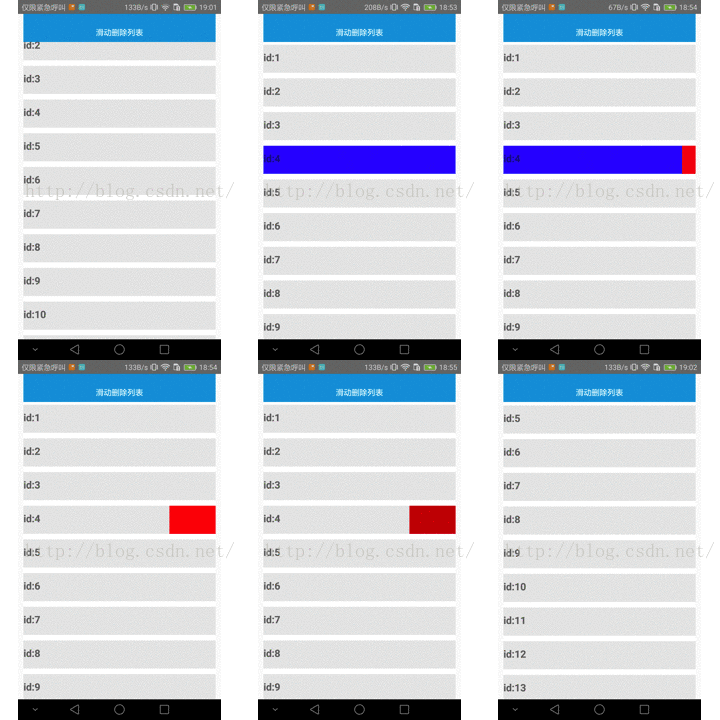
通过react-native提供的PanResponder组件来处理滑动事件,类似于android中的view事件传递机制
部分代码:
    componentWillMount(evt, gestureState){
        this._panResponder=PanResponder.create({
            onStartShouldSetPanResponder:this.onStartShouldSetPanResponder,//开始时询问是否成为响应者
            onMoveShouldSetPanResponder:this.onMoveShouldSetPanResponder,//滑动时询问是否成为响应者
            onPanResponderGrant:this.onPanResponderGrant,//已经成为响应者 类似于android中touch的down事件
            onPanResponderMove:this.onPanResponderMove,//类似于android中touch的move事件
            onPanResponderRelease:this.onPanResponderEnd,//类似于android中touch的up事件
            onPanResponderTerminate:this.onResponderTerminate,//意外终止 类似于android中touch的cancel事件
            onResponderTerminationRequest:this.onResponderTerminationRequest,//其他view想获得事件 是否释放事件
        });
    }
// 开始手势操作。给用户一些视觉反馈,让他们知道发生了什么事情!
onPanResponderGrant=(evt, gestureState)=>{
// console.log("begin")
vx = gestureState.vx; //开始时速度为0
this.pre_hide();/*隐藏之前显示的view*/
console.log('begin vx:'+ vx);
if(left_width<SCREEN_WIDTH){//只能向右面滑动
visible = true;//组件是否显示
}else{ //只能向左面滑动
visible = false;
}
this.setState({
item:{
backgroundColor: 'blue',
opacity:0.8,
},
});
}
// 最近一次的移动距离为gestureState.move{X,Y}
onPanResponderMove=(evt, gestureState)=>{
// console.log("move");
if(!visible){//删除按钮不可见 只能向左滑动
// console.log("向左滑动");
if(gestureState.dx<0){//向左滑动
x = Math.abs(gestureState.dx);//累计横向位移
// console.log("x:" + x);
if(x>=dx){
x=delete_width;//设置右边删除按钮的宽度
}
//实时更新
this.setState({
left:{
width:SCREEN_WIDTH - x,
height:item_height,
},
right:{
width:0 + x,
height:item_height,
},
});
}
}else{//删除按钮已经显示 只能向右滑动
// console.log("向右滑动")
if(gestureState.dx>0){//向右滑动
x = gestureState.dx;//累计横向位移
// console.log("x:" + x);
if(x>=dx){
x=delete_width;
}
//实时更新
this.setState({
left:{
width:left_width + x,
height:item_height,
},
right:{
width:right_width - x,
height:item_height,
},
});
}
}
}
// 用户放开了所有的触摸点,且此时视图已经成为了响应者。
// 一般来说这意味着一个手势操作已经成功完成。
onPanResponderEnd=(evt, gestureState)=>{
vx = gestureState.vx;
console.log('End vx:' + vx);
vx = Math.abs(vx);
console.log("width:",gestureState.dx);
if(!visible){//当删除按钮没显示的时候
if(x>=dx||vx>=1){//停止滑动后 如果大于dx或者水平移动速度大于2 则显示删除按钮
this.setState({
item:{
backgroundColor:'#E8E8E8',
opacity:1,
},
left:{
width:SCREEN_WIDTH-x,
height:item_height,
},
right:{
width:0+ x,
height:item_height,
},
});
this.pre_id(this.props.id);
left_width = SCREEN_WIDTH-x;
right_width = x;
}else{//停止滑动后 如果不大于dx则不显示删除按钮
this.setState({
item:{
backgroundColor:'#E8E8E8',
opacity:1,
},
left:{
width:SCREEN_WIDTH,
height:item_height,
},
right:{
width:0,
height:item_height,
},
});
left_width = SCREEN_WIDTH;
right_width = 0;
}
}else{//当删除按钮已经显示的时候
if(gestureState.dx>=0){//已经显示删除按钮 向左滑动无效 只能向右滑动
this.setState({
item:{
backgroundColor:'#E8E8E8',
opacity:1,
},
left:{
width:SCREEN_WIDTH,
height:item_height,
},
right:{
width:0,
height:item_height,
},
});
left_width = SCREEN_WIDTH;
right_width = 0;
}
}
x=0;//一次事件结束 位移清零
console.log("screen_width",SCREEN_WIDTH);
console.log("left_width:" + left_width);
console.log("right_width",right_width);
}
//不释放 事件
onResponderTerminationRequest=(evt)=>{
return false;
}
//以外终止事件处理
onResponderTerminate=(evt,gestureState)=>{
// console.log("Terminate:");
vx = gestureState.vx;
console.log('Terminate vx:' + vx);
if(!visible){//当删除按钮没显示的时候
if(x>=dx||vx>=1){//停止滑动后 如果大于dx或者水平移动速度大于2 则显示删除按钮
this.setState({
item:{
opacity:1,
backgroundColor:'#E8E8E8',
},
left:{
width:SCREEN_WIDTH-x,
height:item_height,
},
right:{
width:0+ x,
height:item_height,
},
});
this.pre_id(this.props.id);
left_width = SCREEN_WIDTH-x;
right_width = x;
}else{//停止滑动后 如果不大于dx则不显示删除按钮
this.setState({
item:{
opacity:1,
backgroundColor:'#E8E8E8',
},
left:{
width:SCREEN_WIDTH,
height:item_height,
},
right:{
width:0,
height:item_height,
},
});
left_width = SCREEN_WIDTH;
right_width = 0;
}
}else{//当删除按钮已经显示的时候
if(gestureState.dx>=0){//已经显示删除按钮 向左滑动无效 只能向右滑动
this.setState({
item:{
opacity:1,
backgroundColor:'#E8E8E8',
},
left:{
width:SCREEN_WIDTH,
height:item_height,
},
right:{
width:0,
height:item_height,
},
});
left_width = SCREEN_WIDTH;
right_width = 0;
}
}
x=0;//一次事件结束 位移清零
}完整代码:https://github.com/wuyunqiang/SlideItem

开源鸿蒙跨平台开发社区汇聚开发者与厂商,共建“一次开发,多端部署”的开源生态,致力于降低跨端开发门槛,推动万物智联创新。
更多推荐


 1
1 0
0- 0


 已为社区贡献13条内容

所有评论(0)