android list弹性滑动,GitHub - NikiLee2016/react-native-bounce-flatlist: 基于FlatList封装的bounce-FlatList, 支持...
react-native-bounce-flatlist
本插件的FlatList封装基于react-native-ultimate-listview, 弹簧效果实现基于react-native-smartrefreshlayout, 首先对二位开源作者表示感谢.
很大程度上, 我仅仅做了一个解决方案的整合. 希望能对大家有所帮助!
Installation
由于react-native-smartrefreshlayout需要做android端桥接, 安装依赖的时候需要需要对它进行link.
Automatically Installation
yarn add react-native-bounce-flatlist
react-native link react-native-smartrefreshlayout
Manually Installation (Android Only)
yarn add react-native-bounce-flatlist
打开 android/settings.gradle, 添加
...
include ':react-native-smartrefreshlayout', ':reactNativePicker'
project(':react-native-smartrefreshlayout').projectDir = new File(rootProject.projectDir, '../node_modules/react-native-smartrefreshlayout/android')
打开 android/app/build.gradle, 添加
...
dependencies {
compile project(':react-native-smartrefreshlayout')
}
打开 android/app/your-package-name/MainApplication.java, 添加
import com.lmy.smartrefreshlayout.SmartRefreshLayoutPackage;
...
@Override
protected List getPackages() {
return Arrays.asList(
...
new SmartRefreshLayoutPackage(),
);
}
使用
android:
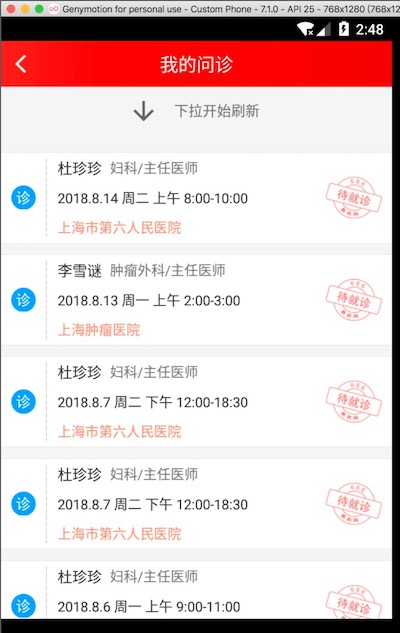
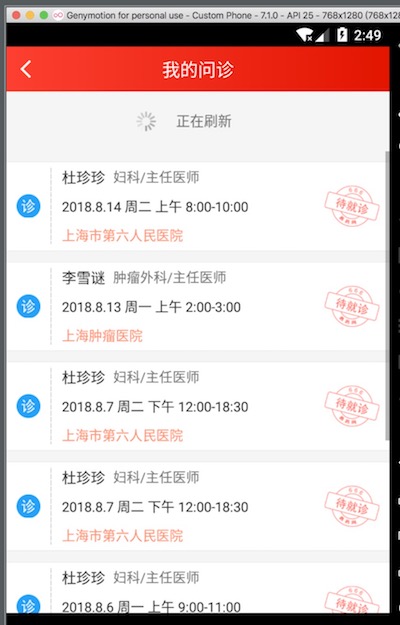
下拉可以看到android端的弹性效果
IOS:


由于在尝试集成react-native-mjrefresh组件的时候出了一些问题, IOS端刷新组件仍然使用的原生RefreshControl, 效果有些差, 不过我已联系作者, 后续会解决
example
import {BounceFlatList} from "react-native-bounce-flatlist";
const fakeData = [1, 2, 3, 4, 5, 6, 7, 8, 9, 10];
...
render() {
return (
onDataFetch={this._onFetch}
defaultEmptyDataDes={'没有数据哦~'}
renderItem={this._renderItem}
pageSize={20}
/>)
}
_onFetch = (page, start, abort) => {
setTimeOut(() => {
start(fakeData);
}, 2000);
}
_renderItem = (item, index) => {
return ({我是第`${item}个条目`});
}
文档
属性名
类型
默认值
描述
onDataFetch
func(page, start, abort)
-
请求数据回调方法. page为当前页码, 从1开始; 请求到数据之后, 调用start方法; 若请求失败, 调用abort方法.
renderItem
func(item, index)
-
条目渲染函数.
pageSize
int
20
为了封装得更彻底, 要求传入每次请求的pageSize
height
int
屏幕高度 - 44
组件整体高度. 给个大概值就行, 主要是为了让LoadingView居中显示, 我暂时没想到更优雅的解决方案.
width
int
屏幕宽度
控件整体宽度. 如果控件的宽度小于屏幕宽度, 请务必指定width, 否则loadingView不会居中显示
onScroll
func(event)
-
滑动监听, 通过event.nativeEvent.contentOffset.y, 可以拿到y方向上的偏移量
renderSeparator
func
-
分割线渲染
showAllLoadViewLimit
func
5
设置showAllLoadViewLimit, 可以指定当服务器数据只有一页时, 数据size超过多少, 才显示 ''没有更多了''
style
any
-
样式
renderHeader
func
-
头布局渲染
customLoadingView
func
-
自定义数据加载时loadingView, 具体如果定义可参考src/view/LoadingView.js
customNetworkView
func(retry)
-
retry: 方法, 调用重新发起请求; 自定义网络错误视图方法
customEmptyDataView
func(retry)
-
retry: 方法, 调用重新发起请求; 自定义空视图回调
customAllLoadedView
func
-
自定义底部提示已全部加载视图
customRefreshingHeader
element
默认样式, DefaultHeader
自定义刷新列表时header的样式, 具体如何定义可以参照 react-native-smartrefreshlayout开发文档
defaultEmptyDataDes
string
"没有数据哦~"
默认空视图下, 文字描述
netWorkErrorMarginTop
int
100
默认网络错误视图中, 图片距离文字的间距. 主要是考虑到有时候列表高度较矮的情况, 视图显示会出现问题
感谢
再次感谢两位开源作者@2534290808和@gameboyVito.
如果这个组件对你有帮助, 请不要吝啬你的start~
由于本人水平有限, 这也是本人正式发布的第一个开源项目, 所以组件在使用中难免有bug或者不尽如人意之处, 届时非常欢迎大家PR!
谢谢!

开源鸿蒙跨平台开发社区汇聚开发者与厂商,共建“一次开发,多端部署”的开源生态,致力于降低跨端开发门槛,推动万物智联创新。
更多推荐


 0
0 0
0- 0


 已为社区贡献2条内容

所有评论(0)