h5唤起小程序
自 2022 年 4 月 11 日起,URL Scheme有效期最长 30 天,不再支持永久有效的URL Scheme、不再区分短期有效URL Scheme与长期有效URL Scheme。每个独立的URL Scheme被用户访问后,仅此用户可以再次访问并打开对应小程序,其他用户无法再次通过相同URL Scheme打开该小程序。在本次规则调整生效前已经生成的URL Scheme,如果有效期超过30天
·
问题:
在开发过程中需要从H5跳转到小程序,这个需要怎么实现呢?

需求:
发送一条短信,里面包含一个短链,点击改链接跳转到小程序;
H5 跳小程序:静态网站 H5 跳小程序 | 微信开放文档
技术方案:
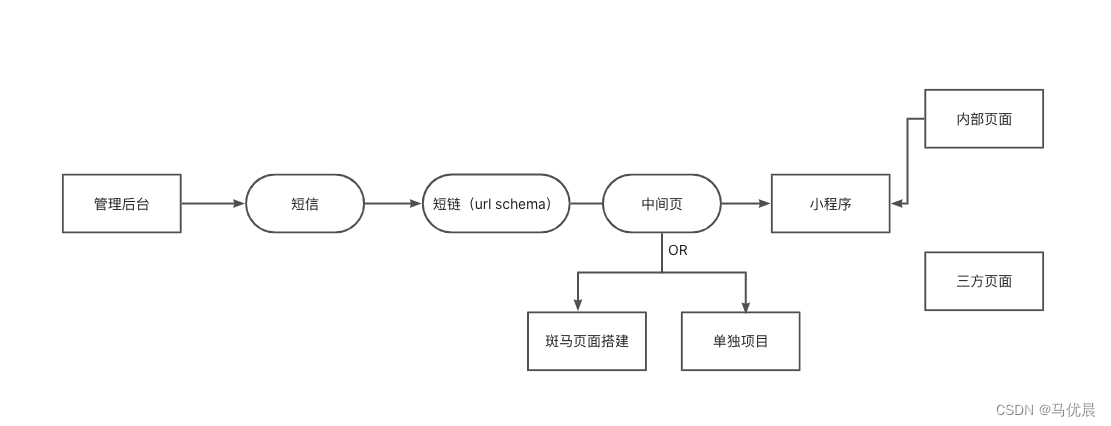
那么我们其实要做的就是中间页,中间页的技术方案实现如下
 这里我们采用url schema的形式,调用接口,获取openlink;
获取schema接口入参
  data: {
    "jump_wxa":
    {
        "path": "/pages/publishHomework/publishHomework",
        "query": "",
        "env_version": "release"
    },
    "is_expire":true,
    "expire_type":1,
    "expire_interval":1
  }
接口数据返回
{
 "errcode": 0,
 "errmsg": "ok",
 "openlink": xxxxxxSchemexxxxx,
}
注意事项
自 2022 年 4 月 11 日起,URL Scheme有效期最长 30 天,不再支持永久有效的URL Scheme、不再区分短期有效URL Scheme与长期有效URL Scheme。若在微信外打开,用户可以在浏览器页面点击进入小程序。每个独立的URL Scheme被用户访问后,仅此用户可以再次访问并打开对应小程序,其他用户无法再次通过相同URL Scheme打开该小程序。 在本次规则调整生效前已经生成的URL Scheme,如果有效期超过30天或长期会被降级为30天有效,只能被1个用户访问,开始时间从调整日期开始计算。
- 微信内的网页如需打开小程序请使用微信开放标签-小程序跳转按钮,无公众号也可以直接使用小程序身份开发网页并免鉴权跳转小程序,见云开发静态网站跳转小程序。符合开放范围的小程序可以下发支持打开小程序的短信
- 该功能基本覆盖当前用户正在使用的微信版本,开发者无需进行低版本兼容
- 只能生成已发布的小程序的 URL Scheme
- 通过 URL Scheme 跳转到微信时,可能会触发系统弹框询问,若用户选择不跳转,则无法打开小程序。请开发者妥善处理用户选择不跳转的场景
- 部分浏览器会限制打开网页直接跳转,可参考示例网页设置跳转按钮
获取调用链接次数限制:获取 URL Scheme | 微信开放文档
小程序链接生成与使用规则调整公告:小程序链接生成与使用规则调整公告 | 微信开放社区官方
代码实现
HTML实现
<!DOCTYPE html>
<html lang="en" xmlns:th="http://www.w3.org/1999/xhtml">

<head>
    <title>打开小程序</title>
    <meta http-equiv="Content-Type" content="text/html; charset=utf-8">
    <meta name="viewport" content="width=device-width, user-scalable=no, initial-scale=1, maximum-scale=1">
    <link rel="stylesheet" href="https://res.wx.qq.com/open/libs/weui/2.4.1/weui.min.css">
    </link>
    <!-- 公众号 JSSDK -->
    <script src="https://res.wx.qq.com/open/js/jweixin-1.6.0.js"></script>
    <script typet="text/javascript" src="http://code.jquery.com/jquery-latest.js"></script>
    <script src="https://cdn.bootcss.com/babel-polyfill/7.6.0/polyfill.js"></script>
    <!-- 调试用的移动端 console -->
    <!-- <script src="https://cdn.jsdelivr.net/npm/eruda"></script> -->

<body>
    <div class="page full">
        <div id="public-web-container" class="hidden">
            <p class="">正在打开 ...</p> <!-- replace -->
            <a id="public-web-jump-button" href="javascript:" class="weui-btn weui-btn_primary weui-btn_loading"
                onclick="openWeapp()">
                <span id="public-web-jump-button-loading"
                    class="weui-primary-loading weui-primary-loading_transparent"><i
                        class="weui-primary-loading__dot"></i></span>
                打开小程序
            </a>
        </div>
        <!-- 跳转小程序的开放标签。文档 https://developers.weixin.qq.com/doc/offiaccount/OA_Web_Apps/Wechat_Open_Tag.html -->

        <div id="wechat-web-container" class="hidden"></div>
        <div id="desktop-web-container" class="hidden">
            <p class="">请在手机打开网页链接</p>
        </div>
    </div>
</body>
<script>
    window.onerror = e => {
        console.error(e)
        alert('发生错误' + e)
    }
</script>
<script>
    function getQueryVariable() {
        let href = window.location.href
        let query = href.substring(href.indexOf('?') + 1);
        let vars = query.split("&");
        let obj = {}
        for (var i = 0; i < vars.length; i++) {
            let pair = vars[i].split("=");
            obj[pair[0]] = pair[1]
        }
        return obj;
    }
    var querys = getQueryVariable();
    var path = querys.path ? decodeURIComponent(querys.path) : '/pages/About/Report/index'    //  replace  需要跳转的路径
    var username = 'wx***********' // replace username小程序原始id
    $('#wechat-web-container').append(`
    <wx-open-launch-weapp
          id="launch-btn"
          username="${username}"
          path="${path}"
    >
    <template>
      <button style="width: 200px; height: 45px; text-align: center; font-size: 17px; display: block; margin: 0 auto; padding: 8px 24px; border: none; border-radius: 4px; background-color: #07c160; color:#fff;">打开小程序</button>
    </template>
  </wx-open-launch-weapp>`)
    console.log('querys', querys)
</script>
<!-- weui 样式 -->

<script>
    document.addEventListener('WeixinOpenTagsError', function (e) {
        console.error('e.detail.errMsg', e.detail.errMsg); // 无法使用开放标签的错误原因,需回退兼容。仅无法使用开发标签,JS-SDK其他功能不受影响
    });
    // console.log($)
    function docReady(fn) {
        if (document.readyState === 'complete' || document.readyState === 'interactive') {
            fn()
        } else {
            document.addEventListener('DOMContentLoaded', fn);
        }
    }
    docReady(async function () {

        var ua = navigator.userAgent.toLowerCase();
        var isWXWork = ua.match(/wxwork/i) == 'wxwork';
        var isWeixin = !isWXWork && ua.match(/micromessenger/i) == 'micromessenger';
        var isMobile = false;
        var isDesktop = false;
        if (navigator.userAgent.match(/(phone|pad|pod|iPhone|iPod|ios|iPad|Android|Mobile|IEMobile)/i)) {
            isMobile = true;
        } else {
            isDesktop = true;
        }
        // 微信中
        if (isWeixin) {
            var containerEl = document.getElementById('wechat-web-container')
            containerEl.classList.remove('hidden')
            containerEl.classList.add('full', 'wechat-web-container')

            var launchBtn = document.getElementById('launch-btn')
            launchBtn.addEventListener('ready', function (e) {
                console.log('开放标签 ready')
            })
            launchBtn.addEventListener('launch', function (e) {
                console.log('开放标签 success')
            })
            launchBtn.addEventListener('error', function (e) {
                console.log('开放标签 fail', e.detail)
            })
            // $.get('', { url: location.href.split('#')[0] }, function (res) { //  replace  获取后端签名授权接口
                wx.config({
                    debug: false, // 开启调试模式,调用的所有api的返回值会在客户端alert出来,若要查看传入的参数,可以在pc端打开,参数信息会通过log打出,仅在pc端时才会打印。
                    appId: 'wx**********', // 必填,企业号的唯一标识,此处填写企业号corpid
                    timestamp: res.data.timestamp || 0, // 必填,生成签名的时间戳
                    nonceStr: res.data.nonceStr || 'nonceStr', // 必填,生成签名的随机串
                    signature: res.data.signature || 'signature',// 必填,签名,见附录1
                    jsApiList: ['chooseImage'], // 必填,需要使用的JS接口列表,所有JS接口列表见附录2
                    openTagList: ['wx-open-launch-weapp', 'wx-open-launch-app'],
                });
                wx.ready(function () {
                });
                wx.error(function (res) {
                    console.log('失败', res)
                    // config信息验证失败会执行error函数,如签名过期导致验证失败,具体错误信息可以打开config的debug模式查看,也可以在返回的res参数中查看,对于SPA可以在这里更新签名。
                    //                alert(JSON.stringify(res))
                })
            // })

        } else if (isDesktop) {
            // 在 pc 上则给提示引导到手机端打开
            var containerEl = document.getElementById('desktop-web-container')
            containerEl.classList.remove('hidden')
            containerEl.classList.add('full', 'desktop-web-container')
            // 手机浏览器端
        } else {
            var containerEl = document.getElementById('public-web-container')
            containerEl.classList.remove('hidden')
            containerEl.classList.add('full', 'public-web-container')


            var buttonEl = document.getElementById('public-web-jump-button')
            var buttonLoadingEl = document.getElementById('public-web-jump-button-loading')
            try {
                await openWeapp(() => {
                    buttonEl.classList.remove('weui-btn_loading')
                    buttonLoadingEl.classList.add('hidden')
                })
            } catch (e) {
                buttonEl.classList.remove('weui-btn_loading')
                buttonLoadingEl.classList.add('hidden')
                throw e
            }
        }
    })

    async function openWeapp(onBeforeJump) {
        // IOS可以直接跳转
        var c = window.c
        const res = await c.callFunction({
          name: 'public',
          data: {
            "jump_wxa":
            {
                "path": "/pages/publishHomework/publishHomework",
                "query": "",
                "env_version": "release"
            },
            "is_expire":true,
            "expire_type":1,
            "expire_interval":1
          }
        })
        if (onBeforeJump) {
          onBeforeJump()
        }
        const { errmsg, openlink} = res;
        if(errmsg === 'ok'){
          // 安卓需要使用location.href跳转
            location.href = openlink; //'weixin://dl/business/?t=*****' //  replace  生成小程序URL Scheme 用于h5跳转
        }
    }
</script>
<style>
    .hidden {
        display: none;
    }

    .full {
        position: absolute;
        top: 0;
        bottom: 0;
        left: 0;
        right: 0;
    }

    .public-web-container {
        display: flex;
        flex-direction: column;
        align-items: center;
    }

    .public-web-container p {
        position: absolute;
        top: 40%;
    }

    .public-web-container a {
        position: absolute;
        bottom: 40%;
    }

    .wechat-web-container {
        width: 100vw;
        height: 100vh;
        /* background-image: url('https://pic.ptdot.cn/tmp_796bfd882696968bc7a90518986b95db.jpg'); */
        background-size: cover;
        background-repeat: no-repeat;
    }

    .wechat-web-container .bannerContent {
        width: 100%;
        height: 100%;
        position: fixed;
        z-index: 2;
        left: 0;
        top: 0;
        background: linear-gradient(180deg, rgba(0, 0, 0, 0.4) 0%, #222222 100%);
    }

    .wechat-web-container p {
        position: absolute;
        top: 40%;
    }

    .wechat-web-container wx-open-launch-weapp {
        position: absolute;
        bottom: 40%;
        left: 0;
        right: 0;
        display: flex;
        flex-direction: column;
        align-items: center;
        z-index: 10;
    }

    .wechat-web-container .content {
        display: flex;
        flex-direction: column;
        align-items: center;
        width: 100vw;
        height: 100vh;
        position: absolute;
        left: 0;
        top: 0;
        z-index: 10;
    }

    .content .title {
        font-weight: bold;
        position: relative;
        font-size: 40px;
        color: #fff;
        margin-top: 100px
    }

    .desktop-web-container {
        display: flex;
        flex-direction: column;
        align-items: center;
    }

    .desktop-web-container p {
        position: absolute;
        top: 40%;
    }
</style>
</head>


</html>
工程项目实现
import { createElement, useEffect, useState } from 'rax';
import View from 'rax-view';
import './weui.min.css';
import './index.css';
import $ from 'jquery';
import wx from 'weixin-js-sdk';
import { getQueryString } from '../utils';
import { request } from '../core/index';


// 插入微信SDK
let head = document.head || document.getElementsByTagName('head')[0];
let script = document.createElement('script');
script.type = 'text/javascript';
script.setAttribute('src', 'https://res.wx.qq.com/open/js/jweixin-1.6.0.js');
head.appendChild(script);


const queryPath = getQueryString('path') || '';
let path = queryPath ? decodeURIComponent(queryPath) : '/pages/About/Report/index'; //  replace  需要跳转的路径
const username = 'wx*********'; // replace username小程序原始id

export default function CallEndMiniProgram() {
 const [weiXin, setWinxin] = useState(false);
   // 环境异常兜底
  useEffect(() => {
    window.onerror = e => {
     console.log(`发生错误${e}`);
   };
  }, []);

  // 微信异常兜底
  useEffect(() => {
    document.addEventListener('WeixinOpenTagsError', (ex: any) => {
      console.error('ex.detail.errMsg', ex.detail.errMsg); // 无法使用开放标签的错误原因,需回退兼容。仅无法使用开发标签,JS-SDK其他功能不受影响
    });
  }, []);

  // 微信异常兜底
  useEffect(() => {
    environmentJust();
  }, []);


const environmentJust = async () => {
  let ua = navigator.userAgent.toLowerCase();
  let isWXWork = ua.indexOf('wxwork') !== -1;
  let isWeixin = !isWXWork && ua.indexOf('micromessenger') !== -1;
  let containerEl = document.getElementById('public-web-container');
  containerEl.classList.remove('hidden');
  containerEl.classList.add('full', 'public-web-container');


  let buttonEl = document.getElementById('public-web-jump-button');
  let buttonLoadingEl = document.getElementById('public-web-jump-button-loading');
  try {
      await openWeapp(() => {
          buttonEl.classList.remove('weui-btn_loading');
          buttonLoadingEl.classList.add('hidden');
      });
  } catch (e) {
      buttonEl.classList.remove('weui-btn_loading');
      buttonLoadingEl.classList.add('hidden');
      throw e;
  }
};

const openWeapp = async (onBeforeJump) => {
  await request({
    v: '1.0',
    method: 'get',
    api: 'xxxxxxx.jump.scheme',
    data: {
      path: '/pages/About/Report/index',
      query: 'channelId=',
    },
  })
    .then((res) => {
      const { code, data } = res;
      if (code === 'SUCCESS') {
        // 安卓需要使用location.href跳转
          location.href = data; // 'weixin://dl/business/?t=*****' //  replace  生成小程序URL Scheme 用于h5跳转
      }
    })
    .catch((e) => {
       console.log(e);
    });
  if (onBeforeJump) {
    onBeforeJump();
  }
};


  return (
    <View
      class="CallEndMiniProgram"
    >
      <div class="page full">
        {/* 微信 */}
        <div id="wechat-web-container" class="hidden">
          <wx-open-launch-weapp
            id="launch-btn"
            username={username}
            path={path}
          >
            <button class="btnStyle" >立即前往小程序</button>
          </wx-open-launch-weapp>
        </div>
        {/* 浏览器 */}
        <div id="public-web-container" class="hidden">
          {!weiXin && <a
            id="public-web-jump-button"
            href="javascript:"
            class="weui-btn"
            onclick={openWeapp}
          >
            立即前往小程序
          </a>}
        </div>
        {/* 桌面 */}
        <div id="desktop-web-container" class="hidden">
          <p class="">请在手机打开网页链接</p>
        </div>
      </div>
    </View>
  );
}
.hidden {
    display: none !important;
}

.full {
    position: absolute;
    top: 0;
    bottom: 0;
    left: 0;
    right: 0;
}

.public-web-container {
    display: flex;
    flex-direction: column;
    align-items: center;
}

#public-web-container {
    display: flex;
    flex-direction: column;
    align-items: center;
    width: 100%;
    min-height: 100vh;
    background: url('https://gw.alicdn.com/imgextra/i4/O1CN01BFSBYL22bFxRfmhH7_!!6000000007138-0-tps-750-1440.jpg') no-repeat;
    background-size: 100% auto;
    background-color: #6ED455;
}

/* .public-web-container p {
    position: absolute;
    top: 40%;
} */

/* .public-web-container a {
    position: absolute;
    bottom: 40%;
} */

.wechat-web-container {
    position: relative;
    width: 100%;
    height: 100vh;
    background: url('https://gw.alicdn.com/imgextra/i4/O1CN01BFSBYL22bFxRfmhH7_!!6000000007138-0-tps-750-1440.jpg') no-repeat;
    background-size: 100% 100%;
}

.wechat-web-container .bannerContent {
    width: 100%;
    height: 100%;
    position: fixed;
    z-index: 2;
    left: 0;
    top: 0;
    background: linear-gradient(180deg, rgba(0, 0, 0, 0.4) 0%, #222222 100%);
}
.btnStyle{
    width: 100%;
    height: 45px;
    text-align: center;
    font-size: 17px;
    display: block;
    margin: 0 auto;
    padding: 8px 24px;
    border: none;
    border-radius: 34px;
    background-color: #0066ff;
    color:#fff;
}

.wechat-web-container p {
    position: absolute;
    top: 40%;
}

.wechat-web-container wx-open-launch-weapp {
    position: absolute;
    bottom: 5%;
    left: 0;
    right: 0;
    display: flex;
    flex-direction: column;
    align-items: center;
    z-index: 10;
    margin: 0 30px;
}

.wechat-web-container .content {
    display: flex;
    flex-direction: column;
    align-items: center;
    width: 100vw;
    height: 100vh;
    position: absolute;
    left: 0;
    top: 0;
    z-index: 10;
}

.content .title {
    font-weight: bold;
    position: relative;
    font-size: 40px;
    color: #fff;
    margin-top: 100px
}

.desktop-web-container {
    display: flex;
    flex-direction: column;
    align-items: center;
}

.desktop-web-container p {
    position: absolute;
    top: 40%;
}
开源鸿蒙跨平台开发社区汇聚开发者与厂商,共建“一次开发,多端部署”的开源生态,致力于降低跨端开发门槛,推动万物智联创新。
更多推荐
 1
1 0
0- 0


 已为社区贡献1条内容

所有评论(0)