KMP OpenHarmony 密码强度评估工具
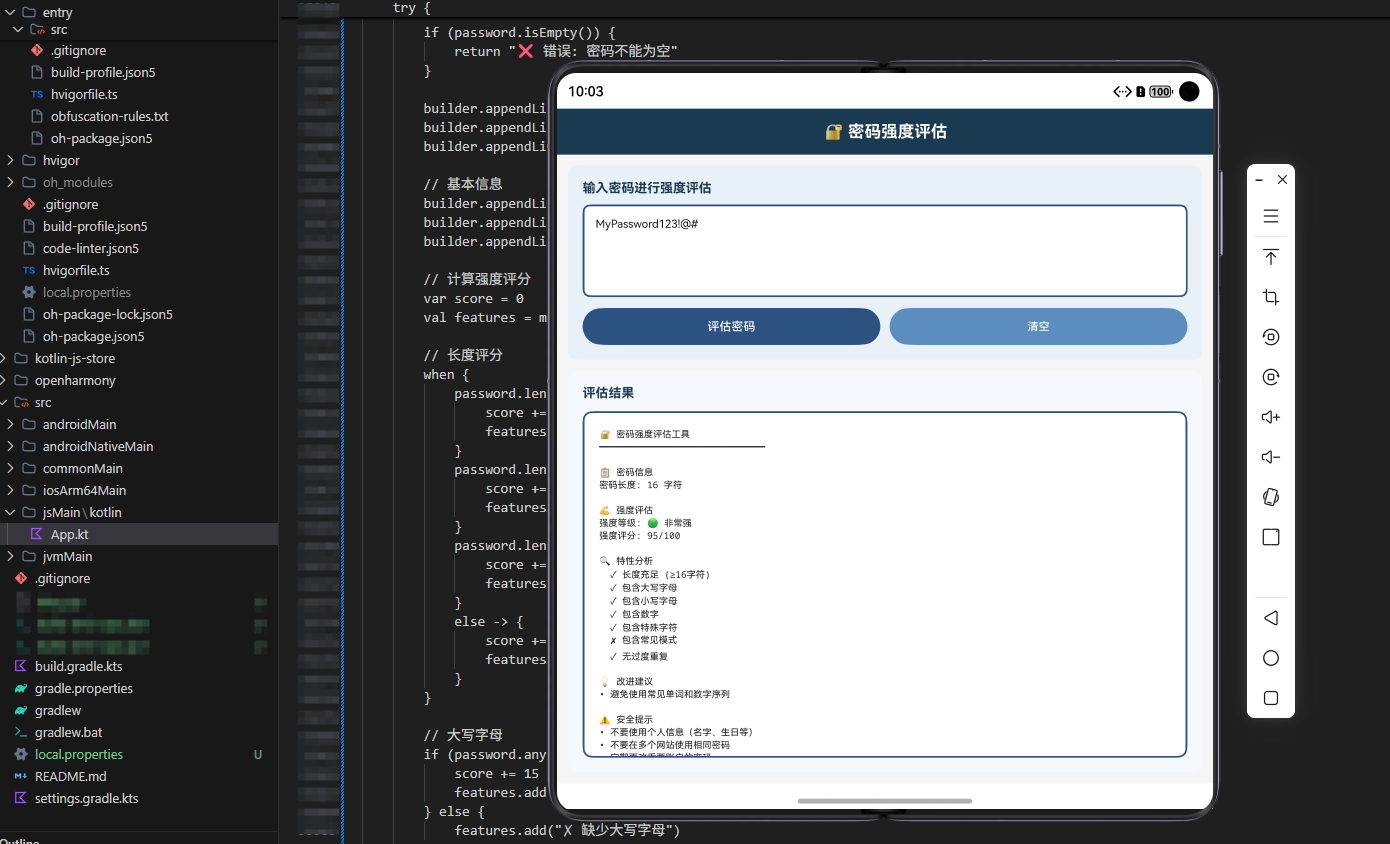
本文介绍了一个基于KMP框架的密码强度评估工具,可在OpenHarmony鸿蒙平台上跨端调用。该工具提供五大核心功能:密码强度计算(综合考虑长度、字符多样性等因素)、安全检查(验证是否符合安全规则)、改进建议(针对弱点提供具体建议)、常见密码检查(防止使用弱密码)和密码生成器(创建安全随机密码)。通过Kotlin实现,工具采用模块化设计,包含常见密码数据库和多维度评估算法,能够有效提升密码安全性,
欢迎加入开源鸿蒙跨平台社区:https://openharmonycrossplatform.csdn.net
文章概述
密码安全是现代应用开发中最关键的问题之一。弱密码是导致账户被盗的主要原因,而强密码可以有效保护用户的账户和数据。然而,很多用户并不了解什么是强密码,也不知道如何创建强密码。这就需要一套密码强度评估工具来帮助用户创建和验证强密码。
密码强度评估工具在实际应用中有广泛的用途。在用户注册中,需要确保用户创建强密码。在密码修改中,需要验证新密码的强度。在安全审计中,需要评估现有密码的强度。在企业安全策略中,需要强制执行密码强度要求。在安全教育中,需要帮助用户理解密码安全的重要性。
本文将深入探讨如何在KMP(Kotlin Multiplatform)框架下实现一套完整的密码强度评估工具,并展示如何在OpenHarmony鸿蒙平台上进行跨端调用。我们将提供多种密码评估功能,包括强度计算、建议生成、安全检查等,帮助开发者和用户创建更安全的密码。
工具功能详解
核心功能
功能1:密码强度计算(Password Strength Calculation)
计算密码的强度等级,从非常弱到非常强。这是最基础的功能,用于评估密码的安全性。
功能特点:
- 综合考虑多个因素
- 返回详细的强度评分
- 支持自定义评分规则
- 提供强度等级分类
功能2:密码安全检查(Password Security Check)
检查密码是否满足安全要求,如最小长度、字符多样性等。
功能特点:
- 检查常见安全规则
- 提供详细的检查结果
- 支持自定义规则
- 返回失败原因
功能3:密码改进建议(Password Improvement Suggestions)
根据密码的弱点提供改进建议。这帮助用户理解如何创建更强的密码。
功能特点:
- 分析密码的弱点
- 提供具体的改进建议
- 优先级排序
- 易于理解的语言
功能4:常见密码检查(Common Password Check)
检查密码是否在常见密码列表中。这可以防止用户使用过于简单的密码。
功能特点:
- 包含常见密码数据库
- 快速查询
- 支持自定义列表
- 模糊匹配支持
功能5:密码生成器(Password Generator)
生成符合安全要求的随机密码。这可以帮助用户快速创建强密码。
功能特点:
- 可自定义长度和字符类型
- 避免混淆字符
- 易于记忆的选项
- 高熵随机生成
Kotlin实现
完整的Kotlin代码实现
/**
 * 密码强度评估工具 - KMP OpenHarmony
 * 提供密码安全评估的多种功能
 */
object PasswordToolUtils {

    // 常见弱密码列表
    private val commonPasswords = setOf(
        "123456", "password", "12345678", "qwerty", "abc123",
        "111111", "1234567", "password123", "123123", "000000",
        "admin", "letmein", "welcome", "monkey", "dragon",
        "master", "sunshine", "princess", "qazwsx", "123456789"
    )

    /**
     * 功能1:密码强度计算
     * 计算密码的强度等级
     */
    fun calculateStrength(password: String): Map<String, Any> {
        val result = mutableMapOf<String, Any>()
        var score = 0
        val feedback = mutableListOf<String>()

        // 长度检查
        when {
            password.length < 6 -> {
                feedback.add("密码长度过短(少于6个字符)")
            }
            password.length < 8 -> {
                score += 10
                feedback.add("密码长度较短(6-8个字符)")
            }
            password.length < 12 -> {
                score += 20
            }
            password.length < 16 -> {
                score += 30
            }
            else -> {
                score += 40
            }
        }

        // 小写字母检查
        if (password.any { it.isLowerCase() }) {
            score += 10
        } else {
            feedback.add("缺少小写字母")
        }

        // 大写字母检查
        if (password.any { it.isUpperCase() }) {
            score += 10
        } else {
            feedback.add("缺少大写字母")
        }

        // 数字检查
        if (password.any { it.isDigit() }) {
            score += 10
        } else {
            feedback.add("缺少数字")
        }

        // 特殊字符检查
        val specialChars = "!@#$%^&*()_+-=[]{}|;:,.<>?"
        if (password.any { it in specialChars }) {
            score += 20
        } else {
            feedback.add("缺少特殊字符")
        }

        // 连续字符检查
        var hasSequence = false
        for (i in 0 until password.length - 2) {
            val c1 = password[i].code
            val c2 = password[i + 1].code
            val c3 = password[i + 2].code

            if (c2 == c1 + 1 && c3 == c2 + 1) {
                hasSequence = true
                break
            }
        }

        if (hasSequence) {
            score -= 10
            feedback.add("包含连续字符序列")
        }

        // 重复字符检查
        val charCounts = password.groupingBy { it }.eachCount()
        val maxCount = charCounts.maxByOrNull { it.value }?.value ?: 0
        if (maxCount > password.length / 2) {
            score -= 10
            feedback.add("包含过多重复字符")
        }

        // 确定强度等级
        val level = when {
            score < 20 -> "非常弱"
            score < 40 -> "弱"
            score < 60 -> "中等"
            score < 80 -> "强"
            else -> "非常强"
        }

        result["分数"] = score.coerceIn(0, 100)
        result["等级"] = level
        result["反馈"] = feedback

        return result
    }

    /**
     * 功能2:密码安全检查
     * 检查密码是否满足安全要求
     */
    fun securityCheck(password: String): Map<String, Any> {
        val result = mutableMapOf<String, Any>()
        val checks = mutableListOf<Map<String, Any>>()

        // 长度检查
        checks.add(mapOf(
            "项目" to "最小长度",
            "要求" to "至少8个字符",
            "通过" to (password.length >= 8)
        ))

        // 大小写检查
        checks.add(mapOf(
            "项目" to "大小写混合",
            "要求" to "包含大写和小写字母",
            "通过" to (password.any { it.isUpperCase() } && password.any { it.isLowerCase() })
        ))

        // 数字检查
        checks.add(mapOf(
            "项目" to "包含数字",
            "要求" to "至少包含一个数字",
            "通过" to password.any { it.isDigit() }
        ))

        // 特殊字符检查
        val specialChars = "!@#$%^&*()_+-=[]{}|;:,.<>?"
        checks.add(mapOf(
            "项目" to "特殊字符",
            "要求" to "至少包含一个特殊字符",
            "通过" to password.any { it in specialChars }
        ))

        // 常见密码检查
        checks.add(mapOf(
            "项目" to "常见密码",
            "要求" to "不在常见密码列表中",
            "通过" to !commonPasswords.contains(password.toLowerCase())
        ))

        val passCount = checks.count { (it["通过"] as Boolean) }
        val allPass = passCount == checks.size

        result["检查项"] = checks
        result["通过数"] = passCount
        result["总数"] = checks.size
        result["全部通过"] = allPass

        return result
    }

    /**
     * 功能3:密码改进建议
     * 提供改进建议
     */
    fun getImprovementSuggestions(password: String): List<String> {
        val suggestions = mutableListOf<String>()

        if (password.length < 12) {
            suggestions.add("增加密码长度到至少12个字符")
        }

        if (!password.any { it.isUpperCase() }) {
            suggestions.add("添加至少一个大写字母")
        }

        if (!password.any { it.isLowerCase() }) {
            suggestions.add("添加至少一个小写字母")
        }

        if (!password.any { it.isDigit() }) {
            suggestions.add("添加至少一个数字")
        }

        val specialChars = "!@#$%^&*()_+-=[]{}|;:,.<>?"
        if (!password.any { it in specialChars }) {
            suggestions.add("添加至少一个特殊字符")
        }

        if (commonPasswords.contains(password.toLowerCase())) {
            suggestions.add("避免使用常见密码")
        }

        // 检查连续字符
        for (i in 0 until password.length - 2) {
            val c1 = password[i].code
            val c2 = password[i + 1].code
            val c3 = password[i + 2].code

            if (c2 == c1 + 1 && c3 == c2 + 1) {
                suggestions.add("避免使用连续字符序列")
                break
            }
        }

        return suggestions
    }

    /**
     * 功能4:常见密码检查
     * 检查密码是否在常见列表中
     */
    fun isCommonPassword(password: String): Boolean {
        return commonPasswords.contains(password.toLowerCase())
    }

    /**
     * 功能5:密码生成器
     * 生成强密码
     */
    fun generatePassword(length: Int = 16, includeSpecial: Boolean = true): String {
        val lowercase = "abcdefghijklmnopqrstuvwxyz"
        val uppercase = "ABCDEFGHIJKLMNOPQRSTUVWXYZ"
        val digits = "0123456789"
        val special = "!@#$%^&*()_+-=[]{}|;:,.<>?"

        var chars = lowercase + uppercase + digits
        if (includeSpecial) {
            chars += special
        }

        val password = StringBuilder()
        val random = kotlin.random.Random

        // 确保包含各种字符类型
        password.append(lowercase[random.nextInt(lowercase.length)])
        password.append(uppercase[random.nextInt(uppercase.length)])
        password.append(digits[random.nextInt(digits.length)])

        if (includeSpecial) {
            password.append(special[random.nextInt(special.length)])
        }

        // 填充剩余长度
        for (i in password.length until length) {
            password.append(chars[random.nextInt(chars.length)])
        }

        // 打乱顺序
        return password.toString().toList().shuffled().joinToString("")
    }

    /**
     * 获取密码统计信息
     */
    fun getPasswordStats(password: String): Map<String, Any> {
        val stats = mutableMapOf<String, Any>()

        stats["长度"] = password.length
        stats["小写字母数"] = password.count { it.isLowerCase() }
        stats["大写字母数"] = password.count { it.isUpperCase() }
        stats["数字数"] = password.count { it.isDigit() }

        val specialChars = "!@#$%^&*()_+-=[]{}|;:,.<>?"
        stats["特殊字符数"] = password.count { it in specialChars }

        val uniqueChars = password.toSet().size
        stats["唯一字符数"] = uniqueChars

        return stats
    }
}

// 使用示例
fun main() {
    println("KMP OpenHarmony 密码强度评估工具演示\n")

    val testPasswords = listOf(
        "123456",
        "password",
        "MyPass123",
        "MySecurePass@123",
        "P@ssw0rd!Secure#2024"
    )

    for (password in testPasswords) {
        println("密码: $password")

        val strength = PasswordToolUtils.calculateStrength(password)
        println("强度: ${strength["等级"]} (${strength["分数"]}分)")

        val isCommon = PasswordToolUtils.isCommonPassword(password)
        println("常见密码: $isCommon")

        val suggestions = PasswordToolUtils.getImprovementSuggestions(password)
        if (suggestions.isNotEmpty()) {
            println("改进建议:")
            suggestions.forEach { println("  - $it") }
        }

        println()
    }

    // 生成强密码
    println("生成的强密码: ${PasswordToolUtils.generatePassword()}\n")
}
Kotlin实现的详细说明
Kotlin实现提供了五个核心功能。密码强度计算通过综合考虑长度、字符多样性、序列和重复等因素来评分。密码安全检查验证密码是否满足各项安全要求。密码改进建议根据密码的弱点提供具体的改进方向。常见密码检查防止用户使用过于简单的密码。密码生成器创建符合安全要求的随机密码。
JavaScript实现
完整的JavaScript代码实现
/**
 * 密码强度评估工具 - JavaScript版本
 */
class PasswordToolJS {
    static commonPasswords = new Set([
        '123456', 'password', '12345678', 'qwerty', 'abc123',
        '111111', '1234567', 'password123', '123123', '000000',
        'admin', 'letmein', 'welcome', 'monkey', 'dragon',
        'master', 'sunshine', 'princess', 'qazwsx', '123456789'
    ]);

    /**
     * 功能1:密码强度计算
     */
    static calculateStrength(password) {
        let score = 0;
        const feedback = [];

        // 长度检查
        if (password.length < 6) {
            feedback.push('密码长度过短(少于6个字符)');
        } else if (password.length < 8) {
            score += 10;
            feedback.push('密码长度较短(6-8个字符)');
        } else if (password.length < 12) {
            score += 20;
        } else if (password.length < 16) {
            score += 30;
        } else {
            score += 40;
        }

        // 小写字母
        if (/[a-z]/.test(password)) {
            score += 10;
        } else {
            feedback.push('缺少小写字母');
        }

        // 大写字母
        if (/[A-Z]/.test(password)) {
            score += 10;
        } else {
            feedback.push('缺少大写字母');
        }

        // 数字
        if (/\d/.test(password)) {
            score += 10;
        } else {
            feedback.push('缺少数字');
        }

        // 特殊字符
        if (/[!@#$%^&*()_+\-=\[\]{}|;:,.<>?]/.test(password)) {
            score += 20;
        } else {
            feedback.push('缺少特殊字符');
        }

        // 连续字符
        if (/(.)\1{2,}/.test(password)) {
            score -= 10;
            feedback.push('包含过多重复字符');
        }

        const level = score < 20 ? '非常弱' :
                      score < 40 ? '弱' :
                      score < 60 ? '中等' :
                      score < 80 ? '强' : '非常强';

        return {
            分数: Math.max(0, Math.min(100, score)),
            等级: level,
            反馈: feedback
        };
    }

    /**
     * 功能2:密码安全检查
     */
    static securityCheck(password) {
        const checks = [
            {
                项目: '最小长度',
                要求: '至少8个字符',
                通过: password.length >= 8
            },
            {
                项目: '大小写混合',
                要求: '包含大写和小写字母',
                通过: /[a-z]/.test(password) && /[A-Z]/.test(password)
            },
            {
                项目: '包含数字',
                要求: '至少包含一个数字',
                通过: /\d/.test(password)
            },
            {
                项目: '特殊字符',
                要求: '至少包含一个特殊字符',
                通过: /[!@#$%^&*()_+\-=\[\]{}|;:,.<>?]/.test(password)
            },
            {
                项目: '常见密码',
                要求: '不在常见密码列表中',
                通过: !this.commonPasswords.has(password.toLowerCase())
            }
        ];

        const passCount = checks.filter(c => c.通过).length;

        return {
            检查项: checks,
            通过数: passCount,
            总数: checks.length,
            全部通过: passCount === checks.length
        };
    }

    /**
     * 功能3:密码改进建议
     */
    static getImprovementSuggestions(password) {
        const suggestions = [];

        if (password.length < 12) {
            suggestions.push('增加密码长度到至少12个字符');
        }
        if (!/[A-Z]/.test(password)) {
            suggestions.push('添加至少一个大写字母');
        }
        if (!/[a-z]/.test(password)) {
            suggestions.push('添加至少一个小写字母');
        }
        if (!/\d/.test(password)) {
            suggestions.push('添加至少一个数字');
        }
        if (!/[!@#$%^&*()_+\-=\[\]{}|;:,.<>?]/.test(password)) {
            suggestions.push('添加至少一个特殊字符');
        }
        if (this.commonPasswords.has(password.toLowerCase())) {
            suggestions.push('避免使用常见密码');
        }

        return suggestions;
    }

    /**
     * 功能4:常见密码检查
     */
    static isCommonPassword(password) {
        return this.commonPasswords.has(password.toLowerCase());
    }

    /**
     * 功能5:密码生成器
     */
    static generatePassword(length = 16, includeSpecial = true) {
        const lowercase = 'abcdefghijklmnopqrstuvwxyz';
        const uppercase = 'ABCDEFGHIJKLMNOPQRSTUVWXYZ';
        const digits = '0123456789';
        const special = '!@#$%^&*()_+-=[]{}|;:,.<>?';

        let chars = lowercase + uppercase + digits;
        if (includeSpecial) {
            chars += special;
        }

        let password = '';
        password += lowercase[Math.floor(Math.random() * lowercase.length)];
        password += uppercase[Math.floor(Math.random() * uppercase.length)];
        password += digits[Math.floor(Math.random() * digits.length)];

        if (includeSpecial) {
            password += special[Math.floor(Math.random() * special.length)];
        }

        for (let i = password.length; i < length; i++) {
            password += chars[Math.floor(Math.random() * chars.length)];
        }

        return password.split('').sort(() => Math.random() - 0.5).join('');
    }

    /**
     * 获取密码统计信息
     */
    static getPasswordStats(password) {
        return {
            长度: password.length,
            小写字母数: (password.match(/[a-z]/g) || []).length,
            大写字母数: (password.match(/[A-Z]/g) || []).length,
            数字数: (password.match(/\d/g) || []).length,
            特殊字符数: (password.match(/[!@#$%^&*()_+\-=\[\]{}|;:,.<>?]/g) || []).length,
            唯一字符数: new Set(password).size
        };
    }
}

// 导出供Node.js使用
if (typeof module !== 'undefined' && module.exports) {
    module.exports = PasswordToolJS;
}
JavaScript实现的详细说明
JavaScript版本充分利用了JavaScript的正则表达式功能。密码强度计算使用正则表达式检查各种字符类型。密码安全检查通过一系列正则表达式验证。密码改进建议根据缺失的字符类型提供建议。密码生成器使用Math.random生成随机密码。这个实现比Kotlin版本更简洁,因为JavaScript有强大的正则表达式支持。
ArkTS调用实现
完整的ArkTS代码实现
/**
 * 密码强度评估工具 - ArkTS版本(OpenHarmony鸿蒙)
 */
import { webview } from '@kit.ArkWeb';
import { common } from '@kit.AbilityKit';

@Entry
@Component
struct PasswordToolPage {
    @State password: string = '';
    @State result: string = '';
    @State selectedTool: string = '强度评估';
    @State isLoading: boolean = false;
    @State allResults: string = '';
    @State generatedPassword: string = '';

    webviewController: webview.WebviewController = new webview.WebviewController();

    private commonPasswords = new Set([
        '123456', 'password', '12345678', 'qwerty', 'abc123',
        '111111', '1234567', 'password123', '123123', '000000'
    ]);

    calculateStrength(password: string): Record<string, any> {
        let score = 0;
        const feedback: string[] = [];

        if (password.length < 6) {
            feedback.push('密码长度过短');
        } else if (password.length < 8) {
            score += 10;
        } else if (password.length < 12) {
            score += 20;
        } else if (password.length < 16) {
            score += 30;
        } else {
            score += 40;
        }

        if (/[a-z]/.test(password)) score += 10;
        else feedback.push('缺少小写字母');

        if (/[A-Z]/.test(password)) score += 10;
        else feedback.push('缺少大写字母');

        if (/\d/.test(password)) score += 10;
        else feedback.push('缺少数字');

        if (/[!@#$%^&*()_+\-=\[\]{}|;:,.<>?]/.test(password)) score += 20;
        else feedback.push('缺少特殊字符');

        const level = score < 20 ? '非常弱' :
                      score < 40 ? '弱' :
                      score < 60 ? '中等' :
                      score < 80 ? '强' : '非常强';

        return {
            分数: Math.max(0, Math.min(100, score)),
            等级: level,
            反馈: feedback
        };
    }

    securityCheck(password: string): Record<string, any> {
        const checks = [
            {
                项目: '最小长度',
                要求: '至少8个字符',
                通过: password.length >= 8
            },
            {
                项目: '大小写混合',
                要求: '包含大小写',
                通过: /[a-z]/.test(password) && /[A-Z]/.test(password)
            },
            {
                项目: '包含数字',
                要求: '至少一个数字',
                通过: /\d/.test(password)
            },
            {
                项目: '特殊字符',
                要求: '至少一个特殊字符',
                通过: /[!@#$%^&*()_+\-=\[\]{}|;:,.<>?]/.test(password)
            }
        ];

        const passCount = checks.filter(c => c.通过).length;

        return {
            检查项: checks,
            通过数: passCount,
            总数: checks.length,
            全部通过: passCount === checks.length
        };
    }

    getImprovementSuggestions(password: string): string[] {
        const suggestions: string[] = [];

        if (password.length < 12) suggestions.push('增加长度到12个字符');
        if (!/[A-Z]/.test(password)) suggestions.push('添加大写字母');
        if (!/[a-z]/.test(password)) suggestions.push('添加小写字母');
        if (!/\d/.test(password)) suggestions.push('添加数字');
        if (!/[!@#$%^&*()_+\-=\[\]{}|;:,.<>?]/.test(password)) suggestions.push('添加特殊字符');

        return suggestions;
    }

    generatePassword(length: number = 16): string {
        const lowercase = 'abcdefghijklmnopqrstuvwxyz';
        const uppercase = 'ABCDEFGHIJKLMNOPQRSTUVWXYZ';
        const digits = '0123456789';
        const special = '!@#$%^&*()_+-=[]{}|;:,.<>?';

        let chars = lowercase + uppercase + digits + special;
        let password = '';

        password += lowercase[Math.floor(Math.random() * lowercase.length)];
        password += uppercase[Math.floor(Math.random() * uppercase.length)];
        password += digits[Math.floor(Math.random() * digits.length)];
        password += special[Math.floor(Math.random() * special.length)];

        for (let i = password.length; i < length; i++) {
            password += chars[Math.floor(Math.random() * chars.length)];
        }

        return password.split('').sort(() => Math.random() - 0.5).join('');
    }

    getPasswordStats(password: string): string {
        const stats = {
            长度: password.length,
            小写字母: (password.match(/[a-z]/g) || []).length,
            大写字母: (password.match(/[A-Z]/g) || []).length,
            数字: (password.match(/\d/g) || []).length,
            特殊字符: (password.match(/[!@#$%^&*()_+\-=\[\]{}|;:,.<>?]/g) || []).length
        };

        return JSON.stringify(stats, null, 2);
    }

    async executePasswordTool() {
        this.isLoading = true;

        try {
            let result = '';
            switch (this.selectedTool) {
                case '强度评估':
                    const strength = this.calculateStrength(this.password);
                    result = `强度: ${strength.等级} (${strength.分数}分)\n反馈: ${strength.反馈.join(', ')}`;
                    break;
                case '安全检查':
                    const check = this.securityCheck(this.password);
                    result = `通过: ${check.通过数}/${check.总数}\n全部通过: ${check.全部通过}`;
                    break;
                case '改进建议':
                    const suggestions = this.getImprovementSuggestions(this.password);
                    result = suggestions.length > 0 ? suggestions.join('\n') : '密码已很强';
                    break;
                case '生成密码':
                    this.generatedPassword = this.generatePassword();
                    result = `生成的密码: ${this.generatedPassword}`;
                    break;
                case '统计信息':
                    result = this.getPasswordStats(this.password);
                    break;
            }

            this.result = result;

            const results = [];
            const strength = this.calculateStrength(this.password);
            results.push(`强度: ${strength.等级}`);
            const check = this.securityCheck(this.password);
            results.push(`安全检查: ${check.通过数}/${check.总数}`);
            results.push(`改进建议: ${this.getImprovementSuggestions(this.password).join(', ')}`);

            this.allResults = `所有结果:\n${results.join('\n')}`;
        } catch (error) {
            this.result = '执行错误:' + error;
        }

        this.isLoading = false;
    }

    build() {
        Column() {
            Row() {
                Text('密码强度评估工具')
                    .fontSize(24)
                    .fontWeight(FontWeight.Bold)
                    .fontColor(Color.White)
            }
            .width('100%')
            .height(60)
            .backgroundColor('#1565C0')
            .justifyContent(FlexAlign.Center)

            Scroll() {
                Column({ space: 16 }) {
                    Column() {
                        Text('输入密码:')
                            .fontSize(14)
                            .fontWeight(FontWeight.Bold)
                            .width('100%')

                        TextInput({ placeholder: '请输入密码' })
                            .value(this.password)
                            .type(InputType.Password)
                            .onChange((value: string) => {
                                this.password = value;
                            })
                            .width('100%')
                            .height(60)
                            .padding(8)
                            .backgroundColor(Color.White)
                            .borderRadius(4)
                    }
                    .width('100%')
                    .padding(12)
                    .backgroundColor('#E3F2FD')
                    .borderRadius(8)

                    Column() {
                        Text('选择工具:')
                            .fontSize(14)
                            .fontWeight(FontWeight.Bold)
                            .width('100%')

                        Select([
                            { value: '强度评估' },
                            { value: '安全检查' },
                            { value: '改进建议' },
                            { value: '生成密码' },
                            { value: '统计信息' }
                        ])
                            .value(this.selectedTool)
                            .onSelect((index: number, value: string) => {
                                this.selectedTool = value;
                            })
                            .width('100%')
                    }
                    .width('100%')
                    .padding(12)
                    .backgroundColor('#E3F2FD')
                    .borderRadius(8)

                    if (this.result) {
                        Column() {
                            Text('结果:')
                                .fontSize(14)
                                .fontWeight(FontWeight.Bold)
                                .width('100%')

                            Text(this.result)
                                .fontSize(12)
                                .width('100%')
                                .padding(8)
                                .backgroundColor('#F5F5F5')
                                .borderRadius(4)
                        }
                        .width('100%')
                        .padding(12)
                        .backgroundColor('#F5F5F5')
                        .borderRadius(8)
                    }

                    if (this.allResults) {
                        Column() {
                            Text('所有结果:')
                                .fontSize(14)
                                .fontWeight(FontWeight.Bold)
                                .width('100%')

                            Text(this.allResults)
                                .fontSize(12)
                                .width('100%')
                                .padding(8)
                                .backgroundColor('#E8F5E9')
                                .borderRadius(4)
                        }
                        .width('100%')
                        .padding(12)
                        .backgroundColor('#E8F5E9')
                        .borderRadius(8)
                    }

                    Button('执行工具')
                        .width('100%')
                        .onClick(() => this.executePasswordTool())
                        .enabled(!this.isLoading)

                    if (this.isLoading) {
                        LoadingProgress()
                            .width(40)
                            .height(40)
                    }
                }
                .width('100%')
                .padding(16)
            }
            .layoutWeight(1)
        }
        .width('100%')
        .height('100%')
        .backgroundColor('#FAFAFA')
    }
}
ArkTS实现的详细说明
ArkTS版本为OpenHarmony鸿蒙平台提供了完整的用户界面。通过@State装饰器,我们可以管理应用的状态。这个实现包含了密码输入框、工具选择和结果显示功能。用户可以输入密码,选择不同的工具,查看评估结果。密码输入框使用InputType.Password来隐藏输入的内容,保护用户隐私。
应用场景分析
1. 用户注册
在用户注册中,需要确保用户创建强密码。应用使用密码工具来验证注册密码的强度。
2. 密码修改
在密码修改中,需要验证新密码的强度。应用使用密码工具来确保新密码足够安全。
3. 安全审计
在安全审计中,需要评估现有密码的强度。安全团队使用密码工具来检查用户密码的安全性。
4. 企业安全策略
在企业安全策略中,需要强制执行密码强度要求。企业使用密码工具来确保所有用户密码都符合安全标准。
5. 安全教育
在安全教育中,需要帮助用户理解密码安全的重要性。教育平台使用密码工具来演示强密码和弱密码的区别。
性能优化建议
1. 缓存常见密码列表
对于频繁检查的常见密码,可以使用缓存来提高性能。
2. 异步处理
对于大量密码的批量检查,使用异步处理可以避免阻塞。
3. 优化正则表达式
使用高效的正则表达式可以提高检查速度。
4. 预编译规则
对于复杂的检查规则,可以预先编译以提高性能。
总结
密码强度评估工具是现代应用开发中不可或缺的安全工具。通过在KMP框架下实现这套工具,我们可以在多个平台上使用同一套代码,提高开发效率。这个工具提供了强度计算、安全检查、改进建议、常见密码检查和密码生成等多种功能,可以帮助用户创建和维护强密码。
在OpenHarmony鸿蒙平台上,我们可以通过ArkTS调用这些工具,为用户提供完整的密码安全体验。掌握这套工具,不仅能够帮助开发者实现安全的密码管理,更重要的是能够在实际项目中灵活应用,提升应用的整体安全性。

开源鸿蒙跨平台开发社区汇聚开发者与厂商,共建“一次开发,多端部署”的开源生态,致力于降低跨端开发门槛,推动万物智联创新。
更多推荐

 26
26 0
0- 0


 已为社区贡献17条内容

所有评论(0)