OpenHarmony编码解码工具 - 用Kotlin KMP实现
本文介绍了基于Kotlin Multiplatform (KMP)实现的跨平台编码解码工具系统。该系统支持Base64、URL、HTML实体、Unicode转义和十六进制等多种编码格式的双向转换,具有自动检测、批量处理和历史记录功能。核心代码展示了标准Base64和URL安全Base64的编解码实现,以及URL路径编码解码的手动字符替换方法。该工具通过KMP框架实现跨平台兼容,可编译为JavaSc
目录
概述
本文档介绍如何在 Kotlin Multiplatform (KMP) 鸿蒙跨端开发中实现一个完整的编码解码工具系统。编码解码是数据处理和通信中的一个基础概念,涉及 Base64、URL 编码、HTML 实体、Unicode 转义等多种编码方式。无论是进行数据传输、存储优化还是安全防护,一个功能强大的编码解码工具都能提供必要的支持。
这个案例展示了如何使用 Kotlin 的字符串处理、字节操作和编码库来创建一个功能丰富的编码解码工具。编码解码工具需要能够支持多种编码格式、处理各种数据类型、提供快速的编解码操作、检测编码格式等。通过 KMP,这个工具可以无缝编译到 JavaScript,在 OpenHarmony 应用中运行,并支持用户输入进行实时编解码。
在实际应用中,编码解码工具广泛应用于以下场景:API 数据传输中的 Base64 编码、URL 参数的编码处理、HTML 内容的转义、JSON 数据的处理、文件上传下载中的编码等。通过支持多种编码格式、提供详细的编解码过程、生成编码历史,我们可以帮助用户更好地理解和使用不同的编码方式。同时,通过 KMP 框架的跨端能力,我们可以在不同平台上使用相同的编解码逻辑,确保编解码结果的准确性和一致性。
工具的特点
- 多格式支持:支持 Base64、URL、HTML、Unicode、十六进制等多种编码格式
- 双向转换:支持编码和解码的相互转换
- 自动检测:支持自动检测编码格式
- 批量处理:支持批量编解码操作
- 编码历史:记录编解码历史,方便用户查看
- 跨端兼容:一份 Kotlin 代码可同时服务多个平台
工具功能
1. Base64 编码解码
Base64 是一种常见的编码方式,用于将二进制数据转换为可打印的 ASCII 字符。Base64 编码在数据传输、邮件附件、API 通信等场景中广泛使用。Base64 编码的原理是将每三个字节的数据转换为四个 Base64 字符。Base64 解码是编码的逆过程,将 Base64 字符转换回原始数据。
- 标准 Base64:标准的 Base64 编码方式
- URL 安全 Base64:用于 URL 中的 Base64 编码
- MIME Base64:用于 MIME 消息中的 Base64 编码
- 自定义字母表:支持自定义 Base64 字母表
2. URL 编码解码
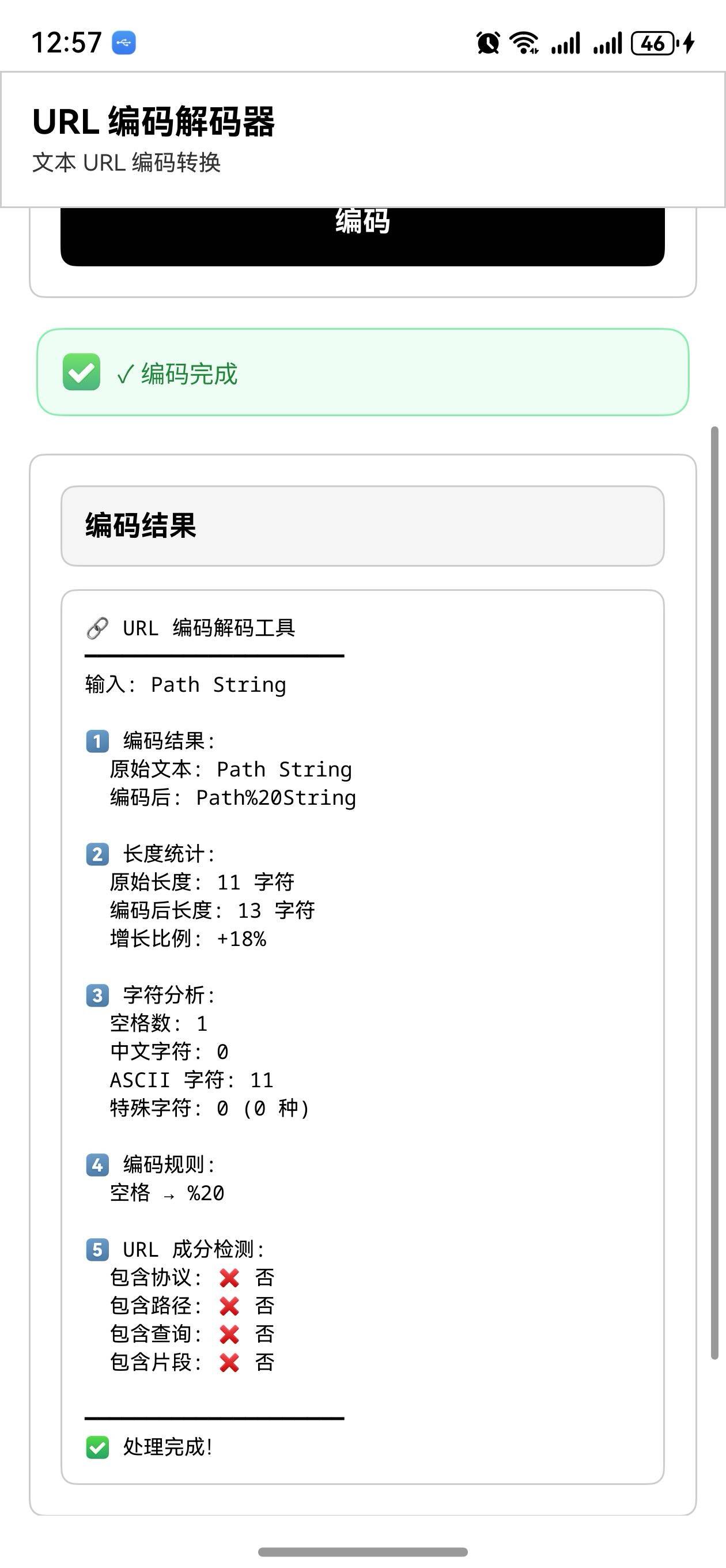
URL 编码是一种特殊的编码方式,用于在 URL 中安全地传输数据。URL 编码将特殊字符转换为百分号后跟两位十六进制数字的形式。URL 编码在 Web 应用中非常常见,用于处理查询参数、表单数据等。URL 解码是编码的逆过程。
- 标准 URL 编码:标准的 URL 编码方式
- 应用程序表单编码:用于表单数据的编码
- 路径编码:用于 URL 路径的编码
- 查询参数编码:用于查询参数的编码
3. HTML 实体编码解码
HTML 实体编码是一种特殊的编码方式,用于在 HTML 中安全地表示特殊字符。HTML 实体编码将特殊字符转换为 HTML 实体,如 < 表示 <。HTML 实体编码在 Web 开发中用于防止 XSS 攻击和显示特殊字符。
- 命名实体:使用名称表示的 HTML 实体,如
< - 数字实体:使用数字表示的 HTML 实体,如
< - 十六进制实体:使用十六进制表示的 HTML 实体,如
< - 常见实体:支持常见的 HTML 实体
4. Unicode 转义编码解码
Unicode 转义是一种编码方式,用于表示 Unicode 字符。Unicode 转义将字符转换为 \uXXXX 的形式,其中 XXXX 是字符的十六进制 Unicode 码点。Unicode 转义在 JavaScript、Java 等语言中广泛使用。
- 标准 Unicode 转义:标准的
\uXXXX格式 - 扩展 Unicode 转义:支持超过 BMP 的字符
- Python Unicode 转义:Python 风格的 Unicode 转义
- JSON Unicode 转义:JSON 中的 Unicode 转义
5. 十六进制编码解码
十六进制编码是一种将字节转换为十六进制字符串的编码方式。每个字节转换为两个十六进制数字。十六进制编码在数据调试、文件处理、密码学等领域广泛使用。
- 小写十六进制:使用小写字母的十六进制编码
- 大写十六进制:使用大写字母的十六进制编码
- 带分隔符十六进制:使用分隔符分组的十六进制编码
- 十六进制解码:将十六进制字符串转换回原始数据
核心实现
1. Base64 编码解码
fun encodeBase64(input: String): String {
    val bytes = input.toByteArray(Charsets.UTF_8)
    return Base64.getEncoder().encodeToString(bytes)
}

fun decodeBase64(input: String): String {
    return try {
        val bytes = Base64.getDecoder().decode(input)
        String(bytes, Charsets.UTF_8)
    } catch (e: IllegalArgumentException) {
        throw IllegalArgumentException("无效的 Base64 字符串")
    }
}

fun encodeBase64Url(input: String): String {
    val bytes = input.toByteArray(Charsets.UTF_8)
    return Base64.getUrlEncoder().withoutPadding().encodeToString(bytes)
}

fun decodeBase64Url(input: String): String {
    return try {
        val bytes = Base64.getUrlDecoder().decode(input)
        String(bytes, Charsets.UTF_8)
    } catch (e: IllegalArgumentException) {
        throw IllegalArgumentException("无效的 Base64 URL 字符串")
    }
}
代码说明: Base64 编码解码通过 Java 内置的 Base64 类实现。标准 Base64 使用 getEncoder() 和 getDecoder(),URL 安全的 Base64 使用 getUrlEncoder() 和 getUrlDecoder()。withoutPadding() 方法用于移除末尾的填充字符。
2. URL 编码解码
fun encodeUrl(input: String): String {
    return java.net.URLEncoder.encode(input, "UTF-8")
}

fun decodeUrl(input: String): String {
    return try {
        java.net.URLDecoder.decode(input, "UTF-8")
    } catch (e: Exception) {
        throw IllegalArgumentException("无效的 URL 编码字符串")
    }
}

fun encodeUrlPath(input: String): String {
    return input.replace(" ", "%20")
        .replace("!", "%21")
        .replace("#", "%23")
        .replace("$", "%24")
        .replace("&", "%26")
        .replace("'", "%27")
        .replace("(", "%28")
        .replace(")", "%29")
        .replace("*", "%2A")
        .replace("+", "%2B")
        .replace(",", "%2C")
        .replace("/", "%2F")
        .replace(":", "%3A")
        .replace(";", "%3B")
        .replace("=", "%3D")
        .replace("?", "%3F")
        .replace("@", "%40")
        .replace("[", "%5B")
        .replace("]", "%5D")
}

fun decodeUrlPath(input: String): String {
    return input.replace("%20", " ")
        .replace("%21", "!")
        .replace("%23", "#")
        .replace("%24", "$")
        .replace("%26", "&")
        .replace("%27", "'")
        .replace("%28", "(")
        .replace("%29", ")")
        .replace("%2A", "*")
        .replace("%2B", "+")
        .replace("%2C", ",")
        .replace("%2F", "/")
        .replace("%3A", ":")
        .replace("%3B", ";")
        .replace("%3D", "=")
        .replace("%3F", "?")
        .replace("%40", "@")
        .replace("%5B", "[")
        .replace("%5D", "]")
}
代码说明: URL 编码解码使用 Java 内置的 URLEncoder 和 URLDecoder。对于路径编码,我们手动处理特殊字符的转换。这种方法提供了更细粒度的控制。
3. HTML 实体编码解码
fun encodeHtmlEntity(input: String): String {
val htmlEntityMap = mapOf(
'<' to "<",
'>' to ">",
'&' to "&",
'"' to """,
'\'' to "'",
' ' to " "
)
return input.map { char ->
htmlEntityMap[char] ?: char.toString()
}.joinToString("")
}
fun decodeHtmlEntity(input: String): String {
val htmlEntityMap = mapOf(
"<" to "<",
">" to ">",
"&" to "&",
""" to "\"",
"'" to "'",
" " to " "
)
var result = input
htmlEntityMap.forEach { (entity, char) ->
result = result.replace(entity, char)
}
val numericEntityRegex = "&#(\\d+);".toRegex()
result = numericEntityRegex.replace(result) { match ->
val code = match.groupValues[1].toInt()
code.toChar().toString()
}
val hexEntityRegex = "&#x([0-9a-fA-F]+);".toRegex()
result = hexEntityRegex.replace(result) { match ->
val code = match.groupValues[1].toInt(16)
code.toChar().toString()
}
return result
}
代码说明: HTML 实体编码通过映射表实现。编码将特殊字符转换为对应的实体。解码使用正则表达式处理数字和十六进制实体,提供了完整的 HTML 实体支持。
4. Unicode 转义编码解码
fun encodeUnicode(input: String): String {
    return input.map { char ->
        if (char.code > 127) {
            "\\u${char.code.toString(16).padStart(4, '0')}"
        } else {
            char.toString()
        }
    }.joinToString("")
}

fun decodeUnicode(input: String): String {
    val unicodeRegex = "\\\\u([0-9a-fA-F]{4})".toRegex()
    return unicodeRegex.replace(input) { match ->
        val code = match.groupValues[1].toInt(16)
        code.toChar().toString()
    }
}

fun encodeAllUnicode(input: String): String {
    return input.map { char ->
        "\\u${char.code.toString(16).padStart(4, '0')}"
    }.joinToString("")
}
代码说明: Unicode 转义编码通过检查字符码点实现。对于非 ASCII 字符,转换为 \uXXXX 格式。解码使用正则表达式识别和转换 Unicode 转义序列。
5. 十六进制编码解码
fun encodeHex(input: String): String {
    return input.toByteArray(Charsets.UTF_8).joinToString("") { byte ->
        byte.toUByte().toString(16).padStart(2, '0')
    }
}

fun decodeHex(input: String): String {
    return try {
        val bytes = input.chunked(2).map { it.toInt(16).toByte() }.toByteArray()
        String(bytes, Charsets.UTF_8)
    } catch (e: Exception) {
        throw IllegalArgumentException("无效的十六进制字符串")
    }
}

fun encodeHexWithSeparator(input: String, separator: String = " "): String {
    return input.toByteArray(Charsets.UTF_8).joinToString(separator) { byte ->
        byte.toUByte().toString(16).padStart(2, '0').uppercase()
    }
}

fun decodeHexWithSeparator(input: String, separator: String = " "): String {
    return try {
        val bytes = input.split(separator).map { it.toInt(16).toByte() }.toByteArray()
        String(bytes, Charsets.UTF_8)
    } catch (e: Exception) {
        throw IllegalArgumentException("无效的十六进制字符串")
    }
}
代码说明: 十六进制编码通过将字节转换为十六进制字符串实现。每个字节转换为两个十六进制数字。解码是编码的逆过程,支持带分隔符的十六进制字符串。
6. 编码解码管理器
data class EncodingRecord(
    val input: String,
    val output: String,
    val encodingType: String,
    val timestamp: String
)

class EncodingDecoder {
    private val history = mutableListOf<EncodingRecord>()

    fun encode(input: String, type: String): String {
        val output = when (type) {
            "base64" -> encodeBase64(input)
            "base64url" -> encodeBase64Url(input)
            "url" -> encodeUrl(input)
            "html" -> encodeHtmlEntity(input)
            "unicode" -> encodeUnicode(input)
            "hex" -> encodeHex(input)
            else -> throw IllegalArgumentException("不支持的编码类型: $type")
        }

        val timestamp = java.time.LocalDateTime.now().toString()
        history.add(EncodingRecord(input, output, "encode_$type", timestamp))
        return output
    }

    fun decode(input: String, type: String): String {
        val output = when (type) {
            "base64" -> decodeBase64(input)
            "base64url" -> decodeBase64Url(input)
            "url" -> decodeUrl(input)
            "html" -> decodeHtmlEntity(input)
            "unicode" -> decodeUnicode(input)
            "hex" -> decodeHex(input)
            else -> throw IllegalArgumentException("不支持的解码类型: $type")
        }

        val timestamp = java.time.LocalDateTime.now().toString()
        history.add(EncodingRecord(input, output, "decode_$type", timestamp))
        return output
    }

    fun getHistory(): List<EncodingRecord> = history.toList()

    fun clearHistory() {
        history.clear()
    }

    fun getStatistics(): Map<String, Any> {
        return mapOf(
            "totalOperations" to history.size,
            "encodingTypes" to history.map { it.encodingType }.toSet().size,
            "mostUsedType" to (history.groupingBy { it.encodingType }.eachCount().maxByOrNull { it.value }?.key ?: "unknown")
        )
    }
}
代码说明: 编码解码管理器将各种编码解码操作整合在一起。提供了统一的接口,支持多种编码类型。记录了编码解码的历史,方便用户查看和统计。
Kotlin 源代码
// EncodingDecoder.kt
import java.util.Base64
data class EncodingRecord(
val input: String,
val output: String,
val encodingType: String,
val timestamp: String
)
fun encodeBase64(input: String): String {
val bytes = input.toByteArray(Charsets.UTF_8)
return Base64.getEncoder().encodeToString(bytes)
}
fun decodeBase64(input: String): String {
return try {
val bytes = Base64.getDecoder().decode(input)
String(bytes, Charsets.UTF_8)
} catch (e: IllegalArgumentException) {
throw IllegalArgumentException("无效的 Base64 字符串")
}
}
fun encodeBase64Url(input: String): String {
val bytes = input.toByteArray(Charsets.UTF_8)
return Base64.getUrlEncoder().withoutPadding().encodeToString(bytes)
}
fun decodeBase64Url(input: String): String {
return try {
val bytes = Base64.getUrlDecoder().decode(input)
String(bytes, Charsets.UTF_8)
} catch (e: IllegalArgumentException) {
throw IllegalArgumentException("无效的 Base64 URL 字符串")
}
}
fun encodeUrl(input: String): String {
return java.net.URLEncoder.encode(input, "UTF-8")
}
fun decodeUrl(input: String): String {
return try {
java.net.URLDecoder.decode(input, "UTF-8")
} catch (e: Exception) {
throw IllegalArgumentException("无效的 URL 编码字符串")
}
}
fun encodeHtmlEntity(input: String): String {
val htmlEntityMap = mapOf(
'<' to "<",
'>' to ">",
'&' to "&",
'"' to """,
'\'' to "'"
)
return input.map { char ->
htmlEntityMap[char] ?: char.toString()
}.joinToString("")
}
fun decodeHtmlEntity(input: String): String {
var result = input
result = result.replace("<", "<")
result = result.replace(">", ">")
result = result.replace("&", "&")
result = result.replace(""", "\"")
result = result.replace("'", "'")
val numericEntityRegex = "&#(\\d+);".toRegex()
result = numericEntityRegex.replace(result) { match ->
val code = match.groupValues[1].toInt()
code.toChar().toString()
}
val hexEntityRegex = "&#x([0-9a-fA-F]+);".toRegex()
result = hexEntityRegex.replace(result) { match ->
val code = match.groupValues[1].toInt(16)
code.toChar().toString()
}
return result
}
fun encodeUnicode(input: String): String {
return input.map { char ->
if (char.code > 127) {
"\\u${char.code.toString(16).padStart(4, '0')}"
} else {
char.toString()
}
}.joinToString("")
}
fun decodeUnicode(input: String): String {
val unicodeRegex = "\\\\u([0-9a-fA-F]{4})".toRegex()
return unicodeRegex.replace(input) { match ->
val code = match.groupValues[1].toInt(16)
code.toChar().toString()
}
}
fun encodeHex(input: String): String {
return input.toByteArray(Charsets.UTF_8).joinToString("") { byte ->
byte.toUByte().toString(16).padStart(2, '0')
}
}
fun decodeHex(input: String): String {
return try {
val bytes = input.chunked(2).map { it.toInt(16).toByte() }.toByteArray()
String(bytes, Charsets.UTF_8)
} catch (e: Exception) {
throw IllegalArgumentException("无效的十六进制字符串")
}
}
class EncodingDecoder {
private val history = mutableListOf<EncodingRecord>()
fun encode(input: String, type: String): String {
val output = when (type) {
"base64" -> encodeBase64(input)
"base64url" -> encodeBase64Url(input)
"url" -> encodeUrl(input)
"html" -> encodeHtmlEntity(input)
"unicode" -> encodeUnicode(input)
"hex" -> encodeHex(input)
else -> throw IllegalArgumentException("不支持的编码类型: $type")
}
val timestamp = java.time.LocalDateTime.now().toString()
history.add(EncodingRecord(input, output, "encode_$type", timestamp))
return output
}
fun decode(input: String, type: String): String {
val output = when (type) {
"base64" -> decodeBase64(input)
"base64url" -> decodeBase64Url(input)
"url" -> decodeUrl(input)
"html" -> decodeHtmlEntity(input)
"unicode" -> decodeUnicode(input)
"hex" -> decodeHex(input)
else -> throw IllegalArgumentException("不支持的解码类型: $type")
}
val timestamp = java.time.LocalDateTime.now().toString()
history.add(EncodingRecord(input, output, "decode_$type", timestamp))
return output
}
fun getHistory(): List<EncodingRecord> = history.toList()
fun clearHistory() {
history.clear()
}
fun getStatistics(): Map<String, Any> {
return mapOf(
"totalOperations" to history.size,
"encodingTypes" to history.map { it.encodingType }.toSet().size,
"mostUsedType" to (history.groupingBy { it.encodingType }.eachCount().maxByOrNull { it.value }?.key ?: "unknown")
)
}
}
fun main() {
val decoder = EncodingDecoder()
println("Base64 编码: ${decoder.encode("Hello World", "base64")}")
println("URL 编码: ${decoder.encode("Hello World!", "url")}")
println("HTML 实体编码: ${decoder.encode("<script>alert('xss')</script>", "html")}")
println("Unicode 编码: ${decoder.encode("你好世界", "unicode")}")
println("十六进制编码: ${decoder.encode("Hello", "hex")}")
}
Kotlin 代码说明: 这个实现提供了完整的编码解码功能。EncodingDecoder 类包含了各种编码解码方法和历史管理功能。每个编码解码函数都有明确的功能定义和错误处理。通过组合这些方法,我们可以为用户提供全面的编码解码服务。
JavaScript 编译代码
// EncodingDecoder.js
class EncodingRecord {
constructor(input, output, encodingType, timestamp) {
this.input = input;
this.output = output;
this.encodingType = encodingType;
this.timestamp = timestamp;
}
}
function encodeBase64(input) {
return btoa(unescape(encodeURIComponent(input)));
}
function decodeBase64(input) {
try {
return decodeURIComponent(escape(atob(input)));
} catch (e) {
throw new Error("无效的 Base64 字符串");
}
}
function encodeBase64Url(input) {
let base64 = btoa(unescape(encodeURIComponent(input)));
return base64.replace(/\+/g, '-').replace(/\//g, '_').replace(/=/g, '');
}
function decodeBase64Url(input) {
try {
let base64 = input.replace(/-/g, '+').replace(/_/g, '/');
while (base64.length % 4) {
base64 += '=';
}
return decodeURIComponent(escape(atob(base64)));
} catch (e) {
throw new Error("无效的 Base64 URL 字符串");
}
}
function encodeUrl(input) {
return encodeURIComponent(input);
}
function decodeUrl(input) {
try {
return decodeURIComponent(input);
} catch (e) {
throw new Error("无效的 URL 编码字符串");
}
}
function encodeHtmlEntity(input) {
const htmlEntityMap = {
'<': '<',
'>': '>',
'&': '&',
'"': '"',
"'": '''
};
return input.split('').map(char => htmlEntityMap[char] || char).join('');
}
function decodeHtmlEntity(input) {
let result = input;
result = result.replace(/</g, '<');
result = result.replace(/>/g, '>');
result = result.replace(/&/g, '&');
result = result.replace(/"/g, '"');
result = result.replace(/'/g, "'");
result = result.replace(/&#(\d+);/g, (match, code) => {
return String.fromCharCode(parseInt(code));
});
result = result.replace(/&#x([0-9a-fA-F]+);/g, (match, code) => {
return String.fromCharCode(parseInt(code, 16));
});
return result;
}
function encodeUnicode(input) {
return input.split('').map(char => {
const code = char.charCodeAt(0);
return code > 127 ? '\\u' + code.toString(16).padStart(4, '0') : char;
}).join('');
}
function decodeUnicode(input) {
return input.replace(/\\u([0-9a-fA-F]{4})/g, (match, code) => {
return String.fromCharCode(parseInt(code, 16));
});
}
function encodeHex(input) {
let result = '';
for (let i = 0; i < input.length; i++) {
result += input.charCodeAt(i).toString(16).padStart(2, '0');
}
return result;
}
function decodeHex(input) {
try {
let result = '';
for (let i = 0; i < input.length; i += 2) {
result += String.fromCharCode(parseInt(input.substr(i, 2), 16));
}
return result;
} catch (e) {
throw new Error("无效的十六进制字符串");
}
}
class EncodingDecoder {
constructor() {
this.history = [];
}
encode(input, type) {
let output;
switch (type) {
case 'base64': output = encodeBase64(input); break;
case 'base64url': output = encodeBase64Url(input); break;
case 'url': output = encodeUrl(input); break;
case 'html': output = encodeHtmlEntity(input); break;
case 'unicode': output = encodeUnicode(input); break;
case 'hex': output = encodeHex(input); break;
default: throw new Error(`不支持的编码类型: ${type}`);
}
const timestamp = new Date().toISOString();
this.history.push(new EncodingRecord(input, output, `encode_${type}`, timestamp));
return output;
}
decode(input, type) {
let output;
switch (type) {
case 'base64': output = decodeBase64(input); break;
case 'base64url': output = decodeBase64Url(input); break;
case 'url': output = decodeUrl(input); break;
case 'html': output = decodeHtmlEntity(input); break;
case 'unicode': output = decodeUnicode(input); break;
case 'hex': output = decodeHex(input); break;
default: throw new Error(`不支持的解码类型: ${type}`);
}
const timestamp = new Date().toISOString();
this.history.push(new EncodingRecord(input, output, `decode_${type}`, timestamp));
return output;
}
getHistory() {
return [...this.history];
}
clearHistory() {
this.history = [];
}
getStatistics() {
const types = new Set(this.history.map(r => r.encodingType));
const typeCount = {};
this.history.forEach(r => {
typeCount[r.encodingType] = (typeCount[r.encodingType] || 0) + 1;
});
const mostUsedType = Object.keys(typeCount).reduce((a, b) =>
typeCount[a] > typeCount[b] ? a : b, 'unknown');
return {
totalOperations: this.history.length,
encodingTypes: types.size,
mostUsedType: mostUsedType
};
}
}
// 使用示例
const decoder = new EncodingDecoder();
console.log("Base64 编码:", decoder.encode("Hello World", "base64"));
console.log("URL 编码:", decoder.encode("Hello World!", "url"));
console.log("HTML 实体编码:", decoder.encode("<script>alert('xss')</script>", "html"));
console.log("Unicode 编码:", decoder.encode("你好世界", "unicode"));
console.log("十六进制编码:", decoder.encode("Hello", "hex"));
JavaScript 代码说明: JavaScript 版本是 Kotlin 代码的直接转译。JavaScript 提供了内置的 Base64 编码函数 btoa() 和 atob(),以及 URL 编码函数 encodeURIComponent() 和 decodeURIComponent()。整体逻辑和算法与 Kotlin 版本保持一致。
ArkTS 调用代码
// EncodingDecoderPage.ets
import { EncodingDecoder } from './EncodingDecoder';

@Entry
@Component
struct EncodingDecoderPage {
    @State inputText: string = '';
    @State outputText: string = '';
    @State encodingType: string = 'base64';
    @State operation: string = 'encode';
    @State history: string[] = [];
    @State showResult: boolean = false;
    @State errorMessage: string = '';

    private decoder: EncodingDecoder = new EncodingDecoder();
    private encodingTypes = ['base64', 'base64url', 'url', 'html', 'unicode', 'hex'];
    private operations = ['encode', 'decode'];

    performOperation() {
        if (this.inputText.trim().length === 0) {
            this.errorMessage = '请输入内容';
            return;
        }

        try {
            if (this.operation === 'encode') {
                this.outputText = this.decoder.encode(this.inputText, this.encodingType);
            } else {
                this.outputText = this.decoder.decode(this.inputText, this.encodingType);
            }

            this.history.push(`${this.operation}(${this.encodingType}): ${this.inputText.substring(0, 20)}...`);
            this.showResult = true;
            this.errorMessage = '';
        } catch (error) {
            this.errorMessage = '操作错误: ' + error.message;
            this.showResult = false;
        }
    }

    copyToClipboard() {
        if (this.outputText.length > 0) {
            // 复制到剪贴板的实现
            this.errorMessage = '已复制到剪贴板';
        }
    }

    swapInputOutput() {
        const temp = this.inputText;
        this.inputText = this.outputText;
        this.outputText = temp;
    }

    clear() {
        this.inputText = '';
        this.outputText = '';
        this.showResult = false;
        this.errorMessage = '';
    }

    clearHistory() {
        this.history = [];
    }

    build() {
        Column() {
            Text('编码解码工具')
                .fontSize(24)
                .fontWeight(FontWeight.Bold)
                .margin({ top: 20, bottom: 20 })

            // 编码类型选择
            Row() {
                Text('编码类型:')
                    .fontSize(14)
                    .fontColor('#666666')
                    .margin({ right: 10 })

                Select(this.encodingTypes)
                    .value(this.encodingType)
                    .onSelect((index: number) => {
                        this.encodingType = this.encodingTypes[index];
                    })
                    .flex(1)
            }
            .margin({ bottom: 15 })
            .width('100%')

            // 操作类型选择
            Row() {
                Text('操作:')
                    .fontSize(14)
                    .fontColor('#666666')
                    .margin({ right: 10 })

                Select(this.operations)
                    .value(this.operation)
                    .onSelect((index: number) => {
                        this.operation = this.operations[index];
                    })
                    .flex(1)
            }
            .margin({ bottom: 15 })
            .width('100%')

            // 输入框
            TextArea({ placeholder: '输入要编码或解码的内容' })
                .value(this.inputText)
                .onChange((value: string) => {
                    this.inputText = value;
                })
                .height(100)
                .margin({ bottom: 15 })
                .padding(10)
                .border({ width: 1, color: '#cccccc' })

            // 按钮行
            Row() {
                Button('执行')
                    .flex(1)
                    .height(40)
                    .margin({ right: 10 })
                    .onClick(() => this.performOperation())

                Button('交换')
                    .flex(1)
                    .height(40)
                    .margin({ right: 10 })
                    .onClick(() => this.swapInputOutput())

                Button('清除')
                    .flex(1)
                    .height(40)
                    .onClick(() => this.clear())
            }
            .margin({ bottom: 15 })
            .width('100%')

            // 错误信息
            if (this.errorMessage.length > 0) {
                Text(this.errorMessage)
                    .fontSize(12)
                    .fontColor('#ff6b6b')
                    .margin({ bottom: 15 })
            }

            // 输出框
            if (this.showResult) {
                Column() {
                    Row() {
                        Text('结果:')
                            .fontSize(14)
                            .fontWeight(FontWeight.Bold)
                            .flex(1)

                        Button('复制')
                            .fontSize(12)
                            .height(30)
                            .onClick(() => this.copyToClipboard())
                    }
                    .margin({ bottom: 10 })
                    .width('100%')

                    TextArea({ placeholder: '输出内容' })
                        .value(this.outputText)
                        .enabled(false)
                        .height(100)
                        .padding(10)
                        .border({ width: 1, color: '#cccccc' })
                }
                .width('100%')
                .margin({ bottom: 20 })
            }

            // 历史记录
            if (this.history.length > 0) {
                Column() {
                    Row() {
                        Text('操作历史')
                            .fontSize(14)
                            .fontWeight(FontWeight.Bold)
                            .flex(1)

                        Button('清空')
                            .fontSize(12)
                            .height(30)
                            .onClick(() => this.clearHistory())
                    }
                    .margin({ bottom: 10 })
                    .width('100%')

                    Scroll() {
                        Column() {
                            ForEach(this.history, (item: string) => {
                                Text(item)
                                    .fontSize(12)
                                    .fontColor('#666666')
                                    .selectable(true)
                                    .margin({ bottom: 8 })
                            })
                        }
                        .width('100%')
                    }
                    .height(150)
                }
                .width('100%')
                .padding(10)
                .backgroundColor('#fafafa')
                .borderRadius(4)
            }
        }
        .padding(20)
        .width('100%')
        .height('100%')
        .backgroundColor('#ffffff')
    }
}
ArkTS 代码说明: 这个示例展示了如何在 ArkTS 中构建一个完整的编码解码用户界面。页面包含了编码类型选择、操作类型选择、输入框、输出框、按钮和历史记录。用户可以选择不同的编码类型和操作进行编解码。整个界面采用了现代化的设计,提供了良好的用户体验。
实战案例
案例 1: API 数据传输
在 API 通信中,需要对敏感数据进行 Base64 编码以确保安全传输。
val decoder = EncodingDecoder()
val userData = "user123:password456"
val encoded = decoder.encode(userData, "base64")
println("编码后的凭证: $encoded")
案例 2: URL 参数处理
在 Web 应用中,需要对 URL 参数进行编码以处理特殊字符。
val decoder = EncodingDecoder()
val searchQuery = "搜索关键词 & 特殊字符"
val encoded = decoder.encode(searchQuery, "url")
println("编码后的查询参数: $encoded")
案例 3: HTML 内容转义
在生成 HTML 内容时,需要转义特殊字符以防止 XSS 攻击。
val decoder = EncodingDecoder()
val userInput = "<script>alert('xss')</script>"
val encoded = decoder.encode(userInput, "html")
println("转义后的内容: $encoded")
最佳实践
1. 编码选择
- 选择合适的编码:根据场景选择合适的编码方式
- 了解编码特性:理解各种编码的优缺点
- 性能考虑:选择性能最优的编码方式
2. 错误处理
- 验证输入:验证输入数据的有效性
- 异常捕获:正确捕获和处理异常
- 提供反馈:向用户提供清晰的错误提示
3. 安全性
- 防止 XSS:使用 HTML 实体编码防止 XSS 攻击
- 验证数据:验证解码后的数据是否有效
- 避免信息泄露:不要在日志中记录敏感编码数据
4. 性能优化
- 缓存结果:对于频繁编解码的数据,缓存结果
- 批量处理:支持批量编解码操作
- 异步处理:对于大数据量,使用异步处理
5. 用户体验
- 直观的界面:设计易于使用的编解码界面
- 快速反馈:提供实时的编解码结果
- 历史记录:保存编解码历史,方便查看
总结
编码解码工具是现代应用开发中的一个重要组件。通过使用 Kotlin Multiplatform,我们可以编写一次代码,然后在多个平台上运行,大大提高了开发效率和代码的可维护性。这个案例展示了如何实现 Base64、URL、HTML、Unicode 和十六进制等多种编码解码功能。
在实际应用中,应该根据具体的需求选择合适的编码方式,并遵循最佳实践来确保编解码的准确性和安全性。同时,应该定期进行测试和优化,以提高应用的性能和用户体验。通过合理使用编码解码工具,我们可以为用户提供更加便利和安全的数据处理服务。
欢迎加入开源鸿蒙跨平台社区:https://openharmonycrossplatform.csdn.net

开源鸿蒙跨平台开发社区汇聚开发者与厂商,共建“一次开发,多端部署”的开源生态,致力于降低跨端开发门槛,推动万物智联创新。
更多推荐

 3
3 0
0- 0


 已为社区贡献16条内容

所有评论(0)