React Native for OpenHarmony 三方库集成实战:巡检表单
React Native for OpenHarmony 三方库集成实战:巡检表单
验证日期: 2026-09-26
受测宿主:RN能力库 0.3.1
一、应用背景
现场巡检表单通常同时包含人员角色、若干安全检查项、流程进度和提交结果。角色选择器、复选框、步骤指示器和 Toast 解决的是不同的 UI 问题,但它们最终都要写入同一份业务状态。若让每个组件自己改变步骤或决定提交成功,页面很快会出现“视觉上进入下一步、服务端实际未提交”的不一致。
本文把四个纯 JavaScript 组件放在一个受控表单中:组件只报告用户操作,reducer 管理状态,提交函数负责本地校验和幂等请求,服务端响应再决定流程是否迁移。
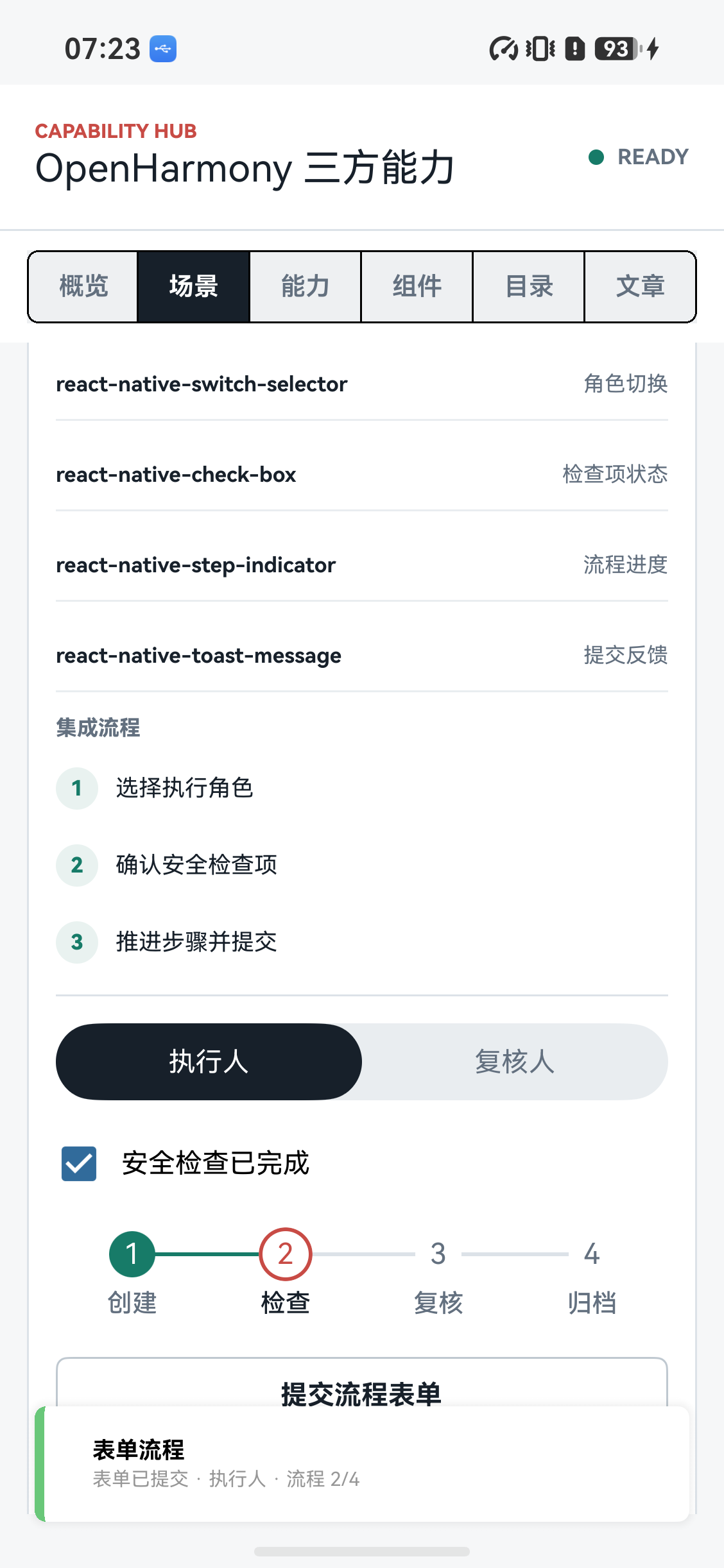
图 1:执行人已选中、安全检查已确认,提交后流程进入第 2 步。
二、应用目标
- 用角色选择器维护稳定的业务值
operator/reviewer; - 用复选框完成提交前的安全检查;
- 用步骤指示器展示当前流程位置,但不绕过服务端状态机;
- 用 Toast 做摘要反馈,同时把错误保留在页面状态中;
- 防止重复点击、页面离开和网络重试产生重复提交。
三、三方库与版本
| 三方库 | 锁定版本 | 适配 TAG | 职责 |
|---|---|---|---|
react-native-switch-selector | 2.3.0 | 2.3.0-ohos-1.0.0 | 执行人/复核人选择 |
react-native-check-box | 2.1.7 | 2.1.7-ohos-1.0.0 | 安全检查状态 |
react-native-step-indicator | 1.0.3 | 1.0.3-ohos-1.0.0 | 流程进度 |
react-native-toast-message | 2.5.2 | 2.5.2-ohos-1.0.0 | 成功与失败反馈 |
四个包均为 MIT 许可证的 OpenHarmony 交付包,版本、源仓库和 TAG 截止 2026-09-26 核对。它们由 Metro 打包为 JavaScript,不引入 HAR 或新的系统权限。
npm install
npm run bundle:harmony
四、应用方式
页面状态用零基 step 保存,显示时再加一。组件的 onPress 和 onClick 只派发动作,不直接调用接口:
const [role, setRole] = useState<'operator' | 'reviewer'>('operator');
const [checked, setChecked] = useState(false);
const [step, setStep] = useState(0);

<SwitchSelector
  initial={0}
  onPress={value => setRole(value as 'operator' | 'reviewer')}
  options={[
    {label: '执行人', value: 'operator'},
    {label: '复核人', value: 'reviewer'},
  ]}
  buttonColor="#17202A"
  backgroundColor="#E9EDF0"
  selectedColor="#FFFFFF"
  height={40}
/>

<CheckBox
  isChecked={checked}
  onClick={() => setChecked(value => !value)}
  rightText="安全检查已完成"
  checkBoxColor="#316B9B"
/>

<StepIndicator
  currentPosition={step}
  stepCount={4}
  labels={['创建', '检查', '复核', '归档']}
  customStyles={stepStyles}
/>

<Pressable onPress={submit} disabled={status === 'submitting'}>
  <Text>{status === 'submitting' ? '提交中...' : '提交流程表单'}</Text>
</Pressable>

{/* Toast 容器在应用根节点只渲染一次 */}
<Toast />
步骤指示器可以展示当前进度,但不能把 onPress 直接接到 setStep。是否允许跳转、回退或进入归档步骤,应由领域状态和服务端响应决定。
五、工程实现
用 reducer 统一状态迁移。
多个布尔值很容易形成冲突组合,例如 submitting=true 同时又 submitted=true。使用明确的状态和操作 ID,让重复提交在入口处被拦截:
type FormStatus = 'draft' | 'validating' | 'submitting' | 'submitted' | 'failed';
type Role = 'operator' | 'reviewer';

type FormState = {
  role: Role;
  checked: boolean;
  step: number;
  status: FormStatus;
  operationId?: string;
  error?: string;
};

type Action =
  | {type: 'roleChanged'; role: Role}
  | {type: 'checkChanged'; checked: boolean}
  | {type: 'submitStarted'; operationId: string}
  | {type: 'submitSucceeded'; nextStep: number}
  | {type: 'submitFailed'; message: string};

function formReducer(state: FormState, action: Action): FormState {
  switch (action.type) {
    case 'roleChanged':
      return state.status === 'submitting'
        ? state
        : {...state, role: action.role};
    case 'checkChanged':
      return {...state, checked: action.checked, error: undefined};
    case 'submitStarted':
      return {...state, status: 'submitting', operationId: action.operationId};
    case 'submitSucceeded':
      return {...state, status: 'submitted', step: action.nextStep, error: undefined};
    case 'submitFailed':
      return {...state, status: 'failed', error: action.message};
  }
}
角色值保存稳定标识,展示文案可以本地化。复选框是 UI 状态,不等于服务端已经完成安全检查;提交时仍需把 checked 放入请求并由服务端重新校验。
提交使用幂等键和错误分层。
本地校验只负责快速反馈,权限、流程版本和业务规则由服务端校验。超时不等于服务端没有收到请求,重试前应使用同一个幂等键查询状态:
async function submitForm() {
  if (state.status === 'submitting') return;
  if (!state.checked) {
    dispatch({type: 'submitFailed', message: '请先完成安全检查'});
    Toast.show({type: 'error', text1: '表单未提交', text2: '安全检查未完成'});
    return;
  }

  const operationId = `${Date.now()}-${Math.random().toString(16).slice(2)}`;
  dispatch({type: 'submitStarted', operationId});
  try {
    const result = await api.submitForm({
      role: state.role,
      checked: state.checked,
      step: state.step,
      idempotencyKey: operationId,
    });
    dispatch({type: 'submitSucceeded', nextStep: result.nextStep});
    Toast.show({type: 'success', text1: '表单已提交', text2: `流程 ${result.nextStep + 1}/4`});
  } catch (error) {
    const message = mapSubmitError(error);
    dispatch({type: 'submitFailed', message});
    Toast.show({type: 'error', text1: '提交失败', text2: message});
  }
}
网络错误可以有限重试,权限拒绝要重新登录或申请权限,版本冲突要刷新表单,字段校验失败要定位到具体字段。不要把所有异常都映射为“请重试”。提交成功后以服务端返回的流程状态更新 step,不要只执行 step + 1。
Toast、键盘和离线草稿。
Toast 是摘要反馈,错误仍要显示在字段下方;用户切换到其他页面后,页面状态仍应能说明为什么没有提交。键盘提交和点击提交调用同一个 submitForm(),失败后将焦点移到第一个错误字段。
现场网络不稳定时,可以保存带 schemaVersion、表单 ID、修改时间和幂等键的草稿。草稿保存、服务端提交和正式审计是三个不同事件,不能因为本地保存成功就显示“已提交”。离线队列恢复时,sending 状态要能够回退为可重试,并用幂等键避免服务端重复写入。
检查项不要使用数组下标作为业务 ID。服务端下发规则变化后,数组顺序可能改变,下标会把旧草稿的结果套到错误的检查项上。草稿和提交 DTO 都使用稳定的 checkId:
type CheckValue = {
  checkId: string;
  checked: boolean;
  note: string;
};

type FormDraft = {
  schemaVersion: 2;
  formId: string;
  workflowVersion: string;
  role: 'operator' | 'reviewer';
  checks: CheckValue[];
  step: number;
  updatedAt: string;
  idempotencyKey: string;
};

function toSubmitDto(draft: FormDraft) {
  return {
    formId: draft.formId,
    workflowVersion: draft.workflowVersion,
    role: draft.role,
    checks: draft.checks.map(check => ({
      id: check.checkId,
      value: check.checked,
      note: check.note.trim(),
    })),
    idempotencyKey: draft.idempotencyKey,
  };
}
展示模型可以包含展开状态、错误文案和本地化 label,提交 DTO 只包含服务端需要的 ID、值、备注和版本。不要直接 JSON.stringify React state,因为 state 里可能包含错误对象、动画状态和未清理的临时字段。
离线队列使用显式状态。 提交请求发出后客户端可能被系统杀死,队列项需要知道下一次启动时能否重试:
type QueueState = 'queued' | 'sending' | 'acknowledged' | 'rejected' | 'conflict';

type QueueItem = {
  key: string;
  state: QueueState;
  attempts: number;
  lastError?: string;
  payload: ReturnType<typeof toSubmitDto>;
};

function recoverQueue(items: QueueItem[]) {
  return items.map(item => item.state === 'sending'
    ? {...item, state: 'queued' as const}
    : item);
}
sending 回退为 queued 只代表客户端没有收到确认,服务端可能已经成功,因此重试必须沿用原幂等键,并优先调用 getSubmissionStatus(key)。字段校验失败不重试,版本冲突刷新后让用户确认,网络错误才使用有限次数的指数退避。
把可访问性作为表单契约。 角色控件声明选择语义,复选框声明 checkbox,提交按钮声明 button。步骤指示器如果不能跳转,应作为进度文本而不是一组可点击按钮:
<Pressable
  accessibilityRole="button"
  accessibilityLabel="提交巡检表单"
  accessibilityState={{disabled: state.status === 'submitting'}}
  disabled={state.status === 'submitting'}
  onPress={submitForm}>
  <Text>提交流程表单</Text>
</Pressable>

{state.error && (
  <Text accessibilityRole="alert">{state.error}</Text>
)}
错误文本放在控件下方而不是覆盖输入区域。大字体和长文案下,按钮允许换行,Toast 只做摘要,详细错误仍然留在页面上。
处理流程版本冲突。 用户打开表单后,另一个终端可能已经完成复核。提交 DTO 携带 workflowVersion,服务端发现版本过期时返回 conflict,客户端保留本地草稿并要求刷新,不能自动把旧表单覆盖回去:
type SubmitError =
  | {code: 'network'; retryable: true}
  | {code: 'timeout'; retryable: false}
  | {code: 'permission'; retryable: false}
  | {code: 'validation'; fields: Record<string, string>}
  | {code: 'conflict'; serverVersion: string};

function mapSubmitError(error: unknown): string {
  const code = getErrorCode(error);
  if (code === 'conflict') return '表单已被其他终端更新,请刷新后再提交';
  if (code === 'validation') return '请修正标记的检查项';
  if (code === 'permission') return '当前角色无权提交此步骤';
  if (code === 'timeout') return '请求超时,请先查询提交状态';
  return '网络不可用,请稍后重试';
}
服务端返回的新流程状态、负责人和下一步必填项都应写入领域状态,再由步骤指示器渲染。客户端的 step + 1 只能用于演示组件,不应作为正式迁移规则。
自动保存需要可重复迁移。 表单 schema 增加必填项时,旧草稿不能直接强制转换成新类型。迁移函数应是纯函数,保存原始 schema 版本,失败时保留原始草稿:
type DraftV1 = {formId: string; checked: boolean; note: string};
type DraftV2 = DraftV1 & {checkId: string};

function migrateDraft(input: DraftV1 | DraftV2): DraftV2 {
  if ('checkId' in input) return input;
  return {
    ...input,
    checkId: 'safety-check',
  };
}
自动保存应去抖,避免每次按键都写磁盘;写入任务也要带序号,旧写入完成后不能覆盖较新的草稿。用户退出账号、删除工单或卸载应用时,按产品规则清理包含备注、位置和附件引用的本地数据。
返回键和顶部返回按钮都调用同一个 attemptLeave():有未保存修改时保存草稿或确认离开,提交中则继续等待任务中心或明确取消。不能因为组件卸载就把已经发出的请求当成失败,也不能在未收到服务端确认时显示成功。
async function attemptLeave() {
  if (state.status === 'submitting') {
    return {allowed: false, reason: 'submitting'} as const;
  }
  if (draftIsDirty(state)) {
    await saveDraft(state);
    return {allowed: true, reason: 'draft-saved'} as const;
  }
  return {allowed: true, reason: 'clean'} as const;
}
把离开决策放在业务层后,系统返回键、顶部按钮和通知深链可以共享同一规则,避免某条路径把用户输入直接丢弃。
组件测试和真机测试。
组件测试验证默认角色、角色切换、勾选、步骤边界和 Toast 调用;业务测试验证未勾选提交、重复点击、超时、权限拒绝和版本冲突。真机测试再检查触摸区域、键盘、返回键、系统字体和前后台切换。
it('does not submit when the safety check is incomplete', async () => {
  const submit = jest.fn();
  const state = {checked: false, status: 'draft' as const};

  await submitFormWith({state, api: {submitForm: submit}});

  expect(submit).not.toHaveBeenCalled();
  expect(Toast.show).toHaveBeenCalledWith(expect.objectContaining({type: 'error'}));
});
六、真机验证
| 验证项 | 实测结果 | 结论 |
|---|---|---|
| HAP 安装与启动 | RN能力库 0.3.1 可启动 | 通过 |
| 角色选择 | 默认显示执行人 | 通过 |
| 安全检查 | 复选框可选中 | 通过 |
| 表单提交 | 显示“表单已提交 · 执行人 · 流程 2/4” | 通过 |
| Toast | 成功反馈显示在根容器 | 通过 |
受测设备为 6UMBB26319007180,系统 OpenHarmony-7.0.0.105,HAP SHA-256:a0f079982142ef5eb836f439af5e71c8f31f33c4988e80ab2a7575bee64b1f03。图 1 来自同一受测 HAP。
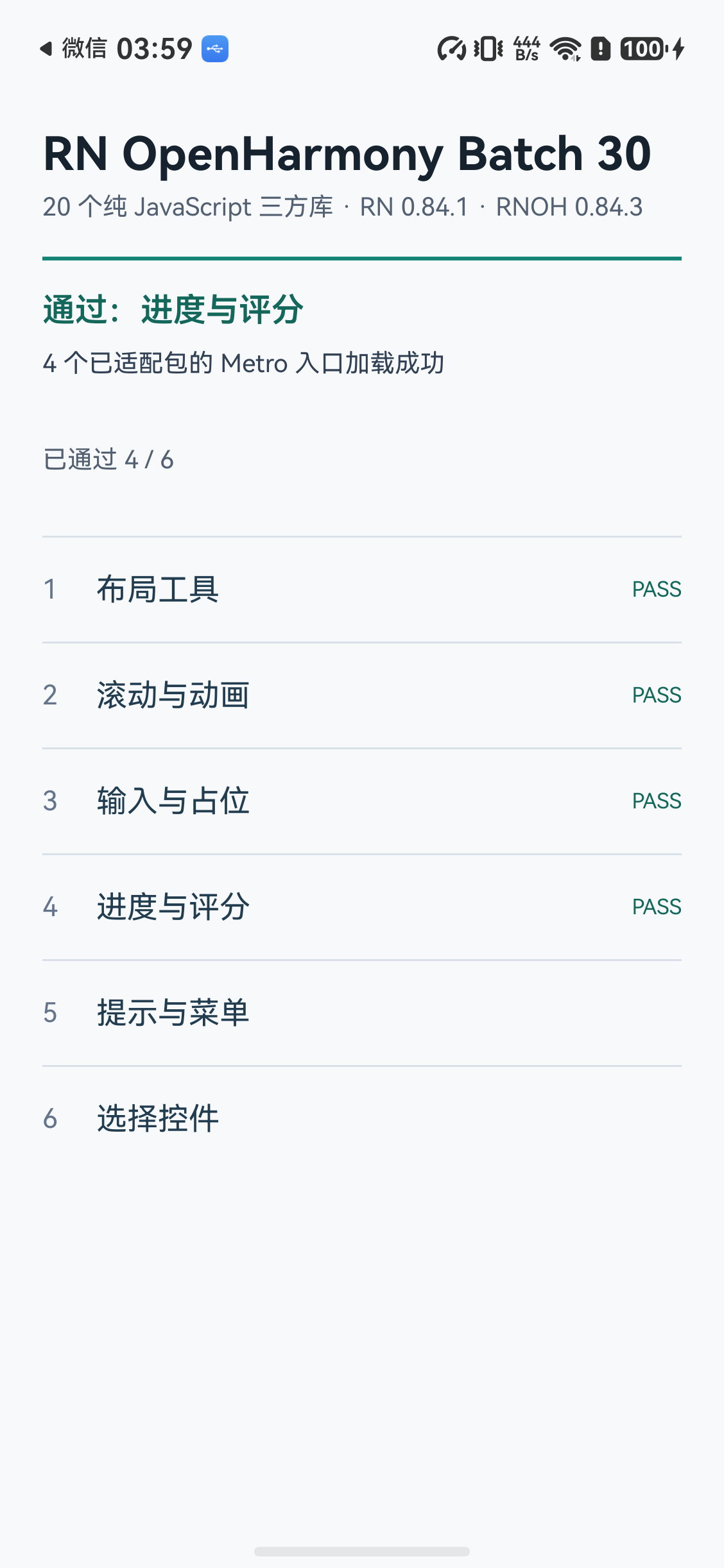
图 2:react-native-step-indicator 库级真机验证中的进度与评分场景,截图来自 2026-09-14 的独立包验证。
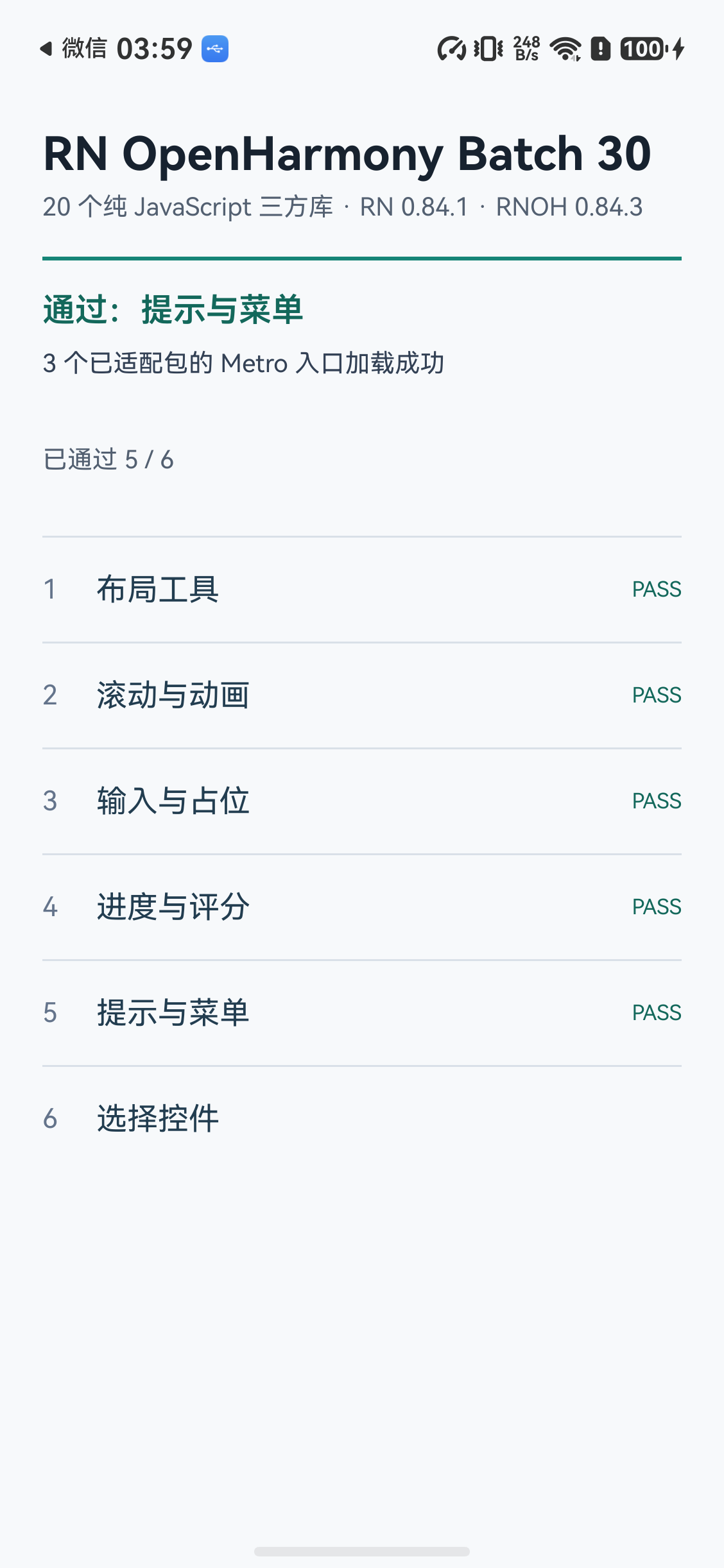
图 3:react-native-toast-message 库级真机验证中的提示与菜单场景。
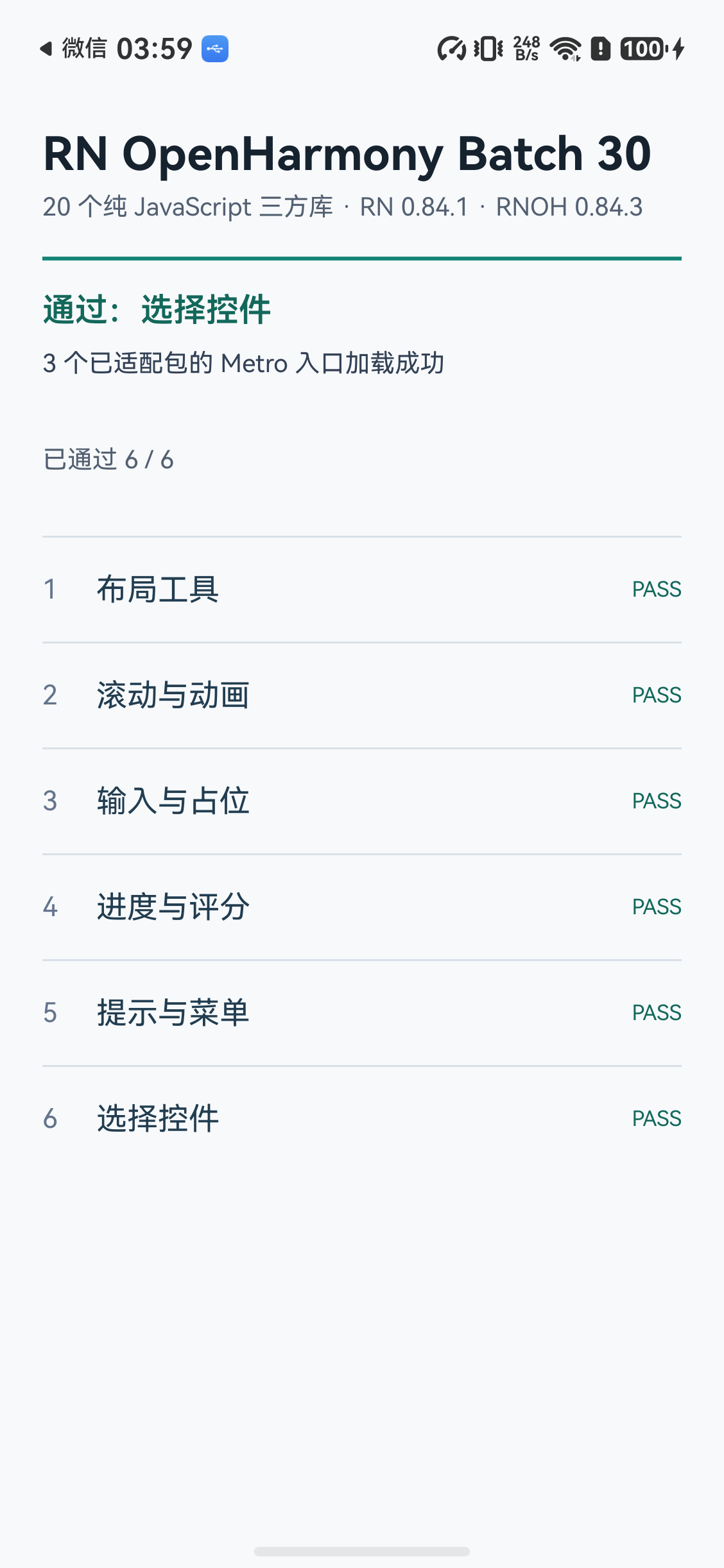
图 4:react-native-check-box 与选择控件的库级真机验证场景。
本轮真机证据覆盖默认角色、已勾选提交和成功 Toast,未覆盖真实后端错误、未勾选提交、离线冲突、草稿恢复、长文案和屏幕阅读器。接入真实接口后必须新增错误分支证据,不能把 Demo 中的本地步骤迁移直接当成服务端流程完成。
七、参考链接
- react-native-switch-selector
- react-native-check-box
- react-native-step-indicator
- react-native-toast-message
- RN能力库
欢迎加入 RN for OpenHarmony 社区。

开源鸿蒙跨平台开发社区汇聚开发者与厂商,共建“一次开发,多端部署”的开源生态,致力于降低跨端开发门槛,推动万物智联创新。
更多推荐
 3
3 0
0- 0


 已为社区贡献22条内容

所有评论(0)