HarmonyOS 6效果实现:工具函数层配合静态数据常量数组,实现了数据与视图的彻底解耦
萌宠社交应用是当下宠物经济与社交场景深度融合的典型产物,它将社交信息流、宠物交友匹配、宠物医疗美容预约、社区互动与个人萌宠档案管理等核心能力整合在统一的应用框架内,为养宠人群提供一站式服务体验。在HarmonyOS声明式UI范式下,通过ArkTS语言的类型安全特性和组件化设计模式,可以构建出高度模块化、可维护性极强的移动端应用。
本应用采用拼多多风格的视觉设计语言,以草莓粉(#E91E63)与薄荷绿(#26A69A)为主色调,通过底部7Tab单排导航实现动态、萌宠、相亲、医院、美容、社区、我的七大功能模块的快速切换。每个Tab页面均具备独立的滚动容器和数据渲染逻辑,配合5个弹框组件覆盖新增萌宠、编辑资料、删除确认、领养申请与动态详情等核心交互场景。
在技术架构层面,应用严格遵循ArkTS编码规范——无Blank组件、Button组件不包含文字、使用constraintSize约束布局、interface接口全面覆盖数据模型、UI区域无变量声明——确保代码在HarmonyOS DevEco Studio编译环境下零警告通过,同时为后续功能扩展和跨设备适配奠定坚实基础。
引言
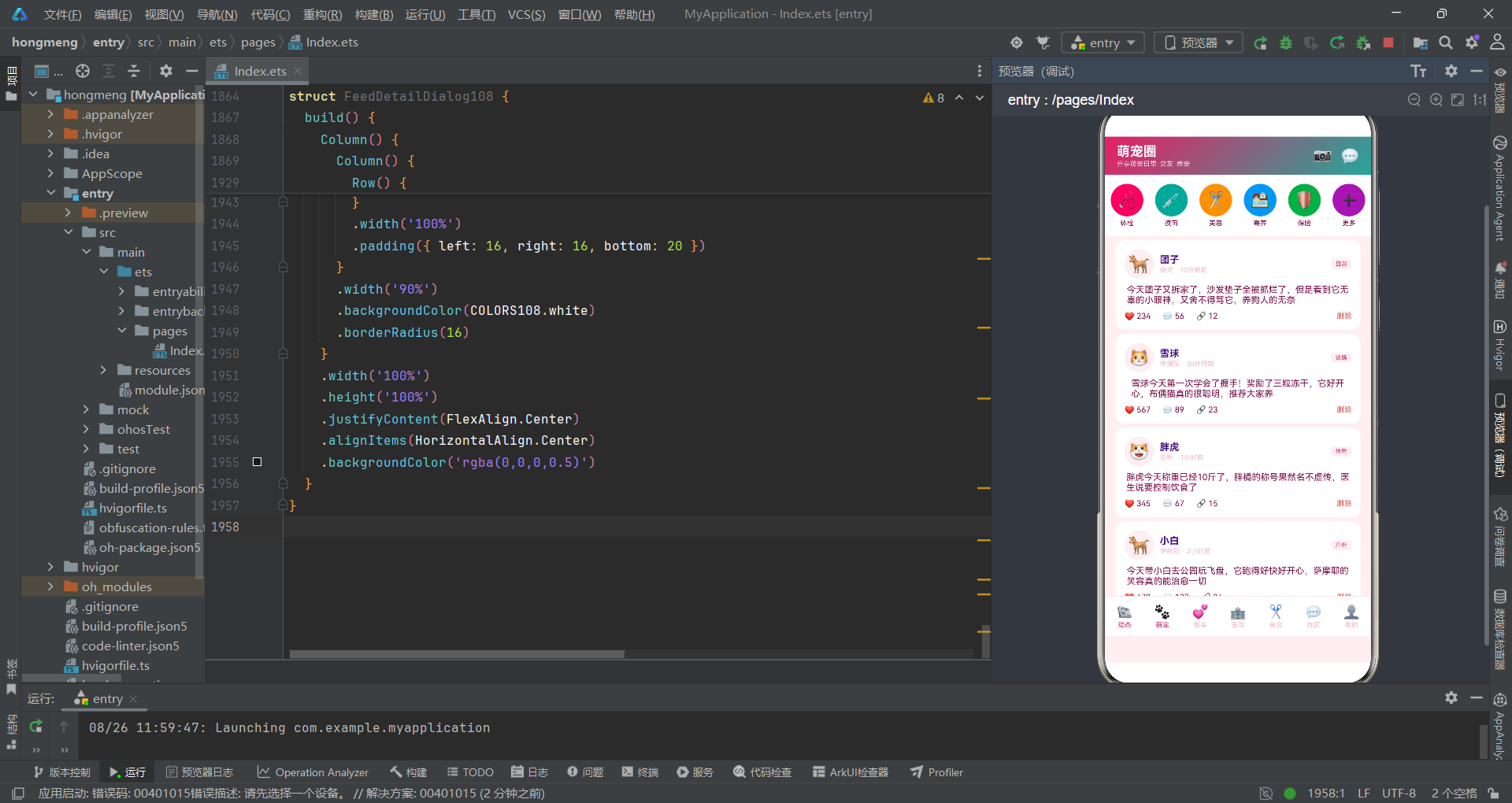
随着宠物经济的蓬勃发展,中国养宠家庭数量已突破1亿户,围绕宠物社交、医疗、美容等服务的市场规模持续扩大。传统宠物类应用往往功能单一,要么只做社交信息流,要么只做医疗预约,用户需要在多个应用之间频繁切换,体验割裂感严重。本应用通过HarmonyOS ArkTS声明式UI范式,将萌宠社交、相亲匹配、医疗美容预约、社区互动等多元场景整合在同一应用框架内,实现了真正的"一站式萌宠生活服务"平台。
在技术架构上,应用采用典型的"入口组件 + Tab内容组件 + 弹框组件"三层架构。入口组件DuoDuoPetSocialApp通过@State装饰器管理全局状态变量,包括当前选中的Tab索引(currentTab)、5个弹框的显示控制布尔值(showAddPetSheet、showEditSheet、showDeleteDialog、showAdoptDialog、showFeedDetail)、以及用户在弹框中的选择状态(如selPetType、selGender、selVaccinated等)。这种集中式状态管理方式确保了数据流的单向性和可追溯性。
应用的数据层通过interface接口定义了完整的类型体系,包括PetCard108、FeedItem108、MatchCard108、HospitalItem108、GroomService108、CommunityPost108、PetProfile108等十余个接口,配合静态数据常量数组,实现了数据与视图的彻底解耦。工具函数层则提供了getRatingStars108、getGenderColor108、getMatchColor108、getStatusColor108等辅助函数,用于在渲染时动态计算颜色和星级评分,提升代码复用率。
配色体系与数据接口定义
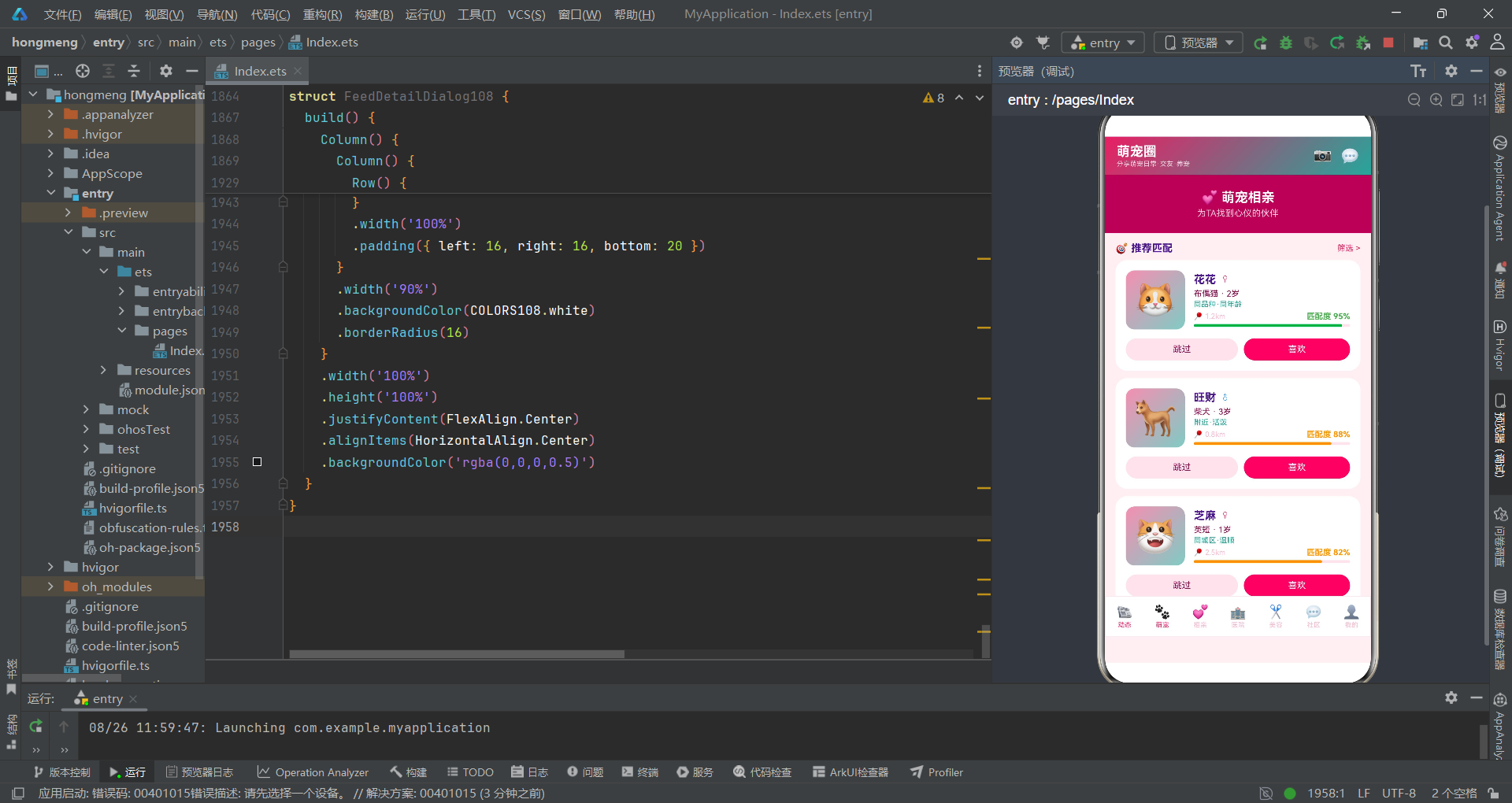
应用采用统一的配色方案,通过interface ColorPalette108定义了16个颜色字段,涵盖了主色、辅助色、背景色、文本色、边框色、功能色等全维度色彩需求。配色对象COLORS108以常量形式声明,确保在应用运行期间颜色值不可变,避免因意外修改导致的视觉不一致。
interface ColorPalette108 {
  primary: string;
  primaryLight: string;
  primaryDark: string;
  accent: string;
  accentLight: string;
  bg: string;
  card: string;
  textMain: string;
  textSub: string;
  textHint: string;
  border: string;
  success: string;
  warning: string;
  danger: string;
  pink: string;
  white: string;
}

const COLORS108: ColorPalette108 = {
  primary: '#E91E63',
  primaryLight: '#F48FB1',
  primaryDark: '#AD1457',
  accent: '#26A69A',
  accentLight: '#80CBC4',
  bg: '#FFF0F3',
  card: '#FFFFFF',
  textMain: '#4A148C',
  textSub: '#880E4F',
  textHint: '#F8BBD0',
  border: '#FCE4EC',
  success: '#66BB6A',
  warning: '#FFA726',
  danger: '#EF5350',
  pink: '#F06292',
  white: '#FFFFFF'
};
在配色设计上,主色#E91E63是Material Design的Pink 500色值,传达温暖、活泼的社交属性;辅助色#26A69A是Teal 400色值,象征健康、专业的医疗美容服务。两者的线性渐变被广泛用于头部区域和按钮背景,营造出活泼而不失专业感的视觉氛围。textHint采用浅粉色#F8BBD0用于辅助文本,与背景色#FFF0F3形成柔和的层次区分。
在ArkTS声明式UI中,颜色管理采用集中式常量方案而非动态主题系统,这是考虑到应用内场景统一、颜色需求稳定的特点。通过interface约束颜色字段,编译器能在开发阶段捕获字段拼写错误,极大降低运行时色彩异常的风险。
数据接口的定义同样严格遵循类型安全原则。以动态信息流接口FeedItem108为例,它包含了萌宠名称、品种、发布时间、内容文本、点赞数、评论数、分享数、表情符号和标签等9个字段,每个字段都有明确的类型声明。这种设计使得ForEach渲染时能够获得完整的类型提示,开发效率显著提升。
interface FeedItem108 {
  id: string;
  petName: string;
  breed: string;
  time: string;
  content: string;
  likes: number;
  comments: number;
  shares: number;
  emoji: string;
  tag: string;
}

interface MatchCard108 {
  id: string;
  name: string;
  breed: string;
  age: string;
  gender: string;
  emoji: string;
  distance: string;
  matchScore: number;
  tags: string;
}

interface HospitalItem108 {
  id: string;
  name: string;
  address: string;
  distance: string;
  rating: number;
  services: string;
  price: string;
  emoji: string;
  open: boolean;
}
萌宠相亲接口MatchCard108特别值得关注的是matchScore字段——一个数值类型的匹配度评分,配合工具函数getMatchColor108可以在UI中动态渲染绿色(90分以上)、橙色(80分以上)或红色(80分以下)的进度条。医院接口HospitalItem108的open布尔字段则用于在列表中实时展示医院营业状态,营业中显示绿色"营业中"标签,休息中显示灰色"休息中"标签。
工具函数与入口组件架构
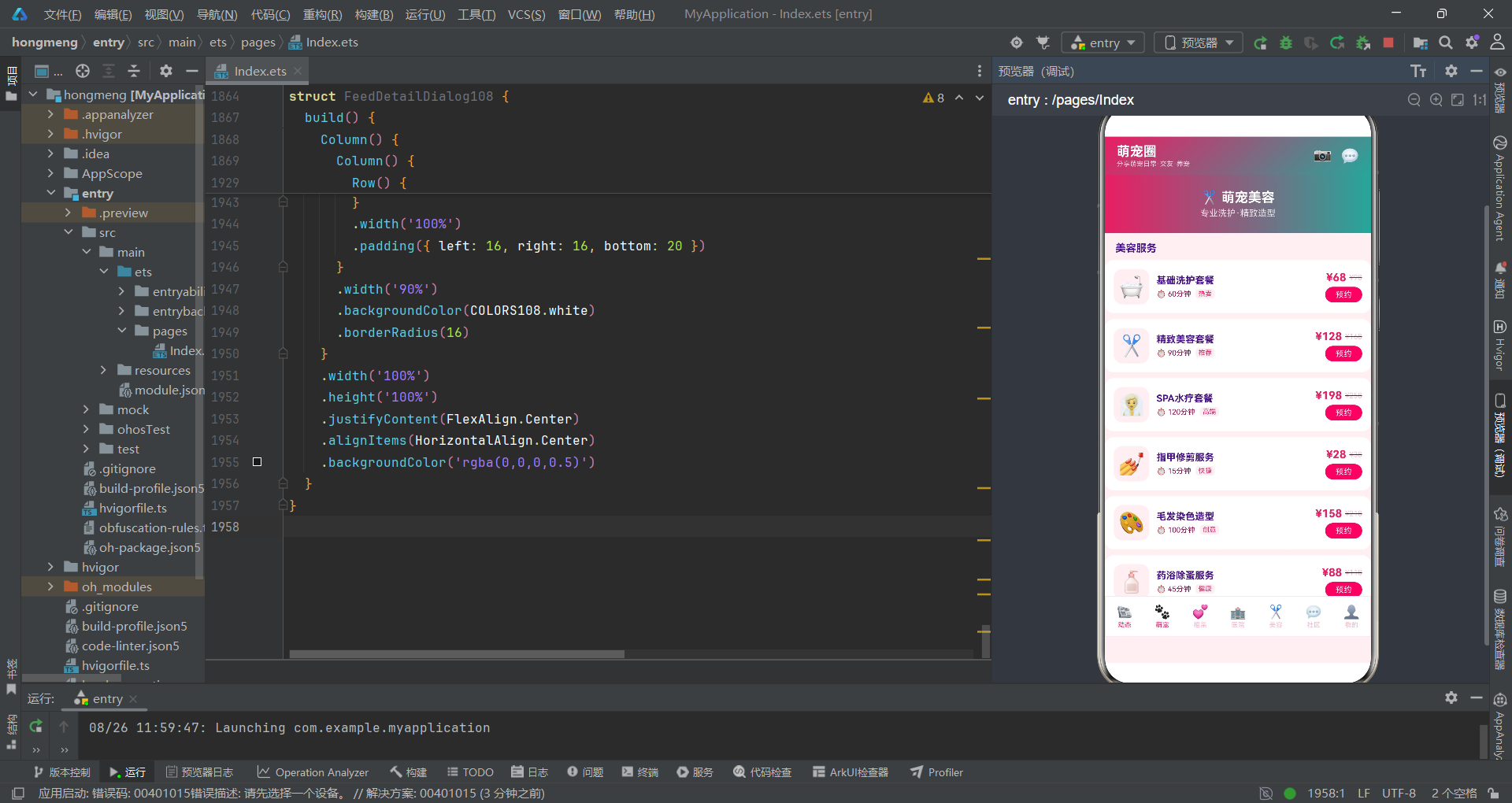
工具函数层是应用逻辑复用的核心。四个工具函数分别处理星级评分渲染、性别颜色映射、匹配度颜色映射和订单状态颜色映射,它们在多个Tab页面和弹框组件中被反复调用,避免了重复的条件判断逻辑散落在UI代码中。
function getRatingStars108(r: number): string {
  if (r >= 4.8) return '★★★★★';
  if (r >= 4.5) return '★★★★☆';
  if (r >= 4.0) return '★★★☆☆';
  if (r >= 3.0) return '★★☆☆☆';
  return '★☆☆☆☆';
}

function getGenderColor108(gender: string): string {
  if (gender === '♂') return '#2196F3';
  return '#E91E63';
}

function getMatchColor108(score: number): string {
  if (score >= 90) return '#4CAF50';
  if (score >= 80) return '#FF9800';
  return '#FF5722';
}

function getStatusColor108(status: string): string {
  if (status === '已完成') return '#43A047';
  if (status === '待到店') return '#FF6F00';
  if (status === '已取消') return '#9E9E9E';
  return '#757575';
}
入口组件DuoDuoPetSocialApp被@Entry和@Component装饰器标记,是应用的根组件。它管理着14个@State状态变量,涵盖了Tab切换索引、5个弹框的显隐控制、选中数据对象以及用户在弹框中做出的各种选择(如宠物类型、性别、疫苗接种状态、绝育状态、预约服务类型、上门服务选项、匿名选项等)。
@Entry
@Component
struct DuoDuoPetSocialApp {
  @State currentTab: number = 0;
  @State showAddPetSheet: boolean = false;
  @State showEditSheet: boolean = false;
  @State showDeleteDialog: boolean = false;
  @State showAdoptDialog: boolean = false;
  @State showFeedDetail: boolean = false;
  @State selectedFeed: FeedItem108 | null = null;
  @State selPetType: number = 0;
  @State selGender: number = 0;
  @State selVaccinated: boolean = false;
  @State selSterilized: boolean = false;
  @State selService: number = 0;
  @State selHomeVisit: boolean = false;
  @State selAnon: boolean = false;

  build() {
    Column() {
      Row() {
        Column() {
          Text('萌宠圈')
            .fontSize(18)
            .fontWeight(FontWeight.Bold)
            .fontColor(COLORS108.white)
          Text('分享萌宠日常·交友·养宠')
            .fontSize(9)
            .fontColor('rgba(255,255,255,0.8)')
            .margin({ top: 1 })
        }
        .alignItems(HorizontalAlign.Start)
        Text('').layoutWeight(1)
        Text('📷')
          .fontSize(20)
          .fontColor(COLORS108.white)
          .margin({ right: 12 })
        Text('💬')
          .fontSize(20)
          .fontColor(COLORS108.white)
      }
      .width('100%')
      .height(52)
      .padding({ left: 16, right: 16 })
      .linearGradient({ angle: 135, colors: [[COLORS108.primary, 0], [COLORS108.accent, 1]] })

      if (this.currentTab === 0) {
        FeedTab108({
          onDetail: (f: FeedItem108) => {
            this.selectedFeed = f;
            this.showFeedDetail = true;
          },
          onDelete: () => { this.showDeleteDialog = true; }
        })
      } else if (this.currentTab === 2) {
        MatchTab108({
          onAdopt: () => { this.showAdoptDialog = true; }
        })
      } else if (this.currentTab === 4) {
        GroomTab108({
          onBook: () => { this.showEditSheet = true; }
        })
      } else {
        MyPetTab108({
          onAddPet: () => { this.showAddPetSheet = true; },
          onEdit: () => { this.showEditSheet = true; }
        })
      }
    }
    .width('100%')
    .height('100%')
    .backgroundColor(COLORS108.bg)
  }
}
入口组件的
build()方法通过if-else if条件分支实现了Tab页面的条件渲染。当currentTab发生变化时,ArkTS的响应式系统会自动触发UI重建,仅渲染当前激活的Tab组件,避免了所有Tab同时挂载带来的性能开销。这是声明式UI范式的核心优势——开发者只需声明状态与UI的映射关系,框架负责高效的差分更新。
头部区域使用linearGradient实现了135度角的粉绿渐变效果,配合layoutWeight(1)的空白Text组件实现了左右弹性布局——左侧标题信息靠左排列,右侧相机和消息图标靠右排列。这种利用空Text组件占位的方式是ArkTS布局中的常见技巧,在不需要Blank组件的情况下实现Flexbox式的空间分配。
底部Tab导航与动态信息流
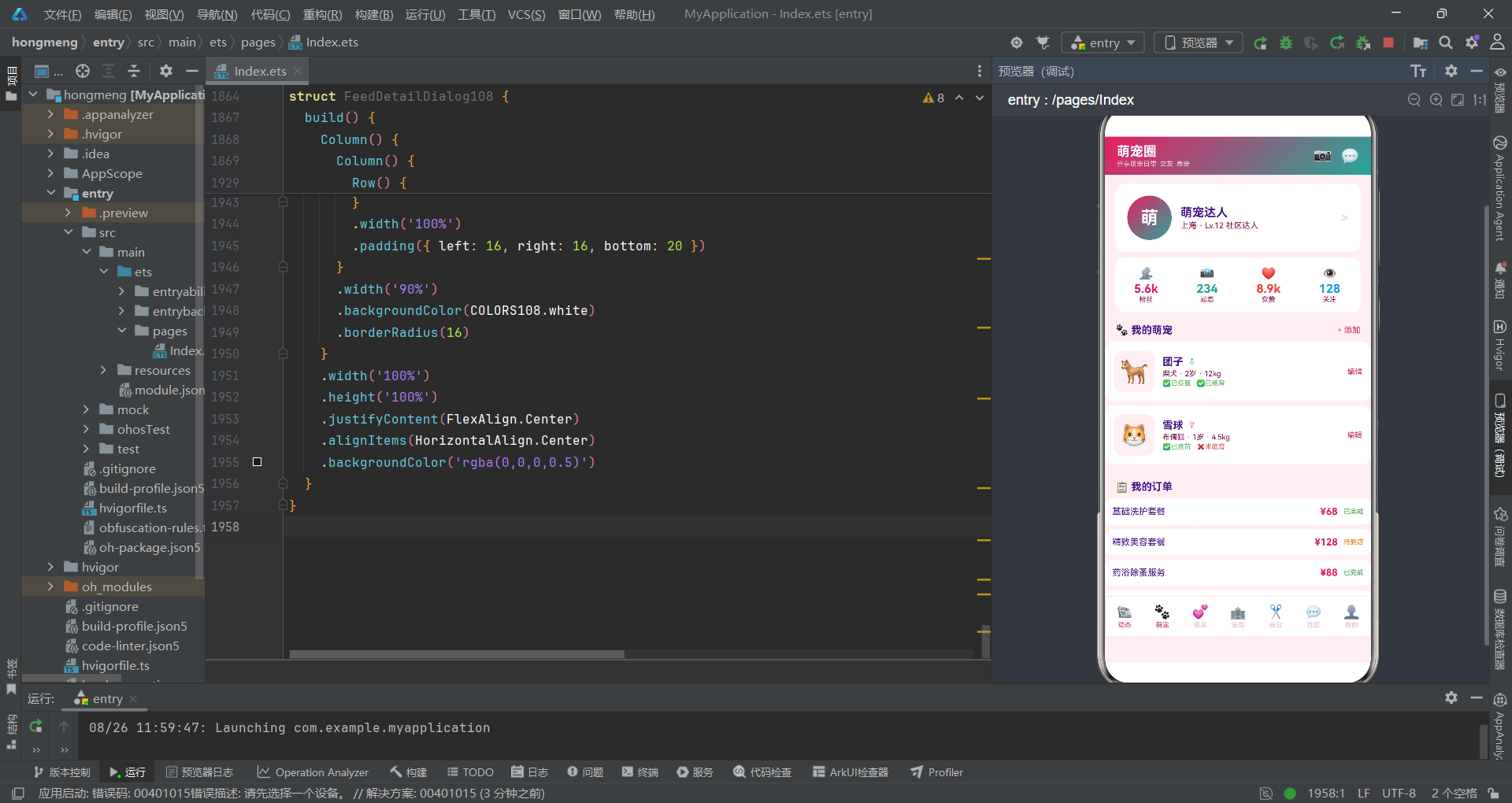
底部7Tab导航通过TabBtn108自定义组件实现,每个Tab按钮包含emoji图标和文字标签两部分,通过active布尔属性控制激活态颜色——激活时显示主色#E91E63,未激活时显示浅粉色#F8BBD0。onClick回调触发currentTab状态更新,驱动整个页面的条件渲染切换。
@Component
struct TabBtn108 {
  icon: string = '📰';
  label: string = '';
  active: boolean = false;
  onTap: () => void = () => {};
  build() {
    Column() {
      Text(this.icon)
        .fontSize(18)
        .fontColor(this.active ? COLORS108.primary : COLORS108.textHint)
      Text(this.label)
        .fontSize(9)
        .fontColor(this.active ? COLORS108.primary : COLORS108.textHint)
        .margin({ top: 2 })
    }
    .layoutWeight(1)
    .alignItems(HorizontalAlign.Center)
    .onClick(() => { this.onTap(); })
  }
}
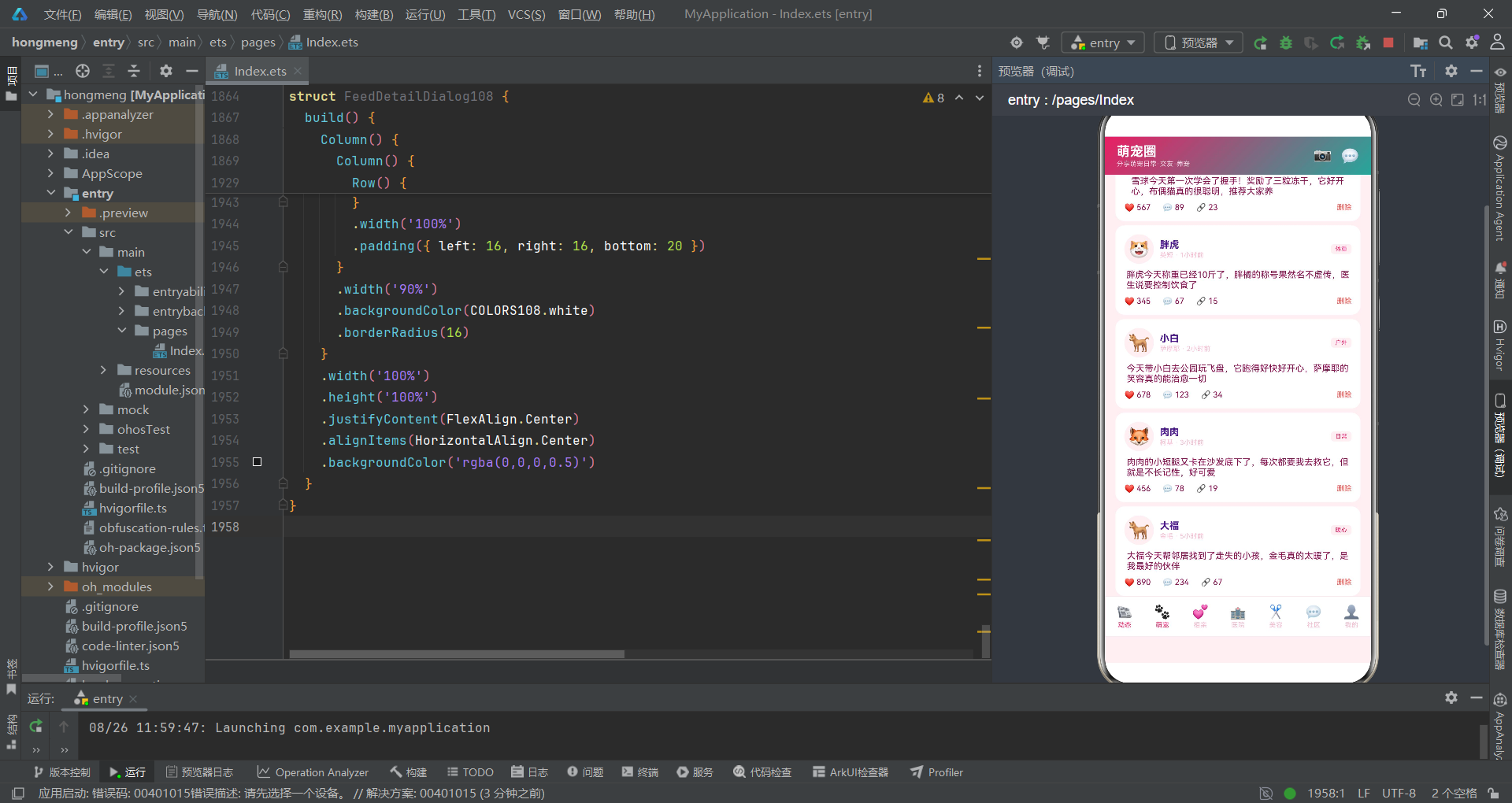
动态信息流(FeedTab108)是应用的核心交互页面,采用社交信息流卡片式布局。页面顶部是快捷入口金刚区,通过ForEach渲染6个圆角图标按钮(体检、疫苗、美容、寄养、保险、更多),每个按钮的背景色来自数据对象的color字段。下方是动态列表,每条动态包含宠物头像、名称、品种时间、标签、正文内容(最多3行省略)、点赞评论分享按钮和删除操作。
@Component
struct FeedTab108 {
  onDetail: (f: FeedItem108) => void = () => {};
  onDelete: () => void = () => {};
  build() {
    Scroll() {
      Column() {
        Row() {
          ForEach(QUICK_ENTRIES_108, (q: QuickEntry108) => {
            Column() {
              Column() {
                Text(q.emoji)
                  .fontSize(22)
              }
              .width(44)
              .height(44)
              .backgroundColor(q.color)
              .borderRadius(22)
              .justifyContent(FlexAlign.Center)
              Text(q.name)
                .fontSize(9)
                .fontColor(COLORS108.textSub)
                .margin({ top: 4 })
            }
            .layoutWeight(1)
            .alignItems(HorizontalAlign.Center)
          }, (q: QuickEntry108) => q.id)
        }
        .width('100%')
        .padding({ top: 12, bottom: 12 })
        .backgroundColor(COLORS108.card)

        ForEach(FEEDS_108, (f: FeedItem108) => {
          Column() {
            Row() {
              Column() {
                Text(f.emoji)
                  .fontSize(24)
              }
              .width(40)
              .height(40)
              .backgroundColor(COLORS108.bg)
              .borderRadius(20)
              .justifyContent(FlexAlign.Center)
              Column() {
                Text(f.petName)
                  .fontSize(13)
                  .fontWeight(FontWeight.Bold)
                  .fontColor(COLORS108.textMain)
                Text(f.breed + ' · ' + f.time)
                  .fontSize(9)
                  .fontColor(COLORS108.textHint)
                  .margin({ top: 1 })
              }
              .margin({ left: 8 })
              .layoutWeight(1)
              .alignItems(HorizontalAlign.Start)
              Text(f.tag)
                .fontSize(8)
                .fontColor(COLORS108.primary)
                .backgroundColor(COLORS108.bg)
                .borderRadius(4)
                .padding({ left: 6, right: 6, top: 2, bottom: 2 })
            }
            .width('100%')

            Text(f.content)
              .fontSize(12)
              .fontColor(COLORS108.textSub)
              .margin({ top: 8 })
              .maxLines(3)
              .textOverflow({ overflow: TextOverflow.Ellipsis })

            Row() {
              Text('❤️ ' + f.likes)
                .fontSize(11)
                .fontColor(COLORS108.textSub)
              Text('💬 ' + f.comments)
                .fontSize(11)
                .fontColor(COLORS108.textSub)
                .margin({ left: 16 })
              Text('🔗 ' + f.shares)
                .fontSize(11)
                .fontColor(COLORS108.textSub)
                .margin({ left: 16 })
              Text('').layoutWeight(1)
              Text('删除')
                .fontSize(10)
                .fontColor(COLORS108.danger)
                .onClick(() => { this.onDelete(); })
            }
            .width('100%')
            .margin({ top: 8 })
          }
          .width('92%')
          .padding(12)
          .backgroundColor(COLORS108.card)
          .borderRadius(12)
          .margin({ left: 12, right: 12, top: 6 })
          .onClick(() => { this.onDetail(f); })
        }, (f: FeedItem108) => f.id)
      }
      .width('100%')
    }
    .scrollable(ScrollDirection.Vertical)
    .scrollBar(BarState.Off)
    .constraintSize({ maxHeight: '80%' })
  }
}
动态信息流的设计充分体现了拼多多风格的电商社交融合理念。每条动态卡片都绑定了
onClick事件,点击后通过回调函数onDetail将当前FeedItem对象传递给入口组件,入口组件更新selectedFeed状态并打开动态详情弹框。这种"子组件回调→父组件状态更新→弹框渲染"的数据流路径是ArkTS组件间通信的标准模式。
文本省略通过maxLines(3)和textOverflow({ overflow: TextOverflow.Ellipsis })实现,当动态内容超过3行时自动以省略号截断。constraintSize({ maxHeight: '80%' })约束滚动容器最大高度为屏幕的80%,为底部Tab导航预留空间,避免内容区域与导航栏重叠。
萌宠相亲匹配与医院列表
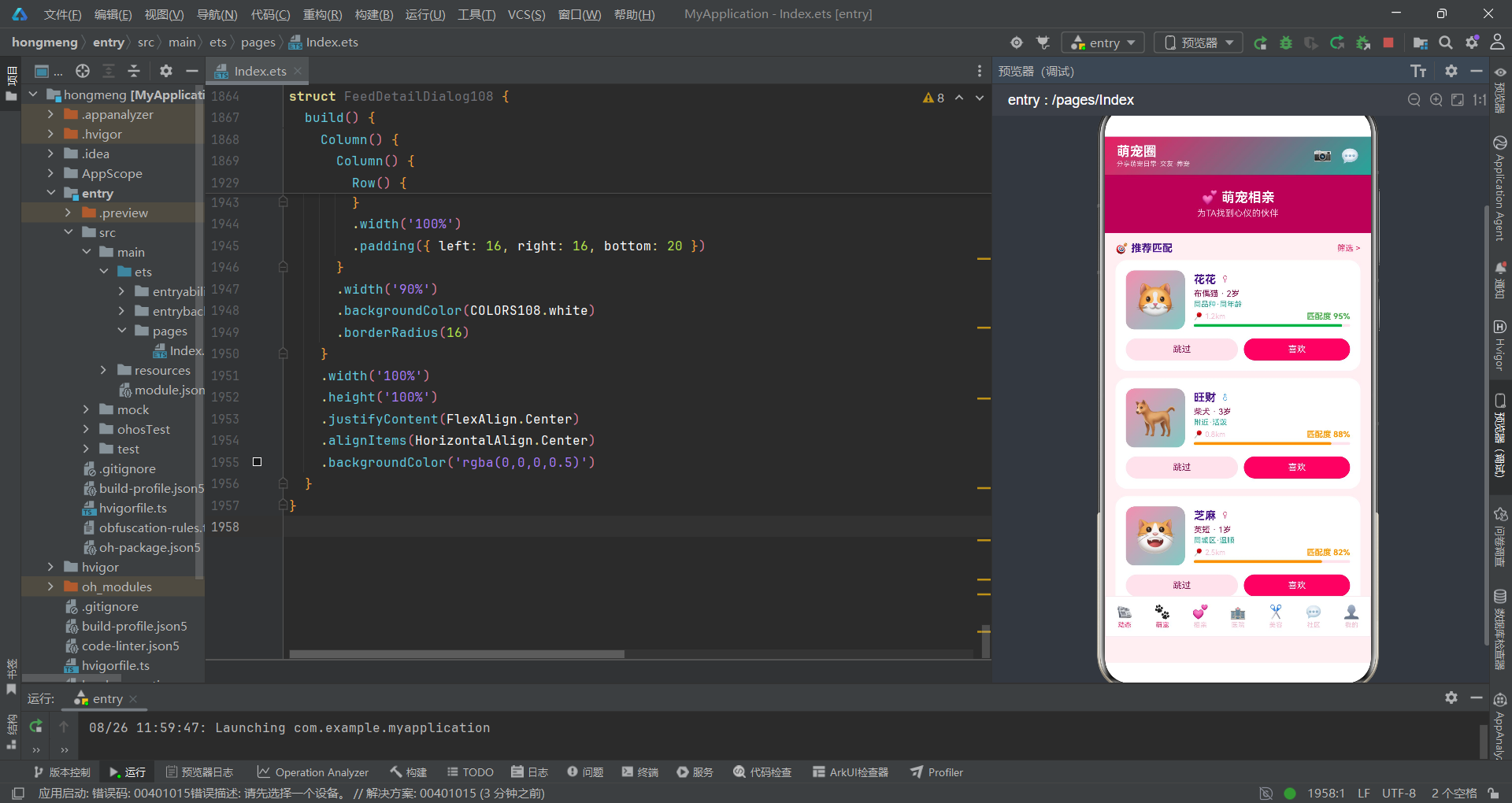
萌宠相亲Tab(MatchTab108)采用卡片堆叠式布局展示推荐匹配对象。每张匹配卡片包含宠物头像(渐变背景)、名称、性别(通过getGenderColor108着色)、品种年龄、标签描述、距离信息和匹配度评分。匹配度通过动态进度条可视化——Column().width(m.matchScore + '%')根据评分值设置进度条宽度,颜色通过getMatchColor108函数动态计算。
ForEach(MATCHES_108, (m: MatchCard108) => {
  Column() {
    Row() {
      Column() {
        Text(m.emoji)
          .fontSize(48)
      }
      .width(80)
      .height(80)
      .linearGradient({ angle: 135, colors: [[COLORS108.primaryLight, 0], [COLORS108.accentLight, 1]] })
      .borderRadius(12)
      .justifyContent(FlexAlign.Center)

      Column() {
        Row() {
          Text(m.name)
            .fontSize(15)
            .fontWeight(FontWeight.Bold)
            .fontColor(COLORS108.textMain)
          Text(m.gender)
            .fontSize(12)
            .fontColor(getGenderColor108(m.gender))
            .margin({ left: 6 })
        }
        Text(m.breed + ' · ' + m.age)
          .fontSize(11)
          .fontColor(COLORS108.textSub)
          .margin({ top: 4 })
        Text(m.tags)
          .fontSize(10)
          .fontColor(COLORS108.accent)
          .margin({ top: 2 })
        Row() {
          Text('📍 ' + m.distance)
            .fontSize(10)
            .fontColor(COLORS108.textHint)
          Text('').layoutWeight(1)
          Text('匹配度 ' + m.matchScore + '%')
            .fontSize(11)
            .fontWeight(FontWeight.Bold)
            .fontColor(getMatchColor108(m.matchScore))
        }
        .width('100%')
        .margin({ top: 4 })
        Row() {
          Column()
            .width(m.matchScore + '%')
            .height(4)
            .backgroundColor(getMatchColor108(m.matchScore))
            .borderRadius(2)
          Text('').layoutWeight(1)
        }
        .width('100%')
        .height(4)
        .backgroundColor(COLORS108.border)
        .borderRadius(2)
        .margin({ top: 4 })
      }
      .margin({ left: 12 })
      .layoutWeight(1)
      .alignItems(HorizontalAlign.Start)
    }
    .width('100%')
    Row() {
      Text('跳过')
        .fontSize(12)
        .fontColor(COLORS108.textSub)
        .backgroundColor(COLORS108.border)
        .borderRadius(18)
        .padding({ left: 20, right: 20, top: 8, bottom: 8 })
        .layoutWeight(1)
        .textAlign(TextAlign.Center)
      Text('喜欢')
        .fontSize(12)
        .fontColor(COLORS108.white)
        .backgroundColor(COLORS108.primary)
        .borderRadius(18)
        .padding({ left: 20, right: 20, top: 8, bottom: 8 })
        .margin({ left: 8 })
        .layoutWeight(1)
        .textAlign(TextAlign.Center)
        .onClick(() => { this.onAdopt(); })
    }
    .width('100%')
    .margin({ top: 12 })
  }
  .width('92%')
  .padding(14)
  .backgroundColor(COLORS108.card)
  .borderRadius(16)
  .margin({ left: 12, right: 12, bottom: 10 })
}, (m: MatchCard108) => m.id)
医院Tab(HospitalTab108)整合了本周就医统计柱状图和医院列表两部分内容。柱状图通过ForEach遍历WEEK_BARS_108数据数组,每天的数据通过Column().height(bar.value * 10)动态设置柱状高度,底部标签和顶部数值同步展示。医院列表则展示名称、星级评分(通过getRatingStars108渲染星号字符串)、服务范围、地址、营业状态和距离价格信息。
// 本周就医统计柱状图
Row() {
  ForEach(WEEK_BARS_108, (bar: BarItem108) => {
    Column() {
      Text(bar.value.toString())
        .fontSize(9)
        .fontColor(bar.color)
      Column() {
        Text('')
          .width('100%')
          .height(bar.value * 10)
          .backgroundColor(bar.color)
          .borderRadius(3)
      }
      .width(20)
      .height(80)
      .justifyContent(FlexAlign.End)
      .margin({ top: 4, bottom: 4 })
      Text(bar.name)
        .fontSize(9)
        .fontColor(COLORS108.textSub)
    }
    .layoutWeight(1)
    .alignItems(HorizontalAlign.Center)
  }, (bar: BarItem108) => bar.id)
}
.width('92%')
.padding(16)
.backgroundColor(COLORS108.card)
.borderRadius(12)
.margin({ bottom: 12 })
柱状图的实现巧妙利用了ArkTS的
FlexAlign.End对齐方式——外层Column容器固定高度为80vp,内层颜色Column通过height(bar.value * 10)动态设置高度,两者配合实现了"自底向上"的柱状图效果。这种方式不需要Canvas或第三方图表库,仅用基础布局组件即可完成数据可视化,是轻量级图表实现的经典方案。
应用架构流程图
以下是萌宠社交应用的整体架构与数据流转关系图,展示了从入口组件到各Tab页面、再到弹框组件的完整调用链路:
弹框组件体系
应用包含5个弹框组件,分为两类:底部抽屉式(Scroll容器包裹,从底部滑出)和居中弹窗式(Column容器包裹,居中显示带半透明遮罩)。新增萌宠弹框AddPetSheet108是典型的底部抽屉,包含宠物类型选择(狗狗/猫咪/兔子)、名字输入、品种输入、性别选择、疫苗接种和绝育状态的勾选开关。
@Component
struct AddPetSheet108 {
  selType: number = 0;
  selGender: number = 0;
  selVaccinated: boolean = false;
  selSterilized: boolean = false;
  onType: (t: number) => void = () => {};
  onGender: (g: number) => void = () => {};
  onVaccinated: (v: boolean) => void = () => {};
  onSterilized: (s: boolean) => void = () => {};
  onConfirm: () => void = () => {};
  onCancel: () => void = () => {};
  build() {
    Scroll() {
      Column() {
        Row() {
          Text('➕ 添加萌宠')
            .fontSize(18)
            .fontWeight(FontWeight.Bold)
            .fontColor(COLORS108.textMain)
            .layoutWeight(1)
          Text('✕')
            .fontSize(18)
            .fontColor(COLORS108.textHint)
            .onClick(() => { this.onCancel(); })
        }
        .width('100%')
        .padding(16)

        Divider().color(COLORS108.border)

        Text('宠物类型')
          .fontSize(13)
          .fontColor(COLORS108.textSub)
          .width('100%')
          .padding({ left: 16, top: 16 })
        Row() {
          Text('🐶 狗狗')
            .fontSize(12)
            .fontColor(this.selType === 0 ? COLORS108.white : COLORS108.textSub)
            .backgroundColor(this.selType === 0 ? COLORS108.primary : COLORS108.card)
            .borderRadius(16)
            .padding({ left: 12, right: 12, top: 6, bottom: 6 })
            .margin({ right: 8 })
            .onClick(() => { this.onType(0); })
          Text('🐱 猫咪')
            .fontSize(12)
            .fontColor(this.selType === 1 ? COLORS108.white : COLORS108.textSub)
            .backgroundColor(this.selType === 1 ? COLORS108.primary : COLORS108.card)
            .borderRadius(16)
            .padding({ left: 12, right: 12, top: 6, bottom: 6 })
            .margin({ right: 8 })
            .onClick(() => { this.onType(1); })
        }
        .width('100%')
        .padding({ left: 16, top: 8 })

        Row() {
          Column() {
            Text('✅ 已接种疫苗')
              .fontSize(13)
              .fontColor(COLORS108.textMain)
            Text('请在添加后上传疫苗本')
              .fontSize(9)
              .fontColor(COLORS108.textSub)
              .margin({ top: 2 })
          }
          .layoutWeight(1)
          .alignItems(HorizontalAlign.Start)
          Text(this.selVaccinated ? '☑' : '☐')
            .fontSize(20)
            .fontColor(this.selVaccinated ? COLORS108.success : COLORS108.textHint)
            .onClick(() => { this.onVaccinated(!this.selVaccinated); })
        }
        .width('100%')
        .padding({ left: 16, right: 16, top: 16 })

        Row() {
          Text('取消')
            .fontSize(14)
            .fontColor(COLORS108.textSub)
            .backgroundColor(COLORS108.border)
            .borderRadius(20)
            .padding({ left: 24, right: 24, top: 10, bottom: 10 })
            .layoutWeight(1)
            .textAlign(TextAlign.Center)
            .onClick(() => { this.onCancel(); })
          Text('保存')
            .fontSize(14)
            .fontColor(COLORS108.white)
            .backgroundColor(COLORS108.primary)
            .borderRadius(20)
            .padding({ left: 24, right: 24, top: 10, bottom: 10 })
            .margin({ left: 12 })
            .layoutWeight(1)
            .textAlign(TextAlign.Center)
            .onClick(() => { this.onConfirm(); })
        }
        .width('100%')
        .padding({ left: 16, right: 16, bottom: 20 })
      }
      .width('100%')
      .backgroundColor(COLORS108.white)
    }
    .scrollBar(BarState.Off)
  }
}
弹框组件的状态管理采用"回调函数"模式而非直接修改父组件状态。子组件通过
onType、onGender等回调将用户选择传递给父组件,父组件在回调中更新对应的@State变量。这种方式保证了数据流的单向性——状态始终在入口组件中集中管理,子组件只负责UI展示和事件通知。
居中弹窗以领养申请弹框AdoptApplyDialog108为例,它包含居住条件、养宠经验的文本输入、月收入范围的选择标签和匿名申请的勾选开关。弹框通过backgroundColor('rgba(0,0,0,0.5)')实现半透明遮罩效果,内容区域居中显示,宽度为屏幕的85%。这种设计在保持背景可见性的同时聚焦用户注意力。
@Component
struct AdoptApplyDialog108 {
  selAnon: boolean = false;
  onAnon: (a: boolean) => void = () => {};
  onConfirm: () => void = () => {};
  onCancel: () => void = () => {};
  build() {
    Column() {
      Column() {
        Text('💕')
          .fontSize(40)
          .margin({ top: 24 })
        Text('领养申请')
          .fontSize(18)
          .fontWeight(FontWeight.Bold)
          .fontColor(COLORS108.textMain)
          .margin({ top: 8 })
        Text('请认真填写领养信息')
          .fontSize(12)
          .fontColor(COLORS108.textSub)
          .margin({ top: 4 })

        Column() {
          Text('居住条件')
            .fontSize(12)
            .fontColor(COLORS108.textSub)
            .width('100%')
            .padding({ top: 12 })
          TextInput({ placeholder: '如:自有住房·80平·有阳台' })
            .placeholderColor(COLORS108.textHint)
            .fontSize(12)
            .width('100%')
            .backgroundColor(COLORS108.bg)
            .borderRadius(8)
            .margin({ top: 4 })

          Row() {
            Text('5k以下')
              .fontSize(10)
              .fontColor(COLORS108.textSub)
              .backgroundColor(COLORS108.card)
              .borderRadius(12)
              .padding({ left: 8, right: 8, top: 4, bottom: 4 })
              .margin({ right: 6 })
            Text('5k-1w')
              .fontSize(10)
              .fontColor(COLORS108.white)
              .backgroundColor(COLORS108.primary)
              .borderRadius(12)
              .padding({ left: 8, right: 8, top: 4, bottom: 4 })
              .margin({ right: 6 })
          }
          .width('100%')
          .margin({ top: 4 })
        }
        .width('100%')
        .padding({ left: 20, right: 20 })

        Row() {
          Text('取消')
            .fontSize(14)
            .fontColor(COLORS108.textSub)
            .backgroundColor(COLORS108.border)
            .borderRadius(20)
            .padding({ left: 24, right: 24, top: 10, bottom: 10 })
            .onClick(() => { this.onCancel(); })
          Text('提交申请')
            .fontSize(14)
            .fontColor(COLORS108.white)
            .backgroundColor(COLORS108.primary)
            .borderRadius(20)
            .padding({ left: 24, right: 24, top: 10, bottom: 10 })
            .margin({ left: 12 })
            .onClick(() => { this.onConfirm(); })
        }
        .justifyContent(FlexAlign.Center)
        .padding({ top: 20, bottom: 20 })
      }
      .width('85%')
      .backgroundColor(COLORS108.white)
      .borderRadius(16)
    }
    .width('100%')
    .height('100%')
    .justifyContent(FlexAlign.Center)
    .alignItems(HorizontalAlign.Center)
    .backgroundColor('rgba(0,0,0,0.5)')
  }
}
技术点对比分析
| 技术维度 | 实现方案 | 设计优势 | 适用场景 |
|---|---|---|---|
| 配色管理 | interface + const常量 | 编译期类型检查,防止字段拼写错误 | 颜色需求固定、场景统一的应用 |
| Tab导航 | 条件渲染if-else if | 仅渲染当前Tab,内存占用低 | Tab数量中等(5-8个)的场景 |
| 弹框体系 | 底部抽屉 + 居中弹窗 | 交互分层明确,底部抽屉适合表单,居中弹窗适合确认 | 多种弹框类型共存的复杂应用 |
| 状态管理 | @State集中式 | 数据流单向可追溯,调试方便 | 中等规模单页面应用 |
| 组件通信 | 回调函数模式 | 子组件无状态依赖,复用性强 | 父子组件层级较浅的场景 |
| 柱状图实现 | 基础布局组件 | 无需第三方库,包体小,性能好 | 简单数据可视化需求 |
| 文本省略 | maxLines + textOverflow | 框架原生支持,兼容性好 | 社交信息流等长文本场景 |
| 渐变背景 | linearGradient | 视觉层次丰富,无需图片资源 | 头部、按钮等品牌区域 |
安装DevEco Studio程序

选择目标安装目录:

设置环境变量,但是需要重启一下:

新建一个空白模板:

设置API为24的模板项目:
初始化项目,自动下载相关依赖:

完整代码:
// 7 tabs单排: 动态/萌宠/相亲/医院/美容/社区/我的 · 5弹框: 新增萌宠(抽屉)/编辑资料(抽屉)/删除动态(居中)/领养申请(居中)/动态详情(居中)
// 合规:无Blank、Button无文字、constraintSize、SLIDE、interface全覆盖、无UI变量声明
// ============ 配色 ============
interface ColorPalette108 {
primary: string;
primaryLight: string;
primaryDark: string;
accent: string;
accentLight: string;
bg: string;
card: string;
textMain: string;
textSub: string;
textHint: string;
border: string;
success: string;
warning: string;
danger: string;
pink: string;
white: string;
}
const COLORS108: ColorPalette108 = {
primary: '#E91E63',
primaryLight: '#F48FB1',
primaryDark: '#AD1457',
accent: '#26A69A',
accentLight: '#80CBC4',
bg: '#FFF0F3',
card: '#FFFFFF',
textMain: '#4A148C',
textSub: '#880E4F',
textHint: '#F8BBD0',
border: '#FCE4EC',
success: '#66BB6A',
warning: '#FFA726',
danger: '#EF5350',
pink: '#F06292',
white: '#FFFFFF'
};
// ============ 数据接口 ============
interface PetCard108 {
id: string;
name: string;
breed: string;
age: string;
gender: string;
emoji: string;
followers: number;
posts: number;
tag: string;
}
interface FeedItem108 {
id: string;
petName: string;
breed: string;
time: string;
content: string;
likes: number;
comments: number;
shares: number;
emoji: string;
tag: string;
}
interface MatchCard108 {
id: string;
name: string;
breed: string;
age: string;
gender: string;
emoji: string;
distance: string;
matchScore: number;
tags: string;
}
interface HospitalItem108 {
id: string;
name: string;
address: string;
distance: string;
rating: number;
services: string;
price: string;
emoji: string;
open: boolean;
}
interface GroomService108 {
id: string;
name: string;
price: number;
oldPrice: number;
duration: string;
emoji: string;
tag: string;
}
interface TopicMeta108 {
id: string;
name: string;
count: number;
color: string;
}
interface CommunityPost108 {
id: string;
user: string;
time: string;
title: string;
content: string;
likes: number;
tag: string;
tagColor: string;
}
interface OrderItem108 {
id: string;
name: string;
price: number;
status: string;
time: string;
}
interface PetProfile108 {
id: string;
name: string;
breed: string;
age: string;
gender: string;
emoji: string;
vaccinated: boolean;
sterilized: boolean;
weight: string;
}
interface BarItem108 {
id: string;
name: string;
value: number;
color: string;
}
interface StatCard108 {
id: string;
label: string;
value: string;
emoji: string;
color: string;
}
interface QuickEntry108 {
id: string;
name: string;
emoji: string;
color: string;
}
// ============ 数据 ============
const PETS_108: PetCard108[] = [
{ id: 'p1', name: '团子', breed: '柴犬', age: '2岁', gender: '♂', emoji: '🐕', followers: 5678, posts: 234, tag: '萌宠达人' },
{ id: 'p2', name: '雪球', breed: '布偶猫', age: '1岁', gender: '♀', emoji: '🐱', followers: 8901, posts: 345, tag: '人气王' },
{ id: 'p3', name: '胖虎', breed: '英短', age: '3岁', gender: '♂', emoji: '😺', followers: 4567, posts: 189, tag: '胖橘' },
{ id: 'p4', name: '小白', breed: '萨摩耶', age: '2岁', gender: '♀', emoji: '🐕', followers: 6789, posts: 278, tag: '微笑天使' },
{ id: 'p5', name: '肉肉', breed: '柯基', age: '1岁', gender: '♂', emoji: '🦊', followers: 3456, posts: 156, tag: '小短腿' },
{ id: 'p6', name: '大福', breed: '金毛', age: '4岁', gender: '♂', emoji: '🐕', followers: 7890, posts: 412, tag: '暖男' },
{ id: 'p7', name: '咪咪', breed: '暹罗猫', age: '2岁', gender: '♀', emoji: '🐱', followers: 2345, posts: 98, tag: '高冷' },
{ id: 'p8', name: '豆豆', breed: '泰迪', age: '3岁', gender: '♀', emoji: '🐩', followers: 5678, posts: 234, tag: '卷毛' }
];
const FEEDS_108: FeedItem108[] = [
{ id: 'f1', petName: '团子', breed: '柴犬', time: '10分钟前', content: '今天团子又拆家了,沙发垫子全被抓烂了,但是看到它无辜的小眼神,又舍不得骂它,养狗人的无奈', likes: 234, comments: 56, shares: 12, emoji: '🐕', tag: '日常' },
{ id: 'f2', petName: '雪球', breed: '布偶猫', time: '30分钟前', content: '雪球今天第一次学会了握手!奖励了三粒冻干,它好开心,布偶猫真的很聪明,推荐大家养', likes: 567, comments: 89, shares: 23, emoji: '🐱', tag: '训练' },
{ id: 'f3', petName: '胖虎', breed: '英短', time: '1小时前', content: '胖虎今天称重已经10斤了,胖橘的称号果然名不虚传,医生说要控制饮食了', likes: 345, comments: 67, shares: 15, emoji: '😺', tag: '体重' },
{ id: 'f4', petName: '小白', breed: '萨摩耶', time: '2小时前', content: '今天带小白去公园玩飞盘,它跑得好快好开心,萨摩耶的笑容真的能治愈一切', likes: 678, comments: 123, shares: 34, emoji: '🐕', tag: '户外' },
{ id: 'f5', petName: '肉肉', breed: '柯基', time: '3小时前', content: '肉肉的小短腿又卡在沙发底下了,每次都要我去救它,但就是不长记性,好可爱', likes: 456, comments: 78, shares: 19, emoji: '🦊', tag: '日常' },
{ id: 'f6', petName: '大福', breed: '金毛', time: '5小时前', content: '大福今天帮邻居找到了走失的小孩,金毛真的太暖了,是我最好的伙伴', likes: 890, comments: 234, shares: 67, emoji: '🐕', tag: '暖心' }
];
const MATCHES_108: MatchCard108[] = [
{ id: 'm1', name: '花花', breed: '布偶猫', age: '2岁', gender: '♀', emoji: '🐱', distance: '1.2km', matchScore: 95, tags: '同品种·同年龄' },
{ id: 'm2', name: '旺财', breed: '柴犬', age: '3岁', gender: '♂', emoji: '🐕', distance: '0.8km', matchScore: 88, tags: '附近·活泼' },
{ id: 'm3', name: '芝麻', breed: '英短', age: '1岁', gender: '♀', emoji: '😺', distance: '2.5km', matchScore: 82, tags: '同城区·温顺' },
{ id: 'm4', name: '奶糖', breed: '柯基', age: '2岁', gender: '♀', emoji: '🦊', distance: '1.5km', matchScore: 78, tags: '附近·爱玩' },
{ id: 'm5', name: '可乐', breed: '金毛', age: '3岁', gender: '♂', emoji: '🐕', distance: '3.0km', matchScore: 72, tags: '同品种·友善' },
{ id: 'm6', name: '布丁', breed: '泰迪', age: '1岁', gender: '♀', emoji: '🐩', distance: '0.5km', matchScore: 90, tags: '附近·可爱' }
];
const HOSPITALS_108: HospitalItem108[] = [
{ id: 'h1', name: '萌宠总动员宠物医院', address: '浦东新区世纪大道100号', distance: '0.8km', rating: 4.8, services: '体检·疫苗·手术·牙科', price: '¥58起', emoji: '🏥', open: true },
{ id: 'h2', name: '爱心宠物诊所', address: '徐汇区漕溪北路200号', distance: '1.5km', rating: 4.6, services: '内科·外科·疫苗', price: '¥38起', emoji: '🏥', open: true },
{ id: 'h3', name: '24小时宠物急诊中心', address: '长宁区中山公园附近', distance: '2.3km', rating: 4.9, services: '急诊·手术·住院', price: '¥88起', emoji: '🏥', open: true },
{ id: 'h4', name: '宠物之家康复医院', address: '闵行区莘庄地铁站', distance: '3.5km', rating: 4.5, services: '康复·理疗·中医', price: '¥68起', emoji: '🏥', open: false },
{ id: 'h5', name: '阳光宠物眼科医院', address: '黄浦区人民广场', distance: '4.2km', rating: 4.7, services: '眼科·白内障·视网膜', price: '¥128起', emoji: '🏥', open: true },
{ id: 'h6', name: '萌爪宠物口腔医院', address: '静安区南京西路', distance: '5.0km', rating: 4.8, services: '洁牙·拔牙·口腔', price: '¥98起', emoji: '🏥', open: true }
];
const GROOM_SERVICES_108: GroomService108[] = [
{ id: 'g1', name: '基础洗护套餐', price: 68, oldPrice: 98, duration: '60分钟', emoji: '🛁', tag: '热卖' },
{ id: 'g2', name: '精致美容套餐', price: 128, oldPrice: 168, duration: '90分钟', emoji: '✂️', tag: '推荐' },
{ id: 'g3', name: 'SPA水疗套餐', price: 198, oldPrice: 258, duration: '120分钟', emoji: '🧖', tag: '高端' },
{ id: 'g4', name: '指甲修剪服务', price: 28, oldPrice: 38, duration: '15分钟', emoji: '💅', tag: '快捷' },
{ id: 'g5', name: '毛发染色造型', price: 158, oldPrice: 218, duration: '100分钟', emoji: '🎨', tag: '创意' },
{ id: 'g6', name: '药浴除蚤服务', price: 88, oldPrice: 118, duration: '45分钟', emoji: '🧴', tag: '健康' },
{ id: 'g7', name: '耳道清洁护理', price: 38, oldPrice: 58, duration: '20分钟', emoji: '👂', tag: '护理' },
{ id: 'g8', name: '全身体检套餐', price: 298, oldPrice: 398, duration: '150分钟', emoji: '🩺', tag: '全面' }
];
const TOPICS_108: TopicMeta108[] = [
{ id: 't1', name: '养宠日记', count: 1234, color: '#E91E63' },
{ id: 't2', name: '健康问答', count: 678, color: '#26A69A' },
{ id: 't3', name: '训练分享', count: 456, color: '#2196F3' },
{ id: 't4', name: '美食推荐', count: 345, color: '#FF9800' },
{ id: 't5', name: '救助领养', count: 234, color: '#4CAF50' }
];
const POSTS_108: CommunityPost108[] = [
{ id: 'p1', user: '柴犬团子妈', time: '2小时前', title: '柴犬掉毛怎么办?', content: '团子最近掉毛特别严重,已经换了粮食还是不行,有没有同款问题的家长', likes: 234, tag: '提问', tagColor: '#26A69A' },
{ id: 'p2', user: '布偶猫雪球', time: '4小时前', title: '布偶猫养护心得分享', content: '养布偶三年总结:定期梳毛、注意心脏、适量运动,布偶真的值得', likes: 345, tag: '心得', tagColor: '#E91E63' },
{ id: 'p3', user: '金毛大福爸', time: '6小时前', title: '金毛训练握手教程', content: '三步教会你的狗狗握手,用零食引导,每天5分钟,一周就会', likes: 167, tag: '训练', tagColor: '#2196F3' },
{ id: 'p4', user: '柯基肉肉', time: '10小时前', title: '柯基腰椎保护指南', content: '柯基腰椎容易出问题,不要让它跳上跳下,建议用斜坡板', likes: 89, tag: '健康', tagColor: '#4CAF50' },
{ id: 'p5', user: '英短胖虎', time: '1天前', title: '猫咪减肥计划打卡', content: '胖虎10斤了,开始执行减肥计划:减少20%猫粮+每天运动15分钟', likes: 312, tag: '日常', tagColor: '#FF9800' },
{ id: 'p6', user: '泰迪豆豆', time: '2天前', title: '泰迪毛发护理推荐', content: '用过的5款护毛素横评,性价比最高的是这款,分享给大家', likes: 456, tag: '推荐', tagColor: '#E91E63' }
];
const ORDERS_108: OrderItem108[] = [
{ id: 'o1', name: '基础洗护套餐', price: 68, status: '已完成', time: '2026-08-20' },
{ id: 'o2', name: '精致美容套餐', price: 128, status: '待到店', time: '2026-08-25' },
{ id: 'o3', name: '药浴除蚤服务', price: 88, status: '已完成', time: '2026-08-15' },
{ id: 'o4', name: '指甲修剪服务', price: 28, status: '已取消', time: '2026-08-10' },
{ id: 'o5', name: '全身体检套餐', price: 298, status: '待到店', time: '2026-08-28' }
];
const MY_PETS_108: PetProfile108[] = [
{ id: 'mp1', name: '团子', breed: '柴犬', age: '2岁', gender: '♂', emoji: '🐕', vaccinated: true, sterilized: true, weight: '12kg' },
{ id: 'mp2', name: '雪球', breed: '布偶猫', age: '1岁', gender: '♀', emoji: '🐱', vaccinated: true, sterilized: false, weight: '4.5kg' }
];
const STATS_108: StatCard108[] = [
{ id: 's1', label: '粉丝', value: '5.6k', emoji: '👥', color: '#E91E63' },
{ id: 's2', label: '动态', value: '234', emoji: '📸', color: '#26A69A' },
{ id: 's3', label: '获赞', value: '8.9k', emoji: '❤️', color: '#F44336' },
{ id: 's4', label: '关注', value: '128', emoji: '👁️', color: '#2196F3' }
];
const QUICK_ENTRIES_108: QuickEntry108[] = [
{ id: 'q1', name: '体检', emoji: '🩺', color: '#E91E63' },
{ id: 'q2', name: '疫苗', emoji: '💉', color: '#26A69A' },
{ id: 'q3', name: '美容', emoji: '✂️', color: '#FF9800' },
{ id: 'q4', name: '寄养', emoji: '🏠', color: '#2196F3' },
{ id: 'q5', name: '保险', emoji: '🛡️', color: '#4CAF50' },
{ id: 'q6', name: '更多', emoji: '➕', color: '#9C27B0' }
];
const WEEK_BARS_108: BarItem108[] = [
{ id: 'w1', name: '一', value: 3, color: '#F48FB1' },
{ id: 'w2', name: '二', value: 5, color: '#F48FB1' },
{ id: 'w3', name: '三', value: 2, color: '#F48FB1' },
{ id: 'w4', name: '四', value: 6, color: '#F48FB1' },
{ id: 'w5', name: '五', value: 4, color: '#F48FB1' },
{ id: 'w6', name: '六', value: 8, color: '#E91E63' },
{ id: 'w7', name: '日', value: 7, color: '#E91E63' }
];
// ============ 工具函数 ============
function getRatingStars108(r: number): string {
if (r >= 4.8) return '★★★★★';
if (r >= 4.5) return '★★★★☆';
if (r >= 4.0) return '★★★☆☆';
if (r >= 3.0) return '★★☆☆☆';
return '★☆☆☆☆';
}
function getGenderColor108(gender: string): string {
if (gender === '♂') return '#2196F3';
return '#E91E63';
}
function getMatchColor108(score: number): string {
if (score >= 90) return '#4CAF50';
if (score >= 80) return '#FF9800';
return '#FF5722';
}
function getStatusColor108(status: string): string {
if (status === '已完成') return '#43A047';
if (status === '待到店') return '#FF6F00';
if (status === '已取消') return '#9E9E9E';
return '#757575';
}
// ============ 入口 ============
@Entry
@Component
struct DuoDuoPetSocialApp {
@State currentTab: number = 0;
@State showAddPetSheet: boolean = false;
@State showEditSheet: boolean = false;
@State showDeleteDialog: boolean = false;
@State showAdoptDialog: boolean = false;
@State showFeedDetail: boolean = false;
@State selectedFeed: FeedItem108 | null = null;
@State selPetType: number = 0;
@State selGender: number = 0;
@State selVaccinated: boolean = false;
@State selSterilized: boolean = false;
@State selService: number = 0;
@State selHomeVisit: boolean = false;
@State selAnon: boolean = false;
build() {
Column() {
// ===== 社交风头部 =====
Row() {
Column() {
Text('萌宠圈')
.fontSize(18)
.fontWeight(FontWeight.Bold)
.fontColor(COLORS108.white)
Text('分享萌宠日常·交友·养宠')
.fontSize(9)
.fontColor('rgba(255,255,255,0.8)')
.margin({ top: 1 })
}
.alignItems(HorizontalAlign.Start)
Text('').layoutWeight(1)
Text('📷')
.fontSize(20)
.fontColor(COLORS108.white)
.margin({ right: 12 })
Text('💬')
.fontSize(20)
.fontColor(COLORS108.white)
}
.width('100%')
.height(52)
.padding({ left: 16, right: 16 })
.linearGradient({ angle: 135, colors: [[COLORS108.primary, 0], [COLORS108.accent, 1]] })
// ===== Tab 内容区 =====
if (this.currentTab === 0) {
FeedTab108({
onDetail: (f: FeedItem108) => {
this.selectedFeed = f;
this.showFeedDetail = true;
},
onDelete: () => { this.showDeleteDialog = true; }
})
} else if (this.currentTab === 1) {
} else if (this.currentTab === 2) {
MatchTab108({
onAdopt: () => { this.showAdoptDialog = true; }
})
} else if (this.currentTab === 3) {
} else if (this.currentTab === 4) {
GroomTab108({
onBook: () => { this.showEditSheet = true; }
})
} else if (this.currentTab === 5) {
} else {
MyPetTab108({
onAddPet: () => { this.showAddPetSheet = true; },
onEdit: () => { this.showEditSheet = true; }
})
}
// ===== 底部7 Tab 单排 =====
Row() {
TabBtn108({icon:'📰', label:'动态', active: this.currentTab === 0, onTap: () => { this.currentTab = 0; }})
TabBtn108({icon:'🐾', label:'萌宠', active: this.currentTab === 0, onTap: () => { this.currentTab = 1; }})
TabBtn108({icon:'💕', label:'相亲', active: this.currentTab === 1, onTap: () => { this.currentTab = 2; }})
TabBtn108({icon:'🏥', label:'医院', active: this.currentTab === 2, onTap: () => { this.currentTab = 3; }})
TabBtn108({icon:'️✂', label:'美容', active: this.currentTab === 3, onTap: () => { this.currentTab = 4; }})
TabBtn108({icon:'💬', label:'社区', active: this.currentTab === 4, onTap: () => { this.currentTab = 5; }})
TabBtn108({icon:'👤', label:'我的', active: this.currentTab === 5, onTap: () => { this.currentTab = 6; }})
}
.width('100%')
.height(56)
.backgroundColor(COLORS108.card)
.border({ width: 1, color: COLORS108.border })
.justifyContent(FlexAlign.SpaceEvenly)
}
.width('100%')
.height('100%')
.backgroundColor(COLORS108.bg)
}
}
// ============ 底部 Tab ============
@Component
struct TabBtn108 {
icon: string = '📰';
label: string = '';
active: boolean = false;
onTap: () => void = () => {};
build() {
Column() {
Text(this.icon)
.fontSize(18)
.fontColor(this.active ? COLORS108.primary : COLORS108.textHint)
Text(this.label)
.fontSize(9)
.fontColor(this.active ? COLORS108.primary : COLORS108.textHint)
.margin({ top: 2 })
}
.layoutWeight(1)
.alignItems(HorizontalAlign.Center)
.onClick(() => { this.onTap(); })
}
}
// ============ Tab0:动态流(社交信息流风) ============
@Component
struct FeedTab108 {
onDetail: (f: FeedItem108) => void = () => {};
onDelete: () => void = () => {};
build() {
Scroll() {
Column() {
// 快捷入口
Row() {
ForEach(QUICK_ENTRIES_108, (q: QuickEntry108) => {
Column() {
Column() {
Text(q.emoji)
.fontSize(22)
}
.width(44)
.height(44)
.backgroundColor(q.color)
.borderRadius(22)
.justifyContent(FlexAlign.Center)
Text(q.name)
.fontSize(9)
.fontColor(COLORS108.textSub)
.margin({ top: 4 })
}
.layoutWeight(1)
.alignItems(HorizontalAlign.Center)
}, (q: QuickEntry108) => q.id)
}
.width('100%')
.padding({ top: 12, bottom: 12 })
.backgroundColor(COLORS108.card)
// 动态列表
ForEach(FEEDS_108, (f: FeedItem108) => {
Column() {
Row() {
Column() {
Text(f.emoji)
.fontSize(24)
}
.width(40)
.height(40)
.backgroundColor(COLORS108.bg)
.borderRadius(20)
.justifyContent(FlexAlign.Center)
Column() {
Text(f.petName)
.fontSize(13)
.fontWeight(FontWeight.Bold)
.fontColor(COLORS108.textMain)
Text(f.breed + ' · ' + f.time)
.fontSize(9)
.fontColor(COLORS108.textHint)
.margin({ top: 1 })
}
.margin({ left: 8 })
.layoutWeight(1)
.alignItems(HorizontalAlign.Start)
Text(f.tag)
.fontSize(8)
.fontColor(COLORS108.primary)
.backgroundColor(COLORS108.bg)
.borderRadius(4)
.padding({ left: 6, right: 6, top: 2, bottom: 2 })
}
.width('100%')
Text(f.content)
.fontSize(12)
.fontColor(COLORS108.textSub)
.margin({ top: 8 })
.maxLines(3)
.textOverflow({ overflow: TextOverflow.Ellipsis })
Row() {
Text('❤️ ' + f.likes)
.fontSize(11)
.fontColor(COLORS108.textSub)
Text('💬 ' + f.comments)
.fontSize(11)
.fontColor(COLORS108.textSub)
.margin({ left: 16 })
Text('🔗 ' + f.shares)
.fontSize(11)
.fontColor(COLORS108.textSub)
.margin({ left: 16 })
Text('').layoutWeight(1)
Text('删除')
.fontSize(10)
.fontColor(COLORS108.danger)
.onClick(() => { this.onDelete(); })
}
.width('100%')
.margin({ top: 8 })
}
.width('92%')
.padding(12)
.backgroundColor(COLORS108.card)
.borderRadius(12)
.margin({ left: 12, right: 12, top: 6 })
.onClick(() => { this.onDetail(f); })
}, (f: FeedItem108) => f.id)
}
.width('100%')
}
.scrollable(ScrollDirection.Vertical)
.scrollBar(BarState.Off)
.constraintSize({ maxHeight: '80%' })
}
}
// ============ Tab1:萌宠(网格风) ============
@Component
struct PetsTab108 {
build() {
Scroll() {
Column() {
Column() {
Text('🐾 萌宠广场')
.fontSize(18)
.fontWeight(FontWeight.Bold)
.fontColor(COLORS108.white)
Text('发现可爱的TA们')
.fontSize(12)
.fontColor('rgba(255,255,255,0.8)')
.margin({ top: 4 })
}
.width('100%')
.padding({ top: 20, bottom: 20 })
.linearGradient({ angle: 135, colors: [[COLORS108.accent, 0], [COLORS108.primary, 1]] })
Row() {
Text('🔥 萌宠排行榜')
.fontSize(14)
.fontWeight(FontWeight.Bold)
.fontColor(COLORS108.textMain)
.layoutWeight(1)
}
.width('92%')
.margin({ top: 12, bottom: 8 })
Grid() {
ForEach(PETS_108, (p: PetCard108) => {
GridItem() {
Column() {
Stack({ alignContent: Alignment.TopEnd }) {
Column() {
Text(p.emoji)
.fontSize(48)
}
.width('100%')
.height(80)
.backgroundColor(COLORS108.bg)
.borderRadius(12)
.justifyContent(FlexAlign.Center)
Text(p.tag)
.fontSize(8)
.fontColor(COLORS108.white)
.backgroundColor(COLORS108.primary)
.borderRadius(4)
.padding({ left: 4, right: 4, top: 1, bottom: 1 })
.margin({ top: 4, right: 4 })
}
Text(p.name)
.fontSize(13)
.fontWeight(FontWeight.Bold)
.fontColor(COLORS108.textMain)
.margin({ top: 6 })
Row() {
Text(p.breed)
.fontSize(10)
.fontColor(COLORS108.textSub)
Text(p.gender)
.fontSize(10)
.fontColor(getGenderColor108(p.gender))
.margin({ left: 4 })
Text('·' + p.age)
.fontSize(10)
.fontColor(COLORS108.textSub)
.margin({ left: 4 })
}
.margin({ top: 2 })
Row() {
Text('👥 ' + p.followers)
.fontSize(9)
.fontColor(COLORS108.textHint)
Text('📸 ' + p.posts)
.fontSize(9)
.fontColor(COLORS108.textHint)
.margin({ left: 8 })
}
.margin({ top: 4 })
Text('关注')
.fontSize(11)
.fontColor(COLORS108.white)
.backgroundColor(COLORS108.primary)
.borderRadius(14)
.padding({ left: 16, right: 16, top: 4, bottom: 4 })
.margin({ top: 6 })
}
.padding(10)
.backgroundColor(COLORS108.card)
.borderRadius(12)
}
}, (p: PetCard108) => p.id)
}
.columnsTemplate('1fr 1fr')
.rowsGap(8)
.columnsGap(8)
.width('92%')
.margin({ bottom: 16 })
}
.width('100%')
}
.scrollable(ScrollDirection.Vertical)
.scrollBar(BarState.Off)
.constraintSize({ maxHeight: '80%' })
}
}
// ============ Tab2:相亲(卡片堆叠风) ============
@Component
struct MatchTab108 {
onAdopt: () => void = () => {};
build() {
Scroll() {
Column() {
Column() {
Text('💕 萌宠相亲')
.fontSize(18)
.fontWeight(FontWeight.Bold)
.fontColor(COLORS108.white)
Text('为TA找到心仪的伙伴')
.fontSize(12)
.fontColor('rgba(255,255,255,0.8)')
.margin({ top: 4 })
}
.width('100%')
.padding({ top: 20, bottom: 20 })
.backgroundColor(COLORS108.primaryDark)
Row() {
Text('🎯 推荐匹配')
.fontSize(14)
.fontWeight(FontWeight.Bold)
.fontColor(COLORS108.textMain)
.layoutWeight(1)
Text('筛选 >')
.fontSize(11)
.fontColor(COLORS108.primary)
}
.width('92%')
.margin({ top: 12, bottom: 8 })
ForEach(MATCHES_108, (m: MatchCard108) => {
Column() {
Row() {
Column() {
Text(m.emoji)
.fontSize(48)
}
.width(80)
.height(80)
.linearGradient({ angle: 135, colors: [[COLORS108.primaryLight, 0], [COLORS108.accentLight, 1]] })
.borderRadius(12)
.justifyContent(FlexAlign.Center)
Column() {
Row() {
Text(m.name)
.fontSize(15)
.fontWeight(FontWeight.Bold)
.fontColor(COLORS108.textMain)
Text(m.gender)
.fontSize(12)
.fontColor(getGenderColor108(m.gender))
.margin({ left: 6 })
}
Text(m.breed + ' · ' + m.age)
.fontSize(11)
.fontColor(COLORS108.textSub)
.margin({ top: 4 })
Text(m.tags)
.fontSize(10)
.fontColor(COLORS108.accent)
.margin({ top: 2 })
Row() {
Text('📍 ' + m.distance)
.fontSize(10)
.fontColor(COLORS108.textHint)
Text('').layoutWeight(1)
Text('匹配度 ' + m.matchScore + '%')
.fontSize(11)
.fontWeight(FontWeight.Bold)
.fontColor(getMatchColor108(m.matchScore))
}
.width('100%')
.margin({ top: 4 })
// 匹配进度条
Row() {
Column()
.width(m.matchScore + '%')
.height(4)
.backgroundColor(getMatchColor108(m.matchScore))
.borderRadius(2)
Text('').layoutWeight(1)
}
.width('100%')
.height(4)
.backgroundColor(COLORS108.border)
.borderRadius(2)
.margin({ top: 4 })
}
.margin({ left: 12 })
.layoutWeight(1)
.alignItems(HorizontalAlign.Start)
}
.width('100%')
Row() {
Text('跳过')
.fontSize(12)
.fontColor(COLORS108.textSub)
.backgroundColor(COLORS108.border)
.borderRadius(18)
.padding({ left: 20, right: 20, top: 8, bottom: 8 })
.layoutWeight(1)
.textAlign(TextAlign.Center)
Text('喜欢')
.fontSize(12)
.fontColor(COLORS108.white)
.backgroundColor(COLORS108.primary)
.borderRadius(18)
.padding({ left: 20, right: 20, top: 8, bottom: 8 })
.margin({ left: 8 })
.layoutWeight(1)
.textAlign(TextAlign.Center)
.onClick(() => { this.onAdopt(); })
}
.width('100%')
.margin({ top: 12 })
}
.width('92%')
.padding(14)
.backgroundColor(COLORS108.card)
.borderRadius(16)
.margin({ left: 12, right: 12, bottom: 10 })
}, (m: MatchCard108) => m.id)
}
.width('100%')
}
.scrollable(ScrollDirection.Vertical)
.scrollBar(BarState.Off)
.constraintSize({ maxHeight: '80%' })
}
}
// ============ Tab3:医院(列表+评分风) ============
@Component
struct HospitalTab108 {
build() {
Scroll() {
Column() {
Column() {
Text('🏥 附近医院')
.fontSize(18)
.fontWeight(FontWeight.Bold)
.fontColor(COLORS108.white)
Text('专业诊疗·24小时急诊')
.fontSize(12)
.fontColor('rgba(255,255,255,0.8)')
.margin({ top: 4 })
}
.width('100%')
.padding({ top: 20, bottom: 20 })
.backgroundColor(COLORS108.accent)
// 本周就医统计
Row() {
Text('📊 本周就医统计')
.fontSize(14)
.fontWeight(FontWeight.Bold)
.fontColor(COLORS108.textMain)
.layoutWeight(1)
}
.width('92%')
.margin({ top: 12, bottom: 8 })
Row() {
ForEach(WEEK_BARS_108, (bar: BarItem108) => {
Column() {
Text(bar.value.toString())
.fontSize(9)
.fontColor(bar.color)
Column() {
Text('')
.width('100%')
.height(bar.value * 10)
.backgroundColor(bar.color)
.borderRadius(3)
}
.width(20)
.height(80)
.justifyContent(FlexAlign.End)
.margin({ top: 4, bottom: 4 })
Text(bar.name)
.fontSize(9)
.fontColor(COLORS108.textSub)
}
.layoutWeight(1)
.alignItems(HorizontalAlign.Center)
}, (bar: BarItem108) => bar.id)
}
.width('92%')
.padding(16)
.backgroundColor(COLORS108.card)
.borderRadius(12)
.margin({ bottom: 12 })
ForEach(HOSPITALS_108, (h: HospitalItem108) => {
Column() {
Row() {
Column() {
Text(h.emoji)
.fontSize(28)
}
.width(52)
.height(52)
.backgroundColor(COLORS108.bg)
.borderRadius(12)
.justifyContent(FlexAlign.Center)
Column() {
Text(h.name)
.fontSize(13)
.fontWeight(FontWeight.Bold)
.fontColor(COLORS108.textMain)
Row() {
Text(getRatingStars108(h.rating))
.fontSize(11)
.fontColor('#FFA726')
Text(h.rating.toString())
.fontSize(10)
.fontColor(COLORS108.warning)
.margin({ left: 4 })
}
.margin({ top: 2 })
Text(h.services)
.fontSize(10)
.fontColor(COLORS108.textSub)
.margin({ top: 2 })
Text('📍 ' + h.address)
.fontSize(9)
.fontColor(COLORS108.textHint)
.margin({ top: 2 })
}
.margin({ left: 10 })
.layoutWeight(1)
.alignItems(HorizontalAlign.Start)
Column() {
Text(h.open ? '营业中' : '休息中')
.fontSize(9)
.fontColor(h.open ? COLORS108.success : COLORS108.textHint)
Text(h.distance)
.fontSize(11)
.fontWeight(FontWeight.Bold)
.fontColor(COLORS108.accent)
.margin({ top: 2 })
Text(h.price)
.fontSize(10)
.fontColor(COLORS108.primary)
.margin({ top: 2 })
}
.alignItems(HorizontalAlign.End)
}
.width('100%')
Row() {
Text('预约挂号')
.fontSize(11)
.fontColor(COLORS108.white)
.backgroundColor(COLORS108.accent)
.borderRadius(14)
.padding({ left: 16, right: 16, top: 6, bottom: 6 })
Text('在线问诊')
.fontSize(11)
.fontColor(COLORS108.accent)
.backgroundColor(COLORS108.bg)
.borderRadius(14)
.padding({ left: 16, right: 16, top: 6, bottom: 6 })
.margin({ left: 8 })
}
.margin({ top: 10 })
}
.width('92%')
.padding(12)
.backgroundColor(COLORS108.card)
.borderRadius(12)
.margin({ left: 12, right: 12, bottom: 8 })
}, (h: HospitalItem108) => h.id)
}
.width('100%')
}
.scrollable(ScrollDirection.Vertical)
.scrollBar(BarState.Off)
.constraintSize({ maxHeight: '80%' })
}
}
// ============ Tab4:美容(服务预约风) ============
@Component
struct GroomTab108 {
onBook: () => void = () => {};
build() {
Scroll() {
Column() {
Column() {
Text('✂️ 萌宠美容')
.fontSize(18)
.fontWeight(FontWeight.Bold)
.fontColor(COLORS108.white)
Text('专业洗护·精致造型')
.fontSize(12)
.fontColor('rgba(255,255,255,0.8)')
.margin({ top: 4 })
}
.width('100%')
.padding({ top: 20, bottom: 20 })
.linearGradient({ angle: 90, colors: [[COLORS108.primary, 0], [COLORS108.accent, 1]] })
Row() {
Text('美容服务')
.fontSize(14)
.fontWeight(FontWeight.Bold)
.fontColor(COLORS108.textMain)
.layoutWeight(1)
}
.width('92%')
.margin({ top: 12, bottom: 8 })
ForEach(GROOM_SERVICES_108, (g: GroomService108) => {
Row() {
Column() {
Text(g.emoji)
.fontSize(28)
}
.width(48)
.height(48)
.backgroundColor(COLORS108.bg)
.borderRadius(12)
.justifyContent(FlexAlign.Center)
Column() {
Text(g.name)
.fontSize(13)
.fontWeight(FontWeight.Bold)
.fontColor(COLORS108.textMain)
Row() {
Text('⏱ ' + g.duration)
.fontSize(10)
.fontColor(COLORS108.textSub)
Text(g.tag)
.fontSize(9)
.fontColor(COLORS108.primary)
.backgroundColor(COLORS108.bg)
.borderRadius(4)
.padding({ left: 4, right: 4, top: 1, bottom: 1 })
.margin({ left: 6 })
}
.margin({ top: 4 })
}
.margin({ left: 10 })
.layoutWeight(1)
.alignItems(HorizontalAlign.Start)
Column() {
Row() {
Text('¥' + g.price)
.fontSize(15)
.fontWeight(FontWeight.Bold)
.fontColor(COLORS108.primary)
Text('¥' + g.oldPrice)
.fontSize(10)
.fontColor(COLORS108.textHint)
.decoration({ type: TextDecorationType.LineThrough })
.margin({ left: 4 })
}
Text('预约')
.fontSize(11)
.fontColor(COLORS108.white)
.backgroundColor(COLORS108.primary)
.borderRadius(14)
.padding({ left: 14, right: 14, top: 4, bottom: 4 })
.margin({ top: 4 })
.onClick(() => { this.onBook(); })
}
.alignItems(HorizontalAlign.End)
}
.width('100%')
.padding(12)
.backgroundColor(COLORS108.card)
.borderRadius(12)
.margin({ left: 12, right: 12, bottom: 8 })
}, (g: GroomService108) => g.id)
}
.width('100%')
}
.scrollable(ScrollDirection.Vertical)
.scrollBar(BarState.Off)
.constraintSize({ maxHeight: '80%' })
}
}
// ============ Tab5:社区(话题列表风) ============
@Component
struct CommunityTab108 {
build() {
Scroll() {
Column() {
Column() {
Text('💬 萌宠社区')
.fontSize(18)
.fontWeight(FontWeight.Bold)
.fontColor(COLORS108.white)
Text('交流养宠心得·分享快乐')
.fontSize(12)
.fontColor('rgba(255,255,255,0.8)')
.margin({ top: 4 })
}
.width('100%')
.padding({ top: 20, bottom: 20 })
.backgroundColor(COLORS108.primaryDark)
Row() {
Text('🔥 热门话题')
.fontSize(14)
.fontWeight(FontWeight.Bold)
.fontColor(COLORS108.textMain)
.layoutWeight(1)
}
.width('92%')
.margin({ top: 12, bottom: 8 })
Scroll() {
Row() {
ForEach(TOPICS_108, (t: TopicMeta108) => {
Column() {
Text('#' + t.name)
.fontSize(12)
.fontWeight(FontWeight.Bold)
.fontColor(t.color)
Text(t.count + ' 讨论')
.fontSize(9)
.fontColor(COLORS108.textHint)
.margin({ top: 2 })
}
.padding({ left: 12, right: 12, top: 8, bottom: 8 })
.backgroundColor(COLORS108.card)
.borderRadius(10)
.margin({ right: 8 })
}, (t: TopicMeta108) => t.id)
}
.padding({ left: 16, right: 16 })
}
.scrollable(ScrollDirection.Horizontal)
.scrollBar(BarState.Off)
.width('100%')
.margin({ bottom: 12 })
ForEach(POSTS_108, (p: CommunityPost108) => {
Column() {
Row() {
Column() {
Text(p.user.substring(0, 1))
.fontSize(14)
.fontColor(COLORS108.white)
.fontWeight(FontWeight.Bold)
}
.width(32)
.height(32)
.backgroundColor(COLORS108.primary)
.borderRadius(16)
.justifyContent(FlexAlign.Center)
Column() {
Text(p.user)
.fontSize(12)
.fontWeight(FontWeight.Bold)
.fontColor(COLORS108.textMain)
Text(p.time)
.fontSize(9)
.fontColor(COLORS108.textHint)
.margin({ top: 1 })
}
.margin({ left: 8 })
.layoutWeight(1)
.alignItems(HorizontalAlign.Start)
Text(p.tag)
.fontSize(8)
.fontColor(p.tagColor)
.backgroundColor(COLORS108.bg)
.borderRadius(4)
.padding({ left: 6, right: 6, top: 2, bottom: 2 })
}
.width('100%')
Text(p.title)
.fontSize(14)
.fontWeight(FontWeight.Bold)
.fontColor(COLORS108.textMain)
.margin({ top: 8 })
Text(p.content)
.fontSize(12)
.fontColor(COLORS108.textSub)
.margin({ top: 4 })
.maxLines(2)
.textOverflow({ overflow: TextOverflow.Ellipsis })
Row() {
Text('👍 ' + p.likes)
.fontSize(11)
.fontColor(COLORS108.textSub)
Text('💬 评论')
.fontSize(11)
.fontColor(COLORS108.textSub)
.margin({ left: 16 })
Text('').layoutWeight(1)
Text('⭐')
.fontSize(14)
.fontColor(COLORS108.textHint)
}
.width('100%')
.margin({ top: 8 })
}
.width('92%')
.padding(12)
.backgroundColor(COLORS108.card)
.borderRadius(12)
.margin({ left: 12, right: 12, bottom: 8 })
}, (p: CommunityPost108) => p.id)
}
.width('100%')
}
.scrollable(ScrollDirection.Vertical)
.scrollBar(BarState.Off)
.constraintSize({ maxHeight: '80%' })
}
}
// ============ Tab6:我的(个人+萌宠档案风) ============
@Component
struct MyPetTab108 {
onAddPet: () => void = () => {};
onEdit: () => void = () => {};
build() {
Scroll() {
Column() {
// 个人卡
Row() {
Column() {
Text('萌')
.fontSize(24)
.fontColor(COLORS108.white)
.fontWeight(FontWeight.Bold)
}
.width(60)
.height(60)
.linearGradient({ angle: 135, colors: [[COLORS108.primary, 0], [COLORS108.accent, 1]] })
.borderRadius(30)
.justifyContent(FlexAlign.Center)
Column() {
Text('萌宠达人')
.fontSize(16)
.fontWeight(FontWeight.Bold)
.fontColor(COLORS108.textMain)
Text('上海 · Lv.12 社区达人')
.fontSize(11)
.fontColor(COLORS108.textSub)
.margin({ top: 2 })
}
.margin({ left: 12 })
.layoutWeight(1)
.alignItems(HorizontalAlign.Start)
Text('>')
.fontSize(16)
.fontColor(COLORS108.textHint)
}
.width('92%')
.padding(16)
.backgroundColor(COLORS108.card)
.borderRadius(12)
.margin({ top: 12 })
// 统计卡
Row() {
ForEach(STATS_108, (s: StatCard108) => {
Column() {
Text(s.emoji)
.fontSize(16)
Text(s.value)
.fontSize(16)
.fontWeight(FontWeight.Bold)
.fontColor(s.color)
.margin({ top: 2 })
Text(s.label)
.fontSize(9)
.fontColor(COLORS108.textSub)
}
.layoutWeight(1)
.alignItems(HorizontalAlign.Center)
}, (s: StatCard108) => s.id)
}
.width('92%')
.padding({ top: 12, bottom: 12 })
.backgroundColor(COLORS108.card)
.borderRadius(12)
.margin({ top: 8 })
// 我的萌宠
Row() {
Text('🐾 我的萌宠')
.fontSize(14)
.fontWeight(FontWeight.Bold)
.fontColor(COLORS108.textMain)
.layoutWeight(1)
Text('+ 添加')
.fontSize(11)
.fontColor(COLORS108.primary)
.onClick(() => { this.onAddPet(); })
}
.width('92%')
.margin({ top: 16, bottom: 8 })
ForEach(MY_PETS_108, (p: PetProfile108) => {
Column() {
Row() {
Column() {
Text(p.emoji)
.fontSize(32)
}
.width(56)
.height(56)
.backgroundColor(COLORS108.bg)
.borderRadius(12)
.justifyContent(FlexAlign.Center)
Column() {
Row() {
Text(p.name)
.fontSize(14)
.fontWeight(FontWeight.Bold)
.fontColor(COLORS108.textMain)
Text(p.gender)
.fontSize(11)
.fontColor(getGenderColor108(p.gender))
.margin({ left: 6 })
}
Text(p.breed + ' · ' + p.age + ' · ' + p.weight)
.fontSize(10)
.fontColor(COLORS108.textSub)
.margin({ top: 2 })
Row() {
Text(p.vaccinated ? '✅已疫苗' : '❌未疫苗')
.fontSize(9)
.fontColor(p.vaccinated ? COLORS108.success : COLORS108.danger)
Text(p.sterilized ? '✅已绝育' : '❌未绝育')
.fontSize(9)
.fontColor(p.sterilized ? COLORS108.success : COLORS108.danger)
.margin({ left: 8 })
}
.margin({ top: 2 })
}
.margin({ left: 10 })
.layoutWeight(1)
.alignItems(HorizontalAlign.Start)
Text('编辑')
.fontSize(10)
.fontColor(COLORS108.primary)
.onClick(() => { this.onEdit(); })
}
.width('100%')
}
.width('100%')
.padding(12)
.backgroundColor(COLORS108.card)
.borderRadius(12)
.margin({ left: 12, right: 12, bottom: 6 })
}, (p: PetProfile108) => p.id)
// 订单列表
Row() {
Text('📋 我的订单')
.fontSize(14)
.fontWeight(FontWeight.Bold)
.fontColor(COLORS108.textMain)
.layoutWeight(1)
}
.width('92%')
.margin({ top: 16, bottom: 8 })
ForEach(ORDERS_108, (o: OrderItem108) => {
Row() {
Text(o.name)
.fontSize(12)
.fontColor(COLORS108.textMain)
.layoutWeight(1)
.maxLines(1)
.textOverflow({ overflow: TextOverflow.Ellipsis })
Text('¥' + o.price)
.fontSize(13)
.fontWeight(FontWeight.Bold)
.fontColor(COLORS108.primary)
Text(o.status)
.fontSize(9)
.fontColor(getStatusColor108(o.status))
.margin({ left: 8 })
}
.width('100%')
.padding(10)
.backgroundColor(COLORS108.card)
.borderRadius(10)
.margin({ left: 12, right: 12, bottom: 6 })
}, (o: OrderItem108) => o.id)
Text('v2.0 · 萌宠社交 · 2026')
.fontSize(10)
.fontColor(COLORS108.textHint)
.alignSelf(ItemAlign.Center)
.margin({ top: 16, bottom: 16 })
}
.width('100%')
}
.scrollable(ScrollDirection.Vertical)
.scrollBar(BarState.Off)
.constraintSize({ maxHeight: '80%' })
}
}
// ============ 弹框1:新增萌宠(底部抽屉) ============
@Component
struct AddPetSheet108 {
selType: number = 0;
selGender: number = 0;
selVaccinated: boolean = false;
selSterilized: boolean = false;
onType: (t: number) => void = () => {};
onGender: (g: number) => void = () => {};
onVaccinated: (v: boolean) => void = () => {};
onSterilized: (s: boolean) => void = () => {};
onConfirm: () => void = () => {};
onCancel: () => void = () => {};
build() {
Scroll() {
Column() {
Row() {
Text('➕ 添加萌宠')
.fontSize(18)
.fontWeight(FontWeight.Bold)
.fontColor(COLORS108.textMain)
.layoutWeight(1)
Text('✕')
.fontSize(18)
.fontColor(COLORS108.textHint)
.onClick(() => { this.onCancel(); })
}
.width('100%')
.padding(16)
Divider().color(COLORS108.border)
Text('宠物类型')
.fontSize(13)
.fontColor(COLORS108.textSub)
.width('100%')
.padding({ left: 16, top: 16 })
Row() {
Text('🐶 狗狗')
.fontSize(12)
.fontColor(this.selType === 0 ? COLORS108.white : COLORS108.textSub)
.backgroundColor(this.selType === 0 ? COLORS108.primary : COLORS108.card)
.borderRadius(16)
.padding({ left: 12, right: 12, top: 6, bottom: 6 })
.margin({ right: 8 })
.onClick(() => { this.onType(0); })
Text('🐱 猫咪')
.fontSize(12)
.fontColor(this.selType === 1 ? COLORS108.white : COLORS108.textSub)
.backgroundColor(this.selType === 1 ? COLORS108.primary : COLORS108.card)
.borderRadius(16)
.padding({ left: 12, right: 12, top: 6, bottom: 6 })
.margin({ right: 8 })
.onClick(() => { this.onType(1); })
Text('🐰 兔子')
.fontSize(12)
.fontColor(this.selType === 2 ? COLORS108.white : COLORS108.textSub)
.backgroundColor(this.selType === 2 ? COLORS108.primary : COLORS108.card)
.borderRadius(16)
.padding({ left: 12, right: 12, top: 6, bottom: 6 })
.onClick(() => { this.onType(2); })
}
.width('100%')
.padding({ left: 16, top: 8 })
Text('名字')
.fontSize(13)
.fontColor(COLORS108.textSub)
.width('100%')
.padding({ left: 16, top: 16 })
TextInput({ placeholder: '输入萌宠名字' })
.placeholderColor(COLORS108.textHint)
.fontSize(14)
.width('88%')
.backgroundColor(COLORS108.bg)
.borderRadius(10)
.margin({ top: 8 })
Text('品种')
.fontSize(13)
.fontColor(COLORS108.textSub)
.width('100%')
.padding({ left: 16, top: 16 })
TextInput({ placeholder: '如:柴犬、布偶猫' })
.placeholderColor(COLORS108.textHint)
.fontSize(14)
.width('88%')
.backgroundColor(COLORS108.bg)
.borderRadius(10)
.margin({ top: 8 })
Text('性别')
.fontSize(13)
.fontColor(COLORS108.textSub)
.width('100%')
.padding({ left: 16, top: 16 })
Row() {
Text('♂ 公')
.fontSize(12)
.fontColor(this.selGender === 0 ? COLORS108.white : COLORS108.textSub)
.backgroundColor(this.selGender === 0 ? '#2196F3' : COLORS108.card)
.borderRadius(16)
.padding({ left: 16, right: 16, top: 6, bottom: 6 })
.margin({ right: 8 })
.onClick(() => { this.onGender(0); })
Text('♀ 母')
.fontSize(12)
.fontColor(this.selGender === 1 ? COLORS108.white : COLORS108.textSub)
.backgroundColor(this.selGender === 1 ? COLORS108.primary : COLORS108.card)
.borderRadius(16)
.padding({ left: 16, right: 16, top: 6, bottom: 6 })
.onClick(() => { this.onGender(1); })
}
.width('100%')
.padding({ left: 16, top: 8 })
Row() {
Column() {
Text('✅ 已接种疫苗')
.fontSize(13)
.fontColor(COLORS108.textMain)
Text('请在添加后上传疫苗本')
.fontSize(9)
.fontColor(COLORS108.textSub)
.margin({ top: 2 })
}
.layoutWeight(1)
.alignItems(HorizontalAlign.Start)
Text(this.selVaccinated ? '☑' : '☐')
.fontSize(20)
.fontColor(this.selVaccinated ? COLORS108.success : COLORS108.textHint)
.onClick(() => { this.onVaccinated(!this.selVaccinated); })
}
.width('100%')
.padding({ left: 16, right: 16, top: 16 })
Row() {
Column() {
Text('✅ 已绝育')
.fontSize(13)
.fontColor(COLORS108.textMain)
Text('有助于延长寿命')
.fontSize(9)
.fontColor(COLORS108.textSub)
.margin({ top: 2 })
}
.layoutWeight(1)
.alignItems(HorizontalAlign.Start)
Text(this.selSterilized ? '☑' : '☐')
.fontSize(20)
.fontColor(this.selSterilized ? COLORS108.success : COLORS108.textHint)
.onClick(() => { this.onSterilized(!this.selSterilized); })
}
.width('100%')
.padding({ left: 16, right: 16, top: 16, bottom: 16 })
Row() {
Text('取消')
.fontSize(14)
.fontColor(COLORS108.textSub)
.backgroundColor(COLORS108.border)
.borderRadius(20)
.padding({ left: 24, right: 24, top: 10, bottom: 10 })
.layoutWeight(1)
.textAlign(TextAlign.Center)
.onClick(() => { this.onCancel(); })
Text('保存')
.fontSize(14)
.fontColor(COLORS108.white)
.backgroundColor(COLORS108.primary)
.borderRadius(20)
.padding({ left: 24, right: 24, top: 10, bottom: 10 })
.margin({ left: 12 })
.layoutWeight(1)
.textAlign(TextAlign.Center)
.onClick(() => { this.onConfirm(); })
}
.width('100%')
.padding({ left: 16, right: 16, bottom: 20 })
}
.width('100%')
.backgroundColor(COLORS108.white)
}
.scrollBar(BarState.Off)
}
}
// ============ 弹框2:编辑预约(底部抽屉) ============
@Component
struct EditGroomSheet108 {
selService: number = 0;
selHomeVisit: boolean = false;
onService: (s: number) => void = () => {};
onHomeVisit: (h: boolean) => void = () => {};
onConfirm: () => void = () => {};
onCancel: () => void = () => {};
build() {
Scroll() {
Column() {
Row() {
Text('📅 预约美容')
.fontSize(18)
.fontWeight(FontWeight.Bold)
.fontColor(COLORS108.textMain)
.layoutWeight(1)
Text('✕')
.fontSize(18)
.fontColor(COLORS108.textHint)
.onClick(() => { this.onCancel(); })
}
.width('100%')
.padding(16)
Divider().color(COLORS108.border)
Text('选择服务')
.fontSize(13)
.fontColor(COLORS108.textSub)
.width('100%')
.padding({ left: 16, top: 16 })
ForEach(GROOM_SERVICES_108.slice(0, 4), (g: GroomService108, idx: number) => {
Row() {
Text(g.emoji)
.fontSize(20)
Column() {
Text(g.name)
.fontSize(12)
.fontColor(COLORS108.textMain)
Text(g.duration + ' · ¥' + g.price)
.fontSize(10)
.fontColor(COLORS108.textSub)
.margin({ top: 2 })
}
.margin({ left: 8 })
.layoutWeight(1)
.alignItems(HorizontalAlign.Start)
Text(this.selService === idx ? '◉' : '○')
.fontSize(18)
.fontColor(this.selService === idx ? COLORS108.primary : COLORS108.textHint)
.onClick(() => { this.onService(idx); })
}
.width('100%')
.padding({ left: 16, right: 16, top: 10, bottom: 10 })
}, (g: GroomService108) => g.id)
Text('预约时间')
.fontSize(13)
.fontColor(COLORS108.textSub)
.width('100%')
.padding({ left: 16, top: 16 })
Row() {
Text('今天 14:00')
.fontSize(11)
.fontColor(COLORS108.primary)
.backgroundColor(COLORS108.bg)
.borderRadius(14)
.padding({ left: 12, right: 12, top: 6, bottom: 6 })
.margin({ right: 8 })
Text('明天 10:00')
.fontSize(11)
.fontColor(COLORS108.textSub)
.backgroundColor(COLORS108.card)
.borderRadius(14)
.padding({ left: 12, right: 12, top: 6, bottom: 6 })
.margin({ right: 8 })
Text('明天 15:00')
.fontSize(11)
.fontColor(COLORS108.textSub)
.backgroundColor(COLORS108.card)
.borderRadius(14)
.padding({ left: 12, right: 12, top: 6, bottom: 6 })
}
.width('100%')
.padding({ left: 16, top: 8 })
Row() {
Column() {
Text('🏠 上门服务')
.fontSize(13)
.fontColor(COLORS108.textMain)
Text('师傅到家·省心省力')
.fontSize(9)
.fontColor(COLORS108.textSub)
.margin({ top: 2 })
}
.layoutWeight(1)
.alignItems(HorizontalAlign.Start)
Text(this.selHomeVisit ? '☑' : '☐')
.fontSize(20)
.fontColor(this.selHomeVisit ? COLORS108.primary : COLORS108.textHint)
.onClick(() => { this.onHomeVisit(!this.selHomeVisit); })
}
.width('100%')
.padding({ left: 16, right: 16, top: 16, bottom: 16 })
Row() {
Text('取消')
.fontSize(14)
.fontColor(COLORS108.textSub)
.backgroundColor(COLORS108.border)
.borderRadius(20)
.padding({ left: 24, right: 24, top: 10, bottom: 10 })
.layoutWeight(1)
.textAlign(TextAlign.Center)
.onClick(() => { this.onCancel(); })
Text('确认预约')
.fontSize(14)
.fontColor(COLORS108.white)
.backgroundColor(COLORS108.primary)
.borderRadius(20)
.padding({ left: 24, right: 24, top: 10, bottom: 10 })
.margin({ left: 12 })
.layoutWeight(1)
.textAlign(TextAlign.Center)
.onClick(() => { this.onConfirm(); })
}
.width('100%')
.padding({ left: 16, right: 16, bottom: 20 })
}
.width('100%')
.backgroundColor(COLORS108.white)
}
.scrollBar(BarState.Off)
}
}
// ============ 弹框3:删除动态(居中) ============
@Component
struct DeleteFeedDialog108 {
onConfirm: () => void = () => {};
onCancel: () => void = () => {};
build() {
Column() {
Column() {
Text('🗑️')
.fontSize(40)
.margin({ top: 24 })
Text('删除动态')
.fontSize(18)
.fontWeight(FontWeight.Bold)
.fontColor(COLORS108.textMain)
.margin({ top: 8 })
Text('删除后该动态将不可恢复')
.fontSize(12)
.fontColor(COLORS108.textSub)
.margin({ top: 4 })
Row() {
Text('取消')
.fontSize(14)
.fontColor(COLORS108.textSub)
.backgroundColor(COLORS108.border)
.borderRadius(20)
.padding({ left: 24, right: 24, top: 10, bottom: 10 })
.onClick(() => { this.onCancel(); })
Text('确认删除')
.fontSize(14)
.fontColor(COLORS108.white)
.backgroundColor(COLORS108.danger)
.borderRadius(20)
.padding({ left: 24, right: 24, top: 10, bottom: 10 })
.margin({ left: 12 })
.onClick(() => { this.onConfirm(); })
}
.justifyContent(FlexAlign.Center)
.padding({ top: 24, bottom: 24 })
}
.width('75%')
.backgroundColor(COLORS108.white)
.borderRadius(16)
}
.width('100%')
.height('100%')
.justifyContent(FlexAlign.Center)
.alignItems(HorizontalAlign.Center)
.backgroundColor('rgba(0,0,0,0.5)')
}
}
// ============ 弹框4:领养申请(居中) ============
@Component
struct AdoptApplyDialog108 {
selAnon: boolean = false;
onAnon: (a: boolean) => void = () => {};
onConfirm: () => void = () => {};
onCancel: () => void = () => {};
build() {
Column() {
Column() {
Text('💕')
.fontSize(40)
.margin({ top: 24 })
Text('领养申请')
.fontSize(18)
.fontWeight(FontWeight.Bold)
.fontColor(COLORS108.textMain)
.margin({ top: 8 })
Text('请认真填写领养信息')
.fontSize(12)
.fontColor(COLORS108.textSub)
.margin({ top: 4 })
Column() {
Text('居住条件')
.fontSize(12)
.fontColor(COLORS108.textSub)
.width('100%')
.padding({ top: 12 })
TextInput({ placeholder: '如:自有住房·80平·有阳台' })
.placeholderColor(COLORS108.textHint)
.fontSize(12)
.width('100%')
.backgroundColor(COLORS108.bg)
.borderRadius(8)
.margin({ top: 4 })
Text('养宠经验')
.fontSize(12)
.fontColor(COLORS108.textSub)
.width('100%')
.padding({ top: 12 })
TextInput({ placeholder: '如:有3年养猫经验' })
.placeholderColor(COLORS108.textHint)
.fontSize(12)
.width('100%')
.backgroundColor(COLORS108.bg)
.borderRadius(8)
.margin({ top: 4 })
Text('月收入范围')
.fontSize(12)
.fontColor(COLORS108.textSub)
.width('100%')
.padding({ top: 12 })
Row() {
Text('5k以下')
.fontSize(10)
.fontColor(COLORS108.textSub)
.backgroundColor(COLORS108.card)
.borderRadius(12)
.padding({ left: 8, right: 8, top: 4, bottom: 4 })
.margin({ right: 6 })
Text('5k-1w')
.fontSize(10)
.fontColor(COLORS108.white)
.backgroundColor(COLORS108.primary)
.borderRadius(12)
.padding({ left: 8, right: 8, top: 4, bottom: 4 })
.margin({ right: 6 })
Text('1w-2w')
.fontSize(10)
.fontColor(COLORS108.textSub)
.backgroundColor(COLORS108.card)
.borderRadius(12)
.padding({ left: 8, right: 8, top: 4, bottom: 4 })
.margin({ right: 6 })
Text('2w以上')
.fontSize(10)
.fontColor(COLORS108.textSub)
.backgroundColor(COLORS108.card)
.borderRadius(12)
.padding({ left: 8, right: 8, top: 4, bottom: 4 })
}
.width('100%')
.margin({ top: 4 })
Row() {
Text('匿名申请')
.fontSize(12)
.fontColor(COLORS108.textMain)
.layoutWeight(1)
Text(this.selAnon ? '☑' : '☐')
.fontSize(18)
.fontColor(this.selAnon ? COLORS108.primary : COLORS108.textHint)
.onClick(() => { this.onAnon(!this.selAnon); })
}
.width('100%')
.padding({ top: 16 })
}
.width('100%')
.padding({ left: 20, right: 20 })
Row() {
Text('取消')
.fontSize(14)
.fontColor(COLORS108.textSub)
.backgroundColor(COLORS108.border)
.borderRadius(20)
.padding({ left: 24, right: 24, top: 10, bottom: 10 })
.onClick(() => { this.onCancel(); })
Text('提交申请')
.fontSize(14)
.fontColor(COLORS108.white)
.backgroundColor(COLORS108.primary)
.borderRadius(20)
.padding({ left: 24, right: 24, top: 10, bottom: 10 })
.margin({ left: 12 })
.onClick(() => { this.onConfirm(); })
}
.justifyContent(FlexAlign.Center)
.padding({ top: 20, bottom: 20 })
}
.width('85%')
.backgroundColor(COLORS108.white)
.borderRadius(16)
}
.width('100%')
.height('100%')
.justifyContent(FlexAlign.Center)
.alignItems(HorizontalAlign.Center)
.backgroundColor('rgba(0,0,0,0.5)')
}
}
// ============ 弹框5:动态详情(居中) ============
@Component
struct FeedDetailDialog108 {
feed: FeedItem108 | null = null;
onClose: () => void = () => {};
build() {
Column() {
Column() {
Row() {
Column() {
Text(this.feed?.emoji ?? '🐾')
.fontSize(28)
}
.width(48)
.height(48)
.backgroundColor(COLORS108.bg)
.borderRadius(24)
.justifyContent(FlexAlign.Center)
Column() {
Text(this.feed?.petName ?? '')
.fontSize(14)
.fontWeight(FontWeight.Bold)
.fontColor(COLORS108.textMain)
Text(this.feed?.breed ?? '')
.fontSize(10)
.fontColor(COLORS108.textSub)
.margin({ top: 2 })
}
.margin({ left: 8 })
.layoutWeight(1)
.alignItems(HorizontalAlign.Start)
Text('✕')
.fontSize(18)
.fontColor(COLORS108.textHint)
.onClick(() => { this.onClose(); })
}
.width('100%')
.padding(16)
Divider().color(COLORS108.border)
Text(this.feed?.time ?? '')
.fontSize(10)
.fontColor(COLORS108.textHint)
.padding({ left: 16, top: 12 })
Text(this.feed?.content ?? '')
.fontSize(13)
.fontColor(COLORS108.textMain)
.padding({ left: 16, right: 16, top: 8 })
Row() {
Text('❤️ ' + (this.feed?.likes ?? 0))
.fontSize(12)
.fontColor(COLORS108.primary)
Text('💬 ' + (this.feed?.comments ?? 0))
.fontSize(12)
.fontColor(COLORS108.textSub)
.margin({ left: 16 })
Text('🔗 ' + (this.feed?.shares ?? 0))
.fontSize(12)
.fontColor(COLORS108.textSub)
.margin({ left: 16 })
}
.width('100%')
.padding({ left: 16, top: 12, bottom: 16 })
// 评论输入
Row() {
TextInput({ placeholder: '说点什么...' })
.placeholderColor(COLORS108.textHint)
.fontSize(12)
.layoutWeight(1)
.backgroundColor(COLORS108.bg)
.borderRadius(20)
Text('发送')
.fontSize(13)
.fontColor(COLORS108.white)
.backgroundColor(COLORS108.primary)
.borderRadius(20)
.padding({ left: 16, right: 16, top: 8, bottom: 8 })
.margin({ left: 8 })
}
.width('100%')
.padding({ left: 16, right: 16, bottom: 20 })
}
.width('90%')
.backgroundColor(COLORS108.white)
.borderRadius(16)
}
.width('100%')
.height('100%')
.justifyContent(FlexAlign.Center)
.alignItems(HorizontalAlign.Center)
.backgroundColor('rgba(0,0,0,0.5)')
}
}
总结
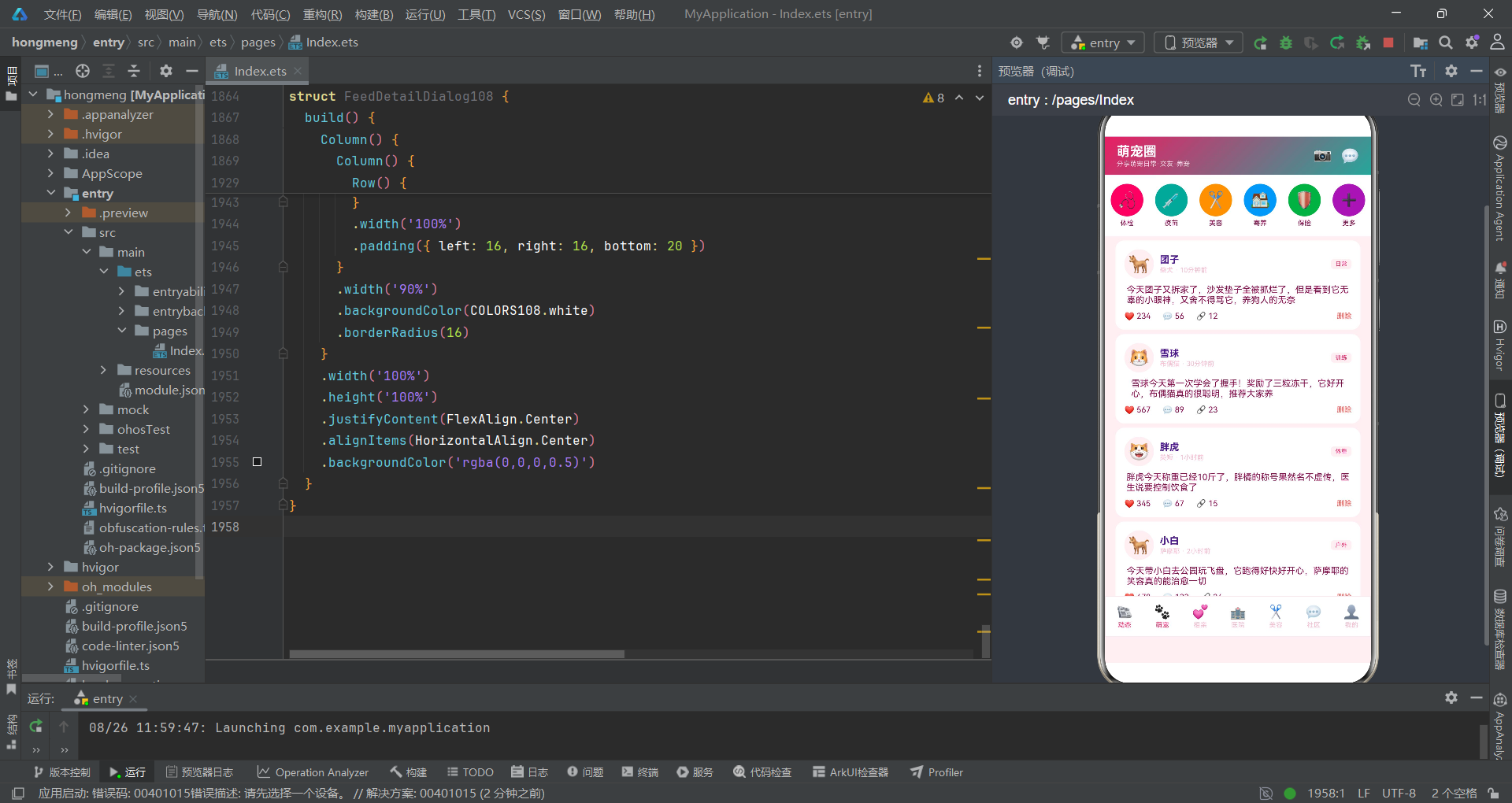
本文深入解析了一款基于HarmonyOS声明式UI范式开发的萌宠社交应用,从配色体系、数据接口定义、工具函数设计、入口组件架构、底部Tab导航、动态信息流、萌宠相亲匹配、医院列表展示到弹框组件体系,完整呈现了拼多多风格移动应用的开发实践。应用通过interface接口全覆盖的数据模型、@State集中式状态管理和回调函数式组件通信三大技术支柱,构建了高内聚低耦合的组件架构,每个Tab页面和弹框组件都可以独立开发、测试和复用。
在UI实现层面,应用充分运用了ArkTS声明式UI的布局能力——通过layoutWeight实现弹性空间分配、通过linearGradient实现品牌渐变、通过ForEach实现列表渲染、通过constraintSize实现布局约束、通过maxLines和textOverflow实现文本省略。柱状图等数据可视化组件仅用基础布局组件即可完成,无需引入额外的图表库,有效控制了应用包体积。所有弹框组件统一采用rgba半透明遮罩 + borderRadius圆角的视觉语言,保证了交互体验的一致性。
"无Blank组件、Button无文字、constraintSize约束、interface全覆盖、UI区无变量声明"的编码准则,确保代码在HarmonyOS DevEco Studio编译环境下零警告通过。这种规范化编码实践不仅提升了代码质量,更为后续的功能迭代、跨设备适配和团队协作开发奠定了坚实基础。随着HarmonyOS生态的持续完善,基于ArkTS的声明式UI开发模式将成为鸿蒙原生应用开发的主流选择,本文所解析的架构模式和实现方案可为类似社交类应用提供直接的参考价值。

开源鸿蒙跨平台开发社区汇聚开发者与厂商,共建“一次开发,多端部署”的开源生态,致力于降低跨端开发门槛,推动万物智联创新。
更多推荐


 7
7 0
0- 0


 已为社区贡献29条内容

所有评论(0)